
How a Leading North American Commercial Vehicle Manufacturer Surfaced Custom Warehouse Data on the Work Lines Form in Dynamics 365 Finance & Supply Chain Management Using an X++ Display Method
Summary
The All work lines form in D365 Finance & Operations only shows what the WHSWorkLine table already knows. When the warehouse floor needs a piece of operational context that lives in a different table entirely, the usual instinct is to add a field, which means touching the base table, or worse, customizing a standard form.
This post walks through a smaller, upgrade-safe alternative: a table extension that adds a cached display method to WHSWorkLine, sourced from a custom table, and surfaced as a grid column on the standard work lines form, with no schema change and no per-row database hit on every refresh.
The example comes from an engagement with a North American truck manufacturer, where warehouse supervisors needed a load-staging reference visible directly on the work line grid instead of a separate lookup screen.
The business challenge
Warehouse supervisors were working two screens at once: the standard All work lines form to track pick and put progress, and a second lookup to check which loading door or staging note applied to each line. Every work line already carried that answer; it just lived in a custom table keyed off the same WorkId and LineNum that WHSWorkLine uses.
The fix didn’t need a new field, a new form, or a modification. It needed one existing screen to know how to ask a second table a question it already had the key for.
Why a table extension, not a table field
Three reasons ruled out adding a real field to WHSWorkLine:
- It’s a Microsoft table. Extending it directly means overlayering, which blocks upgrades and one-version-back servicing.
- The data isn’t really work-line data. It’s staging metadata that happens to be looked up by work line. Storing it separately keeps the source table’s purpose clean.
- A
displaymethod needs no migration. Chain of Command ([ExtensionOf]) attaches new behavior to the table without altering its schema, so the change ships and rolls back like any other extension package.
That leaves one job: write a static display method on a table extension class that reads the custom table and returns a string, then tell the form which column should call it.
The display method
The extension class attaches to WHSWorkLine. The method itself is a plain lookup against the custom table on the composite key WorkId + LineNum:
WHSWorkLine_Extension.xpp
[ExtensionOf(tableStr(WHSWorkLine))]
final class WHSWorkLine_Extension
{
    [SysClientCacheDataMethod]
    public static display str customWorkLineData(WHSWorkLine _whsWorkLine)
    {
        WHSWorkLineCustom workLineCustom;

        select firstOnly Data
            from workLineCustom
            where workLineCustom.WorkId  == _whsWorkLine.WorkId
               && workLineCustom.LineNum == _whsWorkLine.LineNum;

        return workLineCustom.Data;
    }

}
Nothing exotic: a display method is just a method whose return value a form can bind a column to. Because it’s static and takes the buffer as a parameter, the compiler treats it as a table-level display method rather than a form data-source method, which is what makes it reusable from more than one place.
What SysClientCacheDataMethod buys you
Without that attribute, a grid re-evaluates a display method every time the row is redrawn: scrolling, sorting, refreshing, even just switching focus between forms can trigger it again. On a work line grid that can hold several thousand rows during a shift, that’s a select statement repeated far more often than the underlying data ever changes.
SysClientCacheDataMethod tells the client: compute this value once per record, cache it locally, and reuse the cached value instead of calling back to the server on every redraw.
“A cached display method turns a per-scroll database call into a one-time lookup per record. That’s the difference between a grid that feels instant and one that stutters under load.”
Wiring it onto the form
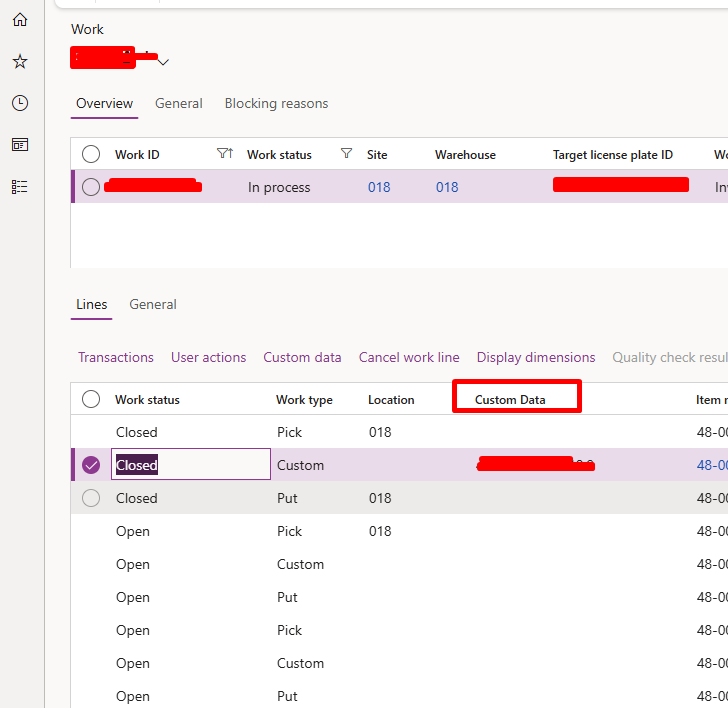
The method lives on the table; the form still needs to be told to use it. Three steps, all done as an extension of the standard form:
- 1Create a form extension for the work lines form and open its design in the tree.
- 2Add a new String Control under the grid’s data source and set its Data Method property to
customWorkLineData, not Data Source / Data Field, since the value isn’t a stored field. - 3Set a Label and Width, position the column where the floor team expects it, then build and synchronize.
Performance notes and gotchas
- Client-side caching means stale values are possible. If another user updates the custom table after the grid has already cached a row’s value, that column won’t refresh until the form re-queries the record. Fine for staging notes that don’t change mid-shift; not fine for anything that must be live to the second.
- Keep the lookup narrow.
select firstOnlyon an indexed composite key (WorkId,LineNum) is cheap. A display method with a join, a loop, or an unindexed filter defeats the point of caching it. - No custom data doesn’t mean an error. Most work lines in this scenario won’t have a row in the custom table; the method should just return an empty string, which it does here by construction.
Rule of thumb: if the source data can change while the form is open and the user needs to see that change immediately, don’t cache it. Cache display methods for data that’s set once and read many times.
Where else this pattern fits
Nothing here is specific to warehouse work lines. The same three pieces (a table extension, a cached display method, and a form control bound by Data Method) apply anywhere a grid needs to show a value that’s derived or looked up rather than stored on the row itself: sales order lines pulling a commitment note, purchase lines surfacing a vendor scorecard flag, or any list page where the “one more column” request would otherwise mean modifying a Microsoft table.
FAQs
1Does this require modifying the WHSWorkLine table?
No.
[ExtensionOf(tableStr(WHSWorkLine))] uses Chain of Command to attach the method without an overlayer or schema change, so it ships as a standard extension package and survives upgrades.2Why static and display, specifically?
display marks the method as form-bindable; static with the buffer passed as a parameter keeps it a table-level method rather than a form data-source method, so any form using WHSWorkLine can reuse it.3What happens if I skip SysClientCacheDataMethod?
The method still works, but the client re-invokes it on every grid redraw: scrolling, sorting, refreshing. On a high-volume grid, that’s a repeated database round trip per visible row for a value that rarely changes.
4Can this bind directly to a report or only to a form?
The method itself is just X++ and can be called from anywhere: reports, other classes, other display methods. The Data Method binding described here is specific to wiring it onto a form grid column.
Conclusion
Not every extra column on a standard F&O form justifies a new field on a Microsoft table. When the data already lives somewhere else and its key is already on the row, a static display method on a table extension gives the grid what it needs without a schema change, an overlayer, or a second screen for the floor team to check.
The cache attribute is what makes it production-ready on a busy work line grid, and its one trade-off, values that can go stale until the record is re-queried, is worth designing around rather than avoiding. For data that’s set once and read many times, it’s a small, upgrade-safe change that removes a real daily annoyance for warehouse supervisors.
Extending standard D365 F&O forms?
If your team is weighing an overlayer against an extension, or looking for a cleaner way to surface custom data on a standard screen, we’re happy to compare approaches.
Connect with Us →About the Author

Raviraj Hirve
Sr. Technical Consultant · CloudFronts
Raviraj Hirve is a Sr. Technical Consultant at CloudFronts with experience in Microsoft Dynamics 365 Finance & Operations development, customization, and implementation. He focuses on translating business requirements into practical, production-ready F&O solutions.
His experience includes X++ development, table and form extensions, warehouse management (WHS) customizations, custom services, and Planning Optimization / Master Planning configuration.
He focuses on understanding business requirements and designing practical, scalable, and maintainable solutions within the Dynamics 365 Finance & Operations ecosystem.
Specialization: Dynamics 365 Finance & Operations, X++ Development, Warehouse Management, Custom Services, Batch Framework, Planning Optimization
Focus Areas: ERP Customization, Supply Chain & Warehouse Solutions, Integration Services, Master Planning
LinkedIn: Raviraj Hirve
Related posts:
Every Target Traced to a Deal: Dynamics 365 Sales Visibility for an Australian Commercial Laundry Pr...
Why Is Consumption Quantity Showing Zero in Dynamics 365 Business Central? A Pharma Manufacturing Ca...
How We Built a Role-Based Customer Portal in Microsoft Power Pages for a US-Based IT Services Provid...