

Implementing Plugin for Automated Lead Creation in Dynamics 365
Dynamics 365 CRM plugins are a powerful way to enforce business logic on the server but choosing when and how to use them is just as important as writing the code itself. In one implementation for a Netherlands-based sustainability certification organization, the client needed their certification journey to begin with a custom application entity while still ensuring that applicant and company details were captured as leads for downstream sales and engagement processes.
This blog explores how a server-side plugin was used to bridge that gap, reliably creating and associating lead records at runtime while keeping the solution independent of UI behavior and future integrations.
In this scenario, the certification application was the starting point of the business process, but sales and engagement still needed to operate on leads. Simply storing the same information in one place wasn’t enough, the system needed a reliable way to translate an application into a lead at the right moment, every time. That transformation logic is neither data storage nor UI behavior; its core business process logic, which is why it was implemented using a Dynamics 365 plugin.
Scenario: Certification Application Not Flowing into Sales
Users reported the following challenge:
a. A user submits or creates a Certification Application
b. Applicant and company details are captured on a custom entity
c. Sales teams expect a Lead to be created for follow-up
d. No Lead exists unless created manually or through inconsistent automation
e. Application and sales data become disconnected
This breaks the intended business flow, as certification teams and sales teams end up working in parallel systems without a reliable link between applications and leads.
Possible Solution: Handling Lead Creation Through Manual Processes (Original Approach)
Before implementing the plugin, the organization attempted to manage lead creation manually or through disconnected automation.
How It Worked (Initially)
a. A Certification Application was submitted
b. Users reviewed the application
c. Sales team manually created a Lead with applicant/company details
d. They tried to match accounts/contacts manually
e. Both records remained loosely connected.
Why This Might Look Reasonable
a. Simple to explain operationally
b. No development effort
c. Works as long as users follow the steps perfectly
The Hidden Problems
1] Inconsistent Data Entry
a. Users forgot to create leads
b. Leads were created with missing fields
c. Duplicate accounts/contacts were created
d. Sales lost visibility into new certification inquiries
2] Broken Cross-Department Workflow
a. Certification team worked in the custom entity
b. Sales team worked in Leads
c. No structural linkage existed between the two
d. Downstream reporting (pipeline, conversion, source tracking) became unreliable.
Workaround to This Approach: Use Server-Side Logic Instead of Manual Steps
Practically, the transformation of an application into a lead is business logic, not user behavior.
Once that boundary is respected, the solution becomes stable, predictable, and automation-friendly.
Practical Solution: A Server-Side Plugin (Improved Approach)
Instead of depending on people or scattered automation, the lead is created centrally and automatically through a plugin registered on the Certification Application entity.
Why a Plugin?
a. Executes consistently regardless of data source
b. Not tied to form events or UI interactions
c. Can safely check for existing accounts/contacts
d. Ensures one source of truth for lead and application linkage
e. Works for portal submissions, integrations, and bulk imports
This is essential for a client, where applications may originate from multiple channels and must feed accurately into the sales funnel.
How the Plugin-Based Solution Works
The solution was implemented using a server-side plugin registered on the Certification Application entity. The plugin executes when a new application is created, retrieves the necessary applicant and organization details, performs basic checks for existing accounts and contacts, creates a Lead using the extracted data, and finally links the Lead back to the originating application record. This ensures that every certification application automatically enters the sales pipeline in a consistent and reliable manner.
Implementation Steps (For Developers New to Plugins)
If you’re new to Dynamics 365 plugins, the implementation followed these core steps:
- Create a .NET Class Library Project
A standard .NET Framework Class Library project was created (not .NET Core).
Plugins must target the .NET Framework. - Choose a Clear Naming Structure
The project and namespace were named to reflect the business purpose of the plugin, making it easier to maintain and identify in larger solutions.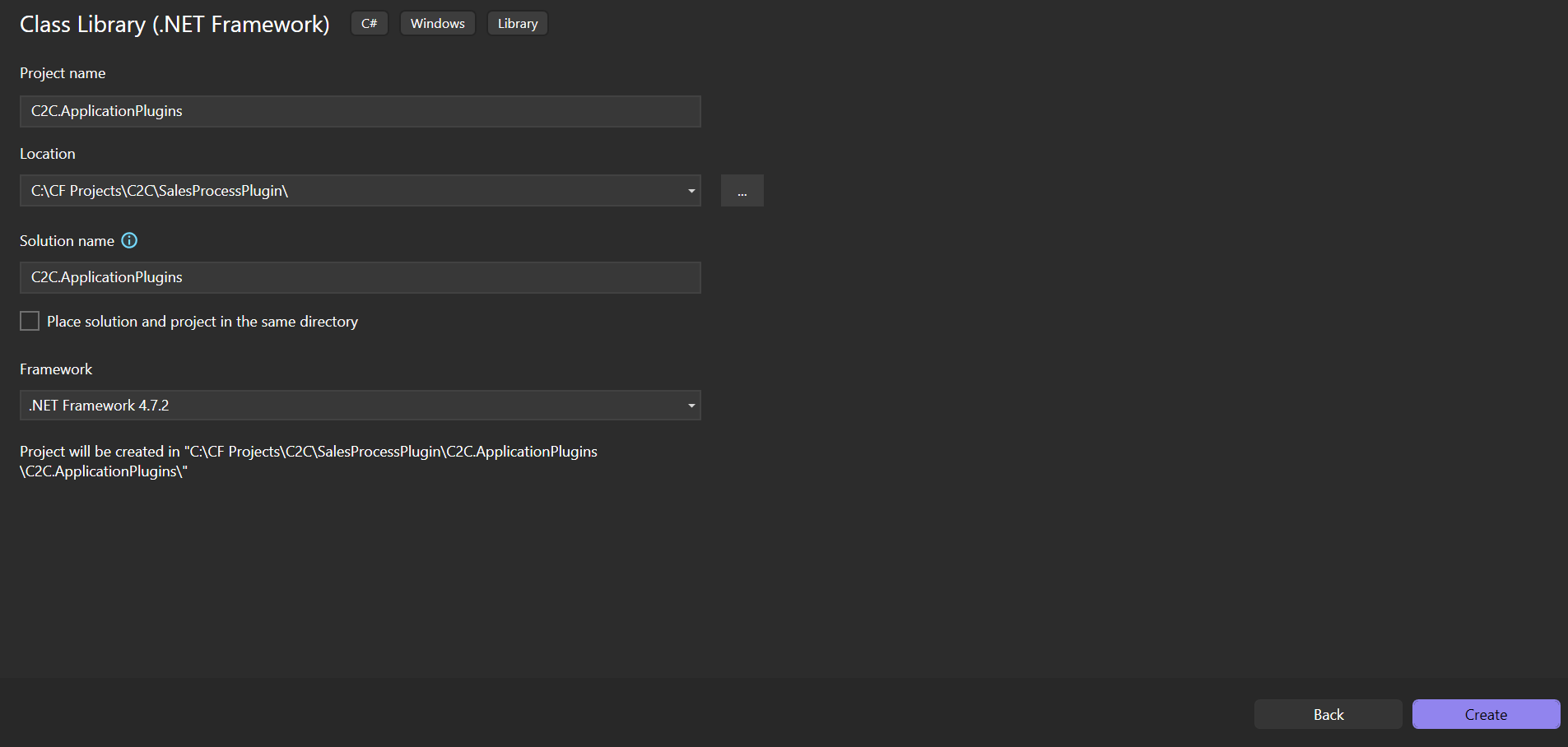
- Sign the Assembly
The assembly was strong name signed to allow secure deployment and versioning within Dynamics 365.- a. Go to Project > Properties > Signing
check “Sign the Assembly” checkbox
Give a name to key file and hit “OK”. 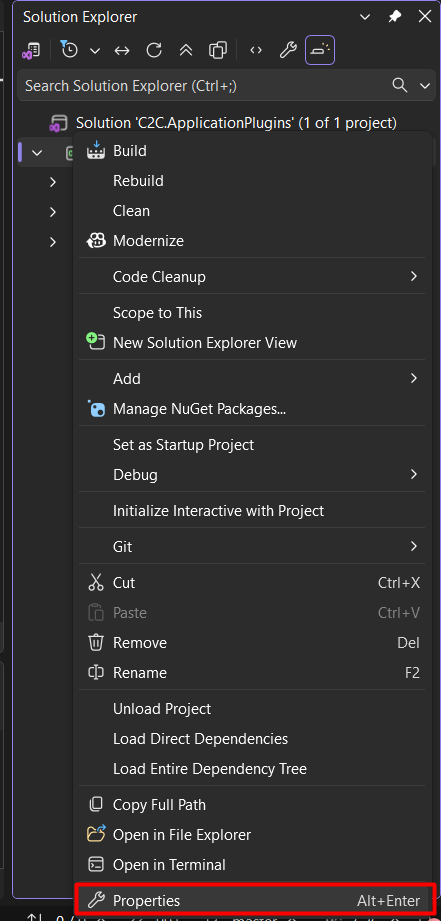
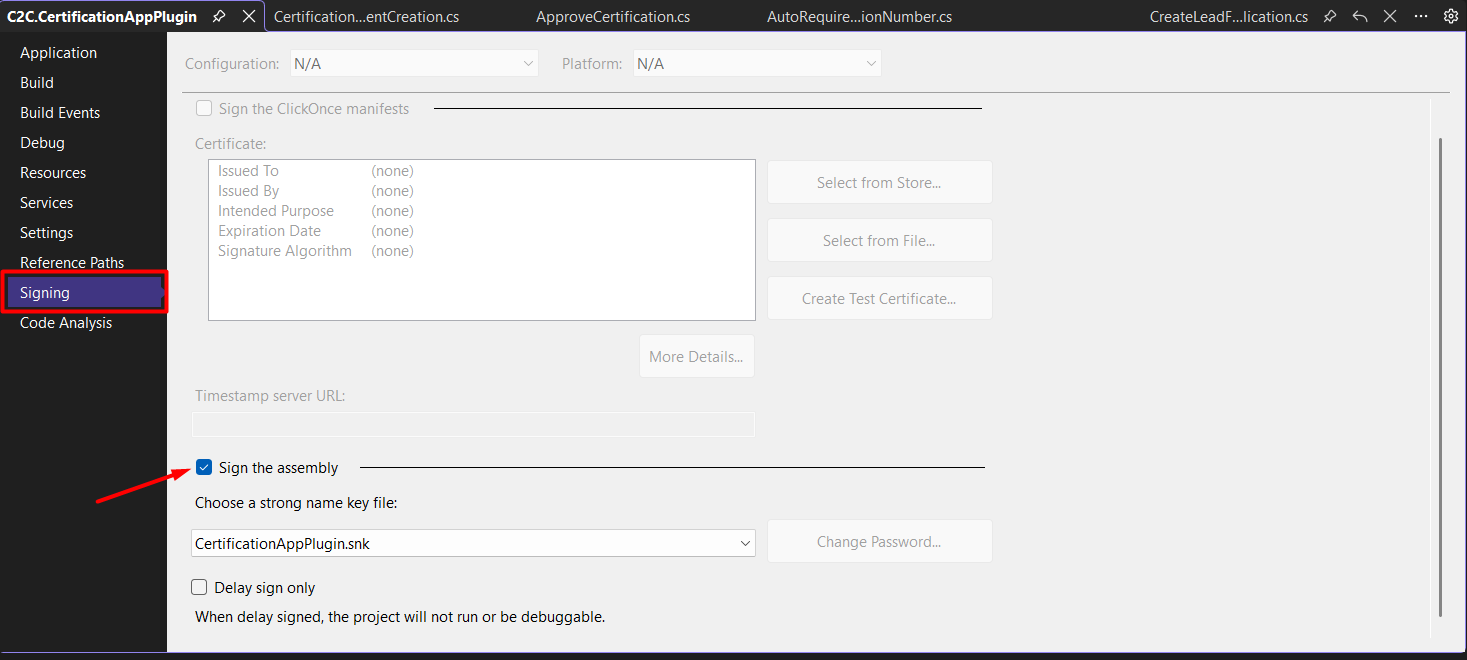
- a. Go to Project > Properties > Signing
- Implement the Plugin Logic
The plugin class implementsIPlugin, retrieves the execution context and organization service, and contains the logic to:- a. Read the Certification Application record
- b. Extract applicant and organization data
- c. Check for existing Account and Contact records
- d. Create a Lead with appropriate field mappings
- e. Update the application with a reference to the created Lead
using Microsoft.Xrm.Sdk;
using Microsoft.Xrm.Sdk.Query;
using System;

namespace C2C.CertificationAppPlugin
{
    public class CreateLeadFromApplication : IPlugin
    {
        private IPluginExecutionContext _context;
        private IOrganizationServiceFactory _factory;
        private IOrganizationService _service;
        private ITracingService _tracing;

        private void GetContext(IServiceProvider serviceProvider)
        {
            _context = (IPluginExecutionContext)serviceProvider.GetService(typeof(IPluginExecutionContext));
            _tracing = (ITracingService)serviceProvider.GetService(typeof(ITracingService));
            _factory = (IOrganizationServiceFactory)serviceProvider.GetService(typeof(IOrganizationServiceFactory));
            _service = _factory.CreateOrganizationService(_context.UserId);
        }

        public void Execute(IServiceProvider serviceProvider)
        {
            try
            {
                GetContext(serviceProvider);

                if (!_context.InputParameters.Contains("Target") ||
                    !(_context.InputParameters["Target"] is Entity))
                {
                    return;
                }

                var target = (Entity)_context.InputParameters["Target"];

                if (target.LogicalName != Constants.ENTITY_CERTIFICATIONAPPLICATION)
                {
                    return;
                }

                var certificationApplicationId = target.Id;

                var certApplication = _service.Retrieve(
                    Constants.ENTITY_CERTIFICATIONAPPLICATION,
                    certificationApplicationId,
                    new ColumnSet(
                        "c2cpii_isnewapplicant",
                        "c2cpii_applicantcompany",
                        "c2cpii_primarycontact",
                        "c2cpii_firstname",
                        "c2cpii_lastname",
                        "c2cpii_jobtitle",
                        "c2cpii_email",
                        "c2cpii_mobilephone",
                        "c2cpii_companyname",
                        "c2cpii_parentcompany",
                        "c2cpii_website",
                        "c2cpii_product",
                        "c2cpii_applicationtype",
                        "c2cpii_applicationnumber",
                        "c2cpii_industryc",
                        "c2cpii_noofemployees",
                        "c2cpii_annualrevenuetier",
                        "c2cpii_country",
                        "c2cpii_region",
                        "c2cpii_subregion",
                        "c2cpii_assessmentbody",
                        "c2cpii_assessmentbodycontact"
                    )
                );

                if (certApplication == null)
                {
                    _tracing.Trace("Certification Application record not found.");
                    return;
                }

                // Extract values
                var applicationNumber = certApplication.GetAttributeValue<string>("c2cpii_applicationnumber");
                var primaryContact = certApplication.GetAttributeValue<EntityReference>("c2cpii_primarycontact");
                var firstName = certApplication.GetAttributeValue<string>("c2cpii_firstname");
                var lastName = certApplication.GetAttributeValue<string>("c2cpii_lastname");
                var jobTitle = certApplication.GetAttributeValue<string>("c2cpii_jobtitle");
                var email = certApplication.GetAttributeValue<string>("c2cpii_email");
                var mobilePhone = certApplication.GetAttributeValue<string>("c2cpii_mobilephone");
                var companyName = certApplication.GetAttributeValue<string>("c2cpii_companyname");
                var parentCompany = certApplication.GetAttributeValue<EntityReference>("c2cpii_parentcompany");
                var website = certApplication.GetAttributeValue<string>("c2cpii_website");
                var productReference = certApplication.GetAttributeValue<EntityReference>("c2cpii_product");
                var applicationType = certApplication.GetAttributeValue<OptionSetValue>("c2cpii_applicationtype");
                var industry = certApplication.GetAttributeValue<OptionSetValue>("c2cpii_industryc");
                var noOfEmployees = certApplication.GetAttributeValue<OptionSetValue>("c2cpii_noofemployees");
                var revenueTier = certApplication.GetAttributeValue<OptionSetValue>("c2cpii_annualrevenuetier");
                var country = certApplication.GetAttributeValue<EntityReference>("c2cpii_country");
                var region = certApplication.GetAttributeValue<EntityReference>("c2cpii_region");
                var subRegion = certApplication.GetAttributeValue<EntityReference>("c2cpii_subregion");
                var assessmentBody = certApplication.GetAttributeValue<EntityReference>("c2cpii_assessmentbody");
                var assessmentBodyContact = certApplication.GetAttributeValue<EntityReference>("c2cpii_assessmentbodycontact");

                var applicationTypeName = "Unknown";

                if (applicationType != null)
                {
                    switch (applicationType.Value)
                    {
                        case 323000000:
                            applicationTypeName = "New Certification";
                            break;

                        case 323000001:
                            applicationTypeName = "Recertification";
                            break;

                        case 323000002:
                            applicationTypeName = "Interim Assessment Review";
                            break;
                    }
                }

                // Extract email domain
                string emailDomain = null;

                if (!string.IsNullOrWhiteSpace(email) && email.Contains("@"))
                {
                    emailDomain = email.Split('@')[1];
                }

                // Find existing account by domain
                Entity existingAccount = null;

                if (!string.IsNullOrEmpty(emailDomain))
                {
                    var accountFetch = $@"
                        <fetch>
                          <entity name='account'>
                            <attribute name='accountid' />
                            <attribute name='name' />
                            <filter>
                              <condition attribute='websiteurl' operator='like' value='%{emailDomain}%' />
                            </filter>
                          </entity>
                        </fetch>";

                    var accounts = _service.RetrieveMultiple(new FetchExpression(accountFetch));

                    if (accounts.Entities.Count > 0)
                    {
                        existingAccount = accounts.Entities[0];
                    }
                }

                // Find existing contact by email
                Entity existingContact = null;

                if (!string.IsNullOrEmpty(email))
                {
                    var contactFetch = $@"
                        <fetch>
                          <entity name='contact'>
                            <attribute name='contactid' />
                            <attribute name='fullname' />
                            <filter>
                              <condition attribute='emailaddress1' operator='eq' value='{email}' />
                            </filter>
                          </entity>
                        </fetch>";

                    var contacts = _service.RetrieveMultiple(new FetchExpression(contactFetch));

                    if (contacts.Entities.Count > 0)
                    {
                        existingContact = contacts.Entities[0];
                    }
                }

                var leadTitle = $"{applicationNumber} - {applicationTypeName} {productReference?.Name}";

                // Create Lead
                var newLead = new Entity("lead")
                {
                    ["subject"] = leadTitle,
                    ["firstname"] = firstName,
                    ["lastname"] = lastName,
                    ["jobtitle"] = jobTitle,
                    ["emailaddress1"] = email,
                    ["mobilephone"] = mobilePhone,
                    ["companyname"] = companyName,
                    ["websiteurl"] = website,
                    ["cf_leadsource"] = new OptionSetValue(3),
                    ["c2cpii_product"] = productReference,
                    ["cf_leadstatus"] = new OptionSetValue(1),
                    ["cf_numberofproductscertification"] = 1,
                    ["c2cpii_existingcontact"] = existingAccount != null,
                    ["cf_industry"] = industry,
                    ["cf_noofemployees"] = noOfEmployees,
                    ["cf_annualrevenue"] = revenueTier,
                    ["cf_country"] = country,
                    ["cf_region"] = region,
                    ["cf_subregion"] = subRegion,
                    ["description"] = $"Lead created from Certification Application {applicationNumber}.",
                    ["c2cpii_assessmentbody"] = assessmentBody,
                    ["c2cpii_assessmentbodycontact"] = assessmentBodyContact
                };

                newLead["parentaccountid"] = existingAccount != null
                    ? new EntityReference("account", existingAccount.Id)
                    : parentCompany;

                newLead["parentcontactid"] = existingContact != null
                    ? new EntityReference("contact", existingContact.Id)
                    : primaryContact;

                var leadId = _service.Create(newLead);

                // Link Lead back to Application
                var updateApp = new Entity(Constants.ENTITY_CERTIFICATIONAPPLICATION, certificationApplicationId)
                {
                    ["c2cpii_lead"] = new EntityReference("lead", leadId)
                };

                _service.Update(updateApp);
            }
            catch (Exception ex)
            {
                _tracing.Trace("Error in CreateLeadFromApplication Plugin: " + ex);
                throw new InvalidPluginExecutionException(
                    "An error occurred in CreateLeadFromApplication plugin.",
                    ex
                );
            }
        }
    }
}
Build and Register the Plugin. Once the plugin logic is implemented, build the project to generate the signed assembly.
After a successful build:
After registration, every new Certification Application will automatically trigger the plugin, ensuring that a Lead is created and linked without any manual intervention.
a. Open the Plugin Registration Tool
b. Connect to the target Dynamics 365 environment
c. Register the compiled assembly
d. Register the plugin step on the Create message of the Certification Application entity
e. Configure the execution stage (typically post-operation) and execution mode (Synchronous or Asynchronous, depending on business needs)
To encapsulate, this solution shows why server-side plugins are the right place for core business logic in Dynamics 365. By automatically creating and linking a Lead when a Certification Application is created, the organization removed manual steps, prevented data inconsistencies, and ensured that every application reliably flowed into the sales pipeline.
We hope you found this blog useful, and if you would like to discuss anything, you can reach out to us at transform@cloudfronts.com
