

Implementing Custom Auto Numbering in Dynamics 365 CRM
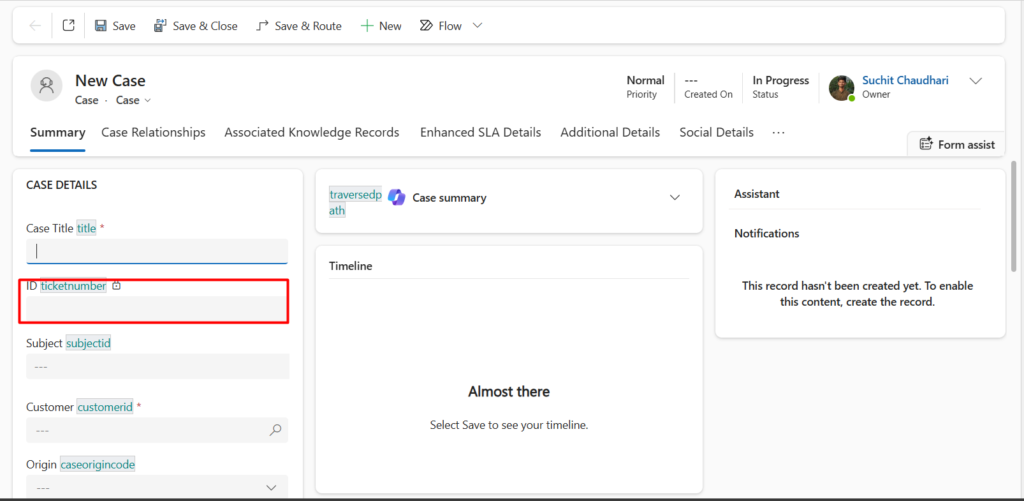
In Microsoft Dynamics 365 CRM, every Case (Incident) record comes with a default Ticket Number. Microsoft generates it automatically, and while that’s fine for basic tracking, it usually doesn’t survive first contact with real business requirements.
Users want meaningful Case IDs—something that actually tells them what kind of case this is, what service it belongs to, and where it came from. Unfortunately, since Ticket Number (ticketnumber) is a Microsoft-managed field, you can’t just slap a custom format on it using configuration alone.
That’s exactly where a Pre-Operation plugin comes in.
This blog walks through a real production use case where we customize the default Case ID format without breaking Microsoft’s auto-numbering, and without creating race conditions or duplicate numbers.
Use Case
Table: Case (Incident)
Field: Ticket Number (ticketnumber)
Requirement:
- a. Keep Microsoft’s auto-generated number
- b. Reformat it into a custom business-friendly Case ID
- c. Prefix based on Case Type
- d. Additional logic for Service & Repair cases
- e. Suffix pulled from Sales Order
Execution:
- a. Pre-Operation plugin on Create
Why Pre-Operation
Microsoft generates the Ticket Number before the Create operation completes. In Pre-Operation, we can:
- a. Read the system-generated
ticketnumber - b. Modify it safely
- c. Let CRM persist the final value automatically
This gives us:
- a. zero duplicates
- b. full transaction safety
- c. better performance
- d. clean rollback on failure
The Custom Ticket Number Format
The final Case ID looks like this:
PREFIX-SystemNumber-SUFFIXExample:
REP-000123-SO4567
SCA-000456-NA
Plugin Logic Overview
Here’s what the plugin does, step by step:
- Runs on Create of Case (
incident) - Reads the auto-generated
ticketnumber - Extracts the numeric portion
- Determines prefix based on:
- a. Case Type
- b. Service & Repair sub-type
- Appends Sales Order as suffix
- Rewrites the Ticket Number before save
The Plugin Code
using System;
using Microsoft.Xrm.Sdk;

namespace CF.OW.ServiceAndRepairPlugin
{
    public class CaseNumberAutoGenerate : IPlugin
    {
        IPluginExecutionContext context;
        IOrganizationServiceFactory serviceFactory;
        IOrganizationService service;
        ITracingService tracingService;

        public void getContext(IServiceProvider serviceProvider)
        {
            context = (IPluginExecutionContext)serviceProvider.GetService(typeof(IPluginExecutionContext));
            serviceFactory = (IOrganizationServiceFactory)serviceProvider.GetService(typeof(IOrganizationServiceFactory));
            service = serviceFactory.CreateOrganizationService(context.UserId);
            tracingService = (ITracingService)serviceProvider.GetService(typeof(ITracingService));
        }

        public void Execute(IServiceProvider serviceProvider)
        {
            getContext(serviceProvider);
            try
            {
                if (context.InputParameters.Contains("Target") && context.InputParameters["Target"] is Entity entity)
                {
                    if (entity.LogicalName != "incident" || context.MessageName.ToLower() != "create")
                        return;

                    // Get ticketnumber from Target
                    var caseNumber = entity.GetAttributeValue<string>("ticketnumber");
                    if (string.IsNullOrEmpty(caseNumber))
                        return;

                    // Split original number
                    var parts = caseNumber.Split('-');
                    string middlePart = parts.Length > 1 ? parts[1] : caseNumber;

                    // Determine prefix based on case type
                    string prefix = "";
                    var selectedType = entity.GetAttributeValue<OptionSetValue>("cf_casetype");
                    if (selectedType != null)
                    {
                        switch (selectedType.Value)
                        {
                            case 1:
                                prefix = "ADD";
                                break;
                            case 2:
                                prefix = "REP";
                                break;
                            case 3:
                                var serviceType = entity.GetAttributeValue<OptionSetValue>("cf_serviceandrepair");
                                if (serviceType != null)
                                {
                                    switch (serviceType.Value)
                                    {
                                        case 1: prefix = "SCA"; break;
                                        case 2: prefix = "SOW"; break;
                                        case 3: prefix = "SBO"; break;
                                    }
                                }
                                break;
                        }
                    }

                    // Get suffix from sales order
                    string suffix = entity.GetAttributeValue<string>("cf_salesorder") ?? "NA";

                    // Build new ticket number
                    string newTicketNumber = $"{prefix}-{middlePart}-{suffix}";

                    // Set the ticketnumber on Target
                    entity["ticketnumber"] = newTicketNumber;

                    // No need to call service.Update in Pre-Operation
                }
            }
            catch (Exception ex)
            {
                tracingService.Trace("CaseNumberAutoGenerate: {0}", ex.ToString());
                throw;
            }
        }
    }
}
Plugin Registration Details
Message: Create
Primary Entity: Case (incident)
Stage: Pre-Operation
Mode: Synchronous
Filtering Attributes: Not required.
To conclude, customizing a Microsoft-managed field like Ticket Number often sounds risky, but as you’ve seen, it doesn’t have to be. By letting Dynamics 365 generate the number first and then reshaping it in a pre-Operation plugin, you get the best of both worlds.
We hope you found this blog useful, and if you would like to discuss anything, you can reach out to us at transform@cloudfronts.com
