

Browser-Level State Retention in Dynamics 365 CRM: Improving Performance & UX with Session Storage
Dynamics 365 model-driven apps are excellent at storing business data, but not every piece of information belongs in Dataverse.
A common design folly is using Dataverse fields to store temporary UI state-things like selected views, filters, or user navigation preferences. While this works technically, it introduces unnecessary performance overhead and can create incorrect behavior in multi-user environments.
In this blog, I’ll focus on browser-level retention of CRM UI data using “sessionStorage“, using subgrid view retention as a practical example for a technology consulting and cybersecurity services firm based in Houston, Texas, USA, specializing in modern digital transformation and enterprise security solutions.
The Real Problem: UI State vs Business Data
Let’s separate concerns clearly:
| Type | Example | Where it should live |
|---|---|---|
| Business data | Status, owner, amounts | Dataverse |
| UI state | Selected view, filter, scroll position | Browser |
Subgrid views fall squarely into the UI state category.
Scenario: Subgrid View Resetting on Navigation
Users reported the following behavior:
- a. User opens a record
- b. Changes a subgrid view
- c. Navigates away
- d. Comes back to the record
- e. Subgrid resets to the default view
This breaks user workflow, especially for records that users revisit frequently.
Possible Solution: Persisting UI State in Dataverse (Original Approach)
This would attempt to fix it by storing the selected subgrid view GUID in a Dataverse field on the parent record.
How It Works
- a. On form load, read the view GUID from Dataverse
- b. Apply it to the subgrid
- c. On subgrid load, update the Dataverse field if the user changed views
subgrid.addOnLoad(function () {
    var currentView = subgrid.getViewSelector().getCurrentView();
    if (!currentView || !currentView.id) return;

    var viewId = currentView.id.replace("{", "").replace("}", "");

    formContext.getAttribute("cf_projectlogviewguid").setValue(viewId);
    formContext.getAttribute("cf_projectlogviewguid").setSubmitMode("always");
});
Why this might look reasonable
- a. Simple to implement
- b. Data persists across sessions
- c. No dependency on browser storage
The Hidden Problems
1] Slower Form Execution
- a. Field updates triggered unnecessary form saves
- b. Additional fetch and patch operations
- c. Increased latency on every view change
2] Data Model Pollution
- a. Dataverse schema expanded just to support UI preferences
- b. UI state mixed with business data
3] Incorrect Multi-User Behavior
- a. View selection was stored per record
- b. When User A changed the view, User B saw the same view
- c. “Last viewed view” leaked across users
4] Scalability Issues
- a. Multiply this pattern across multiple subgrids and forms, and performance degrades quickly
In short, Dataverse was doing work it should never have been asked to do.
Workaround to this Approach: Keep UI State in the Browser for that session,
But practically: The selected subgrid view belongs to the user’s session, not the record. Once that boundary is respected, the solution becomes much cleaner.
Practical Solution: Browser Session Storage (Improved Approach)
Instead of persisting view selection in Dataverse, we store it locally in the browser using sessionStorage.
sessionStorage is part of the Web Storage API, which provides a way to store key-value pairs in a web browser. Unlike localStorage, which persists data even after the browser is closed, sessionStorage is designed to store data only for the duration of a single session. This means that the data is available as long as the tab or window is open, and it is cleared when the tab or window is closed.
Why Session Storage?
- a. Scoped to the current user
- b. Cleared automatically when the browser session ends
- c. Extremely fast (no server calls)
- d. Perfect for short-lived UI preferences
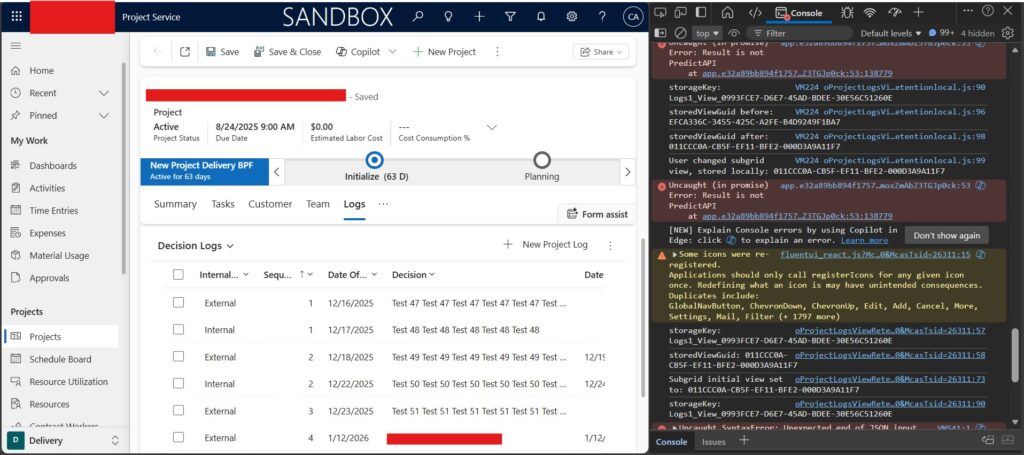
How the Improved Solution Works
1. Store the View Locally on Subgrid Change
- a. Listen to the subgrid
addOnLoadevent - b. Capture the currently selected view GUID
- c. Store it in
sessionStorage - d. Key it is using the record ID to keep it record-specific
Logs1_View_<RecordId>
2. Restore the View on Form/Grid Load
- On form load:
- a. Read the stored view from
sessionStorage - b. Apply it to the subgrid
- c. Fall back to a default view if none exists
- a. Read the stored view from
subgrid.addOnLoad(function () {
    var currentView = subgrid.getViewSelector().getCurrentView();
    if (!currentView || !currentView.id) return;

    var viewId = currentView.id.replace("{", "").replace("}", "");
    sessionStorage.setItem(storageKey, viewId);
});
This ensures that when the user revisits the form, the subgrid opens exactly where they left off.
Why This Approach Is Superior
1] Faster Execution
- a. No Dataverse reads or writes
- b. No form saves triggers
- c. Subgrid loads faster and smoother
2] Correct User Experience
- a. Each user sees their own last-used view
- b. No cross-user contamination
- c. UI behaves predictably
3] Clean Architecture
- a. Dataverse stores business data
- b. Browser stores UI state
- c. Clear separation of responsibilities
4] Zero Backend Impact
- a. No plugins
- b. No flows
- c. No schema changes
When to Use Browser-Level Retention
Use this pattern when:
- a. The data is temporary
- b. The data is user-specific
- c. The data does not belong in reporting or automation
- d. Performance and UX matter
Examples:
- a. Subgrid views
- b. Filters
- c. Selected tabs
- d. Navigation preferences
To conclude, not all data deserves to live in Dataverse. When you store UI state in the browser instead of the database, you gain:
- a. Better performance
- b. Cleaner solutions
- c. Correct multi-user behavior
Subgrid view retention is just one example-but the principle applies broadly across Dynamics 365 customizations.
We hope you found this blog useful, and if you would like to discuss anything, you can reach out to us at transform@cloudfronts.com
