

Exposing Plugins as Bound Actions for Power Automate Flows: A Practical Procedure for Efficient Record Processing, involving several records.
In complex business processes, like calculating commissions or validating data across multiple records, applying the same logic repeatedly in a Power Automate flow can quickly become inefficient and difficult to maintain.
A more scalable approach is to encapsulate the logic in a Dataverse plugin, expose it as a bound action, and then call this action from a flow. This method centralizes business rules, reduces redundancy, and improves maintainability.
In this post, we’ll walk through the steps to implement this approach and examine its advantages over applying the same logic directly within a flow for each individual record. We’ll illustrate this with a practical example from a Houston-based technology consulting and cybersecurity services firm that specializes in modern digital transformation and enterprise security solutions.
Flow Diagram
Trigger → List Each Entity Record → Apply to Each → Perform Bound Action (which is wrapper to execute the Plugin) → Update each record
Step 1: Create the Plugin
The first step is to write a plugin that contains the logic you want to apply to each record.
Example: DuplicateCommissionsCounter
- a. Checks for duplicate commission records on an invoice.
- b. Updates the invoice’s
cf_DuplicateCommissionCountfield. - c. Fetches child commission records, compares them, and updates the count.
private void UpdateCommissionRankOnInvoice()
{
    Entity commissionRank = new Entity(Constants.ENTITY_INVOICE);
    commissionRank[Constants.Invoice.Attr_DuplicateCommissionCount] = DuplicateCount;
    commissionRank.Id = currentEntity.Id;
    service.Update(commissionRank);
}
Step 2: Expose the Plugin as a Bound Action
Instead of running plugin logic manually for each record, you can register it as a bound action in Dataverse.
Procedure:
- Create a new Action in Dataverse.
E.g.
- a. Primary Entity:
Invoice - b. Action Name:
cf_DuplicateCommissionCount
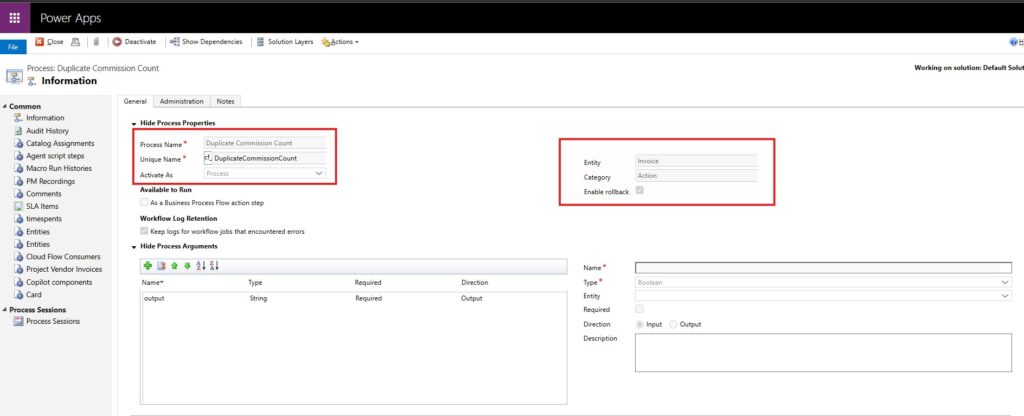
2. Attach your plugin to this action.
- a. Execution Mode: Synchronous
- b. Stage: PostOperation
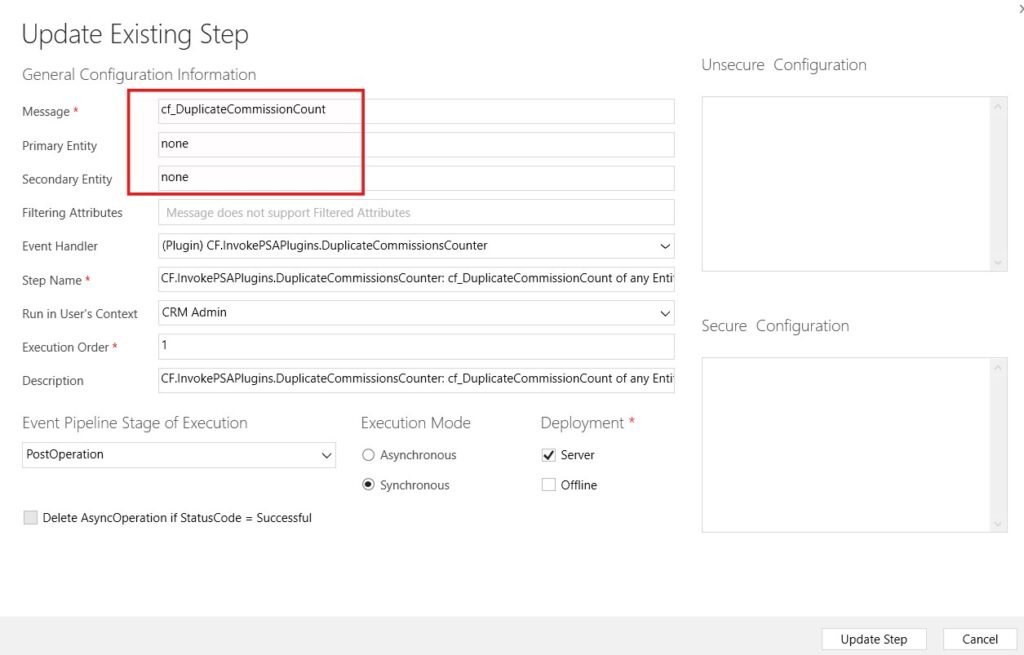
Outcome: This exposes your plugin logic as a reusable, callable bound action. Any process or flow can now invoke it for a specific invoice record.
Step 3: Use Power Automate to Call the Bound Action
Once the plugin is exposed, you can loop through multiple records in a flow and call the action.
Procedure in Power Automate:
- Trigger: Manual, scheduled, or recurrence-based.
- List Rows: Fetch invoices using the Dataverse connector.
- Apply to Each: Loop through each invoice.
- Perform Bound Action:
- a. Action Name:
cf_DuplicateCommissionCount - b. Row ID: Current invoice from loop
- a. Action Name:
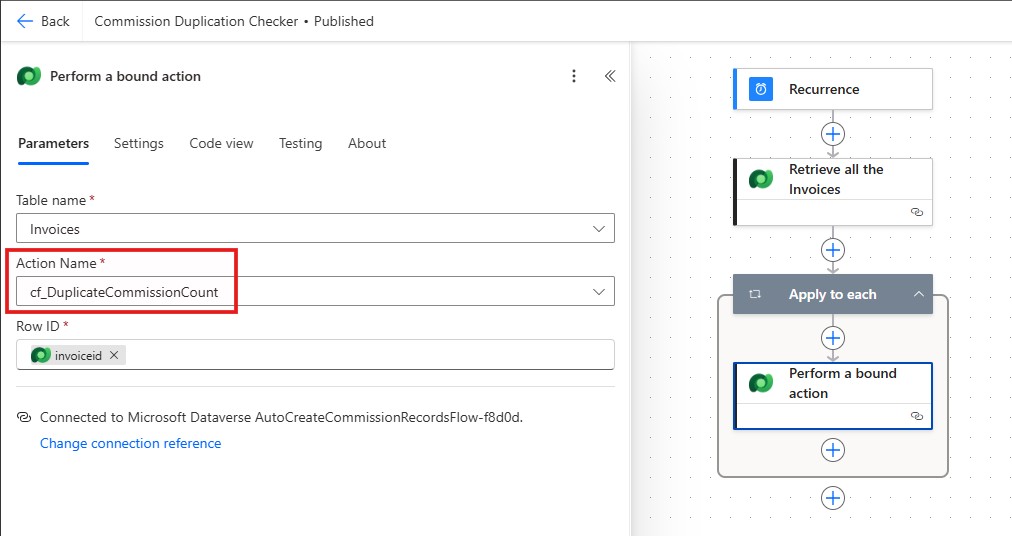
This approach ensures that all complex logic resides in the plugin, while the flow orchestrates which records need processing.
Advantages Over Logic Directly in the Flow
- Centralized Business Rules: All logic lives in the plugin, reducing duplication and errors.
- Reusability: Bound actions can be called from multiple flows, apps, or processes.
- Performance: Dataverse handles logic execution efficiently; you avoid excessive expressions or nested conditions in flows.
- Maintainability: Updates to rules or calculations are done once in the plugin without modifying multiple flows.
- Traceability: Output parameters and plugin tracing make debugging easier.
To conclude, exposing plugins as bound actions is a robust, maintainable way to apply complex logic across multiple records in Dataverse. It allows Power Automate flows to focus on orchestration rather than logic execution, leading to cleaner, faster, and easier-to-manage solutions.
We hope you found this blog useful, and if you would like to discuss anything, you can reach out to us at transform@cloudfronts.com
