

Transforming Return Logistics for a USA Manufacturer: Automating Shipment Processing with Dynamics 365 Customer Service
Summary
This blog highlights the integration of Microsoft Dynamics 365 Customer Service Hub with FedEx Shipping Manager to handle automated email return shipments for a consumer electronic appliances company based in Massachusetts, USA.
In the original process, customer service representatives were required to manually register each return shipment through the FedEx Shipping Manager portal. This process involved copying customer details, creating shipments, generating labels, and capturing tracking numbers — a workflow that typically required 20–30 minutes per request.
The integration project automated the entire return shipment process directly within the Dynamics 365 Customer Service Hub. With a single click, the system now registers the shipment using FedEx Shipment APIs, generates a return label, captures the tracking number, and updates the case record automatically.
This innovation eliminated the need for agents to switch between systems and reduced shipment registration time from 20–30 minutes to just a few seconds, significantly improving operational efficiency and the overall customer service experience.
This blog explains:
- 1] The operational challenges caused by manual shipment registration.
- 2] How Dynamics 365 Customer Service Hub was integrated with FedEx Shipping Manager.
- 3] The functional workflow used to automate shipment creation.
- 4] How customer service representatives trigger shipments directly from CRM.
- 5] The business impact achieved through automation and system integration.
Table of Contents
Customer Scenario
A Massachusetts-based consumer appliance manufacturer known for building innovative kitchen technology was experiencing a growing operational challenge in its customer service operations. As demand for its products increased across major retail channels, the number of customer support cases related to product returns and replacements also grew significantly.
The company’s customer support team handled all service requests through Microsoft Dynamics 365 Customer Service. However, when a product needed to be returned for inspection, replacement, or warranty evaluation, agents were required to manually create a shipment in FedEx Ship Manager.
This manual process involved several steps:
- 1] Opening the customer case in the CRM system
- 2] Copying customer information and shipping details
- 3] Logging into the FedEx portal
- 4] Registering the shipment manually
- 5] Generating a return label
- 6] Capturing the tracking number
- 7] Returning to CRM to update the case
Each shipment registration typically took 20–30 minutes. When hundreds of return requests were processed weekly, this created several operational challenges:
- 1] Agents constantly switched between multiple systems
- 2] Manual data entry increased the risk of errors
- 3] Customer response times increased, leading to customer resentment
- 4] Tracking information was not always immediately available in the case record
The organization needed a more efficient way to handle returns while keeping the entire process inside their CRM platform.
Solution Overview
To streamline the returns process, I implemented an integration between Microsoft Dynamics 365 Customer Service and FedEx shipping manager services.
The goal was simple: Allow customer service representatives to generate a return shipment directly from the case record with a single click.
Instead of navigating to the separate external shipping portal, agents can now initiate a return shipment directly from the CRM case page. Once triggered, the system automatically handles the entire shipment (Email/Return/Label) registration process.
With this solution in place, the workflow now looks like this:
- A customer contacts support regarding a product return via their website, which registers an associated Case record in D365 Case Management (via existing case automation).
- The support agent opens the case in Dynamics 365.
- A “Create Return Shipment” button becomes available when the case meets the required conditions, e.g., Case Stage, RMA availability, Region of Customer, etc., thus validating and restricting shipment privileges.
- With one click, the system registers the shipment with FedEx (via appropriate FedEx Shipment APIs, as per customer requirements).
- The shipment tracking number is automatically captured and stored in the case record. This tracking number is useful for the customer support team as well as the customer to check the progress of the shipment on the FedEx Shipping Manager portal.
- The customer receives an email return label that they can print and attach to their package.
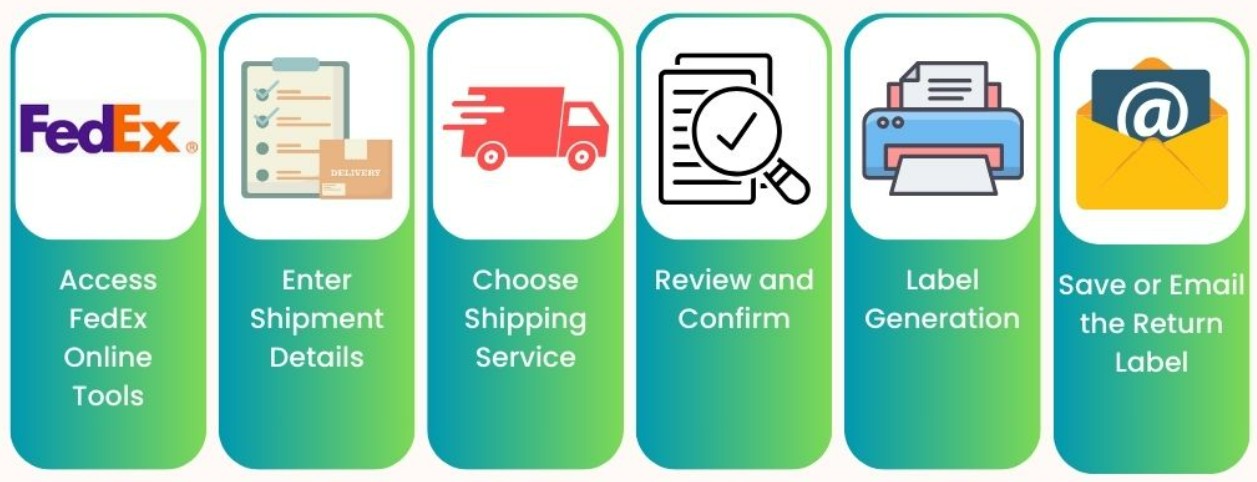
FedEx Email Return Shipment Process Flow
This transformation reduced a 20–30 minute process to just a few seconds.
Functional Implementation Approach
The implementation focused on simplifying the experience for customer service agents while maintaining strict control over when and how shipments could be created.
Intelligent Shipment Trigger Visibility
Within the CRM case interface, the return shipment button appears only when specific conditions are met. This ensures that shipments are created only for valid return scenarios.
Examples of conditions include:
- The case must have an approved return authorization
- The case must be in an appropriate service stage
- The customer address must be eligible for shipment
- Required customer information must be available
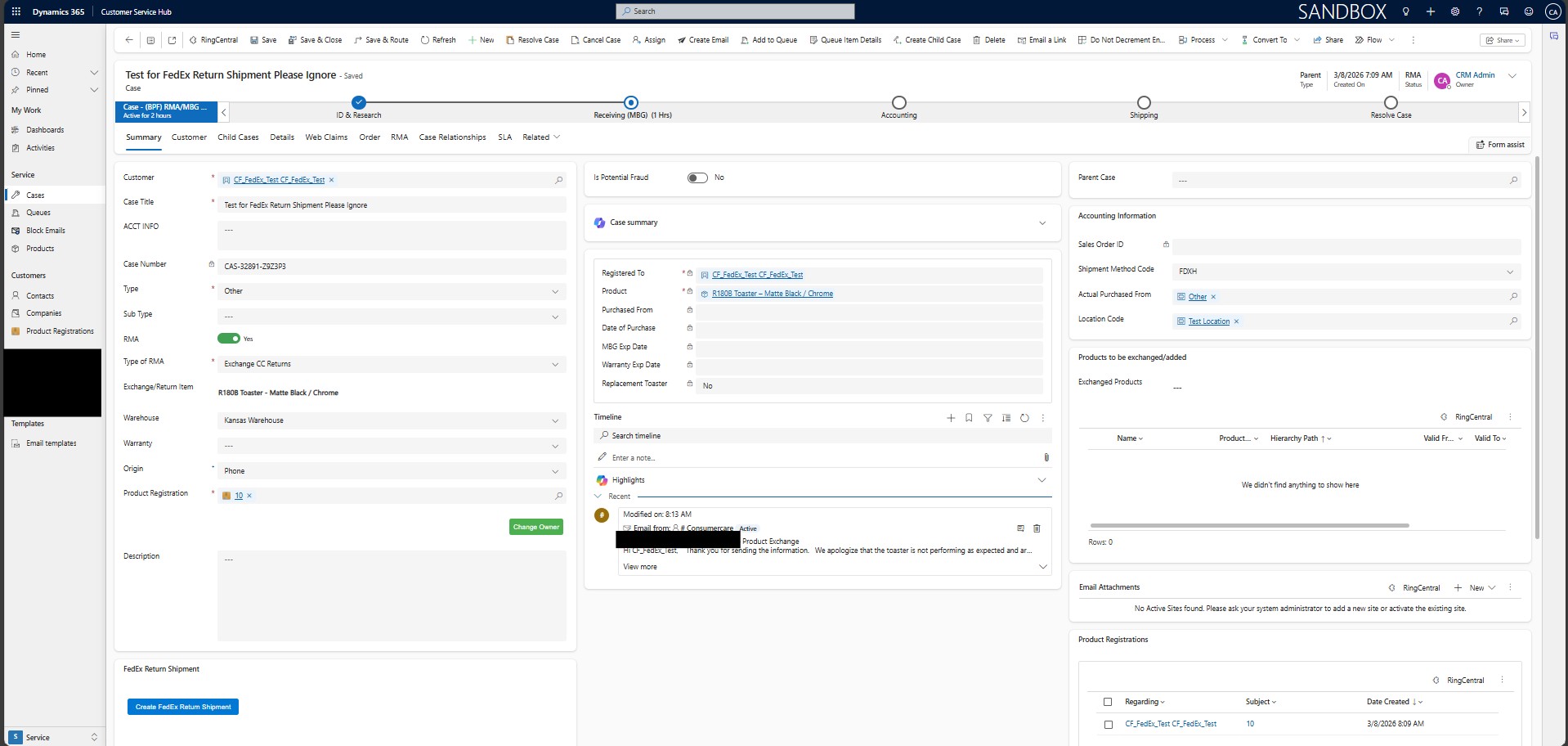
Example: Return Shipment Trigger inside Dynamics 365 Customer Service Hub
By embedding these conditions into the CRM interface, agents are guided through the correct service workflow without needing to remember complex procedures.
Automated Shipment Creation
Once the button is clicked, the system automatically gathers key information from the case record, such as:
- Customer details
- Shipping address
- Product description
- Return authorization number
- Contact phone number
This information is then used to register the shipment through the FedEx shipping system.
The system generates:
- A unique shipment tracking number
- A return shipment registration
- A digital return label
- The warehouse where the shipment would reach based on the product and end consumer requirement – e.g., return, replacement, or repair of the product
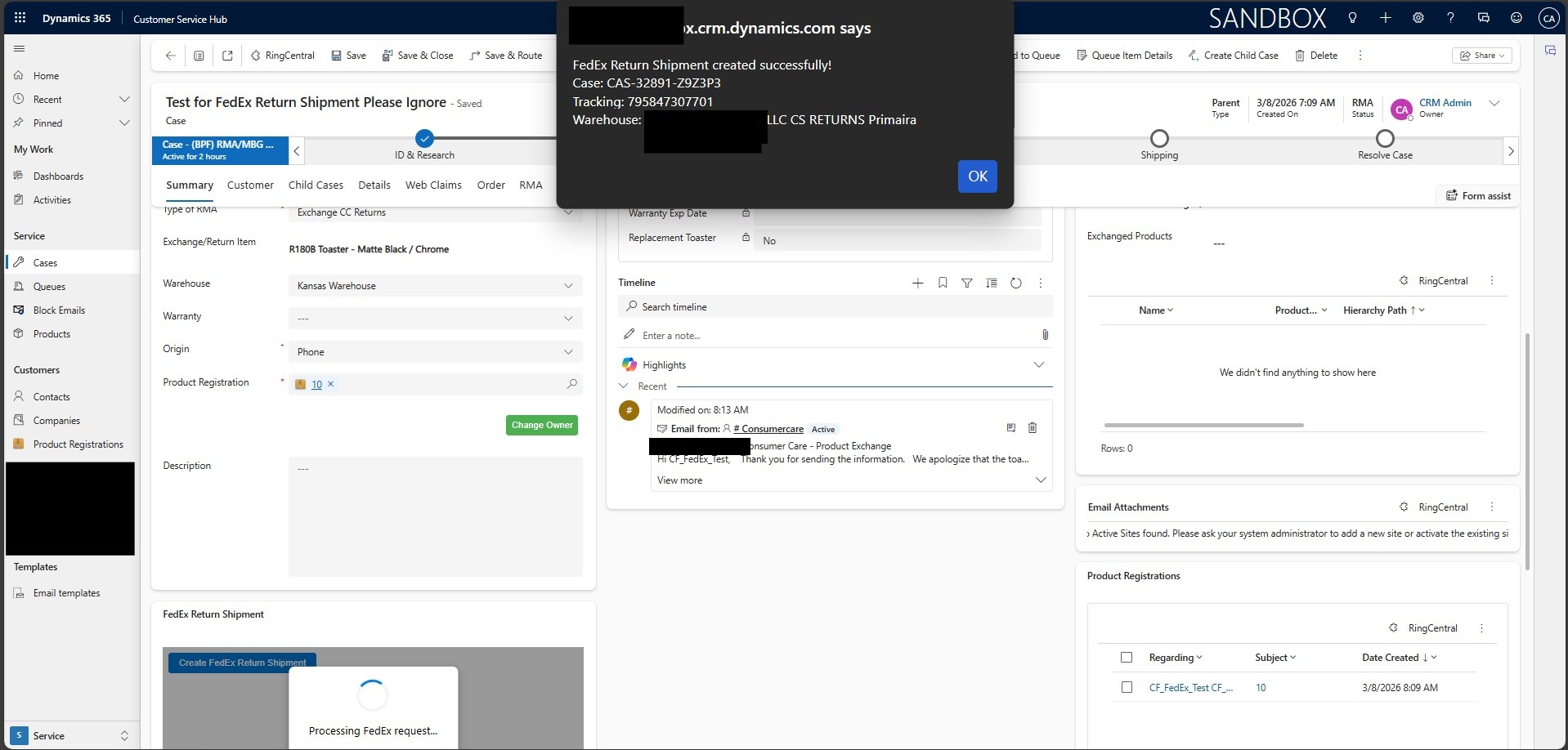
Example: A Successful Return Shipment to a specific warehouse.
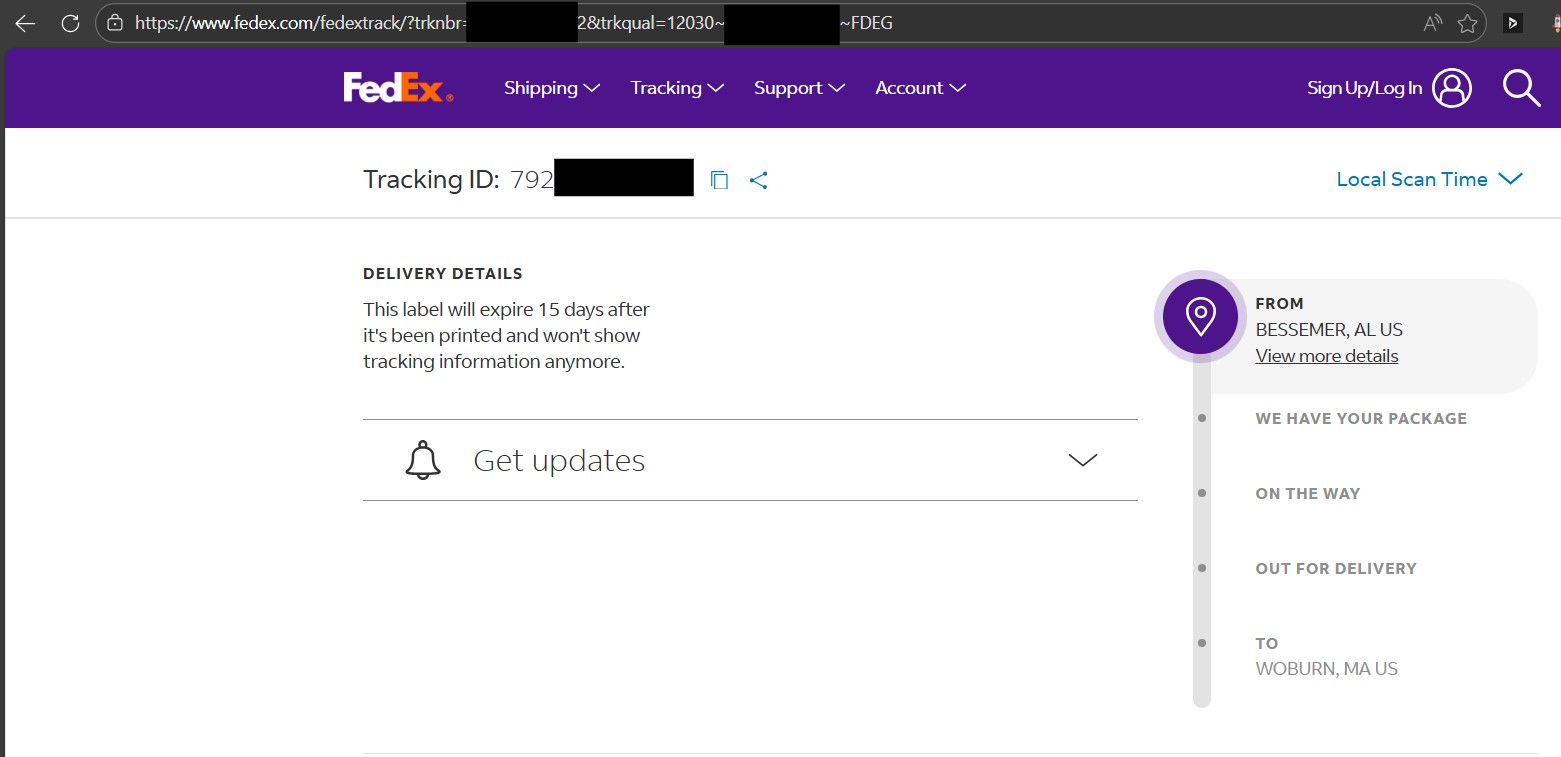
Example: Tracking a Return Shipment using the Tracking No. updated on D365 Customer Service Hub.
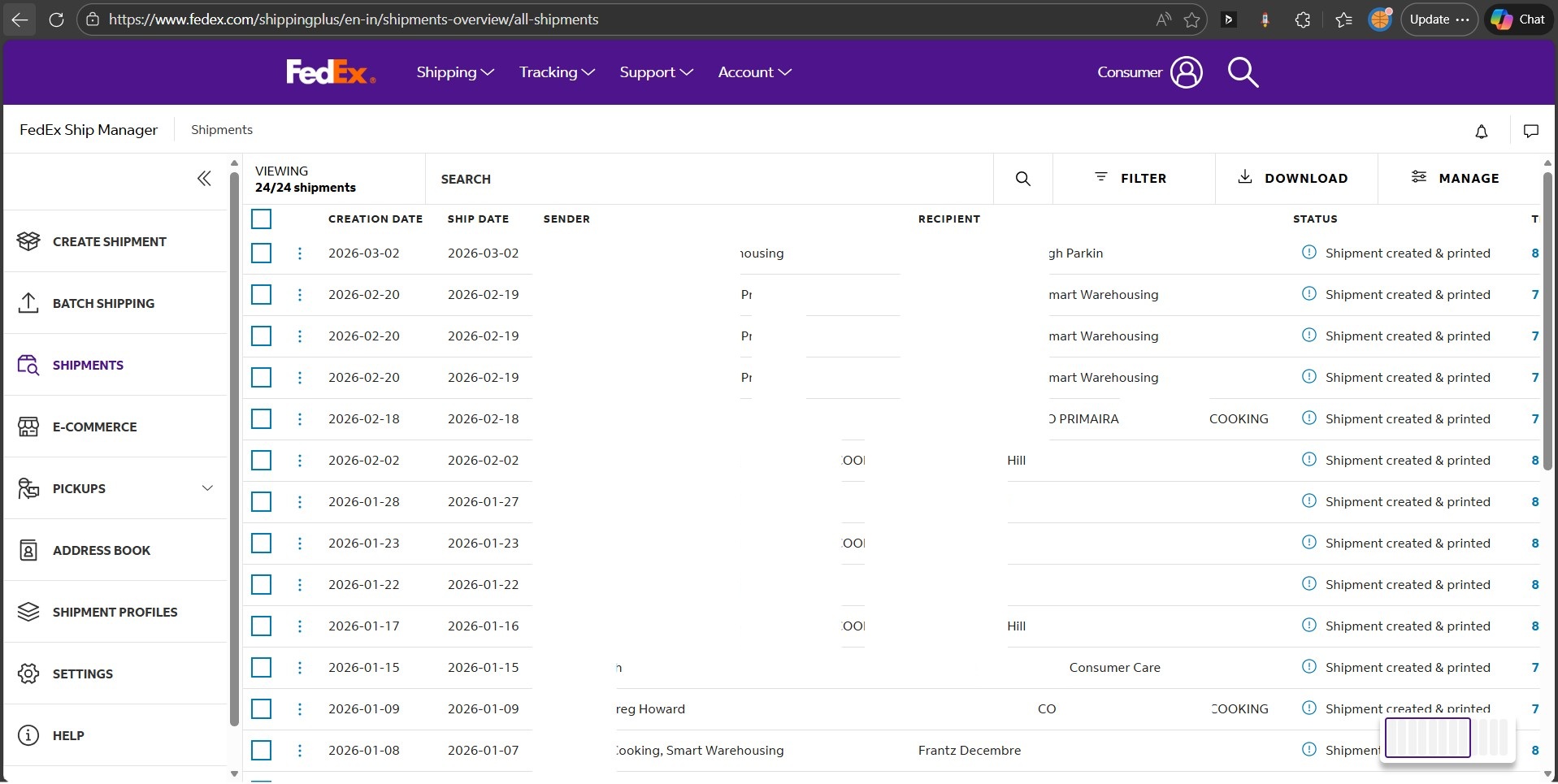
Example: The FedEx Shipping Manager for Tracking the Integrated Shipments.
The tracking number is immediately written back to the case record in Microsoft Dynamics 365 Customer Service, ensuring that support agents can track the return shipment without leaving the case.
Email Return Label Experience
After the shipment is registered, the customer automatically receives an email containing their return label.
The email includes:
- A printable shipping label
- A barcode that can be scanned at a FedEx location
- Shipment details and instructions
- The return authorization reference
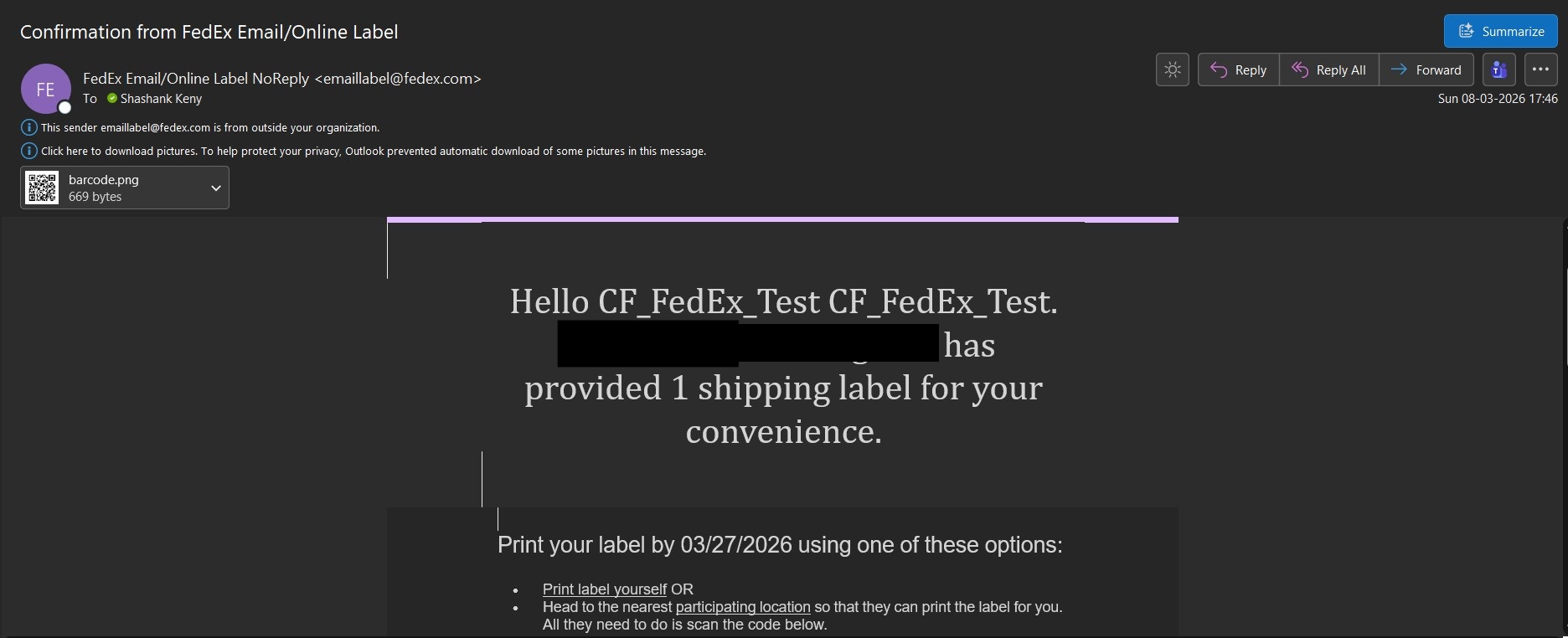
Example: Email Return Label Received by Consumer – 1.
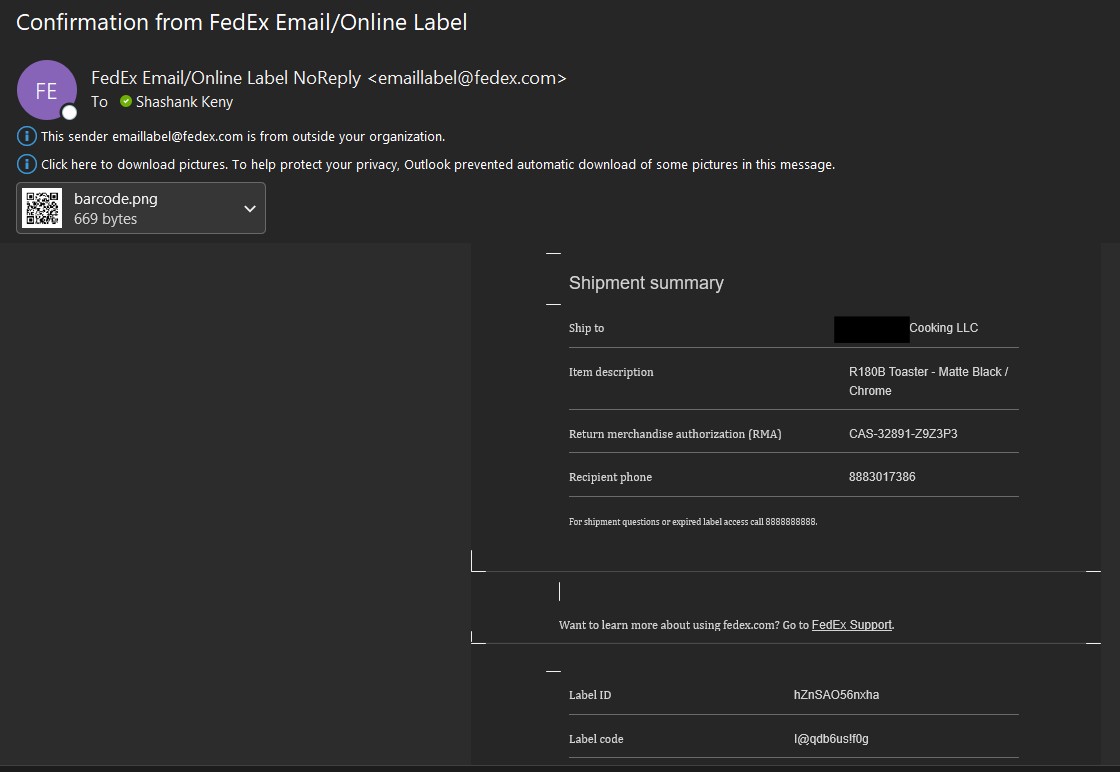
Example: Email Return Label Received by Consumer – 2.
Customers can either:
- Print the label themselves, or
- Visit a participating FedEx location where the label can be printed for them
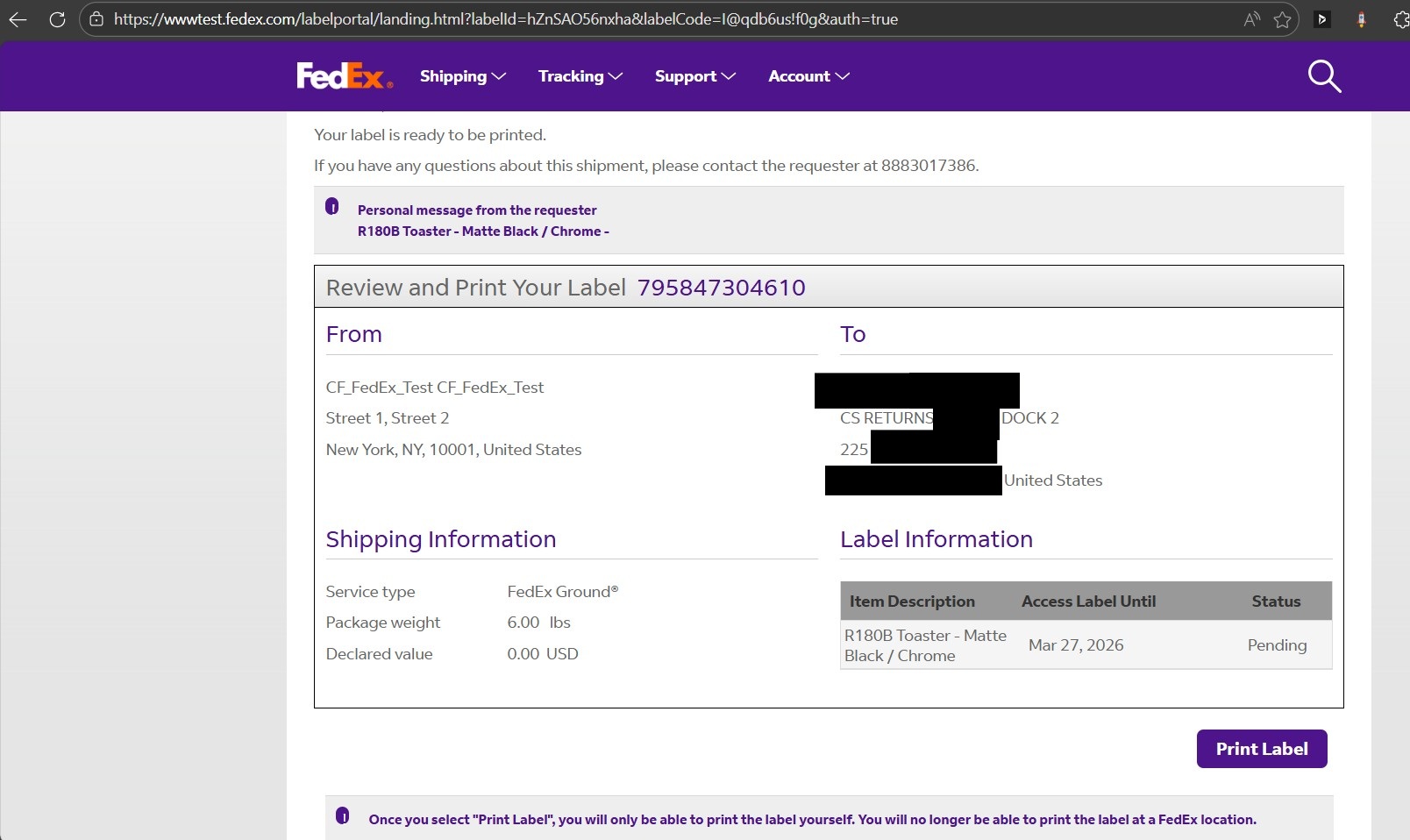
Example: The Email Return Label contents to be printed by the Consumer.
Once printed, the customer attaches the label to the package and ships the product to the company’s returns facility.
Handling Complex Data Automatically
One of the important aspects of this solution that I implemented was ensuring the system could handle complex customer and shipment data reliably, as one cannot burden the Customer Service Representative with trivial details such as the format of phone numbers.
For example, the integration automatically manages:
- Customer phone numbers formatted for shipping systems, only accepting phone numbers that are valid for a geographic location (e.g., US → xxx-xxx-xxxx)
- Product information associated with the case
- Return authorization numbers linked to service cases
- Address validation and formatting
- Multiple product scenarios within support cases
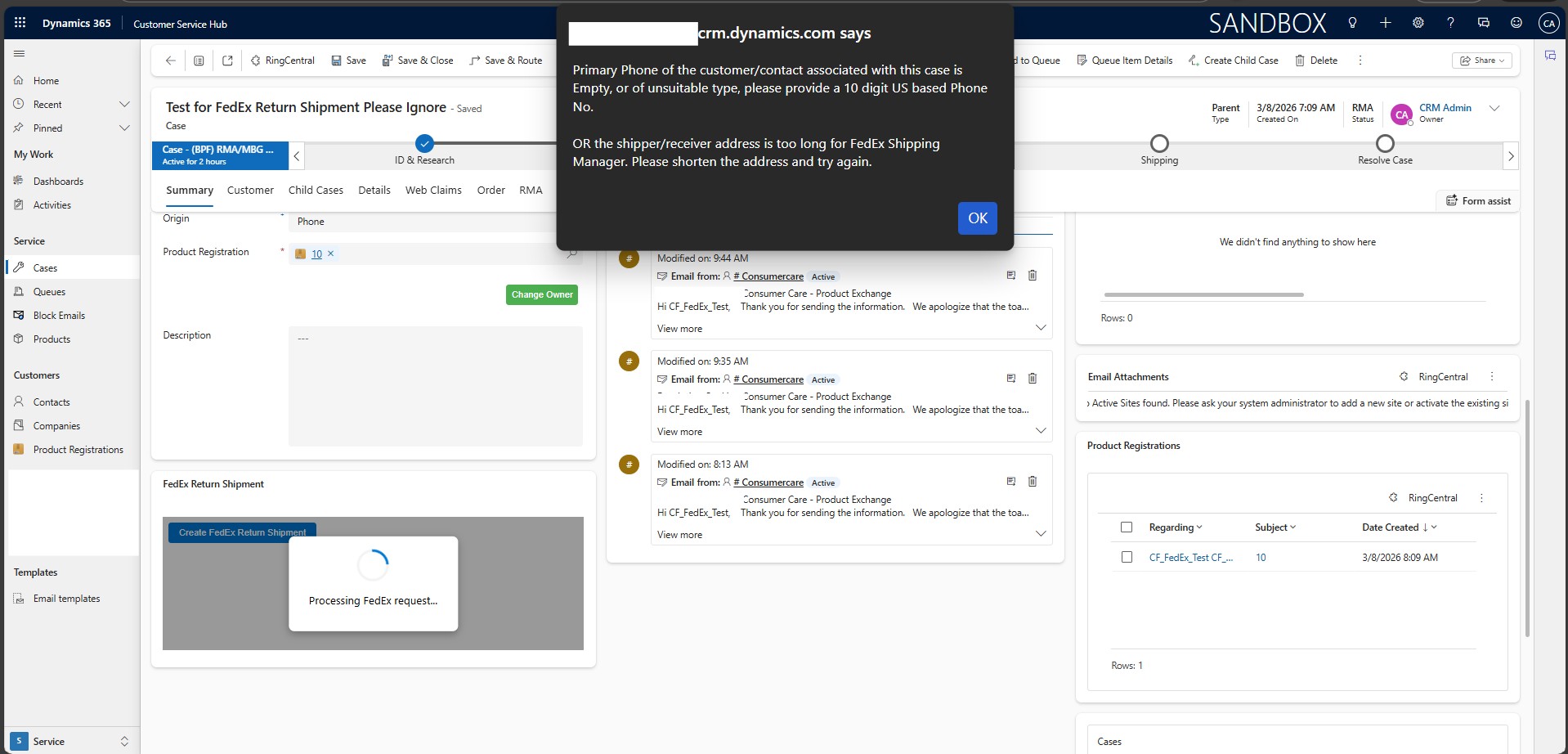
Example: Dynamic handling of exceptions for the End User.
These validations happen behind the scenes so that agents only need to focus on resolving the customer’s issue.
Business Impact
1] Dramatic Time Savings
Return shipment registration dropped from 20–30 minutes per case to just a few seconds. For support teams processing hundreds of returns, this represents hours of operational time saved every week.
2] Increased Customer Service Representative Productivity
Customer service representatives no longer need to move between systems. Everything happens directly within Microsoft Dynamics 365 Customer Service.
This allows agents to focus on customer interactions instead of administrative tasks.
3] Improved Accuracy
Because shipment information is automatically pulled from CRM case data, the risk of:
- Incorrect addresses
- Mistyped customer details
- Wrong product descriptions
… is significantly reduced.
4] Faster Customer Service
Customers receive return labels almost instantly, allowing them to ship their product back without waiting for manual processing.
This faster turnaround improves the overall service experience.
5] Scalable Returns Management
The company can now handle hundreds of product returns efficiently without increasing operational workload.
The automated process ensures the returns system can scale alongside business growth.
Preview Video
The preview video demonstrates the solution at a high level.
Video highlights:
- Opening a customer case in Microsoft Dynamics 365 Customer Service
- The “Create Return Shipment” button appearing in the case interface
- Clicking the button to trigger shipment creation
- Automatic generation of the FedEx return shipment
- Tracking number appearing in the case record
- Customer receiving the return label email
Demo: Creating a FedEx Return Shipment directly from Dynamics 365 Customer Service Hub
The video focuses on how the solution simplifies the workflow and reduces manual effort for customer service teams.
Final Thoughts
Returns are an unavoidable part of product-based businesses, especially in consumer electronics and appliance manufacturing. However, the way returns are handled can significantly influence operational efficiency and customer satisfaction.
By integrating CRM with shipping systems like FedEx, UPS, etc.; organizations can transform a manual, time-consuming process into a seamless one-click experience.
For this Massachusetts-based appliance manufacturer, the integration between Microsoft Dynamics 365 Customer Service and FedEx shipping services enabled faster returns processing, improved agent productivity, and a better overall customer experience.
What once required multiple systems and 20–30 minutes of manual work can now be completed instantly from a single CRM interface—allowing the support team to focus on what matters most: helping customers.
If your Dynamics 365 Customer Service environment requires integrations with external logistics or shipping platforms, reach out to CloudFronts at transform@cloudfronts.com. Our specialists design and implement scalable CRM integrations that automate complex operational workflows and improve service efficiency.
