

How a U.S.-Based Consumer Appliance Manufacturer Stopped Chasing RMA (Return Merchandise Authorization) Emails with a Single Automated Workflow
Summary
A consumer appliance manufacturer was receiving warranty claims through its customer mobile app, but the replacement process still required several manual checks and handoffs. We connected the mobile warranty claim process, Dynamics 365 Customer Service, and Business Central so the claim, RMA decision, replacement order, and case history remain linked throughout the process.
Table of Contents
| 01 | Summary |
| 02 | About the Customer |
| 03 | Business Challenge |
| 04 | Solution |
| 05 | How the RMA Process Works |
| 06 | Business Impact |
| 07 | Conclusion |
| 08 | FAQs |
About the Customer
Our customer is a consumer appliance manufacturer that sells cooking products and supports customers after purchase. When a customer faces a product issue, the service team reviews the warranty claim and decides whether a replacement or exchange is required.
The company already had customer, product, and warranty information in its systems. The main challenge was moving that information from the initial claim to the replacement order without relying on repeated emails or manual data entry.
Business Challenge
Customers submit warranty claims through a mobile app. These claims contain important details about the customer, registered product, and reported issue. Earlier, the service team still had to review information across different records and coordinate the replacement order separately.
This created a few common problems:
- Agents had to check customer, product registration, warranty, duplicate claim, and fraud information manually.
- Replacement details could be shared through emails before the order was created.
- The same product and shipping information could be entered more than once.
- The Business Central Sales Order number was not always easy to trace from the original Case.
- Customer Service had to spend extra time checking whether the replacement order had been created.
The goal was simple: keep the warranty claim, service review, RMA details, and replacement order connected from beginning to end.
Solution
We connected the customer warranty journey across the mobile app, Dynamics 365 Customer Service, and Microsoft Dynamics 365 Business Central.
When a customer submits a web warranty claim through the mobile app, the integration sends the claim and product details to Dynamics 365. A Case is created for the Customer Service team, giving the agent one place to review the request.
During the Identification and Research stage, the agent checks the customer, product registration, warranty, duplicate claim, and potential fraud information. If a replacement or exchange is required, the agent sets RMA to Yes and records the warehouse, warranty type, shipment method, location, and products to be exchanged or added.
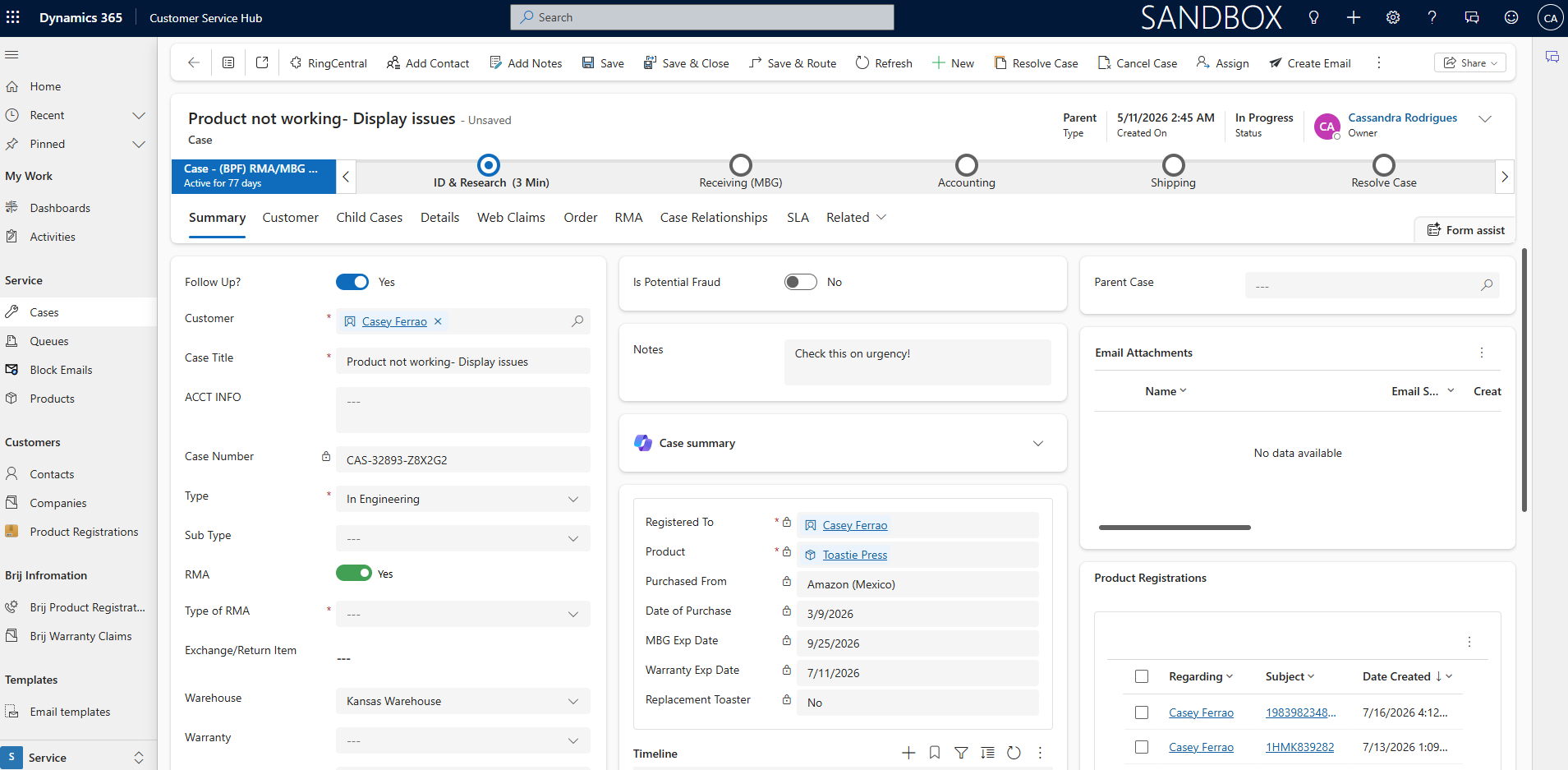
Once the required information is available, the related Sales Order is created in Business Central. The Business Central Sales Order ID is then stored back on the Dynamics 365 Case. This keeps the service request and replacement order connected, so the agent can trace the order without searching through email threads.
How the RMA Process Works
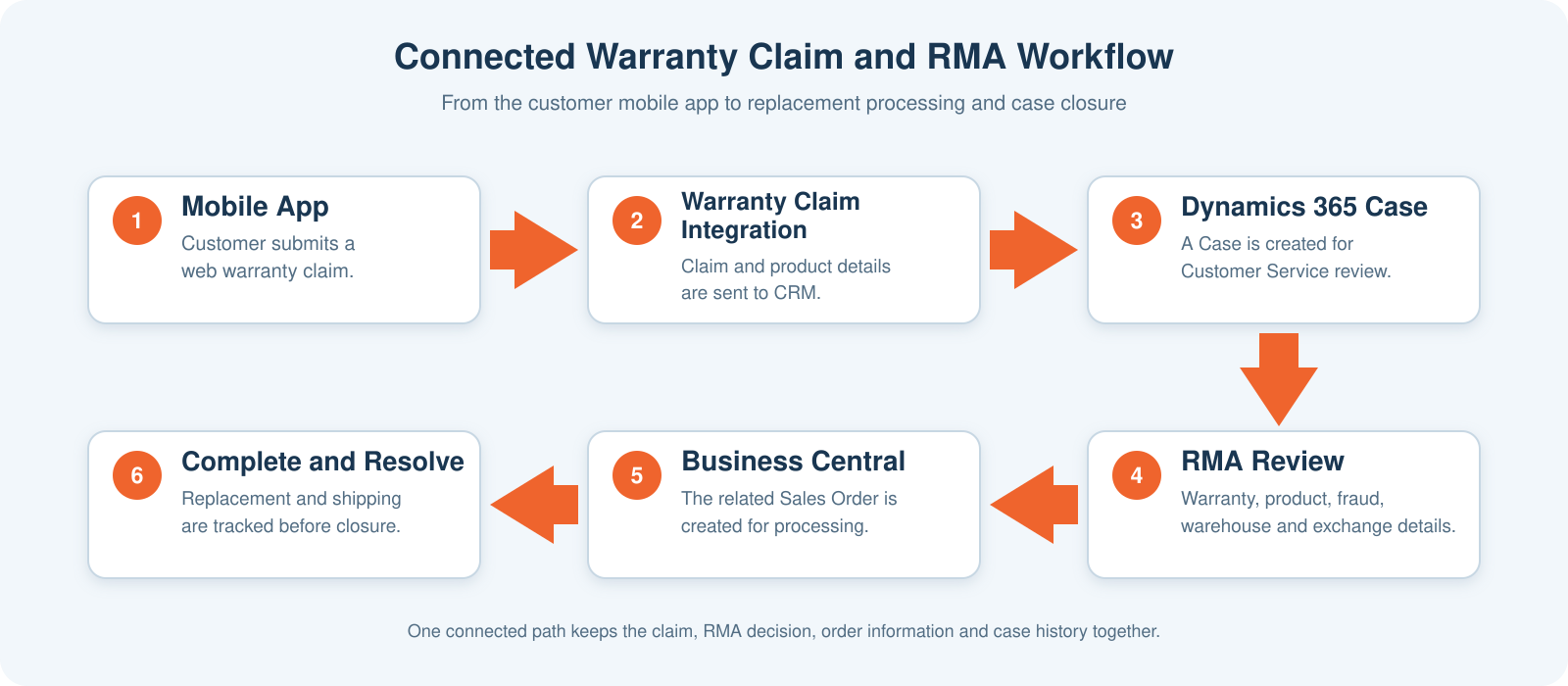
| Step | Stage | What Happens |
|---|---|---|
| 1 | Warranty Claim | The customer submits a web warranty claim through the mobile app. |
| 2 | Warranty Claim Integration | The integration sends the customer, claim, and product information to Dynamics 365. |
| 3 | Case Creation | A Dynamics 365 Case is created for the Customer Service team. |
| 4 | Identification and Research | The agent checks the product registration, warranty, duplicate claim, and potential fraud information. |
| 5 | RMA Details | The agent sets RMA to Yes and records the warehouse, warranty type, shipment method, location, and replacement products. |
| 6 | Business Central Order | The related Sales Order is created in Business Central for replacement processing. |
| 7 | Update and Resolve | The Sales Order ID is saved on the Case, and the agent resolves the Case after the required work is completed. |
Business Impact
The connected process gives Customer Service a clearer and more consistent way to manage replacement requests. The main improvements include:
- Less repeated data entry: Claim and product information received through the mobile app integration is available in Dynamics 365 for the service review.
- Better traceability: The Business Central Sales Order ID remains linked to the original Case.
- Clearer agent process: Important RMA information is captured in defined fields instead of being kept only in emails.
- Fewer follow-ups: Agents can check the Case for the RMA and order details instead of asking another team for the order number.
- More consistent replacements: Warehouse, shipment, warranty, location, and product details are recorded before the Sales Order is created.
- Complete case history: The claim review and replacement information stay connected for future reference.
Conclusion
RMA automation does not need to replace the service agent’s decision. It should remove repeated entry and make the next step clear.
By connecting the mobile warranty claim process, Dynamics 365 Customer Service, and Business Central, this consumer appliance manufacturer created one traceable path from a customer’s warranty claim to the related replacement order. Customer Service can work from the Case, the order can be traced through its Business Central Sales Order ID, and the complete history remains available when the Case is resolved.
Frequently Asked Questions
1. What is an RMA?
RMA stands for Return Merchandise Authorization. It records that a product return, replacement, or exchange has been reviewed and approved for processing.
2. How does the warranty claim enter Dynamics 365?
The customer submits a web warranty claim through the mobile app. The integration sends the claim and product information to Dynamics 365, where a Case is created for Customer Service.
3. Does the automation approve every replacement automatically?
No. The Customer Service agent still reviews the product registration, warranty, duplicate claim, and potential fraud information before confirming the RMA.
4. What information is captured for an approved RMA?
The Case can include the warehouse, warranty type, shipment method, location, replacement products, and the related Business Central Sales Order ID.
5. Why is the Business Central Sales Order ID stored in Dynamics 365?
It gives Customer Service a direct reference to the replacement order. This makes the order easier to trace from the original customer Case.
Looking to simplify your RMA process?
CloudFronts helps organizations connect customer service and order processing using Microsoft Dynamics 365 and Business Central. To discuss your requirements, contact us at transform@cloudfronts.com.
