

How to Eliminate Invoice Posting Blind Spots Between D365 Project Operations and Finance Using Custom Business Events
Posted On August 7, 2026 by
Shruti Gupta Posted in
Tagged in Azure, Custom Business Event, D365 finance and operation, D365 Project Operations, Integration
Summary
In a D365 Project Operations and Finance integrated setup, invoices are created in Project Operations but posted in Finance. Once the accountant posts the invoice in F&O, the project team in PO has no real-time signal that it happened — so they wait for an email, check a report the next day, or chase finance with “has my invoice been posted yet?”
CloudFronts solved this with a custom business event in D365 Finance that fires the moment a project invoice proposal is posted. The event triggers an Azure Logic App, which sends the posted status straight back into D365 Project Operations. The project manager sees the update instantly — no emails, no waiting, no manual follow-up.
This article walks through the end-to-end flow, the custom business event, the exact JSON payload, what the Logic App receives, and the related scenarios where the same pattern applies.
Table of Contents
01 — Context
About the Scenario
A Familiar PO–FO Integration Gap
In a D365 Project Operations and Finance integrated environment, the billing lifecycle is split across two systems. Project invoices originate as invoice proposals in Project Operations, then get reviewed and posted by the accountant in D365 Finance. The posting creates the general ledger entry, records tax and subledger postings, and finalizes the financial transaction.
For growing organizations running this dual-system setup, real-time visibility is non-negotiable. As invoice volume climbs and project teams depend on accurate billing status to communicate with clients and forecast cash flow, even a small gap in how posting status is communicated can quietly erode trust between delivery and finance.
One of the most common and most overlooked gaps in a PO–FO integration is surprisingly simple: the project team never finds out, in real time, that their invoice was posted in Finance.
Have you ever posted a project invoice in F&O, then spent the rest of the day answering “has invoice AC-000051 been posted yet?” messages from project managers? If you’re nodding, this article is for you.
Consider this: in most PO–FO implementations, the only way the project team learns an invoice is posted is through a manual email from finance, a next-day report, or a direct follow-up. Multiply that across dozens of invoices every month, and the overhead — and the risk of a missed update — adds up fast.
The cumulative effect on billing visibility, client communication, and finance–delivery trust is significant. By the end of this article, you will understand exactly why this happens, how D365 F&O’s Business Events framework can close the gap, and the single pattern that eliminates the problem entirely.
02 — Impact
Why This Matters
No Real-Time Posting Visibility Creates Real Business Risk
When the project team in PO has no real-time way of knowing that their invoice has been financially posted in Finance, it isn’t just an inconvenience. It leads to delayed client communication that chips away at trust, manual follow-ups that clog up both delivery and finance, and worst of all, project managers who stop trusting the system and start maintaining their own spreadsheets of “what’s been posted.”
Once that happens, the entire value of a unified PO–FO integration is gone.
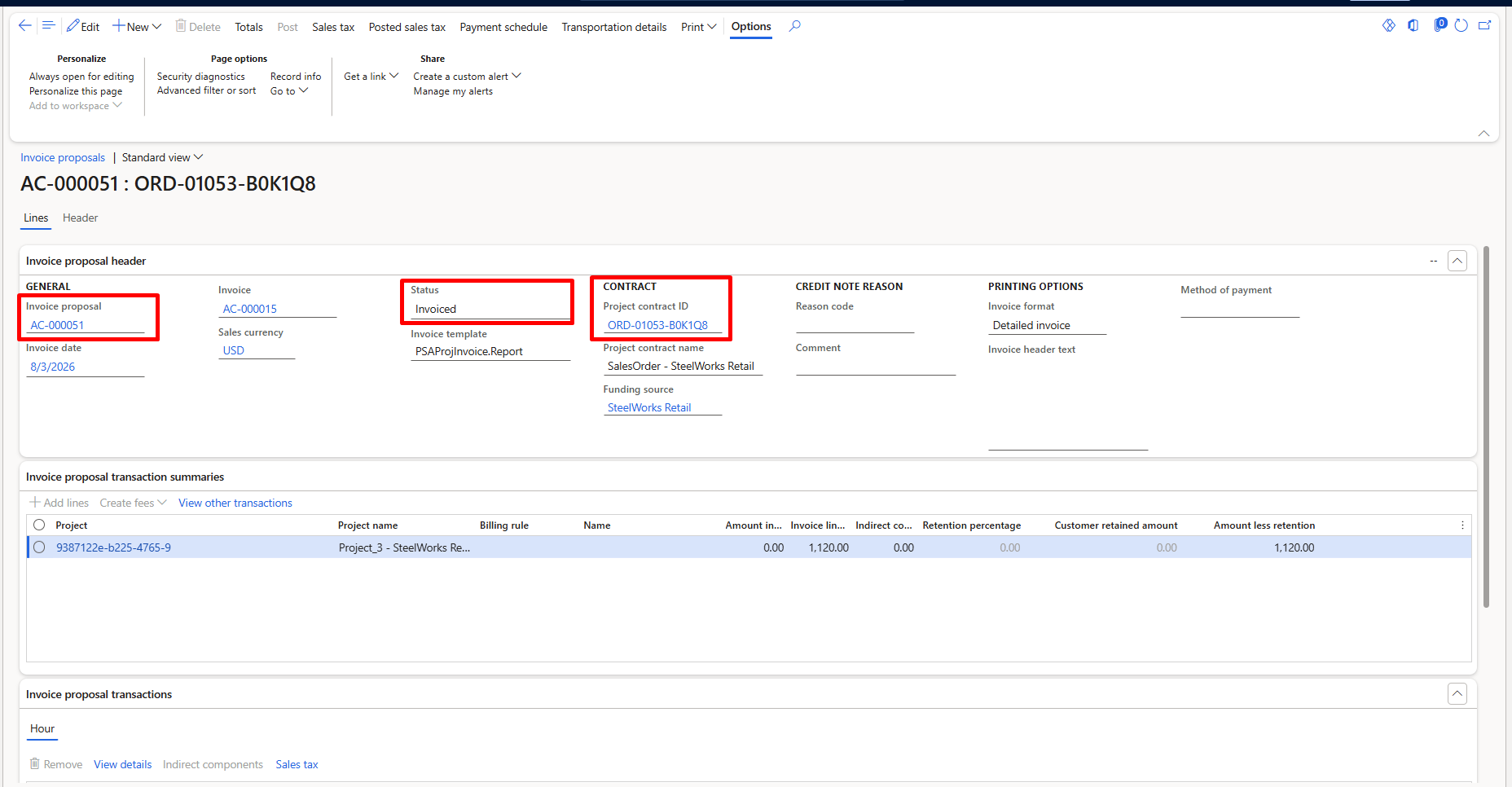
Dynamics 365 Finance — Custom Business Event
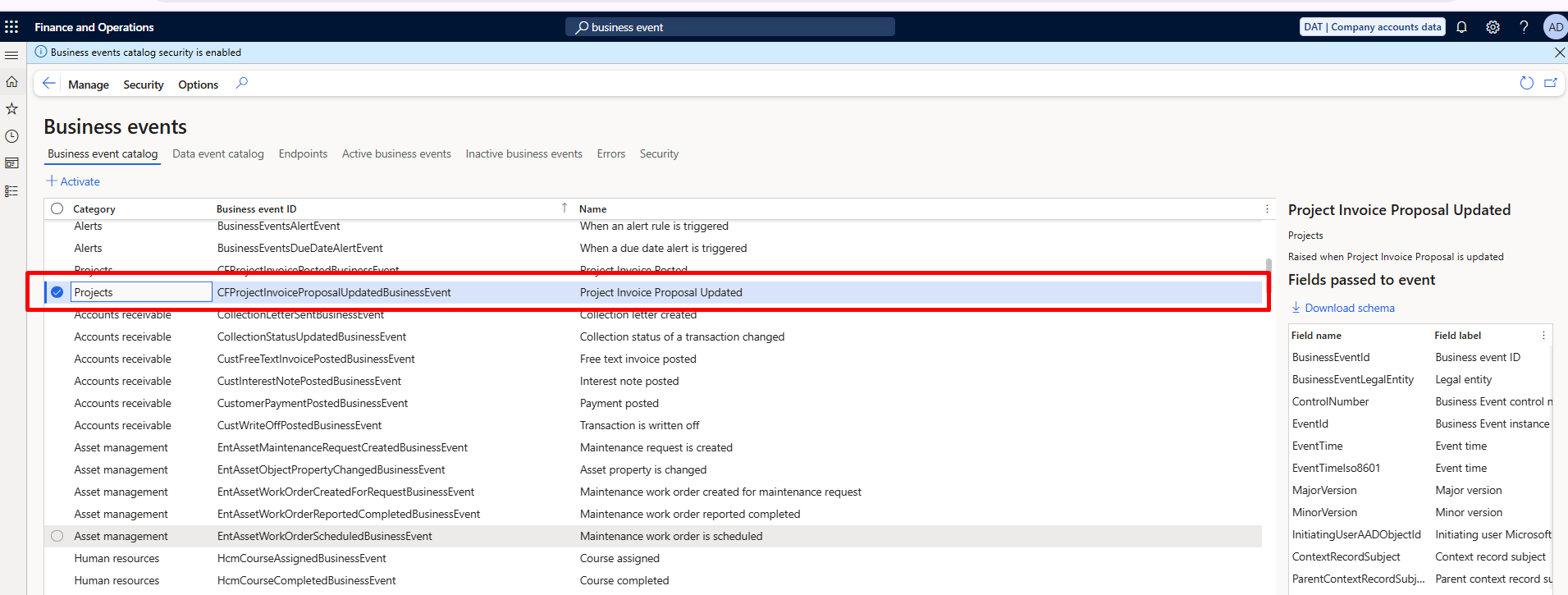
Dynamics 365 Finance — Project Invoice Proposal Posting
03 — Our Perspective
Why We’re Writing This
A Pattern We See Across D365 PO–FO Integrations
At CloudFronts, we’ve implemented and supported Dynamics 365 Project Operations and Finance integrations across professional services, engineering, and project-based organizations. This specific issue — the project team being left blind to invoice posting in Finance — has come up in nearly every engagement where invoices originate in PO and are posted in F&O. We’ve seen the pattern, diagnosed the root cause repeatedly, and built the automation to prevent it. This article distils that experience into something actionable.
04 — The Flow
How D365 F&O Business Events Work
The Flow: F&O → Business Event → Logic App → Project Operations
The integration is straightforward. Four things happen in sequence:
| Step | What Happens | Detail |
|---|---|---|
| 1 | Invoice is Posted in D365 Finance | The project invoice proposal — which originates from D365 Project Operations — is reviewed and posted by the accountant in D365 Finance. The posting creates the GL entry, records tax and subledger postings, and finalizes the financial transaction. |
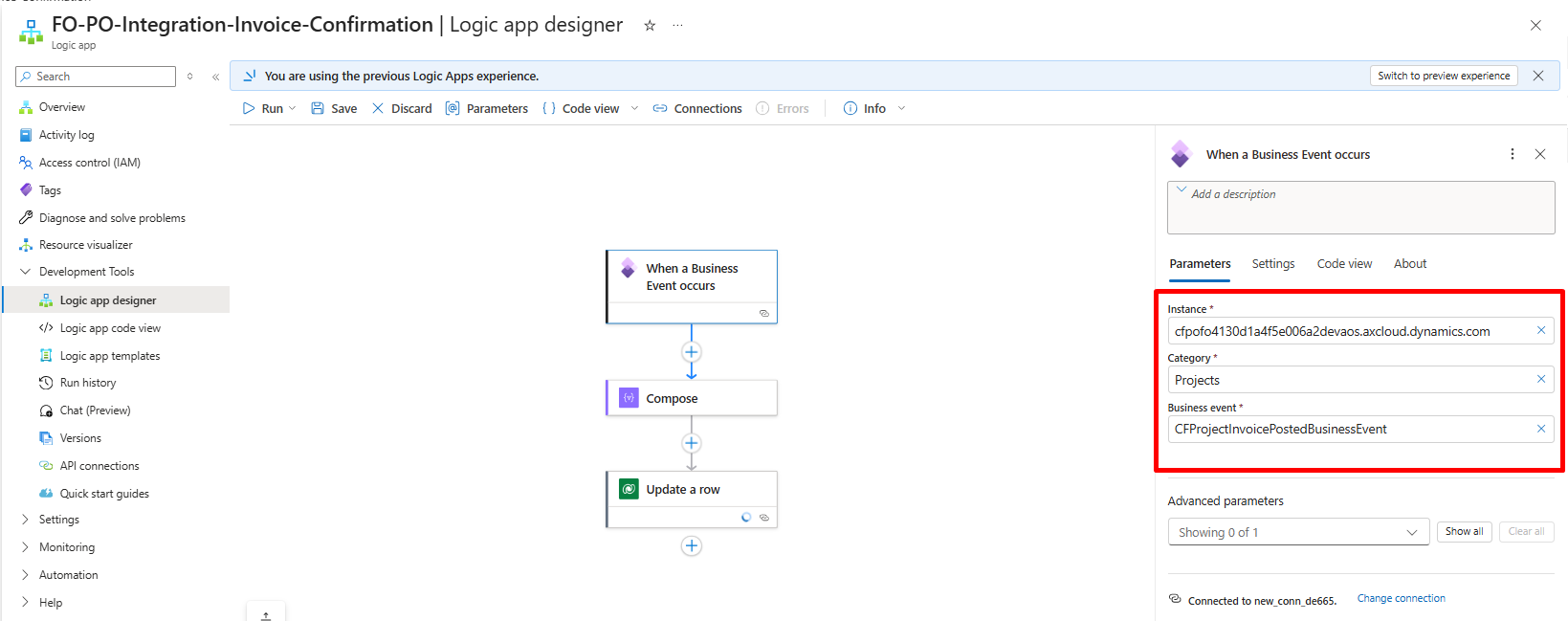
| 2 | Custom Business Event Fires | The moment the posting completes, our custom business event (CFProjectInvoiceProposalUpdatedBusinessEvent) fires automatically. It sends a lightweight JSON payload containing the ProposalId, ProjectContractId, Currency, Company, and event timestamp to the configured endpoint. |
| 3 | Logic App Receives and Processes | The Azure Logic App (FO-PO-Integration-Invoice-Confirmation) is triggered instantly. It receives the payload, extracts the relevant fields, and executes the configured workflow — updating the invoice status in Project Operations and notifying stakeholders. |
| 4 | Status Updated in D365 PO | The Logic App calls back into D365 Project Operations and updates the invoice record with the “Posted” status. The project manager sees this immediately in PO without any manual intervention. |
The entire sequence — from the accountant clicking Post in Finance to the status appearing in Project Operations — takes less than a second.
05 — The Gap
The Problem
The Project Team Is Left in the Dark
Here’s how the issue plays out. A project invoice proposal is created and sent from D365 Project Operations to Finance for posting. The accountant reviews and posts it in D365 F&O. The financial transaction is complete — GL, tax, and subledger all finalized.
But in Project Operations, the invoice record still looks unposted. The project manager has no automated signal that the posting happened.
Root Cause
There is no event-driven bridge between the two systems for this specific posting action. F&O ships with standard business events for common actions (like “Purchase order confirmed” and “Free text invoice posted”), but there is no out-of-the-box event specifically for the project invoice proposal posting step. So the status update either never reaches PO, or it reaches it late — via email, report, or a manually triggered sync.
06 — The Solution
The Fix
Build a Custom Business Event and Let the Logic App Do the Rest
The rule is simple: fire a custom business event from F&O at the exact moment the project invoice proposal is posted, and let an Azure Logic App carry that signal back into Project Operations.
D365 Finance includes a Business Events framework that lets external systems receive notifications when a business action occurs. Because no standard event covers project invoice proposal posting, we built a custom one — CFProjectInvoiceProposalUpdatedBusinessEvent — that fires when a project invoice proposal is posted. The event is registered in the Business Events catalog under System Administration → Business Events, and can be activated per legal entity. The event carries a lightweight JSON payload with the essential identifiers the downstream system needs, and the Logic App consumes it, updates the record in PO, and notifies stakeholders. No human in the loop, no waiting.
07 — The Data
The Payload
The Actual JSON the Event Sends
Here is the actual payload our event sends:
{
  "BusinessEventId": "CFProjectInvoiceProposalUpdatedBusinessEvent",
  "BusinessEventLegalEntity": "AC",
  "Company": "AC",
  "ControlNumber": 5637144576,
  "Currency": "USD",
  "EventId": "6D455E33-D540-4562-A117-5F32D479778D",
  "EventTimeIso8601": "2026-08-03T10:44:59.4817673Z",
  "InitiatingUserAADObjectId": "{410BAC99-6863-4922-A370-F8E56A341E3D}",
  "InvoiceDate": "/Date(1785715200000)/",
  "ProjectContractId": "ORD-01053-B0K1Q8",
  "ProposalId": "AC-000051"
}
ProposalId (AC-000051) — uniquely identifies the invoice proposal that was posted. The Logic App uses this to locate and update the corresponding record in Project Operations.
ProjectContractId (ORD-01053-B0K1Q8) — identifies the project contract the invoice belongs to, enabling the Logic App to route notifications to the correct project team.
Company (AC) — the legal entity where the posting occurred.
Currency (USD) — the transaction currency.
EventTimeIso8601 — the exact timestamp of the posting, useful for audit trail and logging.
InitiatingUserAADObjectId — the Azure AD identity of the user who posted the invoice, enabling traceability back to the specific accountant.
08 — The Automation
The Logic App: What It Receives
Triggered by the Business Event, Confirmed in Run History
The Logic App — FO-PO-Integration-Invoice-Confirmation — is triggered by the “When a Business Event occurs” connector for D365 Finance & Operations. Here is a screenshot from the actual Logic App run history showing the trigger and the Compose step with the received payload:
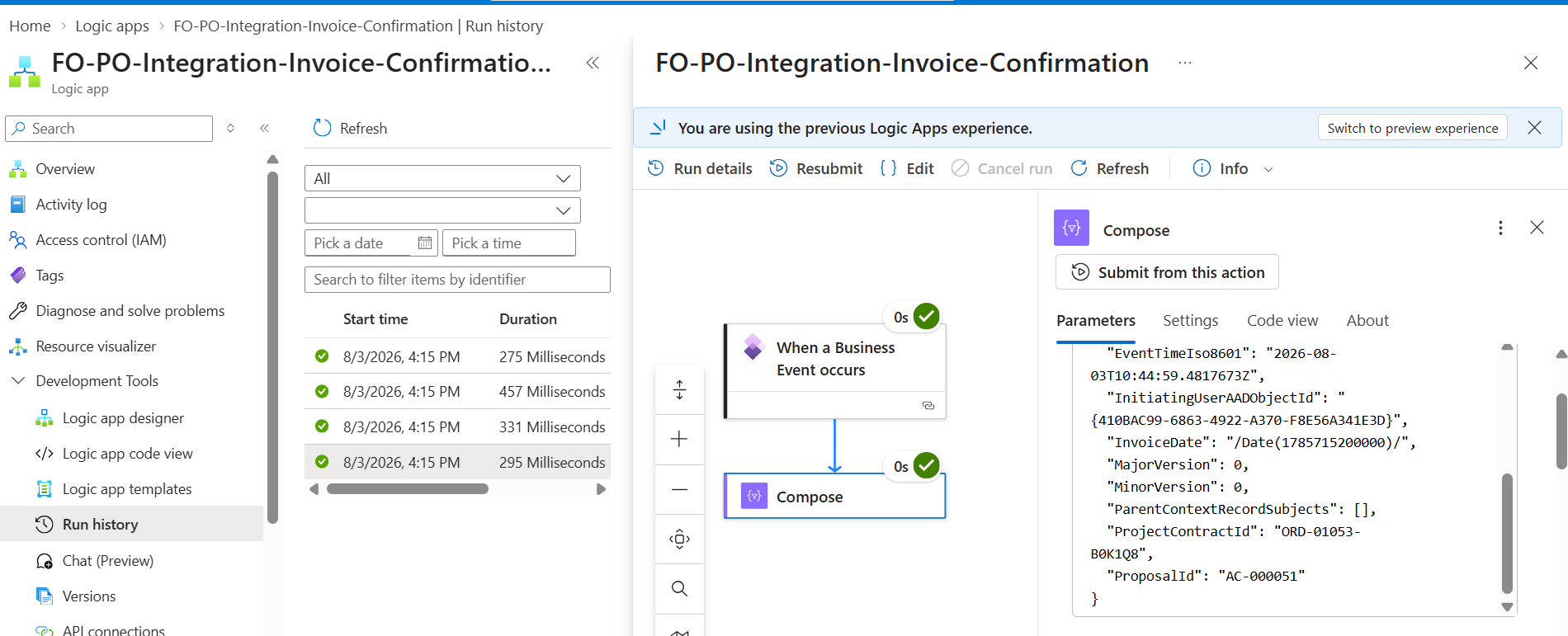
Figure 2: Logic App Run History — Successful Triggers and Compose Output with Payload
A few things to note from this screenshot:
Run History (left panel): Shows four successful runs on 8/3/2026 at 4:15 PM, each completing in 275–457 milliseconds. This confirms the event fires reliably and the Logic App processes it in under half a second.
Workflow (center): The flow is simple — “When a Business Event occurs” triggers the Logic App, followed by a Compose step that captures the full payload. Both steps show green checkmarks confirming successful execution.
Compose Output (right panel): Shows the actual JSON payload received from D365 Finance. You can see the EventTimeIso8601 timestamp, the InitiatingUserAADObjectId (the accountant who posted), the InvoiceDate, the ProjectContractId (ORD-01053-B0K1Q8), and the ProposalId (AC-000051).
From the Compose step, you can extend the Logic App with additional actions — updating the Dataverse record in PO, sending an email to the project manager, posting to a Teams channel, or logging to SharePoint for audit. The payload provides all the identifiers needed to route and update correctly.
09 — Beyond Invoices
Other Scenarios Where This Applies
Build the Pattern for the Whole PO–FO Boundary
The same pattern — a custom business event in F&O triggering a Logic App — works for any scenario where Project Operations needs to know about a financial action that completes in Finance:
01
Vendor Invoice Posted
Update subcontract payment status in PO.
02
Expense Report Posted
Notify the project manager when team expenses are processed.
03
Credit Note Posted
Alert the project team when a customer credit is applied.
04
Payment Received
Update payment status against the posted invoice in PO.
In each case, the pattern is identical: build a custom business event in F&O for the specific posting action, configure the endpoint, and let the Logic App handle the status update and notifications.
10 — Takeaway
Conclusion
Never Leave the Project Team Guessing
To conclude, everything in this article comes down to one rule: never leave the project team blind to a financial action that completed in Finance.
Fire a custom business event the moment the posting happens, carry a lightweight payload to an Azure Logic App, and let it update Project Operations and notify stakeholders — all in under a second, with no manual intervention.
Without this event-driven integration, the project team in PO has no real-time way of knowing when their invoice has been financially posted. With it, both systems stay in sync automatically, the finance team stops fielding “was it posted?” emails, and every run is logged in Azure with the exact payload, timestamp, and result.
11 — Action
Your Next Step
Run a quick audit of your own PO–FO integration: when an invoice is posted in Finance today, does the project team in Project Operations find out automatically, or do they hear about it later? If the answer is “later” — or “only if someone tells them” — it’s time to build the custom business event and Logic App.
At CloudFronts, we’ve implemented this pattern across multiple PO–FO integrations and can help you set it up quickly. If you need help building the business event or designing the Logic App workflow, reach out to us. Let’s make sure your project teams always know the moment their invoice is posted.
Ready to modernize your project operations and finance integration with Dynamics 365?
CloudFronts delivers intelligent automation, seamless integrations, and process optimization solutions that help you maximize the value of your ERP investment.
transform@cloudfronts.com
Author
Shruti Gupta
Senior Consultant at CloudFronts
Shruti is a Senior Consultant at CloudFronts with 5+ years of experience in Azure integrations and Dynamics 365 implementations. She specializes in building seamless, API-driven architectures and connecting enterprise systems across the Microsoft ecosystem. Passionate about solving complex integration challenges, she focuses on delivering scalable, production-ready solutions that drive real business outcomes.
Related posts:
How We Connected an Azure AI Foundry Agent to Dynamics 365 Using the Dataverse MCP Server for a Texa...
How CloudFronts Built a Project Risk Assessment Engine with Databricks Genie
Location Movement Scanning in Dynamics 365 Finance & Operations: Turning Warehouse Floor Movemen...
From Prospecting to Pipeline Intelligence: How We Embedded LinkedIn Sales Navigator into Dynamics 36...
Share Story :
SEARCH BLOGS :
FOLLOW CLOUDFRONTS BLOG :
Enter your email address to follow this blog and receive notifications of new posts by email.
Categories
- AI (21)
- Azure (147)
- Azure AI Search (1)
- Azure and Office 365 (111)
- Azure App Services (3)
- Azure Blob Storage (9)
- Azure Data Factory (3)
- Azure Databricks (27)
- Azure DevOps Services (7)
- Azure Function (25)
- Azure Integration (12)
- Azure Synapse Analytics (3)
- B2B (2)
- Blog (1,631)
- Business Process Flow (8)
- C# (15)
- Canvas Apps (3)
- claude (2)
- Cloud flows (23)
- CloudFlows (11)
- Copilot (5)
- Custom Copilot (3)
- Customer Success (81)
- d365 (12)
- D365 Business Central (364)
- D365 Commerce (5)
- D365 CRM Plugins (6)
- D365 Customer Service (73)
- D365 Field Service (23)
- D365 Finance (20)
- D365 Finance and Operations (268)
- D365 General (307)
- D365 Project Operations (25)
- D365 Project Service Automation (70)
- D365 Retail (60)
- D365 Sales (71)
- D365 SCM (18)
- Data (16)
- Data Governance (1)
- DataBricks (20)
- Databricks Genie (3)
- Dataverse (36)
- Delta Lake (4)
- Demand and Supply Forecasting (1)
- Dot Net (8)
- Dynamics 365 (308)
- Dynamics 365, Business (49)
- Dynamics AX (44)
- Dynamics CRM (190)
- Dynamics NAV (15)
- Headless (1)
- InforLN (2)
- Integrations (7)
- JavaScript (23)
- Logic App (48)
- LS Central (13)
- Microsoft Fabric (2)
- Model-Driven App (12)
- MS Teams (6)
- Odoo (1)
- OpenAI (3)
- Outlook (1)
- Outlook (1)
- Paginated Report (2)
- Power Automate (79)
- Power BI (230)
- Power Fx (5)
- Power Plattform (31)
- Power Query (13)
- Power Virtual Agent (2)
- PowerApps (67)
- PowerApps Portal (13)
- Press Releases (67)
- Project Management (9)
- Project Service Automation (16)
- Ribbon Workbench (5)
- Ribbon Workbench (6)
- Salesforce (2)
- SAP (1)
- SharePoint (8)
- SQL Server (9)
- SSIS (1)
- SSRS Report (7)
- Thought Leadership Article (40)
- Tibco (3)
- Unity Catalog (3)
- XRM ToolBox (3)
RECENT UPDATES
- How We Connected an Azure AI Foundry Agent to Dynamics 365 Using the Dataverse MCP Server for a Texas Industrial Cybersecurity Company
- How CloudFronts Built a Project Risk Assessment Engine with Databricks Genie
- Location Movement Scanning in Dynamics 365 Finance & Operations: Turning Warehouse Floor Movements into Traceable, Scanner-Directed Work
- From Prospecting to Pipeline Intelligence: How We Embedded LinkedIn Sales Navigator into Dynamics 365 Sales for a Texas-Based, Cybersecurity & Azure Services Company
- SAP Business Data Cloud: More Than a Data Platform
