

From Project Operations to Business Central: Following the Data Behind Project Financials
Summary
Connecting Dynamics 365 Project Operations with Business Central creates a continuous data journey from project planning and execution to financial visibility. Project and task information, planning lines, time, materials, expenses, billable values, and invoices must retain their identity and meaning as they move between systems. This implementation focuses on preserving those relationships so that Budget, Actual, Billable, and Invoiced values remain traceable and meaningful throughout the project lifecycle. The result is an integration that does more than synchronize records: it creates a reliable data story that supports project operations, ERP processes, financial analysis, and decision-making.
Inside the article
01 · The project does not live in one system
Project Operations is where teams plan and manage project work. Business Central is where the project becomes part of an ERP financial workflow. The interesting part is the space between them.
When the same customer, project, task, resource or transaction crosses that boundary, the integration has to preserve more than a name. It has to preserve relationships and translate the source record into the target system’s business model.
“Did the record sync?” is only the first question.
“Does the record still mean the same thing?” is the engineering question.
“Does the record still mean the same thing?” is the engineering question.
CRM / Project Operations
Where the project is planned and managed: customer, project, tasks, resources, estimates, time and project activity.
ERP / Business Central
Where the project becomes an ERP financial structure: project tasks, planning lines, journals, invoices and financial visibility.
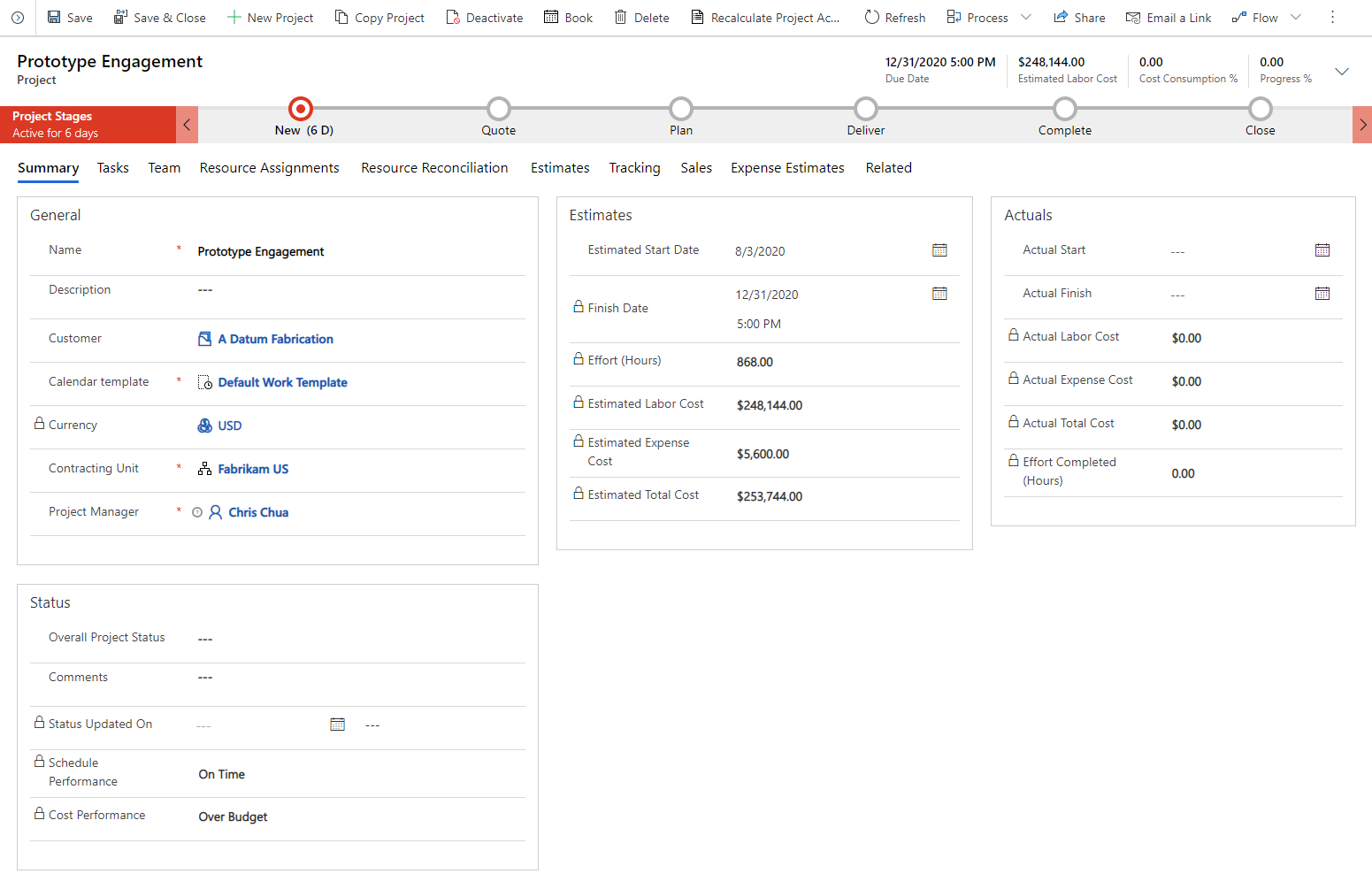
CRM-side view: a Project Operations project with project stages, customer, dates, estimates and project context.
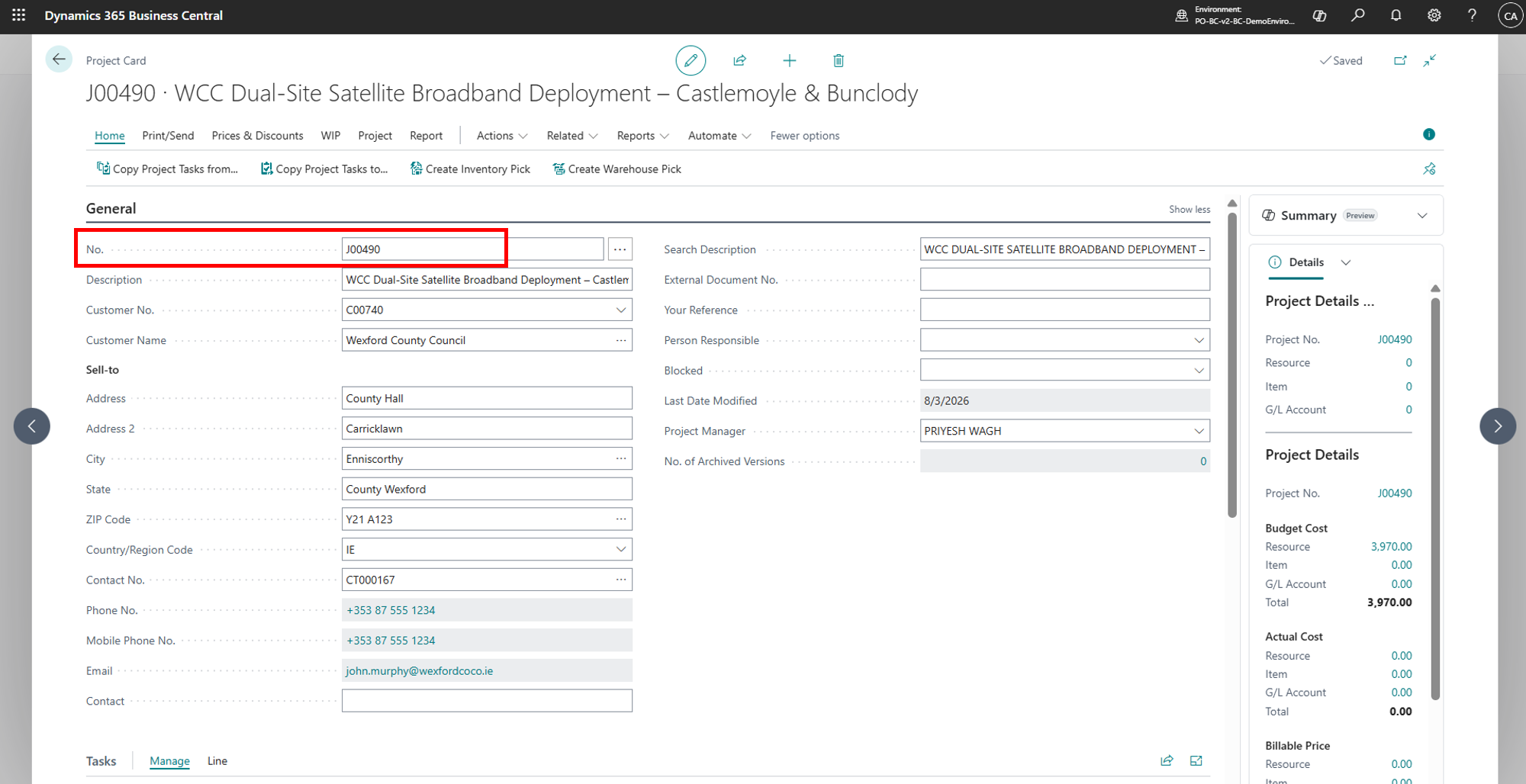
ERP-side view: the corresponding project structure in Business Central.
02 · A different way to look at the integration
Think of the integration as a data pipeline
Source entities become mapped entities, mapped entities become ERP records, and ERP records eventually become transactions and financial metrics.
Project Operations
projects · tasks · resources
→
Mapping Layer
identity · transformation
→
Business Central
projects · planning lines
01
Plan
Estimates, tasks, resources and planned quantities describe what the project is expected to consume.
02
Execute
Time, materials and expenses create operational evidence of what happened.
03
Bill
Billable value moves toward invoicing, turning project activity into commercial output.
03 · Entity-to-entity mapping is where meaning gets preserved
One of the most important parts of a PO–BC integration is deciding what a source entity becomes in Business Central. The mapping is effectively a semantic contract.
| Project Operations | Business Central | Why it matters |
|---|---|---|
| Account Customer | Customer | Customer identity must remain consistent across systems. |
| Project msdyn_project | Project / Job | The project becomes the parent financial structure. |
| Project Task msdyn_projecttask | Project Task / Job Task | Task identity is required for planning and transaction attribution. |
| Estimate msdyn_estimateline | Job Planning Line | Planning becomes a structured BC financial planning record. |
| Time msdyn_timeentry | Project Journal | Recorded effort can become project usage. |
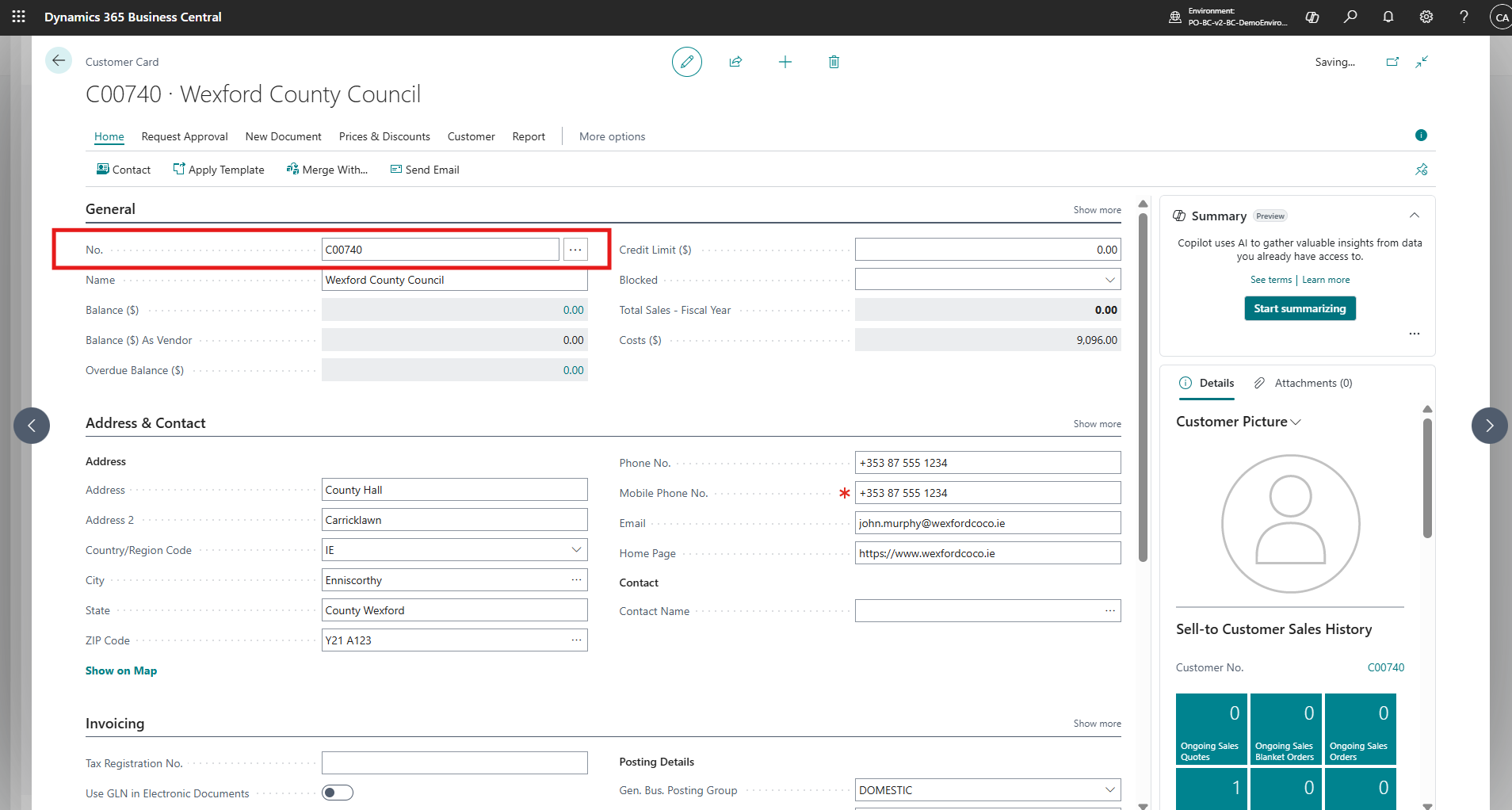
Real-world CloudFronts implementation screenshot: account data flowing into Business Central. Used as a visual reference for the integration journey.
Project identity is carried across the boundary so the ERP can reference the same business project.
04 · Planning lines are the semantic bridge
Planning lines sit at the point where a project plan starts becoming an ERP financial model.
In Business Central, planning lines can represent planned cost and/or billable value depending on how they are configured. That makes them especially important when explaining the transition from “what we intend to do” to “what the ERP expects this project to cost or generate.”
Plan
Quantity
How much work, material or resource usage is expected?
Rate
Unit Cost / Price
What cost or commercial rate is associated with the planned quantity?
Value
Total Cost / Price
The planning line turns quantity and rates into project-level financial expectations.

CRM-side task planning: the work breakdown structure is where project work is decomposed into manageable tasks.
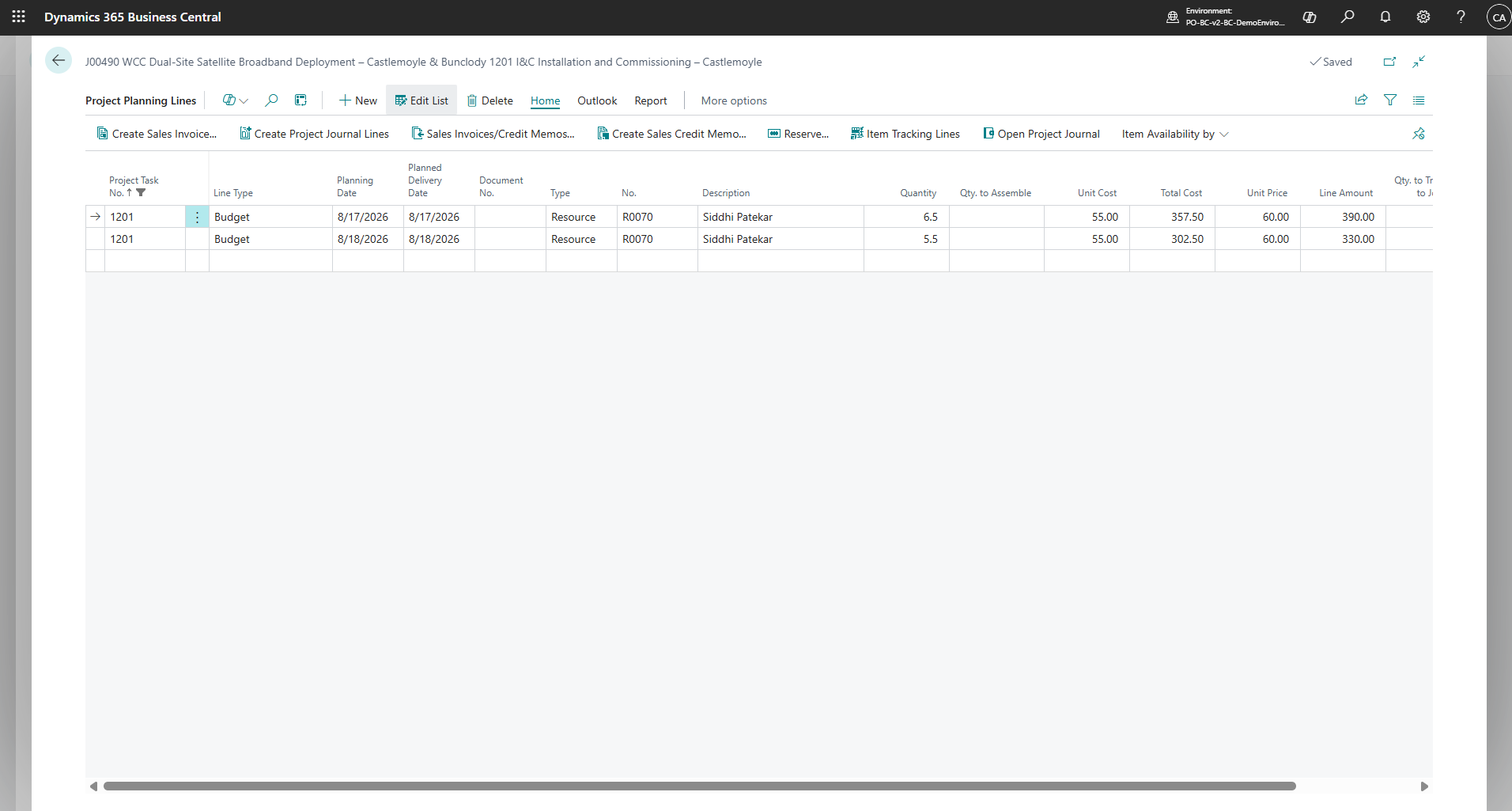
BC-side representation: resource assignments become structured planning lines.
Business Central planning lines provide the bridge between project planning and ERP financial visibility.
05 · The four numbers people confuse most
These values answer different questions. Treating them as interchangeable is one of the fastest ways to misread a project dashboard.
Budget
What did we expect to spend?
Budget represents planned cost. It is a planning value not proof that the cost has already occurred.
Actual
What cost was recorded?
Actual/usage cost is tied to execution and recorded project usage. A blank actual does not mean the budget disappeared; it means there is no displayed actual usage value in that context.
Billable
What value can be charged?
Billable represents chargeable project value according to the project’s planning and billing configuration.
Invoiced
What has actually been billed?
Invoiced is downstream of billable value. A project can have billable value before the corresponding amount has been invoiced.
The simplest mental model
Budget → Actual answers the cost question.
Billable → Invoiced answers the revenue/billing question.
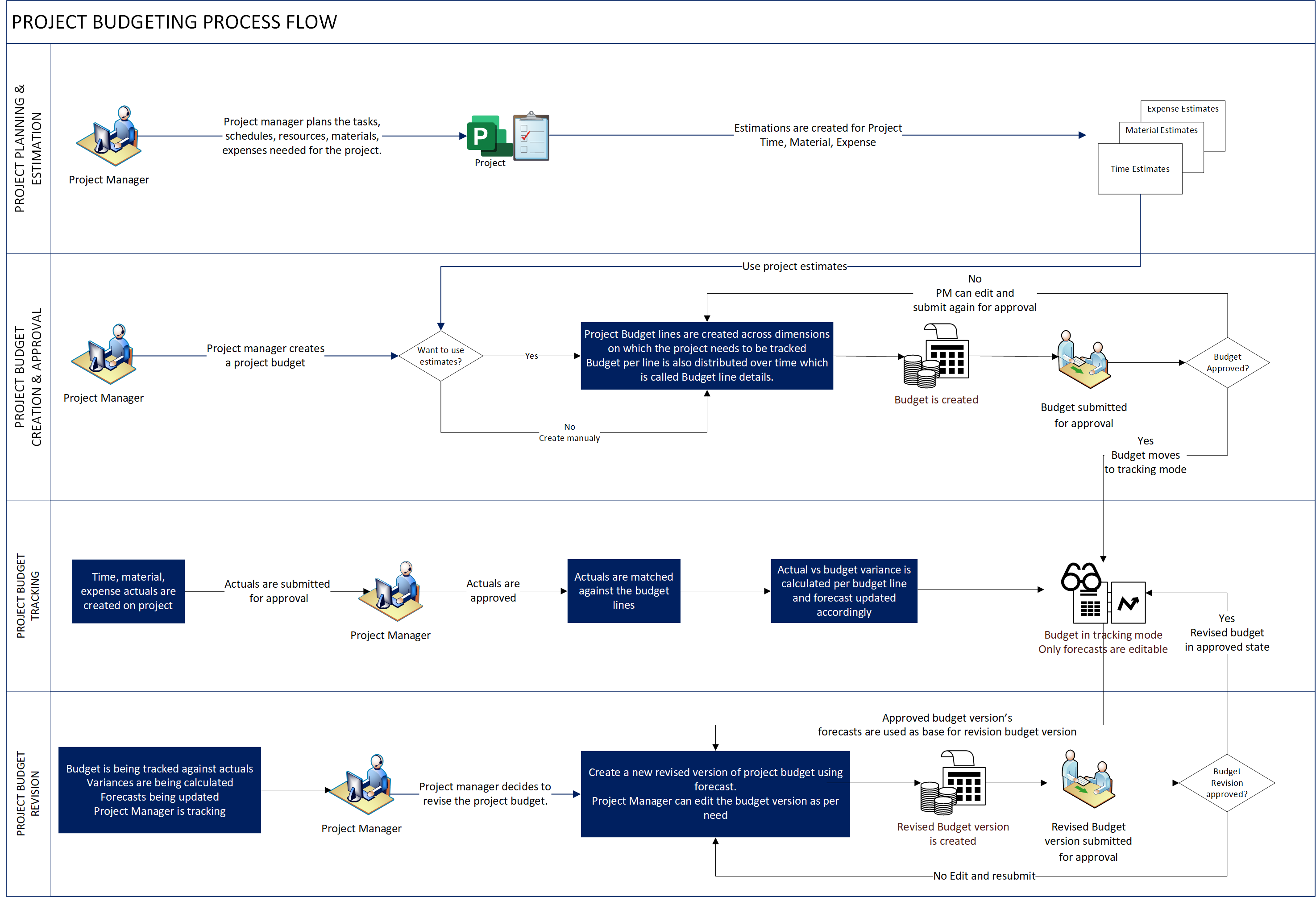
Microsoft documentation visual showing project budgeting concepts.
06 · Execution creates the evidence
Once the project moves from planning into execution, operational records begin to tell the story of what actually happened. Time entries, material usage and expenses are examples of records that can contribute to project actuals and downstream ERP transactions.
Time
hours worked
+
Materials
items consumed
+
Expenses
project spend
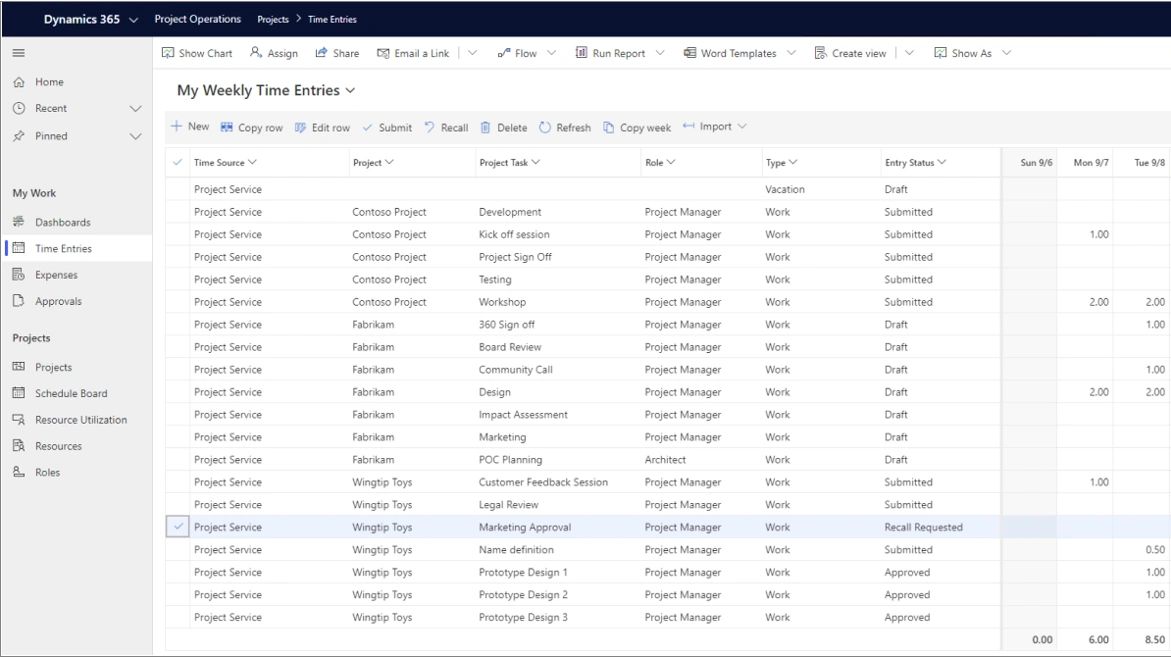
CRM-side execution evidence: time entries recorded against projects and tasks.
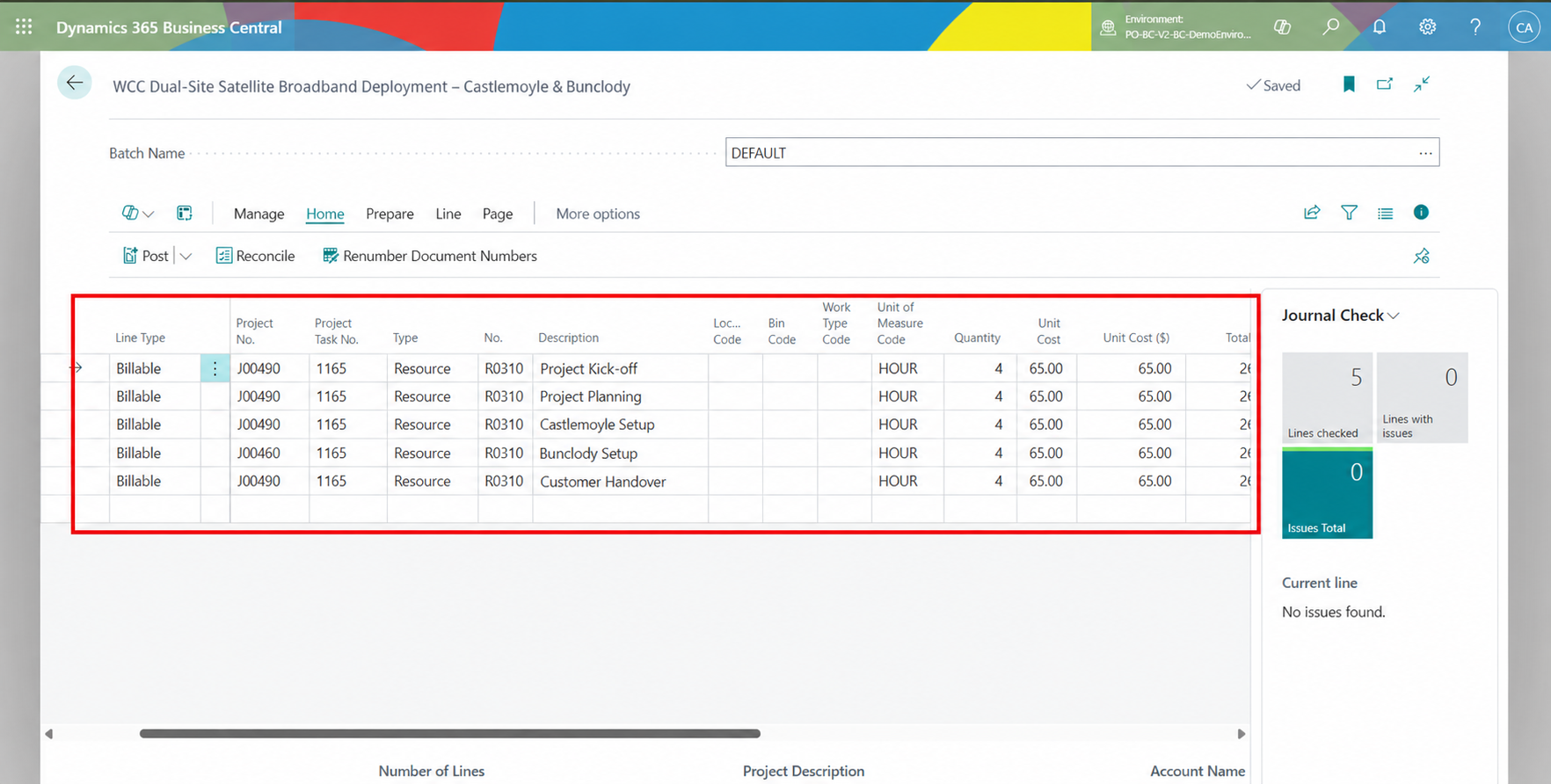
ERP-side transaction: approved time entries represented in the Business Central project journal.
Time-entry data represented in the Business Central project journal flow.
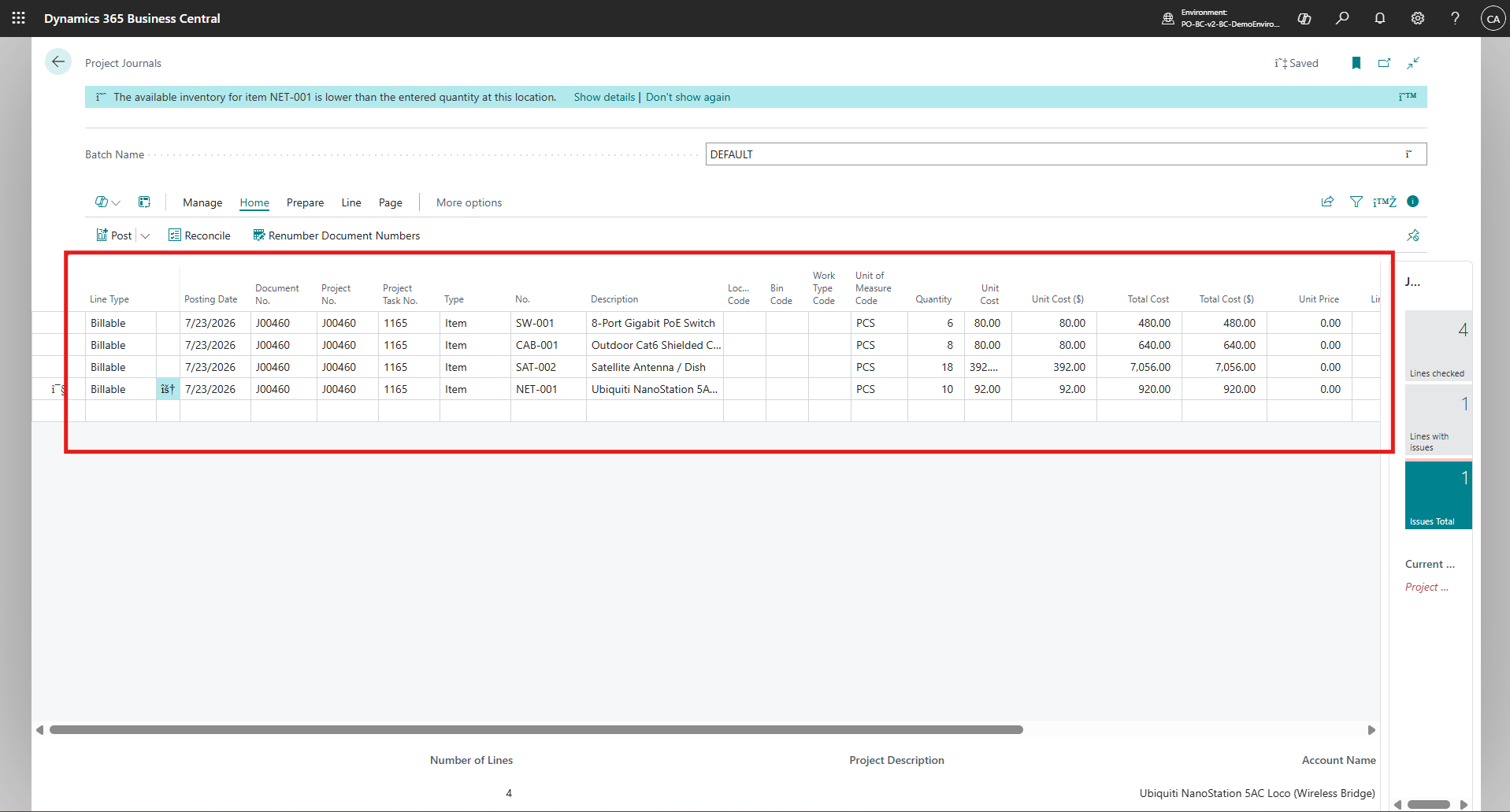
Material usage following the same project-to-ERP transaction path.
Engineering insight: an integration should be traceable backwards. If a number appears in an ERP report, you should be able to explain which transaction produced it and which project/task it belongs to.
07 · From project activity to invoice
The final part of the journey is commercial. Billable project data eventually feeds invoicing, creating a visible chain from planned work to customer-facing financial output.
01
Project Activity
Time, materials, expenses and planned billing information.
02
Billable Value
Amounts that are eligible for charging according to project configuration.
03
Invoice
Commercial document containing the lines ultimately billed to the customer.
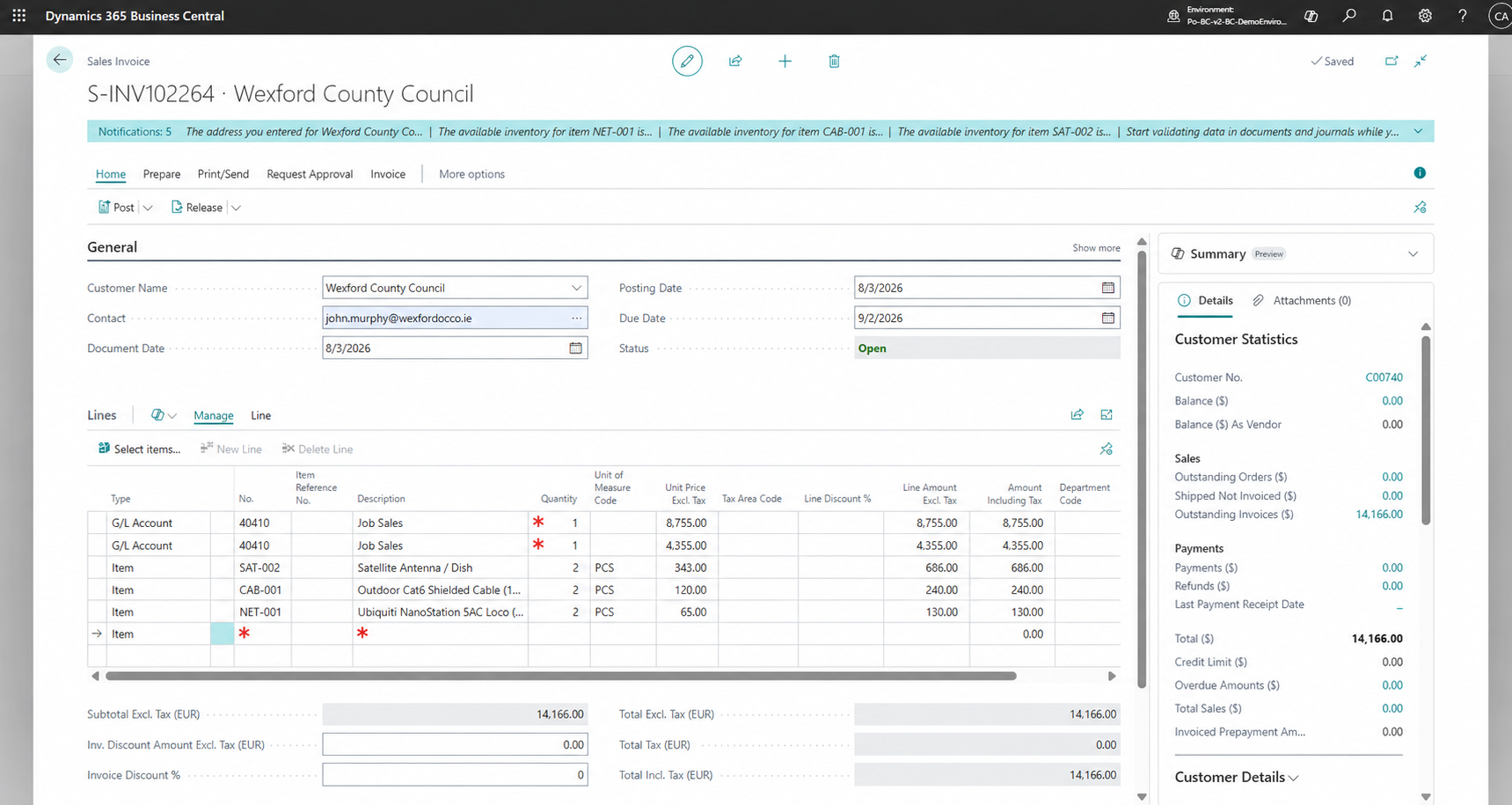
Invoice and invoice-line synchronization visual from the CloudFronts PO–BC implementation article.
08 · The analytics layer: turn records into questions
A useful integration should make analysis easier, not merely make records appear in another system.
Source
PO records
→
ERP
BC records
→
Metrics
cost · billing · variance
Variance
Usage Cost − Budget Cost
Helps answer whether recorded consumption is tracking above or below the plan.
Billing
Invoiced vs Billable
Helps identify the gap between chargeable project value and value already invoiced.
Data-analyst perspective: the most valuable integration metadata is not only “success/failure.” It is lineage: source record → mapped record → transaction → financial value.
09 · What this teaches us about integration engineering
01 · Preserve identity
Customer, project and task references need deterministic relationships across systems.
02 · Preserve meaning
A planning record should remain a planning concept after transformation — not silently become an execution cost.
03 · Preserve traceability
Every financial number should have an explainable path back to the project activity that created it.
04 · Measure business correctness
HTTP success or record creation is not the final test. The final test is whether the resulting ERP data supports the intended business process.
Implementation considerations
| Area | Question to validate |
|---|---|
| Identity | Can the same customer/project/task be uniquely matched? |
| Relationships | Does every child record point to the correct project and task? |
| Dates | Are source and target date types interpreted consistently? |
| Amounts | Are quantity, cost and price semantics preserved? |
| State | Can we distinguish planned, executed and invoiced data? |
| Traceability | Can a finance user explain where a value came from? |
10 · Conclusion
The real value of connecting Project Operations and Business Central is not simply eliminating re-entry. It is creating a continuous data story from planning and execution to financial reporting.
Projects begin with plans, tasks and planning lines, then move through execution as time and material usage become actuals. From there, billable values move toward invoicing, while Business Central provides the financial context needed to understand the project as a whole.
The key is keeping identities, relationships, dates and amounts consistent as data moves between systems. When a project, task or transaction can be traced back to its original activity, Budget, Actual, Billable and Invoiced values retain their meaning and the final dashboard becomes much easier to trust.
In the end, a successful integration is not measured only by whether records were transferred successfully. It is measured by whether the data still tells the same story on the other side.
LET’S TALK
Looking to connect Dynamics 365 Project Operations with Business Central?
CloudFronts helps organizations connect Microsoft Dynamics 365 Project Operations and Business Central with practical integration, customization, automation, and data solutions designed around real-world project and financial processes. To discuss a similar implementation, reach out to us.
Contact us at transform@cloudfronts.com →Related posts:
Location-Based Item Based Visibility in Business Central for a Maldives-Based Marine Services Firm

Connecting Project Operations to Finance: Our Dataverse-to-Business Central Integration for Project ...

From Multiple Data Sources to Azure Databricks: A Zero-Downtime Power BI Migration for Future AI Rea...
