

From Prospecting to Pipeline Intelligence: How We Embedded LinkedIn Sales Navigator into Dynamics 365 Sales for a Texas-Based, Cybersecurity & Azure Services Company
Summary
For technology services companies selling AI, cybersecurity, and Azure solutions, the hardest part of selling is rarely finding a company — it’s finding the right decision-maker, the right relationship path, and the right moment to engage.
We recently implemented LinkedIn Sales Navigator inside Microsoft Dynamics 365 Sales for a Texas-based technology services company specializing in AI, cybersecurity, Azure, and cloud services. The goal wasn’t to drop a LinkedIn widget into a form — it was to build a connected prospecting experience where LinkedIn relationship intelligence and Dynamics 365 sales execution work together without forcing sellers to switch between systems.
The result: sellers can research prospects, understand account relationships, identify mutual connections, and capture sales activity — all from within the CRM they already use every day. LinkedIn became the intelligence layer; Dynamics 365 remained the operational system of record.
This article covers the business requirement, the matching strategy, the CRM synchronization design, and the key lessons learned from turning a LinkedIn integration into an actual sales process change.
Table of Contents
- Introduction
- The Business Requirement
- Why LinkedIn Sales Navigator and Dynamics 365?
- What We Set Out to Achieve
- Solution Overview
- Setting Up LinkedIn Sales Navigator
- Connecting Sales Navigator with Dynamics 365 Sales
- Embedding Sales Navigator into CRM Forms
- Designing the Matching Strategy
- Bringing LinkedIn Intelligence into the Sales Process
- Icebreakers and Relationship Intelligence
- Lead Introduction and Related Leads
- Account Intelligence and Organizational Relationships
- CRM Synchronization and Activity Writeback
- Data Validation: Keeping CRM Current
- Controlling What Gets Written Back to CRM
- Synchronizing Open Opportunity Information
- Testing and Validation
- Business Impact
- The Strategic Value Beyond Integration
- Key Implementation Lessons
- Conclusion
- Frequently Asked Questions
- Final Takeaway
This Blog Explains
- Why fragmented prospecting between LinkedIn and Dynamics 365 was costing sellers time and context.
- What licensing and administrative foundation CRM integration with Sales Navigator requires.
- Why matching LinkedIn profiles to CRM records is a business problem, not just a technical one.
- How CRM synchronization and activity writeback were scoped to avoid a noisy, unrestricted sync.
- How Sales Navigator can surface signals that CRM contact data has gone stale.
- The measurable improvements to seller workflow, CRM data quality, and account planning.
- The lessons we’d apply again on the next CRM-to-LinkedIn implementation.
Case Study
Read more about our Journey with this Customer over here: View Case Study
Introduction
For technology services organizations, selling is rarely about finding a company and sending an email.
The real challenge is identifying the right organization, the right decision-makers, the right relationship path, and the right moment to engage. This becomes particularly important for companies operating across Artificial Intelligence, Cybersecurity, Azure, Cloud, and digital transformation, where sales cycles involve multiple stakeholders, technical influencers, business leaders, and evolving buying committees.
We recently implemented LinkedIn Sales Navigator with Microsoft Dynamics 365 Sales for a Texas-based technology services company specializing in AI, cybersecurity, Azure, and related cloud services. The objective was not simply to place a LinkedIn widget inside Dynamics 365 — it was much broader:
Create a connected prospecting experience where LinkedIn relationship intelligence and Dynamics 365 sales execution could work together without forcing sellers to continuously switch between systems.
The implementation brought LinkedIn Sales Navigator capabilities into the organization’s existing Dynamics 365 Sales environment, enabling sellers to research prospects, identify relevant connections, understand account relationships, create and update CRM records, and capture relevant sales activity within the CRM ecosystem.
This Dynamics 365 Sales LinkedIn integration as a way to bring real-time intelligence about prospects and organizations into the sales process, including profile information, mutual connections, key decision-makers, and other sales insights. For this organization, the value came from turning that capability into a business process rather than simply a software integration.
The Business Requirement
The client already had Dynamics 365 Project Operations & Sales as its CRM platform and LinkedIn as an important channel for professional prospecting and relationship building. However, the sales process naturally crossed between the two platforms.
A typical seller workflow could involve:
- Finding a target company.
- Searching LinkedIn for decision-makers.
- Researching their background.
- Looking for mutual connections.
- Checking whether the person already existed in Dynamics 365.
- Reviewing the account’s existing opportunities.
- Deciding how to approach the prospect.
- Creating or updating the CRM record.
- Recording the interaction.
- Returning to Dynamics 365 to continue managing the opportunity.
Each individual step is manageable. The problem emerges when this happens repeatedly across dozens or hundreds of prospects. The organization needed to reduce this fragmentation.
The business requirement centered around five objectives:
1. Improve prospect discovery
Help sellers identify relevant people and organizations more efficiently.
2. Improve relationship intelligence
Allow sellers to understand mutual connections, organizational relationships, and relevant prospect information.
3. Reduce application switching
Bring useful LinkedIn intelligence directly into the Dynamics 365 sales experience.
4. Improve CRM data quality
Create mechanisms for identifying outdated information and reducing duplicate or disconnected prospect records.
5. Preserve CRM as the operational system of record
LinkedIn should enhance the sales process, not create a parallel sales database.
That last point became one of the most important principles of the implementation.
Why LinkedIn Sales Navigator and Dynamics 365?
LinkedIn Sales Navigator is fundamentally a prospecting and relationship intelligence platform. Dynamics 365 Sales, on the other hand, provides the CRM and sales execution layer. The strategic opportunity was to combine the two.
LinkedIn provides access to professional and organizational intelligence, while Dynamics 365 provides the business context around:
- Accounts
- Contacts
- Leads
- Opportunities
- Activities
- Sales pipeline
- Ownership
- Customer history
When these systems are connected correctly, the seller does not need to think in terms of two disconnected applications. Instead, the experience becomes:
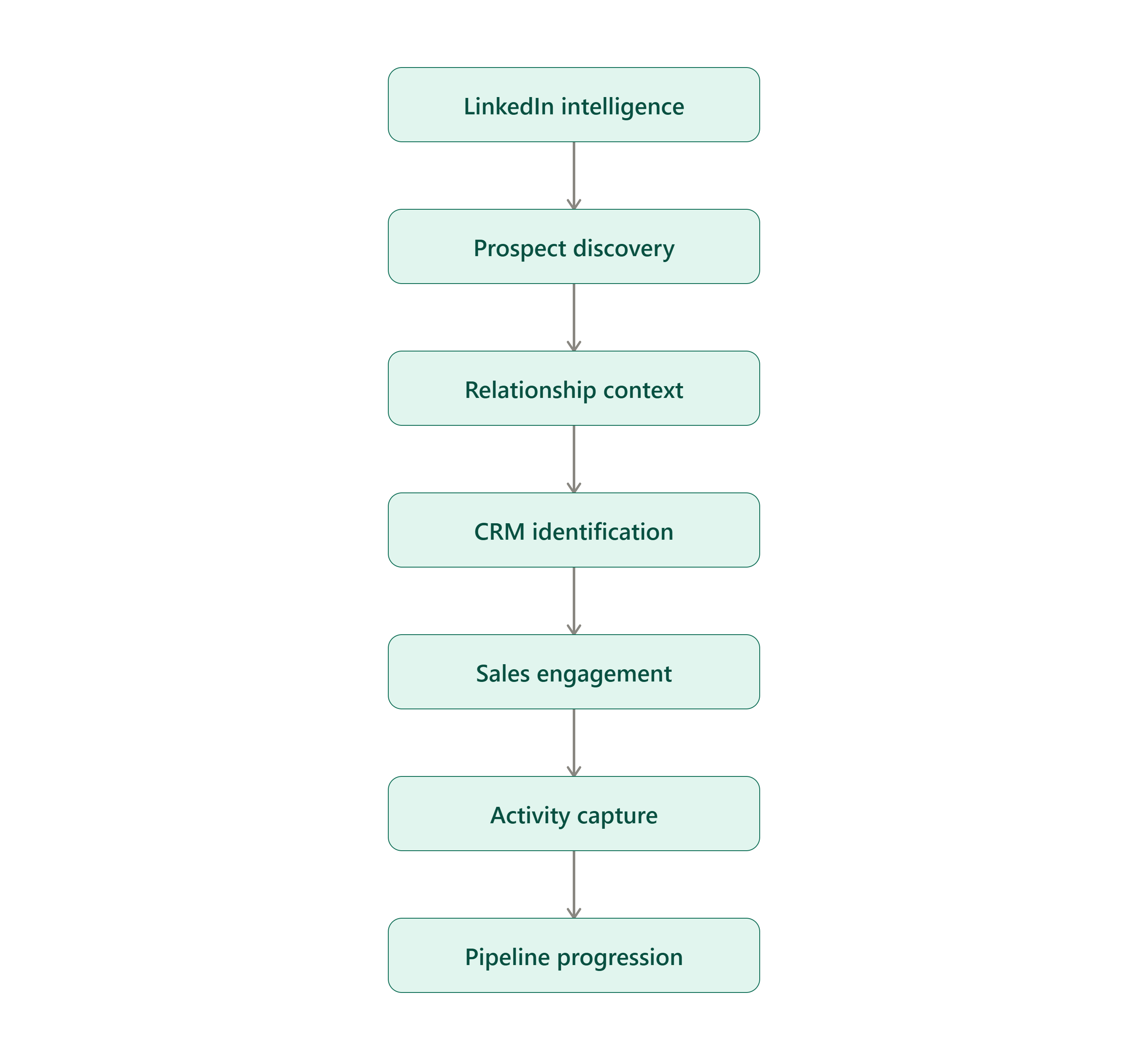
Discover → Understand → Engage → Capture → Progress
LinkedIn’s Sales Navigator highlights CRM Sync capabilities such as auto-save, activity writeback, CRM badges, ROI reporting, and search filtering. CRM integration is available with Sales Navigator Advanced Plus. D365 CRM allows to surface LinkedIn information directly within Dynamics 365 Sales through Sales Navigator controls and embedded experiences.
What We Set Out to Achieve
Our objective during the implementation was to go beyond the technical connection. We approached it from the perspective of:
How can we make the seller’s existing Dynamics 365 workspace more intelligent without disrupting the way the sales team already manages customers and opportunities?
That led to several design decisions. We focused on:
- Embedding Sales Navigator into relevant Dynamics 365 forms.
- Establishing meaningful CRM-to-LinkedIn matching.
- Supporting manual matching when automated matching was insufficient.
- Making LinkedIn intelligence available directly from Lead, Contact, and Account records.
- Enabling CRM synchronization capabilities.
- Understanding how activity writeback should work.
- Maintaining CRM permissions and business rules.
- Synchronizing relevant pipeline information.
- Testing the integration before production rollout.
The result was not simply a connected system. It was a sales intelligence layer embedded into the CRM experience.
Solution Overview
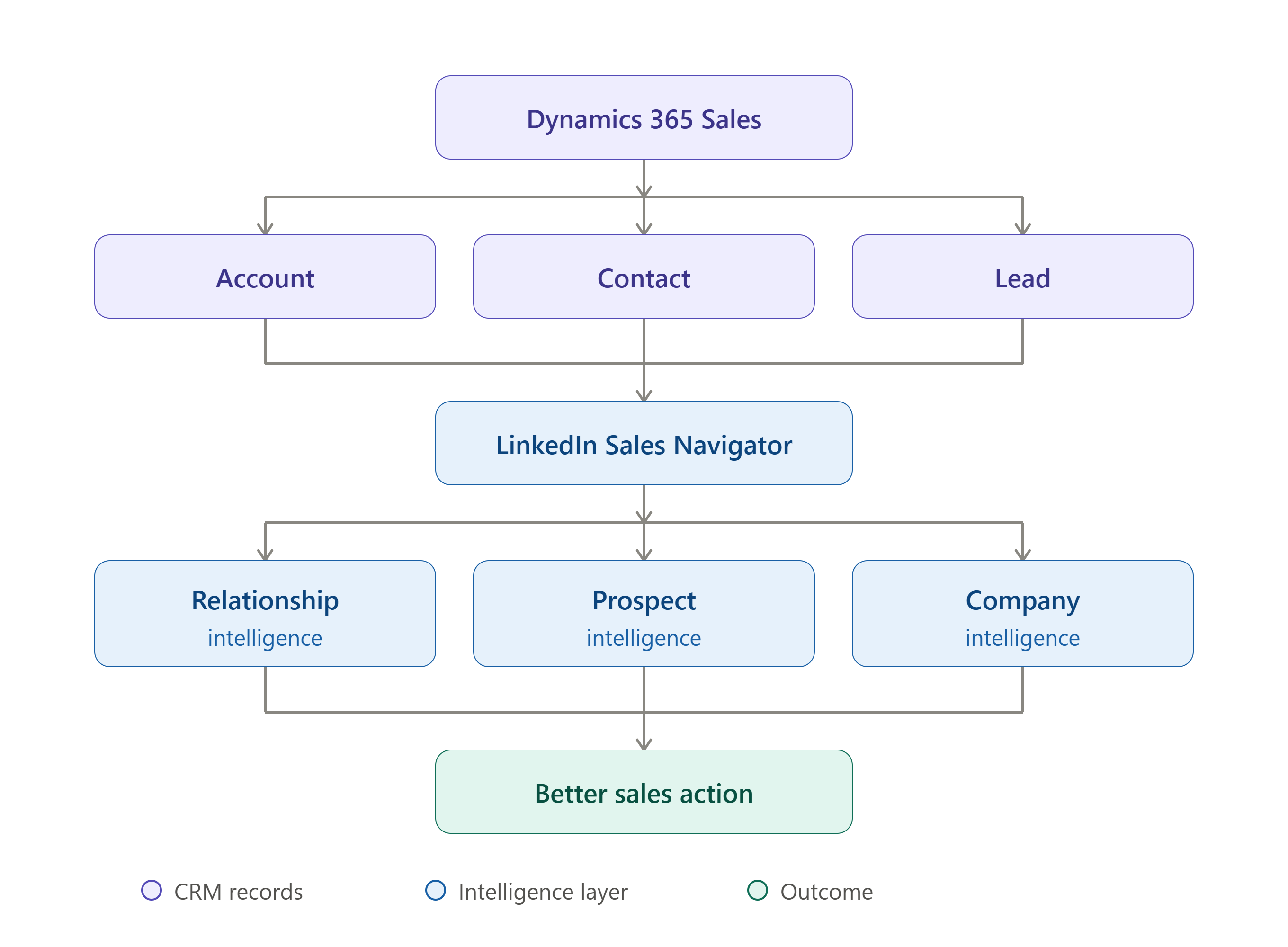
The implemented architecture can be viewed conceptually as:
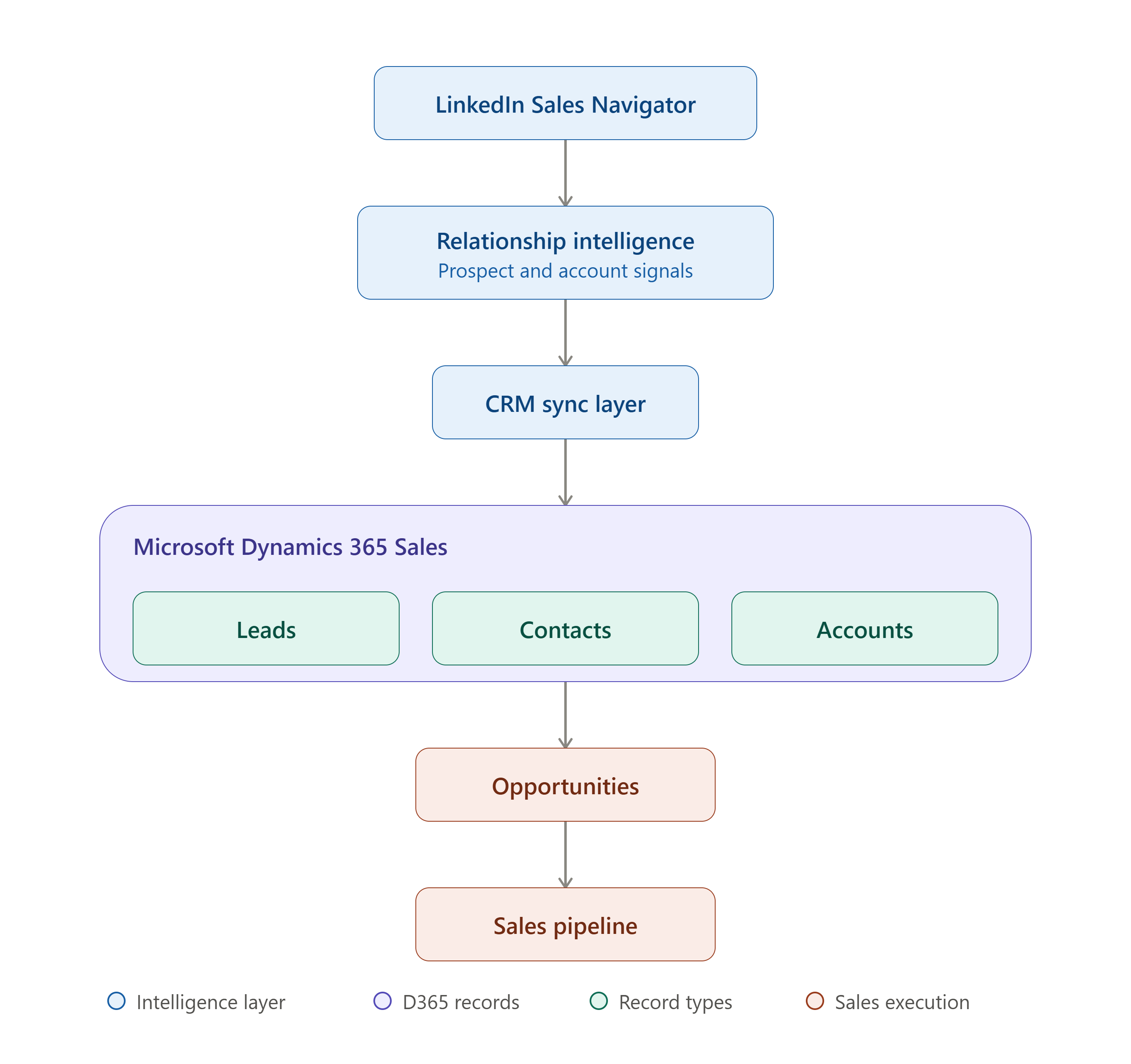
The important design principle was that LinkedIn would augment CRM intelligence rather than replace CRM processes. Dynamics 365 remained the business system where sales records and pipeline processes were managed. LinkedIn became the intelligence and relationship layer that helped sellers make better decisions around those records.
Setting Up LinkedIn Sales Navigator
The first step was establishing thfe correct licensing and administrative foundation.
LinkedIn currently states that CRM integration with Sales Navigator requires the Advanced Plus license. From an implementation perspective, this matters because organizations sometimes approach Sales Navigator as simply a premium LinkedIn subscription — that is not enough when the objective is CRM integration.
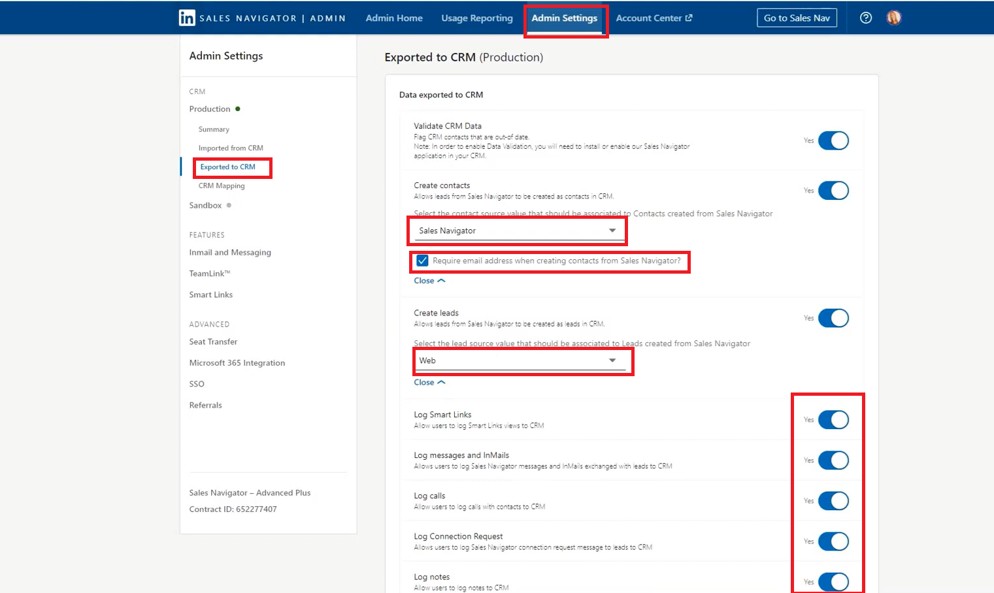
The implementation needed to consider:
- Sales Navigator licensing
- CRM access
- Sales Navigator administration
- CRM administration
- User permissions
- CRM Sync
- Sales Navigator app package
- Dynamics 365 form configuration
- Matching behavior
- Writeback rules
- Testing
Dynamics Setup Steps –
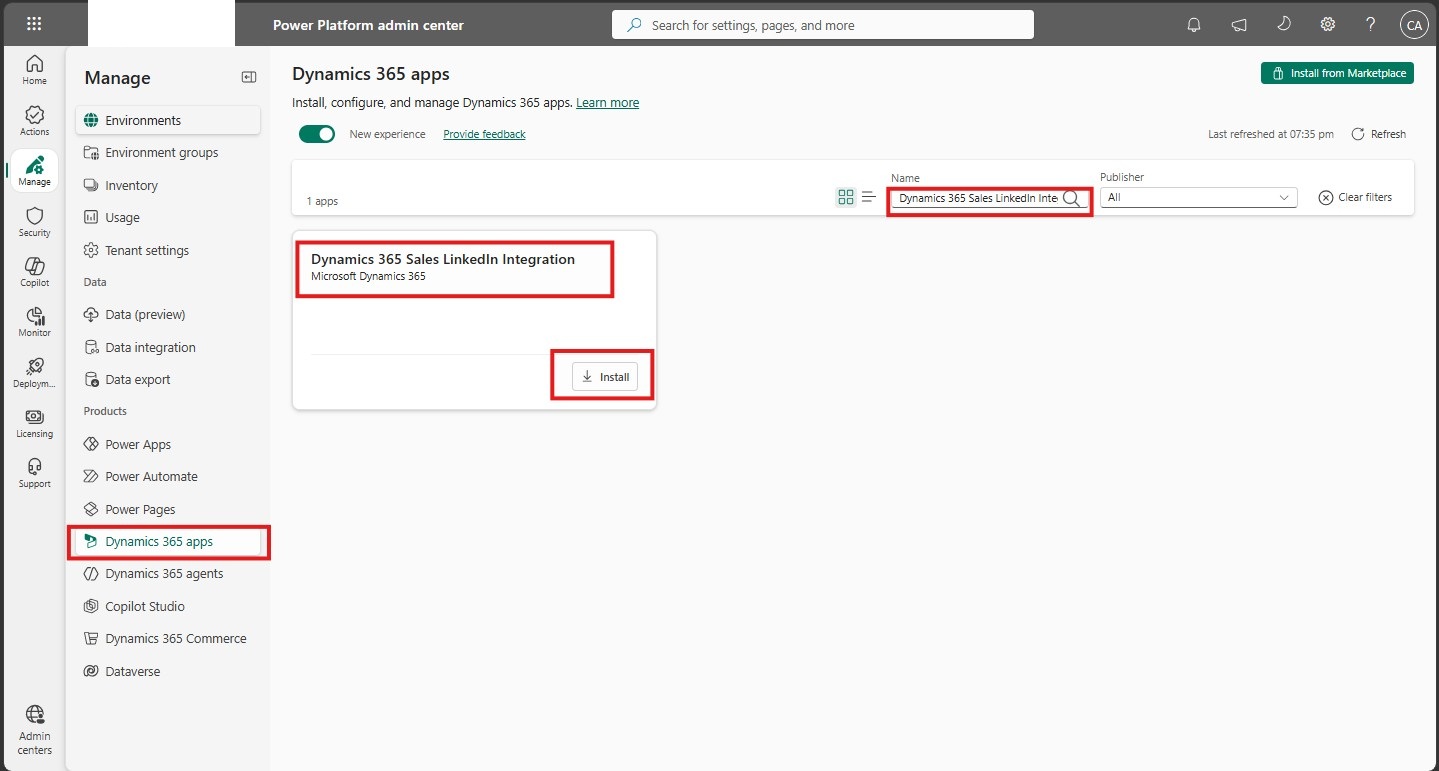
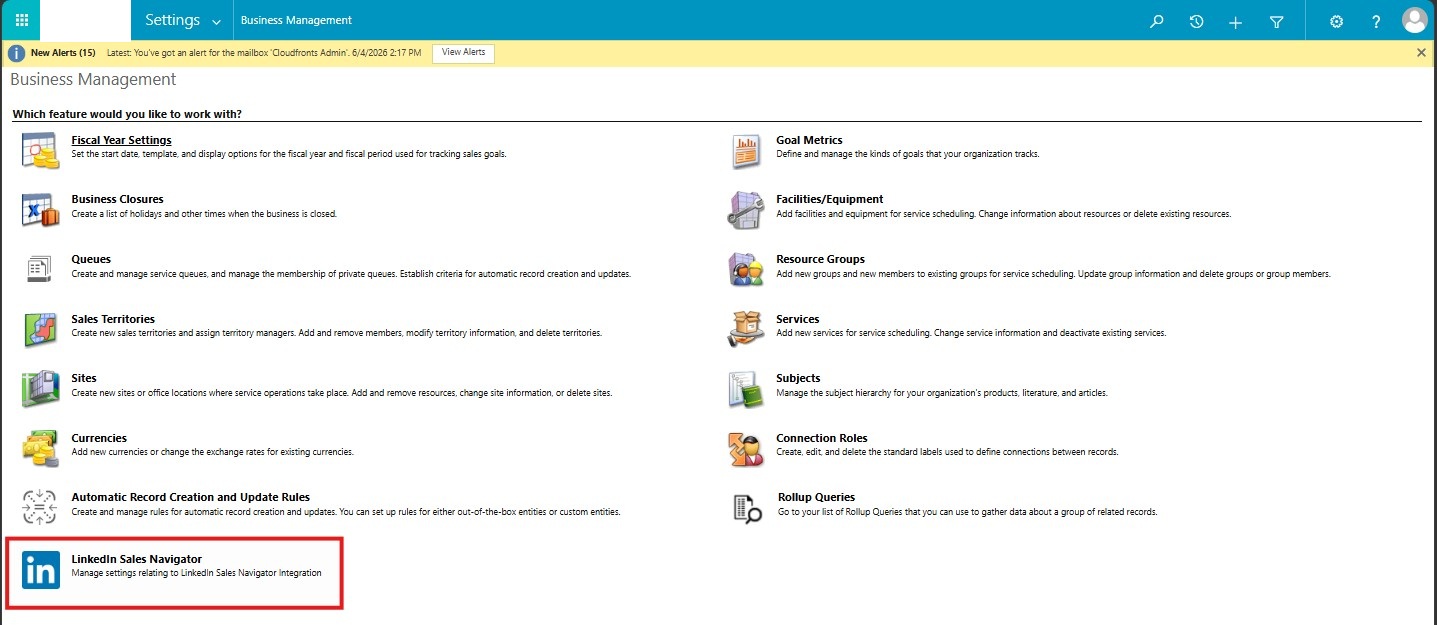
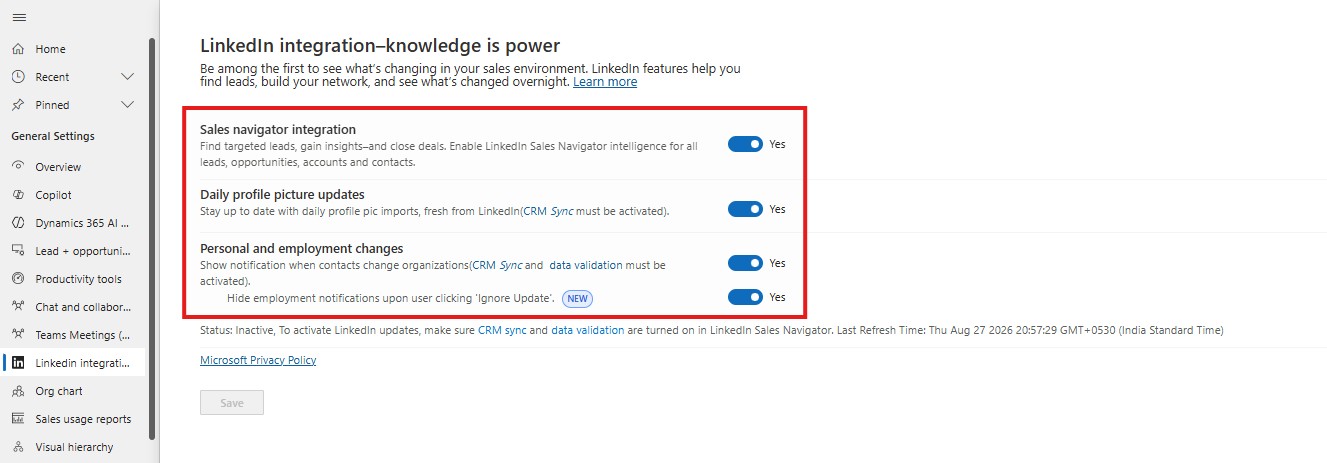

LinkedIn also recommends that CRM administrators and Sales Navigator administrators work together when validating CRM Sync in a test environment. This separation of responsibilities is important in enterprise implementations because CRM configuration and LinkedIn administration are often owned by different teams.
Connecting Sales Navigator with Dynamics 365 Sales
Once the licensing and administrative prerequisites were established, the next stage was connecting Sales Navigator with Dynamics 365.
The Microsoft-supported integration provides Sales Navigator controls that can be added to Dynamics 365 Unified Interface forms. These controls can surface capabilities such as company news, connections, Account IQ, and key-person discovery.
The broader implementation sequence was:
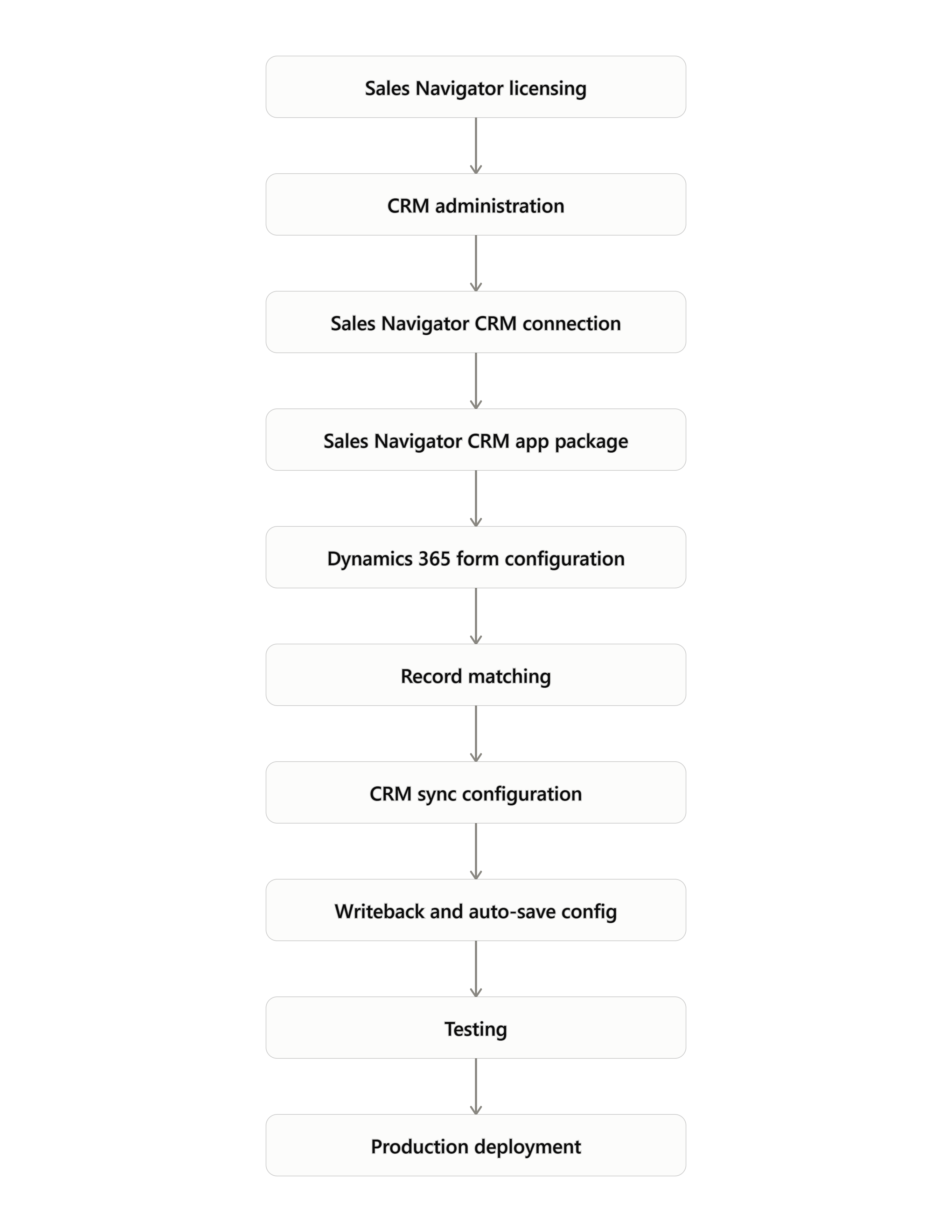
Embedding Sales Navigator into CRM Forms
One of the most visible outcomes of the implementation was bringing Sales Navigator directly into the Dynamics 365 experience. Rather than asking sellers to open LinkedIn separately, relevant Sales Navigator functionality could be exposed from:
- Account forms
- Contact forms
- Lead forms
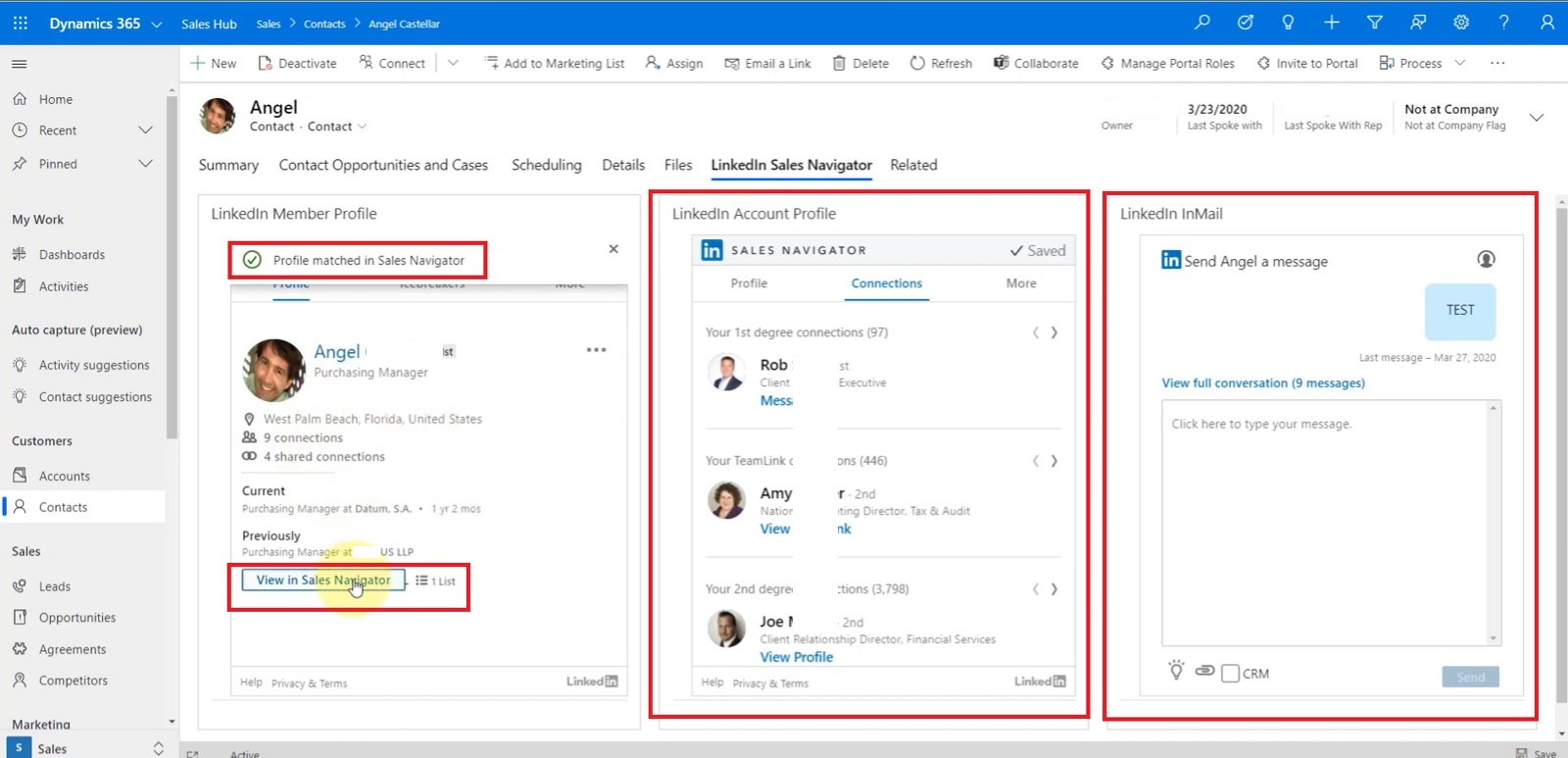
The Sales Navigator widget could display information such as:
- LinkedIn profile
- Professional information
- Mutual connections
- Icebreakers
- Related leads
- Account information
- Company news
- Organizational relationships
- InMail capabilities
This changed the seller experience in a subtle but important way. Instead of:
Dynamics 365 → LinkedIn → Research → Dynamics 365
the experience became:
Dynamics 365 → Research in context → Engage → Continue selling
That reduction in context switching is one of the practical benefits of embedded sales intelligence.
Designing the Matching Strategy
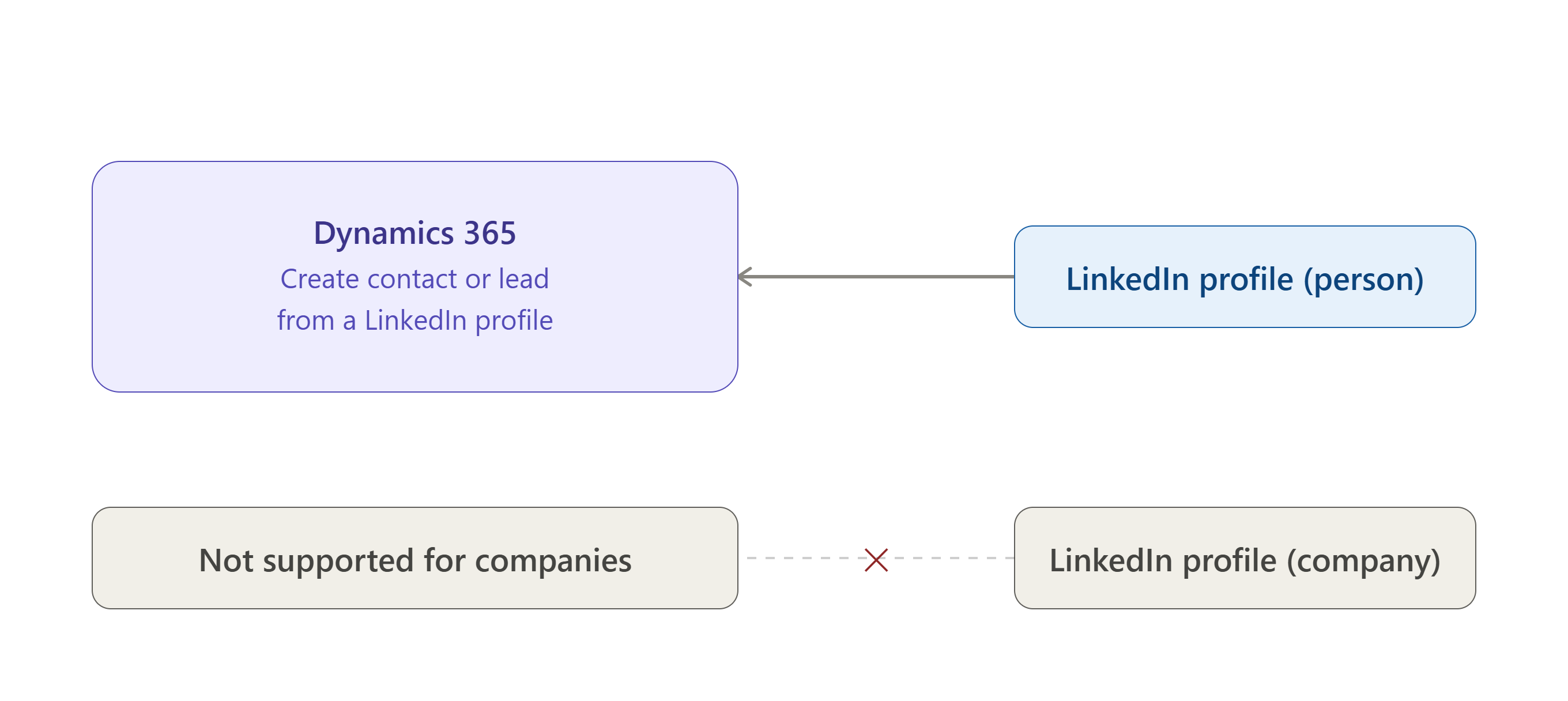
One of the most important technical and functional considerations was record matching. Connecting two systems is relatively straightforward — ensuring that the two systems are talking about the same person or company is much more important.
The implementation used multiple attributes to support matching, including:
- First name
- Last name
- Job title
- Company
- Country
- Phone number
Conceptually:
Dynamics 365 Contact
        |
        +-- First Name
        +-- Last Name
        +-- Title
        +-- Company
        +-- Country
        +-- Phone
        +-- Email
        |
        v
LinkedIn Profile Matching
        |
        +---- Correct Match
        +---- Possible Match
        +---- Incorrect Match
This matters because an incorrect match can be worse than no match. If the system identifies the wrong LinkedIn profile, the seller may begin making decisions based on someone else’s information.
If the returned LinkedIn profile was not the correct individual, the user could select “Not the Right Person” and provide additional information to identify the appropriate profile — balancing automation with human control.
Bringing LinkedIn Intelligence into the Sales Process
Member Profile
The Member Profile experience helps the seller understand whether the LinkedIn person corresponds to the CRM contact and provides contextual information about the individual’s professional relationship with the company. The implementation also incorporated profile information into the CRM experience, including profile imagery and employment context.
This becomes particularly valuable when sellers are dealing with large accounts. A contact may have changed roles. A decision-maker may have moved to another company. A previous contact may no longer be relevant to the account. LinkedIn can provide a valuable external signal that the CRM record may require attention.
Icebreakers and Relationship Intelligence
Cold outreach is often less effective than informed outreach. One of the capabilities exposed through Sales Navigator is the ability to identify relationship context around a prospect.
The Icebreakers experience can surface information such as:
- Mutual connections
- Recent activities
- Shared workspaces
- Mutual groups
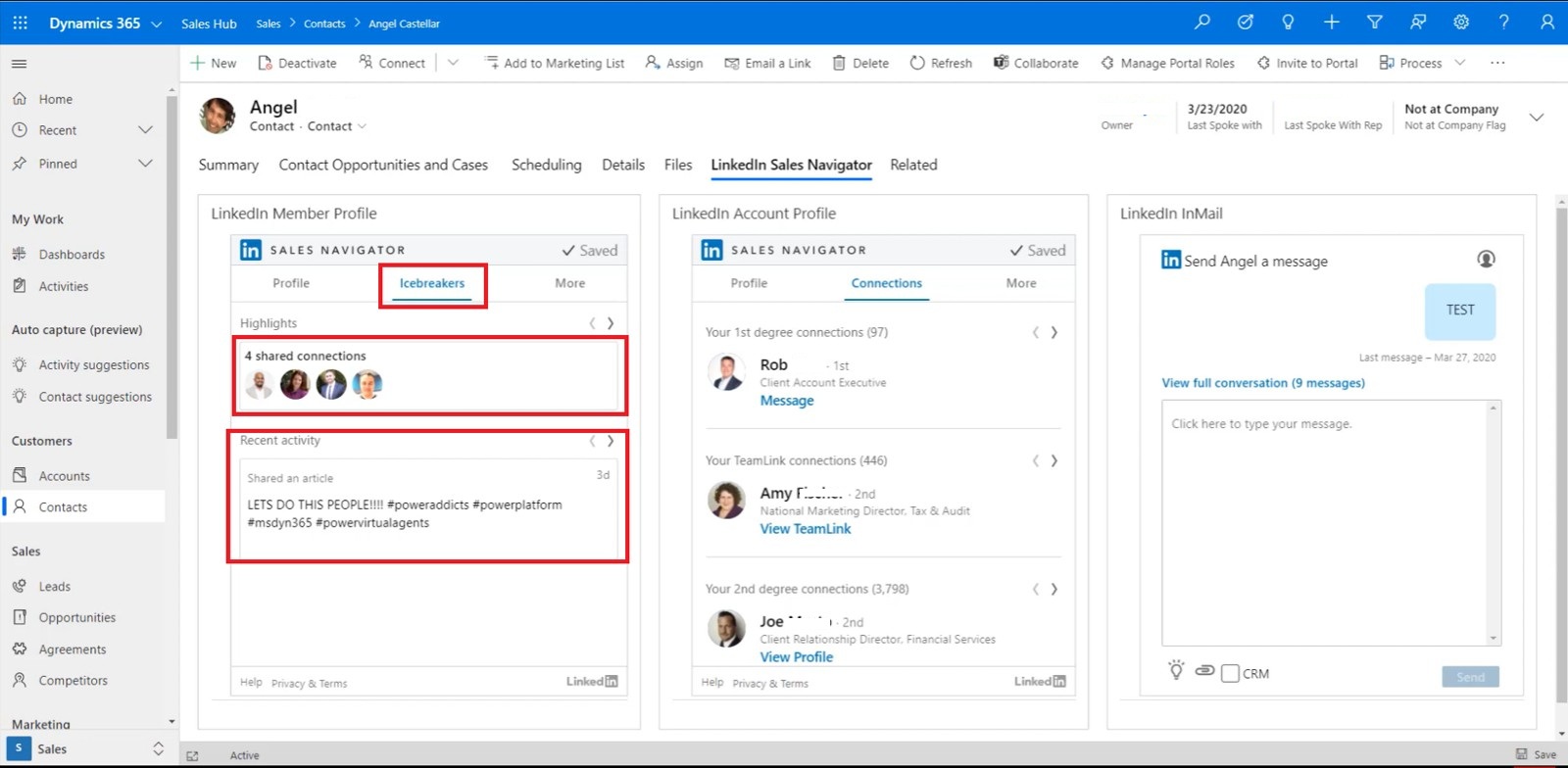
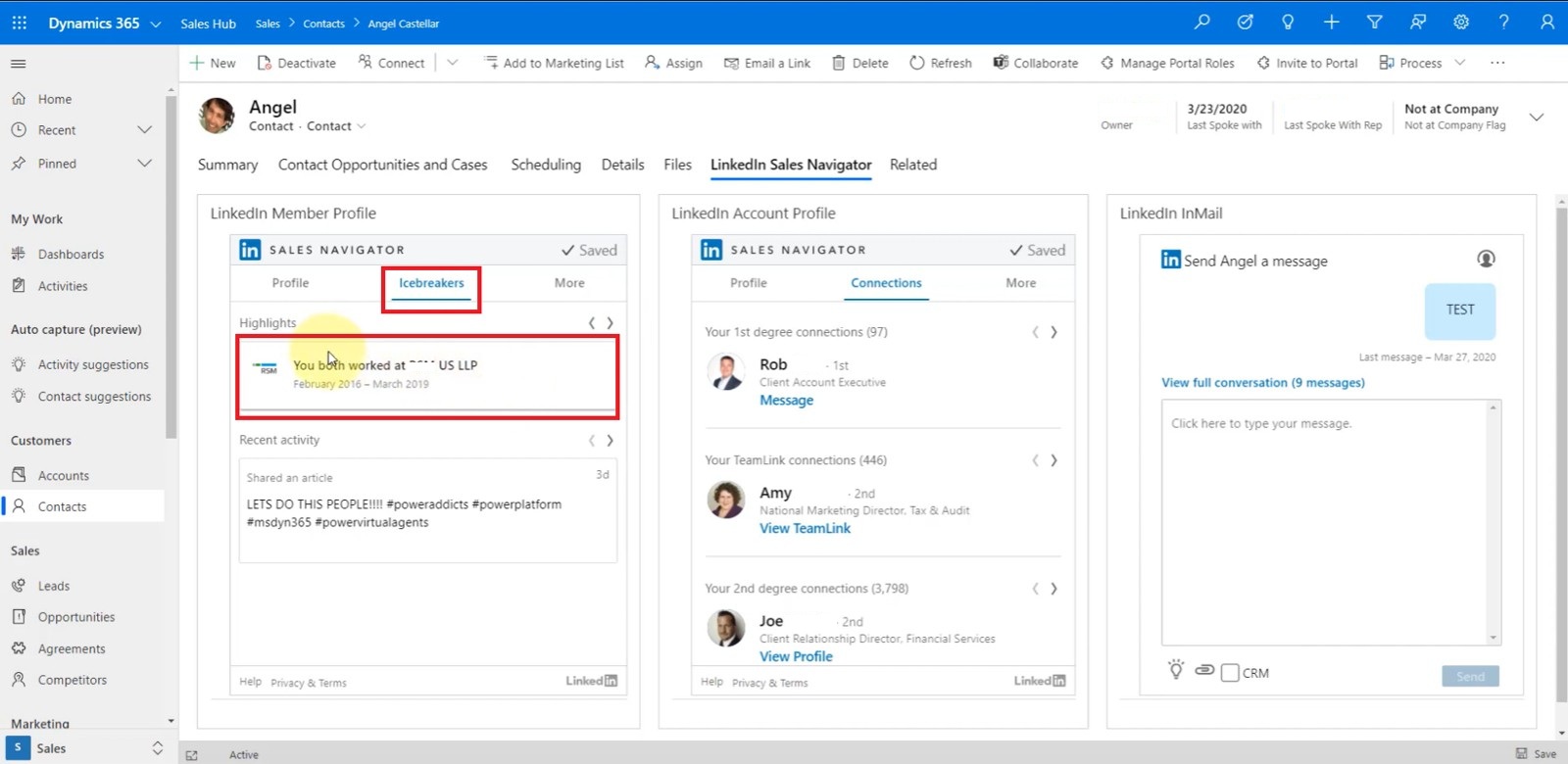
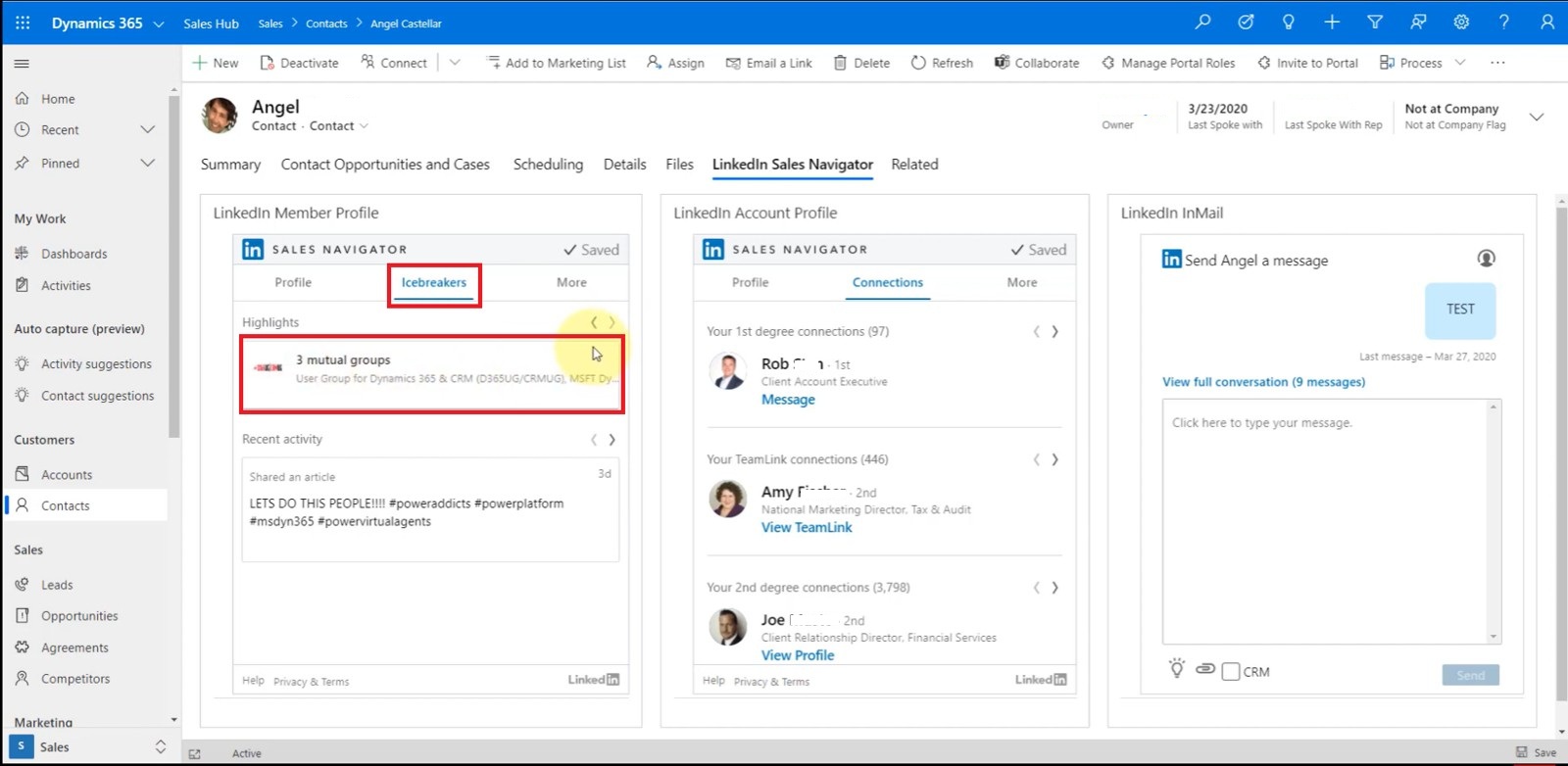
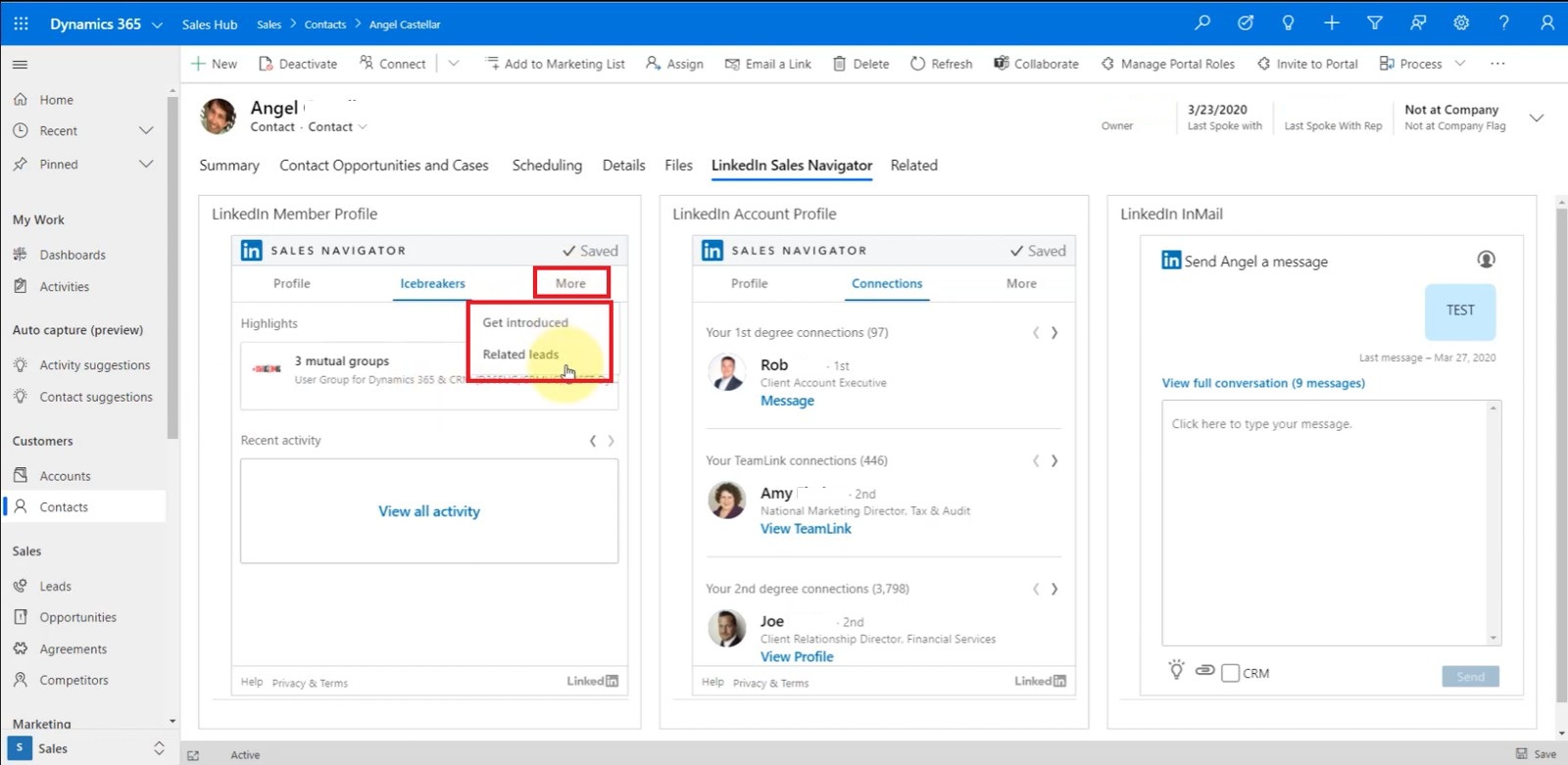
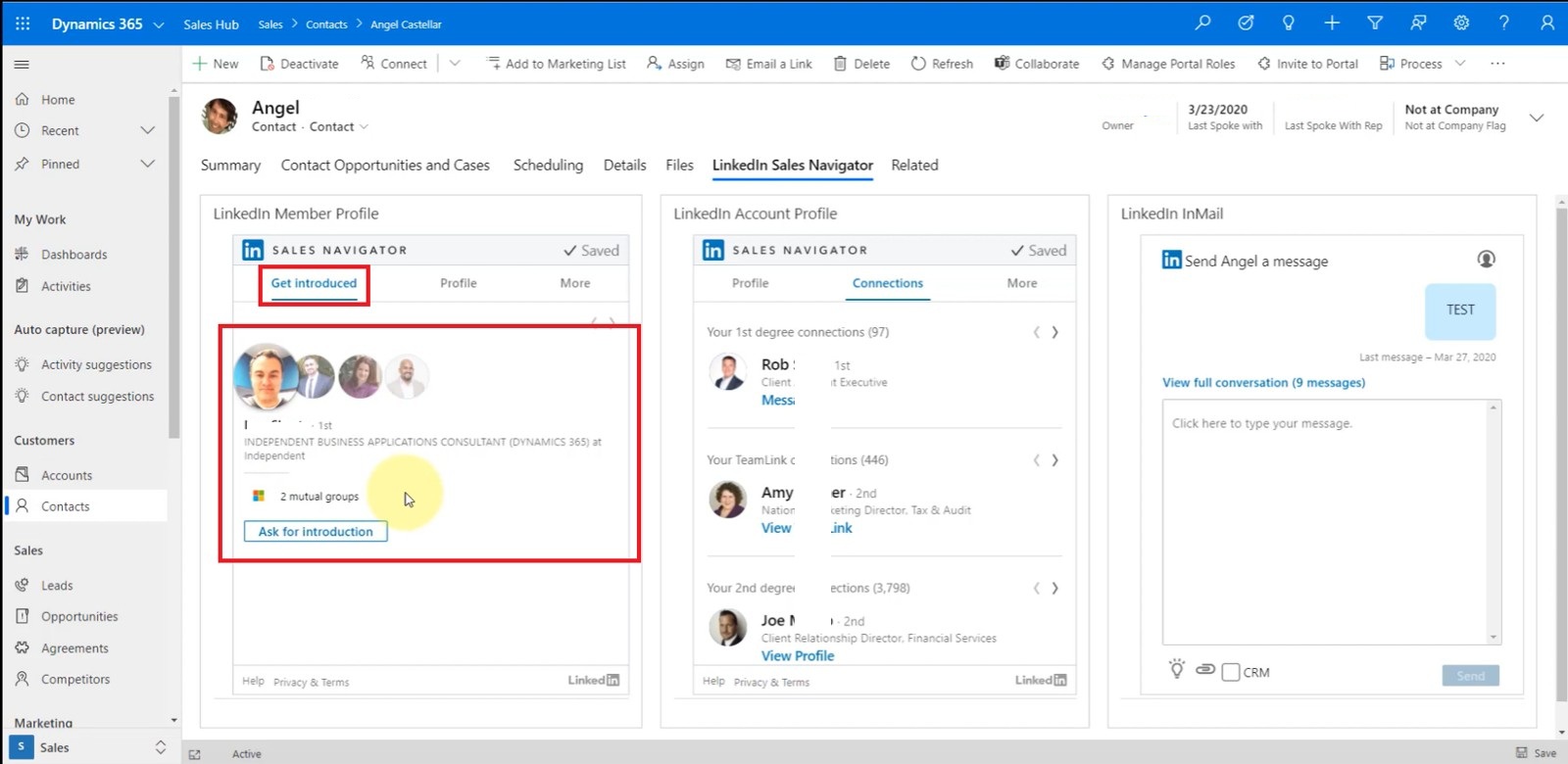
The value is not simply “more LinkedIn information.” The value is better context before the first conversation.
For a professional services organization selling complex AI, cybersecurity, and Azure solutions, that context can influence how a seller approaches the account.
Account Intelligence and Organizational Relationships
The implementation also incorporated account-level intelligence. For example, the Account experience could expose:
- Current company information
- Connections
- TeamLink relationships
- Company news
- Organizational hierarchy
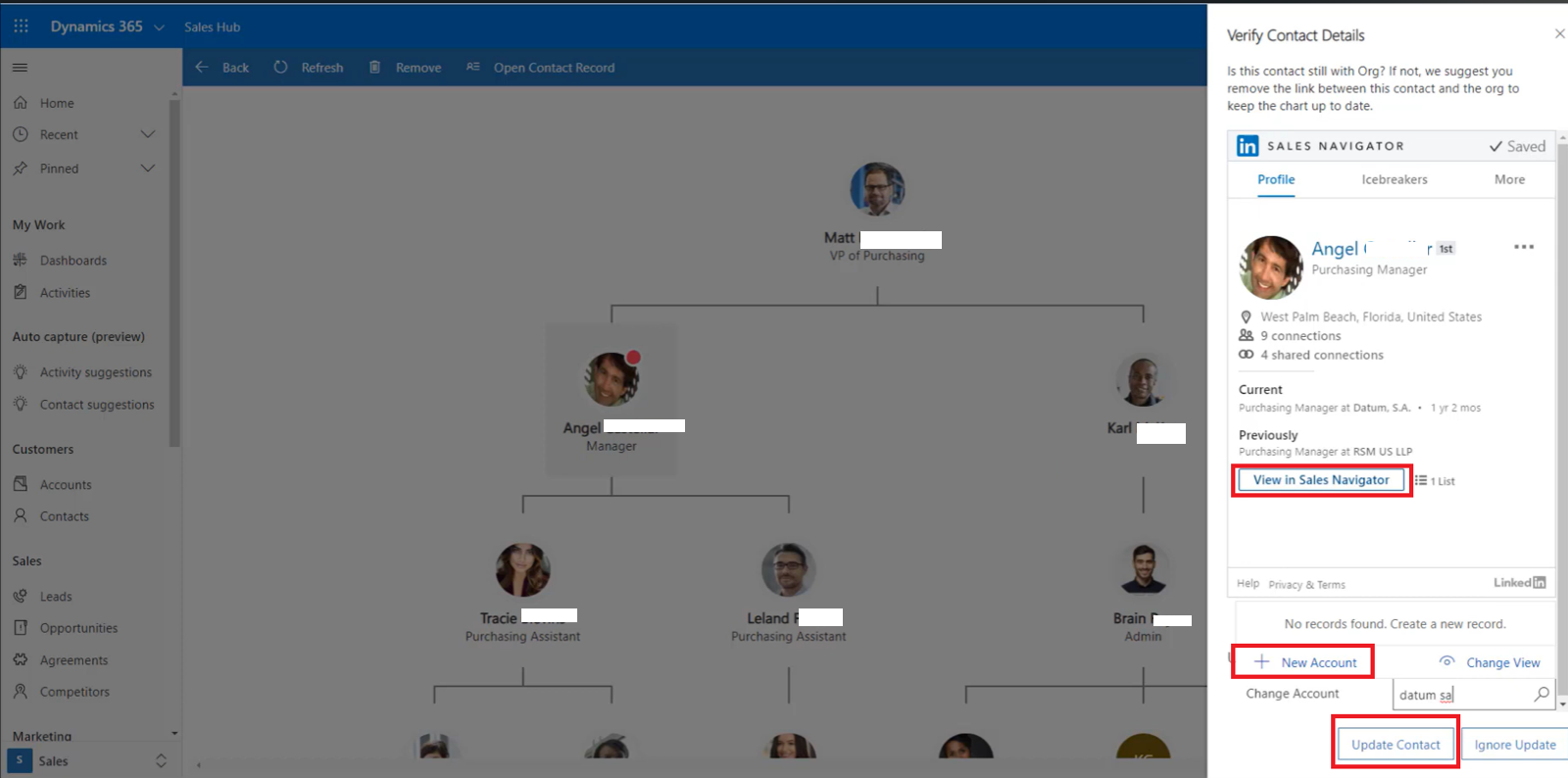
The Connections capability can show first- and second-degree connections as well as relevant TeamLink relationships, where applicable. The organizational chart experience also helps sellers understand the personnel structure of the target company and identify changes in who is associated with the organization.
For a services organization pursuing strategic accounts, this is particularly valuable. The question changes from:
“Who should I contact?”
to:
“How is this organization structured, who influences the buying decision, and where do we already have relationships?”
That is a much more strategic sales question.
CRM Synchronization and Activity Writeback
A major part of the implementation was understanding the direction of data movement. The integration was not designed as unrestricted two-way synchronization. Instead, we looked at what information should move between the systems and under what conditions.
The Sales Navigator capabilities implemented included CRM-related functions such as:
- Auto-save
- Lead/contact creation
- Lead/contact updates
- Activity writeback
- Data validation
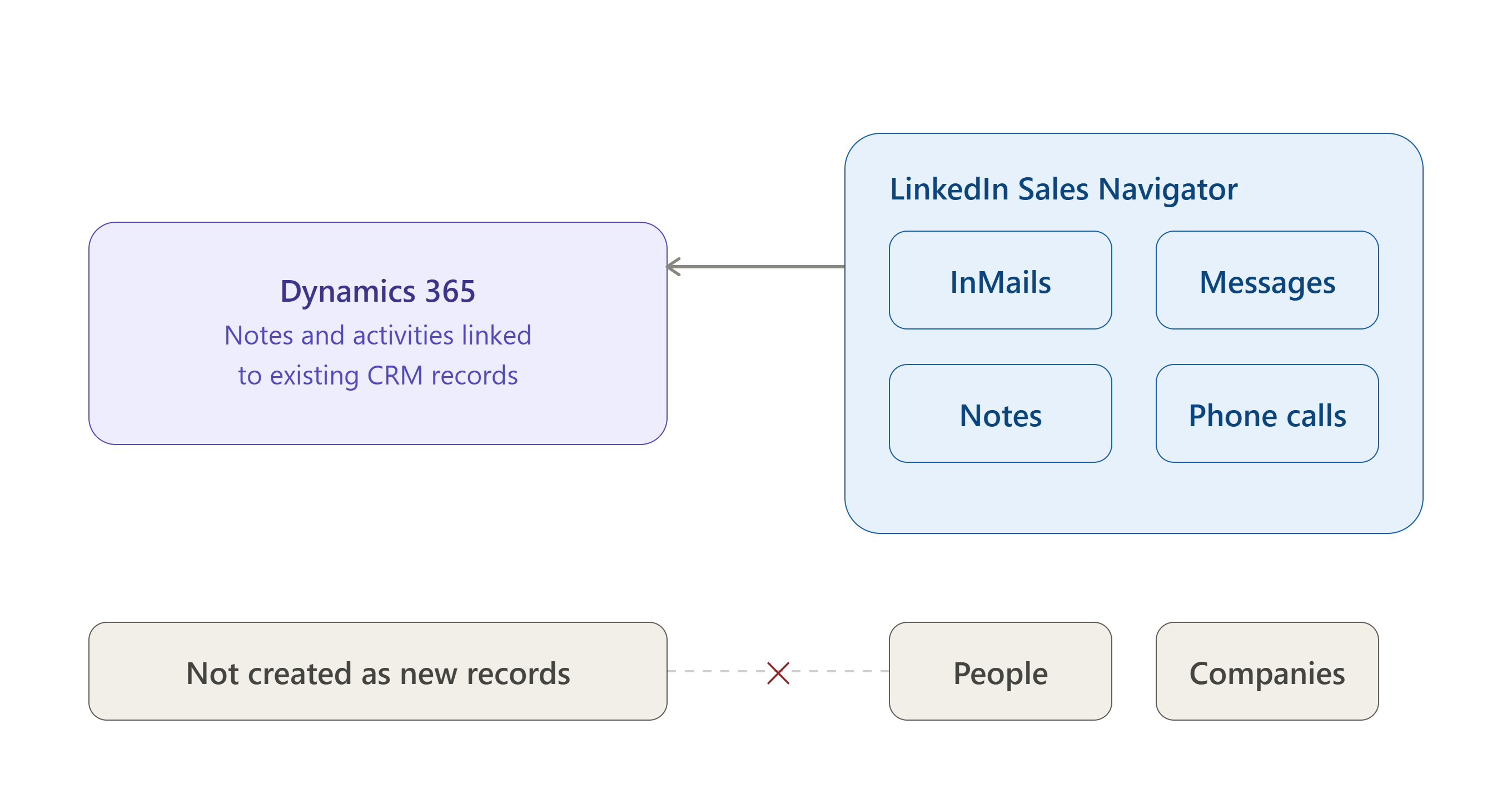
The implementation specifically identifies activity types such as:
InMails
Messages
Connection Requests
Notes
Smart Link Activity
Mobile Calls
as activities that can be synchronized into CRM. This is important because CRM value depends heavily on the quality of sales activity data. If a seller conducts meaningful prospecting activity on LinkedIn but none of that context reaches CRM, the organization loses visibility. With appropriate writeback controls, CRM can remain the central record of sales engagement.
Data Validation: Keeping CRM Current
CRM data naturally becomes outdated. People change jobs. People move between organizations. Titles change. Responsibilities change. Organizations restructure.
LinkedIn can therefore provide a valuable external signal for identifying records that may require review. The implementation included data-validation capabilities that help identify contacts whose LinkedIn profiles indicate changes such as a new role, company change, or updated profile information.
Sales Navigator is not only a prospecting tool — it can also become a source of CRM data-quality signals.
For sales leadership, that distinction matters. A CRM containing thousands of contacts is not necessarily valuable. A CRM containing relevant, current, and actionable customer information is.
Controlling What Gets Written Back to CRM
One of the design principles we considered important during the implementation was that integration should not mean:
“Synchronize everything.”
That approach can quickly create unnecessary records, duplicate information, or noisy activity data. Instead, the implementation allowed the writeback behavior to be controlled according to CRM rules and permissions.
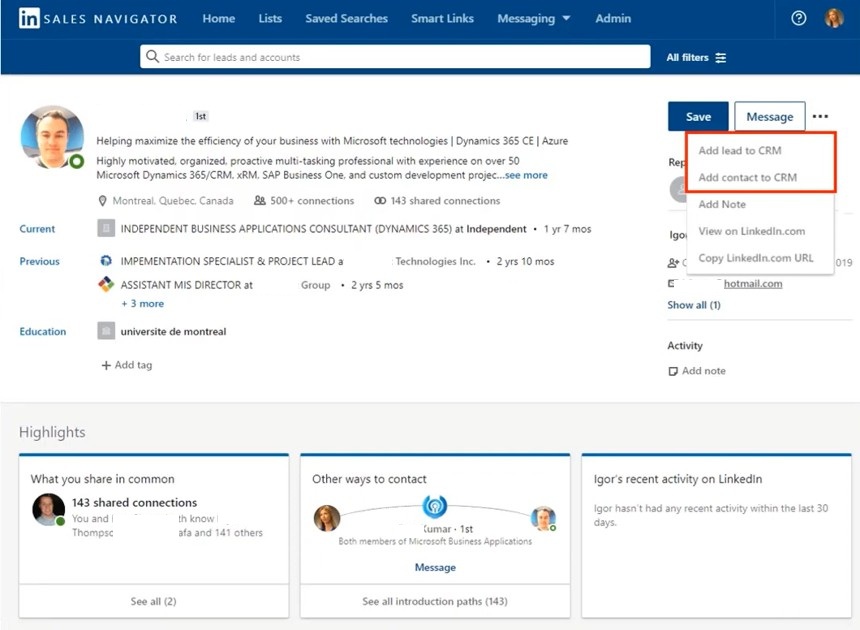
The solution design specifically considers how information coming from Sales Navigator should be validated and written into Dynamics 365. This is an important enterprise integration principle:
The objective is not maximum data movement. The objective is maximum business value from relevant data movement.
CRM should remain governed.
Synchronizing Open Opportunity Information
Another useful part of the implementation was the relationship between the CRM pipeline and Sales Navigator. Open opportunity information and pipeline stages from Dynamics 365 could be made available within the Sales Navigator context, including closing-date information.
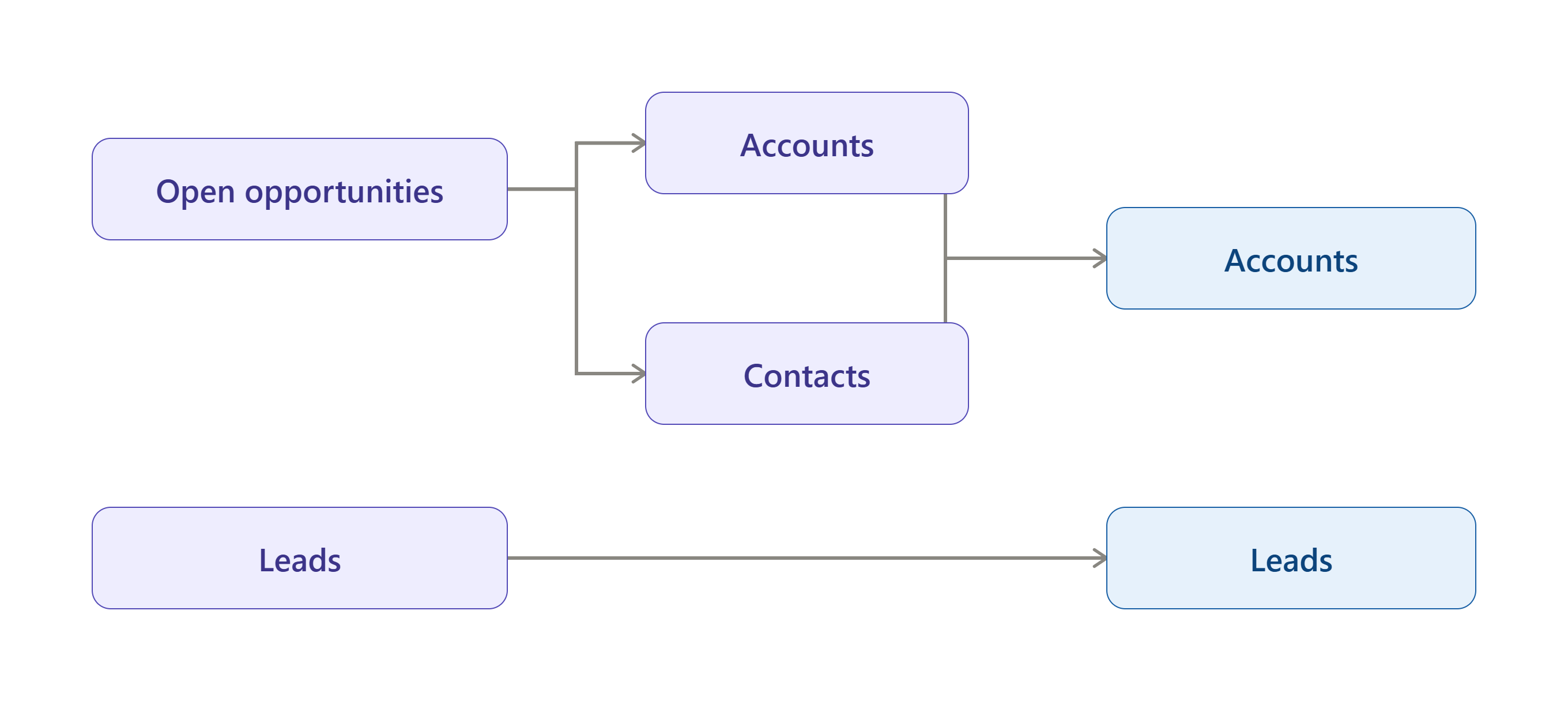
This creates a useful connection between:
What the seller knows about the relationship
                    +
What the organization knows about the commercial opportunity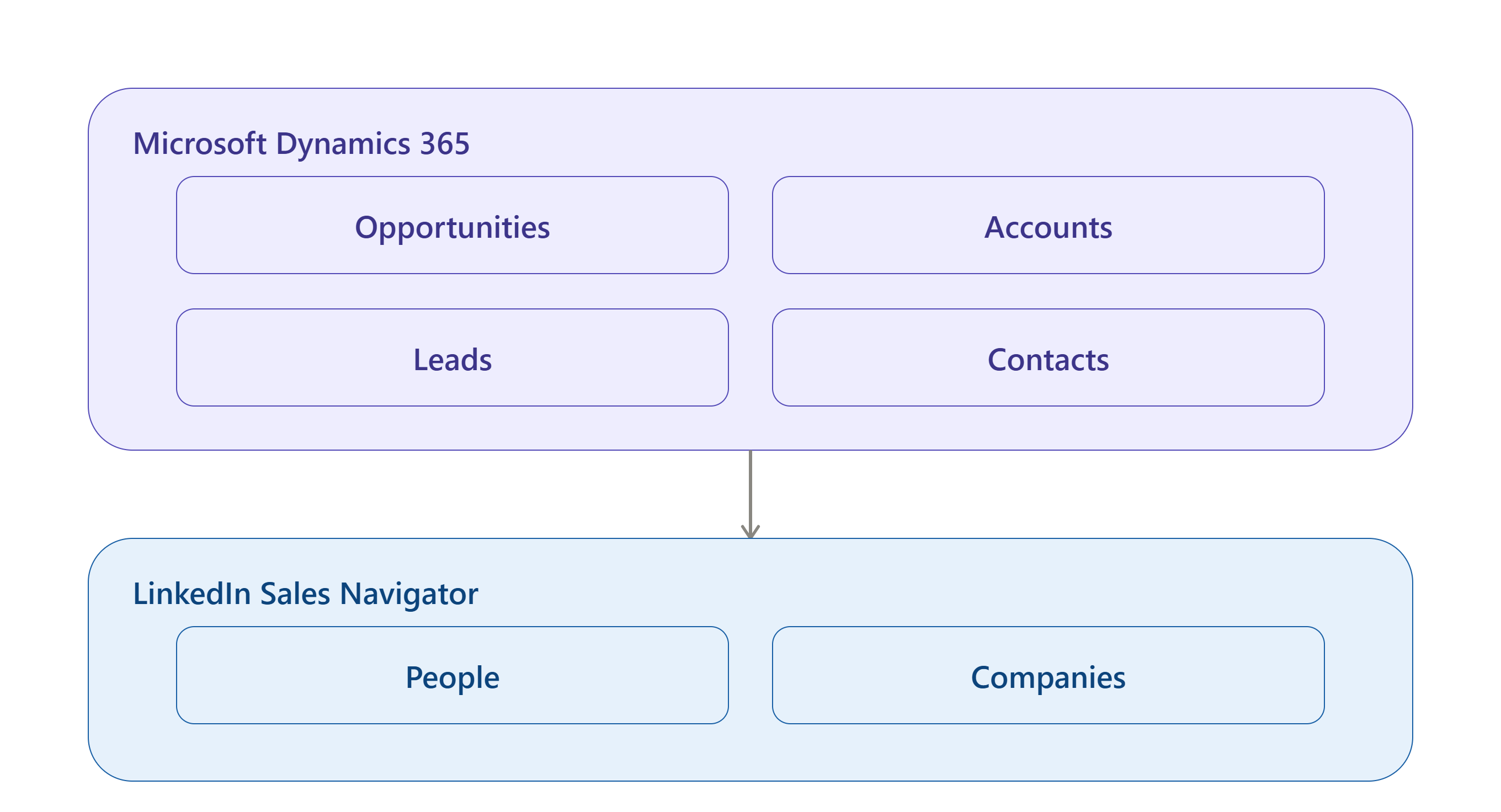
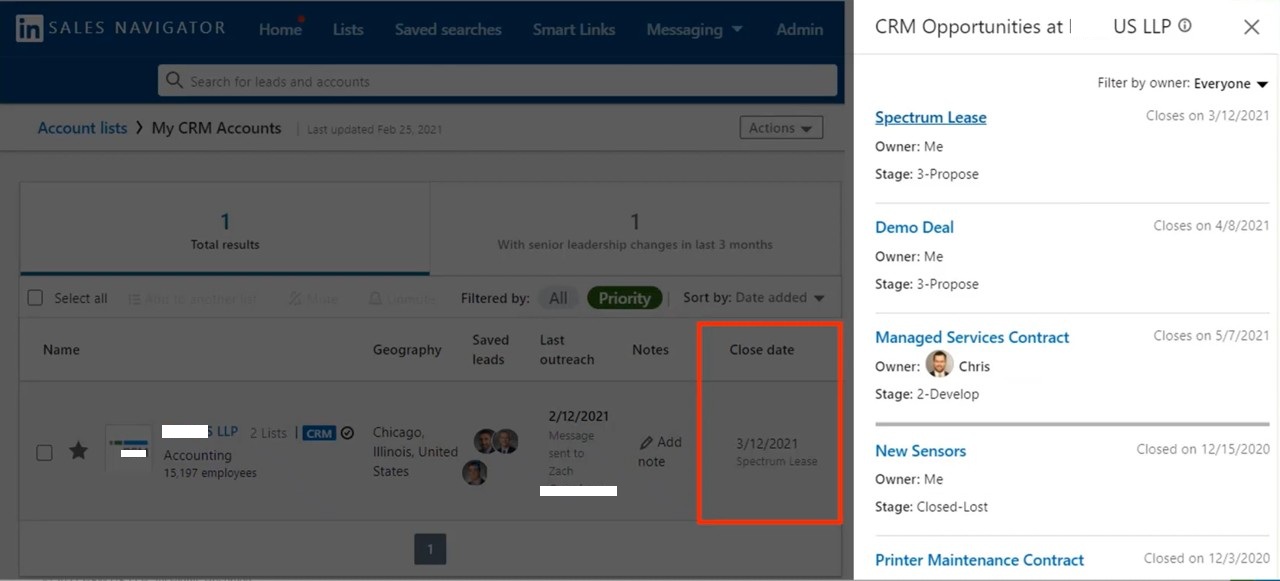
That context can help sellers approach prospects with a better understanding of the account’s existing business relationship.
Testing and Validation
A production integration should not be treated as complete simply because the systems are connected. We validated the implementation from both the CRM and seller perspectives. Key scenarios included:
- CRM Record Matching — Verify that existing Leads, Contacts, and Accounts could be correctly matched with LinkedIn profiles and organizations.
- Manual Matching — Verify that sellers could correct an inaccurate match.
- Embedded Widgets — Verify that Sales Navigator information loaded correctly within the relevant Dynamics 365 forms.
- Activity Writeback — Validate that supported sales activities were recorded correctly in CRM.
- Contact Creation — Validate the process for creating CRM contacts from Sales Navigator where enabled.
- Auto-Save — Verify that records were saved according to the intended configuration.
- Data Validation — Verify that changes to LinkedIn information could surface relevant CRM data-quality signals.
- Security — Validate that CRM permissions continued to govern CRM operations.
LinkedIn specifically recommends testing CRM Sync in a test environment and validating matching, activity writeback, contact creation, auto-save, search filters, and data validation before production deployment.
Business Impact
The real measure of the implementation was not the number of controls added to Dynamics 365. It was the improvement in the sales workflow.
1. Reduced Context Switching
Salespeople can access relevant LinkedIn intelligence from within the Dynamics 365 sales experience, cutting the need to continuously move between CRM and LinkedIn during prospect research.
2. Better Prospect Research
Instead of relying only on CRM data, sellers can consider professional and organizational context available through LinkedIn, supporting more informed outreach.
3. Better Relationship-Based Selling
Mutual connections, TeamLink relationships, shared context, and organizational information help sellers identify warmer paths into target accounts.
4. Improved CRM Data Quality
Data validation provides a mechanism for identifying CRM information that may have become outdated, keeping customer records more relevant.
5. Better Visibility of Sales Engagement
Supported LinkedIn activities can be written back into Dynamics 365, giving CRM a more complete picture of seller engagement.
6. More Intelligent Account Planning
Account-level information such as connections, organizational structures, company information, and news helps sellers think about an account more strategically.
7. Reduced Manual CRM Administration
Where appropriately configured, capabilities such as contact creation and auto-save reduce the repetitive record-management work performed by sellers.
LinkedIn positions CRM Sync as a mechanism for streamlining daily sales and relationship workflows, including auto-save, activity writeback, data validation, and related CRM capabilities.
The Strategic Value Beyond Integration
The most important outcome of this implementation was not technical. It was a change in the way sales intelligence could be consumed.
Before integration:
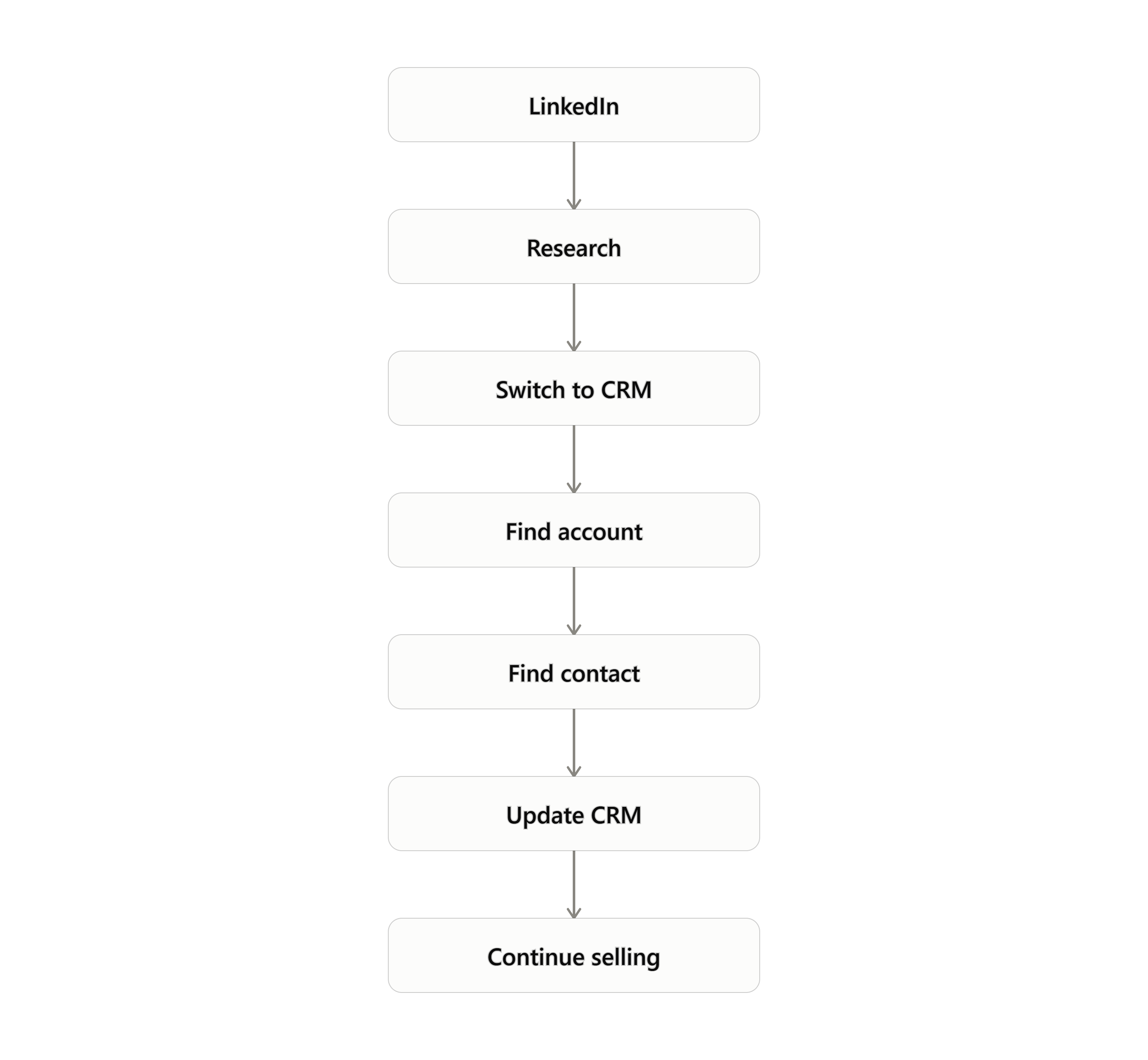
After integration:
That is the distinction between integration and sales transformation. Integration connects two applications. Transformation changes how people use information to make decisions.
The most important lesson from this implementation was that the technology itself was not the difficult part. The difficult part was determining how the technology should behave within the organization’s existing sales process — questions such as whether every LinkedIn interaction should become a CRM activity, when a match should be trusted, and what should flow back from CRM into Sales Navigator. These are business and architecture questions rather than installation questions, and that is where the implementation created its value.
Key Implementation Lessons
Lesson 1: Start with the sales process, not the connector
The first question should not be “How do we integrate LinkedIn with Dynamics 365?” It should be “Where does the sales team lose time or context today?”
Lesson 2: Matching is a business problem
Incorrect identity matching can create misleading sales intelligence. Matching logic therefore deserves as much attention as the integration itself.
Lesson 3: Do not synchronize everything
Good integration is selective. The goal is to move information that improves decision-making, not to replicate every possible data point between platforms.
Lesson 4: Keep CRM authoritative
LinkedIn is extremely valuable as a source of professional and relationship intelligence. Dynamics 365 remains the operational CRM for the organization’s sales process — the two platforms should complement each other rather than compete.
Lesson 5: Test from the seller’s perspective
A technically successful integration can still be a poor business implementation if the seller cannot understand or use it effectively. Testing should cover both whether the integration works, and whether it makes selling easier.
Conclusion
Implementing LinkedIn Sales Navigator with Dynamics 365 Sales for this Texas-based AI, cybersecurity, and Azure services company was ultimately about more than connecting LinkedIn to CRM. It was about bringing relationship intelligence into the place where sales execution already happens.
The implementation connected prospect discovery, relationship intelligence, CRM data, sales activities, account planning, and pipeline context into a more unified seller experience. The resulting model can be summarized as:
The broader lesson is equally important. For modern B2B technology companies, CRM should not simply answer “What do we know about this customer?” It should help answer “Who matters, what has changed, how are we connected, what is happening in the account, and what should the seller do next?”
The implementation represents a shift from CRM as a system of record toward CRM as a system of sales intelligence and action. For organizations selling complex AI, cybersecurity, cloud, and Azure services, that distinction can directly influence how effectively sales teams identify, engage, and develop strategic accounts.
Frequently Asked Questions
1. What is LinkedIn Sales Navigator?
LinkedIn Sales Navigator is LinkedIn’s sales-focused prospecting and relationship intelligence platform. It helps sellers identify prospects and accounts, research professional relationships, receive relevant insights and alerts, and engage with potential customers.
2. Can LinkedIn Sales Navigator integrate with Dynamics 365 Sales?
Yes. Microsoft provides an integration between LinkedIn Sales Navigator and Dynamics 365 Sales that can expose LinkedIn information and Sales Navigator experiences within Dynamics 365.
3. What Sales Navigator license is required for CRM integration?
CRM integration capabilities are available with LinkedIn Sales Navigator Advanced Plus. Microsoft and LinkedIn both identify Advanced Plus as the required level for Dynamics 365 CRM integration.
4. Can Sales Navigator create Contacts in Dynamics 365?
Yes. With the appropriate CRM integration and configuration, users can create CRM contacts directly from Sales Navigator.
5. Can LinkedIn activities be written back to Dynamics 365?
Supported Sales Navigator activities can be synchronized back to CRM, including InMails, messages, connection requests, notes, Smart Link activity, and supported calls.
6. Can Sales Navigator identify whether a Contact already exists in Dynamics 365?
Yes. CRM matching can associate LinkedIn profiles with CRM records and expose CRM-related indicators. The implementation also accounted for manual matching when the automatically identified profile was incorrect.
7. Can Sales Navigator help improve CRM data quality?
Yes. Sales Navigator’s data-validation capabilities can identify changes in LinkedIn information that may indicate CRM contact information is outdated, such as job or company changes.
8. Does every LinkedIn connection automatically become a CRM Contact?
No. The integration should not be treated as an unrestricted conversion mechanism where every LinkedIn relationship automatically becomes a CRM record. The implementation specifically considered controlled writeback and CRM rules so the organization could determine what information should actually enter Dynamics 365.
9. Why is CRM matching so important?
Because relationship intelligence is only useful when it is associated with the correct person or organization. A wrong LinkedIn-to-CRM match can result in inaccurate context and poor sales decisions — which is why the implementation included both automated matching and a mechanism for manually correcting an incorrect match.
10. What is the biggest business benefit of integrating Sales Navigator with Dynamics 365?
The biggest benefit is not simply having LinkedIn information inside CRM. It is bringing prospecting, relationship intelligence, customer data, engagement activity, and sales execution closer together so that sellers can make better decisions without constantly switching between systems.
Key Takeaway:
The goal of a CRM integration should never be to connect systems for the sake of connectivity. The goal should be to connect information to decisions. For this Texas-based AI, cybersecurity, and Azure services company, that meant turning LinkedIn Sales Navigator from a separate prospecting destination into an integrated part of the Dynamics 365 sales experience — giving sellers more context at the moment when that context matters most.
Share Story :

Shashank Keny
D365 Dynamics & Power Platform Consultant
Shashank Keny is an Associate Consultant with 1.5+ years of experience in cloud, data, and business applications. He specializes in building scalable, API-driven architectures and integrating enterprise systems across the Microsoft ecosystem.
He is a Certified Databricks Data Engineer with hands-on experience in Dynamics 365 Project Operations and Dynamics 365 Sales, along with delivering business intelligence solutions using Power BI.
His expertise also extends to modern AI solutions, including building custom copilots and implementing intelligent applications using Azure AI Foundry.
Passionate about solving real-world business challenges through data and AI, he focuses on delivering efficient, scalable, and production-ready solutions.
- Experience: 1.5+ years
- Certification: Databricks Certified Data Engineer
- Specialization: Dynamics 365 Project Operations, Power BI, Azure Integrations, AI Solutions
Related posts:

From Project Operations to Business Central: Following the Data Behind Project Financials
Location-Based Item Based Visibility in Business Central for a Maldives-Based Marine Services Firm
Connecting Project Operations to Finance: Our Dataverse-to-Business Central Integration for Project ...

