How We Built Legal Reports in Word on Business Central for a Home Loan Bank in the Maldives
Summary
A home loan bank in the Maldives came to us needing legal, customer-facing reports for loan statements and overdue notices that had to reflect exact facility figures while matching the bank’s letterhead and legal wording. Traditional RDLC-based report development would have created significant IT dependency and delay for a document like this. Instead, our team used Word-based report layouts in Microsoft Dynamics 365 Business Central, which let us design the legal notice in a familiar document tool while Business Central handled populating it with live facility and customer data. We mapped the bank’s Business Central fields into a Word template, tested it against real facility scenarios, and delivered a working legal report in approximately two days, which is a turnaround that would traditionally take weeks with RDLC. This article walks through how we approached the build, using a sanitized sample report in place of the client’s confidential documents, and explains when we’d recommend Word over RDLC for a bank’s reporting needs.
Table of Contents
- Introduction
- The Problem: IT Bottlenecks and Delayed Customer Documents
- The Word-Based Reporting Solution
- Sample Walkthrough: The Legal Report We Built
- Word Report vs. RDLC Report
- Time and Effort Comparison
- Why Banking Teams Benefit from Word Reports
- What Types of Banking Documents Work Best?
- Business Benefits
- When RDLC Is Still the Better Choice
- FAQs
- Conclusion
- About the Author
Introduction
Legal, customer-facing documents are one of the most sensitive parts of any lending business. A home loan bank in the Maldives came to us needing exactly this kind of document: a legal report covering a loan statement and overdue notice, which had to reflect exact facility figures, carry the correct legal clauses, and match the bank’s letterhead, all while pulling live data straight out of Business Central.
Producing a document like this inside Microsoft Dynamics 365 Business Central can easily turn into a multi-week project if it’s built the traditional way. RDLC-based reporting usually means a developer has to build and maintain the report layout, write or modify code, configure data sources, and run several rounds of testing before the document is ready to go out to a customer.
For a fairly standard legal document, like a loan statement or overdue notice, that kind of timeline is hard to justify. So instead of taking the client down the RDLC route, we proposed another option: Word-based report layouts.
Word templates let us design the layout of the legal report in a tool the bank’s own team could later maintain, while Business Central handled populating it with the correct facility and customer data.
The key idea: We designed the legal report’s layout and wording in Word, and let Business Central handle pulling in the correct facility data, so the client wasn’t locked into a developer for every future change.
This article walks through how we built it, using a sanitized sample report in place of the client’s confidential documents, and explains how a report that would traditionally take weeks of RDLC development was designed, mapped, and delivered in approximately two days using a Word-based approach.
The Problem: IT Bottlenecks and Delayed Customer Documents
When the client first came to us, their existing experience with reporting was the same one many banks run into: a dependency between operations teams and technical teams that turns a simple document request into a long wait.
The kind of request that used to happen internally looked something like this:
“Hey, can we get a loan statement that shows the customer’s outstanding EMI, fines, and facility balance in one clean document?”
“Sure, I’ll put in a ticket with IT.”
[Two weeks later…]
“The statement is almost done. It should be ready in another couple of weeks.”
[Four weeks later…]
“It’s finally here. Wait… the layout doesn’t match our branch letterhead format.”
This kind of situation can happen when a relatively standard customer document becomes dependent on development resources.
Why Do These Delays Happen?
- RDLC report layouts can require specialized development knowledge.
- Developers need time to configure data sources and implement the required reporting logic.
- Testing and troubleshooting can add additional development cycles.
- Small formatting changes such as a different overdue clause or a revised disclaimer may require technical assistance.
- Future modifications can place the document back into the development queue.
- Branch or collections staff may resort to manual, Word- or Excel-based workarounds while waiting for the official document.
The result is a disconnect between the people who understand exactly what a legal notice or statement needs to say and the people responsible for implementing it in the system.
The question we asked the client: What if your own operations or collections team could design and maintain these legal documents, using a tool they already know instead of relying on a developer for every change?
The Word-Based Reporting Solution
Microsoft Word was already familiar to the bank’s operations staff, so we proposed taking advantage of that. Business Central supports using Word templates directly as report layouts, which meant we didn’t need to build the legal report’s presentation through RDLC at all.
Instead of developing the entire document presentation through RDLC, we designed the layout directly in Word and mapped Business Central’s available facility and customer data to the appropriate fields within that template.
The solution: We used Word for the legal report’s presentation and Business Central for the facility data behind it. This separated document design from complex layout development and gave the client’s operations team greater control over formatting, tone, and compliance wording going forward.
How We Approached the Build
Our overall process was straightforward:
- Design the legal report layout using Microsoft Word.
- Add the required data fields to the Word template.
- Map those fields to the appropriate Business Central data.
- Run the report and let Business Central populate the template.
- Review the generated document with the client and adjust the layout where needed.
The important distinction is that the document’s visual presentation can be changed directly in Word rather than requiring us or any developer to modify an RDLC layout for every formatting change down the line.
Creating the Word Template
1 Create the Word Template
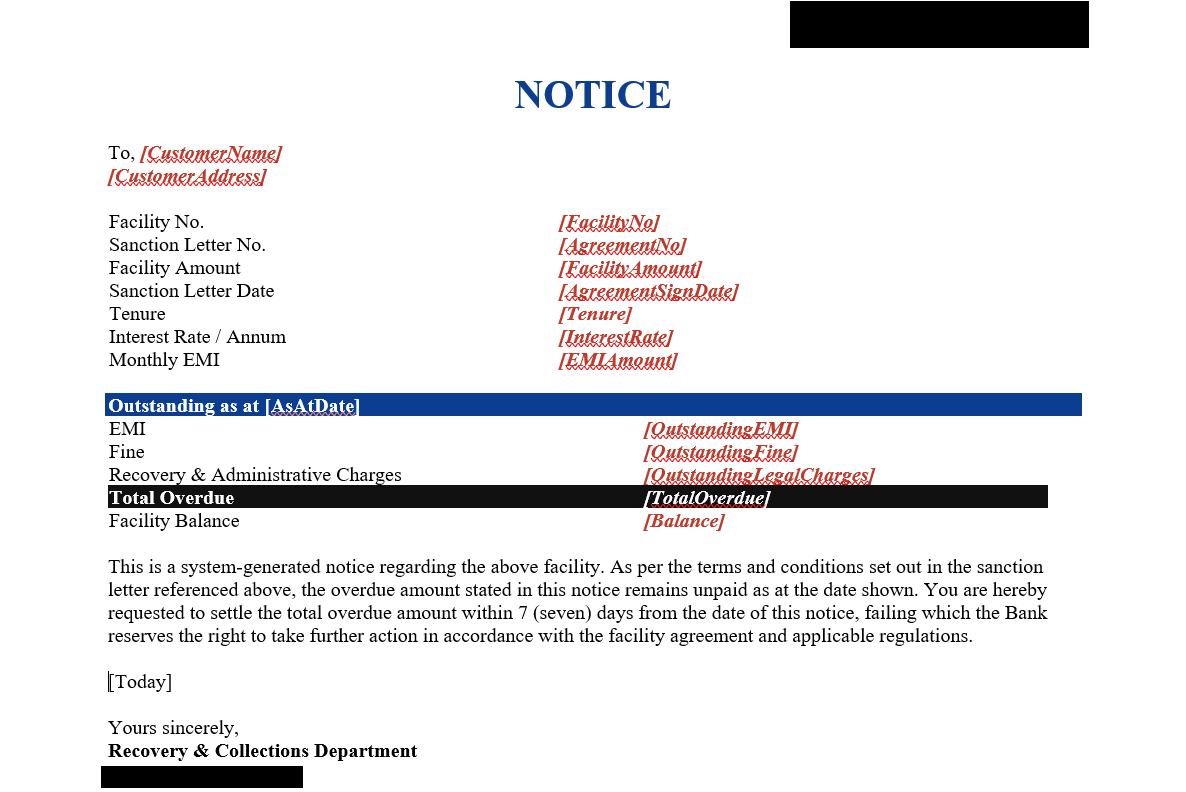
The first step was creating the document layout in Microsoft Word. We built the template using standard Word formatting tools, following the bank’s letterhead and branding requirements.
For the legal report we built, the layout included:
- Bank letterhead, logo, and registered address
- Customer name and address
- Facility (loan) number and sanction letter reference
- Facility amount, tenure, and interest rate
- Monthly EMI amount
- Outstanding EMI, fines, and recovery charges as at a given date
- Total overdue amount and facility balance
- Standard clauses and disclaimers required for a customer notice
The key advantage for the client is that this layout was built using familiar Word functionality rather than specialized report-layout development so their branch and collections staff can adjust wording themselves going forward, without opening a development ticket.
Mapping Business Central Fields
2 Map Business Central Fields
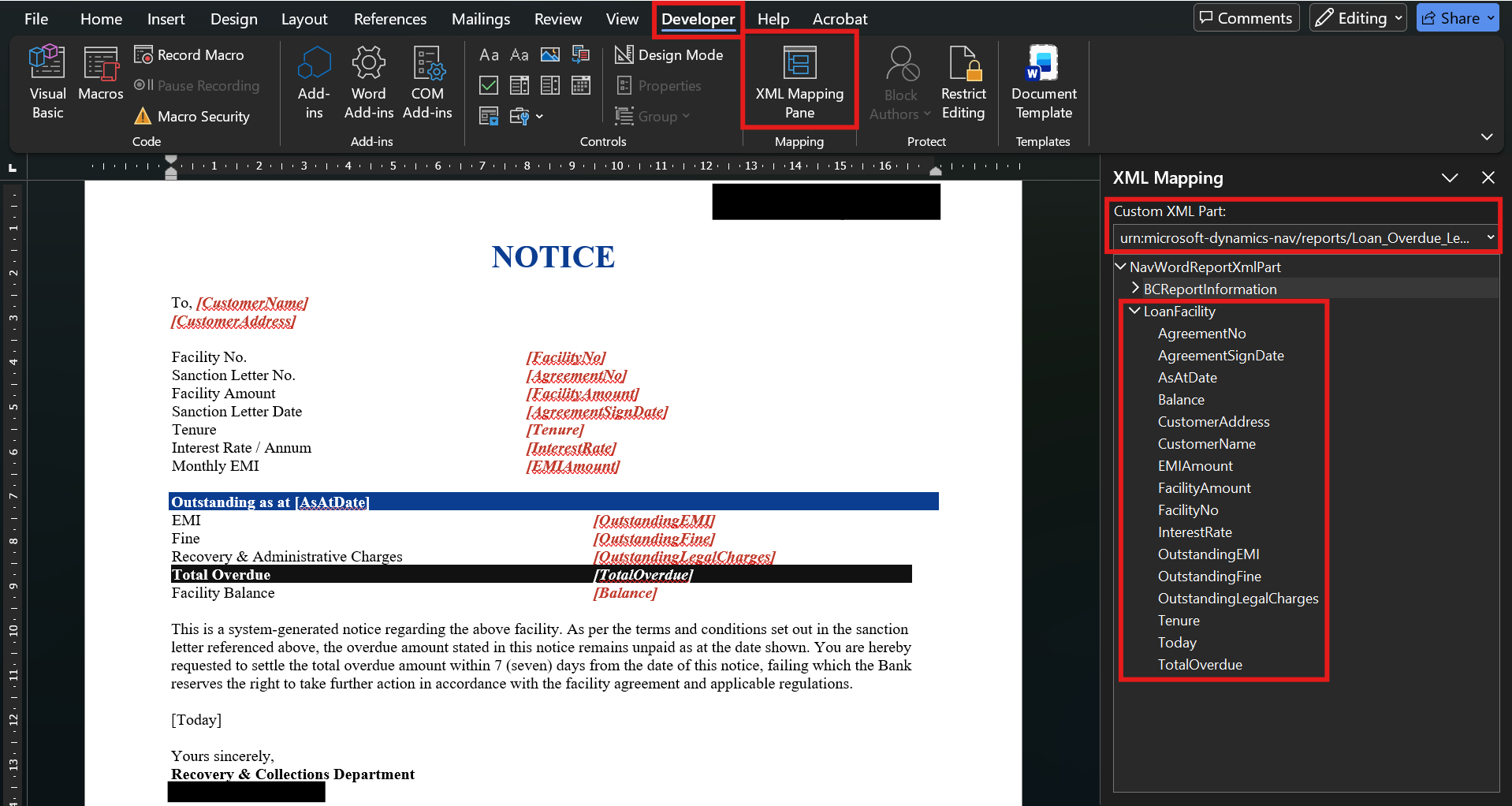
Once the Word layout was ready, our next step was connecting the fields in the document to the corresponding data provided by Business Central.
Conceptually, the legal report template we built contains fields such as:
[CustomerName]
[FacilityNo]
[FacilityAmount]
[Tenure]
[InterestRate]
[EMIAmount]
[OutstandingEMI]
[OutstandingFine]
[TotalOverdue]
[FacilityBalance]
[AsAtDate]
These fields act as placeholders for the facility information that Business Central provides when the report is generated for a specific customer.
We handled establishing the initial field mappings and confirming that the correct facility ledger data was available in Business Central. Once we had the template configured, the client’s own operations team was able to take over most future layout and wording changes themselves.
Testing and Delivering the Report
3 Test and Deliver
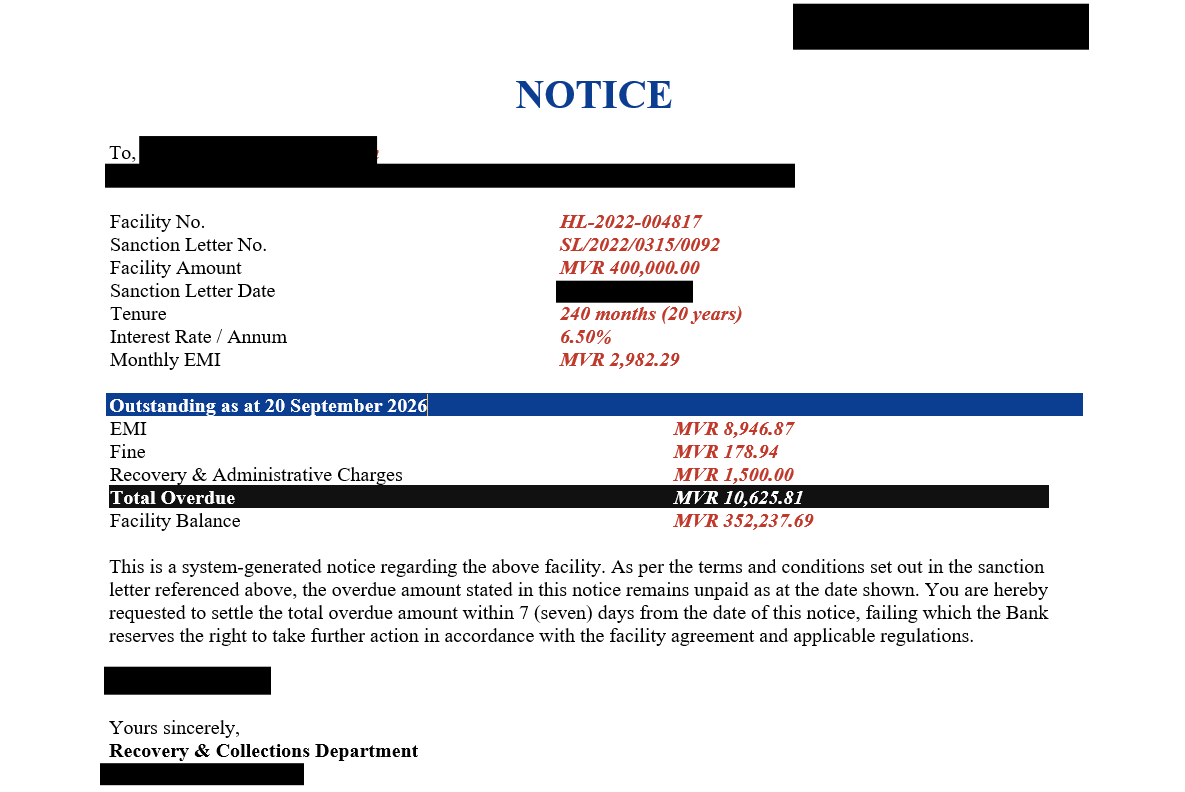
After the template and field mappings were configured, we generated the report using a test customer facility record.
The generated Word document automatically populated the customer name, facility number, EMI, outstanding fines, and total overdue balance, while retaining the formatting and legal clauses defined in the Word template.
We then reviewed the document with the client to confirm the figures and layout matched their operational and legal requirements before it was approved for use.
Sample Walkthrough: The Legal Report We Built
The legal report we delivered for the client is confidential, so the walkthrough below uses a fictional sample facility to show how we approached the build without exposing any real customer or account information.
The client’s requirement was a legal, customer-facing statement that brought together facility details, outstanding EMI, fines, and the facility balance in a single document, styled to match the bank’s notice format and legal wording.
Instead of taking a traditional RDLC development approach, we built the statement using a Word template and delivered it in approximately two days.
Sample Report Requirements
- Customer name (sample data only)
- Facility number and sanction letter reference
- Facility amount and tenure
- Interest rate and monthly EMI
- Outstanding EMI, fines, and recovery charges as at a chosen date
- Total overdue amount and facility balance
- Bank letterhead and standard notice clauses at the top and bottom of the document
Sample outcome: Using placeholder facility data in place of the client’s real records, we created the layout, mapped it to Business Central fields, tested it, and had it ready for use in approximately two days using a Word-based reporting approach.
| Field | Sample Value |
|---|---|
| Customer Name | Sample Customer |
| Facility No. | SAMPLE-001 |
| Facility Amount | MVR 50,000.00 |
| Tenure | 5 years |
| Interest Rate / Annum | 15% |
| Monthly EMI | MVR 1,200.00 |
| Outstanding EMI (as at sample date) | MVR 1,200.00 |
| Fine | MVR 0.00 |
| Total Overdue | MVR 1,200.00 |
| Facility Balance | MVR 48,900.00 |
Word Report vs. RDLC Report
Both Word and RDLC have a place in Business Central reporting for a bank, and we said as much to the client. The important question was never whether one completely replaces the other, but which approach was more appropriate for this particular legal document.
Formatted Word Statement
The Word template can be designed with the bank’s letterhead, spacing, borders, tables, headings, and other familiar document-design features, matching the tone required for a customer-facing notice.
Simplified Version
The same underlying facility data can also be presented using a simpler layout for example, a short summary statement rather than a full notice. Because the presentation is controlled through the Word template, the operations team can experiment with different layouts without rebuilding the underlying report.
The important point: The underlying facility data does not need to change simply because the presentation changes. The Word template provides flexibility over how that data is presented to the customer.
Time and Effort Comparison
One of the biggest advantages demonstrated by this example was the difference in development time.
| Area | Word Report | Traditional RDLC Report |
|---|---|---|
| Example Delivery Time | Approximately 2 days | Approximately 2–4 weeks |
| Layout Development | Designed directly in Word | Requires RDLC/report development |
| Formatting Changes | Can generally be made in the Word template | May require developer involvement |
| Developer Dependency | Lower for straightforward layout changes | Higher |
| Operations Team Familiarity | High as it uses Microsoft Word | Requires specialized technical knowledge |
| Complex Reporting Logic | Best suited to straightforward customer documents | Strong choice for complex requirements |
In this example, the Word-based approach reduced the delivery timeline from an estimated 2–4 weeks to approximately 2 days.
This represents a significant reduction in turnaround time for a standard customer statement.
The exact time savings will vary depending on the document’s complexity, data requirements, and existing Business Central configuration.
Why This Approach Benefited the Client
The biggest advantage of Word-based reporting for this client wasn’t simply the shorter initial development timeline. It was the greater level of control we were able to hand back to their operations and collections teams.
- Speed: Standard customer documents can potentially be delivered in days rather than weeks.
- Control: Operations teams can make many formatting and wording changes directly within the Word template including updating clauses or disclaimers.
- Familiarity: Staff already familiar with Microsoft Word can work with the document layout without learning a specialized report-designing environment.
- Reduced IT Dependency: Small layout or wording changes do not necessarily require a new development ticket.
- Flexibility: Teams can experiment with different layouts, tables, spacing, and letterhead formatting.
- Professional, On-Brand Presentation: Word provides a familiar environment for producing polished, compliant customer documents.
What Types of Banking Documents Work Best?
Word reports are particularly useful when the document primarily involves structured facility and customer information combined with straightforward formatting requirements.
Good Candidates for Word Reports
- Loan statements
- Overdue and demand notices
- Sanction letters and offer letters
- Account statements
- Monthly EMI summaries
- Facility closure letters
- Documents that primarily present figures in tables
- Customer documents requiring flexible, letterhead-based formatting
Use Word when: The document is primarily focused on presenting Business Central facility data in a professional customer-facing letter or statement format, and does not require highly specialized reporting functionality.
Business Benefits
Moving this legal report from a developer-heavy reporting process to a Word-based approach gave the client several practical benefits.
- Faster Delivery: We delivered the legal report in approximately two days instead of following a multi-week RDLC development timeline.
- Lower Development Effort: Straightforward layout or clause changes can often be handled without modifying complex report layouts.
- Greater Business Ownership: Operations and collections teams can have greater control over how their customer documents look and read.
- Reduced Waiting Time: Staff do not need to wait for a developer for every minor formatting adjustment.
- Faster Iteration: Teams can try different layouts and refine wording more quickly.
- Better Alignment: When operations teams participate directly in document design, the final output more closely matches customer communication standards.
Business impact: The goal is not simply to produce documents faster. It is to reduce unnecessary dependency between banking operations and technical implementation while giving teams more control over customer-facing presentation.
When RDLC Is Still the Better Choice
We were clear with the client that Word reporting is not intended to completely replace RDLC. There are reporting scenarios in a bank where RDLC remains the more appropriate technology.
Consider RDLC When You Need:
- Highly complex interest or amortization calculations
- Advanced report logic
- Specialized graphical layouts
- Complex charts and portfolio visualizations
- Highly customized rendering behavior
- Large and complex datasets, such as portfolio-wide regulatory reports
- Specialized reporting requirements that exceed a document-oriented layout
The best approach is therefore to treat Word and RDLC as complementary reporting technologies within the bank’s Business Central environment.
| Requirement | Recommended Approach |
|---|---|
| Loan statement or account letter | Word |
| Overdue / demand notice | Word |
| Sanction or offer letter | Word |
| Basic EMI summary | Word |
| Portfolio-wide risk calculations | RDLC |
| Advanced visualization requirements | RDLC |
| Highly specialized regulatory reporting logic | RDLC |
Key takeaway: Choose Word for straightforward, document-oriented customer communications, and use RDLC when the reporting requirement demands more advanced technical capabilities.
Frequently Asked Questions
1. Will Word reports slow down Business Central?
Generating a report involves retrieving the required facility data and creating the output document. The actual performance impact depends on the report design, data volume, and Business Central environment. Performance should be tested using the bank’s actual reporting volumes rather than assuming Word reports will always have no impact.
2. Can operations staff create Word reports themselves?
Staff who are comfortable with Microsoft Word can generally work with the document layout. However, initial configuration of the report dataset and field mappings may require someone with Business Central technical knowledge.
3. Does Word reporting completely replace RDLC for a bank?
No. Word and RDLC are best viewed as complementary approaches. Word is well suited to straightforward, document-oriented customer communications, while RDLC remains useful for more complex or regulatory reporting scenarios.
4. Can Word and RDLC reports coexist in the same Business Central environment?
Yes. Banks can use different report-layout technologies based on the requirements of individual documents. Existing RDLC reports do not need to be replaced simply because Word-based reporting is introduced.
5. How quickly can a Word report be created?
The timeline depends on the complexity of the document. In the sample loan statement discussed in this article, the layout was designed and mapped in approximately two days.
6. Is Word reporting always cheaper than RDLC?
Not necessarily. The cost depends on the complexity of the requirement and the effort needed to configure the data and template. However, for standard customer documents, Word can reduce development effort and ongoing dependency on specialized report developers.
Conclusion
Customer reporting does not always need to become a multi-week development project.
For straightforward, document-oriented legal communications in Microsoft Dynamics 365 Business Central, Word-based report layouts provide a practical alternative to traditional RDLC development. We were able to design the presentation in a familiar tool while Business Central handled the underlying facility data.
In the sample walkthrough above, a legal report containing facility details, EMI, overdue amounts, and facility balance was designed, mapped, and ready for use in approximately two days.
The approach also gave the client an important long-term advantage: greater flexibility. Now that the underlying data and mappings are established, their team can handle many future presentation and wording changes directly within the Word template, without coming back to us for every small change.
Final takeaway: A bank does not have to choose between operational flexibility and technical reporting capability. Use Word when the requirement is straightforward and document-focused, and use RDLC when the reporting scenario requires more advanced technical functionality.
Related posts:

From Client Secrets to Certificate-Based Authentication: Building a Secure Integration with Azure Ke...

From Multiple Data Sources to Azure Databricks: A Zero-Downtime Power BI Report Data Migration for F...
Using AI for Data Discipline That Drives Better AI Outcomes