How a Leading North American Commercial Vehicle Manufacturer Prevented Incorrect Purchase Prices on Purchase Orders Using Dynamics 365 Finance & Operations
Summary
A leading North American commercial vehicle manufacturer was experiencing incorrect purchase prices on Purchase Orders in Dynamics 365 Finance & Operations. The root cause: overlapping trade agreement records in the PriceDiscTable that were never closed when new prices were introduced.
CloudFronts diagnosed the issue and implemented a single rule – close the active trade agreement record before creating a new one – enforced through automation on both inbound integrations and manual entry workflows. The result: deterministic price resolution, clean audit trails, and procurement teams that trust the system again.
About the Customer
Customer Overview
Our customer is one of North America’s leading manufacturers of heavy-duty commercial vehicles, operating an extensive network of manufacturing and logistics facilities. As part of its supply chain operations, the organization manages high-volume production, component manufacturing, and distribution processes that require seamless integration across enterprise systems.
For growing businesses running Dynamics 365 Finance & Operations, procurement accuracy is non-negotiable. As order volumes climb and vendor pricing evolves, even a small gap in how purchase prices are managed can quietly erode margins, trigger invoice disputes, and undermine trust in the system.
One of the most common and most overlooked causes of pricing errors on Purchase Orders is something surprisingly simple: outdated trade agreement records that were never closed.
Have you ever updated a vendor’s price in D365 FO, only to find that Purchase Orders raised the next week still show the old price? If you’re nodding, this article is for you.
Consider this: organisations that leave overlapping trade agreement records unmanaged often find hundreds, sometimes thousands, of duplicate active price records for the same Item x Vendor combination in their PriceDiscTable. Each one is a potential pricing conflict waiting to surface on a Purchase Order.
The cumulative effect on procurement accuracy, AP reconciliation time, and vendor relationships is significant.
By the end of this article, you will understand exactly why this happens, how D365 FO’s price engine actually resolves trade agreements, and the single rule that eliminates the problem entirely.
Why This Matters
Incorrect Purchase Prices Create Real Business Risk
Incorrect purchase prices on POs are not just a data nuisance. They lead to overpayments that chip away at margins, invoice mismatches that clog up Accounts Payable, and worst of all, procurement teams who stop trusting the system and start overriding prices manually on every order.
Once that happens, the entire value of centralized pricing governance is gone.
Why We’re Writing This
A Pattern We See Across D365 F&O Implementations
At CloudFronts, we’ve implemented and supported Dynamics 365 F&O procurement modules across manufacturing, distribution, and services organisations. This specific issue, stale trade agreements causing wrong PO prices, has come up in nearly every engagement where vendor prices are managed through the Trade Agreement Journal.
We’ve seen the pattern, diagnosed the root cause repeatedly, and built the automation to prevent it. This article distils that experience into something actionable.
How D365 F&O Resolves Purchase Prices
The Price Comes From Trade Agreements, Not the Item Master
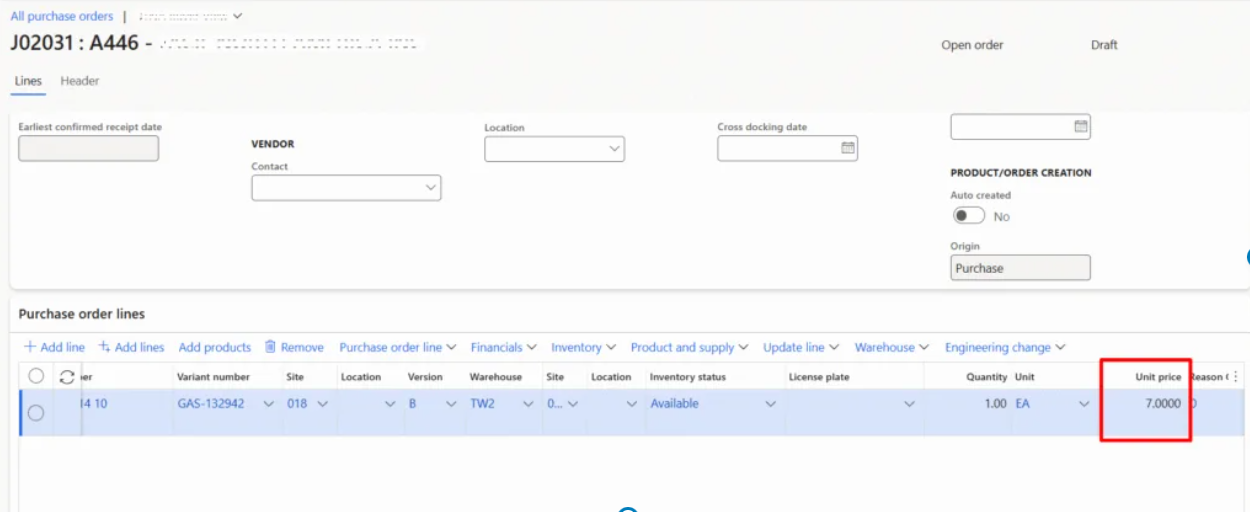
The price on a Purchase Order line does not come from the item master. It is resolved from a Trade Agreement, a dated record that says: “For this item, from this vendor, in this currency, starting from this date, the unit price is X.”
These records are created through the Trade Agreement Journal, posted, and stored in the PriceDiscTable.
When a PO line is created, the price search engine finds every posted record whose date window, from From Date to To Date, covers the PO date.
It then filters by matching keys such as item, vendor, currency, site, warehouse, and quantity break, and selects the price.
Critically, the system does not prefer the most recently posted record. It looks at date windows.
If two records both cover today, the engine has two valid candidates. Its tie-breaking behaviour is not something you should rely on for pricing accuracy.
The Problem
Overlapping Records Create Pricing Conflicts
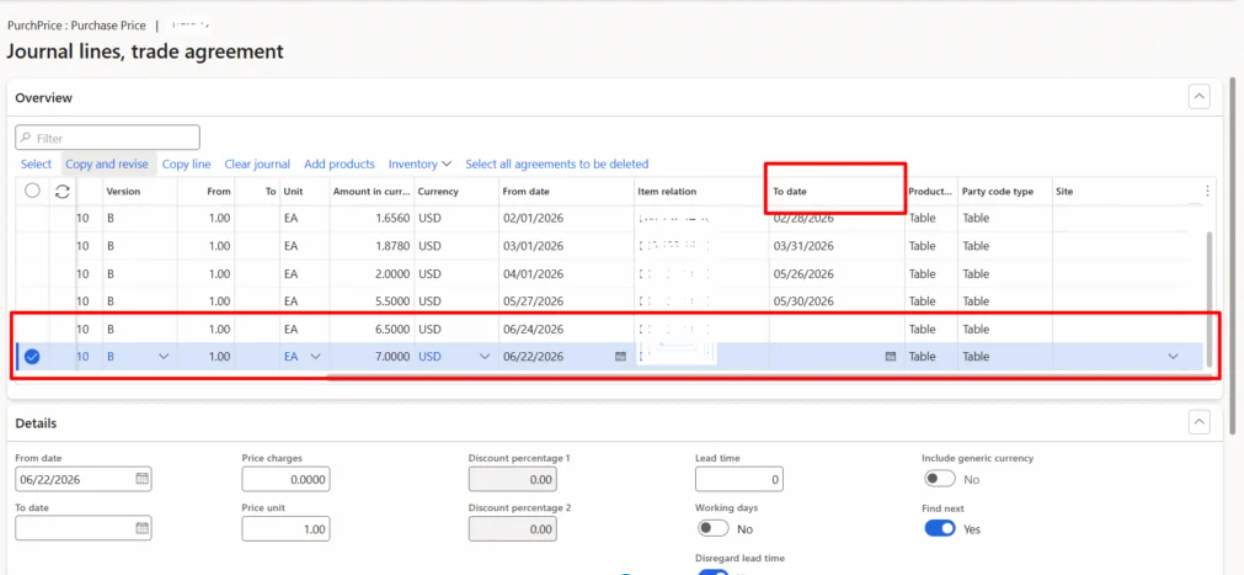
Here’s how the issue plays out. A vendor price is loaded into D365 FO, either from a legacy system integration or manually by a buyer. The record is created with an open-ended To Date, the sentinel 1900-01-01 or a far-future date, meaning it never expires.
Months later, a new negotiated price arrives. A fresh trade agreement line is added for the same Item x Vendor. But nobody closes the original record.
Both records now have date windows that include today. The price engine finds two matches, and sometimes the older, stale price wins.
Root Cause
There is no closure step. Every new price is layered on top of the old one instead of replacing it in time.
The Fix
Close Before You Create
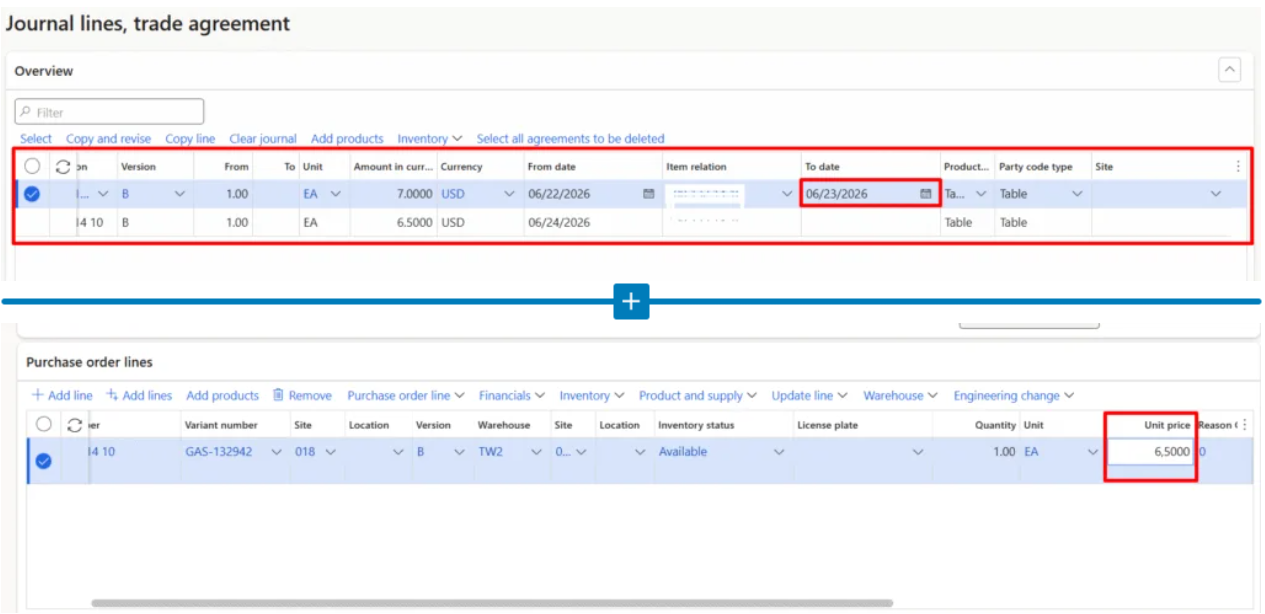
The rule is simple: whenever a new price record is created for an Item x Vendor combination, the currently active record must have its To Date set to Today – 1. The new record’s From Date is set to Today.
This produces two non-overlapping windows: old price valid up to yesterday, new price effective from today.
Why Today – 1?
If both dates include the same day, the engine still finds two candidates. One day’s difference makes the price resolution deterministic.
Worked Example
One Item, One Vendor, One Clean Price Timeline
Item purchased from Vendor A, USD, quantity break of 1:
| Event | Action | From Date | To Date | Price |
|---|---|---|---|---|
| 22 June – Initial load | Create Record A | 22 June 2026 | Open-ended | $7.00 |
| 24 June – New price | Close Record A | 22 June 2026 | 23 June 2026 | $7.00 |
| 24 June – New price | Create Record B | 24 June 2026 | Open-ended | $6.50 |
After posting, any PO dated 24 June or later picks $6.50. Historical POs on or before 22 June still resolve to $7.00. Clean, unambiguous, audit safe.
Where to Enforce This Rule
Automation Should Handle the Closure
Inbound Integration
If prices flow from a legacy system via OData, build a custom API endpoint in D365 FO that handles closure server-side. For each incoming line, the API finds the active record, generates a closing line, creates the new line, and posts the journal atomically.
Manual Entry by Buyers
Add an event handler on the Trade Agreement Journal line table that auto-generates a paired closing line whenever a buyer adds a new price. The buyer reviews both lines in the unposted journal and posts as usual.
This removes the human step that’s been failing, while still giving the buyer visibility and control before committing.
Edge Cases to Handle
Build the Rule for Real-World Data
01
No Prior Record Exists
Skip the closure and just create the new record.
02
Multiple Overlapping Records Exist
Close all of them as bad data cleanup and log a warning.
03
From Date Is in the Past or Future
Set the old record’s To Date to new From Date minus one day instead of Today minus one day.
04
Identical Price
If the key and amount are the same, treat it as a no-op to avoid duplicates.
Conclusion
Never Leave the Old Price Open
To conclude, everything in this article comes down to one rule: never leave the old price open when you create a new one.
Close it with a To Date of one day before the new price starts. Do it in the same journal, in the same transaction, whether the price comes from an integration or a buyer’s keyboard.
Your Next Step
Run a query on your PriceDiscTable for any Item x Vendor combinations that have more than one active PricePurch record with overlapping date windows. The results will tell you the scale of the problem. If you find dozens or hundreds, it’s time to automate the closure rule.
At CloudFronts, we’ve built this pattern into multiple D365 F&O procurement implementations. If you need help diagnosing your trade agreement data or building the closure automation into your integration and manual entry workflows, reach out to us. Let’s make sure your system gives your buyers the right price, every time.
Ready to modernize your finance and supply chain operations with Dynamics 365 Finance & Operations?
CloudFronts delivers intelligent automation, seamless integrations, and process optimization solutions that help you maximize the value of your ERP investment.
transform@cloudfronts.comRelated posts:

From Project Operations to Business Central: Following the Data Behind Project Financials
Location-Based Item Based Visibility in Business Central for a Maldives-Based Marine Services Firm
Connecting Project Operations to Finance: Our Dataverse-to-Business Central Integration for Project ...