

Dynamics 365 Project Operations · Business Central · Integration
A project can be perfectly planned and still become difficult to bill. This article follows the data from quote and resource planning through time, material usage, invoicing, posting and payment, showing how Dynamics 365 Project Operations and Business Central can operate as one connected process.
Summary
This integration connected the customer and project lifecycle in Dynamics 365 Project Operations with project accounting in Business Central. Projects, tasks and resource assignments became usable planning data in BC, while approved time, expenses and material usage became controlled financial transactions. Customer invoices moved to BC for posting, and the resulting invoice and payment status returned to Project Operations, giving delivery and finance teams a shared view without asking either team to abandon the system built for its work.
Introduction
The problem rarely appears during the project kick-off. It appears at month-end, when the project manager says the work is complete, the finance team cannot see the corresponding cost, and the invoice is waiting for someone to re-enter information that already exists in another system.
This is a familiar situation for project-based organizations using Microsoft Dynamics 365 Project Operations for sales, scheduling and delivery, while relying on Microsoft Dynamics 365 Business Central for accounting. Both applications are doing the jobs they were selected to do. The gap lies between them.
For this multi-site engineering scenario, the project included survey and design work, hardware deployment, named and generic resources, time-and-material labour, fixed-price milestones and material consumption. Project Operations gave the delivery team the structure and flexibility it needed. Business Central gave finance the posting controls, project journals, purchasing context, invoicing and financial reporting it needed. The integration was designed to keep those responsibilities clear while allowing the transaction to move only once.
The Business Problem
Before integration, the process depended on hand-offs. A project created in Project Operations had to be recreated as a project in Business Central. Tasks had to be matched to project task numbers. Resource allocations were visible to the project manager but not available as budget or planning lines to finance. Approved time and material usage then had to be interpreted, keyed and checked again before posting.
That process looked manageable when there were only a few projects. It became unreliable as project volume increased. A small difference in a task number could place a cost against the wrong line. A forgotten time entry could delay billing. An invoice posted in Business Central could remain open in Project Operations because nobody returned to update it. Teams gradually created their own spreadsheets to bridge the gap, producing yet another version of the truth.
The larger concern was not simply duplicate data entry. It was timing. Delivery teams looked at current activity, while finance worked with data that was several steps behind. Decisions about project margin, remaining effort and billing readiness were therefore made using different cut-off points.
The PO–BC Solution
The solution treated Project Operations as the operational front office and Business Central as the financial back office. The boundary was deliberate. Project managers continued to build the work breakdown structure, schedule resources and approve usage in Project Operations. Finance continued to control posting periods, journals, invoices, taxes, dimensions and the general ledger in Business Central.
An Azure-based integration layer handled the exchange between Dataverse and Business Central APIs. It translated records, validated mandatory mappings, prevented the same business transaction from being processed twice and wrote a readable integration log whenever a record could not be completed. Depending on the transaction, synchronization could be event-driven or placed in a controlled queue for retry.
One Connected Project Lifecycle
Operational information moves from sales and project delivery into financial processing, while invoice and payment status return to the project team.
| Business area | Primary system | Why it belongs there |
|---|---|---|
| Opportunity, quote and project contract | Project Operations | Commercial terms remain connected to the customer and proposed project. |
| Work breakdown structure and scheduling | Project Operations | Delivery teams plan tasks, dependencies, effort, roles and named resources. |
| Time, expense and material approval | Project Operations | Usage is reviewed by the people closest to project delivery before it becomes financial activity. |
| Project journals, WIP and general ledger | Business Central | Finance applies posting groups, dimensions, periods and accounting policy. |
| Sales invoice posting and payment | Business Central | The receivable, tax, customer ledger and bank application remain under financial control. |
Creating the Data Foundation
A reliable transaction flow starts with quiet, unglamorous master data. The account in Project Operations must point to the correct customer in Business Central. Currency, payment terms, country and postal information must agree. Products, units, resource numbers and dimensions need stable mappings. If those foundations are weak, every later transaction becomes an exception.
In the engineering scenario, an account and its contacts were created during the sales cycle in Project Operations and synchronized to Business Central. When the quote was won, the project contract preserved the agreed billing methods. Labour could remain time and material, while hardware deployment used fixed-price milestones. The resulting project then synchronized to a BC Project, together with the identifiers needed to keep both records connected.
This did not mean that every field was copied in both directions. Only the fields required by the downstream process were mapped. That decision reduced noise, clarified ownership and made it much easier to answer a crucial support question: if a value is wrong, which system should correct it?
From a Project Plan to Business Central Planning Lines
The most interesting part of this integration was not the project header. It was the detail below it.
The project manager first created the work breakdown structure in Project Operations. Survey, design, installation, commissioning and handover were represented as separate tasks with dates, dependencies and effort. Where the individual engineer was not yet known, a generic team member represented the demand for a role. Once resource management found the right person, the booking replaced that demand with a named resource while the task assignment continued to carry the planned effort.
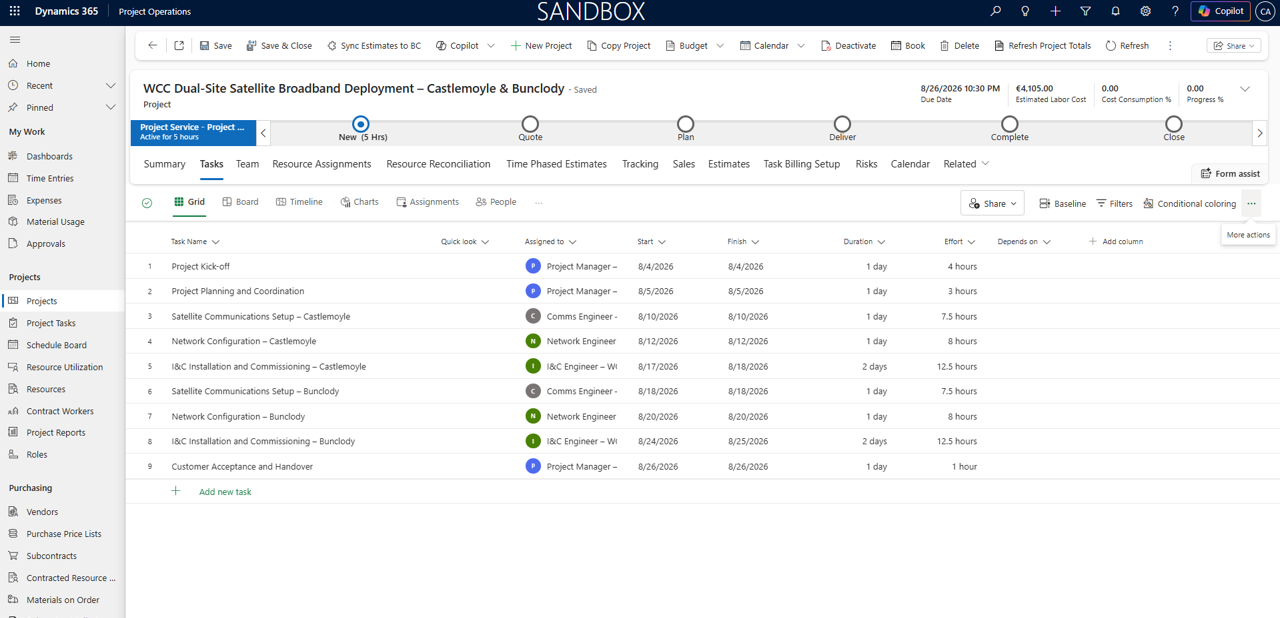
Project tasks and generic resource demand created in Dynamics 365 Project Operations.
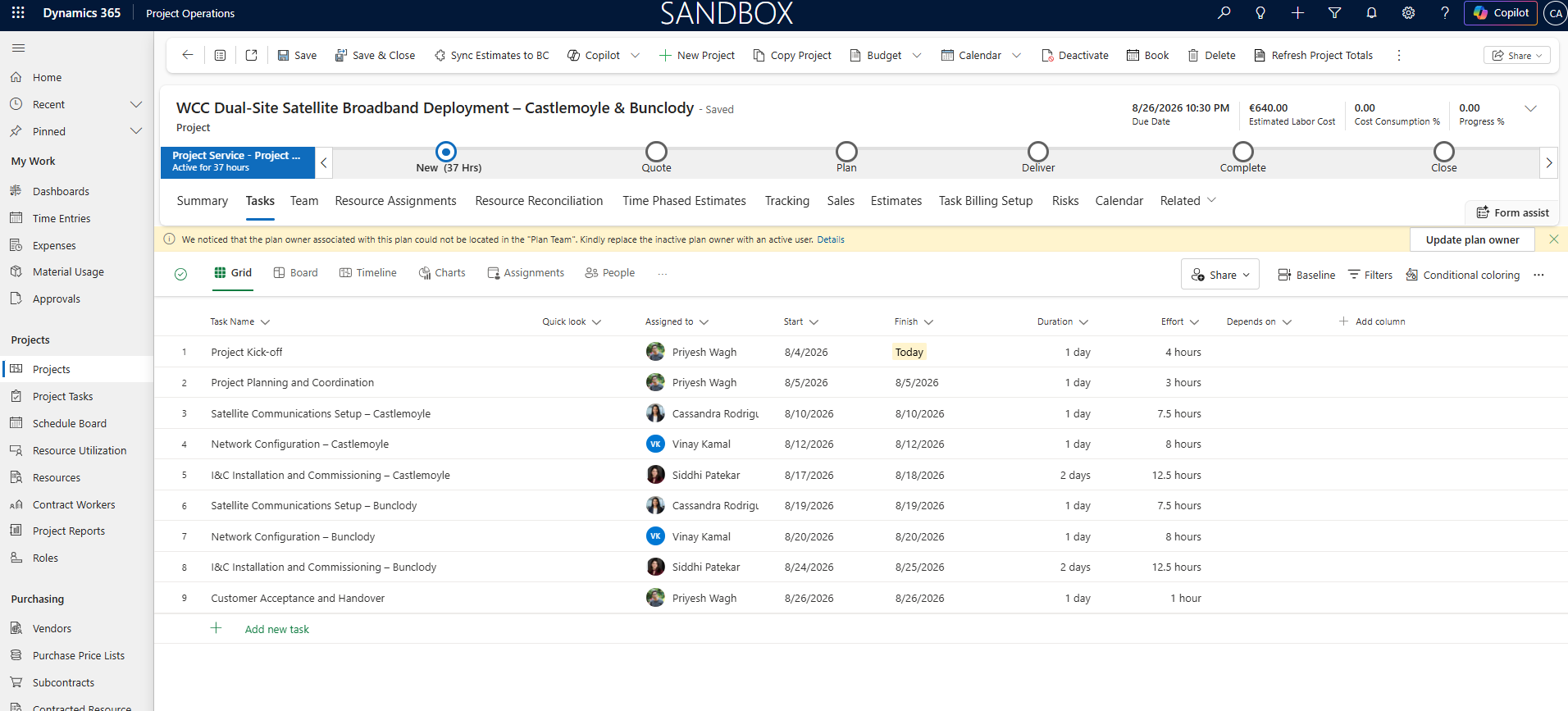
A named resource is selected based on role, skills and availability to fulfil the generic resource demand.
Business Central needed a financial planning view of the same work. Each Project Operations task therefore created or updated the corresponding BC Project Task. Resource assignments were translated into Project Planning Lines. When an assignment covered several working days, the integration could distribute planned quantity by date so finance could see when the effort was expected, not merely the total number of hours.
From Generic Demand to Business Central Planning Lines
The resource begins as role-based demand, becomes a named booking and then creates dated financial planning lines.
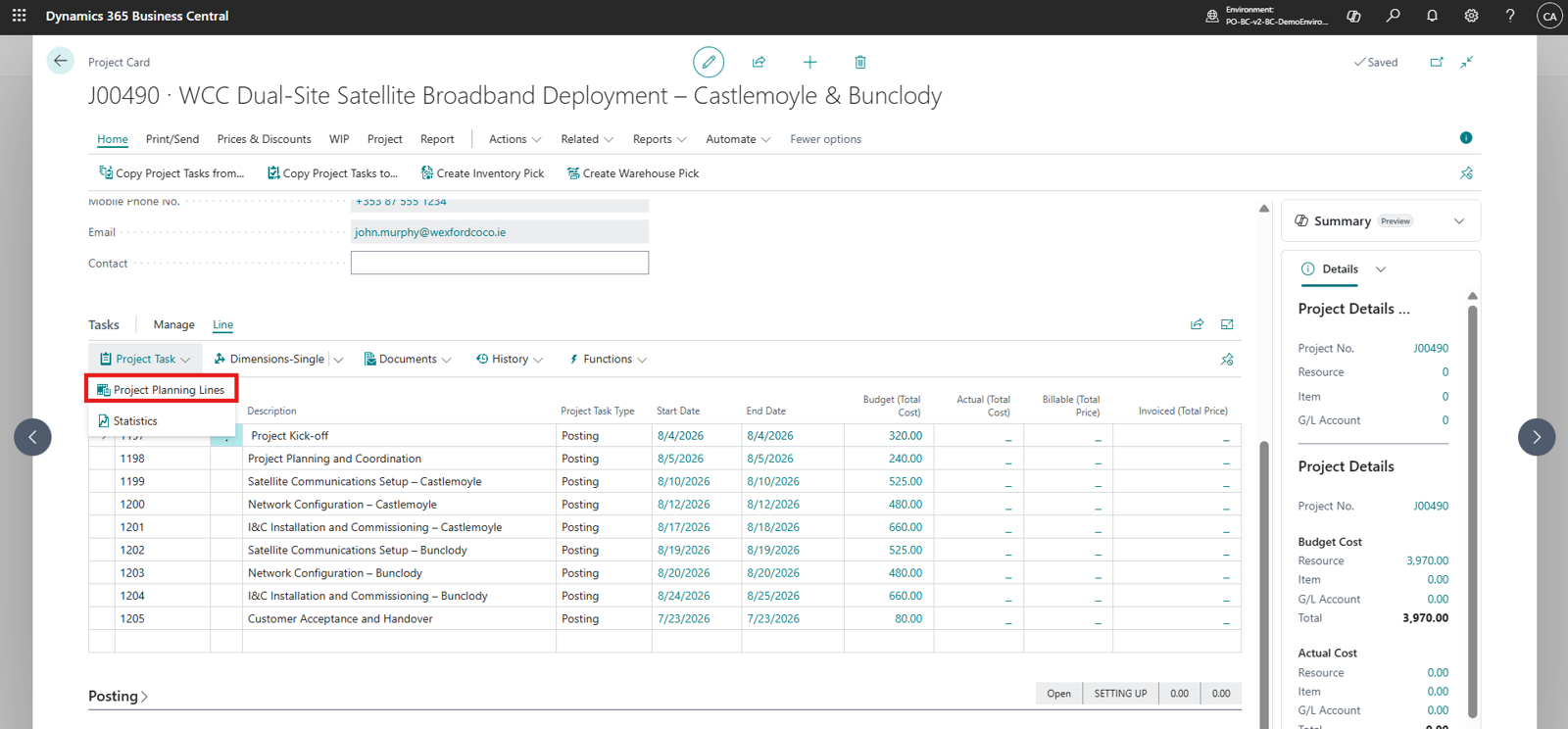
Project tasks and resource assignments synchronized as dated Project Planning Lines in Business Central.
Moving Actual Usage to Finance
Planning data answers what the team expects to consume. Actuals answer what the project has consumed. Keeping those concepts separate was essential.
Team members entered time against the correct project and task in Project Operations. Expenses and material usage followed the same project context. Submission alone did not make an entry financial. The approval step acted as the hand-off point: once the project approver accepted the entry, Project Operations created the relevant actuals, and the integration prepared the corresponding Business Central journal transaction.
Resource time was sent with the resource number, project task, work date, quantity, unit cost and sales price required by the target process. Material usage carried the item or product mapping and quantity. Expenses used an agreed mapping between transaction categories and BC accounts or project posting setup. Business Central then applied its own validations before posting.
This distinction protected both teams. The project manager could correct a draft or rejected entry before finance saw it. Finance received approved activity with the source project, task and transaction reference intact. If the integration retried after a temporary failure, the same reference was used to stop a duplicate journal line from being created.
Approved Usage Integration Monitor
Each approved Project Operations transaction retains its project and task context as it moves to the Business Central Project Journal.
| Source | Project Task | Target | Status |
|---|---|---|---|
| Time | Site Survey | BC Project Journal | Posted |
| Material | Hardware Installation | BC Project Journal | Posted |
| Expense | Commissioning | BC Project Journal | Needs Review |
Action required: The expense category mapping is missing. Correct the setup and retry the same source transaction; the unique reference prevents a duplicate journal line.
Billing, Posting and Payment
The project used more than one billing method, which is common in engineering and professional services. Labour was billed on a time-and-material basis from approved chargeable usage. Deployment deliverables were billed at fixed-price milestones. Treating the entire project as one billing type would have made the demonstration simpler, but it would not have represented the commercial agreement.
Project Operations used contract lines to keep the billing rules separate. The T&M invoice proposal drew from transactions that were approved and marked ready to invoice. The fixed-price portion followed its milestone schedule. After review, the project invoice was confirmed and sent to Business Central with the customer, currency, amounts, tax context, invoice lines and the source identifiers needed for traceability.
Business Central remained the place where finance performed the final checks and posted the sales invoice. The BC invoice number and status were then returned to Project Operations. When payment was applied in Business Central, the project-facing invoice could be updated again, allowing the account and project teams to answer a customer’s payment question without opening a second system or asking finance for a screenshot.
The return path mattered as much as the outbound invoice. Without it, integration would only move work from one team to another. With it, Project Operations showed the commercial status of the work, while Business Central remained the accounting source of truth.
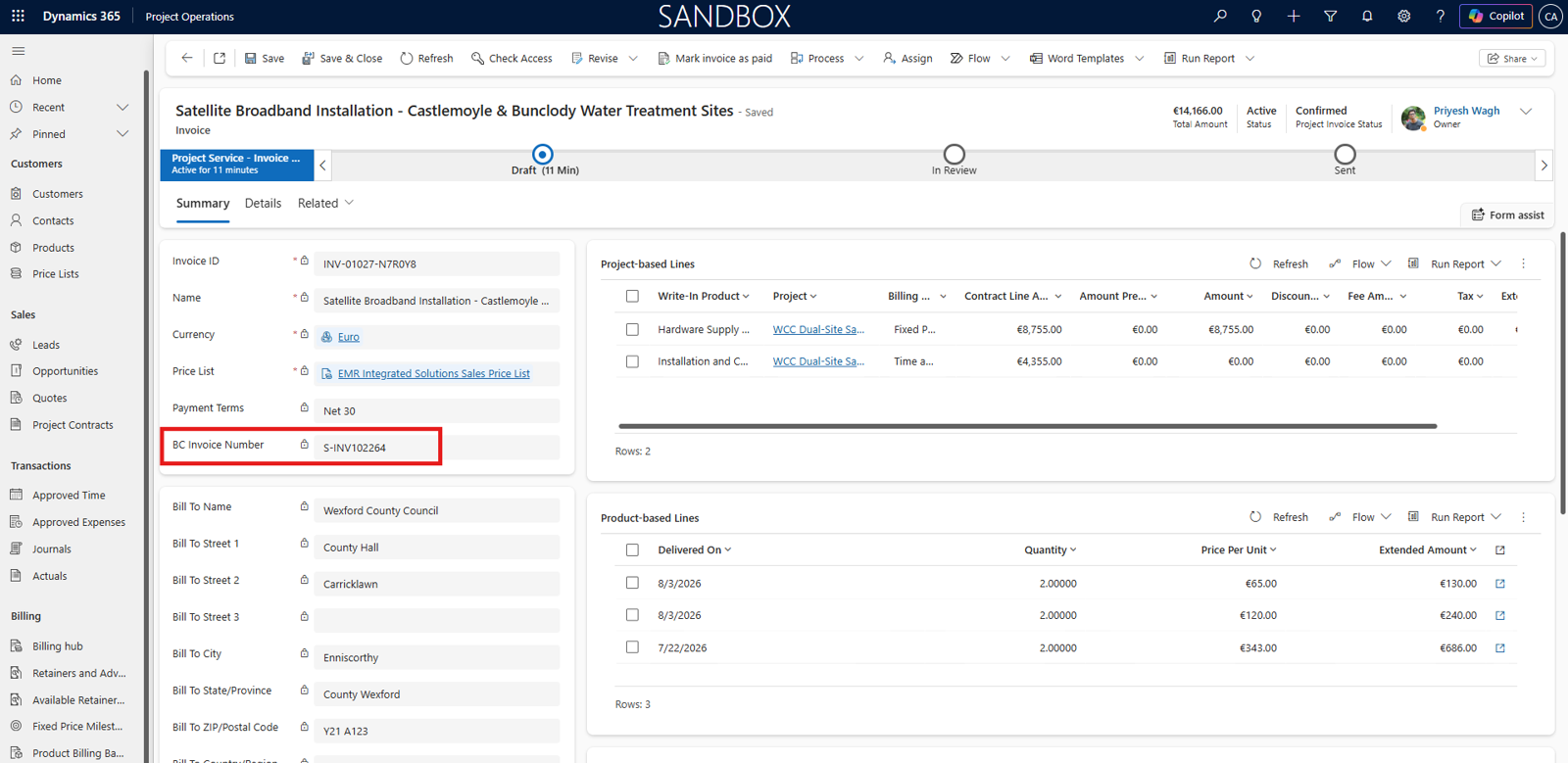
The customer invoice is created in Project Operations and synchronized to Business Central for financial posting.
Controls That Make the Integration Reliable
A successful demo can be built around the happy path. A successful production integration needs to expect records arriving out of order, temporary API failures, closed accounting periods, missing mappings and users correcting data after submission.
1. Stable identifiers and idempotency
Every synchronized business record retained the identifier of its counterpart. Transactions also carried a unique source reference. Before creating a journal or invoice, the integration checked whether that source had already been processed. This made retries safe and prevented duplicate lines when the source record was updated more than once.
2. Dependency-aware processing
A resource assignment cannot create a valid planning line when its BC Project Task does not yet exist. Instead of failing permanently, the record was held until the parent project and task were available. The same rule applied to customer, product and resource dependencies.
3. Clear price ownership
Cost and sales prices can exist in both applications, so the design explicitly defined which system supplied each value for each transaction. The integration did not silently mix a sales price from one price list with a cost from another. When a required price was missing, the transaction was stopped with a message that the support team could act on.
4. Readable errors and controlled retries
Technical exceptions were translated into business context: which project, task, resource or invoice failed, what field caused the issue, and whether the record could be retried. This avoided the common pattern where users repeatedly click a button and unknowingly create a second transaction.
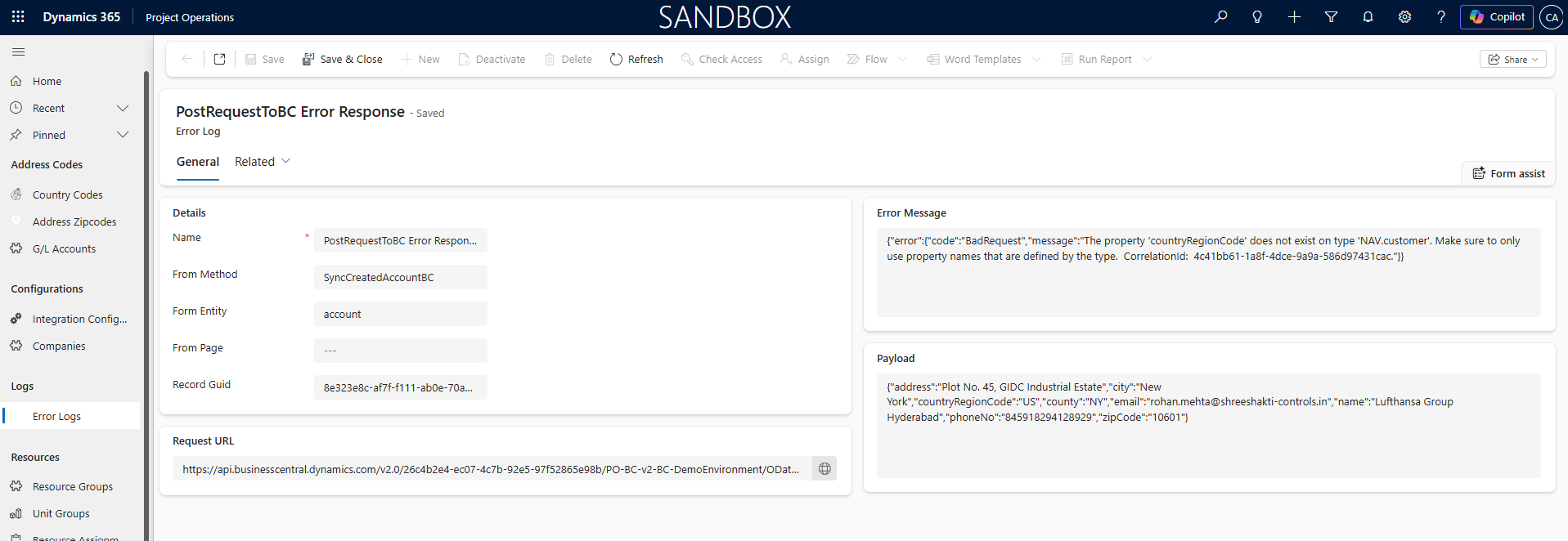
Integration logs provide traceability and actionable error details for synchronized transactions.
Business Impact
The immediate improvement was continuity. A quote could become a project, a project could become a financial plan, approved work could become cost, and billing could become a posted receivable without rebuilding the same transaction at every hand-off.
Project managers gained confidence that approved delivery activity was reaching finance with the right project and task. Finance received cleaner, traceable project transactions and retained control over posting. Leadership gained a more consistent view of planned effort, actual cost, billable value and invoice status.
Frequently Asked Questions
1. Is Project Operations integrated with Business Central out of the box?
Not for the complete project transaction lifecycle described here. Organizations generally need a partner solution or a custom integration to connect project planning, actual usage, invoices and financial status between the two applications.
2. Why not manage the entire project in Business Central?
Business Central includes strong project accounting capabilities, including projects, tasks, planning lines, usage, WIP and invoicing. Project Operations adds a delivery-focused experience for project sales, contract structures, detailed scheduling, resource demand, bookings, time and expense approval, and project collaboration. The right combination depends on the complexity of the organization’s delivery model.
3. Do generic resources need to exist in Business Central?
Not always. A generic resource in Project Operations can represent early demand for a role before a person is selected. The integration design may send the generic assignment as a planning placeholder, or wait until a named resource is booked. The correct approach depends on whether finance needs role-level planning or only named-resource planning lines.
4. When should time, expense and material transactions move to Business Central?
The safest trigger is normally an approved business state, not the initial draft or submission. Approval confirms that the project and task are correct and that the transaction is ready to influence project cost or billing. The exact trigger should still reflect the organization’s control policy.
5. Can one project contain both fixed-price and time-and-material billing?
Yes. Project Operations contract lines can separate billing methods within the same engagement. The integration must preserve the source contract line and billing context so that the correct invoice logic is applied downstream.
6. How are duplicate journals and invoices prevented?
The integration stores a unique source transaction reference and checks it before creating a BC record. Retries update or continue the original transaction rather than creating another one. Number sequencing should also be controlled in the target system instead of relying on a default or repeated line number.
Conclusion
Project Operations and Business Central do not need to compete for ownership of the project. They need a well-defined contract between them.
Project Operations can remain the place where the organization sells, plans, staffs and delivers the work. Business Central can remain the place where finance validates, posts, recognizes and reports its financial effect. The integration connects those responsibilities through stable mappings, approved transaction triggers, dependency-aware processing and a return path for invoice and payment status.
The result is more than synchronized records. It is a project lifecycle in which delivery and finance are looking at the same business event from two appropriate perspectives—and the numbers agree.
Ready to connect project delivery with financial control?
If your teams manage sales and delivery in Dynamics 365 Project Operations while finance works in Business Central, CloudFronts can help you design a dependable sales-to-billing process around your project model.
Explore the CloudFronts PO-BC Integration Module 2.0 on Microsoft Marketplace to learn more about the solution and its capabilities.
Contact transform@cloudfronts.com to discuss your PO–BC integration requirements.
Technical reference note: Microsoft documents Project Operations as supporting project contracts, task planning, resource assignments, time entry approvals and actuals. Microsoft also documents Business Central project tasks, planning lines, journals, invoicing and WIP. The transaction flow in this article describes a partner-led PO–BC integration pattern and should be validated against each organization’s deployment, posting policy and customization scope.
