From Project Reporting to Project Intelligence: How AI is Transforming Project Management
Summary
We built a Databricks Genie agent for our own PMO at CloudFronts, running on Dynamics 365 data held in a Databricks lakehouse. Project managers ask a question in plain English and get an answer back across resource utilization, time tracking, billing and milestones, tickets and cases, and project status. This blog covers what the agent does, what email sentiment analysis shows that the numbers do not, and how it works inside Microsoft Teams.
Table of Contents
Introduction
This started inside our own PMO — the Billing and Delivery Excellence function at CloudFronts.
We learned about a project risk when someone escalated it. The warning signs came earlier than that, in email threads and internal notes, but reading every thread across every project each week was not work anyone could take on.
The rest of the picture was split across systems. Billing held the invoice that had passed its due date, delivery held the milestone that had moved, support held the ticket that had been open for weeks. No one screen put those next to each other, so the PMO opened each project every week and compiled the status by hand.
So we built the agent for ourselves first: a Databricks Genie agent running on Dynamics 365 data held in a Databricks lakehouse, which project managers query in plain English.
The Challenge
Dynamics 365 Project Operations holds everything a project manager needs — resource assignments, logged hours, billing milestones, project budgets, and delivery timelines. The data is there. The challenge is that getting specific answers from it still requires navigating multiple modules, running reports manually, and in many cases, exporting to spreadsheets to piece things together.
This created a set of questions that were surprisingly hard to answer:
- Identifying which resources are overutilized or sitting idle requires pulling allocation data and comparing it manually against actual hours logged
- Understanding whether a project is at risk means cross-referencing milestone progress, budget consumption, and team capacity — a process that can take hours
- Billing questions — what has been invoiced, what is pending, what is approaching a milestone — require moving between finance and project views that are not always aligned
- Status updates for leadership need to be manually compiled, often pulling from data that was accurate yesterday but may have shifted today
The result is that project managers operate on a lag — making decisions based on reports that reflect the past, not the present, and spending time producing those reports instead of acting on them.
The Solution — A Genie Agent Built on Databricks and D365 Project Operations
We built a Genie agent on Azure Databricks, connected to Dynamics 365 Project Operations. Project managers can now ask questions in plain English and get answers drawn directly from their project data — without building a single report.
The agent is designed around the areas that matter most to project managers on a daily basis:
a. Resource Utilization
The agent can answer questions about who is overallocated, which resources have capacity available, and how utilization is trending across the team or a specific project. What previously required pulling allocation reports and comparing them against timesheets can now be answered in a single question.
b. Time Tracking
Project managers can ask which team members have not logged hours for the week, where hours are being spent versus what was planned, and whether a specific project is tracking within its estimated effort. The agent surfaces this from logged timesheet data in D365.
c. Billing and Milestones
The agent connects billing milestone data with project progress, allowing project managers to ask what is due for invoicing, which milestones are approaching, and whether any billing triggers are at risk of being delayed. This brings finance and delivery into the same conversation.
d. Tickets and Cases
The agent surfaces open tickets and cases linked to a project — how many are open, which are overdue, how they are distributed across team members, and whether any are blocking delivery. Project managers can ask for a snapshot of issue health across one or multiple projects without navigating case queues manually.
e. Email Sentiment Analysis
One of the more telling signals of how a project is going is often hiding in the inbox. The agent analyses email communication patterns and sentiment across project stakeholders — flagging when tone is shifting, when a client’s responses are becoming shorter or more urgent, or when concerns are being raised repeatedly. This gives project managers an early, qualitative read on relationship health before it shows up in a formal escalation.
f. Project Status
Instead of assembling a status report, a project manager can ask for a summary of where a project stands — budget consumed, milestones completed, risks flagged, and remaining timeline. The agent compiles this from D365 data and presents it in plain language, ready to share or act on.
The conversation does not stop at one question. A project manager can ask a follow-up — drill into a specific resource, filter by project phase, or compare two projects side by side — and the agent follows the thread, refining its response at each step.
Available directly in Microsoft Teams
The Genie agent is also available as a Databricks App inside Microsoft Teams — meaning project managers do not need to switch tools to get answers. They can ask questions about their projects, resources, and billing directly from the Teams interface they already work in every day.
See It in Action
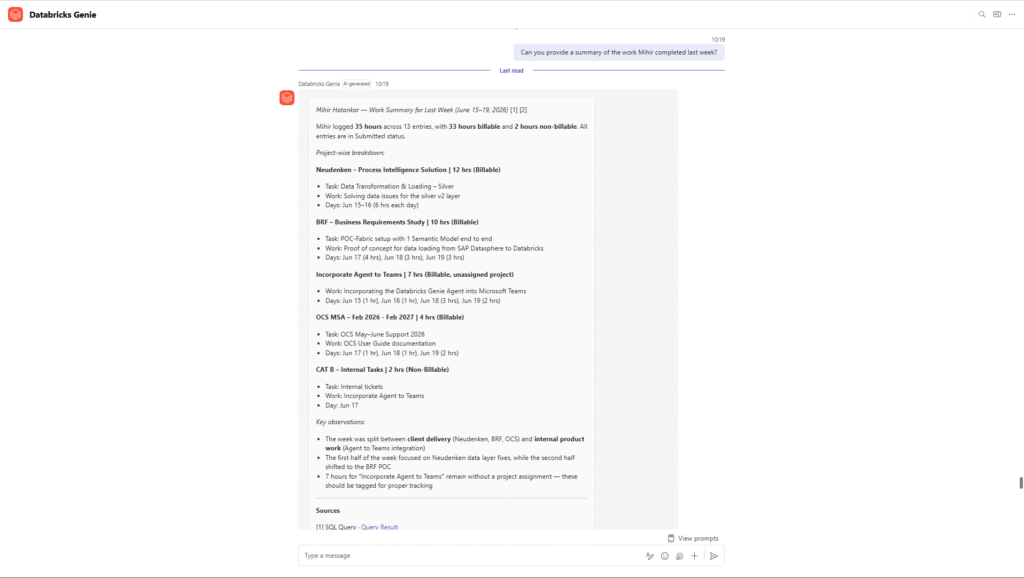
Weekly Work Summary — Time Tracking in Action
A project manager asks Genie for a summary of work completed last week. The agent returns a full breakdown — total hours logged, billable vs non-billable split, project-wise distribution, and key observations — in seconds.
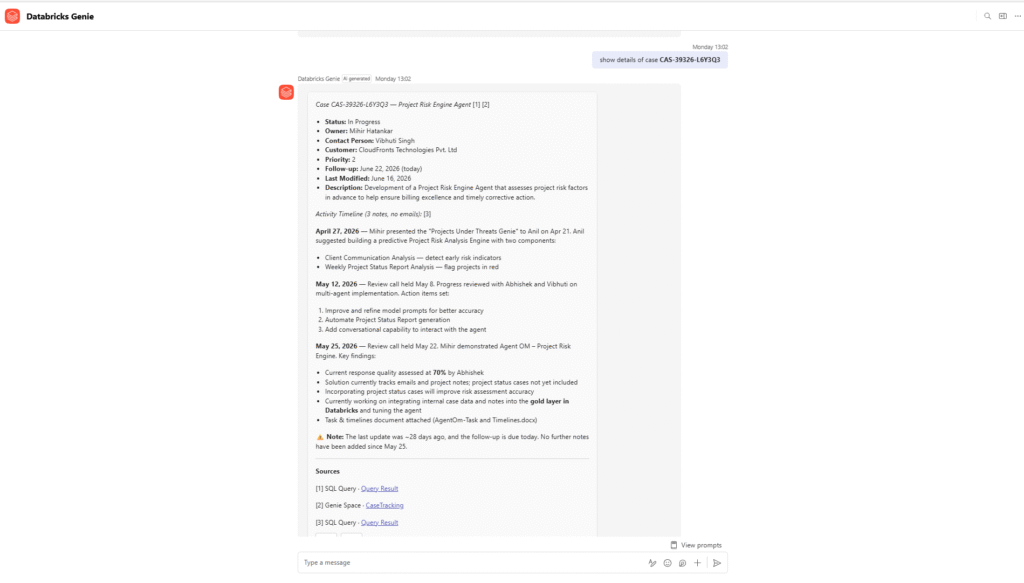
Case Detail View — Tickets and Cases in Action
A project manager asks for details on a specific case. The agent surfaces the full case record — status, owner, priority, activity timeline, and a follow-up alert — without the manager needing to open D365 at all.
Business Impact
The shift from manual reporting to conversational project intelligence changes how project managers spend their time and how quickly problems get caught:
- Project managers spend less time compiling reports and more time managing delivery — the questions that used to take hours to answer now take seconds
- Resource conflicts and overallocation are caught earlier — before they affect delivery timelines or team burnout
- Billing accuracy improves — milestone triggers and invoice readiness are visible, reducing delays in revenue recognition
- Ticket and case visibility means delivery blockers are identified and escalated faster — nothing stays buried in a queue unnoticed
- Email sentiment analysis gives an early signal on stakeholder health — project managers can address concerns before they become escalations
- Leadership updates become easier to produce — a project manager can pull a plain-language summary in minutes rather than assembling it from multiple sources
Frequently Asked Questions
1. Does this replace Dynamics 365 Project Operations?
No. D365 Project Operations remains the system where all project data is managed — resources, timesheets, billing, and milestones. The Genie agent sits on top of that data and makes it conversationally accessible. It adds an intelligence layer without changing how the core system works.
2. How does the agent get data from D365 Project Operations?
Project Operations data is synced into the Azure Databricks Lakehouse using Logic Apps pipelines. Once in Databricks, the data is governed through Unity Catalog and made available to the Genie agent.
3. How long does it take to set something like this up?
It depends on the state of the existing D365 data and the Databricks environment. For organizations already running Project Operations with reasonably clean data, a working Genie agent covering the core areas — utilization, time, billing, and status — can typically be up and running within a few weeks.
Conclusion
Project managers already have access to the data they need. It lives in Dynamics 365 Project Operations — in timesheets, resource plans, billing schedules, and milestone records. The gap has never been the data itself. It has been the time and effort it takes to turn that data into an answer.
A Databricks Genie agent changes that relationship. Instead of building reports, project managers ask questions. Instead of operating on a lag, they work from answers that reflect where the project stands right now. The shift is not just in speed — it is in how project intelligence gets used, and how much of a project manager’s time goes back to actually managing the project.
Watch the webinar
We walked through the full solution in a recorded session — the architecture, the risk engine, and a live demo of the Genie agent.
Watch the recordingInterested in how this was set up? We will be publishing a detailed technical walkthrough and the features of this solution in our next blog. Stay tuned.
About the Author