Using Dataverse MCP with Claude to Unlock Business Insights for Senior Leaders
Summary
MCP Servers are making their way into the mainstream, connecting AI applications together with the AI tool of your choice to utilize them. One such powerful MCP Server, amongst several built by Microsoft, is the Dataverse MCP server. This post walks through what Dataverse MCP brings to users across five capability areas, practical use cases by role, the operational efficiency gains we’ve seen internally at CloudFronts, and answers to the questions this naturally raises around data security and scope.
Table of Contents
A Quick Recap on MCP Servers
Like several business and personal applications have come up with their own MCP Server, one such powerful MCP Server amongst many by Microsoft is the Dataverse MCP server.
Before talking about some use cases, here’s a quick recap of what MCP Servers in general are, to set some context for readers stumbling upon “MCP Servers” for the first time:
1They are an API connection between applications, but capable of understanding human language to connect and execute.
2Don’t need technical knowledge to connect different applications and interact with each other functionally, operating on natural language.
3Widely used by AI Agents to talk to each other and get things done.
4Continue to work after the initial setup.
So, given that, here’s what Dataverse MCP brings to users.
Dataverse MCP Capabilities
Briefly, there are 5 main categories in which Dataverse MCP Servers help:
1Discovery — Use Dataverse MCP to explore the schema of your Dynamics 365 CE / Dataverse environment. Assuming you are a technical team member, you need to explore behind the scenes when customizing solutions, which is where Dataverse MCP can be useful. It’ll go under the hood and make sense of your query to bring you the technical details, instead of you having to remember how it is set up and collate that information. Useful for Solution Architects.
2Query — Query data in simple language by just describing, in human language, what you would otherwise design an Advanced Find for. And when it returns this data, it can go a step further and process or work on the info you asked it to fetch (maybe package it in an Excel file, ready to download from your AI application).
3Record CRUD — Although it’ll ask you for permissions, you can ask your AI tool, connected through Dataverse MCP, to create, update, and delete records. The other day, I just made my Time Entries for the week and asked it to collect Invoice information for a custom entity and bulk-update a custom status on some contacts. So, anything that would need you to go into the system and scrub through forms can be done using Dataverse MCP.
4Schema — I would advise using this carefully. Dataverse MCP is capable of also updating the schema, like creating new tables, fields, etc. If done correctly, with the correct publisher and established naming conventions, this is possible. But I did find myself stuck with incorrect schema creation and a bit of a mess. So, this one is to be used carefully. At times, the schema definition is misunderstood, and you’ve already altered what’s set.
5Skills/Playbooks — Upsert and Delete Skills. This topic on Dataverse Skills deserves a separate blog post in itself.
Use Cases by Role
To keep things simple, here are some common use cases by role on how Dataverse MCP can be useful:
1Solution Architect — you can use Dataverse MCP to query metadata/schema to help identify what the developers have done, if going through developer documentation is too much to go through.
2Manager — if you want to query some data, you can do this by simply establishing some common vocabulary as context first, and then letting Dataverse MCP query what you need, then process that info retrieved within the chat context to make better sense of what you need.
3Developer — if you want to create a series of tables and a templatized field-set in those, you can simply do so by uploading an Excel file and utilizing Dataverse MCP to create the right fields and schema based on the customizations described. Doing this at scale for multiple customers is painstaking and time-consuming, so utilize Dataverse MCP to get this turned around quickly.
4Even your own data — to identify pitfalls and take measures immediately. Every Monday I need to check where I should pay attention the most and get sticking issues out of the way, and this gives me a good understanding, or a high-level picture, of where I need to pay attention.
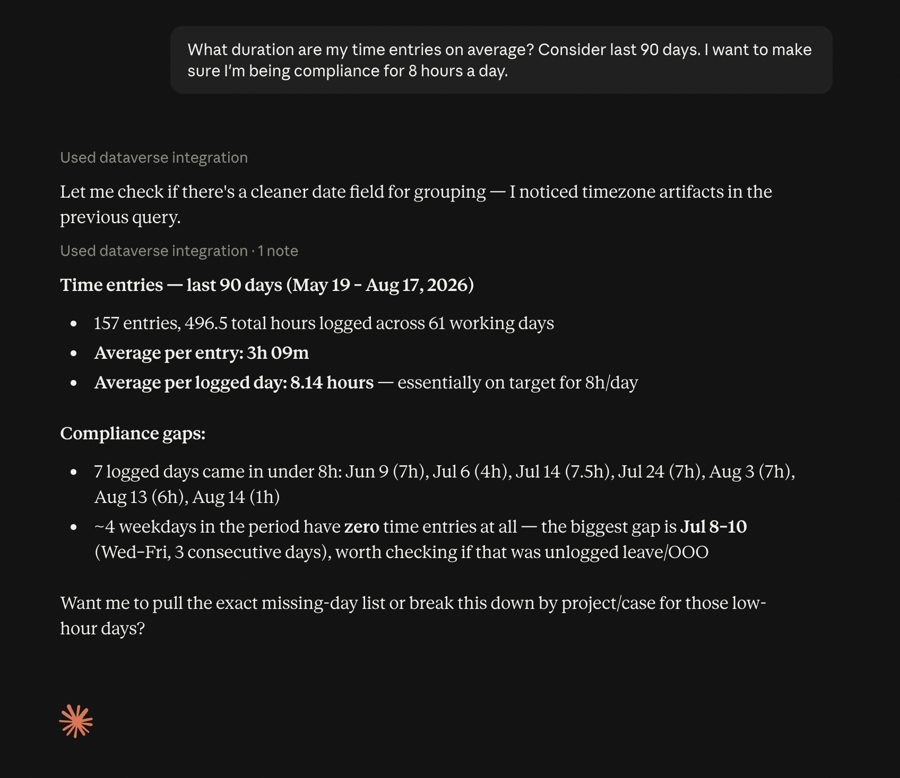
A weekly check-in: asking Claude, connected via Dataverse MCP, to review time entry compliance over the last 90 days.
Business Impact
We have enabled Dataverse MCP for all team members to help with their operational efficiencies.
Business Impact here is operational efficiency gains — if this saves me an hour a day, it saves me 20 hours a month, and about 240 hours a year, which is a significant gain on a broader time horizon.
So, if I multiply this by 15 team members, then we are collectively saving 3,600 hours a year, which can be taken back to focus on growth and client projects more so.
FAQs
Now, this naturally brings some questions to mind, which I thought to anticipate and answer:
1Is the data being used by Claude?
No data is copied over to Claude or its models — only MCP (Model Context Protocol) is used to have a conversation with your existing data, in this case Dataverse. No data is sent anywhere.
2Will users be able to query and modify data belonging to someone else?
No — only data which belongs to self is available for any operation. It follows the security architecture of the hosting SaaS application itself, in this case Dynamics 365 CRM / Dataverse.
3Does this replace using Dynamics 365 CRM / PowerApps entirely?
Not at all — this is only an augmentation of the implementation itself, not a replacement. While its features are still limited today in terms of what is possible, it serves great for the use of Dynamics to make sense of business data, use it in Excel or PowerPoint, and do any calculations. This is a great tool to give you a summary.
Conclusion
Just by starting the Dataverse MCP server on Claude (or any other AI tool, for that matter) paves the way to more ideas as you uncover the first few use cases that work for you.
This can empower teams at scale, and the returns are exponential in terms of freeing up time for your team for other growth activities, rather than them spending time in Power Platforms scrubbing through their tasks for hours, which can be done in minutes through simple conversations.
Want to Put Dataverse MCP to Work for Your Team?
If you’re exploring how Dataverse MCP and Claude can fit into your Dynamics 365 environment, we’d be glad to talk through where it makes sense to start.
Contact UsPriyesh Wagh is a Practice Manager at CloudFronts and Microsoft AI ERP MVP. Priyesh works with his team in delivering Dynamics 365 business applications implementation to CloudFronts global customers, mainly in the US and Europe. For the past few years, Priyesh has been involved deeply in working on Project Operations and ERP integrations. Priyesh joined CloudFronts in 2014, and since then has been working on Dynamics 365 CRM applications, expanding his experience to ERP as well. Connect with Priyesh on LinkedIn.
Related posts:

D365 CRM - Generating Emails using JavaScript via user actions for US based Azure & AI services ...
How a Multi-Country Infrastructure Group Evaluated One vs Two Production Environments in Dynamics 36...
How an Australian Linen Company Made Quote Approvals Secure with One Time Links in Dynamics 365