

Building a Controlled Booking-to-Time Entry Import Framework Inside Dynamics 365 Project Operations for Texas-Based Operational Security & Cybersecurity Firms
Summary
- Two Texas-based firms — one in Cybersecurity, another in Operational Security — required a streamlined and controlled Time Entry (TE) creation process inside Dynamics 365 Project Operations.
- Native D365 Project Operations limitations around Project Task visibility, booking-driven TE creation, and inconsistent resource submissions created operational inefficiencies.
- A fully customized solution was implemented directly inside Dynamics 365 CRM using HTML Web Resources, JavaScript, Dataverse Web API, Ribbon Enable Rules, and custom plugins.
- The solution centralized TE creation under Project Managers and Project Approvers, enabling controlled and secure booking-based TE management.
- A custom booking import framework dynamically surfaced only authorized projects and resources based on Project Approver relationships.
- Custom plugin logic and Resource Assignment–based task resolution automated Project Task mapping for accurate Time Entry creation.
- Key capabilities delivered included controlled booking imports, role-based visibility, automated task association, external comments support, and bulk TE creation.
- Dynamic filtering ensured Project Managers could only access resources and bookings associated with projects they were authorized to manage.
- The entire experience operated natively inside Dynamics 365 Project Operations without external portals, Power Apps screens, or third-party applications.
- The implementation reduced manual effort, improved TE submission reliability, increased operational flexibility, and enabled more accurate tracking of actual project work.
Table of Contents
Two Texas-based firms operating in the Cybersecurity and Operational Security space relied heavily on Dynamics 365 Project Operations for project delivery tracking, resource management, and operational execution. As project operations scaled, Project Managers and Project Approvers required a faster and more controlled mechanism for creating Time Entries (TEs) directly from resource bookings.
The organizations needed a solution that could simplify booking imports, improve Project Task mapping, enforce role-based visibility, and reduce the dependency on individual resources for manual TE submissions. Operationally, Project Managers were often responsible for validating and entering actual work performed, making the standard TE process inefficient and time-consuming.
Key Challenges
- Standard Dynamics 365 Project Operations behavior did not fully support project-task-aware Time Entry creation from bookings.
- Project Task values were not consistently available across Resource Requirements and bookings in several PO environments.
- Resource-driven TE submission resulted in inconsistent and delayed operational reporting.
- Project Managers lacked centralized visibility and controlled access to resource bookings across approved projects.
- Native booking import and TE creation workflows lacked flexibility for operational governance and scalability.
Goals of the Solution
- Centralize Time Entry creation under Project Managers and Project Approvers.
- Enable controlled booking imports with role-based project visibility.
- Automate Project Task association during TE creation.
- Allow bulk creation of booking-driven Time Entries directly inside CRM.
- Improve operational accuracy, flexibility, and governance without relying on external applications or custom portals.
1. Native Booking-to-Time Entry Limitations
Standard Dynamics 365 Project Operations behavior did not consistently expose Project Task information through Resource Requirements and Bookings. This created gaps in task-aware Time Entry creation and forced users to manually reconstruct operational context during the TE process.
2. Lack of Controlled Booking Visibility
Default system behavior provided broader booking visibility than operationally required. The organizations needed a controlled access model where only designated Project Managers and Project Approvers could view and manage booking imports for authorized projects.
3. High Manual Effort in Time Entry Creation
Project Managers and operational teams spent significant time manually entering project references, tasks, durations, and external comments for each Time Entry. This increased administrative overhead and reduced operational efficiency.
4. Inconsistent Resource-Driven Submission Process
The organizations faced reliability challenges with resource-submitted Time Entries, leading to delays, missing entries, and inconsistencies in operational reporting. Project Managers required centralized ownership over TE creation to ensure accurate work tracking.
5. Fragmented User Experience
Users were required to navigate across multiple Dynamics 365 screens and entities to complete routine booking import and Time Entry operations, making the process cumbersome and inefficient for daily operational usage.
6. Scalability and Maintainability Concerns
The firms required a lightweight and scalable solution that could operate natively within Dynamics 365 Project Operations without introducing unnecessary Power Apps layers, external portals, or high-maintenance custom applications.
Architecture Diagram and Flow
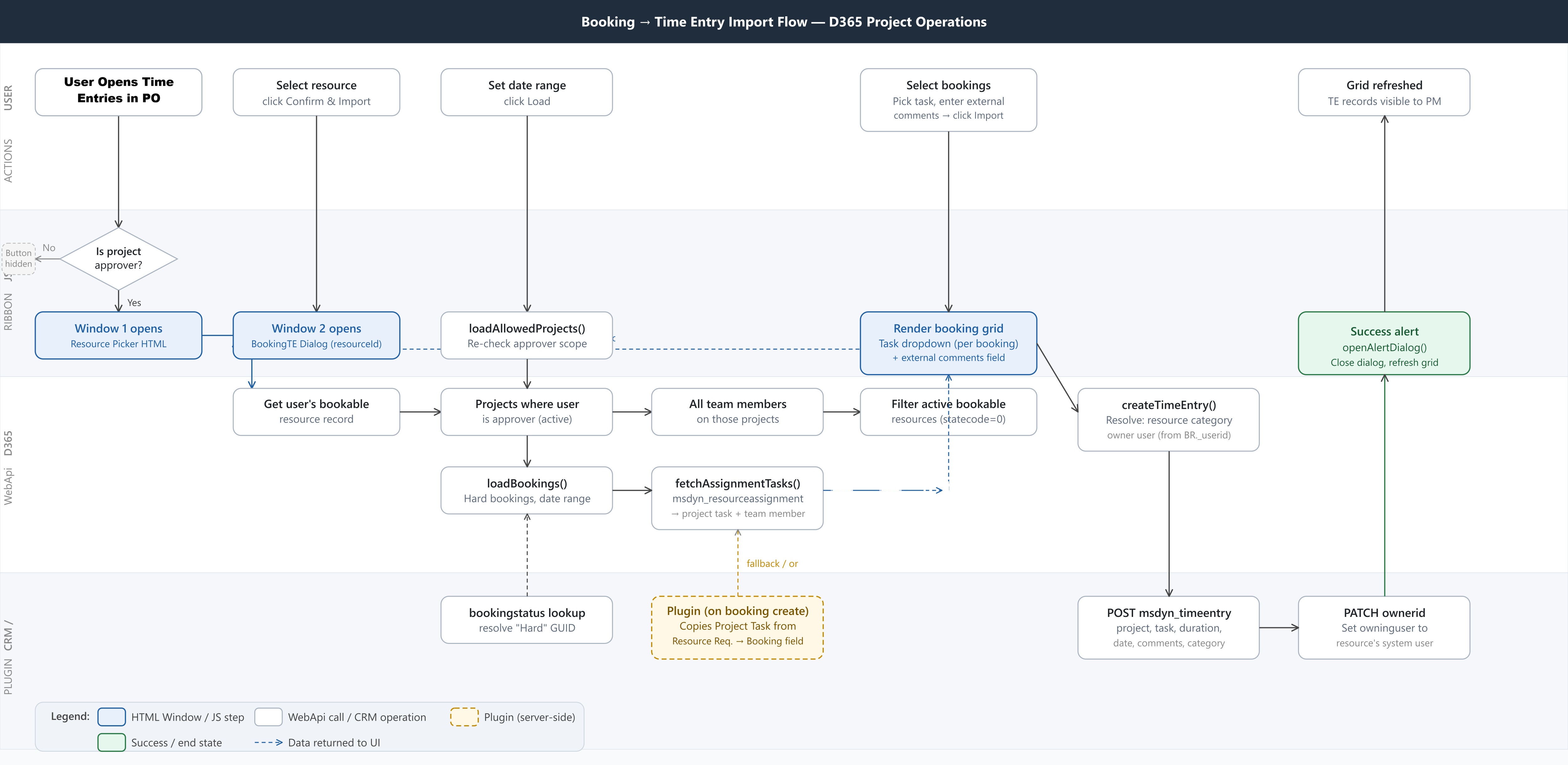
Figure: Complete Frontend – Backend behaviour of the TE Automation Module.
Dynamics 365 Ribbon Workbench
A custom “Import Resource Bookings” ribbon action was introduced to provide controlled access to the booking import process only for authorized Project Managers and Project Approvers.
JavaScript + Dataverse Web API
JavaScript and Dataverse Web API were used to handle dynamic project filtering, approver validation, booking retrieval, task mapping, and automated Time Entry creation directly inside CRM.
HTML Web Resources
Two custom HTML-based interfaces were developed:
- Resource Selection Interface — controlled resource visibility and selection
- Booking Import & TE Creation Interface — booking imports, task selection, external comments, and bulk Time Entry creation
Dataverse Plugin Layer
A lightweight custom C# plugin was implemented to support Project Task resolution, task validation, and booking-to-Time Entry automation scenarios not fully supported natively in Dynamics 365 Project Operations.
Dataverse Entities Involved
The solution leveraged multiple Project Operations entities:
msdyn_project
msdyn_projectteam
msdyn_resourceassignment
msdyn_projecttask
bookableresource
msdyn_resourcerequirement
bookableresourcebooking
msdyn_timeentry
Together, these entities enabled secure, project-aware, and task-aware operational workflows directly inside Dynamics 365 CRM.
Entity Relationships
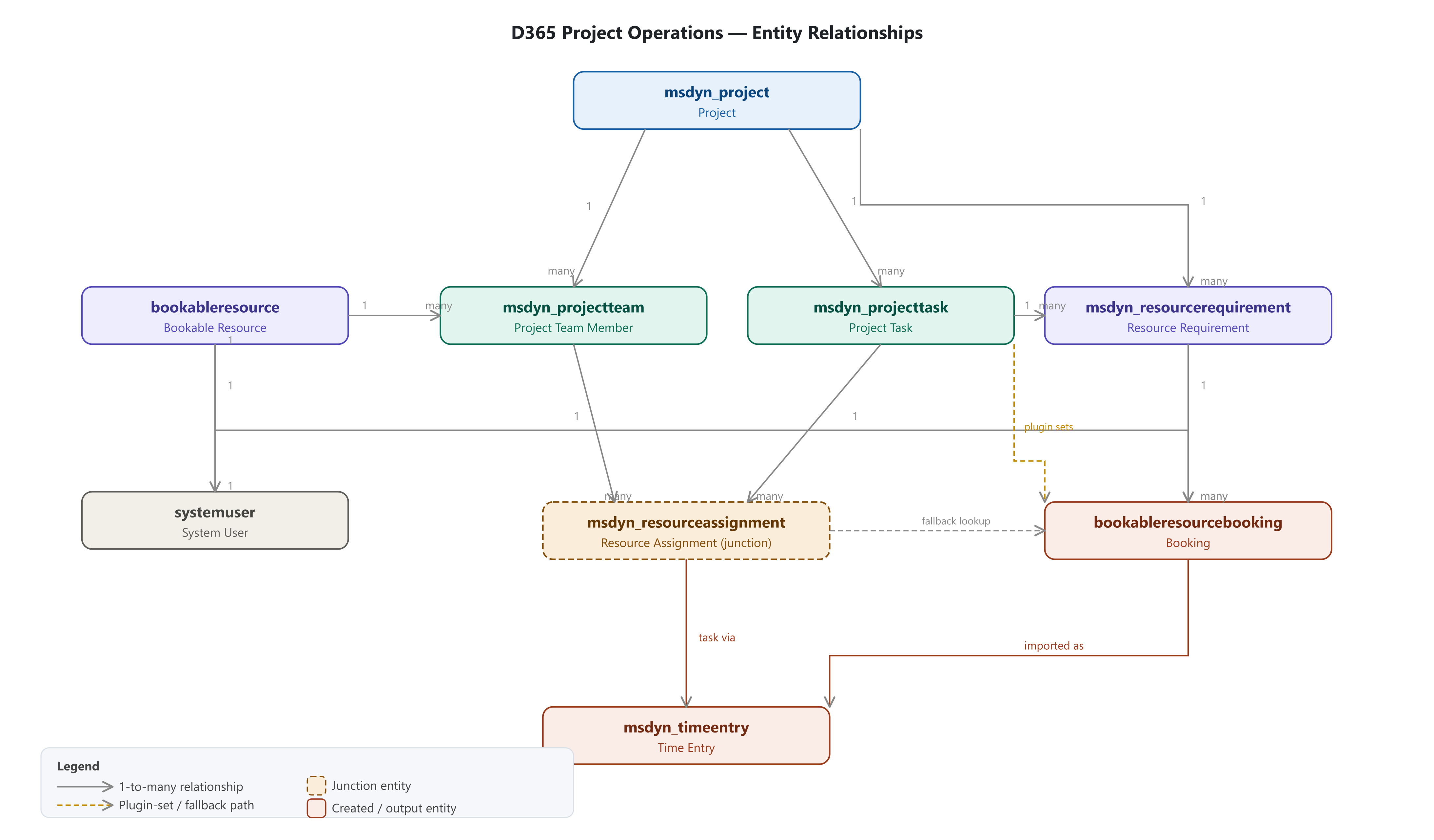
Figure: Relationships and associations of the involved entities.
1. Role-Controlled Ribbon Visibility
A custom ribbon action was implemented to ensure only authorized Project Managers and Project Approvers could access the booking import functionality. Visibility was dynamically controlled based on project approval relationships inside Dynamics 365.
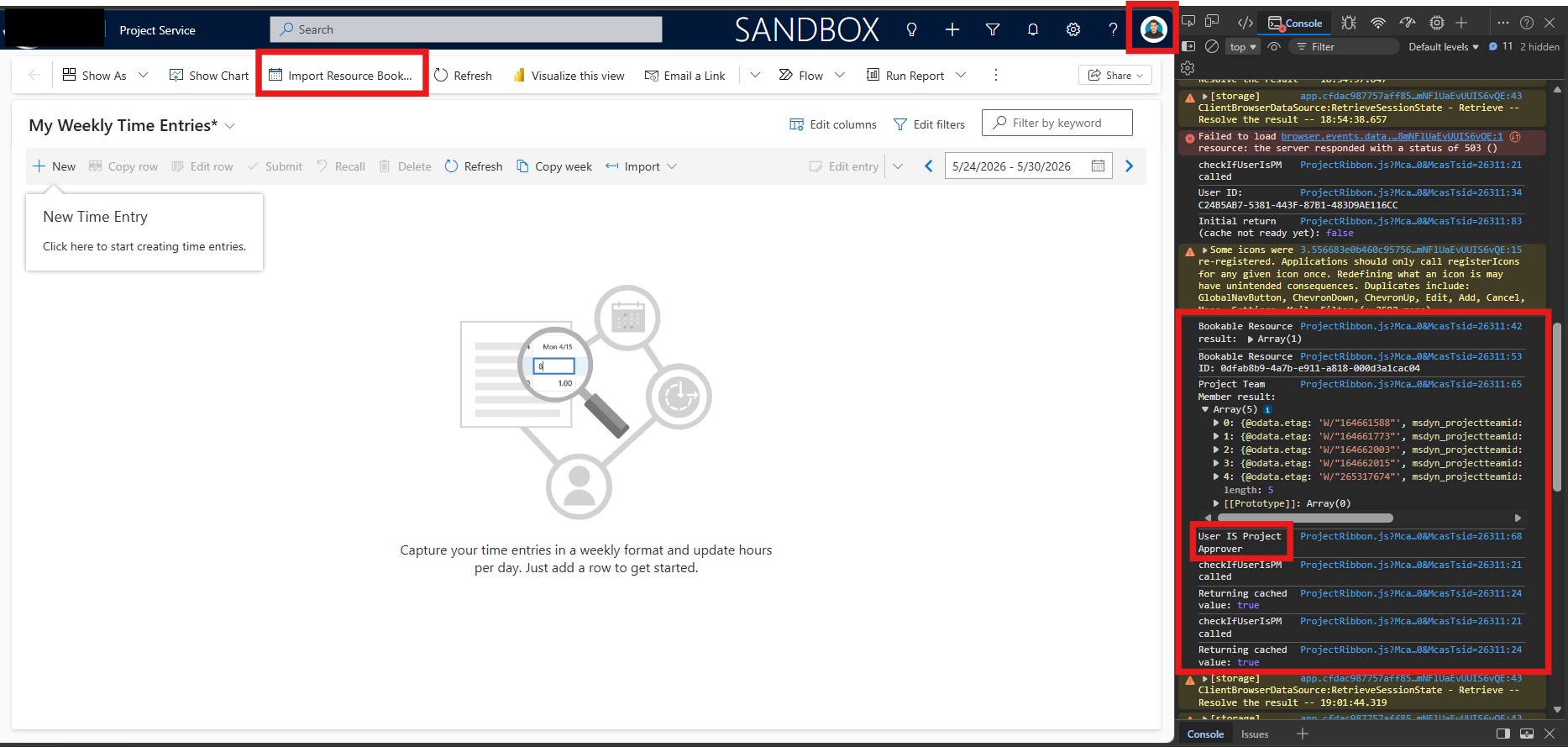
Figure: Case 1: When Logged in as a Project Approver/Manager.
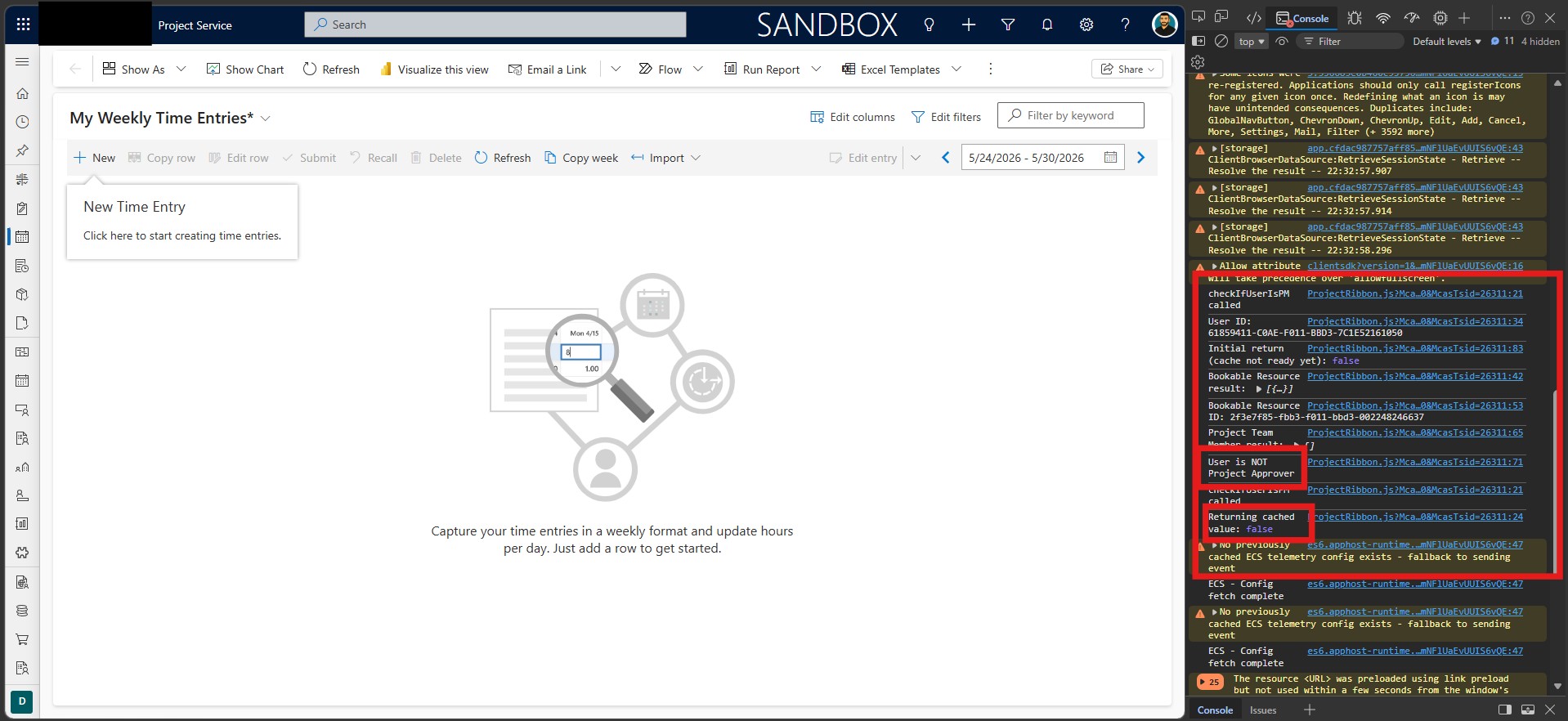
Figure: Case 2: When NOT Logged in as a Project Approver/Manager.
2. Resource Selection Experience
A custom resource selection interface was developed to display only eligible resources associated with projects managed by the logged-in approver. This provided secure and simplified operational visibility.
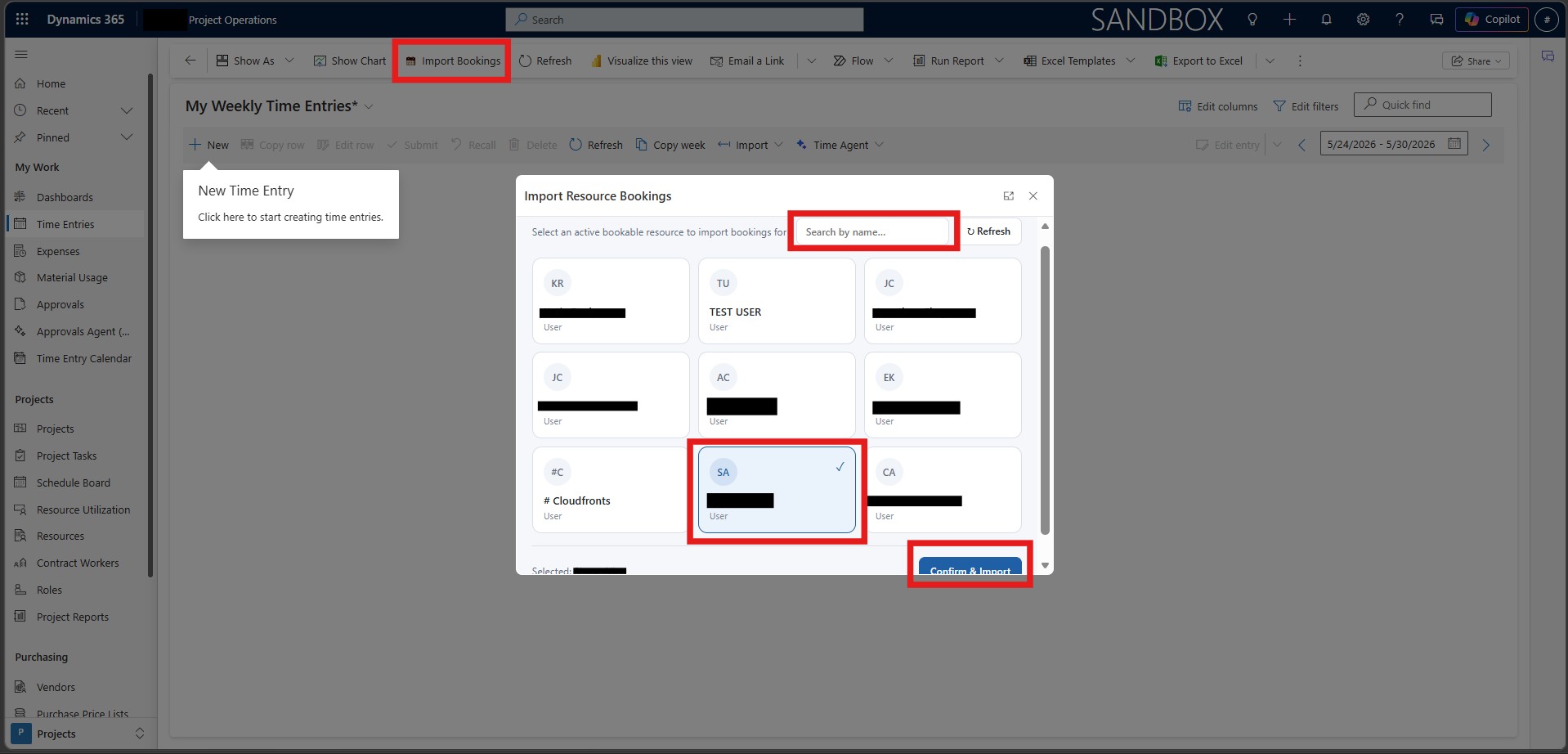
Figure: Bookable Resource Selection from a list of Active Bookable Resources, which are under any Project, where the current user is a Project Approver/Manager.
3. Booking Retrieval Engine
A lightweight booking retrieval framework was implemented using Dataverse Web API to dynamically load bookings based on selected resources, date ranges, and project authorization rules.
4. Dynamic Project Task Resolution
The solution introduced automated Project Task resolution using two complementary paths:
- Plugin path: On booking creation, a C# plugin copies the Project Task from the linked Resource Requirement directly onto the Booking record.
- Resource Assignment path: Where the plugin field is null, the solution queries
msdyn_resourceassignment— the junction entity linking Project Team, Project Task, Bookable Resource, and Project — to dynamically resolve the correct task.
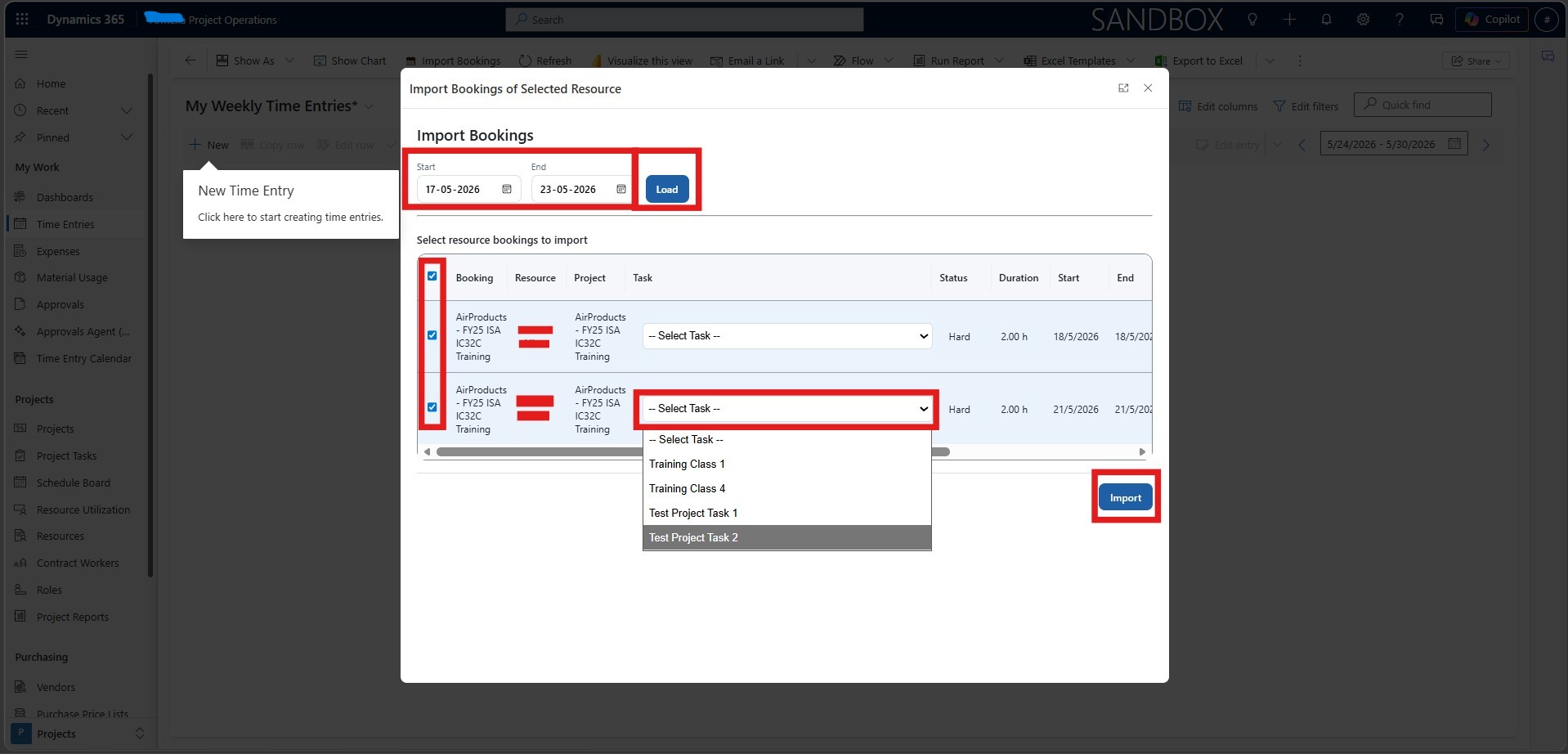
Figure: Based on the time range selected, the user can load the Bookings of his Resources, which have default Task (Via Bookings), else it resolves from Assignments in real-time.
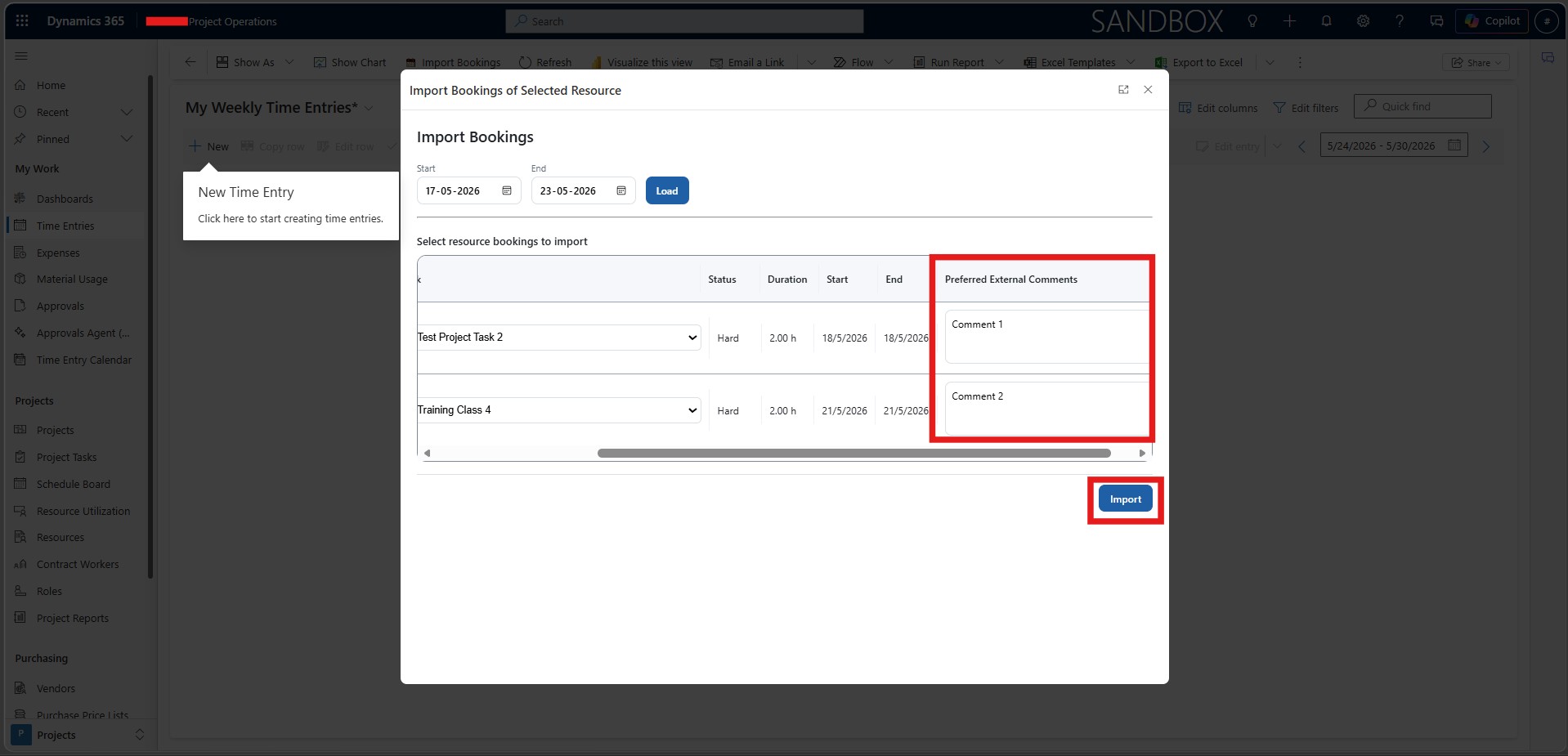
Figure: External Comments can be set at TE creation level, as per the supervision of the Project Lead, else can be set empty.
5. Automated Time Entry Creation
Users could bulk-select bookings and automatically generate Time Entries directly inside CRM, including project references, durations, task mappings, and external comments.
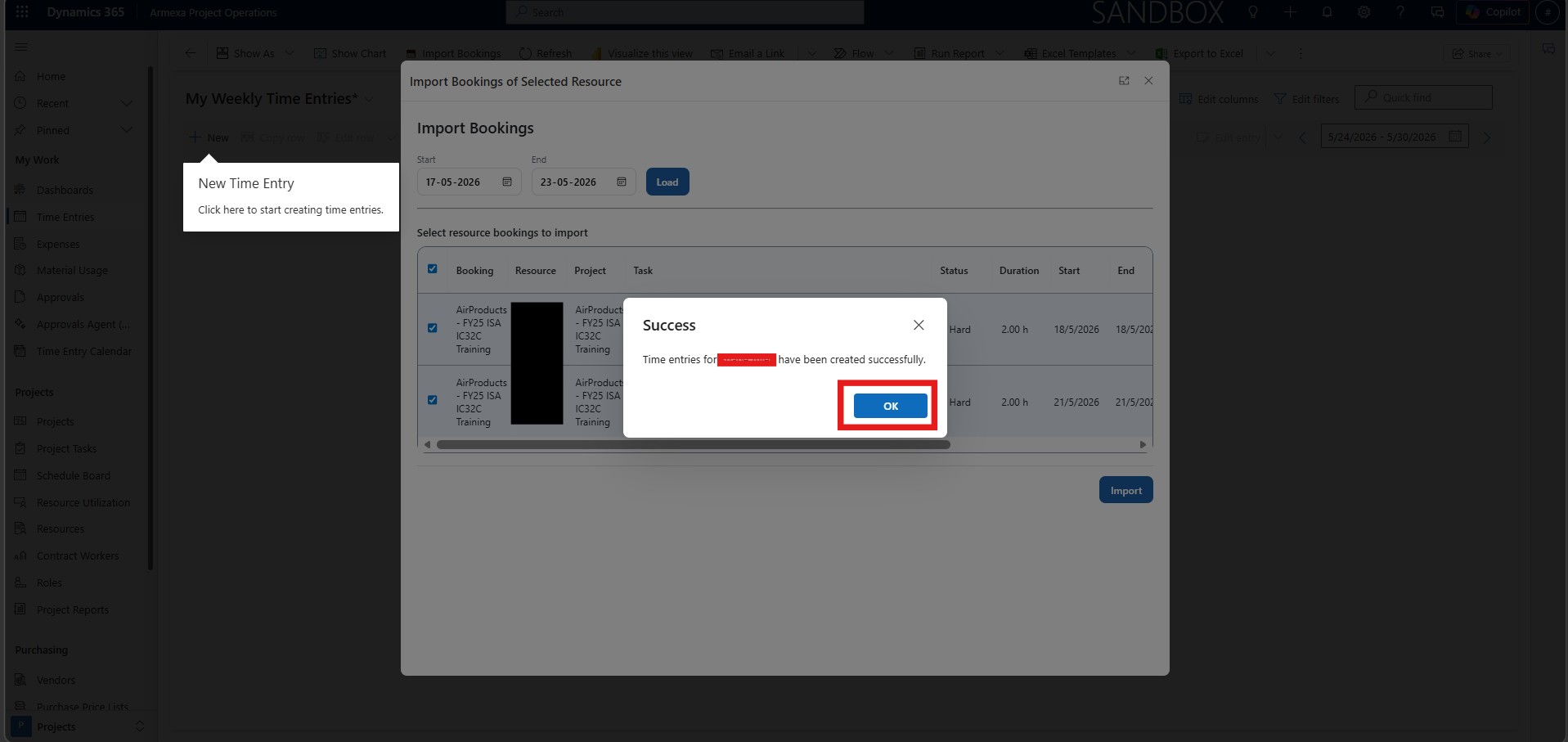
Figure: Resource Specific TE Creation, once Finalized.
6. Ownership & Security Handling
The implementation enforced centralized governance by ensuring Time Entries were created with proper ownership, role-based access, and project-level security controls aligned with operational approval structures.
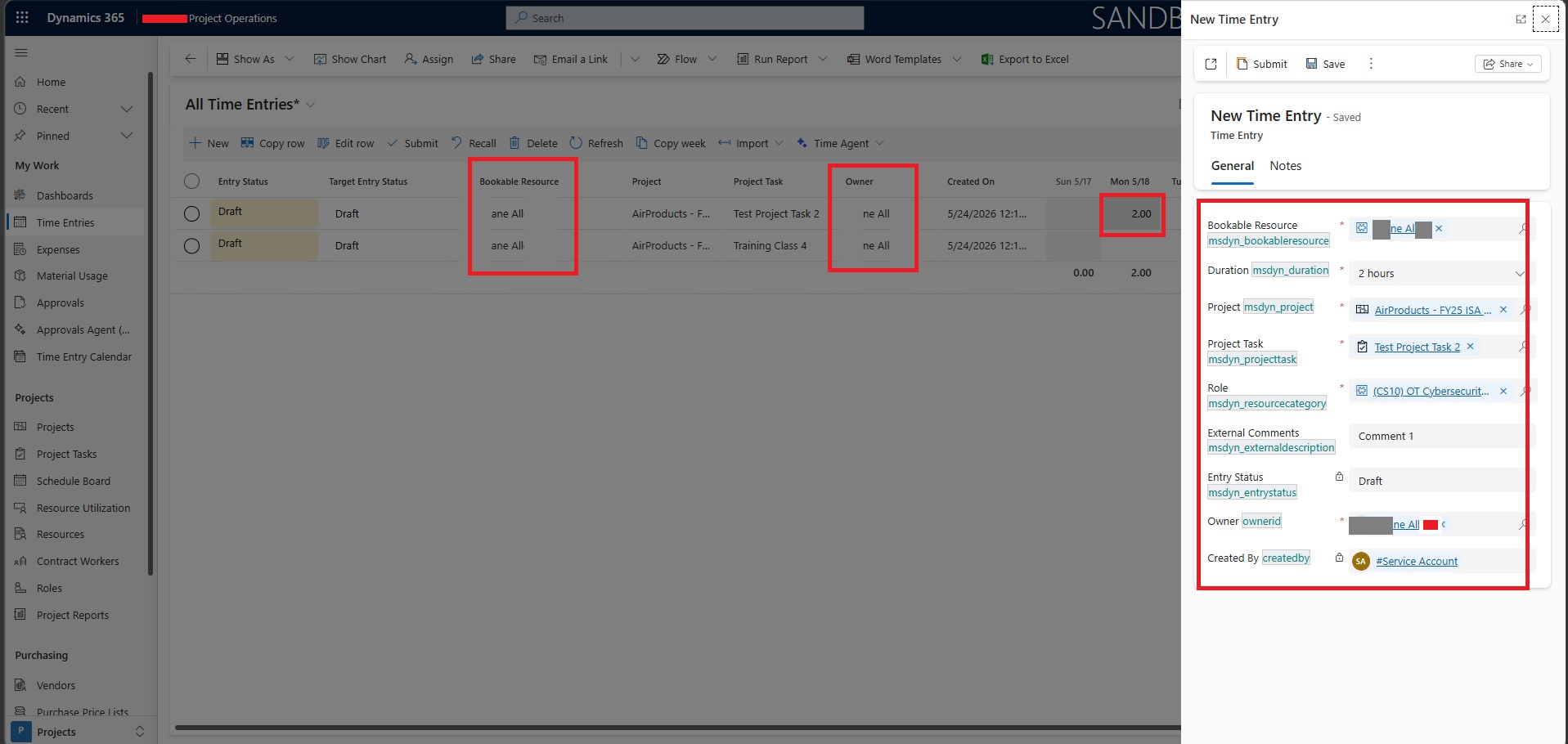
Figure: The Owner is Updated to the Bookable Resource of the TE, and Bookable Resource, Duration, Project, Project Task, Resource Category (Role), External Comments are set accurately as per PM/Approver decision and associated Booking Record.
The solution was designed with a strong focus on operational simplicity, security, scalability, and native Dynamics 365 Project Operations compatibility. Instead of introducing additional Power Apps layers or external applications, the entire framework was implemented directly inside the CRM experience using lightweight web resources, JavaScript, and Dataverse APIs.
1. Native CRM-First Experience
All booking imports and Time Entry operations were executed directly within Dynamics 365 Project Operations. This minimized user context switching and ensured a seamless operational workflow for Project Managers and Approvers.
2. Role-Based Operational Control
The implementation strictly enforced Project Approver–based access controls. Only authorized users could view resources, access projects, and create Time Entries, ensuring controlled operational governance across projects.
3. Lightweight & Scalable Architecture
The framework avoided unnecessary dependencies on custom apps or complex UI layers. By leveraging HTML Web Resources and Dataverse APIs, the solution remained lightweight, maintainable, and scalable as project and resource volumes increased.
4. Automation Over Manual Operations
The design focused heavily on reducing repetitive manual effort. Task resolution, booking retrieval, project filtering, and TE creation were automated to minimize operational overhead and improve data consistency.
5. Dynamic Data-Driven Processing
Rather than hardcoding project or resource relationships, the solution dynamically resolved Projects, Project Teams, Resource Assignments, Project Tasks, and Bookings in real time using Dataverse relationships and API queries.
6. Flexible Operational Workflow
Project Managers could selectively import bookings, assign Project Tasks, add external comments, and create bulk Time Entries based on actual work performed, providing significantly greater operational flexibility compared to native behavior.
7. Secure & Maintainable Customization
The implementation followed a modular architecture using:
- Ribbon Enable Rules
- JavaScript modules
- HTML dialog interfaces
- Dataverse plugins
This ensured easier future enhancements, cleaner maintainability, and reduced impact on standard Dynamics 365 functionality.
The implementation significantly improved operational efficiency for both organizations by centralizing and simplifying the Time Entry creation process inside Dynamics 365 Project Operations. Project Managers and Project Approvers were able to create and manage booking-driven Time Entries from a single controlled interface, eliminating the need for users to manually navigate across multiple CRM screens.
By automating booking imports, project filtering, task association, and TE creation, the solution reduced repetitive administrative effort and accelerated operational workflows for project teams. The introduction of Project Approver–based visibility controls also ensured that only authorized users could access and manage resource bookings, improving governance and reducing operational risk.
The custom task resolution framework addressed common limitations within native Project Operations environments by ensuring accurate Project Task mapping during Time Entry creation. This improved reporting accuracy, billing traceability, and alignment between operational work and project execution activities.
Faster & More Reliable Time Entry Creation
Reduced Manual Operational Overhead
Improved Governance & Security Control
Better Project-Task Aligned Reporting
Increased PM & Approver Flexibility
Scalable Framework Inside D365 PO
This approach worked because it extended Dynamics 365 Project Operations using lightweight native components instead of introducing unnecessary external applications or complex Power Platform layers. The solution remained fully embedded within CRM while aligning closely with the organizations’ real operational workflows.
By combining Ribbon customization, HTML Web Resources, JavaScript, Dataverse Web API, and targeted plugin automation, the implementation delivered a fast, scalable, and maintainable operational framework with minimal overhead.
Role-based visibility through Project Approver relationships ensured secure access control, while automated Project Task resolution and booking-driven TE creation significantly reduced manual effort and improved operational accuracy.
Key insight: Most importantly, the solution simplified day-to-day project operations for Project Managers and Approvers by centralizing booking imports, task mapping, comments capture, and Time Entry creation into a single streamlined experience inside Dynamics 365 Project Operations.
Why was a custom booking import framework required?
The native Dynamics 365 Project Operations experience did not fully support the organizations’ operational requirements around controlled booking visibility, centralized TE creation, and dynamic Project Task mapping.
Who could access the booking import functionality?
Access was restricted to authorized Project Managers and Project Approvers using Ribbon Enable Rules and Project Team–based validation logic.
How were Project Tasks associated with Time Entries?
Project Tasks were dynamically resolved using two complementary paths: a custom plugin that copies the task from the Resource Requirement to the Booking on creation, and a fallback query against Resource Assignment relationships to resolve the correct task where the plugin field was not populated.
Did the solution require external applications or Power Apps screens?
No. The entire implementation operated natively inside Dynamics 365 CRM using HTML Web Resources, JavaScript, Dataverse APIs, and plugins.
How did the solution improve operational efficiency?
The framework automated booking retrieval, task selection, comments capture, and bulk Time Entry creation, significantly reducing manual administrative effort.
Was the solution scalable for future operational growth?
Yes. The architecture was designed as a lightweight and maintainable framework that scales efficiently without introducing unnecessary platform complexity.
How was security and governance handled?
Security was enforced through Project Approver validation, project-scoped resource filtering, and controlled operational visibility directly within Dynamics 365 Project Operations.
Could the framework be extended further?
Yes. The implementation was designed to support additional automation scenarios, approval workflows, validations, and operational extensions as business requirements evolve.
This implementation successfully transformed the Time Entry creation process inside Dynamics 365 Project Operations by delivering a streamlined, secure, and operationally efficient booking import framework tailored to the customer’s real-world business requirements.
By combining lightweight CRM-native technologies such as HTML Web Resources, JavaScript, Dataverse Web API, Ribbon customization, and targeted plugin automation, the solution enabled Project Managers and Project Approvers to centrally manage booking-driven Time Entries with greater accuracy, control, and flexibility.
The framework not only resolved native operational limitations around Project Task mapping and booking visibility, but also significantly reduced manual administrative effort, improved governance, and enhanced the reliability of operational reporting across projects.
Most importantly, the solution achieved these outcomes without introducing unnecessary architectural complexity, external applications, or heavy Power Platform dependencies — resulting in a scalable, maintainable, and fully integrated operational experience directly inside Dynamics 365 Project Operations.
Ready to streamline & automate Time Entry & Project Management operations inside your Dynamics 365 Project Operations environment?
CloudFronts helps organizations build scalable, secure, and operationally efficient CRM-native solutions using Dynamics 365, Power Platform, Dataverse, and custom automation frameworks. Reach out at transform@cloudfronts.com.
Shashank Keny
Associate Consultant · CloudFronts
Shashank Keny is an Associate Consultant at CloudFronts with 1.5+ years of experience in cloud, data, and business applications. He specializes in building scalable, API-driven architectures and integrating enterprise systems across the Microsoft ecosystem.
He is a Certified Databricks Data Engineer with hands-on experience in Dynamics 365 Project Operations and Dynamics 365 Sales, along with delivering business intelligence solutions using Power BI.
His expertise also extends to modern AI solutions, including building custom copilots and implementing intelligent applications using Azure AI Foundry.
Passionate about solving real-world business challenges through data and AI, he focuses on delivering efficient, scalable, and production-ready solutions.
- Experience: 1.5+ years
- Certification: Databricks Certified Data Engineer
- Specialization: Dynamics 365 Project Operations, Power BI, Azure Integrations, AI Solutions
Related posts:
Forecasting with Prophet-When Does It Make Sense

How a Multi-Country Oil & Gas and Marine Services Provider Corrected Receipt Costs Before Invent...
How to Extend Dynamics 365 CRM Using Side Panes: A Practical Implementation for a US-Based Kitchen A...
