

Closing the Loop on Return Logistics: How a U.S.-Based Consumer Appliance Manufacturer Automated FedEx Shipment Tracking in Dynamics 365 Customer Service
Summary
Our previous article (Check out my previous blog here – Transforming Return Logistics for a USA Manufacturer: Automating Shipment Processing with Dynamics 365 Customer Service) covered how we integrated Dynamics 365 Customer Service with FedEx to automate the creation of return shipments for a USA-based manufacturer — solving the shipment-creation half of the requirement.
But creating a shipment is only the start. Once a package leaves the customer, the business still needs to know what’s happening to it — has FedEx received it, is it still with the customer, or has it been delivered? Previously, agents answered this manually by checking the FedEx site case by case, which didn’t scale.
The second phase closes that gap with a scheduled integration between Dynamics 365 Customer Service, Dataverse, Integration, and the FedEx Tracking API. It automatically identifies eligible Cases, pulls the latest FedEx tracking events, determines whether the shipment has entered FedEx possession, and updates the Case accordingly.
The result is a closed-loop process: Create Shipment → Capture Tracking Number → Monitor Shipment → Detect FedEx Possession → Update CRM.
This article covers how the integration was designed, how tracking events were interpreted, how Integration processes the API response, and the technical considerations involved in building against the FedEx Tracking API.
Table of Contents
- From Shipment Creation to Shipment Visibility
- The Business Challenge
- Solution Overview
- Identifying Cases Requiring Tracking
- Calling the FedEx Tracking API
- Understanding FedEx Tracking Events
- Determining Whether a Shipment Has Been Tendered
- Updating Dynamics 365 Customer Service
- Handling Exceptions and Empty Tracking Responses
- Technical Architecture
- Designing the Integration Around Business Events
- Business Impact
- FedEx Tracking API Limitations and Guardrails
- Final Thoughts
This Blog Explains
- Why shipment creation alone was not enough to complete the return logistics process.
- How Dynamics 365 Customer Service was connected to the FedEx Tracking API.
- How eligible Cases are identified automatically.
- How tracking events such as Dropped Off, Picked Up, and In FedEx Possession are interpreted.
- How the solution determines when a shipment should be considered tendered.
- How the latest tracking information is written back to Dynamics 365.
- How Integration handles API responses and exceptions.
- The limitations and throttling considerations of the FedEx Tracking API.
From Shipment Creation to Shipment Visibility
In the previous implementation article (Check out my previous blog here – Transforming Return Logistics for a USA Manufacturer: Automating Shipment Processing with Dynamics 365 Customer Service), the primary objective was to eliminate the manual process of creating FedEx return shipments.
The customer service representative could initiate the shipment directly from the Dynamics 365 Case.
The system handled the rest:
- Collect Case and customer information.
- Register the shipment with FedEx.
- Generate the return label.
- Capture the tracking number.
- Store the tracking number against the Case.
- Send the return label to the customer.
That created a significant improvement in the shipment creation process.
However, there was still a gap.
The tracking number was now inside Dynamics 365, but the shipment status was still outside Dynamics 365.
This highlighted an important principle in integration design:
True integration goes beyond just creating data in an external system—its real power lies in closing the information loop. By including end-to-end shipment tracking, we ensure full visibility, proactive exception management, and a seamless experience from order creation to final delivery.
The second phase therefore asked a different question:
Once Dynamics 365 creates a shipment, can it also continuously understand what is happening to that shipment?
The answer was yes.
The Business Challenge
The existing process (Before FedEx Intg. Was implemented) required customer service representatives to manually monitor return shipments.
A typical workflow looked like this:
- Open Dynamics 365 Customer Service.
- Find the Case.
- Copy the FedEx tracking number.
- Open the FedEx tracking website.
- Enter the tracking number.
- Review the latest shipment event.
- Determine whether the package had been handed over to FedEx.
- Return to Dynamics 365.
- Update the Case status.
- Repeat the process for other Cases.
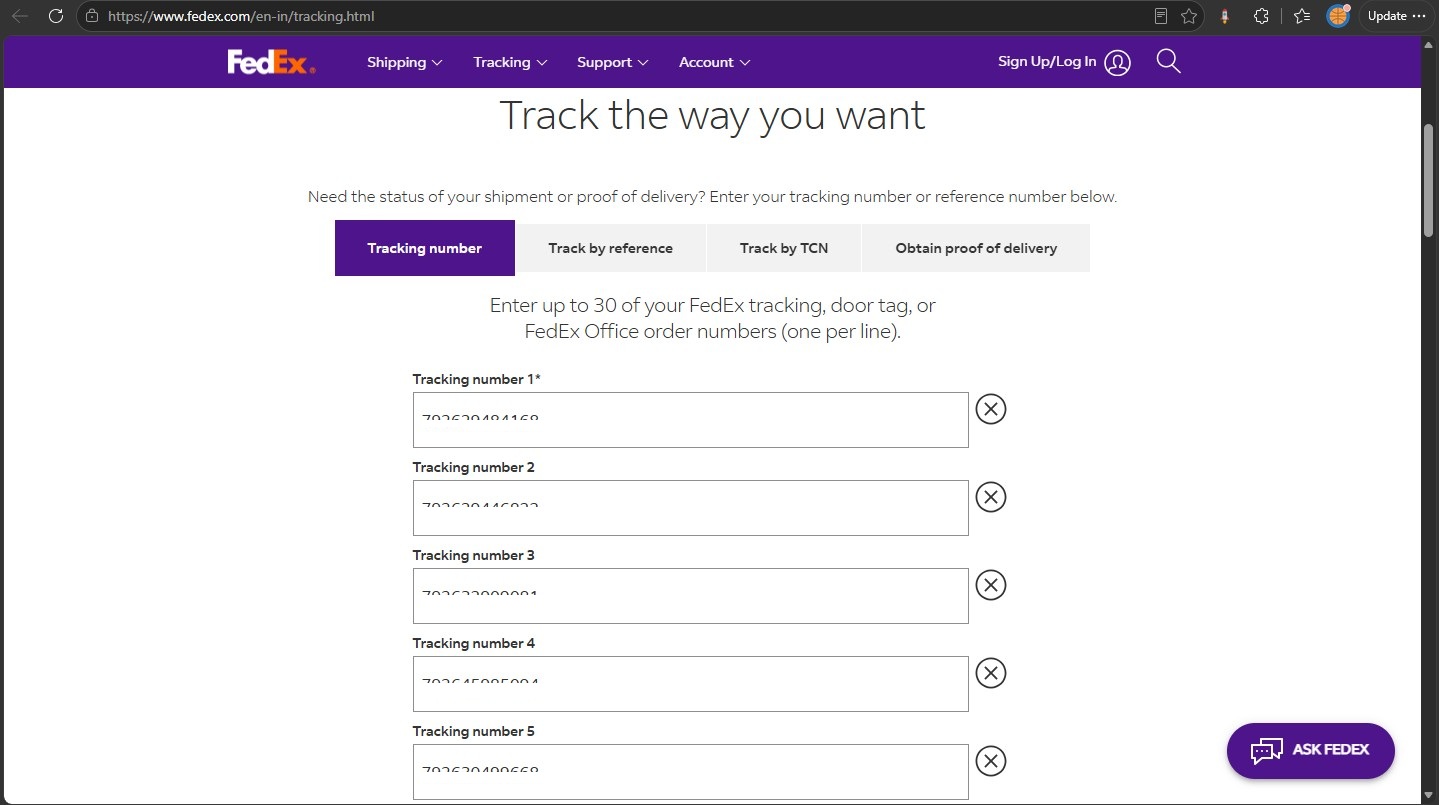
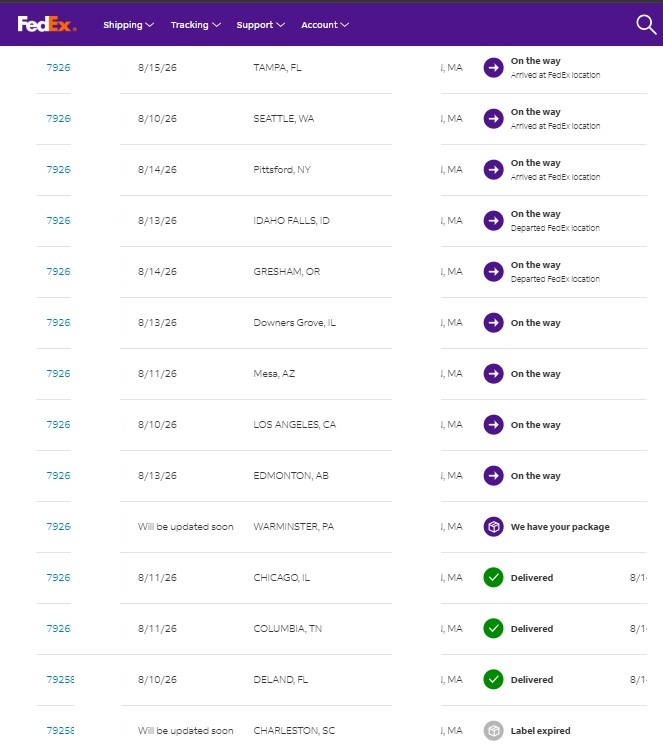
This created several operational challenges.
1. Repetitive Manual Work
Tracking information had to be checked repeatedly for multiple shipments.
2. Context Switching
Agents moved between Dynamics 365 and the FedEx tracking website to complete a single business process.
3. Delayed CRM Updates
Even when FedEx had already received a shipment, the corresponding Case could remain unchanged until somebody manually checked it.
4. Human Interpretation
FedEx returns multiple tracking events and statuses. Agents had to interpret those events and determine which ones represented meaningful milestones for the organization’s return process.
5. Poor Scalability
As the number of return shipments increased, the amount of manual tracking increased with it.
The business did not need another screen for agents to monitor. It needed the tracking information to come back to the system where the business process was already being managed: Dynamics 365.
Solution Overview
I extended the previous FedEx integration by introducing an automated shipment-tracking process.
The solution uses:
- Dynamics 365 Customer Service
- Dataverse
- Integration
- FedEx Tracking API
The high-level process is:
                 Dynamics 365 Customer Service
                              |
                              v
                    Active Cases with
                     Tracking Numbers
                              |
                              v
                      FedEx Tracking
                              |
                              v
                     Tracking Response
                              |
                              v
                    Interpret Scan Events
                              |
                              v
                  Determine Shipment Status
                              |
                              v
                   Update Dynamics 365 Case
The process runs automatically on a scheduled basis.
There is no requirement for a customer service representative to manually visit the FedEx website for every shipment.
Functional Integration Approach
The functional design was intentionally centered around the existing Case lifecycle.
The Case already contained the information required to identify the shipment.
The integration therefore did not introduce a separate tracking application or another user interface.
Instead, it used the Case itself as the operational source of truth.
The process can be summarized as:
Scheduled Trigger
       ↓
Find eligible Cases
       ↓
Read Tracking Number
       ↓
Call FedEx Tracking API
       ↓
Read Tracking Events
       ↓
Interpret Latest Status
       ↓
Determine Tendered / Not Tendered
       ↓
Update Case
This approach keeps the integration aligned with the business process rather than creating a separate operational process around the API.
Identifying Cases Requiring Tracking
The first important design decision was determining which Cases should actually be sent to FedEx.
There is no reason to query the FedEx API for every Case in Dynamics 365.
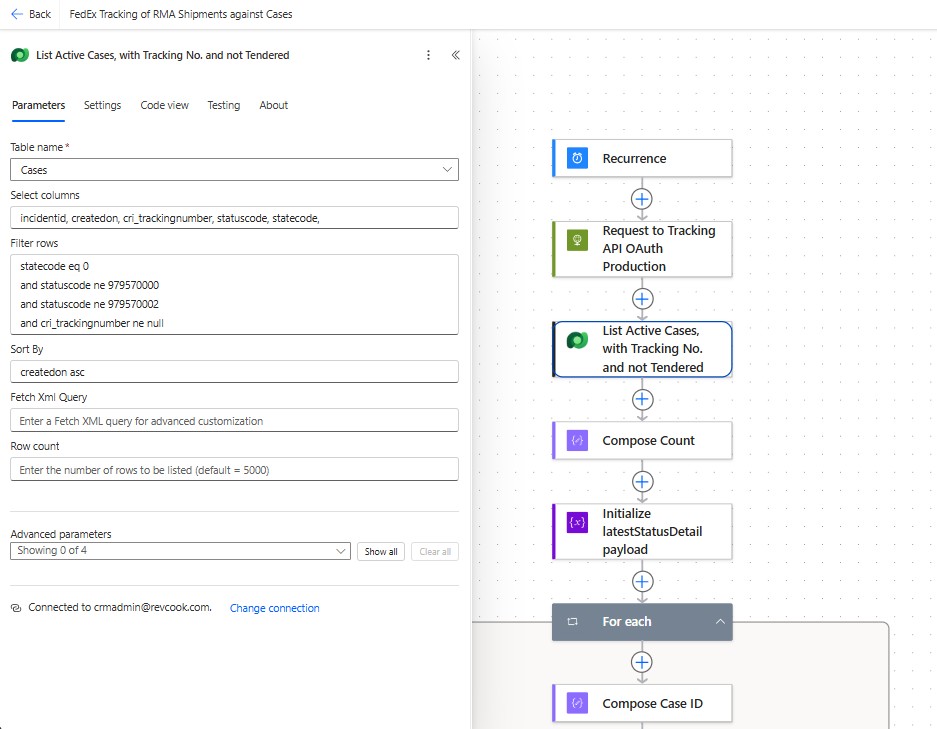
The flow therefore starts by retrieving only Cases that satisfy the business criteria.
The query is designed around conditions such as:
- The Case is active.
- The Case has a FedEx tracking number.
- The Case has not already reached the relevant business status.
- The Case has not already been processed for the required milestone.
Conceptually:
Active Case
     +
Tracking Number Exists
     +
Not Already Tendered
     ↓
Eligible for Tracking
This filtering is important for two reasons.
First, it reduces unnecessary API traffic.
Second, it ensures that the automation remains aligned with the business process.
The integration is not intended to become a generic FedEx tracking engine for every shipment ever created.
It is specifically designed to identify return shipments that still require tracking attention.
Calling the FedEx Tracking API
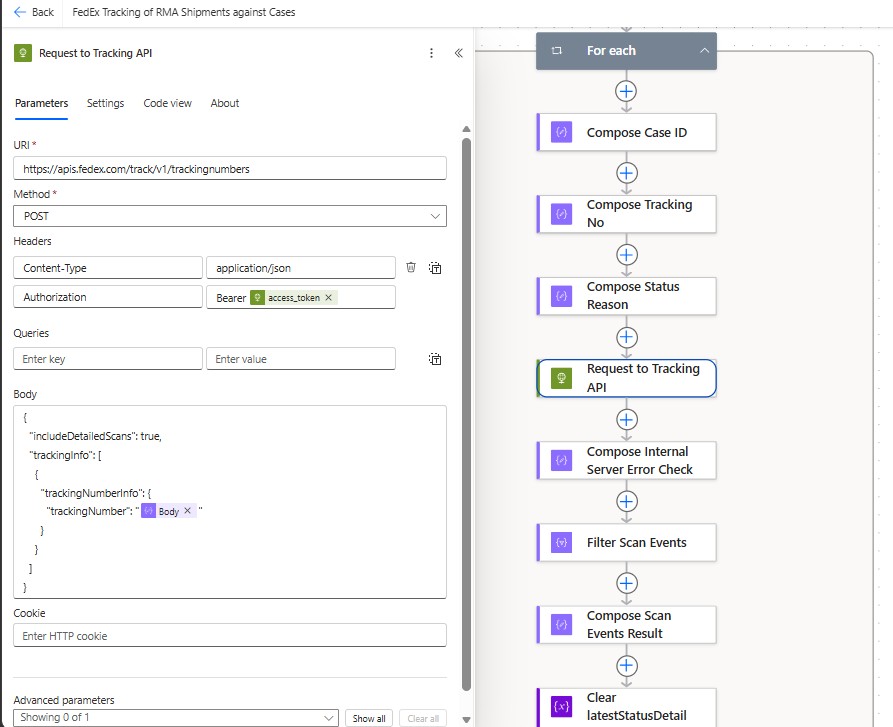
Once an eligible Case is identified, the flow extracts the tracking number and sends it to the FedEx Tracking API.
FedEx’s current Basic Integrated Visibility capability provides basic tracking information for FedEx shipments and supports tracking by tracking number.
The API request is made using an OAuth bearer token.
The request follows the general structure:
POST https://apis.fedex.com/track/v1/trackingnumbers
Authorization: Bearer <access_token>
Content-Type: application/json
Authorization: Bearer <access_token>
Content-Type: application/json
The request body contains the tracking number:
{
  "includeDetailedScans": true,
  "trackingInfo": [
    {
      "trackingNumberInfo": {
        "trackingNumber": "<tracking-number>"
      }
    }
  ]
}
The includeDetailedScans option is particularly useful for this integration because the solution is not interested only in a high-level shipment status.
It needs the underlying scan events to determine whether the shipment has reached a meaningful operational milestone.
The response contains tracking information including the tracking number, tracking results, and scan events.
A simplified response structure looks conceptually like:
output
 └── completeTrackResults
      └── trackResults
           ├── latestStatusDetail
           └── scanEvents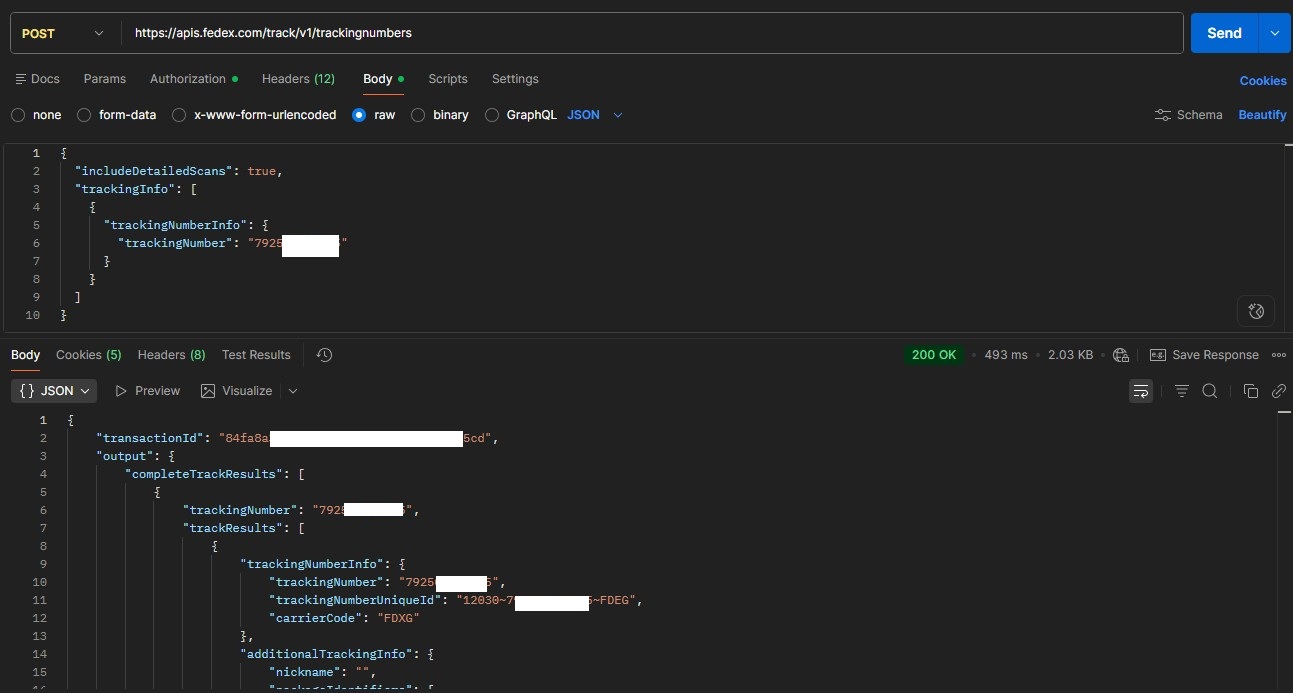
The Integration then works with these elements to determine what happened to the shipment.
Understanding FedEx Tracking Events
One of the more important parts of the implementation was not simply calling the API.
It was interpreting the information returned by the API in terms of the organization’s business process.
FedEx provides a number of tracking event codes, but this implementation does not need to process every event returned by FedEx. Instead, the flow identifies the specific events that indicate the return shipment has progressed into the carrier’s possession.
Return Shipment Events Used by the Flow
For this implementation, the flow specifically filters FedEx tracking events for the following event types:
| Code | Meaning |
|---|---|
| DO | Dropped Off |
| PU | Picked Up |
| IP | In FedEx Possession |
These three events were selected because they provide the business signal required by the Case process.
DO – Dropped Off
The customer has handed the package to the carrier or a FedEx location.
PU – Picked Up
The shipment has been picked up by FedEx.
IP – In FedEx Possession
FedEx has possession of the shipment.
The flow therefore does not treat every tracking update as a business milestone. Instead, it first filters the returned FedEx events to identify whether one of these three relevant events has occurred.
The implementation then performs an additional validation against the latest tracking status. It checks that the shipment’s possessionStatus is true, confirming that FedEx currently has possession of the shipment.
At the same time, the flow explicitly excludes the DL – Delivered status from this possession check.
This distinction is important because a shipment being in the carrier’s possession is a different business milestone from the shipment being delivered.
The logic can therefore be summarized as:
Identify DO, PU, or IP events → confirm possessionStatus = true → ensure the shipment has not reached DL (Delivered).
This allows the integration to translate the carrier’s tracking information into a meaningful business event rather than simply copying the latest FedEx status into CRM.
An integration should not simply copy every external status into CRM. It should translate external system events into meaningful business events.
In this implementation, DO, PU, and IP are the tracking events used to establish that the return shipment has entered FedEx’s possession, while the DL check ensures that the logic does not incorrectly treat an already-delivered shipment as an active possession milestone.
Determining Whether a Shipment Has Been Tendered
This was the key business rule in the implementation.
The requirement was not simply:
“Get the latest FedEx status.”
The actual requirement was:
“Determine whether the return shipment has been tendered to FedEx.”
That is a different problem.
A shipment may have a tracking number while still being physically with the customer.
For example:
Label Created
     ↓
Tracking Number Exists
     ↓
Customer Has Package
     ↓
Dropped Off
     ↓
FedEx Possession
     ↓
In Transit
     ↓
Delivered
The existence of a tracking number therefore does not mean the shipment has entered the carrier network.
The Integration implementation uses the tracking response to identify relevant scan events.
The scan events are filtered for:
DO
IP
PU
These represent meaningful indicators that the shipment has entered the carrier-handling process.
The flow then determines whether relevant scan events exist.
Conceptually:
FedEx scanEvents
       |
       v
Filter:
DO / IP / PU
       |
       v
Any matching events?
       |
     Yes
       |
       v
Shipment has reached
the required milestone
The flow also captures the latestStatusDetail information returned by FedEx.
The information retained includes fields such as:
- Status code
- Derived code
- Localized status
- Description
- Possession status
This allows the integration to retain the carrier’s detailed status while also deriving the business-level status required by Dynamics 365.
Updating Dynamics 365 Customer Service
Once the shipment has been evaluated, the integration determines whether the Case should be updated.
The implementation uses the FedEx response to determine the possession state and prevent a delivered shipment from being incorrectly treated as an active tendering event.
The business rule is conceptually:
Possession Status = TRUE
        AND
Latest Status Code != DL
        ↓
Shipment considered Tendered
This distinction is important.
The automation is not simply looking for a single string such as “Delivered”.
It is combining multiple pieces of information from the FedEx response to determine the business state.
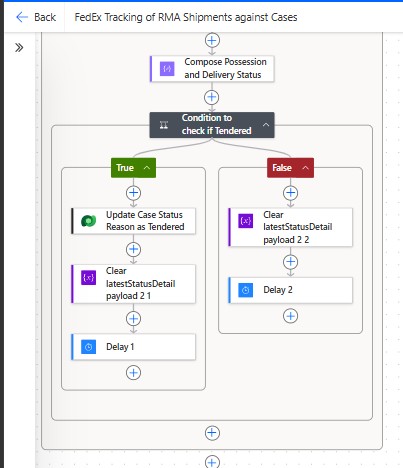
When the condition evaluates to true, the flow updates the Case status reason to the appropriate Tendered state.
The process therefore becomes:
FedEx Tracking Response
          ↓
Latest Status + Scan Events
          ↓
Business Rule Evaluation
          ↓
Tendered?
      /        \
    Yes         No
     ↓           ↓
Update Case    Continue Monitoring
This means the Case becomes the operational representation of what is happening to the physical return shipment.
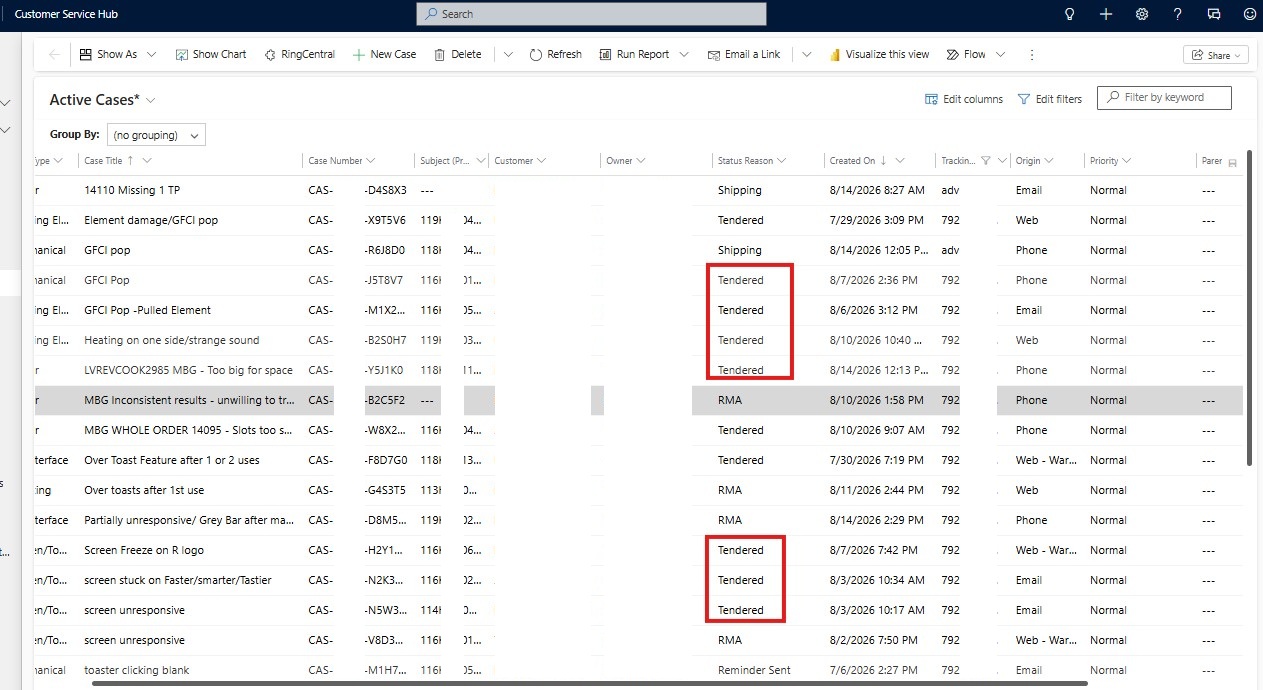
The customer service representative no longer has to manually determine this status.
Handling Exceptions and Empty Tracking Responses
External APIs cannot always be assumed to return the ideal response.
A tracking request may produce:
- No scan events
- An incomplete tracking result
- An unexpected response structure
- An internal server error
- A shipment that has not yet generated meaningful scan information
The flow therefore includes defensive checks before attempting to process the tracking events.
For example, the response is checked to determine whether the expected scanEvents collection is empty.
Conceptually:
Tracking Response
       |
       v
Are scanEvents available?
       |
   +---+---+
   |       |
  Yes      No
   |       |
   v       v
Process   Continue /
Events    Retry Later
The flow also checks the response for internal server errors before attempting to process the scan events.
This is particularly important in scheduled integrations.
A single malformed response should not prevent the entire scheduled process from successfully handling other Cases.
Resiliency in an integration is not about assuming that external systems will always work. It is about designing the workflow so that they do not have to.
Technical Architecture
At a technical level, the solution is implemented as a Integration cloud flow.
The flow is triggered on a recurring schedule.
The high-level architecture is:
                    ┌─────────────────────┐
                    │    Recurrence       │
                    └──────────┬──────────┘
                               │
                               v
                    ┌─────────────────────┐
                    │ Request OAuth Token │
                    │      from FedEx     │
                    └──────────┬──────────┘
                               │
                               v
                    ┌─────────────────────┐
                    │ List Active Cases   │
                    │ with Tracking No.   │
                    └──────────┬──────────┘
                               │
                               v
                    ┌─────────────────────┐
                    │      For Each       │
                    │       Case          │
                    └──────────┬──────────┘
                               │
                  ┌────────────┴────────────┐
                  │                         │
                  v                         v
          Compose Case ID          Compose Tracking No.
                  │                         │
                  └────────────┬────────────┘
                               │
                               v
                    ┌─────────────────────┐
                    │ FedEx Tracking API  │
                    └──────────┬──────────┘
                               │
                               v
                    ┌─────────────────────┐
                    │ Server Error Check  │
                    └──────────┬──────────┘
                               │
                               v
                    ┌─────────────────────┐
                    │ Filter Scan Events  │
                    │ DO / IP / PU        │
                    └──────────┬──────────┘
                               │
                               v
                    ┌─────────────────────┐
                    │ Evaluate Tracking   │
                    │ Result               │
                    └──────────┬──────────┘
                               │
                               v
                    ┌─────────────────────┐
                    │ Determine Tendered  │
                    └──────────┬──────────┘
                               │
                               v
                    ┌─────────────────────┐
                    │ Update Case Status  │
                    └─────────────────────┘
The implementation is therefore relatively lightweight from an infrastructure perspective.
There is no separate application server required for the orchestration.
Integration acts as the integration layer between Dataverse and FedEx.
Processing Multiple Cases
The integration uses a For each pattern to process the eligible Cases.
Conceptually:
List Cases
     |
     v
For Each Case
     |
     +--> Get Tracking Number
     |
     +--> Call FedEx
     |
     +--> Process Response
     |
     +--> Determine Status
     |
     +--> Update Case
This design keeps the Case-to-tracking relationship explicit.
Each tracking request can be associated directly with the originating Dynamics 365 Case.
It also makes the workflow easier to extend later.
For example, the same pattern could be extended to:
- Detect delivery exceptions
- Detect delayed shipments
- Detect delivered shipments
- Capture estimated delivery dates
- Notify agents about exceptions
- Automatically close or advance Cases
- Trigger customer notifications
The tracking API therefore becomes more than a status lookup.
It becomes a source of operational events that can drive the Dynamics 365 service process.
Designing the Integration Around Business Events
One of the key lessons from this implementation is that integration design should begin with business events, not API fields.
FedEx returns many different pieces of information.
But the business does not necessarily care about every field.
The business cares about questions such as:
- Has the customer handed over the package?
- Is FedEx in possession of the shipment?
- Is the shipment in transit?
- Has it been delivered?
- Has something gone wrong?
These are business questions.
The API provides the raw information required to answer them.
The integration layer is responsible for translating:
External API Event
        ↓
Business Interpretation
        ↓
Dynamics 365 State
This separation is what makes the solution useful.
Otherwise, the CRM simply becomes a mirror of the FedEx API response without actually improving the business process.
Business Impact
1. Eliminated Manual Tracking
Customer service representatives no longer need to manually enter tracking numbers into the FedEx tracking website to determine shipment progress. The system performs the tracking automatically.
2. Reduced Context Switching
The Case remains the primary workspace for the customer service team. The representative does not need to leave Dynamics 365 to understand the shipment’s current operational state.
3. Faster Case Updates
Once the FedEx tracking response satisfies the business criteria, the Case can be updated automatically. This removes the dependency on an agent manually discovering and recording the shipment milestone.
4. More Consistent Status Interpretation
Instead of different agents interpreting FedEx tracking messages differently, the integration applies the same business rules to every shipment. The business rule is implemented once and applied consistently.
5. Better Scalability
The number of return shipments can increase without requiring customer service representatives to spend additional time checking every tracking number. The automation scales the monitoring process rather than scaling the manual workload.
6. Foundation for Proactive Customer Service
The current implementation focuses on identifying the tendered state. However, the same architecture can be extended to detect delivery delays, delivery exceptions, shipment exceptions, out-for-delivery events, delivered shipments, and estimated delivery changes.
4. Consistent Status Interpretation — Example
For example:
DO / PU / IP
      ↓
FedEx possession milestone
      ↓
Tendered
6. Moving From Reactive to Event-Driven Customer Service
This creates an opportunity to move from reactive customer service to event-driven customer service.
Instead of waiting for a customer to ask:
“Where is my return?”
the system can identify relevant shipment events before the customer needs to contact the support team.
FedEx Tracking API Limitations and Guardrails
An integration with an external tracking API should not be designed as though the API has unlimited capacity.
FedEx applies organization quotas, Track capability quotas, rate limits, and OAuth thresholds. These are particularly important for a scheduled integration processing multiple tracking numbers.
The integration flow addresses these limitations through a few key guardrails:
Controlled Processing
Only tracking numbers requiring an update are sent to FedEx.
OAuth Token Reuse
The flow reuses the access token rather than generating a new token for every API request.
Token Lifetime Management
OAuth tokens are valid for 1 hour, after which a new token is generated when required.
Relevant Event Filtering
Only business-relevant events such as DO, PU, and IP are processed further.
Avoid Unnecessary Polling
Once the required shipment milestone is established, unnecessary tracking requests are avoided.
Rate-Limit Awareness
The flow is designed to control API calls and account for potential 429 rate-limit responses and 403 OAuth throttling responses.
The key principle is:
The integration treats FedEx API capacity as a design constraint and minimizes unnecessary API traffic through controlled processing, token reuse, and business-event filtering.
Final Thoughts
In the previous article, we focused on automating the creation of return shipments from Dynamics 365 Customer Service.
This implementation completes the next part of that journey.
The business no longer has to manually move between Dynamics 365 and the FedEx tracking website to determine whether a return shipment has been handed over to the carrier.
Instead, the system continuously monitors eligible shipments, retrieves FedEx tracking information, interprets the carrier events, and updates the corresponding Case based on the business rules.
The transformation can therefore be viewed as two connected stages:
Stage 1
Dynamics 365
      ↓
Create FedEx Return Shipment
      ↓
Capture Tracking Number

Stage 2
Tracking Number
      ↓
FedEx Tracking API
      ↓
Interpret Shipment Events
      ↓
Update Dynamics 365 Case
Together, these capabilities create a much more complete return logistics process.
The important shift is from shipment automation to shipment intelligence.
The integration is no longer simply asking:
“Can Dynamics 365 create a FedEx shipment?”
It is asking:
“Can Dynamics 365 understand what is happening to that shipment and use that information to drive the customer service process?”
That distinction is where integration starts becoming more than system connectivity.
It becomes an operational capability.
And for organizations already using Dynamics 365 Customer Service as the center of their service operations, this creates an opportunity to bring carrier events, logistics milestones, and customer service processes into the same operational context.
Key Takeaway:
The end goal is not simply to automate tracking. It is to make shipment visibility part of the customer service experience—without requiring the customer service team to manually monitor another system.
Continue the journey: This solution builds directly on the FedEx return-shipment automation described in our earlier article, “Transforming Return Logistics for a USA Manufacturer: Automating Shipment Processing with Dynamics 365 Customer Service.”
For organizations looking to connect Dynamics 365 with logistics, shipping, or external operational platforms, the same architectural approach can be extended to create event-driven processes that reduce manual intervention while keeping the CRM system at the center of the business workflow.

Shashank Keny
Associate Consultant · CloudFronts
Shashank Keny is an Associate Consultant at CloudFronts with 1.5+ years of experience in cloud, data, and business applications. He specializes in building scalable, API-driven architectures and integrating enterprise systems across the Microsoft ecosystem.
He is a Certified Databricks Data Engineer with hands-on experience in Dynamics 365 Project Operations and Dynamics 365 Sales, along with delivering business intelligence solutions using Power BI.
His expertise also extends to modern AI solutions, including building custom copilots and implementing intelligent applications using Azure AI Foundry.
Passionate about solving real-world business challenges through data and AI, he focuses on delivering efficient, scalable, and production-ready solutions.
- Experience: 1.5+ years
- Certification: Databricks Certified Data Engineer
- Specialization: Dynamics 365 Project Operations, Power BI, Azure Integrations, AI Solutions
