How a Maldives-Based Loan Firm Streamlined Multi-Level Payment Approvals with Microsoft Dynamics 365 Business Central
Summary
As part of our implementation for HDFC Maldives, we encountered a complex payment approval requirement in Microsoft Dynamics 365 Business Central involving multiple approval stages, any-one-user approval behavior, Checked By validation, actual approver tracking, and Internet Banking approval. Instead of replacing the standard Business Central workflow framework, we extended it only where the required business behavior differed from the standard process. This approach allowed us to retain Workflow User Groups, Approval Entries, workflow progression, and standard approval capabilities while introducing custom controls for Checked By processing, Sequence 2 approval handling, actual approver logging, and final payment voucher traceability.
Table of Contents
- Introduction
- Understanding the Business Requirement
- What Worked with Standard Business Central?
- The Challenge at the Second Approval Sequence
- Finding the Right Approach
- The Second Challenge: Who Actually Approved?
- Introducing the Actual Approver Log
- Why Checked By Was Kept Separate
- Automatic Transition to Standard Approval
- Improving Payment Voucher Traceability
- Final Solution Architecture
- Preview Video
- Business Impact
- Frequently Asked Questions
- Conclusion
Introduction
Approval workflows often look straightforward when they are first discussed: one person submits a transaction, the required approvers review it, and the process continues once approval is completed.
In practice, the requirements can become much more complex when different stages need different approval behaviors.
During a loan management implementation for a Maldives-based financial services organization, we encountered exactly this situation while designing the approval process for Payment Journals in Microsoft Dynamics 365 Business Central.
The business did not want a simple sequential approval process. Some stages required any one authorized user to complete the approval, another stage required a separate pre-check before the standard workflow could begin, and the final payment process required two Internet Banking approvals.
The challenge was therefore not simply to configure a workflow. It was to determine how much of the standard Business Central approval framework could be retained, where customization was genuinely required, and how to maintain an accurate audit trail of the users who actually performed each approval action.
The Design Principle
Rather than replacing Business Central’s standard workflow framework, we decided to keep the standard approval engine wherever possible and customize only the areas where the required business behavior differed from the standard process.
Understanding the Business Requirement
The Payment Journal required several approval stages, with different rules at each level.
| Stage | Approvers | Required Behavior |
|---|---|---|
| Checked By | Multiple Checkers | Any one authorized checker |
| Sequence 1 | 2 Approvers | Any one approver |
| Sequence 2 | 4 Approvers | Any one approver |
| Internet Banking | 2 Approvers | Two-level validation |
The intended business process was:
Payment Journal
→
Checked By – Any One
→
Sequence 1 – Any One of 2
→
Sequence 2 – Any One of 4
→
Posting
→
Internet Banking Approval
At first glance, the standard Workflow User Group functionality appeared capable of handling most of this requirement. However, testing revealed an important difference between the expected business behavior and the approval behavior encountered at the later approval sequence.
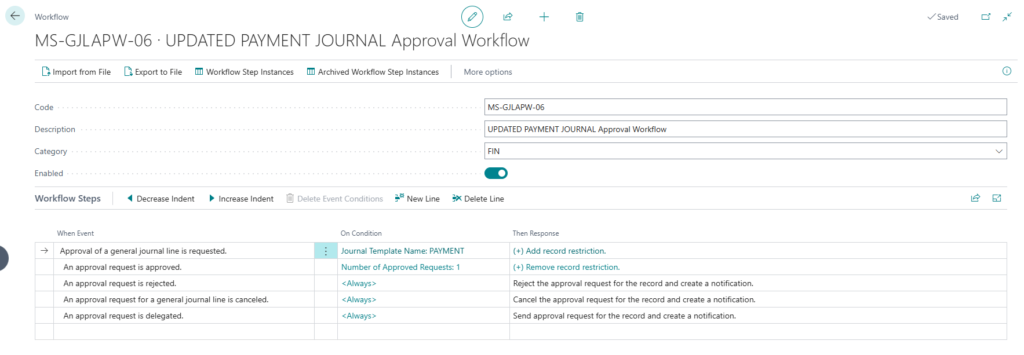
Fig: Payment approval workflow configured for the multi-stage payment process.
What Worked with Standard Business Central?
Workflow User Groups were the natural starting point because they already provide a structured way to maintain approvers without hardcoding individual users in custom development.
For the first approval sequence, two approvers were configured and the required behavior worked as expected.
Sequence 1
Approver A + Approver B → Any one approver completes the stage → Workflow continues
This initially suggested that the standard approval configuration would be sufficient for the entire process.
The benefit of continuing with standard Business Central was significant because the platform was already managing Workflow User Groups, Approval Entries, statuses, approval requests, cancellations, notifications, and workflow progression.
The Challenge at the Second Approval Sequence
The main challenge appeared when the transaction progressed to the second approval sequence.
Four approvers were configured at this level, but the business requirement remained the same: any one of the four authorized approvers should be able to complete the stage.
Expected Behavior
Approver C / Approver D / Approver E / Approver F → Any one approves → Approval stage completes
However, the workflow behavior encountered at this subsequent sequence did not allow the stage to complete in the required manner after only one user approved. The transaction remained pending because the approval requests associated with the sequence were still active.
This created the central mismatch between the standard workflow behavior encountered during testing and the customer’s required approval model.
Finding the Right Approach
One option would have been to replace the approval process entirely with a custom approval engine.
We deliberately avoided that approach.
Business Central was already successfully handling several important parts of the process:
- Workflow User Groups
- Approval Entries
- Approval statuses
- Sending approval requests
- Cancelling approval requests
- Workflow progression
Rebuilding all of this would have introduced unnecessary complexity and additional maintenance.
The Approach
Keep the standard Business Central workflow and customize only the approval behavior that did not meet the business requirement.
For the second approval sequence, we introduced a custom Approve Approval Request action that allows one authorized approver to complete the required stage while preserving the surrounding standard workflow framework. :contentReference[oaicite:4]{index=4}
The Second Challenge: Who Actually Approved?
Solving the approval progression created another important requirement.
When one user completed the customized approval stage, the related standard Approval Entries could ultimately reflect an Approved status for the eligible approvers.
Consider four users:
Approver C
Approver D ← Actually clicked Approve
Approver E
Approver F
If the final Approval Entries are reviewed only by status, they may not clearly identify that Approver D was the person who physically performed the approval action.
This became especially important because the Payment Voucher needed to answer a very simple audit question:
Who actually clicked Approve?
The standard Approval Entry status alone was therefore not sufficient for the reporting requirement. :contentReference[oaicite:5]{index=5}
Introducing the Actual Approver Log
To preserve the identity of the person who actually performed the approval, we introduced a separate Actual Approver Log.
At the moment the user performs the approval action, the solution captures:
- User ID
- Approval sequence
- Document or record reference
- Approval date and time
User Clicks Approve
→
Capture User ID
→
Capture Date/Time
→
Store Actual Approver Log
→
Continue Approval Processing
If Approver D performs the action, the log retains Approver D as the actual approver even if the surrounding workflow entries are subsequently updated during completion of the stage.
For reporting purposes, the Payment Voucher can therefore use this log instead of assuming that every Approval Entry with an Approved status represents the user who actually performed the approval.
Fig: Actual Approver Log capturing the user who performed the approval action

Why Checked By Was Kept Separate
The first stage of the process had a slightly different purpose from the formal approval workflow.
Before a payment could enter the standard approval process, it needed to be reviewed and checked by one authorized user.
Rather than forcing this activity into another standard workflow sequence, we implemented a separate Checked By process.
Authorization is still controlled through a Workflow User Group such as CHECKEDBY, which means administrators can decide who is allowed to perform the check without hardcoding individual user accounts.
Send for Checked By
→
Pending Checked By
→
Any Authorized CHECKEDBY User
→
Approve Checked By
→
Payment Journal Check Log
This provides full control over the any-one-user behavior while continuing to use Business Central setup to manage authorized users.
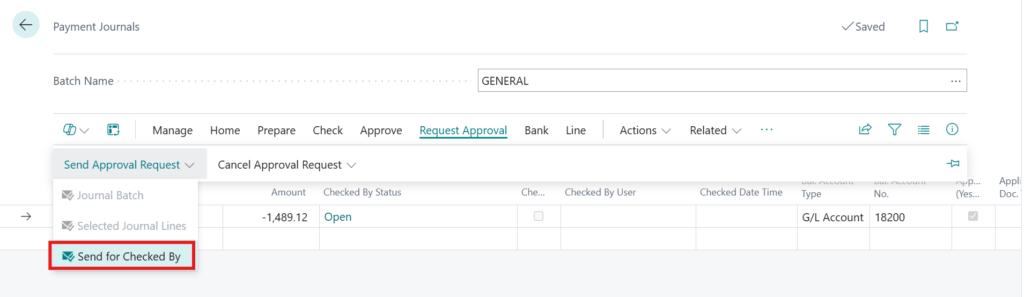
Fig: Custom Checked By process before the standard approval workflow begins.
Automatic Transition to Standard Approval
An important usability decision was to avoid requiring the Finance user to perform another manual Send for Approval action after the Checked By stage was completed.
Once Checked By is approved, the system automatically triggers the standard approval request.
Checked By Approved
→
Automatically Trigger Approval Request
→
Standard Business Central Workflow
From the user’s perspective, the entire process therefore feels like one continuous approval journey even though it combines custom and standard approval components. :contentReference[oaicite:8]{index=8}
Improving Payment Voucher Traceability
The custom logs became particularly valuable when preparing the final Payment Voucher.
The business needed the voucher to show the actual users involved at each stage rather than simply displaying generic approval statuses.
| Payment Voucher Field | Data Source |
|---|---|
| Prepared By | Checked By Log – Sender |
| Checked By | Checked By Log – Actual Checker |
| Authorized / Approved By | Actual Approver Log |
| Internet Banking Approved By 1 | Internet Banking Approval |
| Internet Banking Approved By 2 | Internet Banking Approval |
This provides a much clearer audit trail than relying entirely on the standard Approval Entry table. :contentReference[oaicite:9]{index=9}
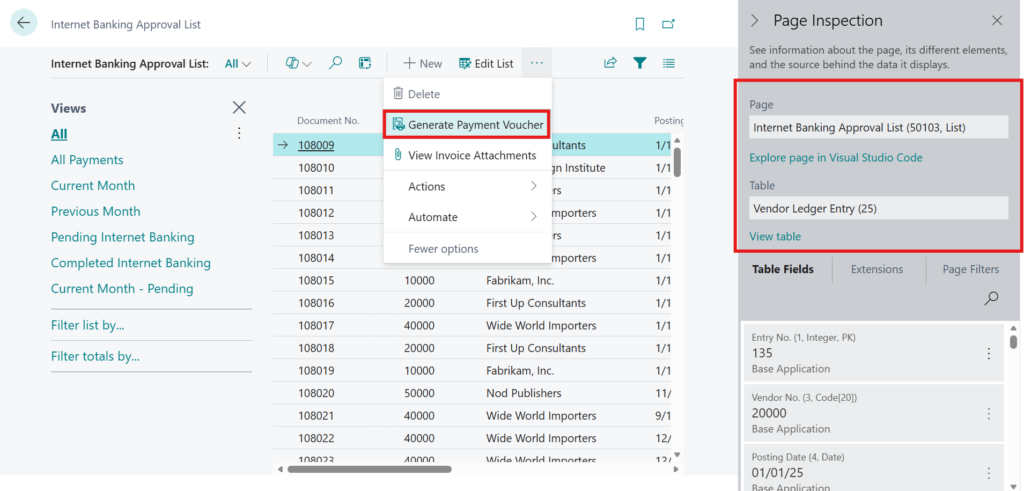
Fig: Payment Voucher showing the actual users involved in the approval process.
Final Solution Architecture
The final design combines custom pre-checking, the standard Business Central workflow engine, targeted approval customization, and separate Internet Banking validation.
Payment Journal
→
Finance Officer
→
Send for Checked By
→
CHECKEDBY User Group – Any One
→
Checked By Log
→
Automatic Standard Approval
→
Sequence 1 – Any One of 2
→
Sequence 2 – Any One of 4
→
Actual Approver Log
→
Posting
→
Internet Banking – Approver 1 + Approver 2
→
Payment Voucher
This architecture allowed us to extend the standard approval framework rather than replace it. Workflow User Groups continued to control authorized users, while custom logs provided the flexibility and auditability required by the business.
Preview Video
The following video provides a quick walkthrough of the multi-level payment approval process implemented in Microsoft Dynamics 365 Business Central, including the Checked By stage, workflow approvals, actual approver tracking, and the overall approval flow.
Business Impact
- Controlled Payment Processing: Payments cannot bypass the required Checked By and approval stages.
- Flexible Any-One Approval: Authorized users can complete approval stages without requiring unnecessary approvals from every user in the group.
- Better Auditability: The solution records the actual user who performs each important approval action.
- Reduced Manual Steps: Approval automatically moves from Checked By into the standard workflow without requiring another submission action.
- Centralized User Management: Workflow User Groups continue to manage authorized users without hardcoding user IDs.
- Improved Payment Voucher Reporting: The final voucher can identify the actual users involved across Checked By, workflow approval, and Internet Banking approval.
Frequently Asked Questions
1. Why not build the entire approval process as a custom solution?
Business Central already provides a strong approval framework for Workflow User Groups, Approval Entries, statuses, notifications, and workflow progression. The implementation therefore customized only the areas where the required business behavior differed from the standard process.
2. Why was Checked By implemented separately?
Checked By required an any-one-user validation before the formal approval workflow began. Keeping it separate provided greater control while still allowing authorized users to be maintained through the CHECKEDBY Workflow User Group.
3. Why was an Actual Approver Log required?
The business needed to identify the user who physically performed the approval action. Standard Approval Entry statuses alone were not sufficient for this reporting requirement after the customized approval stage was completed.
4. Does the solution still use standard Business Central workflows?
Yes. The standard Business Central workflow remains an important part of the solution. The customizations extend specific approval behaviors rather than replacing the overall workflow framework.
Conclusion
The most important lesson from this implementation was that complex approval requirements do not always require replacing the standard Business Central workflow engine.
For this Maldives-based loan firm, the right approach was to keep the standard approval framework wherever it already met the business requirement and introduce targeted customizations only where additional control was needed.
Workflow User Groups continued to manage authorized users, standard workflow functionality continued to control approval progression, while custom Checked By and Actual Approver logs provided the flexibility and auditability required by the payment process.
Key Takeaway
A hybrid approach—standard Business Central workflow combined with focused custom approval logic—can provide greater flexibility without unnecessarily rebuilding functionality that the platform already handles well.
Ready to strengthen payment approvals and financial controls in Microsoft Dynamics 365 Business Central?
CloudFronts helps organizations design secure, flexible, and auditable approval processes that combine standard Business Central workflows with targeted customizations for real-world business requirements. To discuss a similar implementation, reach out to us at transform@cloudfronts.com .
About the Author

Related posts:

From Client Secrets to Certificate-Based Authentication: Building a Secure Integration with Azure Ke...

From Multiple Data Sources to Azure Databricks: A Zero-Downtime Power BI Report Data Migration for F...
Using AI for Data Discipline That Drives Better AI Outcomes