01Summary
A leading North American manufacturer of heavy-duty commercial vehicles moved three years of procurement history from a legacy ERP into Dynamics 365 Finance and Operations, and roughly 4,000 of those Purchase Orders were already cancelled in the source system. The Data Management Framework imported them as records without complaint, but DMF cannot run a PO cancellation, so those orders landed in D365 F&O as confirmed supply and the first test Master Planning run returned net requirements of zero for hundreds of items the assembly line actually needed. CloudFronts extended the DMF staging entity with a cancel flag and added a post-import X++ batch job that reads the flag and calls the same cancellation API behind the Cancel button on the Purchase Order form. All 4,000 cancelled POs now hold the correct state in D365 F&O, MRP plans against real supply, and a reconciliation log gives procurement a line by line count to check against legacy.
Table of Contents
02About the Customer
Our customer is one of North America’s leading manufacturers of heavy-duty commercial vehicles, operating an extensive network of manufacturing and logistics facilities. As part of its supply chain operations, the organization manages high-volume production, component manufacturing, and distribution processes that require seamless integration across enterprise systems.
03Business Challenges
The customer builds heavy-duty commercial vehicles across a network of manufacturing and logistics facilities, running high-volume component production that feeds a fixed assembly schedule. Master Planning was a go-live dependency, not a phase two item. If MRP could not be trusted on the first run, the build schedule could not be trusted either.
Uncancelled POs are phantom supply
D365 F&O nets demand, meaning sales orders, production orders and forecasts, against supply, meaning on-hand inventory, Purchase Orders and planned orders. Every confirmed PO counts as expected incoming material. Import 4,000 cancelled legacy POs as confirmed orders and the planning engine sees 4,000 supply lines that no vendor will ever ship.
The arithmetic is unforgiving. Net requirement is demand minus supply, so inflating supply with dead orders drives net requirement to zero or below. MRP then raises nothing. The warehouse stays empty and the line stops.
Where the existing pipeline stopped
- Legacy system exports PO line recordsEvery Purchase Order, active or cancelled, leaves the legacy ERP as a flat file record.
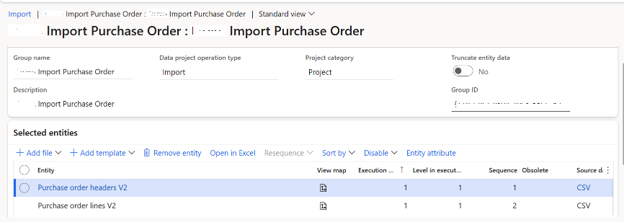
- DMF imports the records into D365 F&OPO lines land in PurchTable and PurchLine through the standard Purchase Order Lines data entity.
- Backend automation approves and confirms POs starting with NThe automation picks up everything matching that number series prefix and pushes it through approval and confirmation.
That pipeline handled active orders well. The cancelled ones broke it in four separate ways.
- No flag in the file. The legacy export mixed active and cancelled POs, and the DMF entity carried no field to mark which ones needed cancelling in D365 F&O.
- The automation confirmed the wrong orders. It ran on every PO matching the number series, so orders cancelled in legacy were approved and confirmed into live supply commitments.
- Manual cancellation cost weeks. The UI cancels one PO at a time. The team sized 4,000 POs at three to four weeks of clicking, and MRP could not run reliably until that cleanup finished.
- No reconciliation record. Even a manual pass would leave no structured log proving each cancellation completed, and no way to match the cancelled count between legacy and D365 F&O.
Why the cancelled POs could not simply be dropped from scope
MRP accuracy was the reason this work became non-negotiable, but three other requirements pointed the same way.
- Audit and compliance. Procurement auditors trace why a purchase was raised, who approved it and why it was reversed. Three years of history with the cancellations missing is a history with holes in it.
- Vendor performance analysis. Cancellation patterns are where lead time failures and specification mismatches show up. Migrate only active and completed POs and procurement loses the evidence it negotiates with.
- Financial reconciliation. Cancelled POs that carried prepayments, accruals or commitments have to exist in D365 F&O so finance can close out historical transactions without opening the legacy system again.
04Solution Overview
Before the fix makes sense, one thing about D365 F&O has to be clear. Cancelling a Purchase Order is not a data update. It is a business operation, and the status field is the last thing it touches, not the first.
What the Cancel button actually does
- Validation checks. The system tests eligibility. Has a product receipt posted against any line? Has an invoice been matched? Are registrations pending? Any of these blocks the cancellation or narrows it to specific lines.
- Workflow recall. If Change Management is enabled, the approval workflow is recalled so the PO leaves its approved state through the proper channel instead of a status override.
- Accounting distribution reversal. Encumbrances, pre-encumbrances and budget reservations created at confirmation are reversed or voided.
- Inventory marking cleanup. Marking references between PO lines and sales or production order lines are removed.
- MRP exclusion. The PO drops out of Master Planning calculations and stops counting as incoming supply. For this migration, that was the step that mattered.
- Status update. Only once all of the above completes does the PO status become Cancelled.
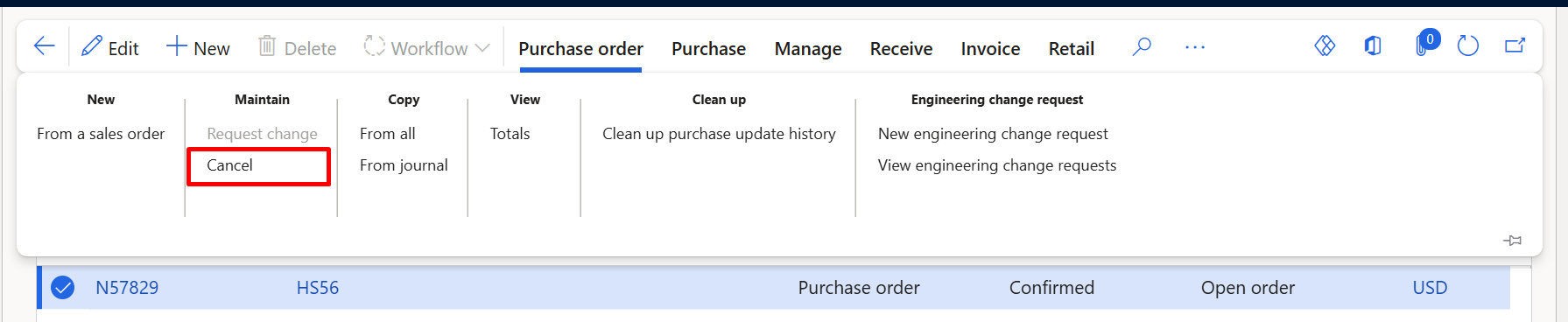
The Purchase Order Lines DMF entity writes field values into PurchTable and PurchLine. It does not invoke any of those six steps. Push a status value of Cancelled through DMF and you get one of three outcomes, a validation failure, a silently ignored value, or a written status with none of the underlying logic behind it. That third outcome is the dangerous one, because the PO reads as Cancelled on screen while MRP still counts it as supply and the accounting distributions stay live.
Flag on import, cancel in batch
- Import every PO through DMF with a cancel flagThe legacy export adds a CancelFlag column carrying Y or N per PO. Active and cancelled orders travel the same DMF pipeline, and the entity is extended with a custom staging field to receive the flag. Nothing fires during import. The flag is stored and nothing more.
- Let the existing approval and confirmation automation run untouchedPOs starting with N are approved and confirmed exactly as before. CloudFronts changed no part of that automation, which kept the migration risk contained to one new component.
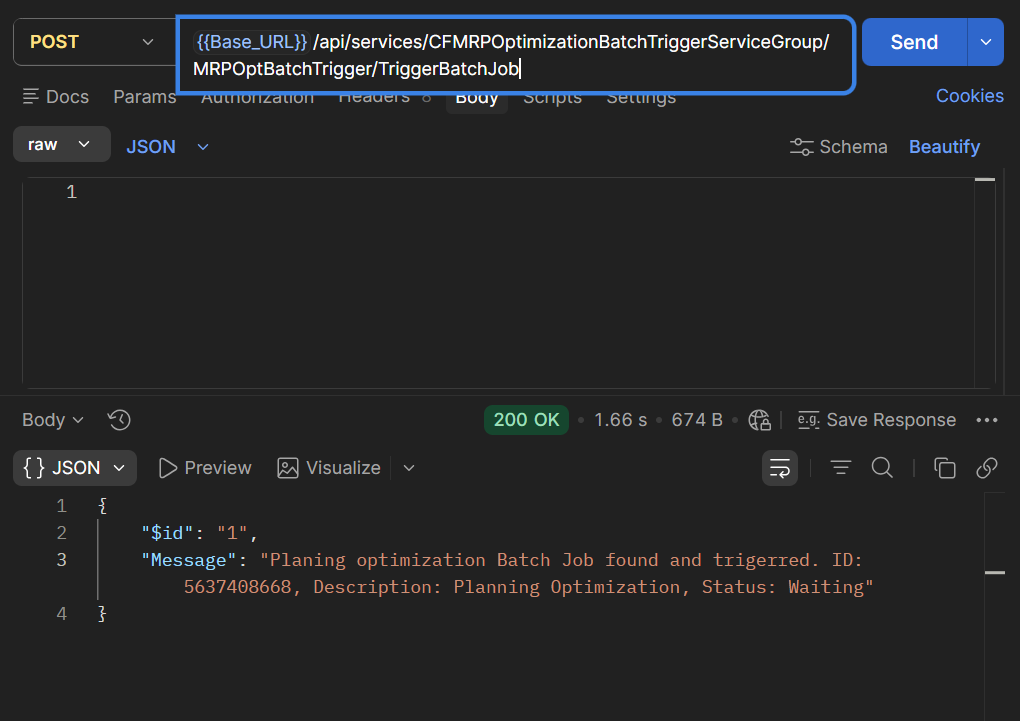
- Run the cancel batch jobA custom X++ batch job selects POs where the flag is Y and the state is not already Cancelled, then calls the standard cancellation API for each one. Accounting distributions reverse, the PO leaves MRP supply, and every outcome is written to a log table.
- Run Master PlanningWith dead orders out of supply, MRP nets against the real picture and raises planned purchase orders only where there is a genuine shortfall. The batch job has to finish before the first production MRP run.
For a business stakeholder, the shape of it is simple. The legacy system tells D365 F&O which orders are dead, D365 F&O cancels them the same way a procurement user would, and a log proves it happened.
05Technical Approach
DMF entity extension
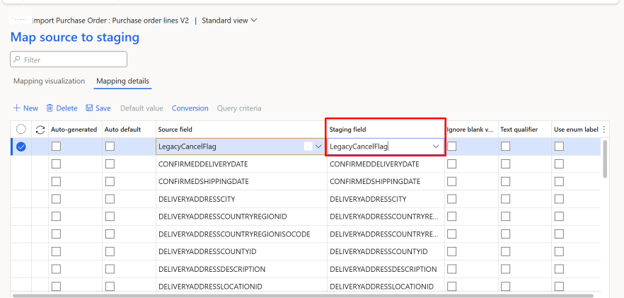
CloudFronts extended the PurchPurchaseOrderLineV2 staging table with one custom field, CFLegacyCancelFlag, a string holding Y or N. No logic is attached to it. It is a data carrier and nothing else, which keeps the import behaviour identical to the pre-existing pipeline.
The DMF project maps the cancel flag column from the legacy flat file to CFLegacyCancelFlag on the staging table, which in turn maps to a custom field on PurchTable. Header level was the right choice here, because the legacy system cancelled whole orders rather than individual lines. If your legacy data cancels at line level, map to PurchLine instead and drive the batch job from the line.
The cancellation batch job
The job is a custom X++ runnable class extending RunBaseBatch. It runs five steps per flagged PO.
| Step | Action | Detail |
|---|---|---|
| 1 | Query flagged POs | Select from PurchTable where CFLegacyCancelFlag == 'Y' and DocumentState != Cancelled |
| 2 | Validate eligibility | Confirm no product receipt posted, no invoice matched, no pending registration |
| 3 | Recall workflow if applicable | Where Change Management is enabled, recall the approval workflow programmatically before cancelling |
| 4 | Call standard cancellation | Invoke PurchTableType::construct(purchTable).cancelled(), the same method the UI Cancel button calls. This is what removes the PO from MRP supply. |
| 5 | Log the result | Write PO number, timestamp, outcome and error reason to a custom log table |
Per-PO processing sequence inside the batch job.
Each PO is processed in its own transaction scope, so one failure does not roll back the orders already cancelled in that run. Batch size is configurable, which mattered during test cycles when the team wanted to cancel a controlled subset of MRP-critical items first.
End-to-end pipeline sequence
| Sequence | Step | Handled by | Output |
|---|---|---|---|
| 1 | Legacy exports PO records with CancelFlag | Legacy ERP | Flat file with Y or N per PO |
| 2 | DMF imports all PO records | Data Management Framework | POs created in D365 F&O with the flag stored |
| 3 | Automation approves and confirms POs starting with N | Existing backend automation | POs in Approved and Confirmed state |
| 4 | Cancel batch job runs on flagged POs | Custom X++ batch job | Flagged POs cancelled and removed from MRP supply |
| 5 | Reconciliation log generated | Custom X++ batch job | Log row per PO with outcome and reason |
| 6 | Master Planning run | D365 F&O MRP | Correct net requirements, planned orders for real shortfalls only |
The migration pipeline with the cancellation and MRP steps added at the end.
Q1Why cancel after confirmation instead of before?
The existing automation confirms every PO matching the number series. Cancel first and that automation fails on orders it can no longer find, which means reworking a component that already worked. Cancelling after confirmation also follows the natural lifecycle, create, approve, confirm, then cancel, so the PO carries a full record of its state transitions for audit.
Q2Why not suppress the POs from MRP with a coverage override instead?
Coverage groups and manual exclusions hide the symptom. The orders still appear as supply in on-hand reporting, still hold live accounting distributions, and still cause reconciliation mismatches against legacy. Cancelling them properly clears the MRP problem and every downstream problem in one operation.
Q3Is the batch job safe to run more than once?
Yes. The query filters out anything already in Cancelled state, so a rerun picks up only the POs that failed or were added since the last run. During test cycles the team ran it repeatedly against the same migration batch with no double processing.
Worked example, PO N-00412
PO N-00412 was raised in the legacy system against Vendor A for 200 units of a steel frame component, item SF-2040. Procurement cancelled it six months earlier after the vendor missed the agreed lead time, then raised and fulfilled a replacement order with Vendor B. Here is how that single record moves through the pipeline.
| Stage | Action | PO status | MRP impact |
|---|---|---|---|
| Legacy export | N-00412 exported with CancelFlag = Y | n/a | n/a |
| DMF import | N-00412 created in D365 F&O | Open, Draft | Not yet visible to MRP |
| Approval automation | N-00412 approved | Approved | Not yet visible to MRP |
| Confirmation automation | N-00412 confirmed | Confirmed | MRP counts 200 units of SF-2040 as incoming supply, which is wrong |
| Cancel batch job | Standard cancellation API called | Cancelled | 200 units removed from MRP supply, which is correct |
| MRP run | Master Planning nets requirements | Cancelled | SF-2040 planned orders raised against actual demand only |
PO N-00412 through the migration pipeline, from phantom supply to correct planning.
After the batch job, N-00412 sits in exactly the state it would occupy if a procurement user had opened it and clicked Cancel. Distributions reversed, workflow history intact and readable, 200 units of SF-2040 gone from supply, one log row confirming it. Skip the cancellation step and MRP raises no planned purchase order for the frames those production orders need, and the assembly line runs dry.
Edge cases the batch job has to handle
- ◆Partially received POsWhere legacy received part of an order before cancelling it, the received lines cannot be cancelled. The job logs the PO as an exception for procurement to review, who cancel the open lines and close or return the received quantity. The received quantity is already on hand, so only the open line quantity was creating phantom supply.
- ◆POs already cancelledThe query excludes anything in Cancelled state, whether from an earlier run or a manual intervention. That keeps the job idempotent and safe to rerun after a partial failure.
- ◆Blank or null CancelFlagIf a mapping issue leaves the flag empty, the job treats the PO as active and leaves it alone. Missing data defaults to the safe behaviour, an uncancelled order that a human can review, rather than a cancellation nobody asked for.
- ◆Items carrying safety stockOn items with safety stock or minimum coverage settings, one phantom PO is enough to suppress a planned order that coverage would otherwise trigger. CloudFronts validated the job against MRP-critical items first so the highest-impact orders cleared before the first planning run.
06Business Impact / Key Takeaways
- 4,000Cancelled legacy POs processed in a single batch run
- 0Manual UI cancellations required per migration batch
- 3 to 4 weeksManual cleanup effort removed from the migration plan
- Same dayTime from migration batch to first reliable MRP run
| Metric | Before | After |
|---|---|---|
| MRP accuracy at go-live | Unreliable, 4,000 phantom supply lines | Correct, real supply only |
| Manual cancellations per migration batch | All 4,000, one at a time in the UI | 0 |
| Time to process cancelled POs | Weeks of manual effort | Minutes, one batch run |
| Audit trail for cancellations | None | Log row per PO with number, timestamp and outcome |
| Disruption to existing automation | No solution existed | Zero, the import and confirmation pipeline was untouched |
| Reconciliation method | Manual count comparison | Automated legacy count against D365 F&O cancelled count |
Before and after, cancelled PO handling during migration.
- MRP worked from the first run. The primary success metric. Planned orders from the first post-migration Master Planning cycle matched the production schedule, with no suppressed demand signals and no stockouts traceable to migration data quality.
- Procurement trusts the migrated history. Every cancelled PO in legacy has a matching cancelled PO in D365 F&O, and the reconciliation log lets IT and procurement verify that line by line rather than sampling.
- The go-live date held. The manual alternative would have consumed three to four weeks and blocked reliable planning for all of it. The batch job cleared the backlog inside a single migration test cycle.
- The pattern is reusable. Flag and batch applies to any lifecycle operation DMF cannot trigger, PO closure, workflow approval, confirmation or finalisation. Once the cancellation job existed, the team had a template for the rest of the migration.
07Conclusion / Final Thoughts
Two checks will tell you whether this applies to your migration. Count the cancelled Purchase Orders sitting in your legacy system, then run a test MRP cycle after a migration dry run and compare the planned orders against what your production schedule genuinely needs. Net requirements of zero on items you know are short is the signature of phantom supply from uncancelled legacy POs, and it is a production risk rather than a data cleanup task you can push past go-live. The fix is one X++ class, one custom field and one extra step at the end of a pipeline you have already tested.
08Call to Action / Connect With Us
CloudFronts has built this pattern into multiple D365 F&O migrations, covering the DMF entity extension, the X++ batch job and post-migration MRP validation. Tell us where your procurement migration stands at transform@cloudfronts.com.
Author Profile

Shruti Gupta
Senior Consultant · Cloudfronts
Senior Consultant at CloudFronts with 5+ years of experience in Azure integrations and Dynamics 365 implementations. She specializes in building seamless, API-driven architectures and connecting enterprise systems across the Microsoft ecosystem. Passionate about solving complex integration challenges, she focuses on delivering scalable, production-ready solutions that drive real business outcomes.