How a Texas-Based AI and Cybersecurity Services Company Streamlined Dataverse Choice Management in Dynamics 365
Summary
In rapidly evolving sales organizations, business requirements rarely remain static. New products, services, sales categories, commercial models, and operational scenarios can continuously introduce the need for additional values in Dynamics 365.
For one of our clients, this resulted in a recurring dependency on the technical team. Whenever the business needed to add or modify values in a Dynamics 365 Choice column, they had to approach the implementation team for a seemingly small configuration change.
At first glance, replacing the Choice column with a Lookup table appeared to be a natural solution. However, that approach would introduce a much larger change: migrating existing records, replacing references throughout the application, modifying system processes, reviewing integrations, and potentially impacting logic that already depended on the existing Choice values.
Instead of redesigning the data model to solve a configuration problem, I approached the requirement from a solution-architecture perspective.
I built a self-service Dataverse Choice Manager that allows authorized users to select a Dataverse table and Choice column, add or update options, publish the metadata, and automatically create an audit record and notify system administrators.
The solution uses supported Dataverse Web API and Metadata APIs to perform controlled schema-level operations while introducing governance, auditability, and guardrails around those changes.
The result is a model where the business can adapt its Choice values without continuously depending on developers, while the technical team retains control over security, governance, auditing, and platform integrity.
Case Study
Read more about our Journey with this Customer over here: View Case Study
Table of Contents
Introduction
Dynamics 365 implementations often evolve alongside the businesses they support.
A sales organization may initially define a finite set of values for a Choice column. Over time, however, new products are introduced, sales processes change, new commercial categories emerge, and terminology evolves.
The technical change may appear trivial:
“I just need to add one more option to this Choice field.”
But when the same request occurs repeatedly, a different problem emerges.
The business becomes dependent on the technical team for configuration changes that are fundamentally part of day-to-day business evolution.
For one of our clients, this pattern was becoming increasingly common. The organization is highly sales-focused and operates in an environment where business requirements continue to evolve.
The question therefore became:
Can I give the business controlled self-service access to Choice values without redesigning the existing Dataverse data model?
Rather than immediately changing the schema, I looked at the problem from a solution-design perspective.
The answer was to build a controlled metadata management layer over Dataverse.
Business Requirement
The client’s requirement was straightforward:
- Select a Dynamics 365 table.
- Select a Choice column.
- Add a new option when the business needs one.
- Update an existing option label when terminology changes.
The challenge was not simply performing these operations.
The challenge was performing them safely.
A typical Dynamics 365 user does not need unrestricted access to the Dataverse schema. Giving users broad customization privileges would create an entirely different governance problem.
I therefore needed to balance two competing objectives:
Business agility
The sales team should not need to raise a development request every time a new Choice value is required.
Technical governance
The organization still needs to know:
- Who made the change?
- What was changed?
- When was it changed?
- Which table was affected?
- Which Choice column was affected?
- What was the previous value?
- What is the new value?
- Was the change successfully published?
This led us to a more important architectural principle:
Self-service does not have to mean unrestricted access.
The solution should expose only the operations that the business needs while keeping the underlying metadata APIs behind a controlled interface.
The Architectural Decision
Option 1: Replace the Choice with a Lookup
One possible solution was to replace the existing Choice column with a Lookup pointing to a new Dataverse table.
Conceptually, this would provide an excellent long-term model for highly dynamic business values.
For example:
Sales Record
    |
    +-- Category Lookup
            |
            +-- Category A
            +-- Category B
            +-- Category C
            +-- Category D
The business could then create new category records without changing metadata.
However, the problem was the existing implementation.
The Choice column was already being used across the solution.
Replacing it would potentially require:
- Identifying all existing records containing the Choice value.
- Creating corresponding records in the new Lookup table.
- Migrating existing data.
- Replacing the existing field references.
- Updating JavaScript.
- Reviewing plugins.
- Reviewing Power Automate flows.
- Reviewing business rules.
- Reviewing integrations.
- Updating reports and Power BI dependencies.
- Testing existing processes.
- Deploying the changes across environments.
In other words, a small configuration problem could turn into a substantial data-model transformation.
The Architectural Conclusion
The problem was not necessarily that the Choice column was the wrong data type.
The problem was that the organization needed a controlled way to manage its values.
Therefore, rather than redesigning the data model, I preserved the existing architecture and built a self-service management capability around it.
How I Solved It
I designed a web-resource-based application inside Dynamics 365:
Dataverse Choice Manager
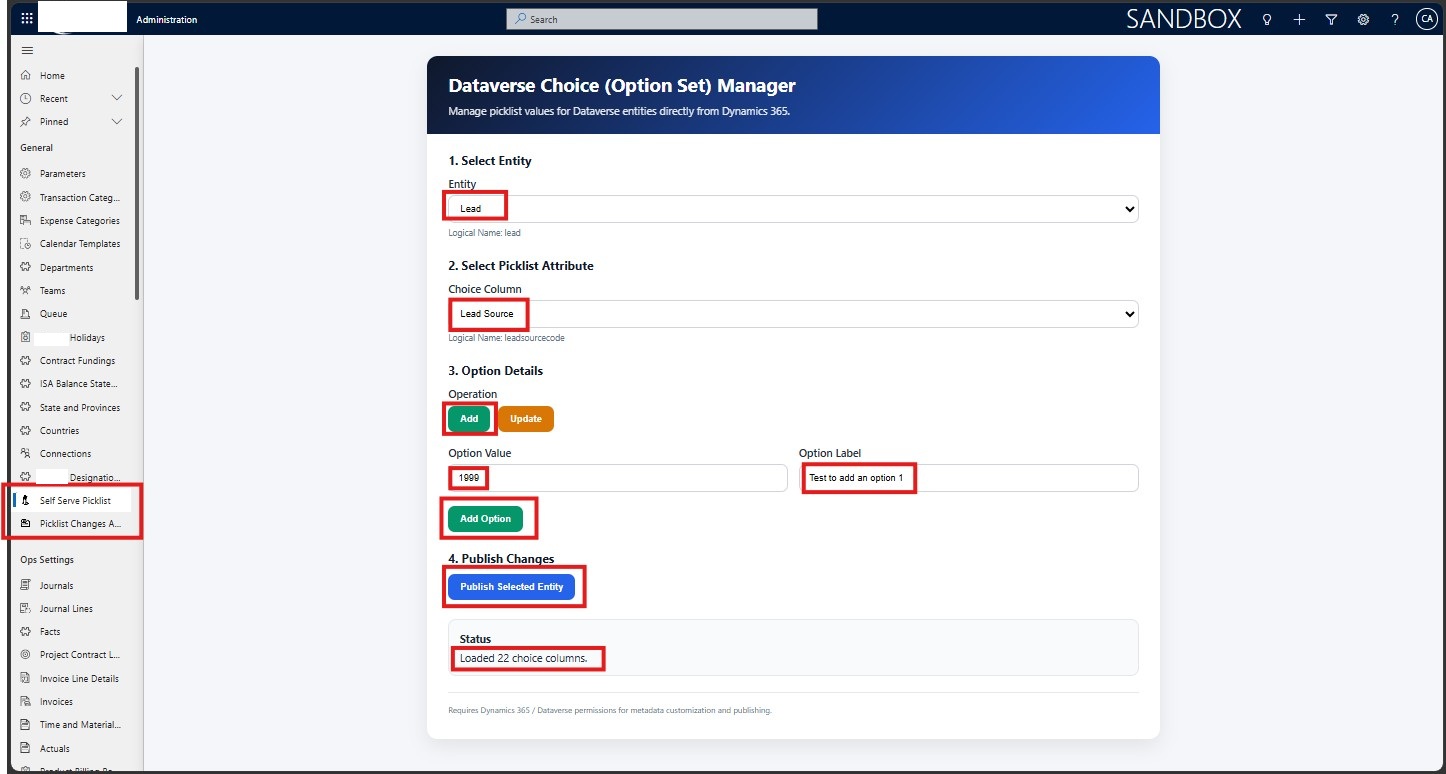
The application provides a simple interface through which an authorized user can:
- Select a Dataverse table.
- Retrieve the available Choice columns.
- Select a Choice column.
- Retrieve its existing options.
- Add a new option.
- Update an existing option.
- Publish the affected table.
- Generate an audit record.
- Notify the system administrator.
From the user’s perspective, this becomes a simple business operation.
From the platform perspective, however, the application is interacting directly with Dataverse metadata.
The high-level architecture is:
Dynamics 365 User
        |
        v
Dataverse Choice Manager
        |
        +--------------------+
        |                    |
        v                    v
Dataverse Web API      Metadata Actions
        |                    |
        |          InsertOptionValue
        |          UpdateOptionValue
        |          DeleteOptionValue
        |          PublishXml
        |
        v
Dataverse Metadata
        |
        v
Choice Column Updated
        |
        +----------------------+
        |                      |
        v                      v
Custom Audit Log        System Administrator Email
This is where the solution becomes more interesting from an architecture perspective.
I did not bypass Dataverse.
I used the platform’s supported APIs and actions to expose a controlled self-service experience on top of them.
Implementation Procedure
Step 1 – Dynamically Retrieve Dataverse Tables
The application begins by retrieving customizable Dataverse tables through the EntityDefinitions metadata endpoint.
Conceptually, the application queries:
/api/data/v9.2/EntityDefinitions
and filters for customizable entities.
Instead of hardcoding table names, the application dynamically builds the table dropdown.
This means that if another supported table is introduced into the environment, the Choice Manager can discover it without requiring another code change.
The user sees the friendly display name while the application internally works with the logical name.
For example:
| User Interface | Internal |
|---|---|
| Opportunity | opportunity |
| Lead | lead |
| Account | account |
| Contact | contact |
This separation between presentation and logical metadata is important when working with Dataverse APIs.
Step 2 – Retrieve Choice Columns Dynamically
Once the user selects a table, the application queries the table metadata and retrieves its Picklist/Choice attributes.
The application uses the Dataverse Metadata API to identify attributes of type:
PicklistAttributeMetadata
This prevents users from attempting to manage unrelated column types.
The interface therefore becomes context-aware:
Select Table
      |
      v
Retrieve Metadata
      |
      v
Show Choice Columns
Again, no hardcoded field list is required.
Step 3 – Retrieve Existing Options
After the Choice column is selected, the application retrieves its existing options through the metadata API.
This allows the user to see both:
- Option label
- Option value
For example:
Pending Approval (100000001)
Approved (100000002)
Rejected (100000003)
Approved (100000002)
Rejected (100000003)
This is important when updating an option because the underlying integer value remains significant even when its label changes.
Step 4 – Add a New Choice Value
To add a new option, the application invokes the Dataverse:
InsertOptionValue action.
The request contains information such as:
- EntityLogicalName
- AttributeLogicalName
- Label
- LanguageCode
- Value
The application can therefore create a new Choice value without requiring the user to open the Maker Portal and manually modify the column.
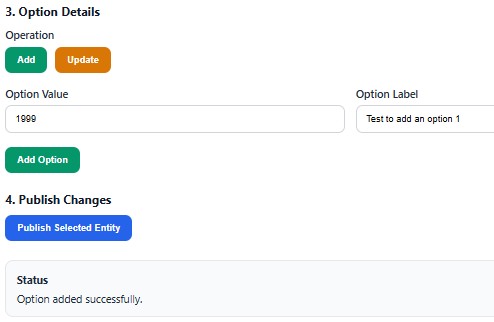
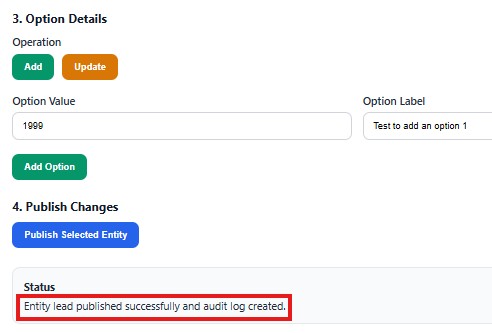
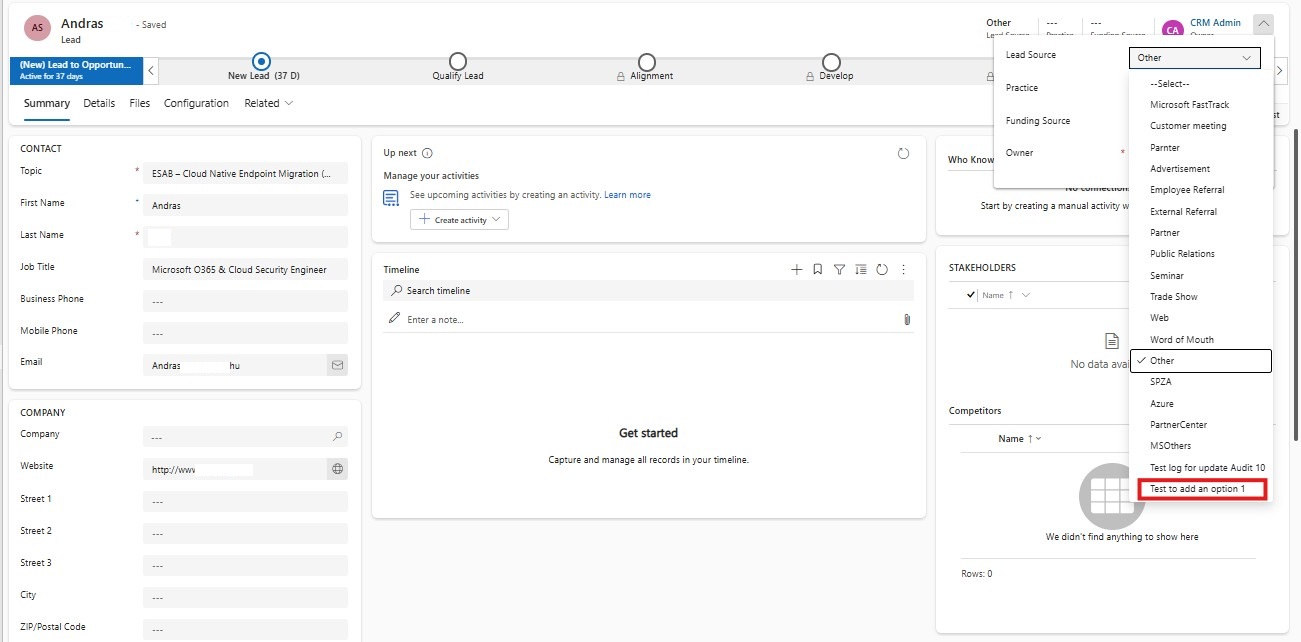
Where an explicit option value is supplied, that value can also be passed to the API.
This gives the technical team greater control over how option values are introduced.
Step 5 – Update an Existing Choice Value
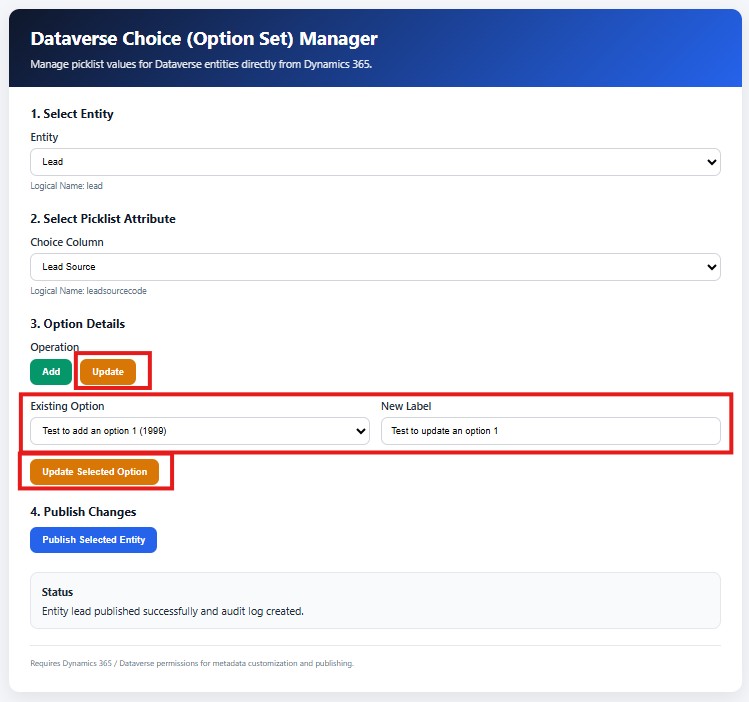
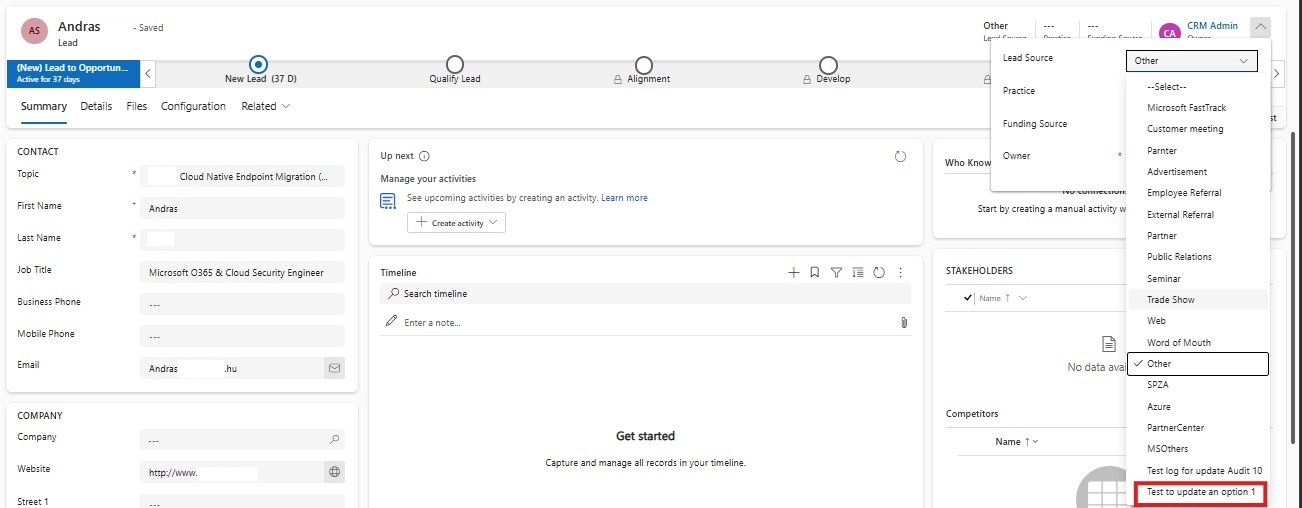
The second major operation is updating an existing option label.
The application first retrieves the existing options and allows the user to select one.
It then invokes:
UpdateOptionValue with the selected option value and the new localized label.
An important design decision here was to capture the previous label before making the change.
For example:
| Before | After |
|---|---|
| 100000002 → Pending Approval | 100000002 → Awaiting Customer Approval |
The option value remains the same while the business-facing label changes.
The previous value is subsequently stored in the custom audit record.
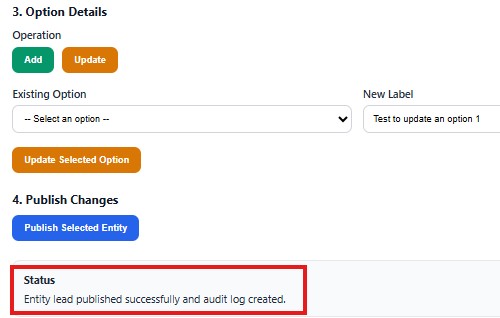
Step 6 – Publish the Metadata
Changing metadata is not the end of the process.
The customization must be published before the change is fully available across the environment.
The application therefore invokes:
PublishXml for the selected entity.
The logical flow becomes:
User Request
     |
     v
Metadata Change
     |
     v
PublishXml
     |
     v
Published Dataverse Metadata
This was an important part of the design because the user should not have to separately navigate to the Maker Portal simply to publish the change.
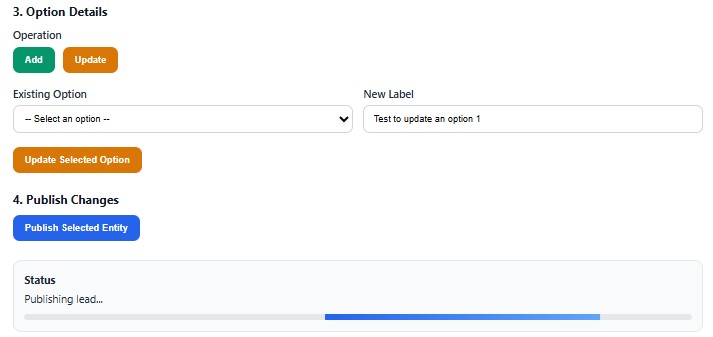
The self-service experience therefore covers the complete operation rather than only the metadata modification itself.
Custom Auditing and Governance
One of the more interesting challenges was auditing.
Dataverse provides auditing capabilities for data changes, but metadata configuration changes such as Choice modifications require a different approach when an organization wants a business-specific, detailed change history.
I therefore introduced a dedicated custom table:
Picklist Changes Audit Log
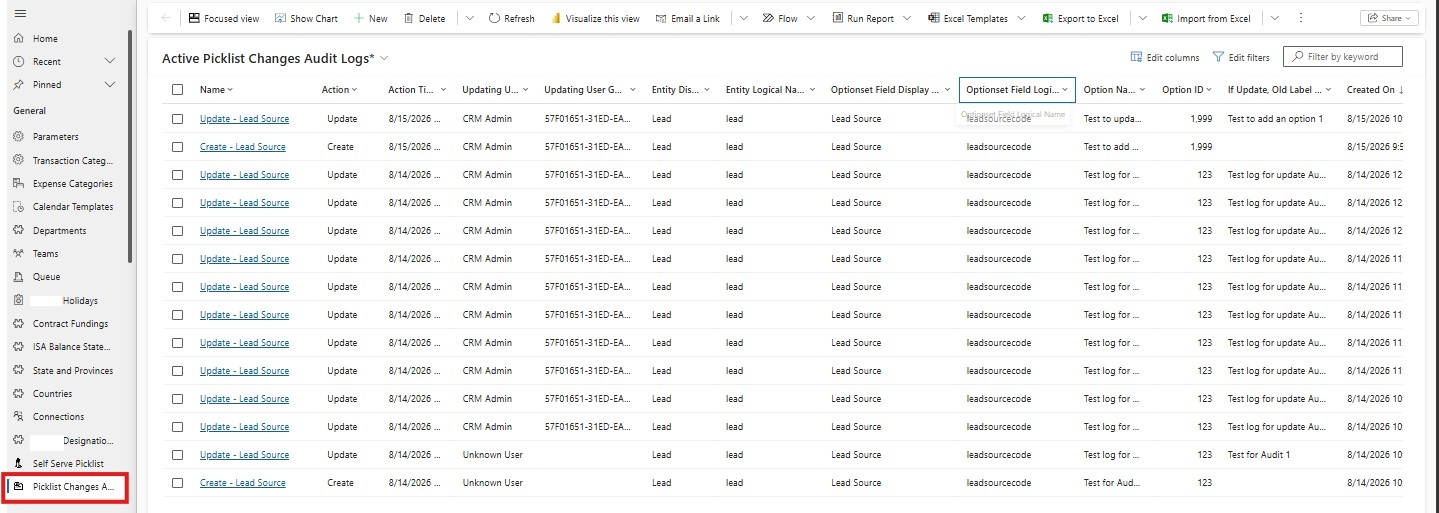
The audit record captures information including:
- Action
- Action time
- User name
- User GUID
- Entity display name
- Entity logical name
- Choice column display name
- Choice column logical name
- Option name
- Option value
- Previous label when applicable
A typical audit record can therefore answer:
| Field | Value |
|---|---|
| Who? | John Smith |
| When? | 15-Aug-2026 10:32 |
| What? | Choice label updated |
| Table? | Opportunity |
| Column? | Sales Category |
| Option Value? | 100000002 |
| Old Label? | Pending Approval |
| New Label? | Awaiting Customer Approval |
This turns an otherwise difficult-to-track metadata operation into a business-readable audit trail.
Protecting the Audit Trail
Creating an audit table is only half of the solution.
If users can subsequently modify or delete the audit records, the audit trail itself cannot be considered trustworthy.
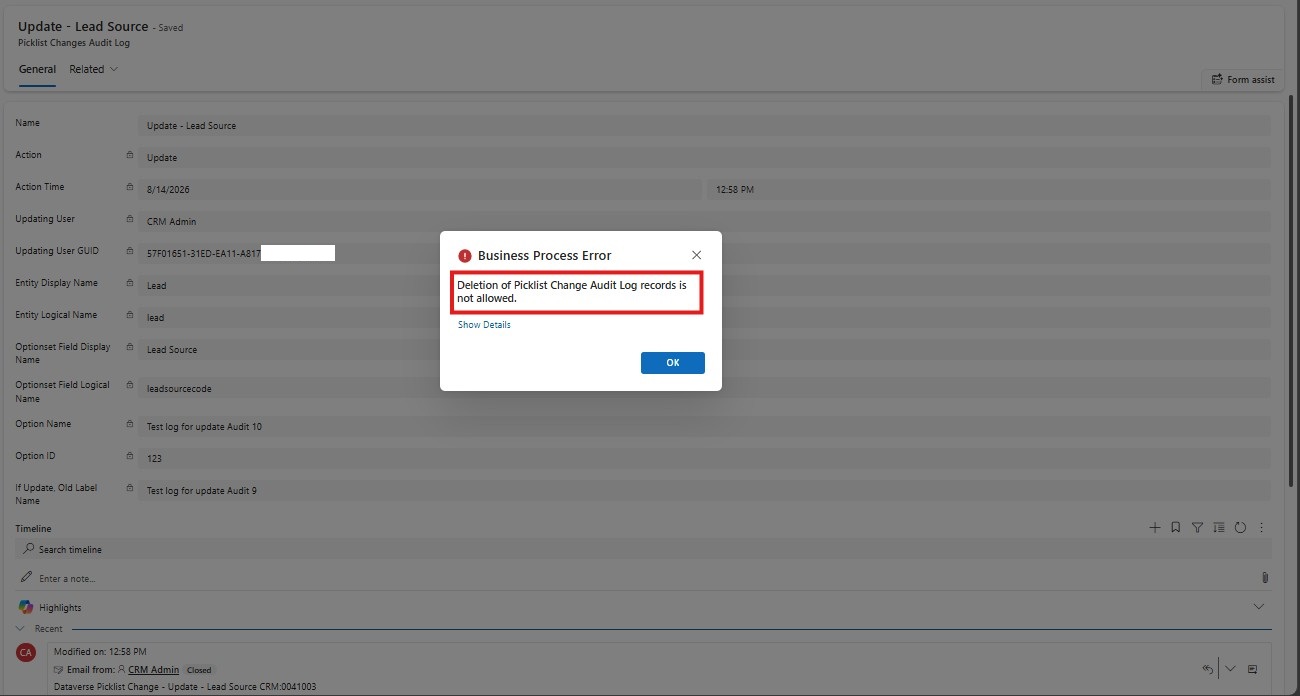
I therefore added server-side controls through a Dataverse plugin.
The plugin protects the audit table by:
Preventing deletion
A delete operation on the audit record is rejected.
Protecting critical fields
The plugin checks updates against protected audit attributes.
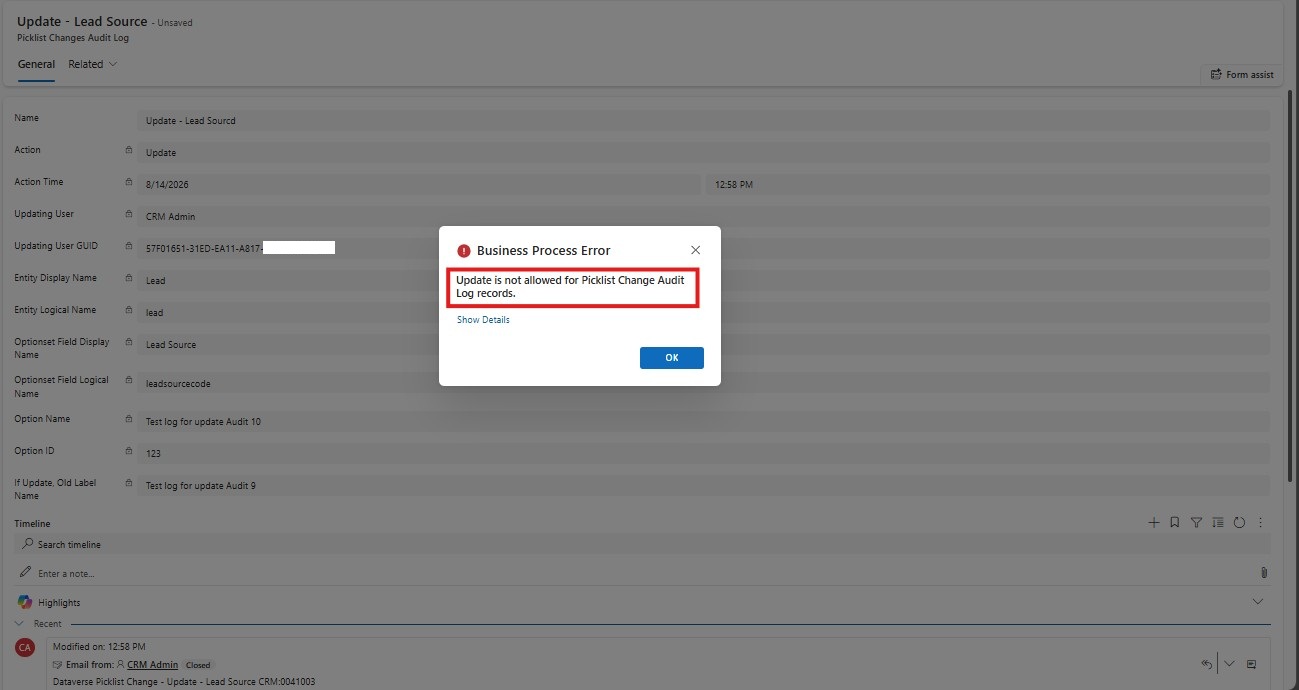
If a user attempts to modify fields such as:
- Action
- Action Time
- Updating User
- Entity
- Choice Column
- Option Name
- Option ID
- Previous Label
the operation is rejected.
This is important because client-side restrictions alone are not sufficient.
A user could potentially bypass JavaScript through another client, API call, import, or automation.
The plugin therefore establishes the governance boundary on the server.
The architectural pattern becomes:
Client-side UI
      |
      | Convenience / controlled experience
      v
Dataverse API
      |
      | Server-side enforcement
      v
Audit Control Plugin
      |
      v
Immutable Audit History
This is a broader lesson that applies well beyond this particular solution:
Client-side controls improve usability; server-side controls establish trust.
Email Notification
The next requirement was operational visibility.
An audit record sitting silently in Dataverse is useful, but administrators may not continuously monitor the audit table.
I therefore added an email notification after a successful publish.
The email contains the relevant information about the change and is associated with the corresponding audit record.

The process is:
Publish successful
       |
       v
Create Audit Record
       |
       v
Retrieve Audit Record ID
       |
       v
Create Email
       |
       v
Associate Email with Audit Record
       |
       v
Send Email
The association is particularly useful because it allows administrators to navigate from the email activity back to the exact audit record.
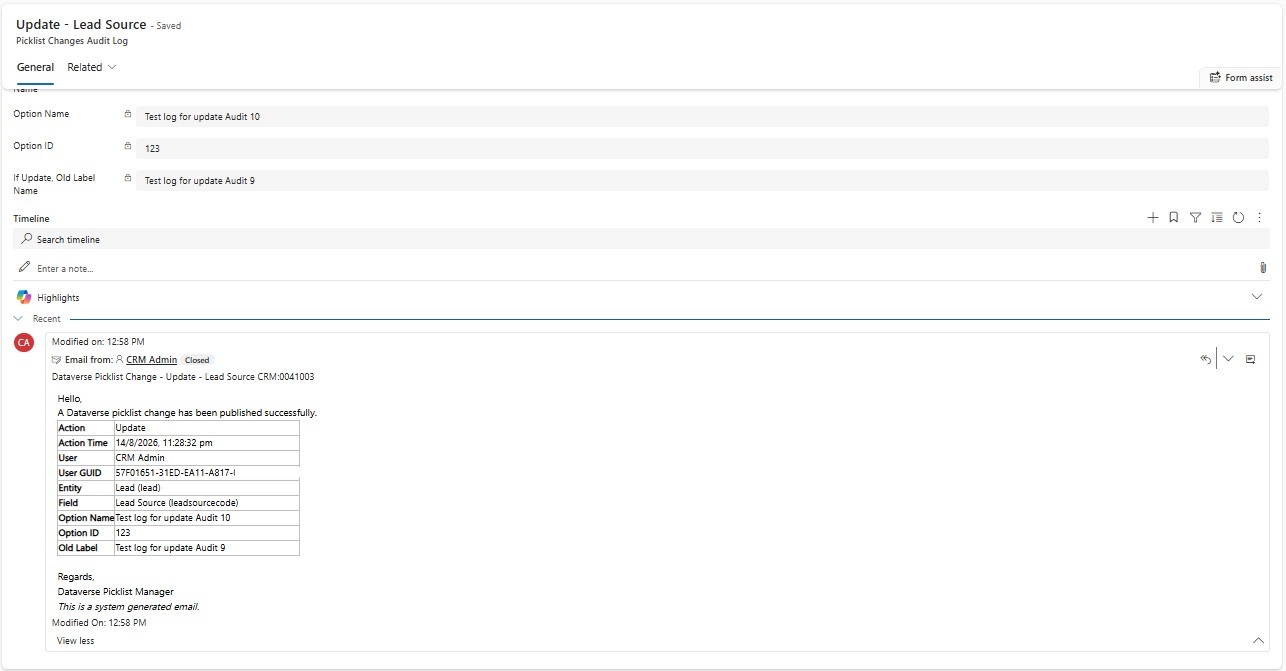
This required creating the appropriate relationship between the custom audit table and the Email activity rather than treating the custom table as a standard activity-enabled table.
That distinction is important in Dataverse: a custom business table does not automatically become an activity entity simply because activities are enabled in the user experience. Relationships and activity-party/regarding behavior must still align with the Dataverse activity model.
Working Within Dataverse Platform Boundaries
An important part of this solution was understanding the distinction between bypassing a platform restriction and working around a user-experience limitation using supported APIs.
I did not attempt to modify Dataverse metadata through unsupported database operations.
Instead, I used the exposed Web API and Dataverse actions, including:
InsertOptionValue
UpdateOptionValue
DeleteOptionValue
PublishXml
combined with Metadata APIs for discovery.
This allowed us to create a business-friendly abstraction over capabilities that normally require technical configuration access.
The architecture can therefore be viewed as:
Complex Platform Capability
            |
            v
      Metadata APIs
            |
            v
   Controlled Abstraction
            |
            v
      Business User
The complexity is hidden from the business without removing the underlying platform governance.
That is the key architectural value.
Benefits of the Solution
1. Reduced Technical Dependency
Sales users no longer need to raise a development request for every Choice value change. The technical team can focus on actual application development instead of repetitive configuration requests.
2. No Data Migration
Because the existing Choice column remains in place, existing records do not need to be migrated into a new Lookup table. This avoids a potentially significant data conversion exercise.
3. Existing Processes Remain Intact
Existing plugins, JavaScript, Power Automate flows, integrations, reports, business rules, views, and other dependent components can continue referencing the same column. The underlying data model is preserved.
4. Faster Business Adaptation
A business user can respond to an evolving requirement without waiting for a full development cycle.
5. Centralized Governance
Instead of allowing users to modify Choice values through unrestricted administrative access, the organization can provide a controlled interface. This creates a much more intentional governance model.
6. Traceability
Every change can be associated with user, timestamp, entity, field, action, option value, previous label, and new label — providing operational visibility that would otherwise be difficult to maintain for this type of configuration activity.
7. Reusable Framework
Although the original requirement was driven by a specific business problem, the architecture is reusable. The same pattern can be extended to other metadata-management scenarios where Dataverse exposes supported APIs. The larger opportunity is not simply a “Picklist Manager” — it is a controlled self-service metadata management framework.
4. Faster Business Adaptation — Changing the Operating Model
This changes the operating model from:
Business Request
      ↓
Developer
      ↓
Development
      ↓
Testing
      ↓
Deployment
      ↓
Business
to:
Authorized User
      ↓
Choice Manager
      ↓
Validated Metadata Change
      ↓
Publish
      ↓
Audit + Notification
Limitations and Guardrails
Exposing Dataverse metadata operations through a self-service interface introduces a different class of risk. The objective was not to give users unrestricted access to the Dataverse metadata layer, but to provide controlled self-service capabilities for a narrowly defined business requirement.
The solution was therefore designed with explicit guardrails around what users can change, who can change it, and how those changes are recorded.
1. Deletion Was Intentionally Removed
Although the Dataverse API supports deleting choice values, deletion was deliberately excluded from the self-service interface. This was an architectural decision rather than a technical limitation.
Deleting a choice value can have consequences for existing records, business rules, workflows, Power Automate flows, plugins, reports, integrations, and other downstream processes that depend on that value.
For example, if an organization has Customer Status = Prospect and that option is deleted, existing records and processes relying on that value may require additional remediation.
Therefore, the kiosk supports the safer operations:
- Add a new choice value
- Update the label of an existing choice value
- Publish the change
while destructive operations such as deletion remain outside the self-service experience.
Self-service should automate low-risk administrative changes, not expose every available administrative capability.
2. Only Choice Attributes Are Exposed
The application does not expose the entire Dataverse metadata model. Once an entity is selected, the application specifically retrieves Choice/Picklist attributes and presents only those attributes to the user.
This prevents the interface from becoming a generic metadata administration tool capable of modifying unrelated schema components such as:
- Data types
- Relationships
- Required levels
- Primary keys
- Lookup definitions
- Other attribute metadata
The scope is intentionally restricted to the business problem the client needed to solve: managing evolving Choice values.
3. Existing Option Values Are Preserved
When updating a Choice, the solution changes the label associated with the existing option value rather than creating a new option.
For example:
| Before | After |
|---|---|
| 100000001 – In Progress | 100000001 – Under Review |
The underlying option value remains 100000001. This is important because downstream applications may depend on the numeric option value rather than its display label. Preserving the value minimizes the risk of breaking existing records, integrations, business rules, and reporting logic.
4. Publishing Is an Explicit Operation
Adding or updating a Choice value does not automatically mean that the change has been fully published across the Dataverse metadata layer.
The solution therefore separates the operation into two stages:
Metadata Change → Publish
The user explicitly selects Publish Selected Entity after making the change. This provides an additional control point and ensures that the metadata modification is not silently published without the user’s confirmation.
5. Audit Logging Is Built Around the Gap in Standard Auditing
One of the important limitations encountered during the design was that these changes are metadata operations rather than normal record-field updates. The Choice itself is not being changed through a standard form field update that can simply be captured through normal Dataverse auditing.
To address this, a dedicated custom table was introduced:
Picklist Change Audit Log
The solution records information such as:
- Action performed
- Action timestamp
- User name
- User GUID
- Entity
- Entity logical name
- Choice column
- Choice logical name
- Option label
- Option value
- Previous label, when applicable
This creates an application-level audit trail around the metadata operation.
6. Audit Records Are Protected Against Tampering
Creating an audit table alone would not be sufficient if users could subsequently modify or delete the audit records. A Dataverse plugin was therefore introduced on the audit table as an additional control layer.
The plugin:
- Prevents deletion of audit records
- Prevents modification of protected audit information
- Allows only non-sensitive fields to remain potentially editable
- Uses execution-depth protection to avoid unintended recursion
This means the audit mechanism is not simply “Create a log record.” It becomes “Create a controlled record of the metadata change that users cannot subsequently rewrite or remove.”
7. Administrator Notification Is Part of the Control Framework
The solution also extends the audit mechanism with an email notification to the designated administrator.
After a successful metadata publish:
Publish → Create Audit Record → Send Notification
The notification contains the context required for an administrator to understand what changed, including:
- Who performed the change
- Which entity was affected
- Which Choice column was modified
- What operation was performed
- Option value
- New label
- Previous label, where applicable
- Time of the change
The audit record is also associated with the generated email, providing a relationship between the change record and its notification. This gives administrators both a persistent audit record and an immediate notification mechanism.
End-to-End Working
The complete process can be summarized as follows:
                    ┌──────────────────────┐
                    │   Sales User         │
                    └──────────┬───────────┘
                               │
                               v
                    ┌──────────────────────┐
                    │ Dataverse Choice     │
                    │ Manager              │
                    └──────────┬───────────┘
                               │
                    Select Entity + Field
                               │
                               v
                    ┌──────────────────────┐
                    │ Metadata Web APIs    │
                    └──────────┬───────────┘
                               │
                 ┌─────────────┴─────────────┐
                 │                           │
                 v                           v
          InsertOptionValue          UpdateOptionValue
                 │                           │
                 └─────────────┬─────────────┘
                               │
                               v
                         PublishXml
                               │
                               v
                    ┌──────────────────────┐
                    │ Successful Publish   │
                    └──────────┬───────────┘
                               │
                  ┌────────────┴────────────┐
                  │                         │
                  v                         v
          Custom Audit Log            Email Notification
                  │                         │
                  └────────────┬────────────┘
                               v
                       Governance Trail
The important point is that the user experiences this as a single business process.
Behind the interface, however, multiple Dataverse capabilities are being orchestrated.
Why This Approach Works
The strongest part of this solution is not the API call itself.
The real value comes from the architectural decision behind it.
A common approach to an evolving Choice field is:
“The field changes frequently, so let’s replace it with a Lookup.”
That can certainly be the right answer when the values represent a true business entity with its own attributes, lifecycle, ownership, relationships, or reporting requirements.
But not every frequently changing Choice requires a new table.
In this scenario, introducing a Lookup would have solved one problem while creating several others.
Instead, I asked a different question:
How can I make the existing architecture more adaptable without introducing unnecessary architectural change?
That shift in thinking led to the self-service metadata layer.
This is an important solution-design principle:
Do not redesign the data model simply because the configuration needs to become more flexible. First determine whether the existing model can safely be made more adaptable.
Conclusion
The requirement began as a recurring sales configuration request:
“Can you add another option to this Choice field?”
The obvious technical response would have been to continue handling the requests manually or redesign the field as a Lookup.
Neither approach was ideal.
Manual configuration created an ongoing dependency on the technical team, while replacing the Choice column would have introduced data migration, application dependency, integration, and regression risks.
Instead, I designed a controlled self-service layer around Dataverse.
By combining:
- Dataverse Web API
- Dataverse Metadata APIs
- InsertOptionValue
- UpdateOptionValue
- DeleteOptionValue
- PublishXml
- A custom audit table
- Server-side plugin controls
- Email notification
- A Dynamics 365 web resource interface
I transformed a recurring technical request into a governed business capability.
More importantly, the solution demonstrates that platform flexibility does not always require architectural replacement.
Sometimes the better architecture is to preserve the existing data model and build the right abstraction around it.
The result is a Dynamics 365 environment that is more responsive to business change while still maintaining technical governance and traceability.
Key Takeaway:
In an evolving business, agility and governance should not be treated as opposites.
The right architecture can give business teams the ability to adapt while ensuring that every meaningful configuration change remains controlled, traceable, and accountable.
The goal is not to give users unrestricted access to Dataverse metadata.
The goal is to give them the right capability, through the right abstraction, with the right guardrails.
That is where self-service becomes an architectural advantage rather than a governance risk.

Shashank Keny
Associate Consultant · CloudFronts
Shashank Keny is an Associate Consultant at CloudFronts with 1.5+ years of experience in cloud, data, and business applications. He specializes in building scalable, API-driven architectures and integrating enterprise systems across the Microsoft ecosystem.
He is a Certified Databricks Data Engineer with hands-on experience in Dynamics 365 Project Operations and Dynamics 365 Sales, along with delivering business intelligence solutions using Power BI.
His expertise also extends to modern AI solutions, including building custom copilots and implementing intelligent applications using Azure AI Foundry.
Passionate about solving real-world business challenges through data and AI, he focuses on delivering efficient, scalable, and production-ready solutions.
- Experience: 1.5+ years
- Certification: Databricks Certified Data Engineer
- Specialization: Dynamics 365 Project Operations, Power BI, Azure Integrations, AI Solutions
Related posts:

D365 CRM - Generating Emails using JavaScript via user actions for US based Azure & AI services ...
Dynamics 365 Project Operations and Business Central Integration: Automate Data Sync Without Manual ...
How a Multi-Country Infrastructure Group Evaluated One vs Two Production Environments in Dynamics 36...