How a Leading North American Commercial Vehicle Manufacturer Triggers MRP On Demand Using a Custom X++ Service in Dynamics 365 Finance & Operations
Summary
Planning Optimization (what most F&O teams still call MRP out of habit) normally runs on a fixed recurrence: nightly, or every few hours. That’s fine until an upstream event lands between runs and the plan needs to reflect it before the next window opens.
Rather than reconstructing the entire Planning Optimization call from scratch, this post covers a smaller, safer pattern: a custom X++ service that finds the existing, already-configured batch job and flips its status to Waiting, so the batch framework picks it up on its next poll. Same job, same configuration, just triggered early.
The example is drawn from an engagement with a North American truck manufacturer, where an upstream integration needed to nudge Master Planning immediately after a data load rather than wait out the scheduled recurrence.
The business trigger
Planning Optimization is normally left alone once it’s configured: coverage groups, item coverage, and a batch recurrence tell it when to run, and most days that schedule is all anyone needs. The gap shows up when a trigger for a fresh plan doesn’t come from the calendar; it comes from another system.
A large sales order import lands late, an engineering change lands mid-afternoon, or an upstream integration finishes a nightly sync on its own schedule, and the planning team needs the recalculated plan before the next window opens, not after. Manually opening Master Planning parameters and clicking “Run now” doesn’t scale when the trigger has to come from outside the ERP entirely.
Why reuse the batch job, not rebuild the call
Planning Optimization isn’t a simple in-process function call. The batch task hands off to an Azure-hosted optimization engine, carrying policy and configuration that already lives in Master Planning setup: coverage groups, item coverage codes, the plan itself. Reconstructing that entire call from a custom service would mean duplicating configuration the system already tracks, and keeping two copies of it in sync forever.
The simpler move: find the batch job the system already runs on its recurrence, and change its status so the batch framework picks it up on the next poll instead of waiting for the scheduled time. Same job, same configuration, just triggered early.
Where the batch job’s RecId comes from
The service doesn’t look the batch job up by caption at runtime; captions get renamed, retranslated, or duplicated, which makes name-matching fragile. Instead, the correct job’s RecId is captured once, during setup, and stored on a custom parameters table (here, a field on ReqParameters). The trigger call then becomes a single indexed select instead of a caption search.
Ops note: because the pointer is a raw
RecId, it breaks silently if the batch job is ever deleted and recreated. An LCS environment refresh or a redeploy of the batch setup is enough to do it. Re-capture and re-save the RecId as part of any environment refresh checklist.The service class
The method is deliberately thin: find the configured batch job, flip its status inside a transaction, and report back what happened.
CFMRPOptimizationBatchTriggerService.xpp
internal final class CFMRPOptimizationBatchTriggerService
{
    public CFMRPOptBatchTriggerServiceResponseContract triggerMRPOptBatchJob()
    {
        CFMRPOptBatchTriggerServiceResponseContract response =
            new CFMRPOptBatchTriggerServiceResponseContract();

        try
        {
            BatchJob batchJob;

            select firstOnly forUpdate batchJob
                where batchJob.RecId == ReqParameters::find().MRPOptBatchJobRefRecId;

            if (!batchJob.RecId)
            {
                response.parmMessage("Planning Optimization batch job was not found.");
            }
            else if (batchJob)
            {
                ttsbegin;
                batchJob.selectForUpdate(true);
                batchJob.Status = BatchStatus::Waiting;
                batchJob.update();
                ttscommit;

                response.parmMessage(strFmt(
                    "Planning optimization batch job found and triggered. ID: %1, Description: %2, Status: %3",
                    batchJob.RecId,
                    batchJob.Caption,
                    enum2Str(batchJob.Status)));
            }
        }
        catch (Exception::Error)
        {
            response.parmMessage("Trigger failed");
        }

        return response;
    }

}
Three things worth calling out in that order of execution:
- The initial
select firstOnly forUpdatelocates the job and prepares it for a later update, but it sits outside any transaction at that point. The real lock happens with theselectForUpdate(true)call just beforettsbegin, which is what actually matters for correctness under concurrent triggers. - Flipping
StatustoWaitingis the entire “trigger.” Nothing here talks to the Planning Optimization engine directly; that’s the batch framework’s job once it sees a waiting task. - The response contract carries a single human-readable message, which is enough for a calling system to log success or failure without needing to parse the batch job’s internal state itself.
Exposing it as a callable service
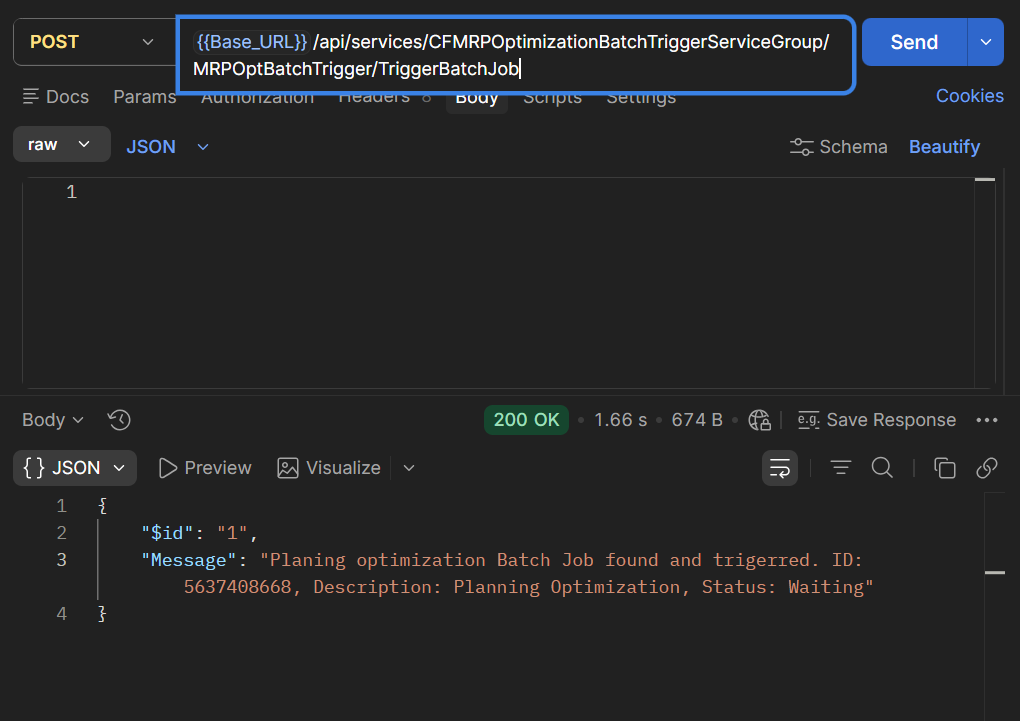
The class itself is just X++. Making it callable from outside the ERP is a standard AOT step:
- 1Add an AOT Service node referencing this class and the
triggerMRPOptBatchJobmethod. - 2Add the service to a Service Group and deploy. F&O exposes it over the standard integration endpoint once deployed, callable from an integration platform or middleware without any custom endpoint code.
- 3Have the calling system read
parmMessageto confirm the job was actually found and flipped, rather than treating a successful call as proof that MRP ran. The trigger is fire-and-forget from the batch engine’s side.
Gotchas worth knowing
- “Waiting” is not “running now.” The status change queues the job for the batch server’s next poll, typically seconds to a couple of minutes later depending on batch server load, not a synchronous MRP run. Don’t build a caller that blocks waiting for a result.
- The catch block swallows the real error.
catch (Exception::Error)returns a flat"Trigger failed"with no diagnostic detail retained. That’s fine for a demo; in production it means the caller, and whoever gets paged, has no idea why it failed. Worth extending to log the actual exception before returning the generic message. - Retriggering a running job is harmless, but a symptom. Flipping an already-
Executingjob back toWaitingdoesn’t start a second concurrent run. If a caller is doing that repeatedly in a tight retry loop, though, it’s usually a sign the caller isn’t checking the response message before retrying.
“A trigger service doesn’t need to reimplement what Master Planning already knows how to run. It only needs to know which job to wake up.”
FAQs
1Does this method run Planning Optimization synchronously?
No. It only changes the batch job’s status to
Waiting. The actual optimization run happens whenever the batch server next polls for waiting tasks, which is asynchronous from the caller’s perspective.2Why not call the Planning Optimization APIs directly instead of reusing a batch job?
Because the coverage, policy, and provider configuration for a Planning Optimization run is tied to how that specific batch job was set up in Master Planning. Reusing the existing job guarantees the triggered run behaves identically to a normal scheduled one, instead of a separately configured call drifting out of sync over time.
3What happens if the stored RecId points to a batch job that no longer exists?
The initial select returns no rows,
!batchJob.RecId evaluates true, and the method returns a “not found” message rather than throwing. That gives the calling system a clear signal to fix configuration instead of a cryptic runtime error.4Can this pattern support choosing between multiple batch jobs or plans?
Yes, but it needs a small extension: replace the single stored RecId with a lookup keyed by a plan or job identifier, and add that identifier as a parameter on the request contract. The trigger logic itself (select, flip status, commit) stays the same.
5Is this specific to manufacturing or to this particular batch job?
No. The pattern (locate an already-configured batch job by a stored RecId and flip it to Waiting) applies to any scheduled batch process that occasionally needs to run early in response to an external event, not just Planning Optimization.
Conclusion
A scheduled batch job doesn’t have to mean a plan that only ever updates on the clock. Reusing the existing, already-configured Planning Optimization job, rather than reconstructing the call, keeps the trigger simple and keeps behavior identical to a normal scheduled run: the only thing that changes is when it happens, not how it runs.
The trade-off is the same discipline any integration point needs: the stored RecId has to be kept current, and the generic error handling in this implementation is worth hardening before it runs unattended in production. Neither is a reason to avoid the pattern, just a reason to build it with those two details in mind from day one.
Need MRP to react to more than a schedule?
If your Master Planning setup needs to respond to real-time events from other systems, not just a recurrence, we can help design the integration and the batch orchestration around it.
Connect with Us →About the Author

Raviraj Hirve
Sr. Technical Consultant · CloudFronts
Raviraj Hirve is a Sr. Technical Consultant at CloudFronts with experience in Microsoft Dynamics 365 Finance & Operations development, customization, and implementation. He focuses on translating business requirements into practical, production-ready F&O solutions.
His experience includes X++ development, table and form extensions, warehouse management (WHS) customizations, custom services, and Planning Optimization / Master Planning configuration.
He focuses on understanding business requirements and designing practical, scalable, and maintainable solutions within the Dynamics 365 Finance & Operations ecosystem.
Specialization: Dynamics 365 Finance & Operations, X++ Development, Warehouse Management, Custom Services, Batch Framework, Planning Optimization
Focus Areas: ERP Customization, Supply Chain & Warehouse Solutions, Integration Services, Master Planning
LinkedIn: Raviraj Hirve
Related posts:

How a Multi-Country Infrastructure Group Evaluated One vs Two Production Environments in Dynamics 36...
How an Australian Linen Company Made Quote Approvals Secure with One Time Links in Dynamics 365
Recovering Lost Approval History After a Purchase Order Deletion in Business Central