How to configure Device License in Business Central
A Device License in Business Central is a type of user license that provides access to the application on a specific device, rather than a user-based license. This is particularly useful for scenarios where a shared device, such as a point of sale (POS) terminal, warehouse scanner, or shared workstation, needs to access Business Central without requiring individual user licenses.
Why Device Licenses are Important
Device licenses are particularly useful for organizations that have multiple employees using the same device at different times. Examples of such use cases include:
- Retail Stores: Multiple cashiers or sales representatives using a shared point-of-sale (POS) terminal.
- Warehouse Management: Multiple warehouse employees using handheld barcode scanners or mobile devices.
- Field Service: Employees in the field using tablets or mobile phones to interact with Business Central.
Steps to achieve the goal
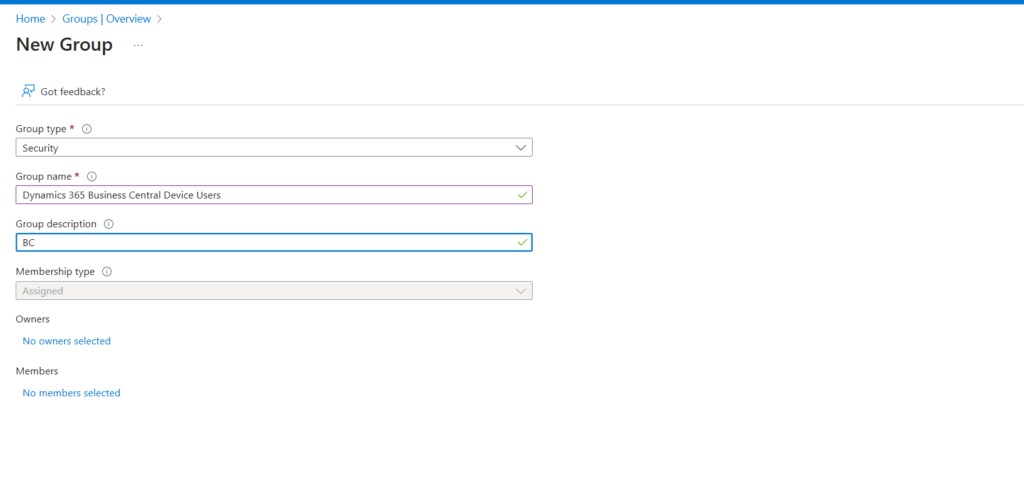
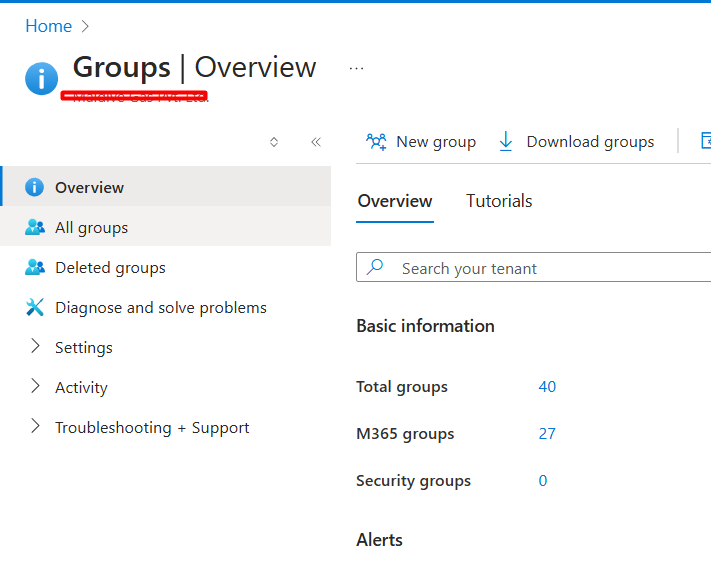
- Globally search porta.azure.com-> Groups-> Add group-> Give Name as: Dynamics 365 Business Central Device Users – Add Members
- Go to Business Central -> Globally search users page-> Click on Update users from D365 action
- Once the you see the users you would be able to wait for few mins
- Post which you can login from that user account and see if you are able to access Business Central
Configuring device licenses in Microsoft Dynamics 365 Business Central is essential for organizations that use shared devices such as POS terminals, warehouse scanners, or mobile phones. By following these steps, businesses can efficiently manage device access, reduce costs, and ensure that employees can access Business Central when needed, regardless of the device they are using.
With the ability to configure and monitor device licenses, you can ensure your Business Central environment runs smoothly, and your team stays productive. If you have any questions or need assistance with your configuration, feel free to reach out to a Microsoft partner or consultant. Happy configuring!
We hope you found this blog useful, and if you would like to discuss anything, you can reach out to us at transform@cloudfonts.com.
Related posts:

Understanding the Difference Between Temporary Tables and SourceTableTemporary in Business Central
Precision in the Pharmacy: Transforming Warehouse and Inventory Visibility in Pharmaceutical Manufac...
Posting Date vs Clearing Date - Why Prior-Year Entries Appear in Business Central Bank Reconciliatio...
How to Handle Language and Format Region in RDLC Reports in Microsoft Dynamics 365 Business Central
Share Story :
SEARCH BLOGS :
FOLLOW CLOUDFRONTS BLOG :
Enter your email address to follow this blog and receive notifications of new posts by email.
Categories
- AI (13)
- Azure (139)
- Azure AI Search (1)
- Azure and Office 365 (111)
- Azure App Services (3)
- Azure Blob Storage (5)
- Azure Data Factory (2)
- Azure Databricks (24)
- Azure DevOps Services (7)
- Azure Function (19)
- Azure Integration (9)
- Azure Synapse Analytics (3)
- B2B (1)
- Blog (1,552)
- Business Process Flow (4)
- C# (11)
- Canvas Apps (1)
- Cloud flows (22)
- CloudFlows (11)
- Copilot (5)
- Custom Copilot (3)
- Customer Success (81)
- d365 (9)
- D365 Business Central (351)
- D365 Commerce (5)
- D365 CRM Plugins (3)
- D365 Customer Service (65)
- D365 Field Service (21)
- D365 Finance (14)
- D365 Finance and Operations (253)
- D365 General (304)
- D365 Project Operations (17)
- D365 Project Service Automation (61)
- D365 Retail (60)
- D365 Sales (60)
- D365 SCM (14)
- Data (7)
- Data Governance (1)
- DataBricks (18)
- Dataverse (20)
- Delta Lake (2)
- Demand and Supply Forecasting (1)
- Dot Net (4)
- Dynamics 365 (281)
- Dynamics 365, Business (40)
- Dynamics AX (44)
- Dynamics CRM (169)
- Dynamics NAV (15)
- InforLN (1)
- Integrations (2)
- JavaScript (16)
- Logic App (43)
- LS Central (13)
- Model-Driven App (9)
- MS Teams (6)
- Odoo (1)
- OpenAI (2)
- Outlook (1)
- Outlook (1)
- Paginated Report (2)
- Power Automate (72)
- Power BI (223)
- Power Fx (1)
- Power Plattform (24)
- Power Query (9)
- Power Virtual Agent (2)
- PowerApps (60)
- PowerApps Portal (13)
- Press Releases (67)
- Project Management (6)
- Project Service Automation (10)
- Ribbon Workbench (3)
- Ribbon Workbench (2)
- Salesforce (2)
- SharePoint (6)
- SQL Server (9)
- SSIS (1)
- SSRS Report (7)
- Thought Leadership Article (29)
- Tibco (3)
- Unity Catalog (2)
- XRM ToolBox (1)
RECENT UPDATES
- From Default to Dynamic: Transforming Dynamics CRM Subgrids with Custom HTML for a Netherlands-Based Sustainability Certification Non-Profit
- How We Built & Deployed a Mobile-Based Canvas App for Unified Time, Expense (with Receipts) & Material Submission with Project-Based Approvals for a US Cybersecurity Firm
- Building a Reliable Bronze Silver Gold Data Pipeline in Databricks for Enterprise Reporting
- Stop Hard-Coding Recipients: Streamlining Email Automation with Dataverse and Power Automate for a U.S.-Based Window and Door Manufacturer
- Stop Creating Entities: Simplifying CRM with JSON and Custom HTML for a Sustainability Certification Non-Profit in the Netherlands