Enhancing Power Automate Approval Experiences with Markdown Formatting for a Texas-Based Security Operations Firm
Summary
- Implemented Markdown-based formatting standards for Power Automate Approval Requests at a Texas-based Operational Security Provider.
- Transformed plain-text approval emails into structured, executive-friendly approval experiences.
- Improved readability through headers, sections, tables, lists, hyperlinks, and emphasis formatting.
- Reduced approver effort by presenting key business information in a consistent and easily consumable format.
- Leveraged native Power Automate Approval Markdown capabilities without requiring custom development.
- Improved approval turnaround times by making critical information easier to review and approve.
Table of Contents
- Introduction
- The Business Problem
- The Solution
- Using Headers for Section Separation
- Using Line Breaks and Paragraphs
- Using Bullet Lists for Business Information
- Using Numbered Lists for Approval Steps
- Using Nested Lists for Additional Context
- Using Tables for Approval Summaries
- Using Hyperlinks for Record Navigation
- Using Emphasis for Important Information
- Escaping Special Characters
- Building a Structured Approval Request
- Limitations
- Business Impact
- FAQs
- Conclusion
1. Introduction
In Microsoft Dynamics 365 Project Operations, quotes represent a critical milestone in the sales lifecycle. Before a quote can be activated and progress toward project execution, organizations often require review and approval controls to ensure pricing accuracy, contractual compliance, and business alignment. Since Quote Review & Approval is not a standard capability within Dynamics 365 Project Operations, this requirement typically requires customization.
For a Texas-based Operational Security Provider, the requirement extended beyond a simple approval process. The organization needed a controlled workflow where only designated business leads associated with a specific Opportunity or Quote could generate, submit, and approve customer quotations, ensuring accountability and governance throughout the approval chain.
A custom approval framework was developed using Microsoft Power Automate and Dynamics 365 Project Operations to automatically identify approvers and route quotes through the required approval process before activation.
While the workflow successfully enforced the necessary business controls, the approval requests themselves were difficult to review. Critical information such as customer details, quote values, approval notes, and record links were presented as plain text, making approvals slower and less efficient.
To improve the approver experience, Markdown formatting was introduced within Power Automate Approval Requests. Using structured headers, tables, hyperlinks, emphasis formatting, and organized sections, approval notifications became significantly more readable and actionable across Outlook, Outlook Web, and Power Automate approval channels.
This article focuses on how Markdown was used to transform standard approval request bodies into professional, executive-friendly approval experiences that improved readability, reduced approval effort, and accelerated quote approval decisions.
2. The Business Problem
The organization manages a high volume of customer opportunities and project-based engagements, where quotes serve as the commercial foundation for service delivery. Before a quote could be activated and converted into an operational project, it needed to undergo a formal review and approval process involving designated business stakeholders.
To support this requirement, a custom quote approval workflow was implemented within Dynamics 365 Project Operations and Power Automate. The workflow successfully enforced business rules, ensured only authorized personnel could submit and approve quotes, and provided the necessary governance around pricing and customer commitments.
However, a significant usability challenge emerged during adoption.
The approval requests being sent to approvers contained all the required information, but the content was presented as large blocks of plain text. As quote complexity increased, approvers found it difficult to quickly identify key details such as:
- Customer Name
- Opportunity Information
- Quote Number
- Total Quote Value
- Requested Approval Type
- Business Justification
- Requestor Information
- Direct Links to Dynamics 365 Records
This often forced approvers to spend additional time reviewing approval requests or navigating back into Dynamics 365 to locate information that should have been immediately visible within the approval notification itself.
The lack of visual structure created several operational challenges:
- Slower approval turnaround times
- Increased requests for clarification
- Inconsistent user experience across approval requests
- Difficulty identifying critical information at a glance
- Reduced executive engagement with approval emails
- Higher likelihood of approval delays for time-sensitive opportunities
The business needed a way to present approval information in a format that was clear, professional, and easy to consume without requiring additional custom applications or significant development effort.
The Objective: Transform approval requests from plain-text notifications into structured, decision-ready approval experiences that allowed stakeholders to review and act on quote approvals quickly and confidently.
3. The Solution
One important limitation of the Power Automate Approval action is that it does not support custom HTML rendering within approval request bodies. Unlike standard email notifications where HTML templates can be used extensively, Approval actions rely on a restricted rendering engine that supports a subset of Markdown syntax.
As a result, many approval requests are delivered as large blocks of plain text, making them difficult to review, especially when multiple business details need to be presented to approvers.
To improve readability without introducing custom applications or alternative notification mechanisms, the approval request body was redesigned using Power Automate’s native Markdown capabilities.
This approach allowed approval requests to be structured into clearly defined sections, highlight important information, provide direct navigation links, and present approval summaries in a more professional format.
3.1 Using Headers for Section Separation
Headers are one of the simplest ways to introduce structure into approval requests.
Syntax
# Main Heading
## Section Heading
### Subsection Heading
Example
# Quote Approval Request

## Opportunity Information

## Financial Summary

## Approval Notes
Headers create visual separation between different parts of the approval request and help approvers quickly locate relevant information.
3.2 Using Line Breaks and Paragraphs
Approval requests often contain multiple fields and explanatory comments. Proper spacing prevents information from appearing crowded.
Syntax
Line One

Line Two
Or force a new line using two trailing spaces:
Line One
Line Two
Example
Requested By: John Smith

Department: Operations

Approval Required Before Quote Activation
Proper spacing significantly improves readability compared to continuous blocks of text.
3.3 Using Bullet Lists for Business Information
Bullet lists are useful when presenting multiple approval considerations, requirements, assumptions, or supporting notes.
Syntax
- Item One
- Item Two
- Item Three
Example
### Key Considerations

- Executive review required
- New customer engagement
- Pricing exception applied
- Legal review completed
Bullet lists allow approvers to scan information quickly without reading lengthy paragraphs.
3.4 Using Numbered Lists for Approval Steps
Numbered lists work well when presenting a sequence of actions or review instructions.
Syntax
1. First Step
2. Second Step
3. Third Step
Example
### Review Process

1. Review quote details
2. Validate pricing information
3. Approve or reject request
This format is particularly useful when approvals involve multiple review checkpoints.
3.5 Using Nested Lists for Additional Context
Complex approval requests often require supporting details beneath primary items.
Syntax
1. Primary Item
   - Supporting Detail
   - Supporting Detail
Example
1. Pricing Review
   - Standard pricing applied
   - No discount exceptions

2. Compliance Review
   - Terms approved
   - Security assessment completed
Nested lists help organize related information while maintaining readability.
3.6 Using Tables for Approval Summaries
Tables are one of the most effective Markdown features available within Power Automate approvals. Rather than displaying information across multiple lines, important approval details can be consolidated into a structured summary.
Syntax
| Field  | Value  |
|--------|--------|
| Name   | Value  |
| Name   | Value  |
Example
## Approval Summary

| Field        | Value            |
|--------------|------------------|
| Customer     | Contoso Ltd      |
| Quote Number | QUO-1001         |
| Quote Value  | $150,000         |
| Status       | Pending Approval |
Tables provide a clean and highly scannable layout for approval information.
3.7 Using Hyperlinks for Record Navigation
Approvers frequently need access to source records before making a decision. Markdown allows HTTPS links to be rendered as clickable hyperlinks.
Syntax
[Link Text](https://example.com)Example
## Quick Links

[Open Quote Record](https://contoso.crm.dynamics.com)

[Open Opportunity](https://contoso.crm.dynamics.com)
This reduces navigation effort and allows approvers to access supporting records directly from the approval request.
3.8 Using Emphasis for Important Information
Not every piece of information deserves equal visual weight. Markdown emphasis can be used to highlight critical values, warnings, and approval requirements.
Bold Text
Syntax
**Important Information**Example
Quote Value: **$150,000**Italic Text
Syntax
_Additional Information_Example
_Approval required before activation._Strikethrough Text
Syntax
~~Deprecated Information~~Example
~~Previous Quote Value: $125,000~~While less common in approval requests, strikethrough formatting can be useful when highlighting revised values or superseded information.
3.9 Escaping Special Characters
When dynamic data contains Markdown control characters, special characters can be escaped using a backslash.
Syntax
\#
\[
\]
\(
\)
\_
Example
Reference Number: SR\#10025This ensures the content renders correctly without unintentionally triggering Markdown formatting.
3.10 Building a Structured Approval Request
By combining multiple Markdown features, approval requests can be transformed from plain-text notifications into structured approval documents.
# Quote Approval Request

## Approval Summary

| Field        | Value            |
|--------------|------------------|
| Quote Number | QUO-1001         |
| Amount       | $150,000         |
| Status       | Pending Approval |

## Key Considerations

- Executive review required
- Pricing exception applied
- Contract terms approved

## Important Notes

**Approval Required Before Quote Activation**

## Quick Links

[Open Quote](https://contoso.crm.dynamics.com)
Although Power Automate Approval actions do not support HTML customization, Markdown provides enough formatting capability to significantly improve the presentation, readability, and usability of approval request bodies.
14. Limitations
Client Support
Markdown support among clients is inconsistent. The Power Automate team works to address these inconsistencies, however, inconsistencies remain. The following table lays out the known limitations among the supported clients.
| Feature | Power Automate | Power Automate mobile app | Outlook | Outlook Web | Teams | Teams mobile app | Approvals Teams App |
|---|---|---|---|---|---|---|---|
| Headers | Yes | Yes | Yes | Yes | No | No | No |
| Numbered Lists | Yes | Yes | No | Yes | Yes | Yes | No |
| Nested Numbered Lists | Yes | Yes | No | Yes | Yes | Yes | Yes |
| Tables | Yes | Yes | Yes | Yes | No | No | No |
| Images | No | No | No | No | No | No | No |
| Forced Line Breaks | Yes* | Yes* | No (use a blank line instead) | Yes* | Yes* | Yes* | No |
| Blank Lines | No | No | Yes | Yes | No | Yes | No |
| Emphasis | Yes | Yes | Yes | Yes | No | No | No |
*Forced line breaks within table cells aren’t supported for Power Automate, the Power Automate mobile app, Outlook Web, Teams, and the Teams mobile app.
4. Implementation
The approval workflow was implemented using the native Start and Wait for an Approval action in Power Automate. Since Approval actions do not support custom HTML rendering, the approval request body was designed using Markdown syntax to improve readability and present information in a structured format.
The approval request was organized into logical sections using Markdown headers, highlighted information using emphasis formatting, and direct navigation links back to Dynamics 365 records. This allowed approvers to review all relevant information directly from the approval notification without needing to navigate elsewhere.
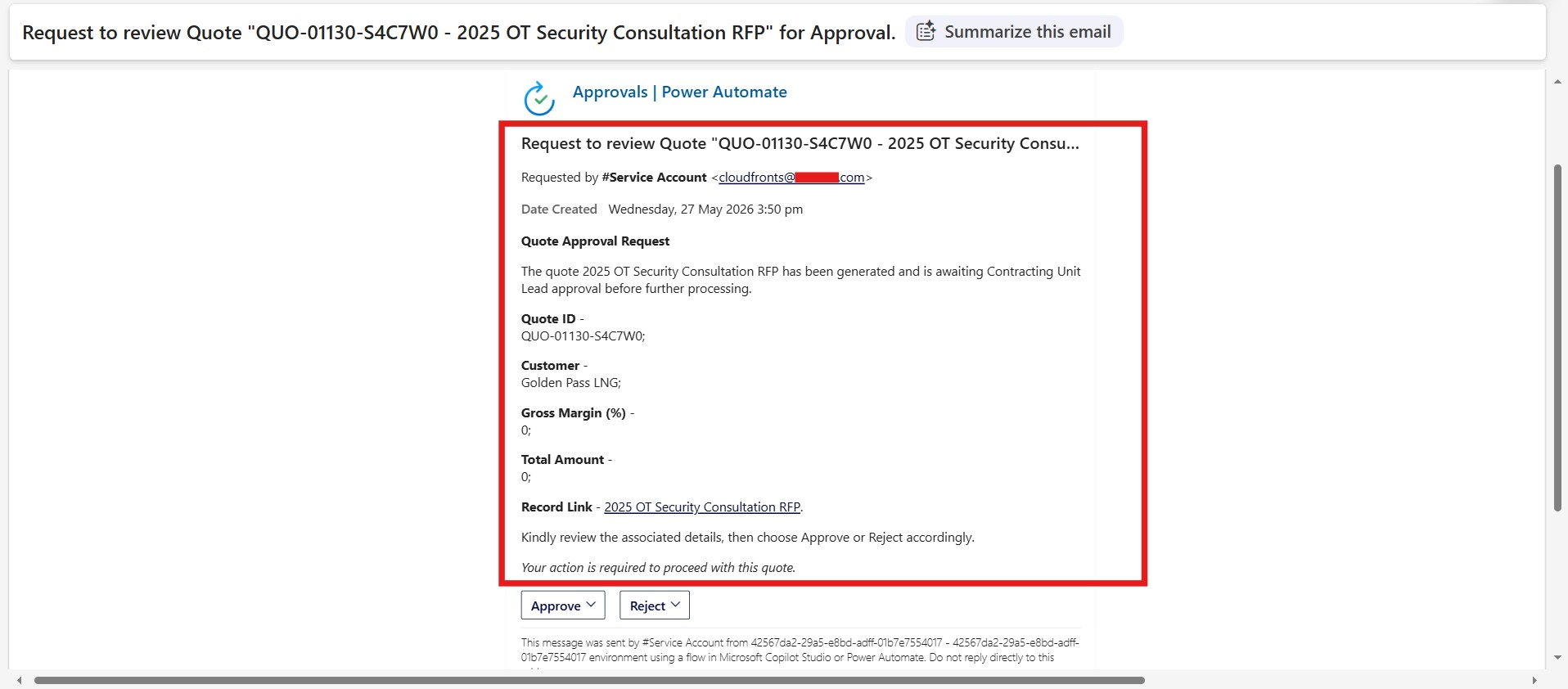
Structured formatting helped separate business information into easily identifiable sections, making it significantly easier for approvers to review quote details, financial information, approval notes, and supporting references.
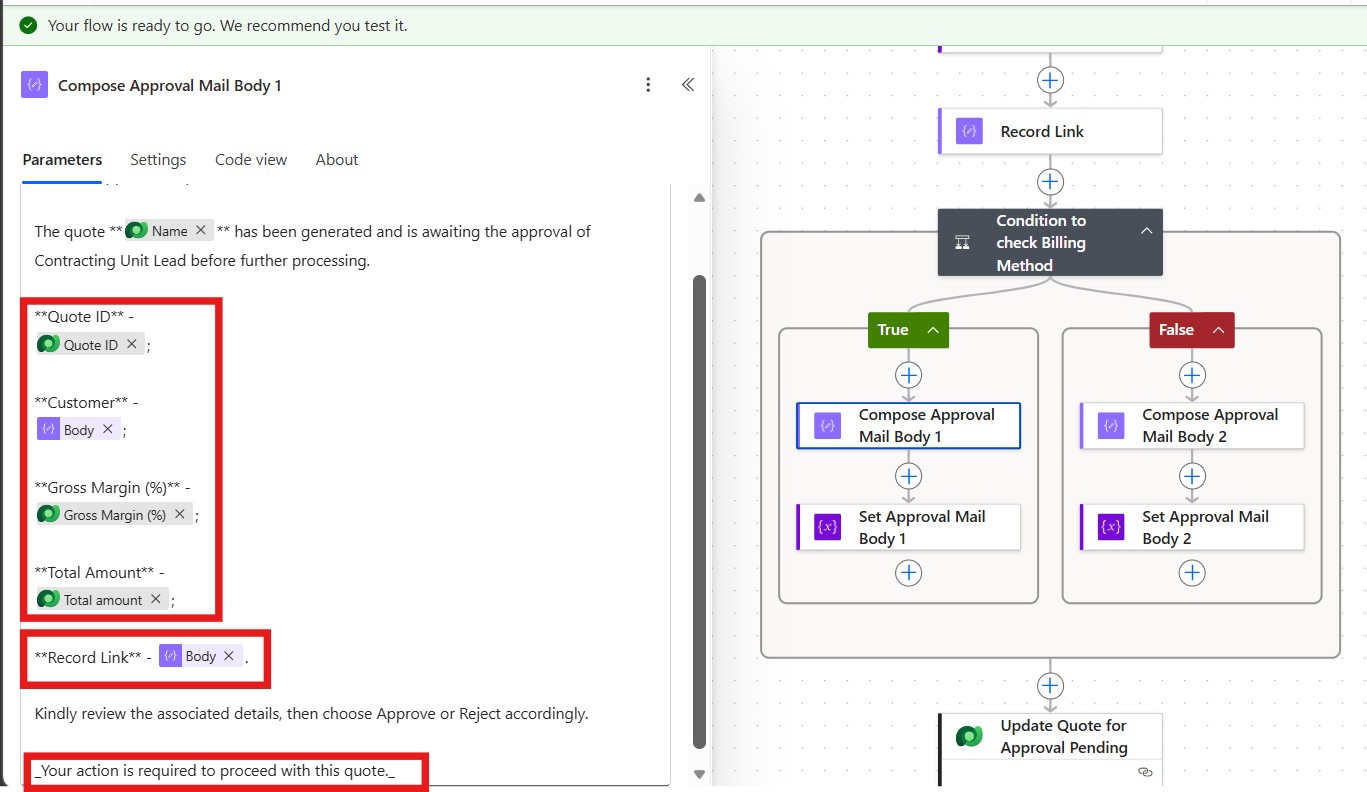
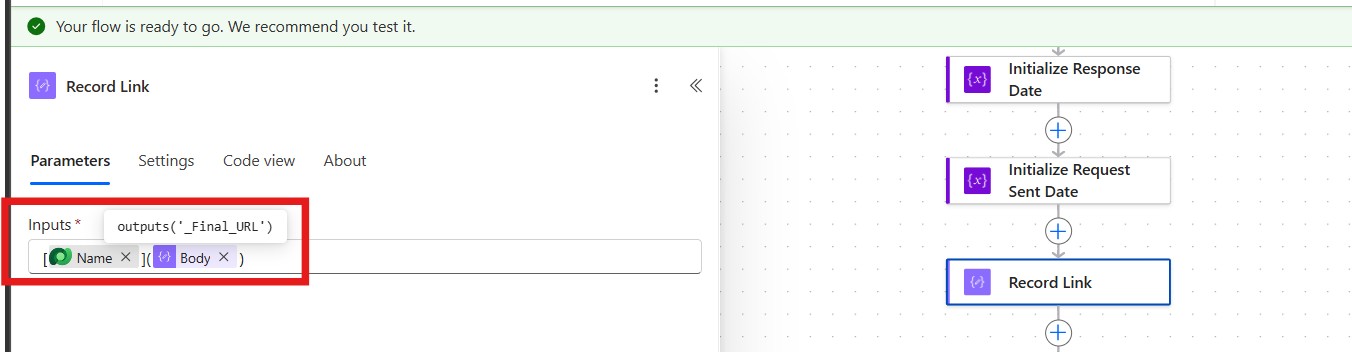
Key Takeaway: While Power Automate Approval actions do not support custom HTML templates, Markdown provides a powerful and lightweight alternative for creating professional, structured, and user-friendly approval request experiences.
15. Business Impact
Implementing Markdown-based formatting within Power Automate Approval Requests significantly improved the overall approval experience without requiring additional development or custom notification frameworks.
Key benefits included:
- Improved readability of approval requests through structured layouts and clear sectioning.
- Faster approval decisions by making critical information easier to identify and review.
- Reduced dependency on opening Dynamics 365 records for basic quote validation.
- Consistent approval formatting across all quote approval workflows.
- Better user adoption due to more professional and intuitive approval notifications.
- Enhanced visibility of important information through tables, emphasis formatting, and direct record links.
While the approval workflow itself ensured proper governance and control, Markdown formatting helped ensure approvers could review and act on requests more efficiently, ultimately reducing approval delays and improving the overall user experience.
16. FAQs
1. Why use Markdown instead of HTML in Power Automate Approval Requests?
The Approval action does not support custom HTML rendering. Markdown is the native formatting option available for structuring approval request bodies and improving readability.
2. Which Markdown feature provides the biggest usability improvement?
Tables typically deliver the greatest impact. They allow key approval information such as quote numbers, customer details, values, and statuses to be presented in a compact, easy-to-scan format.
3. Will Markdown render the same way across all approval channels?
Not always. Support varies across Outlook, Outlook Web, Power Automate, Teams, and mobile clients. Features such as tables, headers, and emphasis may render differently depending on the client being used, so testing across target platforms is recommended.
17. Conclusion
Although Power Automate Approval actions do not support custom HTML formatting, Markdown provides a simple and effective way to create more professional, structured, and user-friendly approval requests.
By leveraging features such as headers, tables, lists, hyperlinks, and emphasis formatting, approval notifications can be transformed from plain-text messages into clear, decision-ready approval experiences. Small formatting improvements can have a significant impact on readability, user adoption, and approval efficiency, helping approvers review and act on requests with greater confidence and speed.
References: Markdown – Wikipedia
Ready to modernise your Workflows your D365 Project Operations?
CloudFronts builds scalable Power Platform and Dynamics 365 solutions that replace legacy Processes & Automations infrastructure. Reach out at transform@cloudfronts.com.
Shashank Keny

Shashank Keny
Associate Consultant · CloudFronts
Shashank Keny is an Associate Consultant at CloudFronts with 1.5+ years of experience in cloud, data, and business applications. He specializes in building scalable, API-driven architectures and integrating enterprise systems across the Microsoft ecosystem.
He is a Certified Databricks Data Engineer with hands-on experience in Dynamics 365 Project Operations and Dynamics 365 Sales, along with delivering business intelligence solutions using Power BI.
His expertise also extends to modern AI solutions, including building custom copilots and implementing intelligent applications using Azure AI Foundry.
Passionate about solving real-world business challenges through data and AI, he focuses on delivering efficient, scalable, and production-ready solutions.
- Experience: 1.5+ years
- Certification: Databricks Certified Data Engineer
- Specialization: Dynamics 365 Project Operations, Power BI, Azure Integrations, AI Solutions
Related posts:

From Project Operations to Business Central: Following the Data Behind Project Financials
Location-Based Item Based Visibility in Business Central for a Maldives-Based Marine Services Firm
Connecting Project Operations to Finance: Our Dataverse-to-Business Central Integration for Project ...