Streamlining Approval Management in Business Central: Implementing Amount-Specific and Multi-Approver Workflows
Summary
This blog highlights how Microsoft Dynamics 365 Business Central can be used to implement Amount-Specific and Multi-Approver Workflows to automate approval management across business operations.
In many organizations, approval processes are handled manually through emails, spreadsheets, and verbal confirmations. These manual approval systems often create delays, missing approvals, operational bottlenecks, and poor audit visibility.
The implementation of approval workflows in Business Central helps organizations automate approval routing based on transaction amount, approval hierarchy, department, and business rules.
Using Business Central Workflow and Approval Management functionality, organizations can:
- Automatically route approvals based on amount thresholds
- Configure multiple approvers for a single transaction
- Implement hierarchical approval structures
- Reduce manual follow-ups and email dependency
- Maintain complete audit tracking of approvals and rejections
This blog explains:
1] The operational challenges caused by manual approval processes
2] How Amount-Specific workflows can be implemented in Business Central
3] How Multi-Approver workflows improve approval governance
4] The workflow architecture and approval routing logic
5] The business impact achieved through workflow automation
Table of Contents
- Business Scenario
- Solution Overview
- Amount-Specific Approval Workflow
- Multi-Approver Workflow Structure
- Workflow Architecture
- Approval User Setup
- Handling Complex Approval Scenarios
- Business Impact
- Final Thoughts
Business Scenario
A growing manufacturing and distribution organization was facing significant challenges in managing approvals across procurement, finance, and operations.
The organization handled:
- Purchase approvals
- Payment approvals
- General journal approvals
- Expense approvals
- Vendor-related approvals
However, the approval process was largely manual.
Employees submitted requests through emails and internal communication channels, after which managers manually reviewed and approved transactions. For higher-value transactions, approvals often required escalation to senior management or finance leadership.
This manual process created several operational issues:
1] Delays in approvals due to manual follow-ups
2] Lack of visibility into approval status
3] Missing audit tracking for approved and rejected transactions
4] Difficulty enforcing amount-based approval policies
5] Increased risk of unauthorized approvals
6] Approval bottlenecks during manager unavailability
The organization required a scalable approval system that could automate approval routing while ensuring strict financial control and governance.
Solution Overview
To streamline approval management, Amount-Specific and Multi-Approver workflows were implemented using Microsoft Dynamics 365 Business Central.
The objective was simple:
Automatically route approvals to the correct approvers based on transaction amount and business hierarchy.
With this implementation:
- Low-value transactions could be approved quickly
- High-value transactions automatically required senior-level approval
- Multiple departments could participate in the approval process
- Approval tracking became fully transparent
- Approval history became auditable
The workflow solution was implemented using:
- Workflow Setup
- Workflow Conditions
- Approval User Setup
- Approval Limits
- Workflow Responses
- Notification Framework
Amount-Specific Approval Workflow
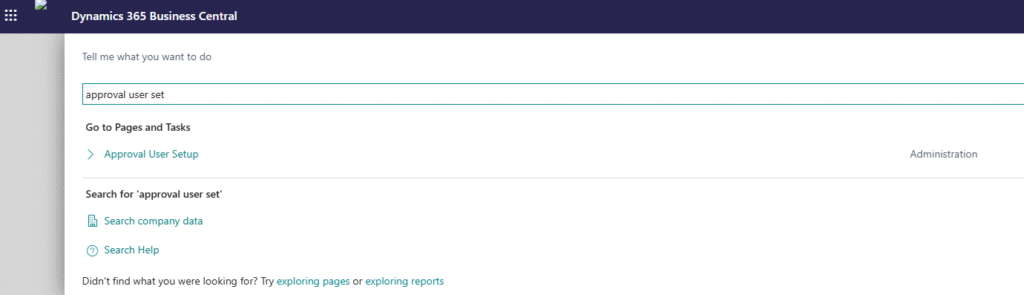
Understanding Amount-Based Approval Routing
The organization required different approvers depending on the transaction amount.
Example approval structure:
| Amount Range | Approver |
| Up to 50,000 | Team Lead |
| 50,001 – 2,00,000 | Department Manager |
| Above 2,00,000 | Finance Director |
Using Business Central workflows, approval conditions were configured based on document amount.

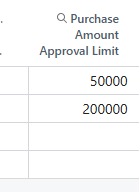
This ensured:
- Small transactions moved quickly
- Medium transactions required managerial review
- Large transactions required senior authorization
Example: Purchase Approval Workflow
When a Purchase Order is created:
Scenario 1 — Low Amount Approval
If Purchase Amount <= 50,000:
1] Send approval request to Team Lead
2] Team Lead approves
3] Document is automatically released
Scenario 2 — Medium Amount Approval
If Purchase Amount > 50,000 and <= 2,00,000:
1] Send approval request to Department Manager
2] Manager approves
3] Document is automatically released
Scenario 3 — High Amount Approval
If Purchase Amount > 2,00,000:
1] Send approval request to Procurement Head
2] Send approval request to Finance Director
3] Both approvals are completed
4] Document is released
This automated routing eliminated manual intervention completely.
Multi-Approver Workflow Structure
Understanding Multi-Approver Workflows
Certain business processes required approvals from multiple departments before transactions could proceed.
Business Central workflows were designed to support:
- Sequential approvals
- Hierarchical approvals
- Multi-department approvals
- Conditional approvals
- Escalation approvals
Sequential Approval Example
Approval moves step-by-step between users.
Example:
Employee → Team Lead → Manager → Finance Head
Each approver receives the approval request only after the previous approver completes approval.
This ensures strict control and structured review processes.
Department-Based Multi Approval
Some transactions required validations from multiple departments.
Example:
- Procurement validates vendor and pricing
- Finance validates budget availability
- Operations validates business requirement
Only after all approvals are completed does the workflow continue further.
Workflow Architecture
Approval Workflow Process Flow
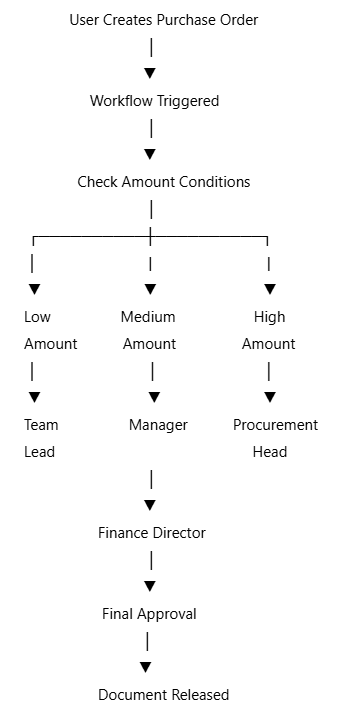
The workflow engine automatically evaluates the conditions and routes approvals accordingly.
Approval User Setup
Configuring Approval Hierarchy
The approval hierarchy was managed using the Approval User Setup page in Business Central.
Important configurations included:
| Field | Purpose |
| User ID | Business Central User |
| Approver ID | Direct Approver |
| Purchase Amount Approval Limit | Purchase approval limit |
| Unlimited Approval | Unlimited approval rights |
| Substitute | Backup approver |
| Request Amount Approval Limit | Generic approval limit |
This setup formed the foundation for workflow automation.
Handling Complex Approval Scenarios
One important aspect of the implementation was handling complex approval scenarios automatically.
The system managed:
- Approval escalation
- Substitute approvers during leave
- Approval rejection handling
- Multi-level hierarchy routing
- Department-based approvals
- Amount validations
- User-specific approval limits
These validations and routing decisions happened automatically in the background.
Users only needed to submit the transaction — the system handled the approval logic.
Business Impact
1] Faster Approval Processing
Low-value transactions were approved quickly without unnecessary managerial involvement.
Approval cycle time reduced significantly.
2] Improved Financial Control
High-value transactions automatically required senior management approval.
This reduced the risk of unauthorized approvals.
3] Increased Operational Efficiency
Employees no longer needed to manually follow up for approvals through emails or calls.
The system automatically notified approvers and tracked pending approvals.
4] Better Audit Tracking
All approval actions were stored inside Business Central.
Organizations could track:
- Approved transactions
- Rejected transactions
- Pending approvals
- Approval timestamps
- Approval history
5] Scalable Approval Management
The organization could now handle increasing transaction volume without increasing operational overhead.
The workflow engine scaled efficiently with business growth.
To conclude, approval management is a critical component of any ERP implementation, especially for organizations dealing with procurement, finance, and operational governance.
By implementing Amount-Specific and Multi-Approver Workflows in Microsoft Dynamics 365 Business Central, organizations can automate approval routing while maintaining strong financial and operational control.
What was previously handled manually through emails and spreadsheets can now be managed automatically through a structured workflow engine inside Business Central.
This transformation not only improves operational efficiency but also strengthens compliance, transparency, and audit readiness across the organization.
If your Business Central environment requires custom approval workflows, amount-based approval automation, or multi-department approval management, implementing a well-designed workflow architecture can significantly improve business operations and user productivity.
Ready to modernise your Workflows your D365 Business Central?
CloudFronts builds scalable Power Platform and Dynamics 365 solutions that replace legacy Processes & Automations infrastructure. Reach out at transform@cloudfronts.com.
Related posts:

From Project Operations to Business Central: Following the Data Behind Project Financials
Location-Based Item Based Visibility in Business Central for a Maldives-Based Marine Services Firm
Connecting Project Operations to Finance: Our Dataverse-to-Business Central Integration for Project ...