Simplifying Record Management in Microsoft Dynamics 365 Business Central with a Generic Data Deletion Utility for Titan Labs
This article demonstrates how to build a reusable Generic Data Deletion Utility in Microsoft Dynamics 365 Business Central that allows administrators and developers to safely delete individual records from any table using primary key values. Instead of creating separate utilities for different tables, this generic solution leverages RecordRef, FieldRef, and KeyRef to dynamically access Business Central tables at runtime.
Summary
- Developed a generic data deletion utility for Microsoft Dynamics 365 Business Central.
- Enabled administrators to delete records from supported Business Central tables without creating table-specific code.
- Used RecordRef, FieldRef, and KeyRef to dynamically identify primary keys at runtime.
- Provided lookup functionality for selecting Business Central tables through the standard Object List.
- Added confirmation prompts before deletion to reduce accidental data loss.
- Designed the solution as a Processing Only report for administrative maintenance activities.
- Created a reusable framework that can be extended for future data maintenance utilities.
Table of Contents
- 1. Introduction
- 2. The Business Problem
- 3. The Solution
- 3.1 Selecting the Business Central Table
- 3.2 Providing the Primary Key Values
- 3.3 Dynamically Identifying the Record
- 3.4 Confirming and Deleting the Record
- 3.5 Security and Permissions
- 4. Implementation
- 5. Business Impact
- 6. Frequently Asked Questions
- 7. Conclusion
1. Introduction
Organizations in the pharmaceutical manufacturing industry frequently perform data cleanup activities during implementation, testing, data migration, and ongoing production support. Deleting specific records from Microsoft Dynamics 365 Business Central tables often requires custom-built utilities or direct database interventions, making the process time-consuming, less flexible, and difficult to maintain.
To address this requirement, a Generic Data Deletion Utility was developed for a leading pharmaceutical manufacturing organization using Microsoft Dynamics 365 Business Central. By leveraging RecordRef, FieldRef, and KeyRef, the solution enables authorized users to dynamically locate and delete records from any Business Central table using primary key values without requiring table-specific deletion logic.
This article explains the architecture of the solution, the AL programming concepts used, and how the framework provides a reusable and controlled approach for administrative data maintenance across standard and custom Business Central tables.
2. The Business Problem
During implementation, testing, data migration, and production support activities, the organization frequently required the deletion of specific records from various Microsoft Dynamics 365 Business Central tables. Since each table has its own structure, fields, and primary key definitions, performing these deletions typically required custom-built utilities or temporary development efforts.
This table-specific approach increased development effort, reduced operational efficiency, and made routine data maintenance activities more complex. The organization required a single reusable framework that could dynamically work with multiple Business Central tables without requiring separate deletion logic for each table.
The Objective:
Develop a generic data deletion utility that enables authorized users to safely identify and delete records from any Business Central table using primary key values while maintaining control and minimizing the risk of accidental data loss.
3. The Solution
To simplify administrative data maintenance, a Generic Data Deletion Utility was developed in Microsoft Dynamics 365 Business Central. The solution provides a centralized utility that enables users to delete records from multiple tables without requiring separate deletion programs for each table.
The tool allows authorized users to select a Business Central table, provide the required primary key values, locate the corresponding record dynamically, and delete it after user confirmation. The design supports both standard and custom Business Central tables while providing a flexible and reusable approach for controlled data management.
The following sections describe the key components of the solution and explain how each feature contributes to making the tool dynamic, secure, and easy to maintain.
3.1 Selecting the Business Central Table
The first step in the deletion process is selecting the Business Central table that contains the record to be removed. The request page provides fields for the Table Number and Table Name, allowing the user to identify the required standard or custom table.
Instead of requiring users to manually remember table numbers, the Table No. field provides a drill-down option. This opens the standard All Objects with Caption page and filters the available objects to display only Business Central tables.
TableObjects.SetRange(
    "Object Type",
    TableObjects."Object Type"::Table);

if PAGE.RunModal(
        PAGE::"All Objects with Caption",
        TableObjects) = Action::LookupOK then begin

    TableId := TableObjects."Object ID";
    TableCaption := TableObjects."Object Caption";
end;
Once a table is selected, the solution stores its object ID in the Table No. field and automatically displays the corresponding table name. This helps users verify that the correct table has been selected before providing the primary key values.
The Table Name field is kept non-editable because its value is automatically retrieved from the selected Business Central table.
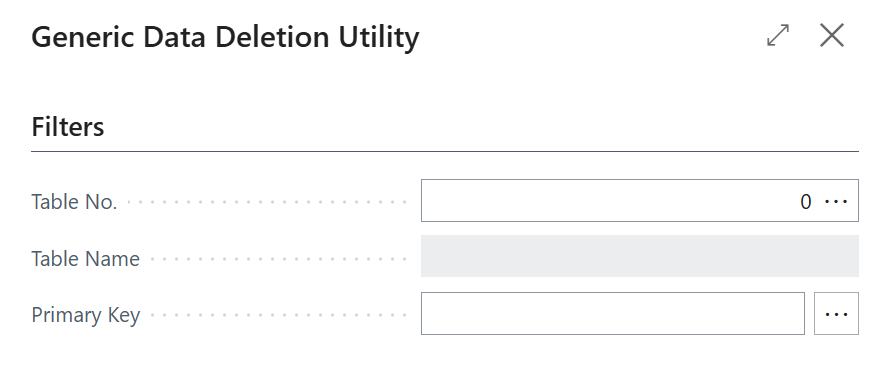
Figure 1: Filtered Data Deletion request page for selecting the table and entering primary key values
3.2 Providing the Primary Key Values
After selecting the required table, the user must provide the primary key values that uniquely identify the record to be deleted. Since each Business Central table has its own primary key structure, the solution supports primary key.
The first key value is entered in the Primary Key field, while the Key 2 and Key 3 fields are available for tables that use multiple fields as part of their primary key. This enables the tool to locate records accurately regardless of the table structure.
For example, a Customer record requires only the Customer No., whereas a Sales Line record requires multiple values such as the Document Type, Document No., and Line No. By supporting multiple key fields, the same utility can work across a wide range of standard and custom Business Central tables.
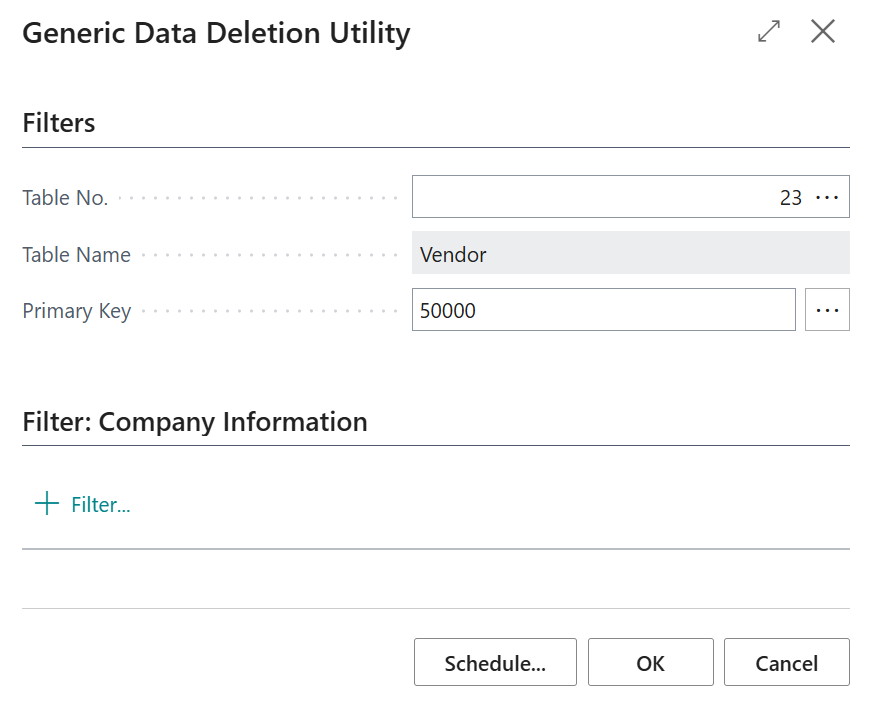
Figure 2: Entering the primary key values required to uniquely identify a Business Central record.
3.3 Dynamically Identifying the Record
Unlike conventional deletion utilities that are developed for a single table, this solution dynamically identifies records irrespective of the selected Business Central table. It uses the RecordRef, KeyRef, and FieldRef data types to work with table metadata at runtime, making the solution completely generic.
After the user selects a table and enters the primary key values, the tool opens the selected table dynamically, retrieves its primary key definition, and applies the entered values as filters. Since the primary key information is obtained at runtime, the same logic can work for any standard or custom Business Central table without additional development.
TableRef.Open(TableId);

KeyDefinition := TableRef.KeyIndex(1);

for FieldIndex := 1 to KeyDefinition.FieldCount() do
    ApplyPrimaryKeyFilter(
        KeyDefinition.FieldIndex(FieldIndex),
        UserFilters[FieldIndex]);
This dynamic approach eliminates the need to hardcode field names or create separate deletion logic for individual tables. The solution automatically adapts to the primary key structure of the selected table, making it highly reusable and easy to maintain.
3.4 Confirming and Deleting the Record
Once the primary key filters are applied, the solution searches the selected table for the matching record. To prevent accidental deletion, the tool proceeds only when a single record is identified.
Before deleting the record, a confirmation message is displayed to the user. The record details are included in the message so that the user can review the selected entry before completing the deletion.
if RecordReference.FindFirst() then begin
    ConfirmationText :=
        StrSubstNo(
            'Do you want to delete this record? %1',
            Format(RecordReference));

    if Confirm(ConfirmationText, false) then begin
        RecordReference.Delete(true);
        Message('The selected record has been deleted.');
    end;
end;
The Delete(true) method executes the table deletion trigger where applicable. This ensures that the standard or custom deletion logic defined on the selected table is also processed.
The solution does not perform bulk deletion. Restricting the process to a single matching record provides better control and reduces the risk of removing multiple records unintentionally.
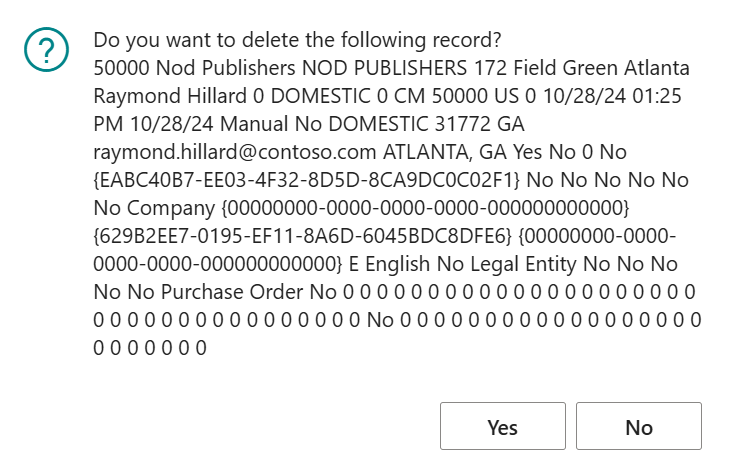
Figure 3: Confirmation message displayed before deleting the selected Business Central record.
3.5 Security and Permissions
Since the Generic Data Deletion Utility performs permanent record deletion, security was an important consideration during the implementation. The report is designed for administrative use and can be executed only by users who have the necessary permissions to modify and delete records from the supported Business Central tables.
The required table permissions are defined within the report, ensuring that deletion requests are restricted to authorized users. This prevents unauthorized access while allowing administrators to safely maintain application data during implementation, testing, and support activities.
Permissions =
    TableData 18 = IMD,
    TableData 36 = IMD,
    TableData 37 = IMD,
    ...
    TableData 99000880 = IMD;
By explicitly defining permissions, the solution provides an additional layer of control and ensures that record deletion is performed only within approved operational boundaries.
4. Implementation
The Generic Data Deletion Utility was implemented as a Processing Only report in Microsoft Dynamics 365 Business Central. Since the objective is to perform controlled record deletion, the report executes the required operations without generating any printed output.
The utility provides a request page where users can select the required Business Central table, specify the corresponding primary key values, and execute the deletion process. By leveraging Business Central’s runtime objects, the same implementation works across both standard and custom tables without requiring table-specific development.
To ensure safe operation, the utility validates the required inputs before processing the request and prompts users for confirmation before permanently deleting the selected record. Report-level permissions further restrict the functionality to authorized users, providing controlled and secure data maintenance.
5. Business Impact
The Generic Data Deletion Utility provides a practical and reusable solution for administrators and implementation teams who frequently need to remove specific records during configuration, testing, and support activities. Instead of developing separate deletion utilities for different tables, a single generic solution can be used across multiple Business Central objects.
By dynamically identifying tables and their primary keys, the utility significantly reduces development effort while simplifying data maintenance. The confirmation mechanism and controlled permissions help minimize the risk of accidental data deletion, ensuring that only authorized users can perform these operations.
Overall, the solution improves operational efficiency, reduces maintenance time, and provides a scalable framework that can be reused across future Business Central implementations and support engagements.
Key Benefits
- Provides a single reusable utility for deleting records across multiple Business Central tables.
- Eliminates the need to develop separate deletion programs for individual tables.
- Supports both standard and custom Business Central tables.
- Improves efficiency during implementation, testing, and support activities.
- Ensures controlled and secure record deletion through confirmation prompts and report-level permissions.
6. Frequently Asked Questions (FAQs)
1. Can the Generic Data Deletion Utility delete records from standard Business Central tables?
Yes. The utility supports both standard and custom Business Central tables, provided the necessary report permissions are granted.
2. Is the utility limited to a specific table?
No. The utility dynamically works with different Business Central tables by using runtime objects such as RecordRef, KeyRef, and FieldRef.
3. How does the utility prevent accidental deletion?
Before deleting a record, the utility validates the user inputs and displays a confirmation prompt, allowing the user to verify the selected record before proceeding.
4. Can this utility be used in production environments?
Yes, but it should be restricted to authorized administrators and support personnel, as record deletion is a permanent operation.
7. Conclusion
Managing data during implementation, testing, and support often requires administrators to remove specific records efficiently and accurately. The Generic Data Deletion Utility addresses this requirement by providing a centralized and reusable solution that works across multiple Business Central tables without requiring table-specific development.
By leveraging Business Central’s runtime objects, supporting primary key, and incorporating validation, confirmation, and permission controls, the utility offers a secure and flexible approach to record deletion. Its generic design simplifies data maintenance, reduces development effort, and enhances operational efficiency for Business Central implementations.
Whether used during project deployments, user acceptance testing, or ongoing support, the Generic Data Deletion Utility serves as a valuable administrative tool for maintaining Business Central environments in a controlled and reliable manner.
Related posts:

D365 CRM - Generating Emails using JavaScript via user actions for US based Azure & AI services ...
Dynamics 365 Project Operations and Business Central Integration: Automate Data Sync Without Manual ...
How a Multi-Country Infrastructure Group Evaluated One vs Two Production Environments in Dynamics 36...