
Summary
In Part 1 of this series, a U.S.-based consumer appliance manufacturer moved FedEx return shipment creation into Dynamics 365 Customer Service. In Part 2, we automated tracking, so a case updates itself once the customer hands the package to FedEx.
Part 3 covers the release that makes the integration production-grade. Consumer Care agents can now create and cancel FedEx return shipments from a single FedEx Shipments menu on the case. Every request is validated before it leaves Dynamics 365 and routed to the correct return warehouse automatically. Each request is recorded in a tamper-proof FedEx RMA Shipment Audit Log that stores exactly what was sent to FedEx and what came back.
This article walks through the architecture: one unbound action, one plugin, two commands, and the design decisions behind validation, configuration, cancellation, customer communication, and auditability.
- How Consumer Care agents create and cancel FedEx return shipments from a single menu on the case.
- What the customer receives from FedEx, and how easy it is for them to print a return label.
- How the system checks each case before anything is sent to FedEx.
- How every shipment, cancellation, and FedEx response is recorded for future reference.
- The good practices behind the solution, and the outcome for the client.
Read more about our journey with this customer here: View Case Study | Part 1: Automating Shipment Processing | Part 2: Automating FedEx Shipment Tracking
Business Requirement
Our client is a U.S.-based consumer appliance manufacturer whose Consumer Care team handles product returns, exchanges, and refunds every day. Their customer service runs entirely on Dynamics 365 Customer Service, and every return starts as a case.
Earlier in this series, we brought FedEx return labels into Dynamics 365 (Part 1) and made shipment status visible on the case (Part 2). With those in daily use, the business wanted to take the next step:
In practice, that meant:
- Creating a FedEx return shipment with a single click.
- Being able to cancel a shipment just as easily if plans change.
- Sending each return to the right warehouse automatically.
- Keeping a complete, trustworthy record of everything sent to and received from FedEx.
- Making it easy for agents to follow up with the customer.
Problem Statement
Returns are rarely a straight line. A customer may change their mind, an exchange may turn into a refund, or a product may need to go to the engineering team for review instead of the standard returns warehouse.
To support that variety confidently, the team needed answers to everyday questions without leaving Dynamics 365:
- How do we reverse a shipment that is no longer needed?
- How do we make sure every return goes to the correct warehouse?
- How do we catch missing customer details before the request reaches FedEx?
- Where can anyone see exactly what was shipped, when, and what FedEx confirmed?
The goal was to answer all of these within the case itself, in a way that any agent could use on day one.
What We Addressed
One-click shipment creation
A FedEx return shipment is created straight from the case, and FedEx emails the customer a printable label.
One-click cancellation
A shipment can be cancelled from the same menu, and the case is updated automatically.
Automatic warehouse selection
The system picks the correct return warehouse based on the type of return.
Built-in checks
Missing or incorrect details are flagged in plain English before anything is sent to FedEx.
Complete audit trail
Every shipment and cancellation is recorded, including what FedEx confirmed and charged.
Ready-to-send customer email
A follow-up email is prepared on the case from an approved template, ready for the agent to review and send.
The Process
Everything starts from a single FedEx Shipments menu on the case, with two options:
| Option | What it does |
|---|---|
| Return Shipment with Audit | Creates a FedEx return shipment for the case and emails the customer a return label |
| Cancel current Shipment | Cancels the shipment currently linked to the case |
At a glance, the journey looks like this:
Agent opens the case
        ↓
FedEx Shipments → Return Shipment with Audit
        ↓
System checks the case (customer, address, phone, return type)
        ↓
FedEx creates the return shipment
        ↓
Customer receives the label by email  →  prints it  →  drops off the parcel
        ↓
Case shows the tracking number and a FedEx tracking link
        ↓
Draft follow-up email ready for the agent
        ↓
Audit log records the full details
1. Creating a FedEx Return Shipment (RMA)
The agent opens the case, makes sure the return details are filled in, and selects FedEx Shipments → Return Shipment with Audit. A progress message shows while the request is processed.
Within seconds, the agent sees a confirmation with:
- The case number
- The warehouse the parcel will be returned to
- The FedEx tracking number
The case refreshes on its own, and the tracking number and a direct FedEx tracking link appear on the case. One click on the link opens the FedEx tracking page for that parcel. The case number is printed on the FedEx label as the return reference, so the warehouse can match the parcel to the case as soon as it arrives.
2. The Customer’s Return Label Experience
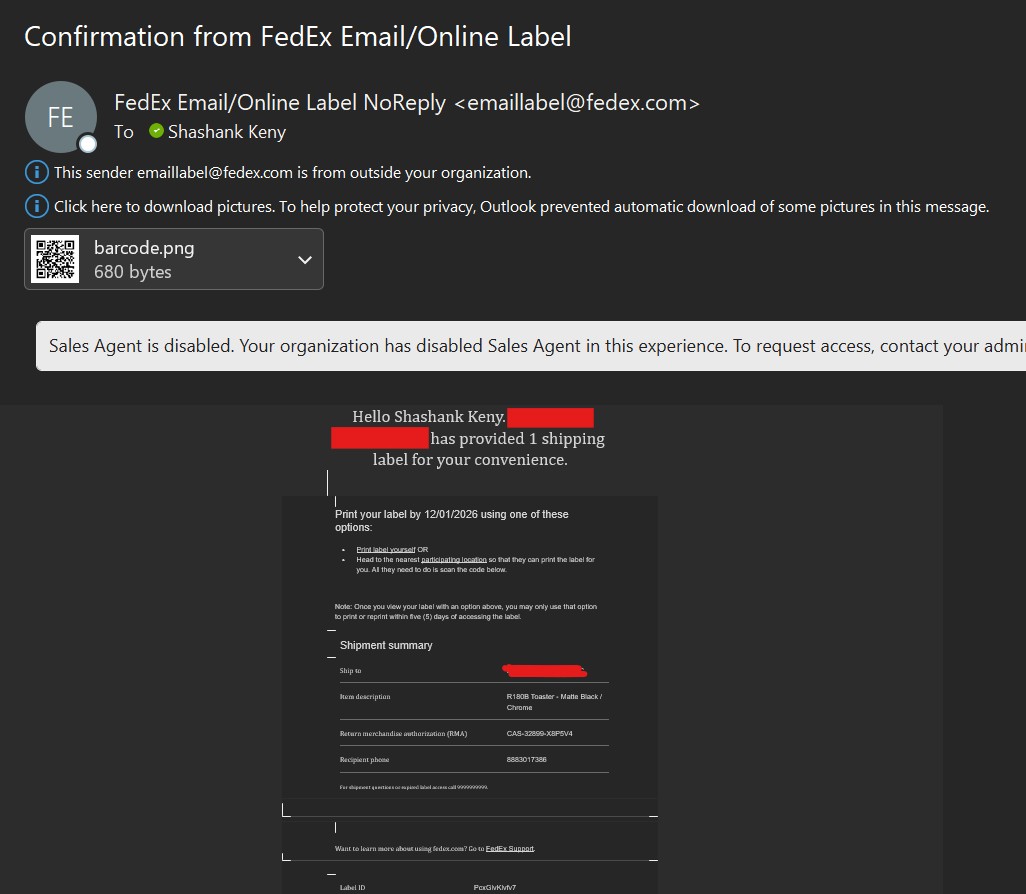
As soon as the shipment is created, FedEx emails the customer directly. The email shows the item being returned, the return reference, and the date by which the label should be printed. The customer can print the label at home or simply show a code at a FedEx location and have it printed there.
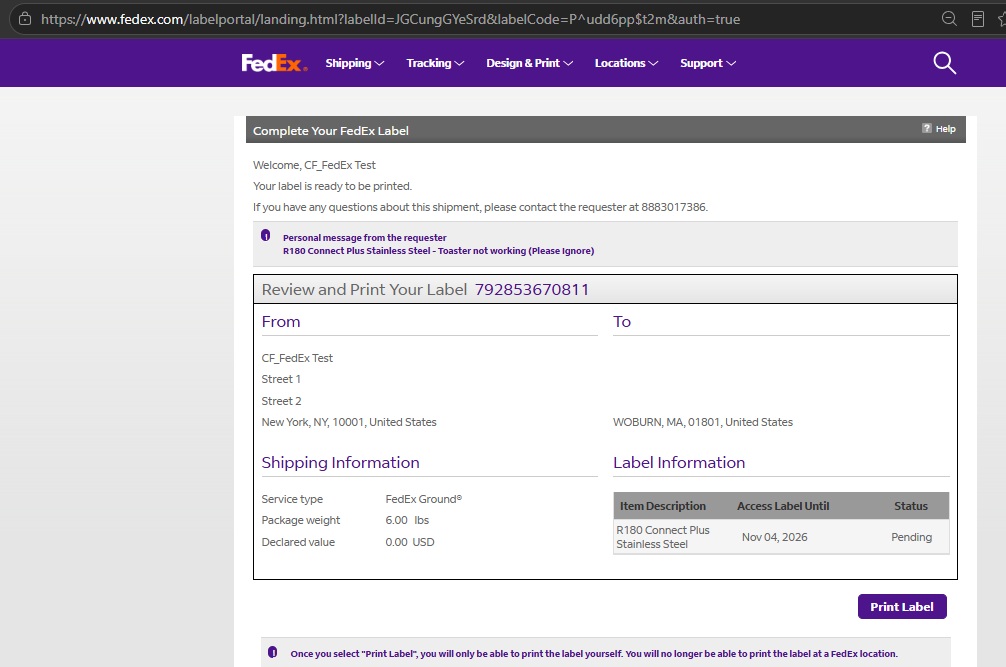
The link in the email opens a simple FedEx page where the customer reviews the shipment details and prints the label.
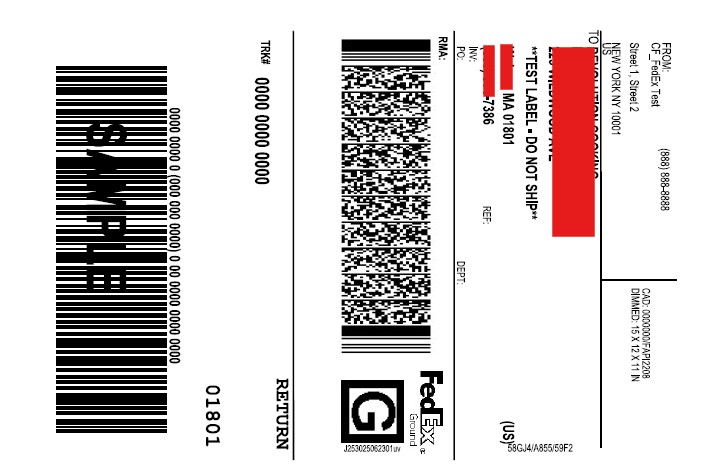
The customer attaches the printed FedEx Ground RETURN label to the package and drops it off at any FedEx location. No phone calls, no waiting for a label in the post.
3. Cancelling a Shipment
Plans change. A customer may decide to keep the product, or a label may have been created on the wrong case. The agent selects FedEx Shipments → Cancel current Shipment, and the system:
- Asks FedEx to cancel the shipment.
- Waits for FedEx to confirm the cancellation.
- Clears the tracking number and tracking link from the case.
- Records the cancellation in the audit log.
The case is only updated once FedEx confirms, so what agents see in Dynamics 365 always matches FedEx.
4. Auditing Every Shipment
Every time an agent creates or cancels a shipment, the system saves a FedEx RMA Shipment Audit Log record. It is named after the case, the customer, the tracking number, and the date, so it is easy to find.
| The audit record shows | Why it helps |
|---|---|
| Who the shipment was for, and which case it belongs to | Instant context for anyone reviewing a return |
| Whether it succeeded, failed, or was stopped, and why | Support questions are answered in seconds |
| Sender and warehouse addresses, item, weight, and dimensions | A clear record of exactly what was shipped |
| The customer’s label link and its expiry date | Agents can help customers who lose their label |
| Delivery estimate and FedEx charges | Finance can see shipping costs per return |
| The full message exchanged with FedEx | The IT team has everything needed to investigate an issue |
Audit records are read-only: they cannot be edited or deleted. A short notice at the top reminds users that the record reflects what FedEx confirmed at the time, and that FedEx tracking shows the latest status.
5. Process Handling Behind the Scenes
Several steps that agents used to think about now happen automatically:
| Step | What happens automatically |
|---|---|
| Choosing the warehouse | Standard customer-care returns go to the returns warehouse. Returns that need engineering review go to the engineering warehouse. The choice is made from the type of return on the case. |
| Updating the case | The tracking number and a FedEx tracking link are added to the case as soon as the shipment is created, and removed when it is cancelled. |
| Preparing the customer email | A draft email is created on the case from the approved Exchange or Refund template. The agent reviews it and sends it when ready. |
| Moving the case forward | Once FedEx confirms that it has the parcel (the Tendered status from Part 2), the case moves to the Accounting stage on its own, so the exchange or refund can be processed. |
6. Validations
Before anything is sent to FedEx, the system checks that the case is ready. If something is missing, the agent sees a short, clear message explaining what to fix, and nothing is sent until it is corrected.
| Check | What the agent is asked to do if it fails |
|---|---|
| The case is saved and active | Save the case, or work on an active case |
| The return (RMA) is approved on the case | Turn on RMA for the case |
| The type of return is an exchange or a refund | Choose a supported return type |
| The item being returned is recorded | Fill in the Exchange/Return Item |
| The case is past the initial investigation stage | Move the case to the next stage |
| The customer is a contact located in the United States (excluding Puerto Rico) | Check the customer and their address |
| The customer has a valid 10-digit US phone number | Update the customer’s phone number |
| The customer’s and warehouse’s addresses are complete, and the customer has an email address | Complete the missing address or email details |
7. Authentication and Secure Configuration
The connection to FedEx is handled securely on the server, never in the agent’s browser:
- Secure sign-in to FedEx: each request uses FedEx’s standard secure sign-in (OAuth), requested fresh for every operation.
- One protected settings record: the FedEx account and connection details are stored in a single settings record in Dynamics 365. Only an authorized administrator can change it, and it cannot be deleted or duplicated by mistake.
- Test and live modes: a simple switch on the settings record moves the integration between the FedEx test environment and live FedEx, with no change to the solution.
- Protected warehouse details: the warehouse records used as return destinations cannot be deleted while the integration relies on them.
Good Practices We Followed
Keep it to one menu
Create and cancel live together under FedEx Shipments, so agents always know where to go.
Check first, then send
Validating the case before contacting FedEx saves agent time and avoids failed requests.
Speak the agent’s language
Every message explains what to fix in plain words, not technical error codes.
Prevent mistakes by design
Duplicate shipments are blocked, and the case only changes after FedEx confirms.
Record everything, change nothing
Every attempt is logged, including those that did not go through, and logs cannot be altered.
Keep people in control of customer communication
The follow-up email is prepared automatically but sent by the agent, so every message can be personalized.
Settings, not code
Account details, test or live mode, and email templates are managed from one secure record, making changes quick and safe.
Outcome for the Client
The whole return in one place
Consumer Care creates, cancels, tracks, and follows up on return shipments without leaving the case.
Seconds, not minutes
A return label that once took 20–30 minutes to arrange in FedEx is now created in a few clicks, and can be cancelled just as quickly.
Easy for every agent
Two clearly named options and plain-English guidance mean new agents can process returns from day one.
Fewer errors
Built-in checks and automatic warehouse selection keep returns going to the right place with the right details.
A better customer experience
Customers receive their FedEx label by email right away and a consistent follow-up from Consumer Care.
Full visibility and accountability
Every shipment, cancellation, and FedEx charge is on record for Consumer Care, Finance, and IT.
Conclusion
Across this series, return logistics for our client has moved entirely into Dynamics 365 Customer Service:
| Part | What it delivered |
|---|---|
| Part 1 | FedEx return labels created from the case |
| Part 2 | Shipment progress tracked automatically on the case |
| Part 3 | Create and cancel from one menu, automatic warehouse selection, customer follow-up, and a complete audit trail |
The result is a return process that is simple for agents, convenient for customers, and transparent for the business.
The best integrations are the ones users barely notice. When creating, cancelling, and recording a return each take a single click, the team can focus on what matters most: looking after the customer.
Frequently Asked Questions
1. Do agents need to log in to FedEx?
No. Creating, cancelling, and tracking return shipments all happen from the case in Dynamics 365.
2. How does the customer get the return label?
FedEx emails it directly. The customer can print it at home or have it printed at a FedEx location.
3. Can a shipment be created twice for the same case?
No. If a shipment already exists, the agent is asked to cancel it before creating a new one.
4. What happens if the customer never uses the label?
The label expires after 19 days, and FedEx only charges for a return label once it is used.
5. How does the system know which warehouse to use?
It is chosen automatically from the type of return recorded on the case.
6. Is the follow-up email sent automatically?
No. A draft is prepared on the case from an approved template, and the agent reviews and sends it.
7. Where can I see what happened with a shipment?
On the FedEx RMA Shipment Audit Log for the case, which shows every shipment and cancellation along with what FedEx confirmed.
8. Could this work with other carriers?
Yes. The same approach can be applied to UPS or other carriers that offer shipping services online.
Want to simplify returns, or bring any shipping partner into Dynamics 365 Customer Service? Reach out to the CloudFronts team at transform@cloudfronts.com.