

How an Industrial Cybersecurity Company in Texas Improved Field Time and Expense Tracking with Microsoft Power Apps and Dynamics 365 Project Operations
Summary
- Designed and deployed a mobile-first Power Apps Canvas App for a Texas-based industrial cybersecurity firm specializing in operational technology (OT) security for oil and gas infrastructure.
- Unified time tracking, expense management, material consumption logging, and approvals into a single experience integrated with Dynamics 365 Project Operations.
- Eliminated fragmented desktop-based workflows that delayed project reporting, approvals, and billing.
- Automated expense receipt processing through Power Automate, improving compliance and reducing manual effort.
- Implemented project-scoped approval routing to ensure submissions were reviewed only by authorized stakeholders.
- Enabled real-time project visibility through structured Dataverse-driven workflows and lifecycle tracking.
- Provided mobile approvals and submission monitoring, dramatically reducing turnaround times.
- Improved data accuracy, audit readiness, and billing efficiency across field operations.
Table of Contents
1. Introduction
Field-driven organizations live and die by the accuracy and speed of their project data. For a company securing critical infrastructure like oil rigs, every hour an engineer spends fighting with a clunky time-entry screen is an hour not spent on the job site — and every delayed expense submission is a delay in client billing and financial reporting.
This is the story of how a Texas-based cybersecurity firm moved away from a fragmented, desktop-oriented workflow inside Dynamics 365 Project Operations and adopted a unified, mobile-first Canvas App that brought time tracking, expense submission, and material logging into one place, with built-in compliance controls and project-specific approval routing.
The Goal:
Build a unified mobile-first experience that allows field engineers to submit time, expenses, and materials from
anywhere while ensuring compliance, controlled approvals, and real-time project visibility.
2. Requirement & Business Scenario
The firm manages multiple concurrent field engagements using Dynamics 365 Project Operations as its system of record. Consultants and field engineers were expected to log three categories of activity against active projects:
- Time entries for hours worked
- Expense entries covering travel, accommodation, airfare, and related costs
- Material usage logs for equipment, parts, and consumables
The core issue was that the underlying system was built for desktop use, not for engineers working on-site at remote rig locations. This created several compounding problems:
- Field staff had no efficient way to submit entries from a mobile device, so submissions piled up until they were back at a desk.
- Time, expense, and material tracking lived in separate workflows, forcing users to context-switch between screens for what should have been a single daily task.
- Expense compliance was inconsistent — receipts were sometimes attached, sometimes forgotten, and the process for linking a receipt to an expense record involved several manual, error-prone steps behind the scenes.
- Approvals had no project-level boundaries, making it hard to guarantee that only the right project stakeholders could review and approve specific submissions.
- Project managers lacked real-time visibility into resource usage, which meant billing and client reporting cycles were consistently delayed.
Left unaddressed, these gaps were directly affecting data accuracy, audit readiness, and the speed at which the business could invoice clients.
3. Solution
CloudFronts designed a unified mobile experience using Power Apps Canvas Apps layered on top of Dynamics 365 Project Operations and Dataverse, built around one guiding principle:
One App. All Submissions. Controlled Approvals. Real-Time Visibility.
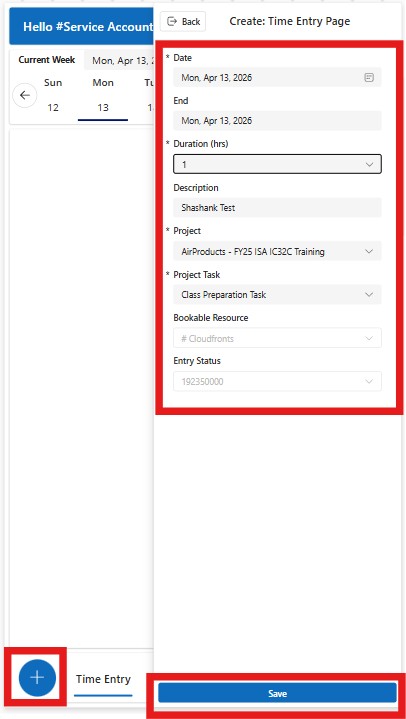
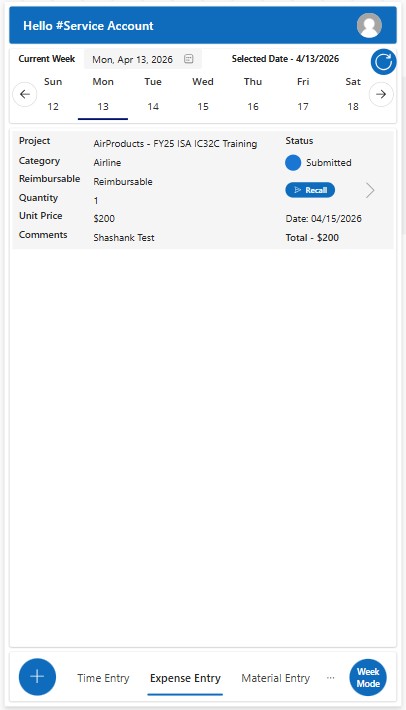
For field users, the app became the single place to submit time entries on a daily or weekly basis, create expense entries with automatic receipt handling, log material consumption against the correct project, and track the live status of every submission.
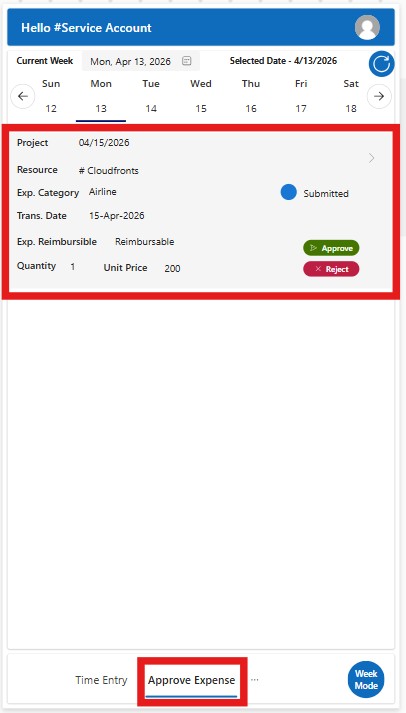
For project approvers, the same app surfaced only the entries tied to projects they were actually responsible for, let them approve or reject submissions directly from their phone, and preserved a clean, audit-ready trail for every decision.
Day Mode and Week Mode
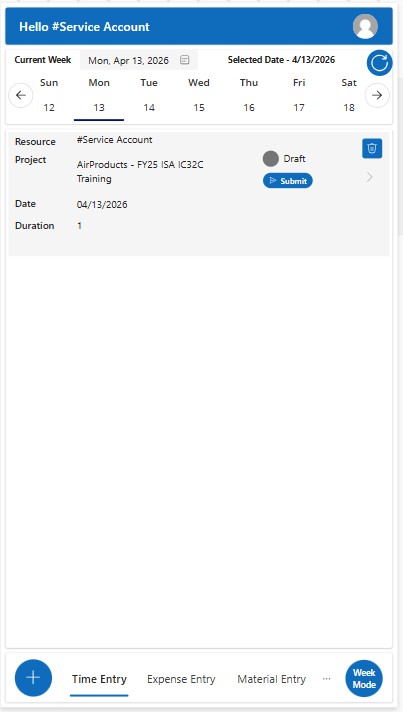
Users could switch between a detailed single-day entry view, useful for precise logging and corrections, and a bulk weekly view that sped up repetitive data entry — letting each person work the way that suited their role.
Calendar-Based Swipe Navigation
A Dynamics-style calendar with swipe gestures let users move quickly across days and weeks, reviewing or correcting historical entries without friction.
Stage-Aware Interface
Every record followed the same lifecycle — Submitted, Pending, Approved, Rejected, Recall Requested, Recall Approved, Recall Rejected — and the UI adapted to whatever stage a record was in.
Action buttons such as Submit, Approve, Reject, and Recall only appeared when they were actually valid, significantly reducing user confusion and accidental actions.
Conditional Receipt Enforcement
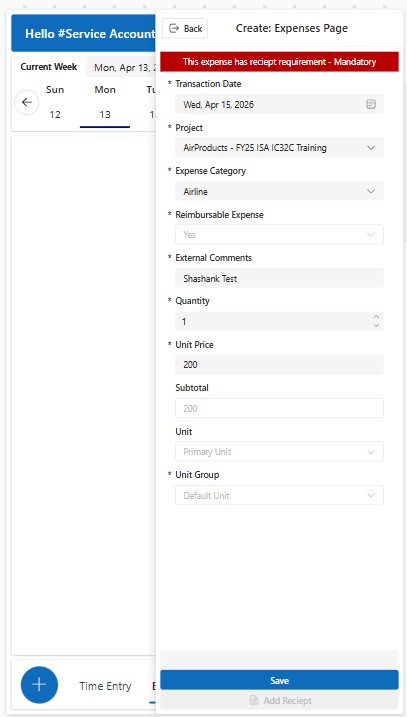
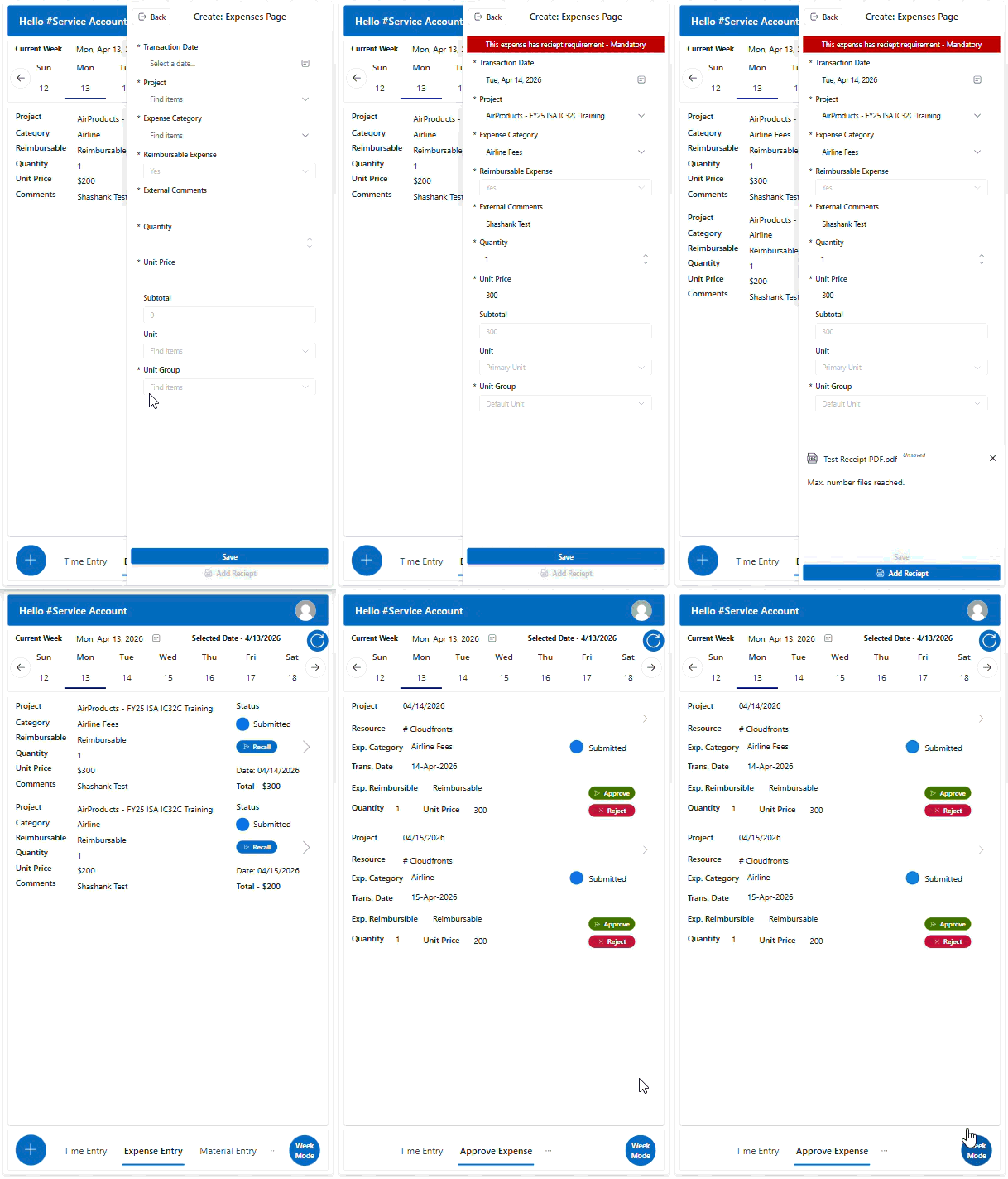
Rather than requiring a receipt for every expense category, the app applied compliance rules selectively. Receipts were mandatory for airfare and OT hardware purchases, while remaining optional for lower-risk categories such as meals and local transportation.
4. Implementation
The technical implementation centered on a unified Dataverse data model and a set of automations that removed manual work from both the field user and the back office.
Unified Data Model
Time, expense, and material entries were all structured in Dataverse and linked back to the relevant project, resource, approval record, and — for expenses — supporting documentation.
Every submission created a record with a clearly defined lifecycle stage, ensuring all three entry types behaved consistently even though their underlying business logic differed.
Validation Before Submission
The Canvas App enforced field-level validation before allowing a record to be saved, checking that essentials such as transaction date, project, category, quantity, and cost information were populated.
If(
    Or(
        IsBlank(DatePicker.SelectedDate),
        IsBlank(ProjectCombobox.Selected),
        IsBlank(CategoryCombobox.Selected),
        IsBlank(QuantityInput.Value),
        IsBlank(PriceInput.Value)
    ),
    Notify("Required fields are missing.", NotificationType.Error)
)
Patch-Based Record Creation
Once validation passed, the application used Dataverse Patch operations to create records and calculate derived values such as expense subtotals dynamically based on quantity and unit price.
Automated Receipt Handling
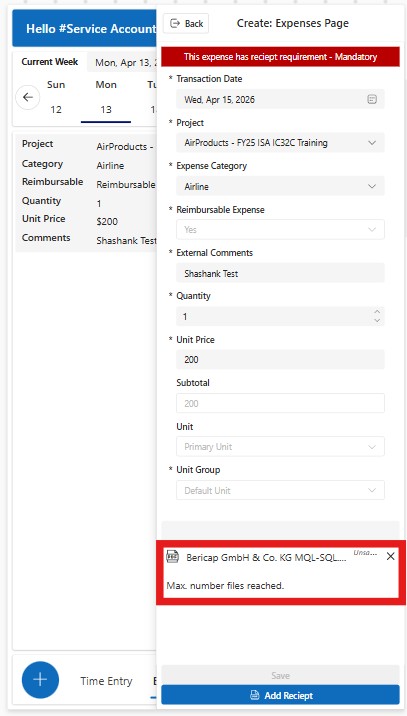
For expense submissions, the previously manual chain of creating an Expense Receipt record, attaching a file as a Note, converting it to the correct document format, and updating the status to Submitted was fully automated.
The Canvas App passed the expense ID, file name, and file content to a Power Automate flow, which created the Expense Receipt record, stored the file as a Note (Annotation) with the correct MIME type, and updated the parent expense status automatically.
Project-Scoped Approval Routing
When a record was submitted, the system automatically created a corresponding approval record and routed it using project-resource relationships already defined in Dynamics 365 Project Operations through bound actions.
This guaranteed that only approvers assigned to a given project could see and act on its submissions.
Lifecycle-Driven Status Management
Every record moved through a controlled path — Draft to Submitted to Pending to Approved or Rejected, with a recall path available if a user needed to pull back a submission.
The lifecycle was managed through a combination of Power Apps UI logic, bound actions, and Dataverse status fields.
5. Implementation Gallery
The following screenshots highlight key areas of the solution, including time entry, expense management, material tracking, approval workflows, and submission lifecycle visibility.
Implementation Walkthrough
6. Outcome
The shift to a unified, mobile-first workflow produced measurable improvements across the board:
- Submission time moved from delayed, desk-bound entry to near real-time mobile submission.
- Approval turnaround dropped from hours or days to effectively instant, since approvers could act from their phones as soon as notifications arrived.
- Data accuracy improved as fragmented entry points were replaced by structured, validated submissions.
- The overall user experience consolidated from multiple disconnected tools into a single app covering time, expense, and materials.
- Project managers gained real-time visibility into resource usage, resulting in faster and more accurate client billing cycles.
- Expense compliance improved significantly since receipts could no longer be forgotten for categories that required them, and the entire receipt-to-record process was handled automatically.
7. FAQs
Can a single Canvas App really handle time, expense, and material submissions together?
Yes. With a shared Dataverse data model and conditional logic driving the UI, a single application can support multiple entry types while still giving each one its own validation rules and workflow.
How were approvals restricted to the right project stakeholders?
Approval routing relied on the project-resource relationships already defined in Dynamics 365 Project Operations, triggered through bound actions, ensuring only assigned approvers could view or act on submissions.
What happened to receipts that used to be attached manually?
The entire process — creating the Expense Receipt record, attaching the file as a Note, and updating the expense status — was automated through a Power Automate flow triggered when an expense was submitted from the Canvas App.
Is this solution extensible beyond time and expense tracking?
Yes. The same architecture can be extended with Power BI dashboards for deeper analytics, billing system integrations, and AI-driven insights for predictive project tracking.
8. Conclusion
Fragmented, desktop-only processes are a persistent drag on project-driven organizations, especially those with field teams working far from a desk.
By unifying time, expense, and material submission into a single mobile-first Canvas App on top of Dynamics 365 Project Operations, this Texas-based cybersecurity firm replaced delay and manual error with real-time visibility and automated compliance.
When submission, validation, and approval all live in one well-designed workflow, both efficiency and data accuracy improve — and the people doing the most critical field work spend less time on paperwork and more time on the job.
If your Dynamics 365 Project Operations environment requires smarter automation for expense management, receipts, or document-driven workflows, reach out to CloudFronts at transform@cloudfronts.com. Our specialists build scalable Power Platform and Dynamics 365 solutions that reduce manual effort, improve compliance, and accelerate financial processes.

Shashank Keny
Associate Consultant · CloudFronts
Shashank Keny is an Associate Consultant at CloudFronts with 1.5+ years of experience in cloud, data, and business applications. He specializes in building scalable, API-driven architectures and integrating enterprise systems across the Microsoft ecosystem.
He is a Certified Databricks Data Engineer with hands-on experience in Dynamics 365 Project Operations and Dynamics 365 Sales, along with delivering business intelligence solutions using Power BI.
His expertise also extends to modern AI solutions, including building custom copilots and implementing intelligent applications using Azure AI Foundry.
Passionate about solving real-world business challenges through data and AI, he focuses on delivering efficient, scalable, and production-ready solutions.
- Experience: 1.5+ years
- Certification: Databricks Certified Data Engineer
- Specialization: Dynamics 365 Project Operations, Power BI, Azure Integrations, AI Solutions
