

From Manual to Automated: Scalable Client Statement Reporting with Power BI for a Houston-Based Enterprise Security Services Firm
Summary
A services firm based in Houston, Texas, specializing in enterprise security solutions, improved operational efficiency by transitioning from Excel-based reporting to Power BI Paginated Reports, implemented by CloudFronts.
CloudFronts designed a structured, client-ready reporting solution integrated with Dynamics 365 CRM.
The solution supports manual distribution today while being fully prepared for future automation such as scheduled PDF delivery.
Business impact: Improved operational efficiency, standardized reporting, and scalability without rework.
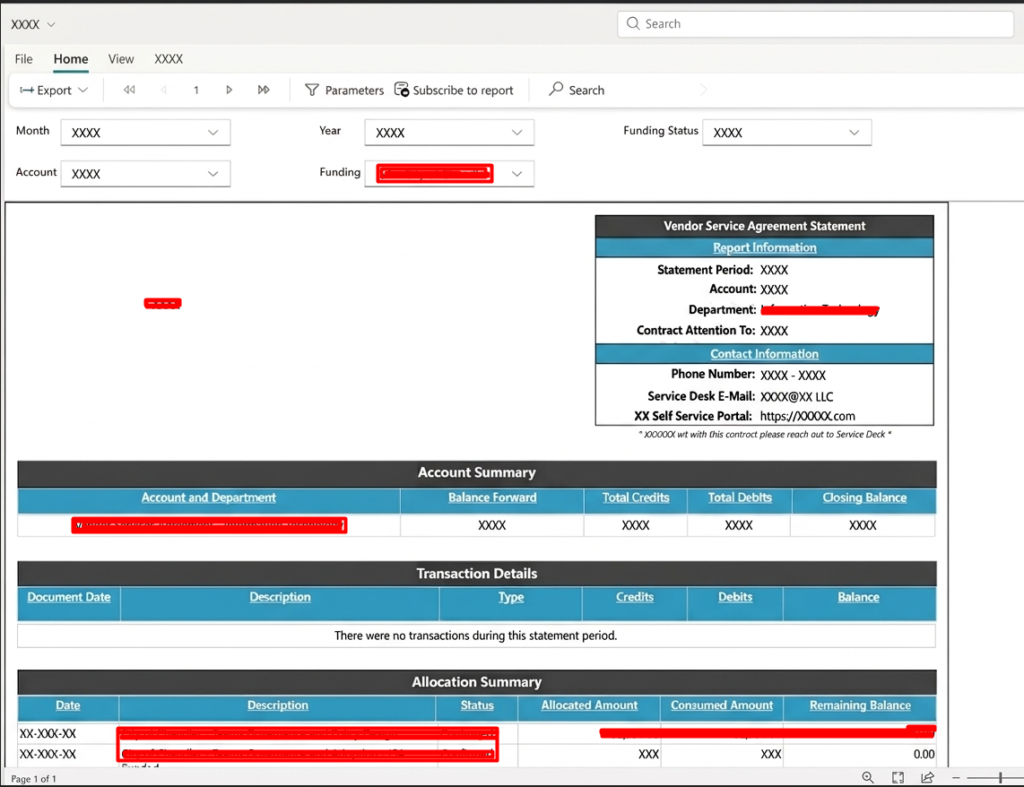
Client-ready account statement using Power BI Paginated Reports
About the Customer
As a 9x Microsoft Gold Partner and 6x Microsoft Advanced Specialization-endorsed organization based in Texas, U.S., the customer specializes in delivering solutions for critical business needs across systems management, security, data insights, and mobility.
The Challenge
Initially, the organization generated account statements manually using Excel for a small number of clients.
While this approach worked at a smaller scale, it presented several limitations:
- Manual effort and inefficiency: Reports had to be created individually for each client.
- Lack of standardization: Formatting and structure varied across reports.
- Scalability concerns: While effective for a small client base, the process was not designed to scale as the business grows to 30–50+ clients.
- Technology decision gap: The team required guidance on choosing between SSRS and Power BI Paginated Reports, along with future automation capabilities.
As a result, the organization needed a solution that addressed current inefficiencies while preparing for future scale.
The Solution
CloudFronts implemented Power BI Paginated Reports, integrated with Dynamics 365 CRM, to create structured, print-ready account statements.
Technologies Used
- Dynamics 365 CRM — Source of funding, account, and transaction data
- Power BI Paginated Reports — Designed pixel-perfect, client-facing statements
- Power BI Service — Enabled hosting and future automation capabilities
What CloudFronts Configured
CloudFronts designed a paginated report tailored for client communication, including account summaries, transaction-level details, and allocation tracking.
The solution includes parameterized filtering for month, account, and funding status, enabling efficient report generation across multiple clients.
The report was built with a strong emphasis on consistency, print-ready formatting, and reusability—ensuring that reports can be generated without redesign as the business grows.
CloudFronts also guided the customer in selecting Power BI Paginated Reports over SSRS to ensure better alignment with the Power BI ecosystem and support for future automation such as subscription-based PDF delivery.
Key Implementation Decisions
- Replacing Excel with Paginated Reports: Improved standardization and reduced manual effort.
- Choosing Paginated Reports over SSRS: Enabled seamless integration with Power BI Service and future automation readiness.
- Designing for scalability: Built a solution that works manually today but supports automation in the future.
Business Impact
| Metric | Before | After |
|---|---|---|
| Report Creation | Manual Excel-based | System-generated reports |
| Operational Efficiency | Low | Significantly improved |
| Scalability | Limited | Ready for growth |
| Consistency | Variable | Standardized |
The organization now operates with a structured reporting system that reduces manual effort while being fully prepared for future automation.
Frequently Asked Questions
Should I use SSRS or Power BI Paginated Reports?
If you are using Power BI, Paginated Reports are a better choice due to seamless integration and future automation support.
Can I automate PDF report delivery later?
Yes. Paginated Reports support subscription-based delivery for automated PDF emails.
Do I need automation from day one?
No. It is more effective to design a scalable solution first and introduce automation as the business grows.
Conclusion
This implementation highlights that effective reporting is not just about automation—it is about designing for scalability from the beginning.
By choosing Power BI Paginated Reports, the organization built a solution that meets current needs while avoiding future rework as they grow.
Not every reporting requirement needs a dashboard or immediate automation. A well-designed structured report can often be the most scalable solution.
Read the full case study here:
Invoke
We hope you found this article useful. If you would like to explore how AI-powered customer service can improve your support operations, please contact us at transform@cloudfronts.com.
Deepak Chauhan | Consultant, CloudFronts
