

Automating Attribute creation in D365 Project Operations, Using Dataverse OData Metadata APIs for an Internal Project Operations–Finance & Operations Integration
Please find this CloudFronts Product at – Integration Module between Dynamics 365 Project Operations and Finance & Operations | Microsoft Marketplace
Summary
Manually creating custom fields in Dynamics 365 Project Operations across multiple environments is time-consuming, error-prone, and blocks automation. This challenge can be addressed by using Dataverse Metadata OData APIs to programmatically create, update, and publish custom attributes during deployment. The process involves authenticating with Azure AD, calling Metadata API endpoints to create attributes, and publishing the changes with the PublishXml action, all through a fully automated approach. As a result, organizations achieve zero manual intervention, environment consistency, integrations, reduced human error, and a reusable framework that can be applied across all field types.Please find this CloudFronts Product at – CloudFronts – PO-FO Connector
Table of Contents
Introduction
When integrating external business applications with Microsoft Dynamics 365 Project Operations, it is common to discover that every customer requires additional fields to store information originating from ERP systems, manufacturing platforms, pricing engines, or product lifecycle management systems.
For one of our internal projects & Prospect PoC implementing product-centric integrations, we needed a way to provision these custom fields automatically during deployment. Traditionally, creating new columns involves opening the Power Apps Maker Portal, adding fields manually, publishing the table, exporting a solution, and repeating the same process across multiple environments.
While this approach works for occasional changes, it quickly becomes a bottleneck for automated deployments and CI/CD pipelines.
The Solution: CloudFronts implemented a fully automated approach using the Dataverse Metadata OData APIs, enabling integration deployments to create and publish new Project Operations attributes programmatically.
Business Challenge
The customer’s integration platform exchanged large volumes of product and financial information with Dynamics 365 Project Operations. Each deployment required several custom attributes such as:
- Product identifiers
- ERP reference numbers
- Financial synchronization IDs
- External integration keys
- Processing status fields
Creating these fields manually across Development, Test, UAT, and Production introduced several challenges:
- Manual configuration effort (time-intensive)
- Human errors (typos, misconfigurations)
- Environment inconsistencies (field variations across environments)
- Longer deployment windows
- Difficult CI/CD automation
The Objective: Allow the deployment process itself to provision any missing attributes before importing data, eliminating manual touchpoints entirely.
Why OData Metadata APIs?
Most developers use the Dataverse Web API for CRUD operations on business records. However, Dataverse also exposes Metadata APIs, allowing developers to programmatically manage the schema itself—including tables, columns, relationships, and option sets.
Microsoft documents creating attribute metadata by posting to the Attributes navigation property of an entity definition. This means integrations can:
- Create new columns dynamically
- Update existing metadata
- Publish customizations instantly
- Eliminate manual portal work
- Scale across multiple environments consistently
Unlike traditional manual solutions, the Metadata API approach is fully programmable, auditable, and repeatable.
Implementation Procedure
Step 1 – Authenticate with Dataverse
The integration first authenticates against Azure Active Directory using an application registration and retrieves an OAuth Bearer Token. That token is then supplied with every Metadata API request.
Authentication Flow:
- Register application in Azure AD
- Configure permissions for Dataverse access
- Obtain OAuth 2.0 Bearer Token
- Include token in Authorization header for all API calls
Step 2 – Creating a Custom Attribute
The Dataverse Metadata API exposes the following endpoint for creating new attributes:
POST /api/data/v9.2/EntityDefinitions(LogicalName=’msdyn_contractlineinvoiceschedule’)/Attributes
Instead of creating business records, this endpoint creates metadata at the schema level. For this implementation, we created a new string attribute with the following properties:
- Schema Name:
int_fnoid - Display Name: FNO ID
- Data Type: String
- Maximum Length: 100
The request body uses the Microsoft.Dynamics.CRM.StringAttributeMetadata type together with standard metadata properties such as SchemaName, DisplayName, RequiredLevel, and MaxLength.
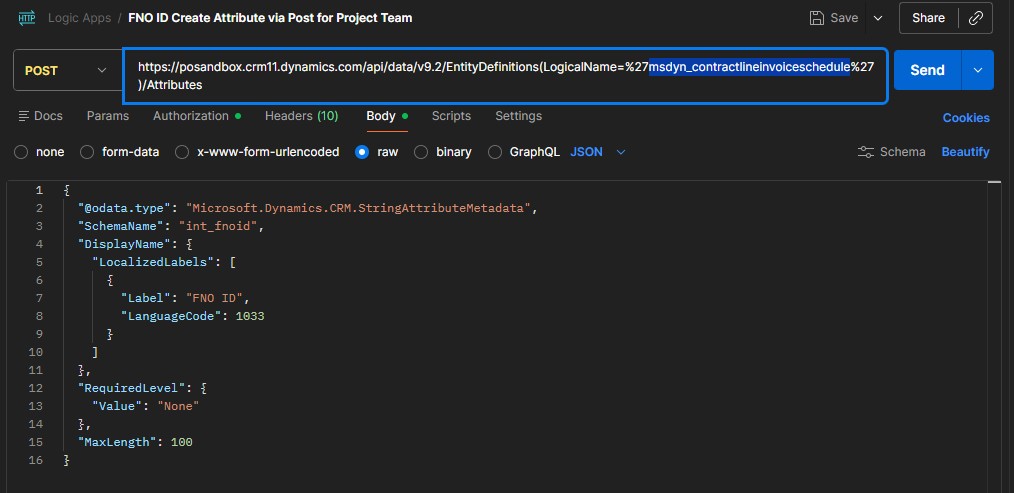
Supported Metadata Types: Microsoft supports multiple metadata types through the same endpoint including String, Decimal, Boolean, Picklist, DateTime, Lookup, Currency, and more.
Step 3 – Publishing the Metadata
Creating an attribute does not immediately make it available. Like changes made through the Power Apps Maker Portal, metadata created through the Web API must also be published. This is accomplished using the PublishXml action.
POST /api/data/v9.2/PublishXml
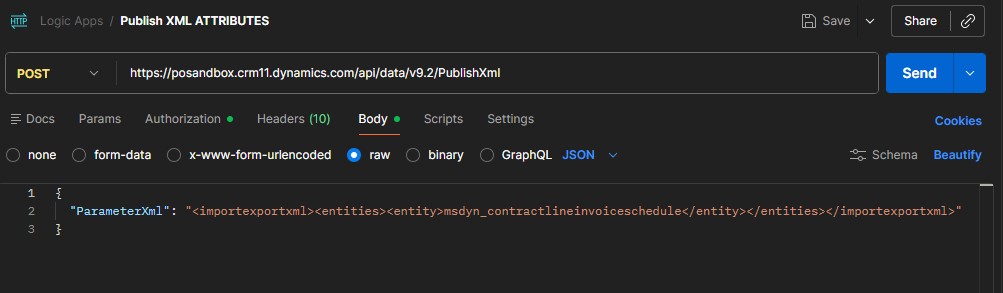
The request specifies the entity to publish. After publishing completes successfully, the new attribute immediately becomes available throughout Dynamics 365.
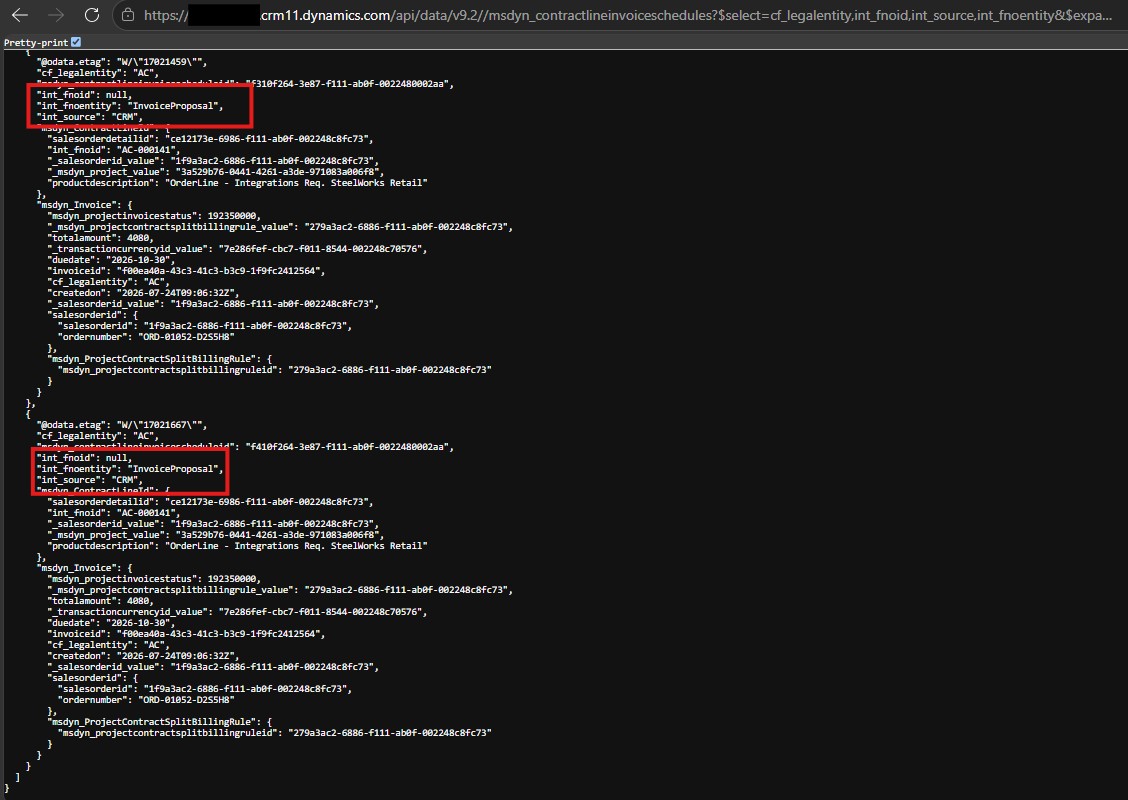
End-to-End Working
The complete deployment process follows these steps:
- Integration authenticates with Azure AD.
- Dataverse access token is generated.
- Metadata API checks whether the required attribute exists.
- Missing attributes are created automatically.
PublishXmlis executed.- New attributes become available.
- Product synchronization begins.
- External systems start populating the new fields immediately.
Integration Points: This Attribute creation setup can be utilized across Logic Apps, Plugins, Azure Functions, and other Custom Workflows.
Why This Approach Works
✓ Fully Automated Deployments
No manual intervention is required when new integration fields are introduced.
✓ Environment Consistency
Development, Test, UAT, and Production remain synchronized because every environment provisions the same metadata through code.
✓ CI/CD Friendly
Metadata creation can be incorporated directly into Azure DevOps or GitHub deployment pipelines.
✓ Reusable Framework
The same framework can create String, Decimal, Currency, Lookup, Date, Option Sets, and Boolean fields.
✓ Reduced Human Error
Eliminates mistakes caused by manual customization and inconsistent naming conventions.
✓ Prevented Duplication
Eliminates duplication of records, preventing system garbage in the database.
Real-World Use Cases
Use Case 1: PO-FO Integration (Project Operations to Finance Operations)
For enterprises running integrated Project Operations and Finance Operations modules, this approach ensures that:
- ERP reference numbers sync automatically across all linked tables
- Financial synchronization IDs are created before data import
- External integration keys propagate consistently
- Processing status tracking fields exist in all dependent entities
- No manual re-entry of attribute definitions across environments
Impact: Reduces deployment time from hours to minutes, eliminates sync mismatches between PO and FO modules, and enables real-time data reconciliation.
Conclusion
For an internal project and prospect PoC implementing product-centric integrations, automating metadata creation transforms what was previously a manual administrative task into a repeatable deployment process.
Rather than relying on solution imports or manual customization through the Power Apps Maker Portal, integrations can now provision required Project Operations attributes on demand using the Dataverse Metadata APIs and immediately publish them.
This approach significantly reduces deployment effort, ensures consistency across environments, and enables seamless integrations at enterprise scale. For organizations implementing Dynamics 365 Project Operations, leveraging the Metadata Web API is a powerful way to automate schema management and support modern DevOps and CI/CD practices.
Key Takeaway: In a world where integration complexity is increasing, the ability to automate metadata provisioning isn’t just a technical improvement—it’s a competitive advantage. Organizations that embrace programmatic schema management will deploy faster, with higher quality, and with lower operational overhead.

Shashank Keny
Associate Consultant · CloudFronts
Shashank Keny is an Associate Consultant at CloudFronts with experience in cloud, data, and business applications. He specializes in building scalable, API-driven architectures and integrating enterprise systems across the Microsoft ecosystem.
He is a Certified Databricks Data Engineer with hands-on experience in Dynamics 365 Project Operations and Dynamics 365 Sales, along with delivering business intelligence solutions using Power BI.
His expertise also extends to modern AI solutions, including building custom copilots and implementing intelligent applications using Azure AI Foundry.
Passionate about solving real-world business challenges through data and AI, he focuses on delivering efficient, scalable, and production-ready solutions.
- Certification: Databricks Certified Data Engineer
- Specialization: Dynamics 365 Project Operations, Power BI, Azure Integrations, AI Solutions
