Summary
A centralized New Product Development (NPD) process was created in Microsoft Dynamics 365 for SIP Industries, a manufacturing organization, replacing disconnected spreadsheets, emails, meeting notes, and verbal follow-ups with a single Dataverse-backed record. A lightweight Simple Intake form enables users to create requests quickly, while a detailed Information form supports cross-functional execution. A configurable business process flow guides each request through Market Analysis, Feasibility Analysis, Drawing Approval, Pattern/Sample, First Article Inspection, Customer Approval, and Production. Power Automate manages feasibility and development approval handoffs, including notifications, outcomes, and comments. Together, these capabilities improve visibility into ownership, current stage, pending decisions, aging, and production readiness.
Introduction
SIP Industries (SIP) manufactures, imports, and distributes Municipal Casting, Utility Fittings, Joint Restraints, and OEM Castings. Based in Houston, Texas, with facilities in the United States, India, and China, SIP was one of the first innovators to globally source municipal castings and utility fittings in the United States. CloudFronts previously partnered with SIP on a Dynamics 365 Sales implementation, and this NPD initiative builds on that same Dynamics 365 foundation.
For SIP’s manufacturing team, the question “Where is this new product request, and what is holding it up?” should be easy to answer. In reality, finding the answer can mean checking several spreadsheets, searching email threads, reviewing meeting notes, and following up with different departments.
A request may start with Sales or Customer Service, move to Engineering for feasibility, go through drawing and sample reviews, return to the customer for approval, and finally reach Production. Every team has a valid part to play, but without one shared process the complete journey is difficult to see.
To solve this, a unified NPD process was configured for SIP Industries using Microsoft Dynamics 365, Microsoft Dataverse, a model-driven application, a business process flow, and Power Automate. The aim was simple: capture the request once, collect the right information at the right time, route decisions automatically, and keep the full history together.
The Business Problem
New Product Development is not owned by a single department. Commercial teams assess demand, customer value, competitor information, expected usage, and market potential. Engineering reviews specifications, materials, weight, capacity, design constraints, and technical risk. Quality and Operations manage patterns, samples, inspections, feedback, and readiness for production. Leadership needs to know which requests deserve investment and where action is delayed.
When this information is scattered across different tools, four recurring problems appear:
- Repeated data entry: The same customer, product, and requirement details are typed into multiple trackers.
- Unclear ownership: Teams know that a request exists but cannot easily see who must act next.
- Untraceable decisions: Approval outcomes and comments remain buried in email, making it hard to understand why a request moved forward or stopped.
- Weak management visibility: Status reports are prepared manually and may already be out of date when they are shared.
The Solution
The solution was designed around one core idea: every new product request should have one record, one visible lifecycle, and one decision history. Dataverse stores the information, the model-driven app presents the forms and views, the business process flow guides users through the stages, and Power Automate manages approvals and notifications.
The following sections explain how each part of the solution addressed a gap in the earlier email-and-spreadsheet-driven process.
A Fast Intake Experience Without Process Overload
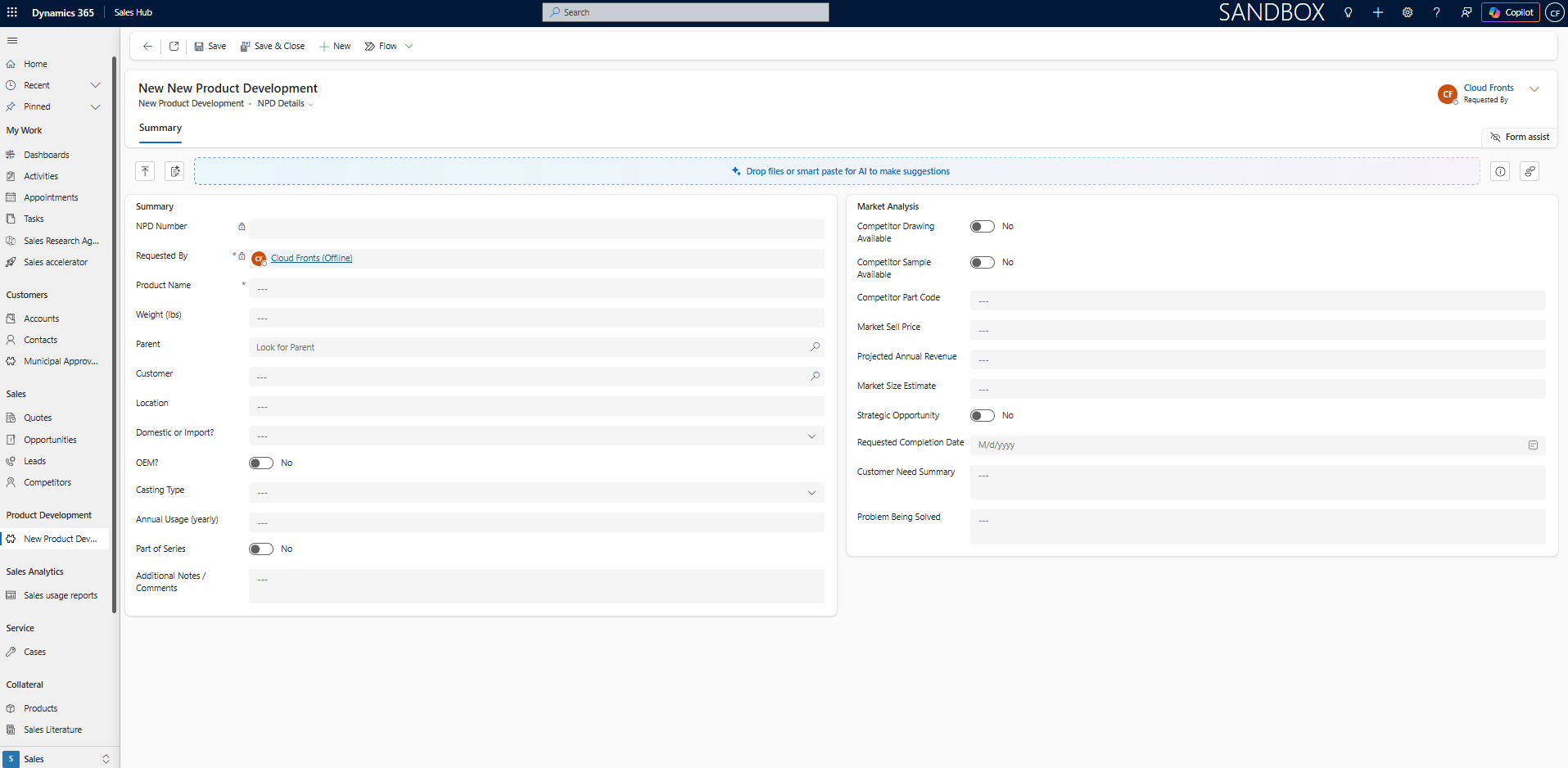
The process starts with a Simple Intake form. It contains only the information needed to register an idea, such as the product name, requester, customer, location, weight, OEM indicator, casting type, and requested completion date. The timeline and business process flow are intentionally hidden at this point so that raising a request feels quick and straightforward.
After the record is saved for the first time, it opens in the full Information form. The detailed tabs, timeline, business process flow, review fields, and related records then become available to the teams responsible for assessment and execution. The Requested By value remains visible and is locked after creation so the origin of the request is preserved.
One Shared Record for Commercial, Technical, and Operational Context
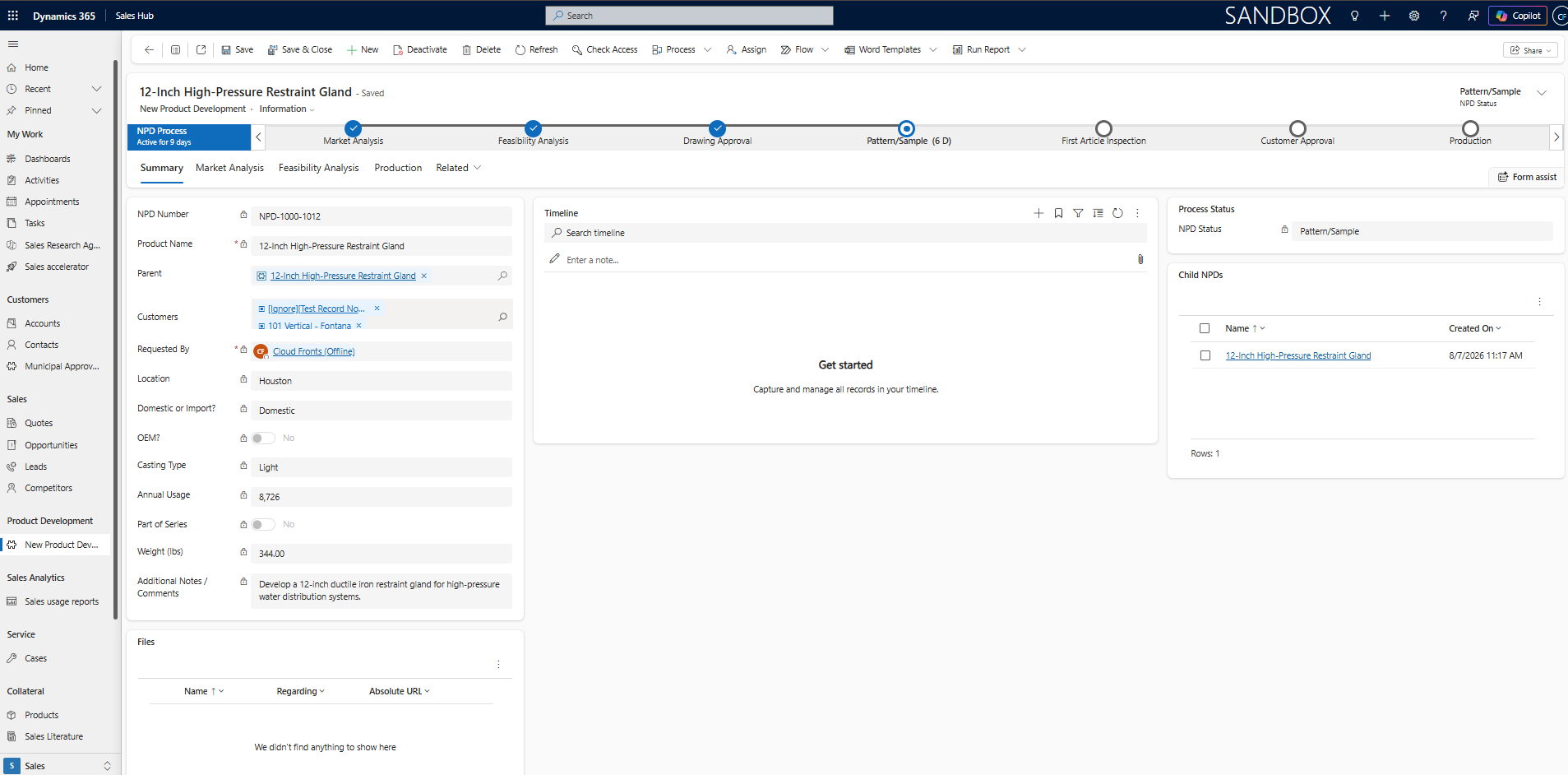
The complete NPD form acts as the shared workspace for the initiative. Information is arranged into clear areas such as Market Analysis, Feasibility, and Production so that each team can focus on its part of the process without losing the context entered earlier.
Market Analysis can capture the customer need, competitor part code, annual usage, expected market value, strategic importance, and customer feedback. Feasibility can hold specifications, location, weight, OEM status, casting type, foundry, capacity considerations, target cost, and technical risks. Later stages record drawing decisions, pattern or sample findings, inspection results, customer approval, and production-readiness information.
This structure removes the need for each department to create its own version of the request. The same record becomes richer as it moves forward, while the original business context stays intact.
A Stage-Driven Business Process Flow
A business process flow gives users a visible path from initial assessment to production. Each stage presents the information needed for the next decision, helping users understand where the request is today, what must be completed, and what outcome is expected before it can move ahead.
| NPD stage | Decision supported | Information captured |
|---|---|---|
| Market Analysis | Confirm that the opportunity is commercially worth exploring. | Customer need, competitor part code, annual usage, market context, expected value, strategic fit, and customer feedback. |
| Feasibility Analysis | Decide whether the product can be developed responsibly. | Specifications, weight, location, OEM indicator, casting type, foundry, capacity, cost considerations, dependencies, and technical risk. |
| Drawing Approval | Validate the proposed design when a formal drawing review is required. | Drawing status, revisions, comments, corrections, and approval outcome. |
| Pattern / Sample | Prepare and evaluate a representative pattern or sample where applicable. | Build status, sample dates, findings, feedback, and corrective actions. |
| First Article Inspection | Confirm that the first produced item meets the defined requirements. | Inspection results, nonconformities, disposition, comments, and completion date. |
| Customer Approval | Record customer acceptance before production release. | Customer feedback, approval status, decision date, and outstanding actions. |
| Production | Move the approved request into operational execution. | Production readiness, owner, target completion, open actions, and final status. |
The process is configurable. Drawing Approval and Pattern/Sample can remain available when the product requires them, while simpler requests can follow a shorter path. This keeps governance consistent without forcing every request through unnecessary work.
Automated Feasibility and Development Approvals
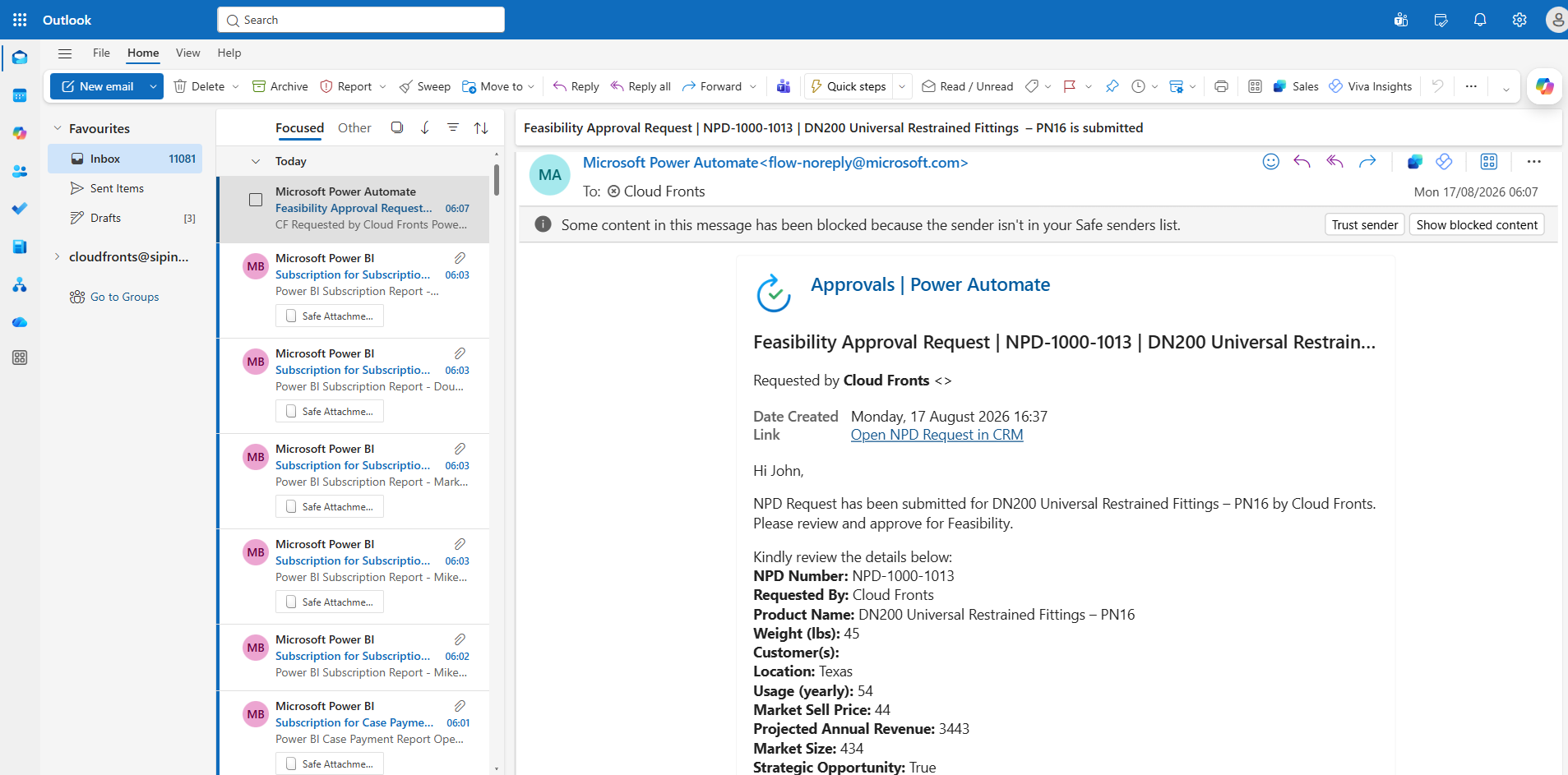
Power Automate was used to coordinate approval handoffs that previously depended on someone remembering to send an email. When the relevant stage information is ready, the automation prepares a structured approval and routes it to the appropriate reviewer.
- Submit: The user completes the required information and submits the NPD request for review.
- Validate: The automation checks the context required for the decision and identifies the correct approval route.
- Route: The approver receives the NPD number, product name, requester, customer or market context, location, and a direct link to the record.
- Decide: The approver approves or rejects the request and records comments.
- Update: The outcome, response details, and next status are written back to Dynamics 365.
- Notify: The next owner is informed, and the request either progresses or returns for rework.
Because the result is stored with the NPD record, users can see both the current status and the decision context that brought the request there. This is more reliable than leaving important approval history only in an inbox.
Status, Aging, Views, and Management Visibility
The business process flow guides the user, while clear status fields support automation and reporting. The status can be aligned with the active stage so that views and dashboards show the same story as the record itself. An Active For (Hours) formula can also be introduced to make aging visible and help teams identify requests that have remained untouched for too long.
Examples of useful operational views include:
- Requests awaiting feasibility review
- Requests pending development approval or rework
- Open requests grouped by current stage
- Overdue requests and aging by owner
- Products approaching production readiness
This gives managers a current NPD pipeline rather than a manually assembled status report. The same information can later support charts, dashboards, and management reporting as adoption grows.
Role-Based Access and Traceability
The application uses the existing Dynamics 365 and Dataverse security model so that commercial, engineering, operations, quality, and leadership users access information according to their responsibilities. Sensitive fields or records can receive more granular controls where required.
Dataverse auditing can be enabled for important tables and columns that need a formal history. Together with the timeline, approval details, stage, owner, and status, this creates a dependable record of how the product request developed over time.
Business Impact
The biggest benefit of a unified NPD process is not simply that spreadsheets are replaced. The organization gains a consistent way to make, record, and monitor cross-functional product decisions. Users start with a short intake experience, complete information relevant to the active stage, and work from the same record throughout the lifecycle.
Approvers receive structured context, teams have a clearer next action, and leaders gain a more dependable view of the pipeline. Just as importantly, the development history remains available when ownership changes, reducing dependence on individual memory and informal handovers.
Key Benefits
- One source of truth: Every NPD request has a visible owner, stage, history, and next action.
- Less repeated work: Commercial, engineering, quality, and operations teams contribute to the same record.
- Clearer handoffs: The process shows who needs to act and what information is required.
- Better approval context: Reviewers receive consistent information and their decisions are preserved.
- Live management visibility: Views can highlight pending reviews, blockers, aging, and production readiness.
- A scalable foundation: The process can evolve with additional stages, controls, documents, integrations, and reporting.
Frequently Asked Questions (FAQs)
Is New Product Development available as a complete out-of-the-box module in Dynamics 365?
No. The process described here is a configurable business solution built using Dataverse, a model-driven application, business process flows, Power Automate, security roles, and reporting components. This allows the design to follow the manufacturer’s actual governance model.
Why use a Simple Intake form and a separate full Information form?
The Simple Intake form keeps request creation quick and focused. Once the record is saved, the full form provides the detailed tabs, timeline, process stages, approvals, and related information required by the teams executing the request.
Can the NPD stages change for different product types?
Yes. Optional stages can be retained, bypassed, or handled through conditional logic. The process should enforce the decisions that matter without adding unnecessary steps to every request.
Can approvals be completed from email?
Yes. Power Automate can send actionable approval requests to designated reviewers. The response can then update the NPD record, store the decision context, and notify the next stakeholder.
Does the solution replace ERP, PLM, CAD, or quality-management systems?
Not necessarily. The Dynamics 365 NPD application acts as the governance and collaboration layer for requests, stages, decisions, ownership, and visibility. It can coexist with or integrate with specialist systems where deeper engineering, manufacturing, document, or financial capabilities are required.
Conclusion
New product requests should not depend on disconnected spreadsheets, inboxes, and individual follow-ups. A unified NPD process can bring intake, market analysis, technical feasibility, design and sample reviews, approvals, customer acceptance, and production readiness into one visible lifecycle inside Microsoft Dynamics 365.
By combining a lightweight intake form, a shared Dataverse record, a stage-driven business process flow, automated approvals, and live reporting, the organization gives every team a clearer next step and leadership a more reliable view of the product-development pipeline.
Whether a manufacturer is evaluating one customer-specific request or managing a broader product-development portfolio, this approach provides a practical foundation for stronger governance, faster decisions, and better cross-functional execution.
If your organization is looking to digitize a manual product-development or approval process in Microsoft Dynamics 365, reach out to transform@cloudfronts.com. Our specialists build scalable Dynamics 365 and Power Platform solutions that reduce manual effort, improve visibility, and strengthen process governance.