01Summary
A manufacturer of custom steel windows and doors was running its entire sales pipeline through a default BPF that ended at the Opportunity stage. Once a deal was won, production tracking moved to spreadsheets and email threads. Sales could not tell a client where their order stood. Operations had no consolidated view of which orders were in engineering review, which were in fabrication, and which were waiting on finishing. CloudFronts designed and implemented a multi-entity Business Process Flow in D365 Sales that spans Lead, Opportunity, and a custom Order Fulfillment entity. The BPF now tracks every order through its production stages, from engineering sign-off through fabrication, finishing, quality inspection, and dispatch. Sales sees order status without calling the shop floor. Operations reports on production bottlenecks across the full pipeline.
Table of Contents
02About the Customer
A manufacturer of custom steel windows and doors uses Dynamics 365 Sales to manage its customer relationships and order pipeline. The business builds bespoke, high-specification products where every order is unique, every unit requires individual engineering, and every delivery carries a direct reputational commitment to the client.
02Business Challenges
Every product this manufacturer builds is bespoke. Every steel window and door is individually engineered, fabricated, and finished to specification. Every delivery carries a direct reputational commitment to the end client, whether that client is a homeowner, an architect, or a commercial developer. The sales cycle does not end when the deal is won. It ends when the product is delivered, installed, and accepted.
The D365 Sales environment had been live for over a year when CloudFronts began the engagement. The standard Lead-to-Opportunity BPF was in place. The problems started the moment a deal moved to Won.
- Production tracking lived outside the CRM. Once an opportunity was marked as Won, the order moved to a shared spreadsheet. The operations team tracked engineering review, fabrication, finishing, and dispatch dates in separate columns. Version control was manual. Updates were delayed.
- Sales had no visibility into order status. When a client called to ask where their order was, the sales rep had to phone or email the shop floor. The answer took hours, sometimes a day. For a business built on bespoke, high-specification products, that delay eroded the client experience.
- No single view from inquiry to delivery. Management could report on pipeline (leads and opportunities) or on production (the spreadsheet), but not on the full journey from first inquiry to delivered product. There was no way to measure the total cycle time from lead capture to dispatch, or to identify where orders stalled.
- The lead form had accumulated 40+ custom fields. Contact data, project specifications, engineering notes, and production preferences were all on the Lead entity. Sellers filling in a new inquiry from a trade show had to scroll past glazing specification fields that only mattered later. The form was slow to load and difficult to use on mobile.
- No distinction between project types in the process flow. A residential architect requesting a quote for three casement windows and a commercial developer scoping a 200-unit curtain wall project followed the same BPF stages. The qualification criteria, production complexity, and delivery timelines are fundamentally different, but the system treated them identically.
03Solution Overview
CloudFronts designed a multi-entity Business Process Flow that extends the sales process beyond the Opportunity into production. The BPF spans three entities: Lead, Opportunity, and a custom Order Fulfillment entity. Instead of ending at Won, the process flow continues through the production stages that define this manufacturer’s delivery commitment: engineering review, fabrication, finishing, quality inspection, and dispatch.
The Lead entity was trimmed to fewer than 15 fields. Contact details, referral source, project type (residential or commercial), and initial product interest (windows, doors, curtain walls, or mixed) are the only data captured at the lead stage. Engineering specifications, production requirements, and order details move to the entities where they belong: the Opportunity and Order Fulfillment records.
The Order Fulfillment entity tracks the production lifecycle of each won deal. Each fulfillment record is linked to an Opportunity and carries its own set of production stages, dates, owners, and status fields. Sales reps see a live production status on the opportunity record without accessing the shop floor system. Operations managers see a consolidated production pipeline across all active orders, with the ability to filter by stage, project type, and expected dispatch date.
04Technical Approach
Entity Model
The framework uses three primary entities in the BPF and two supporting reference tables.
| Entity | Type | Purpose | Key Fields |
|---|---|---|---|
| Lead | Standard | First contact: who the lead is and where they came from | Contact name, company/architect firm, referral source, project type (Residential/Commercial), initial product interest (Windows/Doors/Curtain Walls/Mixed) |
| Opportunity | Standard | Deal record: commercial qualification and proposal | Estimated project value, product mix, unit count, expected order date, project timeline, sales stage |
| Order Fulfillment | Custom | Production lifecycle: tracks each won order through manufacturing to delivery | Engineering review status, fabrication start/end dates, finishing status, quality inspection outcome, dispatch date, delivery confirmation, Opportunity lookup |
Entity model for the multi-entity BPF framework
The Order Fulfillment entity carries a lookup to the Opportunity. When an opportunity moves to Won, the BPF transitions to a new Order Fulfillment record. This record becomes the single source of truth for production status. The Opportunity record retains the commercial data (deal value, product mix, client details), while the Order Fulfillment record tracks manufacturing progress.
Business Process Flow Design
D365 supports multi-entity BPFs spanning up to five entities. We designed this BPF to span three: Lead, Opportunity, and Order Fulfillment.
- Stage 1: Lead Capture (Lead entity)Required fields: referral source, project type, contact information, initial product interest. The stage gate enforces minimum data quality before a lead advances. A trade show inquiry cannot move forward until the project type and product interest are captured. This keeps the lead form fast (fewer than 15 fields) and ensures every lead entering the pipeline has the context needed for qualification.
- Stage 2: Opportunity Qualification and Proposal (Opportunity entity)When a lead qualifies, the BPF transitions to the Opportunity. This stage captures the commercial and technical details: estimated project value, product mix (window types, door configurations, curtain wall specifications), unit count, project timeline, and site requirements. For residential projects, the focus is on design preferences, homeowner decision timelines, and planning permission status. For commercial projects, the focus is on structural engineering requirements, facade specifications, contractor coordination, and project phasing. The stage gate requires a completed proposal and client confirmation before advancing.
- Stage 3: Order Fulfillment (Order Fulfillment entity)When the opportunity moves to Won, the BPF transitions to a new Order Fulfillment record. This stage tracks the production lifecycle through a defined sequence: Engineering Review, Fabrication, Finishing (powder coating, hardware fitting), Quality Inspection, and Dispatch. Each sub-stage has its own status field, owner assignment, start/end dates, and SLA target. The BPF stage gates prevent an order from advancing to Fabrication before Engineering Review is signed off, and from advancing to Dispatch before Quality Inspection is passed.
Order Fulfillment: Production Stage Tracking
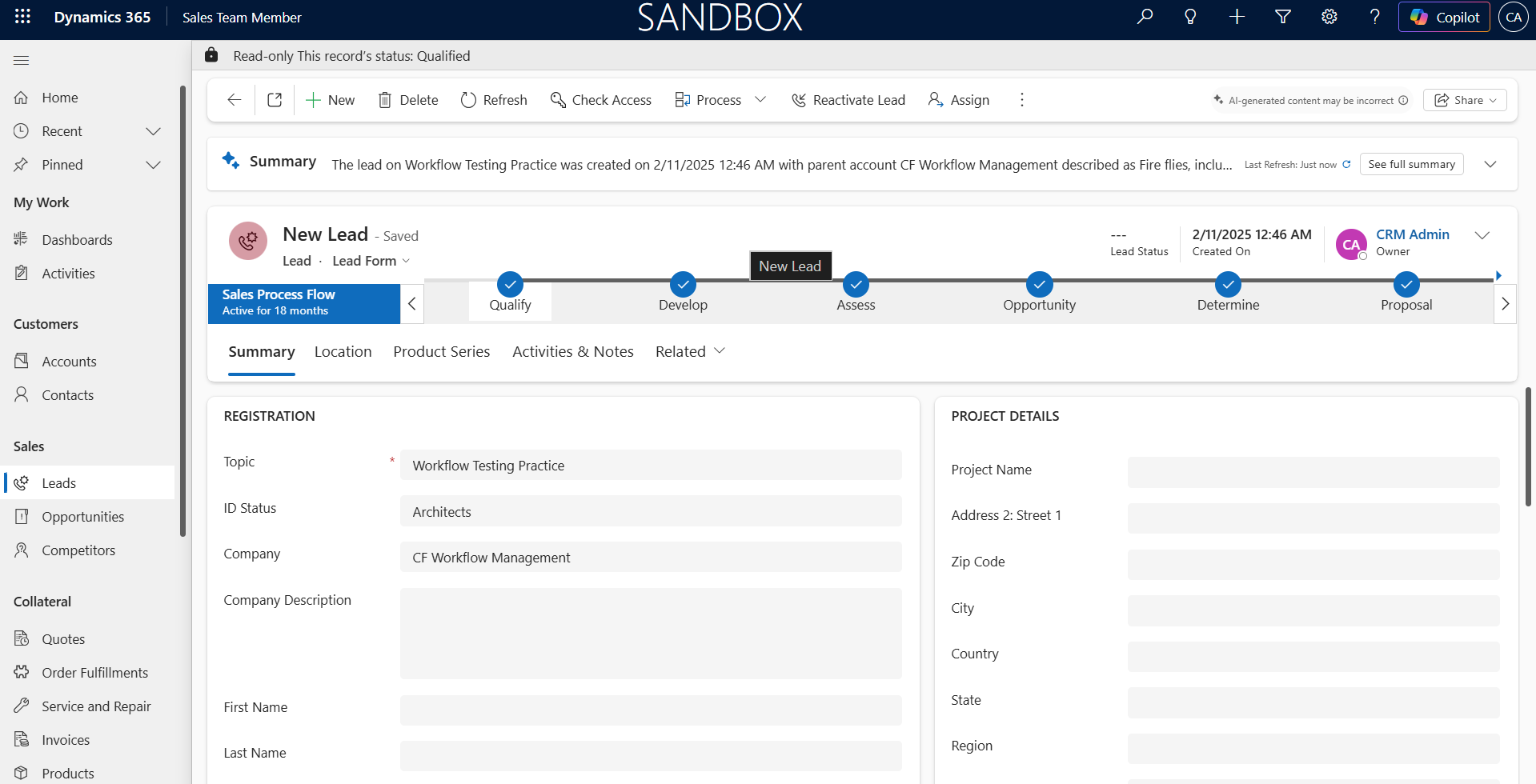
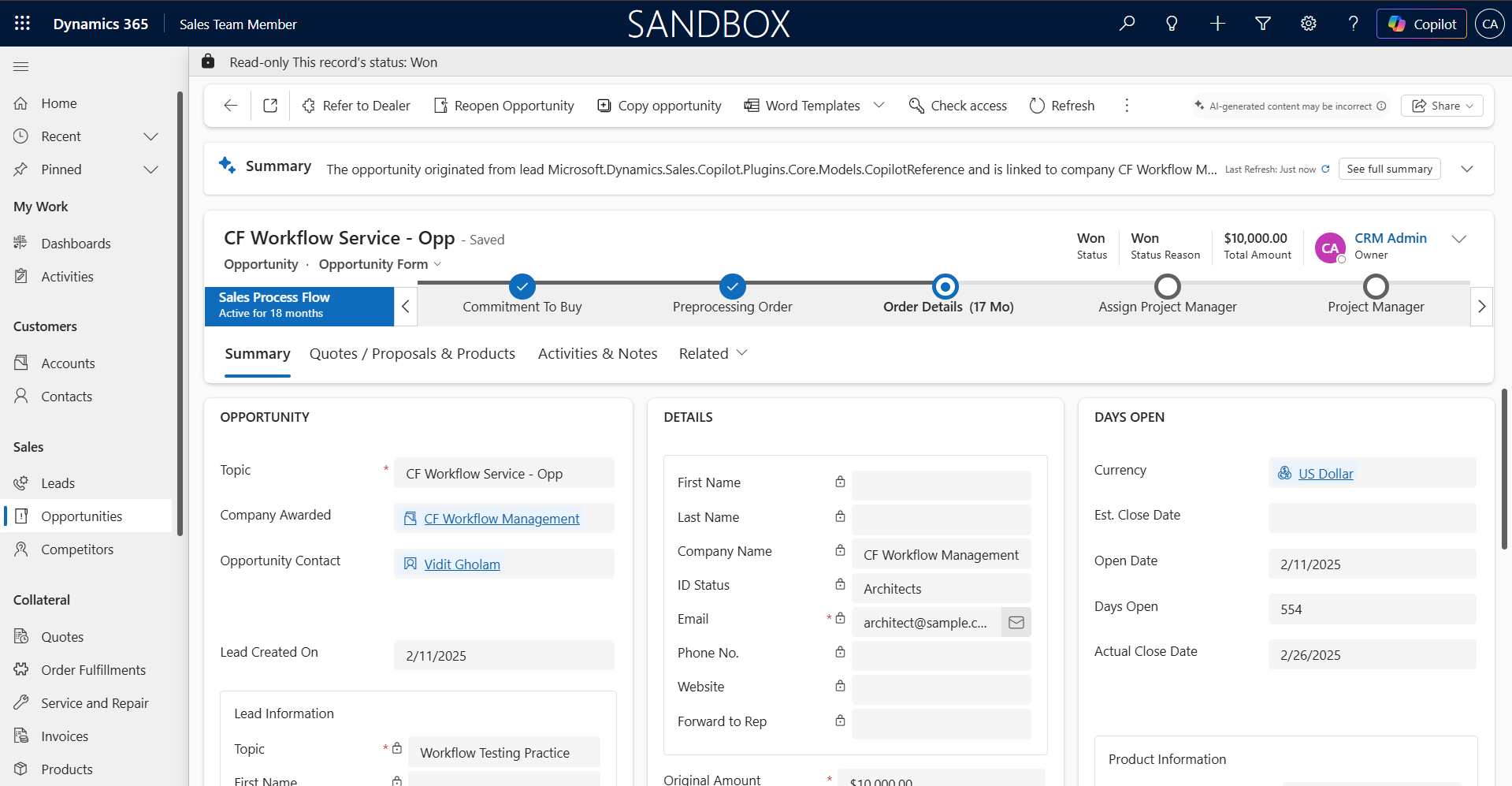
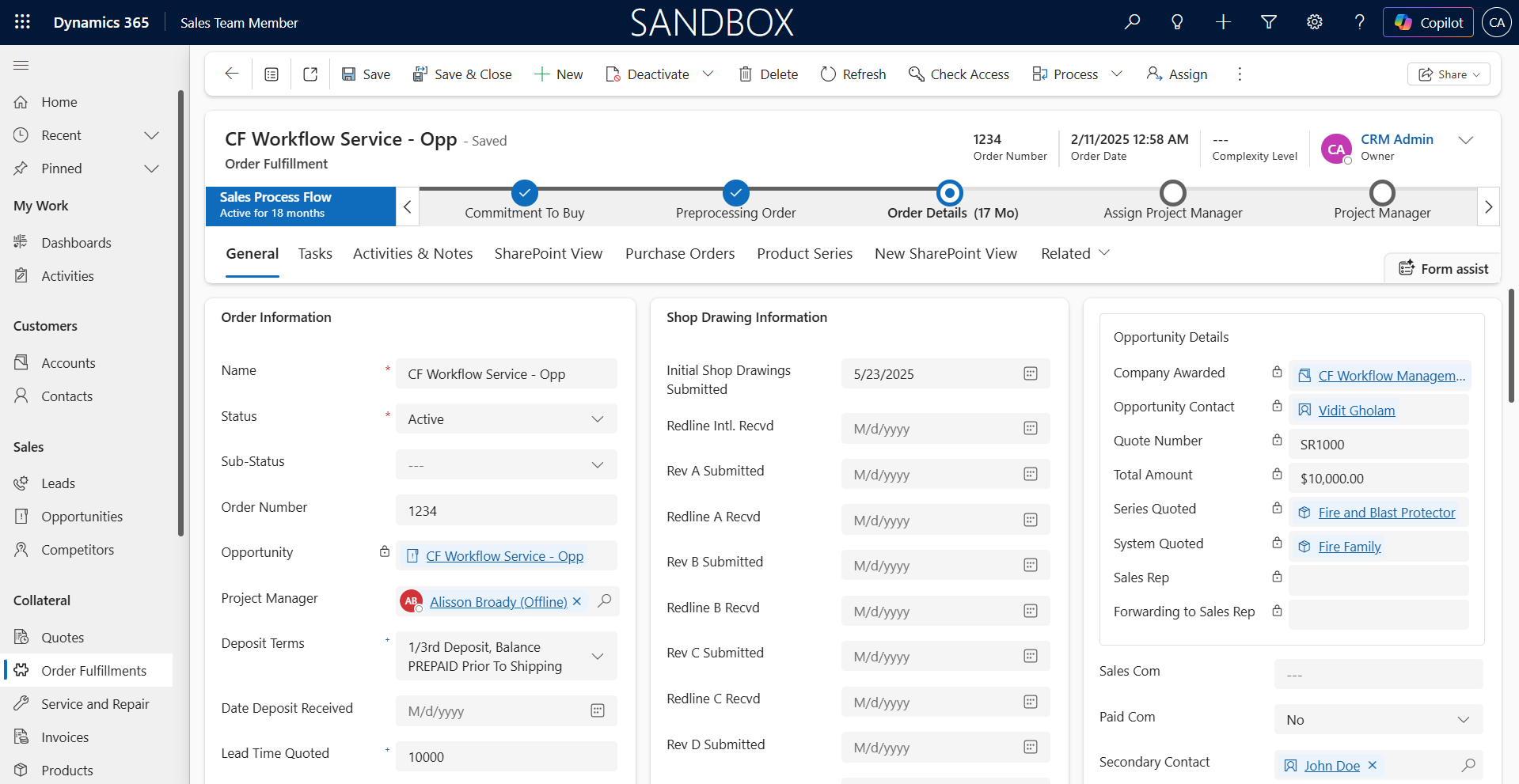
The Order Fulfillment entity is the core of this implementation. Each production stage is tracked with status, ownership, dates, and SLA compliance on the same record.
| Production Stage | Owner | Key Fields | Stage Gate |
|---|---|---|---|
| Engineering Review | Engineering Lead | Drawing status, structural calculations, glazing specification sign-off, revision count | Engineering sign-off date must be populated before Fabrication can begin |
| Fabrication | Shop Floor Manager | Fabrication start date, estimated completion, material availability status, unit progress (e.g., 12 of 30 units complete) | All units must be marked fabrication-complete before Finishing can begin |
| Finishing | Finishing Lead | Powder coat color, hardware fitting status, custom finish notes | Finishing completion date required before Quality Inspection |
| Quality Inspection | QA Lead | Inspection outcome (Pass/Fail/Rework), defect notes, rework count | Inspection outcome must be Pass before Dispatch is allowed |
| Dispatch | Logistics Coordinator | Scheduled dispatch date, carrier details, delivery confirmation, client sign-off | Delivery confirmation closes the Order Fulfillment record |
Production stages tracked on the Order Fulfillment entity
The Production Stage Reference table defines the stage sequence and SLA targets per project type. Residential orders have shorter SLA windows (smaller unit counts, simpler specifications). Commercial orders carry longer windows but tighter accountability at each gate because delays cascade across a larger project. Changing the SLA targets or adding a new stage for a new product type is a reference table update, not a BPF redesign.
BPF Branching by Project Type
The BPF branches at the Opportunity stage based on the project type field inherited from the Lead. Each branch loads different required fields on the Opportunity form and sets different SLA targets on the Order Fulfillment record.
| Project Type | Opportunity Stage Focus | Order Fulfillment SLA Profile |
|---|---|---|
| Residential | Design preferences, homeowner timeline, planning permission status, estimated 1 to 20 units | Shorter production SLAs: Engineering Review 5 days, Fabrication 10 days, Finishing 5 days, QA 2 days, Dispatch 3 days |
| Commercial | Structural requirements, facade specifications, contractor coordination, phased delivery schedule, estimated 20 to 500+ units | Longer production SLAs with milestone tracking: Engineering Review 15 days, Fabrication 30 to 60 days (phased), Finishing 15 days, QA 5 days, Dispatch per phase |
BPF branching by project type
Automation Layer
Order Fulfillment Record Creation (Power Automate)
When an Opportunity’s status changes to Won, a Power Automate flow creates the Order Fulfillment record automatically. The flow copies the product mix, unit count, project type, and client details from the Opportunity. It sets the production stage to Engineering Review, assigns the engineering lead based on project type, and populates SLA target dates from the Production Stage Reference table. The sales rep does not create this record manually. The transition is handled by the flow, and the BPF advances to Stage 3.
SLA Monitoring and Alerts (Power Automate)
A scheduled flow runs daily and compares each active Order Fulfillment record’s current stage dates against the SLA targets. When an order is within 24 hours of breaching its SLA for the current production stage, the flow sends an alert to the stage owner and the operations manager. When an SLA is breached, a second alert escalates to the production director with the order details, client name, and number of days overdue.
A separate flow sends a weekly production summary to the sales team: orders in each production stage, orders on track, orders at risk of SLA breach, and orders dispatched that week. This is the report that replaced the phone calls to the shop floor.
Client Status Notifications (Power Automate)
When an Order Fulfillment record’s production stage changes (for example, from Fabrication to Finishing), a flow sends an automated status update to the client via email. The email includes the current stage, the expected next milestone, and the estimated dispatch date. For commercial projects with phased deliveries, the notification includes the specific phase and unit range. This replaced the manual client update process where sales reps compiled status from the spreadsheet and drafted individual emails.
Security Model
The multi-entity model gives each team access to the data they need without exposing what they do not.
- 🔒Shop Floor AccessProduction staff own and edit Order Fulfillment records for their assigned stage. They see production data (fabrication progress, finishing status, QA results) but not the deal value, margin, or commercial terms on the Opportunity.
- 🔑Sales Rep VisibilitySales reps see Order Fulfillment records in read-only mode. They can check production status and relay it to clients, but cannot modify stage dates or inspection outcomes.
- 🛡️Column-Level Security on FinancialsEstimated project value, margin targets, and pricing details on the Opportunity use column-level security. Production staff and logistics coordinators cannot see these fields.
Reporting Architecture
With lead source data on the Lead, commercial data on the Opportunity, and production data on Order Fulfillment, Power BI joins all three entities through their lookups. The data model produces reports that were impossible when production lived in a spreadsheet.
| Report | Joins | What It Answers |
|---|---|---|
| Full Lifecycle Funnel | Lead → Opportunity → Order Fulfillment | What is the total cycle time from first inquiry to delivery, broken down by project type and referral source? |
| Production Pipeline | Order Fulfillment (stage, dates, SLA) | How many orders are in each production stage right now? Which orders are at risk of SLA breach? Where are the bottlenecks? |
| SLA Compliance by Stage | Order Fulfillment → Production Stage Reference | Which production stage breaches its SLA most often? Is Engineering Review the bottleneck for commercial projects? Is Finishing the bottleneck for residential? |
| Source-to-Delivery Conversion | Lead → Opportunity → Order Fulfillment (dispatch date) | Which referral sources (architect referrals, trade shows, website) produce orders that actually ship and get delivered, beyond the ones that only close? |
Core reports enabled by the three-entity data model
Before this implementation, the operations team maintained a production spreadsheet with manual date entries and conditional formatting as the only visual indicator of order status. Reporting required exporting the spreadsheet, cleaning the data, and cross-referencing it with CRM exports. That process took several hours each week and produced a snapshot that was outdated by the time it reached management.
05Business Impact
- < 15Custom fields on the Lead entity, down from 40+
- 5Production stages tracked per order with individual SLA targets
- 3Entities in a single BPF: Lead, Opportunity, Order Fulfillment
- 0Phone calls to the shop floor needed for a client status update
- Sales sees production status without leaving the CRM. The Order Fulfillment record is linked to the Opportunity. A sales rep checking on a client’s order sees the current production stage, the SLA status, and the expected dispatch date on the same screen where they manage the relationship.
- Clients receive automated status updates. When an order moves from Fabrication to Finishing, the client gets an email with the current stage and estimated dispatch date. For a business built on bespoke products and direct reputational commitment, this replaced a manual process that often lagged by days.
- Operations identifies bottlenecks in real time. The production pipeline report shows how many orders sit in each stage, which are approaching SLA breach, and which have already breached. Before this implementation, that information lived in a spreadsheet that was updated once a day at best.
- The BPF enforces production discipline. Stage gates prevent an order from advancing to Fabrication before Engineering Review is signed off. Quality Inspection must pass before Dispatch is allowed. These gates existed as informal rules before. Now the system enforces them.
- Full lifecycle reporting connects marketing spend to delivered product. Management can trace a referral source through lead capture, deal close, production, and delivery. The question "Which sources produce orders that actually ship?" now has a data-backed answer.
06Conclusion
For a manufacturer where every product is engineered to specification, the sales process does not end when the deal closes. It ends when the product is delivered, inspected, and accepted. The multi-entity BPF CloudFronts built for this client extends D365 Sales from a pipeline management tool into a full lifecycle system that connects first inquiry to dispatch in a single process flow.
The framework was designed and configured within a single sprint. The long-term return shows up every time a sales rep answers a client’s status question in seconds instead of hours, every time the operations manager catches an SLA breach before it becomes a missed delivery, and every time management pulls a source-to-delivery report that no spreadsheet could produce.
07Connect With Us
If your D365 Sales BPF ends at the Opportunity and your production tracking lives in spreadsheets, reach out to CloudFronts for a solution architecture review. We have designed multi-entity BPFs for manufacturers and can help you build one that tracks every order from first inquiry to delivery.
Author Profile

Shruti Gupta
Senior Consultant · CloudFronts
I am a Senior Consultant at CloudFronts with 5+ years of experience in Azure integrations and Dynamics 365 implementations. She specializes in building seamless, API-driven architectures and connecting enterprise systems across the Microsoft ecosystem. Passionate about solving complex integration challenges, she focuses on delivering scalable, production-ready solutions that drive real business outcomes.