How an Abu Dhabi-Based Diversified Holding Company Simplified Master Data Maintenance in Dynamics 365 Business Central Using Excel
Summary
This solution is being implemented initially for the Chart of Accounts of an Emirates-based firm , where significant updates are required across the existing G/L Account master. The objective is to provide Finance users with a simpler and more familiar way to review and maintain supported records through Excel, reducing the dependency on technical users for routine maintenance activities. Although the current implementation focuses on the Chart of Accounts, the approach is not limited to G/L Accounts and can be extended to other supported master data, such as Customers, Vendors, Items, and similar records. By providing an Excel-based alternative for suitable maintenance scenarios, the solution reduces the need to use Configuration Packages for every routine update while allowing technical teams to focus on complex development, integrations, automation, and customization activities.
Table of Contents
Introduction
The Chart of Accounts is one of the core components of financial management in Microsoft Dynamics 365 Business Central. As part of the current implementation for an Emirates-based firm, significant updates are required to the existing Chart of Accounts to align the financial structure with the organization’s evolving reporting, accounting, and operational requirements.
Since the required changes involve a large number of G/L Accounts, updating each account individually within Business Central would be repetitive and time-consuming. The volume of changes creates a requirement for a more efficient approach that allows multiple existing records to be reviewed and updated in a structured manner.
Traditionally, Configuration Packages can be used to perform bulk data updates in Business Central. While this provides a powerful mechanism for data migration and bulk maintenance, routine updates may still require technical involvement and additional configuration steps. For the current Chart of Accounts requirement, the objective is to provide Finance users with a simpler and more familiar method for making supported bulk changes.
The Key Question:
Can Finance users efficiently review and update a large number of G/L Accounts through a familiar Excel-based interface, while reducing the need for technical assistance for routine bulk maintenance activities?
To address this requirement, the proposed approach uses the Microsoft Dynamics 365 Business Central Excel integration for supported bulk maintenance activities. Although the initial implementation is focused on the Chart of Accounts due to the significant updates required for the Emirates-based firm, the same approach can also be applied to other supported master data, such as Customers, Vendors, Items, and other relevant records, where similar bulk maintenance requirements arise.
Understanding the Business Requirement
During the implementation, the consultant was faced with a practical challenge: the Finance team needed to make a significant number of changes to the existing Chart of Accounts, but updating each G/L Account individually in Business Central would require considerable manual effort. The consultant also needed a solution that Finance users could work with directly, without having to depend on the technical team for every routine change.
The Excel integration provided a way to address this issue by allowing the consultant to work with the relevant G/L Account data in a familiar spreadsheet environment. Instead of opening and modifying accounts one by one, the required records could be brought into Excel, reviewed together, and the necessary values could be prepared or updated in bulk. This made the large-scale Chart of Accounts maintenance activity more manageable and significantly reduced repetitive manual work.
How the Requirement Was Resolved:
The consultant can use the Business Central Excel integration to provide Finance users with a structured way to work with supported G/L Account data in bulk. This allows multiple records to be reviewed and updated through Excel rather than requiring individual changes within Business Central for every account.
This approach also addressed the dependency between the Finance and technical teams. Finance users can handle suitable routine master-data maintenance themselves, while the technical team remains available for activities that genuinely require technical expertise, such as complex customizations, integrations, automation, troubleshooting, and development.
Although the immediate problem was related to the Chart of Accounts, the solution is not limited to G/L Accounts. The same concept can be applied wherever Business Central supports the relevant Excel-based maintenance capability, including other master data such as Customers, Vendors, Items, and similar records. This makes the approach useful beyond the immediate implementation and provides a repeatable method for handling future bulk maintenance requirements.
The Traditional Approach
Before considering the Excel-based approach, the consultant could use Configuration Packages to perform bulk updates to the Chart of Accounts. Configuration Packages are a standard and powerful Business Central capability for importing, exporting, and managing data across Business Central tables and remain particularly useful for data migration, initial configuration, and structured data-import scenarios.
However, for the current requirement, the Finance team needed to make a significant number of changes to existing G/L Accounts. Using a Configuration Package for every such change could require additional preparation and involvement from a technical or experienced Business Central user. This created an additional dependency for what was essentially a routine master-data maintenance activity.
The consultant therefore had to consider not only how the data could be updated in bulk, but also how the process could be made easier for the Finance team while maintaining appropriate control over the data.
Finance Identifies Changes
→
Prepare Update Data
→
Technical Assistance
→
Configure Package
→
Import & Validate
→
Finance Verification
This approach works well when there is a genuine requirement for structured data migration or when multiple related tables and fields need to be handled together. However, for repetitive updates to existing master records, it can result in additional steps that are not always necessary for the Finance user’s immediate requirement.
The objective, therefore, was not to replace Configuration Packages altogether. Instead, the consultant identified an opportunity to use the Business Central Excel integration for suitable routine bulk-maintenance activities. This provides a simpler working method for the current Chart of Accounts updates while allowing Configuration Packages to remain available for scenarios where their broader data-management capabilities are required.
The Business Problem
When Finance users need to perform recurring or one-time bulk updates to the Chart of Accounts, involving a technical resource for every update can create additional coordination between Finance and technical teams.
The challenges associated with a technical bulk-update process can include:
- Dependence on technical users for routine bulk updates.
- Additional steps for preparing and managing Configuration Packages.
- Increased coordination between Finance and technical teams.
- Additional effort for relatively straightforward data-maintenance activities.
- Reduced direct ownership of routine master-data maintenance by functional users.
From the Finance team’s perspective, the business requirement is often already understood. The additional effort comes primarily from the technical mechanism required to apply the changes.
The Objective:
Move suitable bulk-update activities closer to the functional user while retaining Business Central’s security, validation, permissions, and data controls.
The Excel-Based Solution
Business Central provides Excel integration that allows users to work with supported Business Central data through a familiar Excel environment.
For the Chart of Accounts requirement, this provides an opportunity to simplify suitable bulk-maintenance activities for Finance users. Instead of manually updating a large number of G/L Accounts one by one, the consultant can provide a more practical process for reviewing and maintaining the required records.
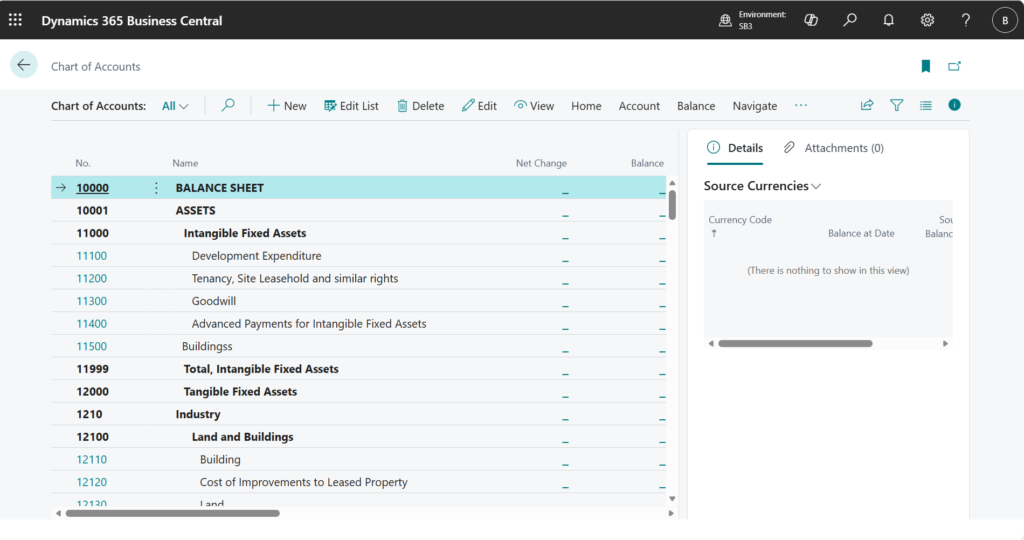
Figure 1: Business Central Chart of Accounts used as the starting point for the bulk-maintenance activity.
Business Central
→
Open in Excel
→
Review Data
→
Update Supported Fields
→
Publish
→
Verify
The key change is the user experience. Instead of depending on a technical user to prepare a Configuration Package for every suitable bulk update, authorized Finance users can work with supported information through a familiar spreadsheet interface.
This shifts the focus from a purely technical data-import activity toward a functional data-maintenance process.
Using Excel Integration
The process begins from the relevant Business Central page. For the Chart of Accounts requirement, the Finance user works with the G/L Account records that need to be reviewed or updated.
From the relevant Business Central page, the user can access the available Excel integration option and open the supported data in Excel.
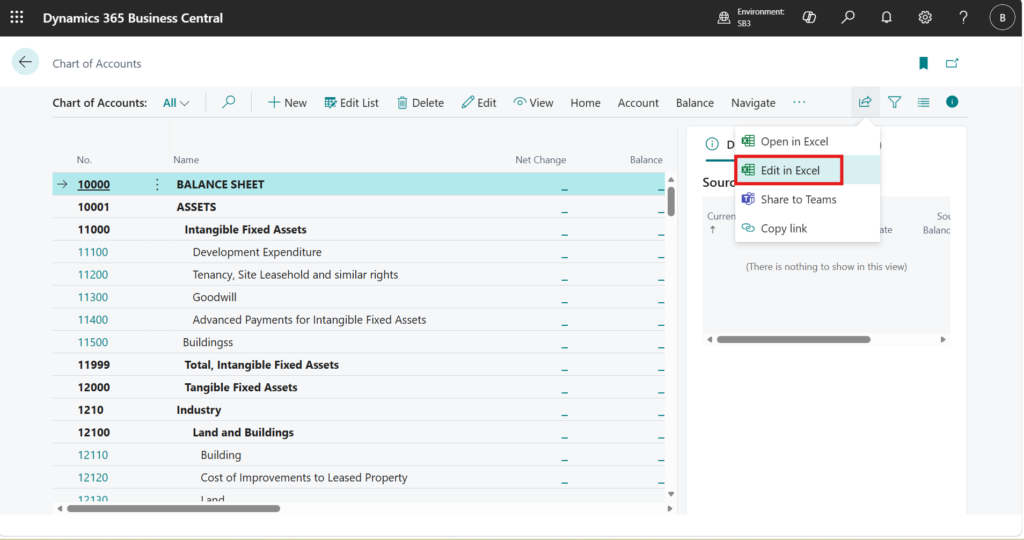
Figure 2: Accessing the Excel integration from the relevant Business Central page.
The available Excel integration provides a familiar spreadsheet environment for working with supported Business Central data.
Important:
The Excel-based approach is intended for supported scenarios. The fields available for editing depend on the Business Central page, the Excel integration scenario, permissions, and the underlying Business Central business logic.
Selecting the Required G/L Accounts
Before opening the data in Excel, the Finance user can identify the relevant G/L Accounts that require attention.
Business Central filters can be used to narrow down the records and focus on the accounts relevant to the business requirement. This is particularly useful when the Chart of Accounts contains a large number of G/L Accounts.
This allows the user to work with a targeted set of records rather than manually navigating through individual G/L Accounts.
Reviewing Existing Data
Once the supported data is opened in Excel, the Finance user can review the existing values before making any changes. The Microsoft Dynamics 365 Business Central connector in Excel provides the connection between Excel and Business Central, allowing users to work with supported Business Central data directly from the spreadsheet environment.
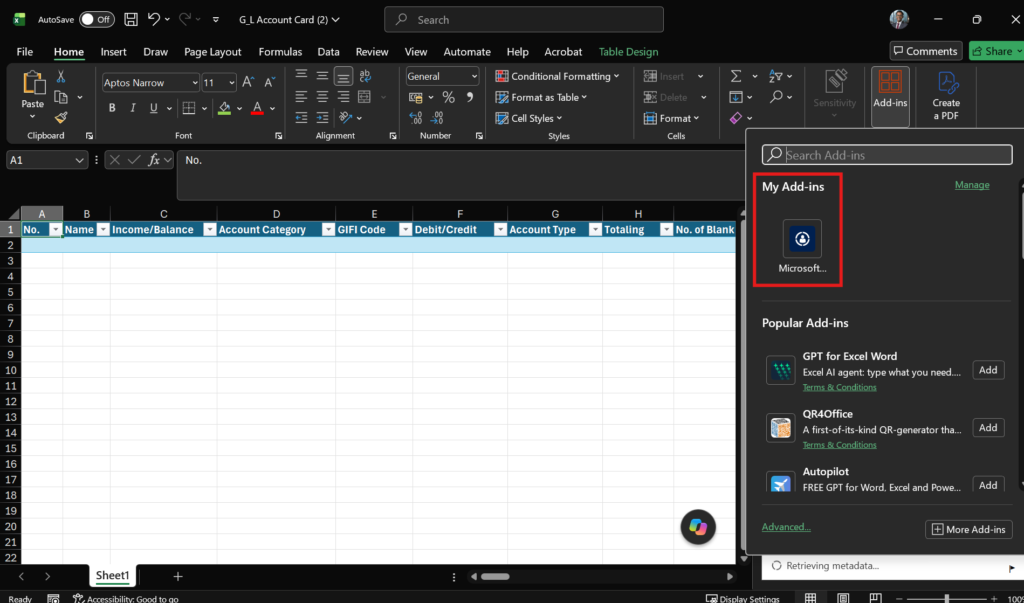
Figure 3: Microsoft Dynamics 365 Business Central connector used to connect Excel with Business Central data.
After establishing the connection, the user can use the Edit in Excel functionality to work with the relevant Business Central records. This allows the Finance user to bring the required G/L Account information into Excel and work with multiple records in a familiar spreadsheet environment.
Once the records are available in Excel, the Finance user can review the existing values, compare multiple G/L Accounts, and identify the records requiring modification. This is particularly useful when a large number of accounts need to be reviewed as part of the Chart of Accounts update.
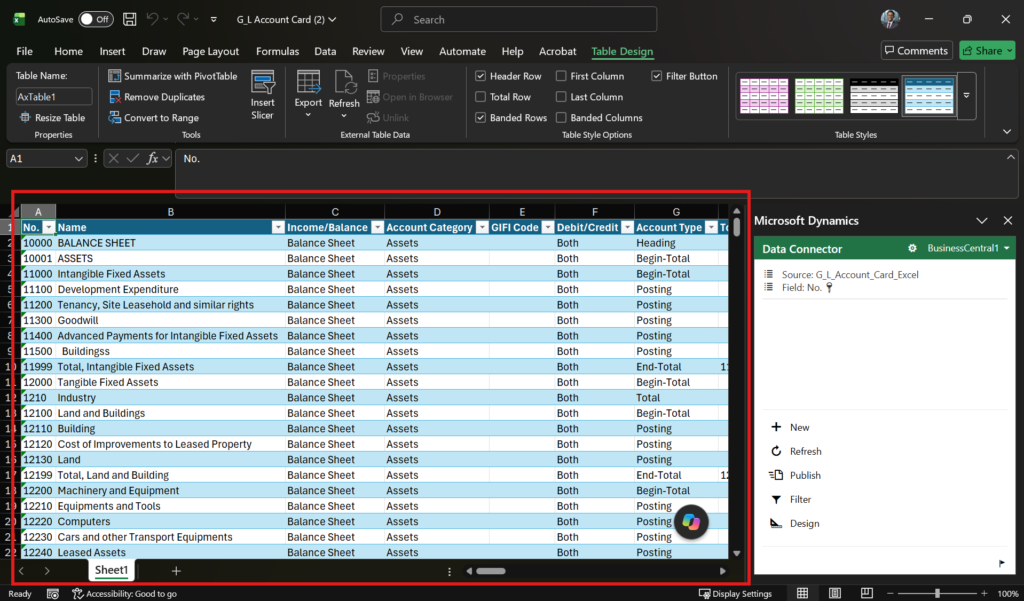
Figure 4: G/L Account data displayed in Excel for review and preparation of the required changes.
Reviewing the existing information before making updates also helps users identify incorrect or inconsistent values and prepare the required changes before publishing them back to Business Central.
Key Point:
The combination of the Business Central Excel connector and the Edit in Excel functionality provides Finance users with a familiar spreadsheet-based interface for supported bulk-maintenance activities, while Business Central remains the underlying system for the business data.
Updating Supported Fields
The Finance user can update the supported fields directly within the Excel environment. Multiple records can be reviewed together, allowing the required values to be updated in a structured manner.
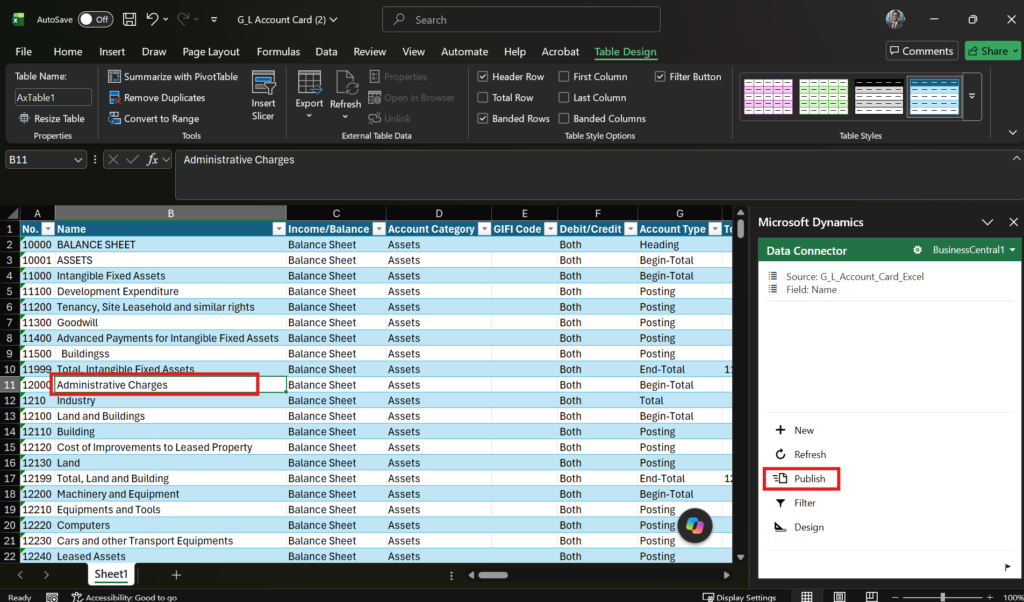
Figure 5: Updating the required supported G/L Account fields in Excel.
Instead of opening and modifying each G/L Account individually, multiple records can be reviewed together, making suitable bulk-maintenance activities more practical.
Functional Advantage:
The Finance user can work with multiple records in a familiar spreadsheet environment while Business Central remains the underlying business system.
Publishing Changes
After reviewing the updated information, supported changes can be published back to Business Central through the Excel integration.
The process does not replace Business Central with Excel. Excel provides the user interface for the supported activity, while Business Central remains responsible for the underlying business data and applicable validation.
Key Principle:
The objective is not to bypass Business Central validation. The objective is to provide a simpler and more familiar interface for suitable bulk-maintenance activities.
Verifying the Changes
Once the update has been completed, the Finance user can return to Business Central and verify the updated G/L Accounts.
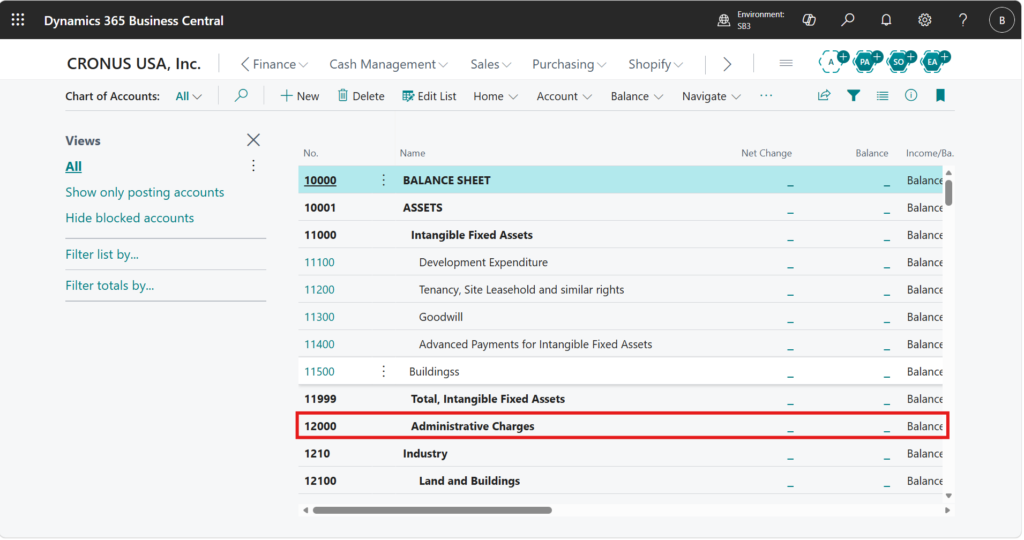
Figure 6: Verifying the updated G/L Account records in Business Central after publishing the changes.
This final verification step helps confirm that the intended records were updated correctly and that the business data reflects the required changes.
Select G/L Accounts
→
Open in Excel
→
Review
→
Update
→
Publish
→
Verify
Implementation Approach
From a Business Central implementation perspective, the focus is on creating a practical Excel-based workflow while retaining the standard Business Central data structure, permissions, and validation.
1. Identify the Business Requirement
The first step is to determine which Chart of Accounts fields need to be maintained in bulk and whether those fields are supported by the selected Excel scenario.
2. Use the Appropriate Business Central Page
The process should begin from the relevant Business Central page so that users are working with the appropriate records and filters.
3. Enable the Excel-Based User Experience
The applicable Business Central Excel integration is used to provide Finance users with access to the supported data in Excel.
4. Maintain Security and Permissions
Users should only be able to perform updates for which they have the required Business Central permissions.
5. Validate the Business Process
The Excel-based process should be tested with representative Chart of Accounts data before being adopted for production use.
Key Implementation Principle:
The objective is not to bypass Business Central. The objective is to provide a simpler user experience while keeping Business Central as the system that manages the underlying business data and applicable validation.
Moving Bulk Maintenance Toward Functional Users
The main value of this approach is not Excel itself. The larger benefit is the ability to move suitable routine data-maintenance activities closer to the functional team.
Finance users understand the business requirement and the financial data that needs to be changed. Providing a familiar interface can therefore reduce the need to translate every routine requirement into a technical data-import activity.
| Traditional Approach | Excel-Based Approach |
|---|---|
| Finance user identifies the required changes. | Finance user identifies the required changes. |
| Technical resource may prepare the Configuration Package. | User works with supported data through Excel. |
| Technical resource supports the import process. | User can publish supported changes. |
| Finance user validates the result. | Finance user validates the result. |
This approach does not eliminate the technical team’s role. Instead, it allows technical resources to focus on activities where technical expertise is actually required.
Business Impact
The Excel-based approach provides Finance users with a more familiar way to manage suitable bulk Chart of Accounts updates and can reduce unnecessary technical involvement in routine data-maintenance activities.
Key Benefits
- Reduced Technical Dependency: Suitable routine bulk updates can be handled closer to the functional team.
- Familiar User Experience: Finance users can work with data using an environment they already understand.
- Improved Efficiency: Multiple records can be reviewed and maintained together instead of relying entirely on individual record updates.
- Reduced Configuration Package Dependency: Suitable routine updates do not necessarily need to follow a technical Configuration Package process.
- Functional Ownership: Finance users can take greater ownership of routine master-data maintenance.
- Better Use of Technical Resources: Consultants and developers can focus on complex requirements, integrations, automation, and customizations.
Important Considerations
The Excel-based approach should not be considered a complete replacement for Configuration Packages.
Configuration Packages continue to have an important role in scenarios such as structured data migration, initial setup, and situations involving multiple related tables or more complex import requirements.
The appropriate approach should therefore be selected based on the nature of the requirement.
| Requirement | Potentially Suitable Approach |
|---|---|
| Routine bulk maintenance by Finance users | Excel integration, where supported |
| Large structured data migration | Configuration Packages or another appropriate migration approach |
| Complex data transformations | Technical or integration-based solution |
| Multiple related tables | Evaluate the appropriate Business Central data-import approach |
Important:
Not every Chart of Accounts field or Business Central data-maintenance scenario should automatically be handled through Excel. The available fields and supported operations depend on the specific Business Central page, integration scenario, permissions, and underlying business logic.
Frequently Asked Questions
1. Does Excel integration completely replace Configuration Packages?
No. Configuration Packages remain useful for data migration, initial setup, and other structured import scenarios. Excel integration provides an additional option for suitable routine bulk updates.
2. Why use Excel for Chart of Accounts maintenance?
Excel is already familiar to many Finance users. Using Business Central’s Excel integration can provide a practical way to review and manage supported records in bulk.
3. Does this eliminate the need for technical consultants?
No. The objective is to reduce technical involvement in suitable routine updates, not to eliminate the technical role. Developers and consultants are still required for complex customizations, integrations, automation, troubleshooting, and other technical requirements.
4. Can every Chart of Accounts field be updated through Excel?
Not necessarily. The fields available for editing depend on the Business Central page, the specific Excel integration scenario, permissions, and the underlying business logic.
5. Is the Excel approach only useful for the Chart of Accounts?
No. The same concept can be considered for other supported Business Central data-maintenance scenarios where users need to review or update multiple records.
6. Does Excel bypass Business Central validation?
No. The purpose of the integration is to provide a different user interface for supported activities while Business Central remains the underlying business system.
Conclusion
Bulk Chart of Accounts maintenance does not always need to be treated as a technical data-import exercise. For suitable requirements, Business Central’s Excel integration can provide Finance users with a familiar and practical way to work with their data.
For the Abu Dhabi-based diversified holding company, this approach provides an opportunity to move routine bulk updates closer to the functional user and reduce unnecessary dependency on Configuration Packages and technical resources.
The key is not simply replacing one tool with another. The real improvement is creating a process where the person who understands the financial data can take greater ownership of routine maintenance, while technical teams remain focused on activities that require technical expertise.
Key Takeaway:
Business Central’s Excel integration can help transform suitable bulk data maintenance from a technical activity into a more functional, familiar, and user-friendly process.
Looking to simplify your Business Central data-maintenance processes?
CloudFronts helps organizations extend Microsoft Dynamics 365 Business Central with practical customizations, automation, integrations, and financial process solutions designed around real-world business requirements.
About the Author