Approval workflows in Microsoft Dynamics 365 Business Central provide a structured mechanism for multi-level document approvals. However, the standard approval email often lacks sufficient business context, making it difficult for approvers to take quick and informed decisions.
In this implementation, for a Maldives-based loan and financial services organization, instead of modifying the core approval engine, we enhanced only the notification layer using Business Central’s event-driven architecture. The solution intercepts standard approval notifications and replaces them with a custom HTML email containing payment details and direct navigation links to the Payment Journal.
This approach ensures the standard workflow remains fully intact while significantly improving the approval experience through richer and more actionable communication.
Standard Business Central approval workflow remains unchanged.
Custom HTML email notification introduced via an event-driven extension.
Direct navigation to the Payment Journal enabled from the email.
Microsoft Dynamics 365 Business Central includes a powerful approval workflow engine that automates document approvals, supports multi-level approval chains, and automatically notifies approvers through email.
Although the standard approval process works exceptionally well, the default email notification is intentionally simple. Approvers typically receive limited information and often need to open Business Central to locate the payment journal before they can review or approve the request.
For organizations processing large volumes of financial transactions in a Maldives-based loan and financial services environment, this additional navigation slows down approvals and creates unnecessary effort.
During one of our recent implementations in a Maldives-based lending and financial operations setup, the client wanted to improve the approval experience without changing Microsoft’s standard approval workflow. The objective was to retain every aspect of the existing workflow while enhancing only the email notification layer by introducing a modern, information-rich HTML email format.
2. Business Requirement
The client wanted to achieve the following objectives:
Preserve the standard Microsoft Dynamics 365 Business Central approval workflow.
Keep all approval entries and workflow responses unchanged.
Replace the standard approval email with a professional HTML email.
Display important payment information directly inside the email body.
Allow approvers to open the Payment Journal with a single click.
Improve the overall approval experience without modifying Microsoft’s workflow engine.
The primary goal was to enhance usability while maintaining full compatibility with the standard Business Central approval framework.
3. Solution Overview
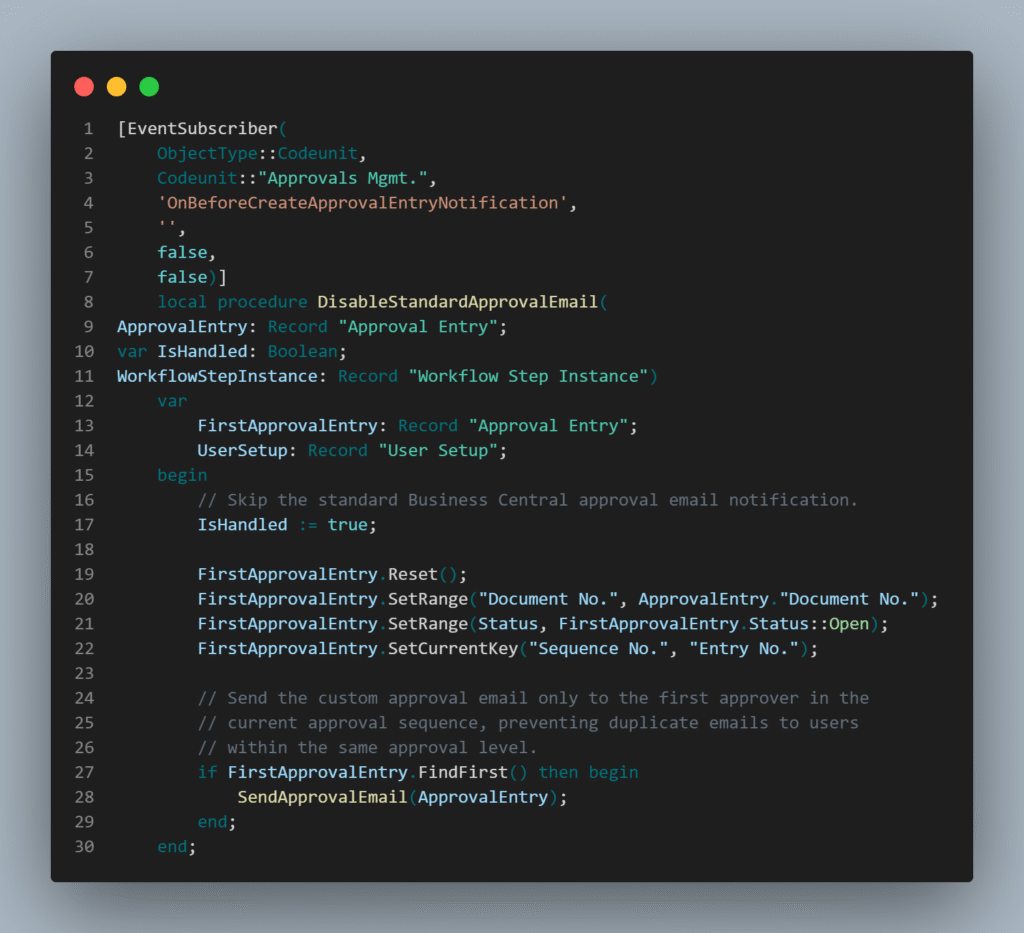
Microsoft Dynamics 365 Business Central provides an event named OnBeforeCreateApprovalEntryNotification, which is triggered immediately before the standard approval notification email is generated.
Instead of modifying the standard approval workflow, the solution subscribes to this event and enhances only the notification layer by replacing the default email with a structured and business-friendly notification.
The solution performs the following actions:
1. Approval Notification Interception: Stops the standard approval email from being sent by subscribing to the standard Business Central event.
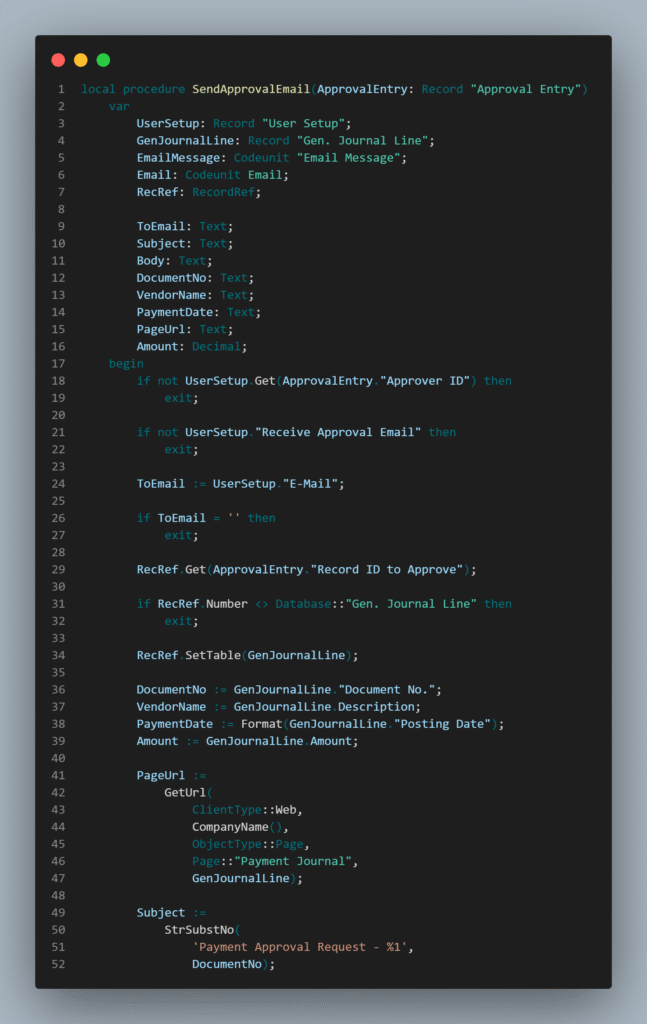
2. Payment Details Retrieval: Retrieves relevant payment information from the approval entry.
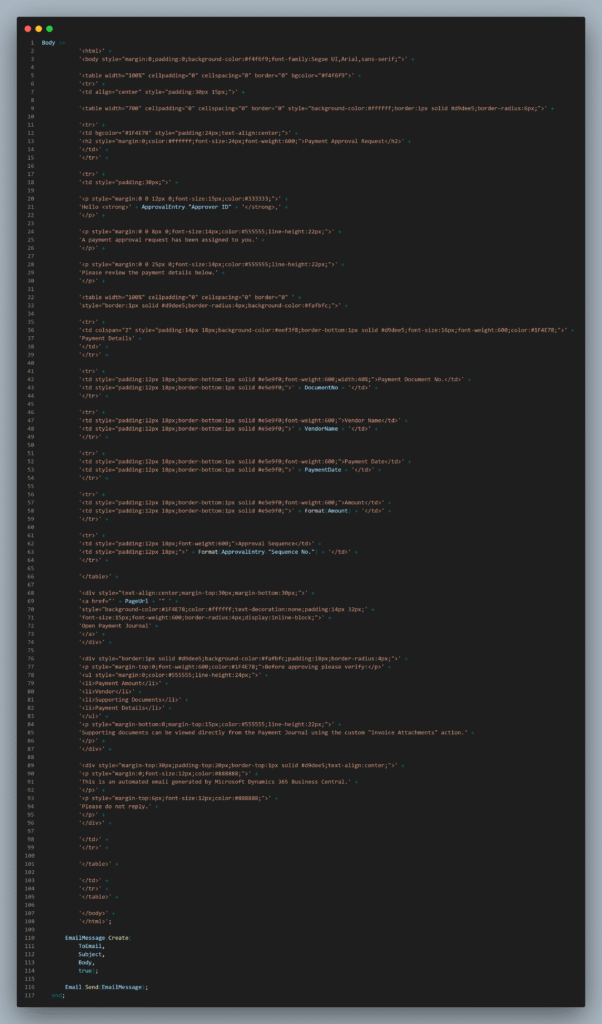
3. Custom HTML Email Generation: Generates a professionally formatted HTML email containing payment details and approval information.
4. Approval Sequence Visibility: Displays approval sequence details to help approvers understand the pending action.
5. Direct Navigation Link: Provides a direct link to open the Payment Journal from the approval email.
6. Standard Email Integration: Sends the customized notification using Business Central’s standard Email functionality.
Since only the notification layer is customized, the approval workflow, approval entries, approval sequences, and workflow responses continue to function exactly as Microsoft designed.
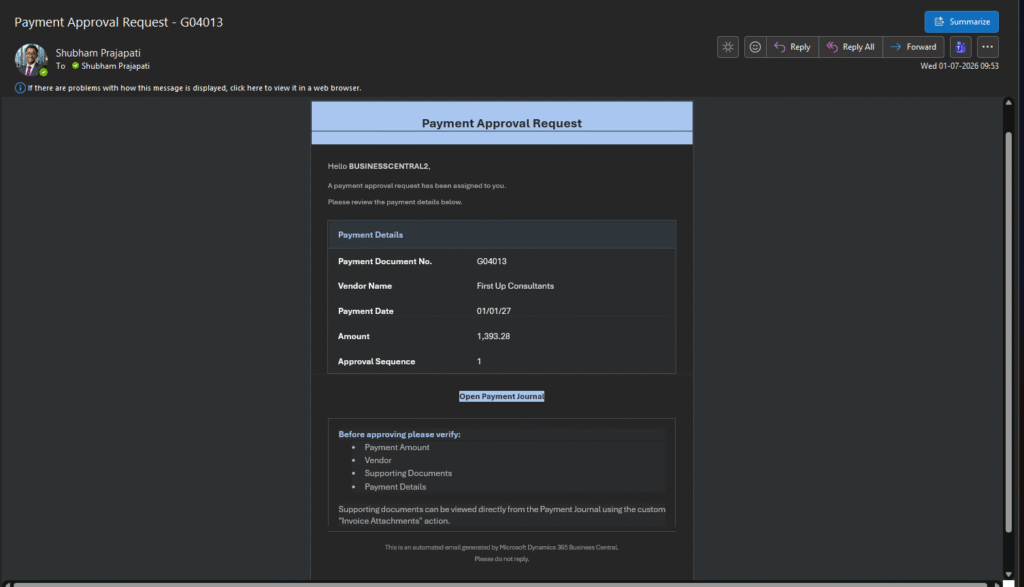
Approval email showing custom HTML layout with payment details and direct navigation link to Payment Journal.
4. Implementation
The entire implementation follows Microsoft’s recommended event-driven development approach, making the solution fully upgrade-safe.
The customization uses the standard OnBeforeCreateApprovalEntryNotification event to intercept the approval notification before Business Central sends the default email.
Once the event is triggered, the solution performs the following steps:
Approval Email Interception: The standard approval email notification is suppressed to prevent the default email from being sent.
Approval Data Retrieval: Payment Journal details are retrieved from the Approval Entry record.
HTML Email Generation: A responsive HTML email is generated containing key payment information.
Payment Information Display: The email includes the following details:
Payment Document Number
Vendor Name
Posting Date
Payment Amount
Approval Sequence
Payment Journal Navigation: A direct Open Payment Journal button is included using Business Central’s standard URL generation.
Approval Validation Support: A payment verification checklist is displayed to help approvers validate important information before approving the payment.
Invoice Attachment Access: A custom Invoice Attachments action is added to the Payment Journal, allowing approvers to review supporting invoice documents directly within Business Central.
The result is a modern approval experience while keeping the standard workflow logic, approval entries, and business processes completely untouched.
AL Event Subscriber code for OnBeforeCreateApprovalEntryNotification + custom HTML email generation logic will be inserted here.
5. Preview Video
The preview video section has been removed as per updated requirement.
6. Business Impact
Implementing customized approval email notifications delivered several operational benefits while keeping Microsoft’s standard workflow engine fully intact.
Improved User Experience
Approvers receive all important payment information directly within the email, reducing the need to navigate through Business Central before reviewing requests.
Faster Approval Decisions
Direct navigation to the Payment Journal enables approvers to review and process approvals much more quickly.
Better Visibility
Payment amount, vendor information, posting date, and approval sequence are immediately visible, making approvals easier and reducing the chance of overlooking important details.
Easier Document Verification
Supporting invoice attachments can be reviewed directly from the Payment Journal before approving payments.
Upgrade-Friendly Solution
Because the implementation relies entirely on standard Microsoft Dynamics 365 Business Central events, no modifications are made to the core approval engine, ensuring future upgrades remain smooth and low-risk.
7. Conclusion
Microsoft Dynamics 365 Business Central’s event-driven extensibility model allows developers to significantly enhance the user experience without modifying standard application logic.
By leveraging the OnBeforeCreateApprovalEntryNotification event, we replaced the default approval email with a professional HTML notification while preserving the complete standard approval workflow.
Approvers now receive richer payment information, can navigate directly to the Payment Journal, and have quick access to supporting documents—all without altering Microsoft’s workflow engine.
This implementation demonstrates how targeted customizations can greatly improve productivity and usability while remaining fully aligned with Microsoft’s recommended extension development practices.
Ready to modernize your Business Central approval experience?
Standard approval emails often lack context, forcing approvers to open Business Central repeatedly just to review basic payment details. With event-driven customization, you can transform these notifications into rich, structured HTML emails that improve decision-making speed and user experience.
CloudFronts helps organizations extend Microsoft Dynamics 365 Business Central with smart, upgrade-safe customizations, workflow enhancements, and finance automation solutions.
For more information, reach out at transform@cloudfronts.com.