Enhancing General Ledger Visibility with Purchase Invoice Details in Dynamics 365 Business Central for a Maldives Financial Institution and an Abu Dhabi-Based Diversified Holding Company
Summary
In Business Central, users may need to view relevant purchase invoice details directly from General Ledger Entries for better transaction visibility and traceability. This enhancement was implemented based on requirements identified across multiple Business Central implementations, including projects for a leading UAE-based consortium and a financial institution in the Maldives.
The solution enables purchase invoice details to be automatically captured against relevant General Ledger Entries for new transactions, while also providing an option to update previously posted entries. This helps finance users quickly identify the related invoice information without having to navigate through multiple pages or documents.
Related Case Studies:
Table of Contents
- Introduction
- Understanding the Business Requirement
- The Challenge with Standard G/L Entry Descriptions
- Displaying vs. Storing the Description
- Designing the Solution
- Updating Historical G/L Entries
- Maintaining the Description for New Entries
- Implementation Approach
- Business Impact
- Frequently Asked Questions
- Conclusion
Introduction
In day-to-day financial operations, users often need to trace General Ledger Entries back to the original purchase transactions for verification, reconciliation, and reporting purposes. However, the standard General Ledger view may not always provide enough contextual information to quickly identify the details of the related purchase invoice.
Based on requirements identified across multiple Business Central implementations, including projects for a leading UAE-based consortium and a financial institution operating in the Maldives, an enhancement was introduced to make relevant purchase invoice details available directly within General Ledger Entries.
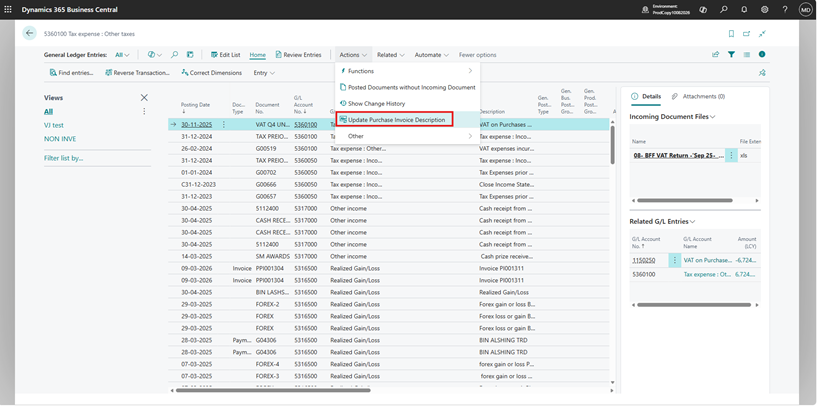
The enhancement improves transaction visibility by capturing the relevant purchase invoice description against the General Ledger Entry. For newly posted transactions, the information can be populated automatically, while previously posted entries can be updated through a dedicated action.
This approach reduces the need for users to navigate between General Ledger Entries and posted purchase invoices, making financial review and transaction tracing more convenient and efficient.
Understanding the Business Requirement
From a Finance user’s perspective, the requirement was straightforward:
When a user reviews a G/L Entry, the Description should provide meaningful information about the transaction.
The requirement needed to work for both existing historical entries and transactions posted after the customization was introduced.
1. Historical G/L Entries
Business Central may already contain a significant number of posted G/L Entries. These historical records also needed to have the enhanced description populated.
Updating these entries individually would not be practical. Therefore, the solution needed to provide a controlled way to update existing G/L Entries in bulk.
2. New G/L Entries
For future transactions, the description should be populated automatically during the posting process so that users do not have to manually update the G/L Entry after posting.
This resulted in two key requirements:
- Provide a mechanism to populate descriptions for historical G/L Entries.
- Automatically maintain the description for newly created G/L Entries.
The Challenge with Standard G/L Entry Descriptions
The first question during the design was whether the required description could simply be calculated when the G/L Entry page was opened.
At the page level, a value can be calculated dynamically based on related information. This approach can be useful when the requirement is simply to display additional information to the user.
However, there is an important distinction between displaying a calculated value and storing that value in the underlying G/L Entry record.
A page-level calculated value does not automatically become part of the underlying G/L Entry data.
Therefore, although a user may see the expected description on the page, the value may not be available in the same way for other processes that directly consume the G/L Entry data.
Key Design Consideration
The requirement was not only to display a meaningful description. The description needed to be persisted against the G/L Entry record.
Displaying vs. Storing the Description
This distinction became an important part of the solution design.
1. Page-Level Calculation
A page-level calculation is useful when the requirement is simply:
“Show this information to the user.”
The value can be generated when the page is opened without modifying the underlying G/L Entry record.
2. Persisted G/L Entry Description
For this requirement, the description needed to become part of the actual G/L Entry data. The solution therefore stores the generated description directly against the G/L Entry.
G/L Entry
→
Determine Transaction Information
→
Generate Description
→
Store in G/L Entry
This approach ensures that the description remains available after the page is closed and can be consumed by other Business Central processes that use the G/L Entry record.
Designing the Solution
The solution was designed around two scenarios: historical G/L Entries and newly created G/L Entries.
1. Historical G/L Entries
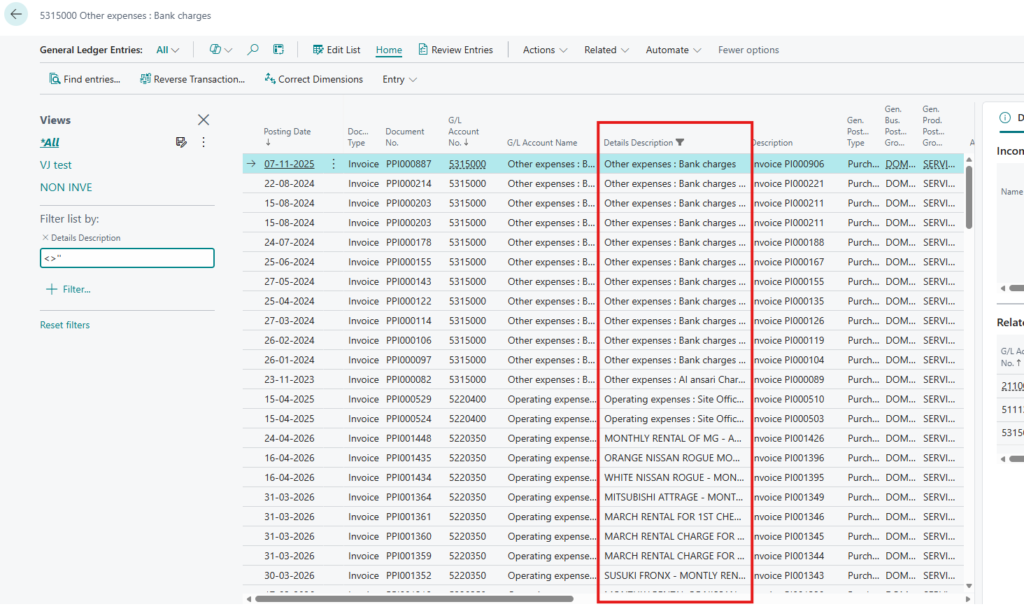
A dedicated action is provided to populate the enhanced description for existing G/L Entries. This allows Finance users or authorized administrators to update historical records without having to process each entry individually.
2. Newly Created G/L Entries
For newly posted transactions, the description is maintained as part of the G/L Entry creation process.
This means that the enhancement does not depend on users remembering to manually update the description after every posting.
Two-Part Approach
Existing Entries: One-time controlled update.
New Entries: Automatic description population during the posting process.
Updating Historical G/L Entries
Since the system may already contain historical G/L Entries, simply implementing the logic for future postings would leave existing records without the enhanced description.
To address this, we introduced a one-time action that allows the required description to be generated and stored for historical entries.
The process can be represented as:
Existing G/L Entries
→
Run Update Action
→
Determine Required Information
→
Generate Description
→
Update G/L Entry
This approach provides a practical way to bring historical records into the same structure used for newly posted transactions.
Maintaining the Description for New Entries
Updating historical records solves only one part of the requirement. The same description logic also needs to be applied to future G/L Entries.
Therefore, the solution ensures that the description is generated and stored when the relevant G/L Entry is created.
This avoids a situation where historical records have the enhanced description while newly posted transactions continue using the previous standard behavior.
Business Transaction
→
Posting
→
G/L Entry Created
→
Generate Description
→
Store Description
The result is a consistent description structure across both historical and newly created G/L Entries.
Implementation Approach
From a Business Central development perspective, the implementation focuses on working with the G/L Entry record while keeping the description-generation logic reusable.
1. Reading the Required Transaction Information
The required information is identified from the relevant transaction context associated with the G/L Entry.
2. Generating the Description
Once the required information is available, it is combined into the required description format.
3. Persisting the Value
Instead of calculating the value only when the page is displayed, the generated description is stored against the G/L Entry record.
At a conceptual level, the implementation follows this pattern:
G/L Entry
    ↓
Read relevant transaction information
    ↓
Build meaningful description
    ↓
Assign description to G/L Entry
    ↓
Modify G/L Entry
The same design principle is used for the historical update action, allowing existing entries to be brought into alignment with the new description structure.
Business Impact
The enhancement provides Finance users with more meaningful information directly within General Ledger Entries and reduces the need to investigate the originating transaction simply to understand the purpose of a posting.
Key Benefits
- Improved Transaction Visibility: Finance users can understand the purpose of a G/L Entry more easily.
- Consistent Information: Historical and newly posted G/L Entries can follow the same description approach.
- Better Financial Review: More meaningful descriptions simplify transaction investigation and reconciliation.
- Reduced Manual Effort: Users do not need to manually maintain descriptions after posting.
- Reusable Data: Because the description is stored against the G/L Entry, it can be used by processes that consume the underlying record.
Frequently Asked Questions
1. Why not simply calculate the description on the G/L Entry page?
A page-level calculation can display the required information, but it does not provide the same persistence as storing the value directly against the G/L Entry record. Since this requirement needed the description to be part of the G/L Entry data, the value was persisted.
2. Does the solution support historical G/L Entries?
Yes. A dedicated action can be used to populate the enhanced description for existing historical G/L Entries.
3. Will newly posted G/L Entries also receive the enhanced description?
Yes. The description logic is also applied to newly created G/L Entries so that future transactions follow the same approach.
4. Why is storing the description important?
A stored value remains part of the G/L Entry record and can therefore be used more reliably for reporting, filtering, analysis, and other processes that consume G/L Entry data.
5. Does the solution replace the standard G/L Entry functionality?
No. The solution extends the existing Business Central functionality by enhancing the information available on G/L Entries while retaining the standard posting process.
Conclusion
Enhancing the General Ledger Entry description in Business Central may appear to be a small customization, but the distinction between displaying information and persisting information is important when designing an ERP solution.
Instead of relying only on a calculated value at the page level, the solution stores the generated description directly against the G/L Entry record.
By combining a one-time historical update with automatic handling for new entries, Finance users can work with a more informative and consistent General Ledger.
The implementation demonstrates how a focused Business Central customization can improve financial visibility while continuing to work within the standard ERP framework.
Looking to enhance financial visibility and streamline your Business Central processes?
CloudFronts helps organizations extend Microsoft Dynamics 365 Business Central with practical customizations, automation, integrations, and financial process solutions designed around real-world business requirements. To discuss a similar implementation, reach out to us at transform@cloudfronts.com.
About the Author

Related posts:

From Client Secrets to Certificate-Based Authentication: Building a Secure Integration with Azure Ke...

From Multiple Data Sources to Azure Databricks: A Zero-Downtime Power BI Report Data Migration for F...
Using AI for Data Discipline That Drives Better AI Outcomes