

Watch first
01Summary
A Houston-based cybersecurity firm wanted their sales team to ask plain-language questions about CRM data, “how many active leads do we have”, “summarise this account’s open opportunities”, without opening Dynamics 365 and building a view for every question.
We built it as an Azure AI Foundry agent connected to Microsoft Dataverse over the Model Context Protocol (MCP). No custom data layer, no synchronised copy of CRM, no bespoke API surface. Dataverse itself is the MCP server, and Foundry’s Agent Service calls it as a tool.
The agent runs on GPT-4.1 and took an afternoon to wire up. The two things that actually cost time were an OAuth redirect URL that Foundry generates after you click Connect, and an architecture decision we got wrong the first time: the tenant your agent lives in decides whether per-user CRM security is achievable at all.
02In This Blog
A practitioner walkthrough of connecting Foundry to Dynamics 365 over MCP, written around the two failures that cost us the most time rather than the happy path alone.
- The Scenario: A sales team that wanted answers from CRM without building a view for every question.
- The Approach: Use Dataverse as a first-party MCP server rather than building an API layer and hand-written function schemas.
- The Action: Environment enablement, an Entra app registration, the MCP tool with OAuth identity passthrough, and the redirect URL nobody warns you about.
- The Outcome: Per-user security enforced by Dataverse itself, with no parallel permission model to maintain.
The connection is an afternoon. The question of whose identity the agent is acting as decides whether any of it survives contact with production.
Table of Contents
03Why MCP Changes the Shape of This Problem
Before MCP, connecting an LLM to Dynamics 365 meant building glue: an API layer, a set of hand-written function definitions describing each operation, schema documentation maintained by hand, and a deployment to own forever. Every new table meant another function.
The Model Context Protocol replaces that with a contract. The server advertises its tools, the model discovers them at runtime, and the plumbing is the same whichever client connects. Microsoft ships Dataverse as a first-party MCP server, so the glue layer is simply gone.
https://{organisation}.crm{n}.dynamics.com/api/mcpA preview endpoint exists at /api/mcp_preview with additional tools, gated behind a separate environment setting.
The tool surface
| Tool | What it does |
|---|---|
search | Searches table schemas and business skills by keyword |
search_data | Searches structured and unstructured data |
describe | Returns details for tables, records, schemas, skills and apps |
read_query | Runs supported Dataverse SQL SELECT queries |
create_record | Inserts a row, returns the Gcfb-mcp7fd |
update_record | Updates an existing row |
delete_record | Deletes a row, only after explicit user approval |
create_table, update_table, delete_table | Schema operations |
upsert_skill, delete_skill | Manages Dataverse skills and playbooks |
init_file_upload, commit_file_upload, file_download | SAS-based file handling |
04Step 1: Enable the MCP Server and Allow Your Client
This is admin work in the Power Platform admin center, not maker work, and it is where most failed attempts stall.
- Open the environment settingsPower Platform admin center, then Manage, then Environments. Open the target environment and select Settings on the command bar.
- Turn on the MCP serverExpand Product, select Features, find Dataverse Model Context Protocol, and enable Allow MCP clients to interact with Dataverse MCP server.
- Open the allowed client listSelect Advanced Settings. This is where non-Microsoft and custom clients are registered individually.
- Add your client and enable itCreate an Allowed MCP Client record carrying the Application Id of the app registration you create in Step 2, then set Is Enabled to Yes.
| Field | Value |
|---|---|
| Name | A readable label, for example Foundry Dataverse Agent |
| Unique Name | A unique identifier for the record |
| Application Id | The client (app) ID of the Entra app registration from Step 2 |
| Is Enabled | Yes |
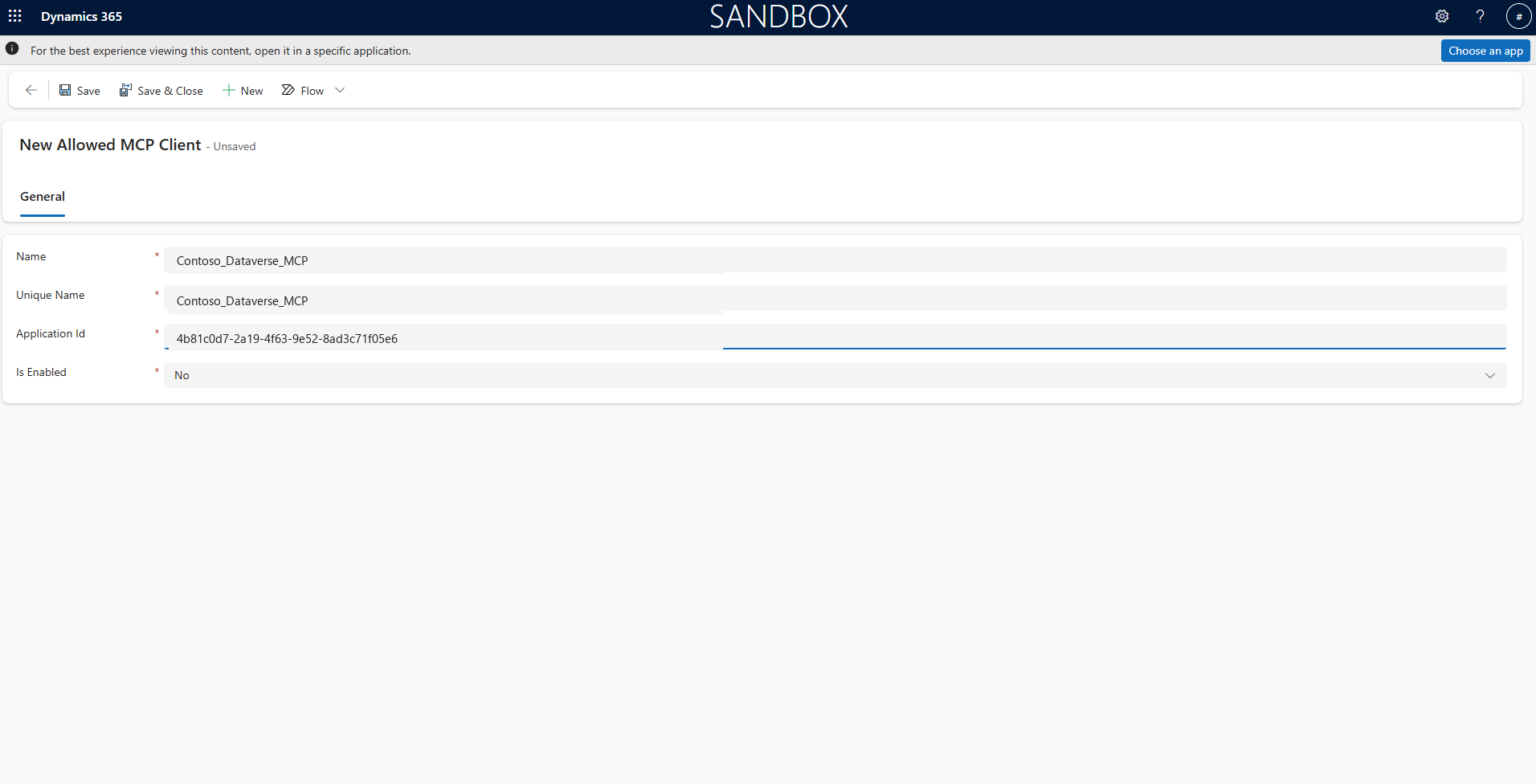
This is a chicken-and-egg with Step 2: you need the Application Id before you can fill this in. Create the app registration first, then come back.
Two constraints worth knowing before you plan the rollout:
- Managing the MCP server through Advanced connector policies requires the environment to be a Managed Environment.
- The allow list applies only to the
/api/mcpagent entrypoint. MCP-named custom APIs are ordinary Dataverse APIs and are not restricted by this setting.
If you want the preview tools, enable Allow MCP clients to interact with Dataverse MCP server (Preview version) as a separate step and point at /api/mcp_preview. Preview tools are not covered by Microsoft support agreements and the APIs can change without notice, so keep them out of anything you intend to run in production.
05Step 2: Register the Entra App
Foundry’s MCP tool needs an OAuth client to authenticate as. Create an app registration in the same tenant as your Dataverse environment.
- Create the registrationAzure portal, Entra ID, App registrations, New registration. Name it something like Foundry-Dataverse-Agent.
- Create a client secretUnder Certificates and secrets. Record the value immediately, because you cannot read it again.
- Grant the Dynamics CRM permissionUnder API permissions, add Dynamics CRM, user_impersonation, delegated. Grant admin consent if your tenant requires it.
- Copy the two identifiersThe Application (client) ID and the Directory (tenant) ID. You need both in Step 3, and the client ID again for the Allowed MCP Client record in Step 1.
Leave the redirect URI blank for now. Foundry generates it, and you come back in Step 4 to add it.
06Step 3: Add the MCP Tool to the Agent
In the Foundry portal, open your project, go to Build, then Agents, and open or create an agent. Ours runs on gpt-4.1 on a Global Standard deployment.
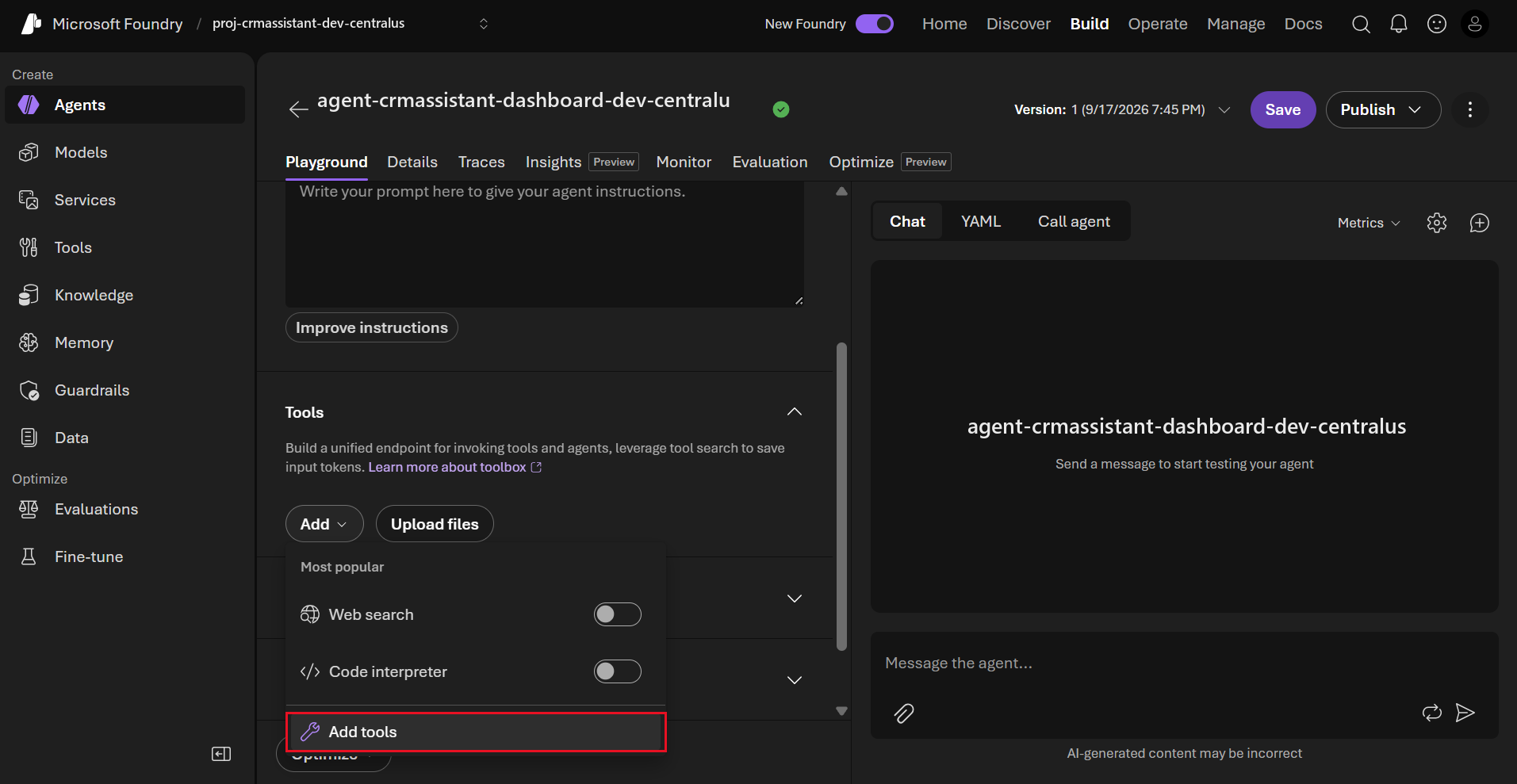
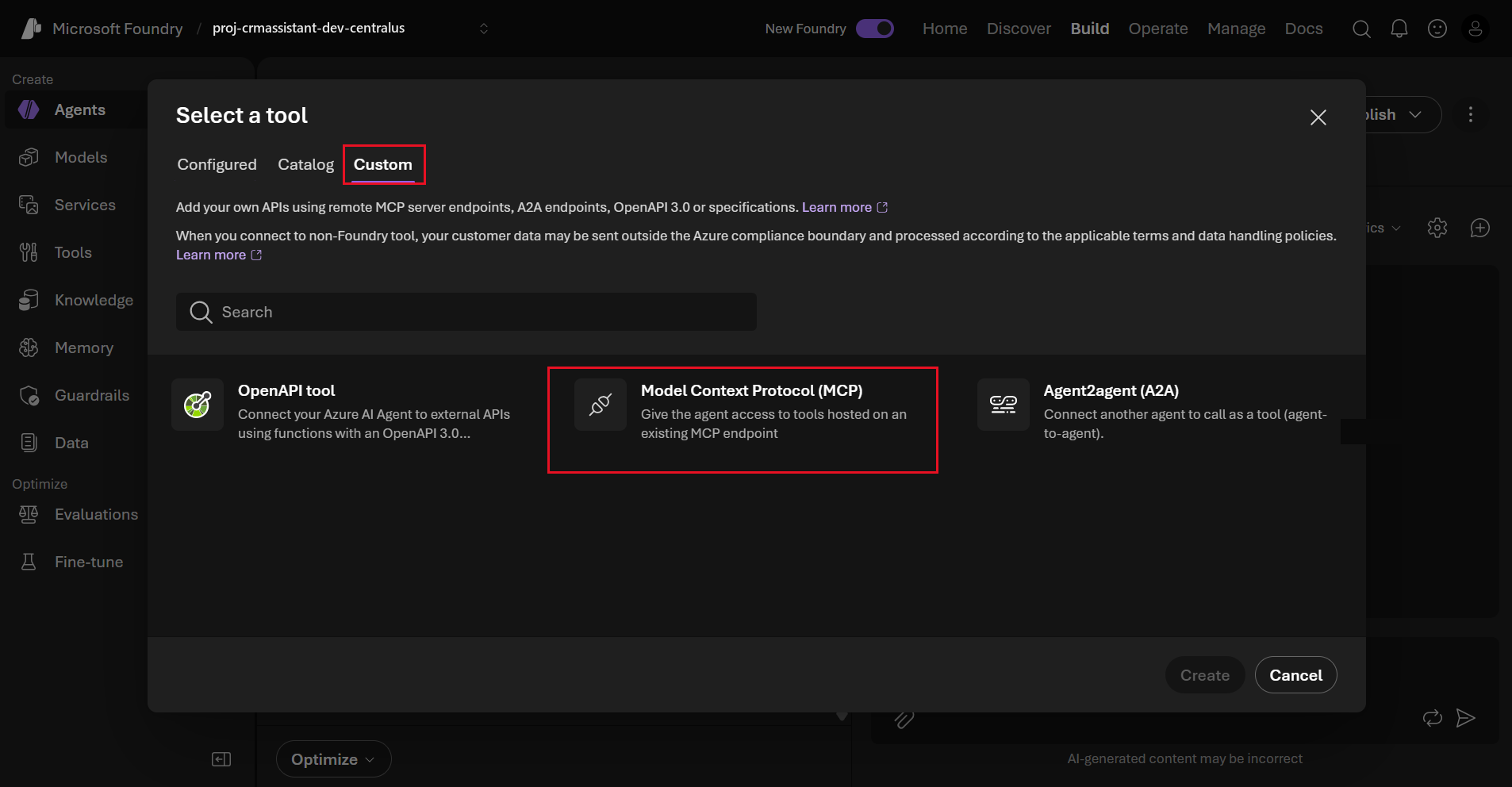
Foundry warns you here that third-party MCP services are Non-Microsoft Products under the Product Terms. Dataverse is a Microsoft service, so this warning does not apply to what we are building, but it is worth reading before you connect anything else.
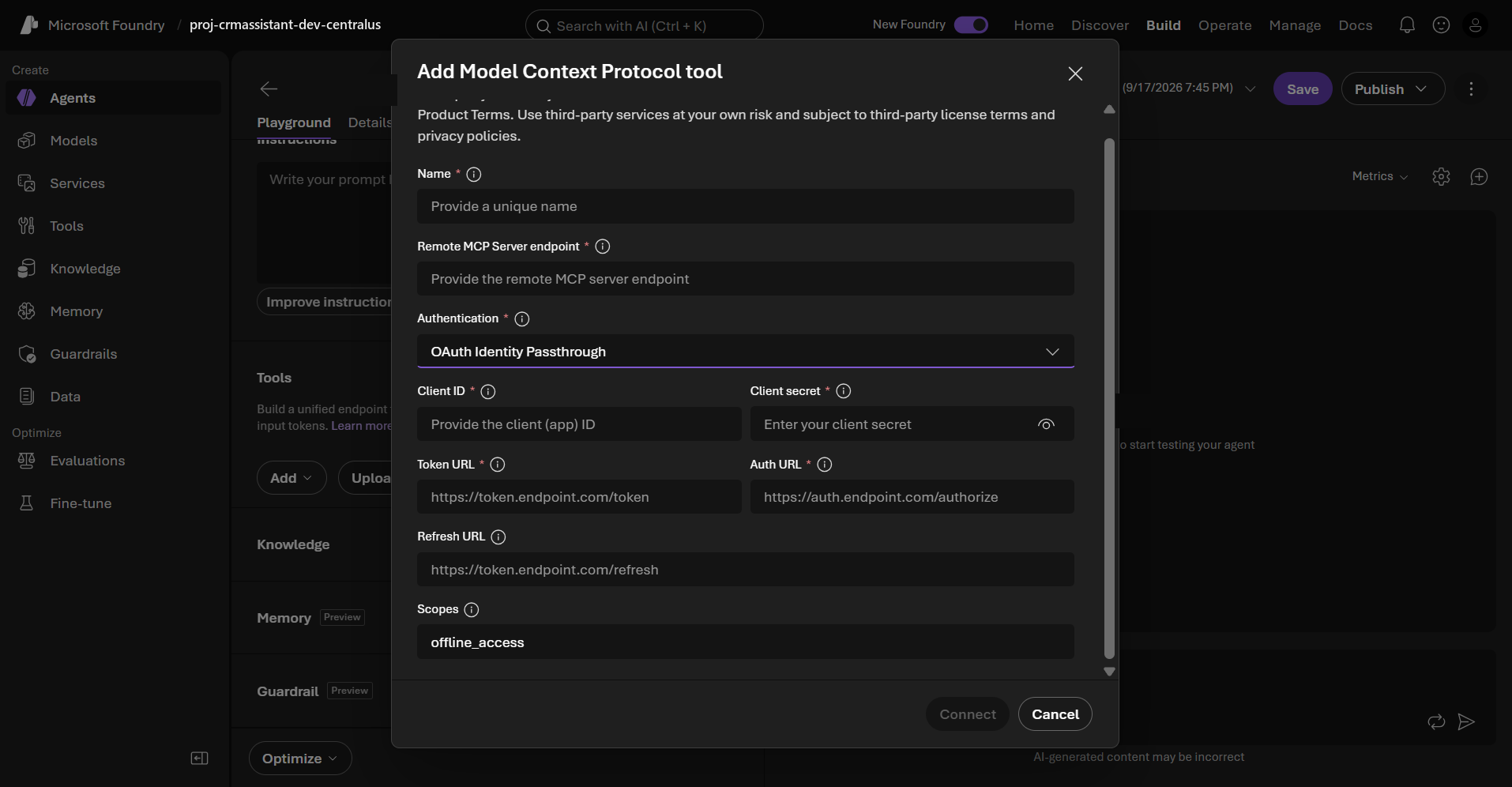
Now fill it in. Choose OAuth Identity Passthrough as the authentication method, which is what makes per-user security work.
| Field | Value |
|---|---|
| Name | A unique name, for example Dataverse-MCP |
| Remote MCP Server endpoint | https://{organisation}.crm.dynamics.com/api/mcp |
| Authentication | OAuth Identity Passthrough |
| Client ID | The Application (client) ID from Step 2 |
| Client secret | The secret value from Step 2 |
| Token URL | https://login.microsoftonline.com/{tenant-id}/oauth2/v2.0/token |
| Auth URL | https://login.microsoftonline.com/{tenant-id}/oauth2/v2.0/authorize |
| Refresh URL | https://login.microsoftonline.com/{tenant-id}/oauth2/v2.0/token |
| Scopes | https://{organisation}.crm.dynamics.com/user_impersonation offline_access |
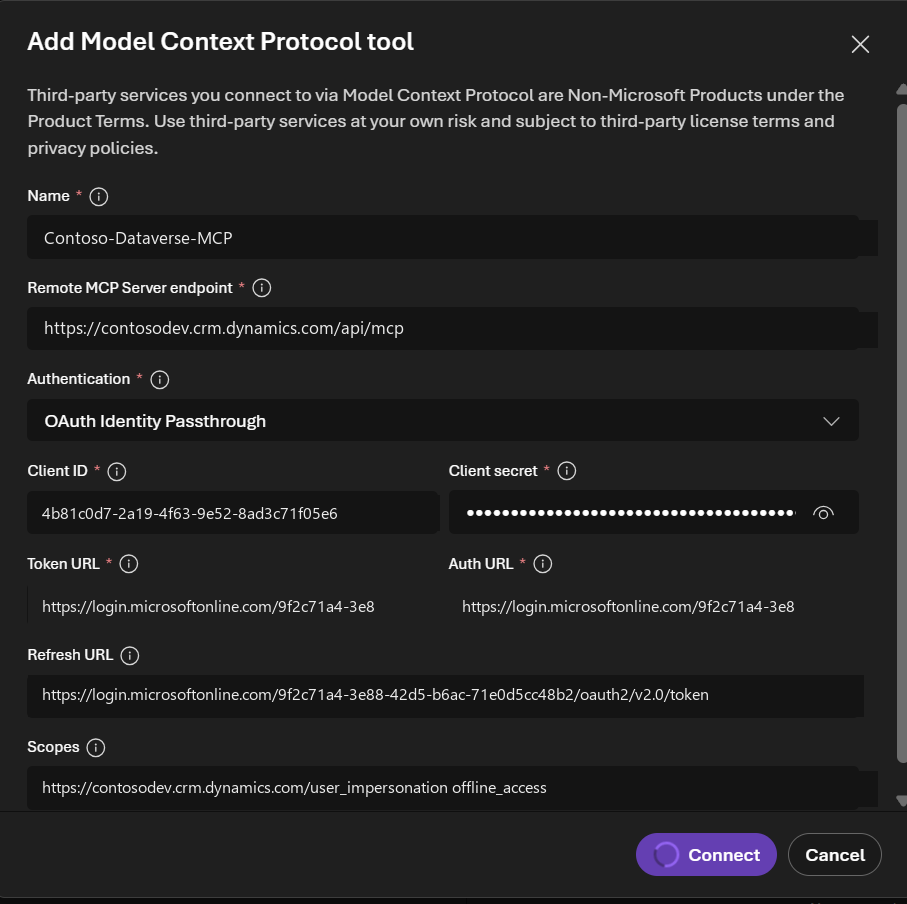
Three details in that table are worth calling out, because the placeholder text in the dialog does not hint at any of them.
- The Refresh URL is the same as the Token URL. The placeholder shows
https://token.endpoint.com/refresh, which suggests a distinct endpoint. Entra does not have one. Refresh grants go to/oauth2/v2.0/token. - The scope needs the full Dataverse resource URI. It is
https://{organisation}.crm.dynamics.com/user_impersonation, with your organisation’s own host. A scope of justuser_impersonationwill not resolve. - Keep
offline_accessin the scope list. It is prefilled by default and it is doing real work. Without it no refresh token is issued, and the agent will re-prompt for consent on a cadence that makes it unusable.
Select Connect.
07Step 4: Close the Redirect URL Loop
This is the step that is easy to miss, because it only appears after you have already clicked Connect and feel finished.
Foundry responds with a dialog headed You’ve created a credential provider, containing a redirect URL of this shape:
https://global.consent.azure-apim.net/redirect/{generated-guid}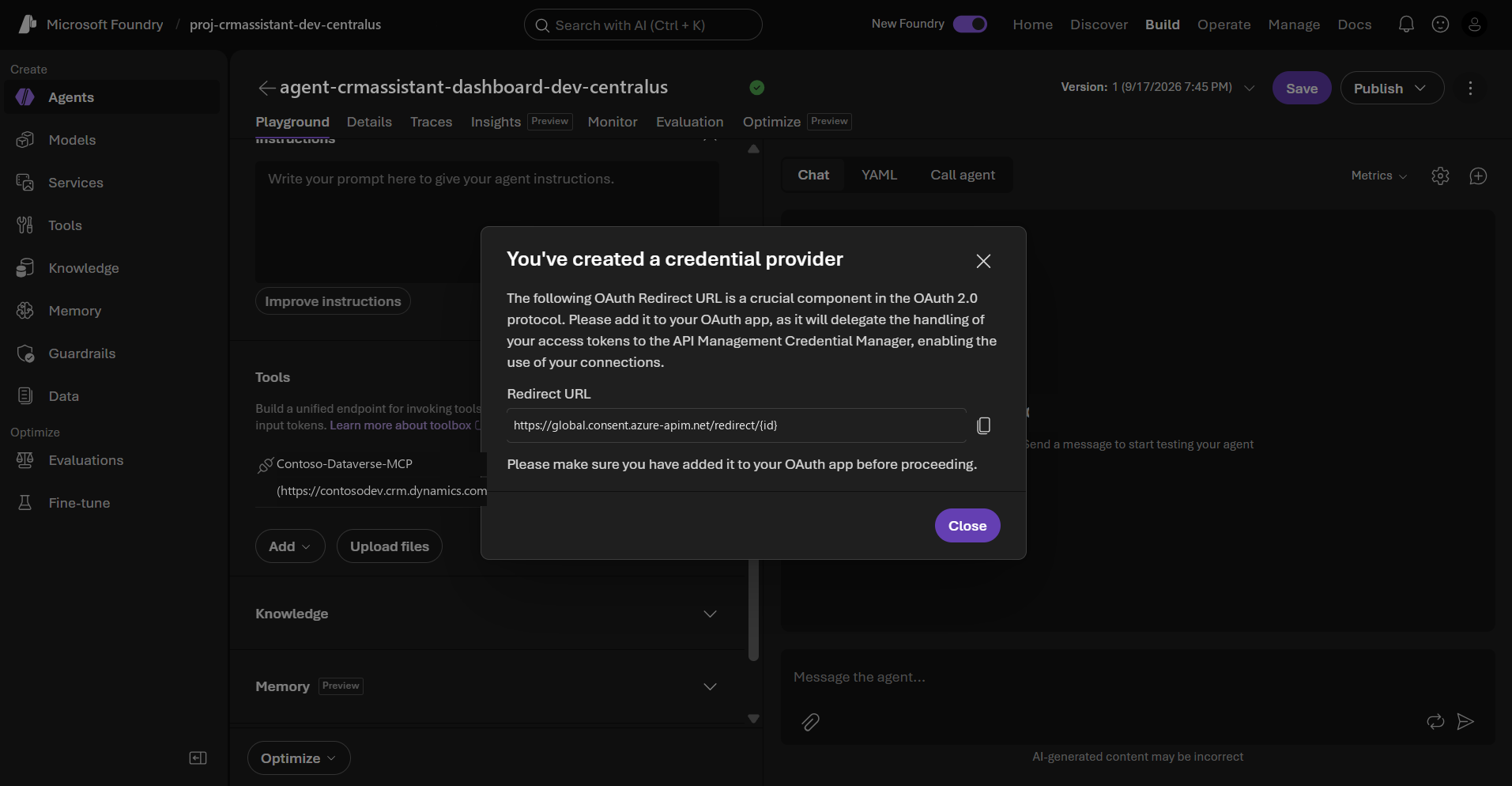
Copy it. Go back to your app registration in Entra, open Authentication, select Add Redirect URI, and add it there. The tool is already attached to the agent at this point and looks configured, but until this URI is registered the OAuth handshake cannot complete.
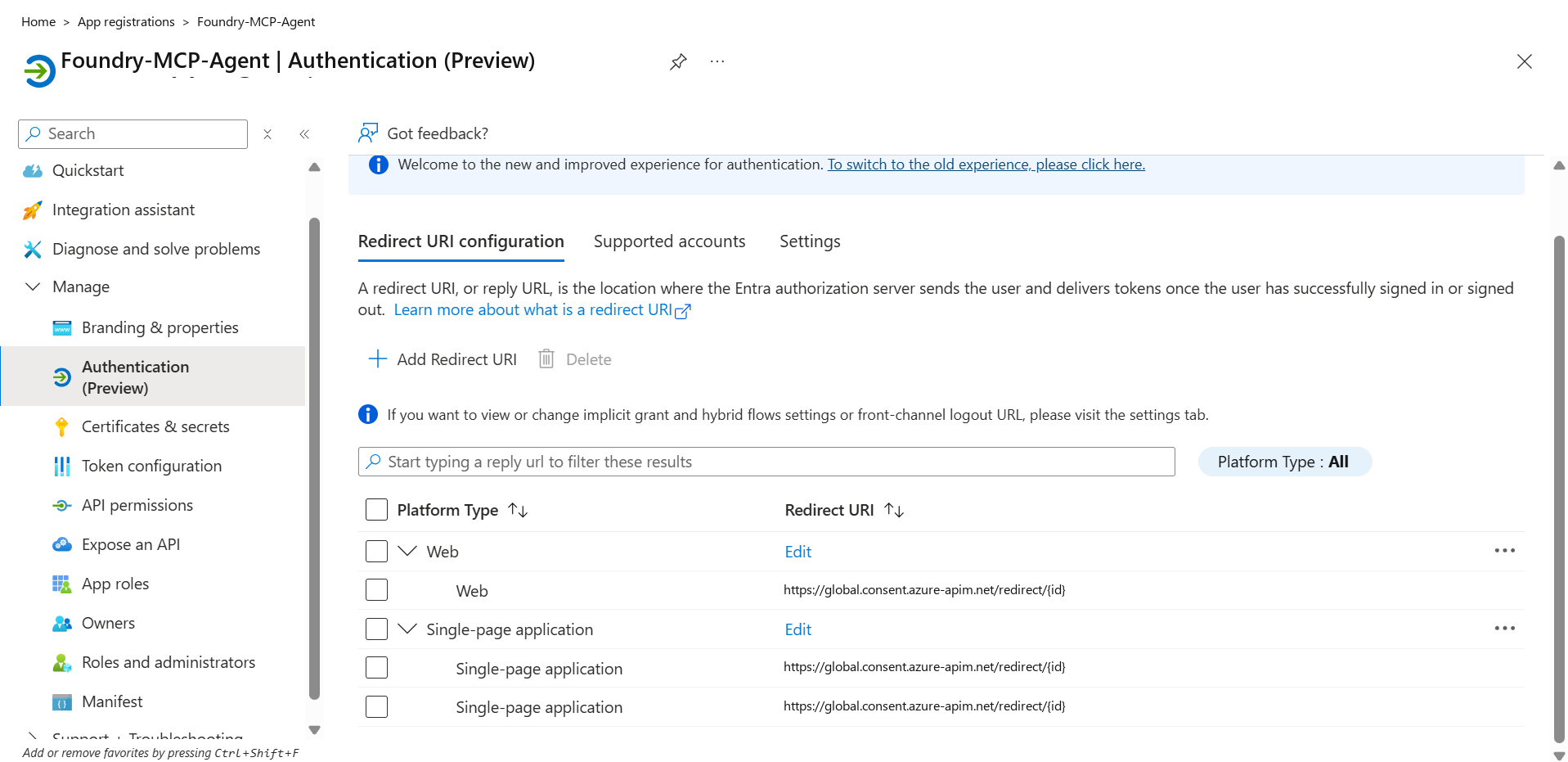
We had this wrong, and the symptom is specific enough to be worth describing precisely.
08Step 5: Consent, and the Consent Loop
The first time an agent turn needs the tool, the playground does not answer. It returns a consent request instead, with an Open consent button and an oauth_consent_request marker on the response. This is expected, and it is the identity passthrough working as designed.
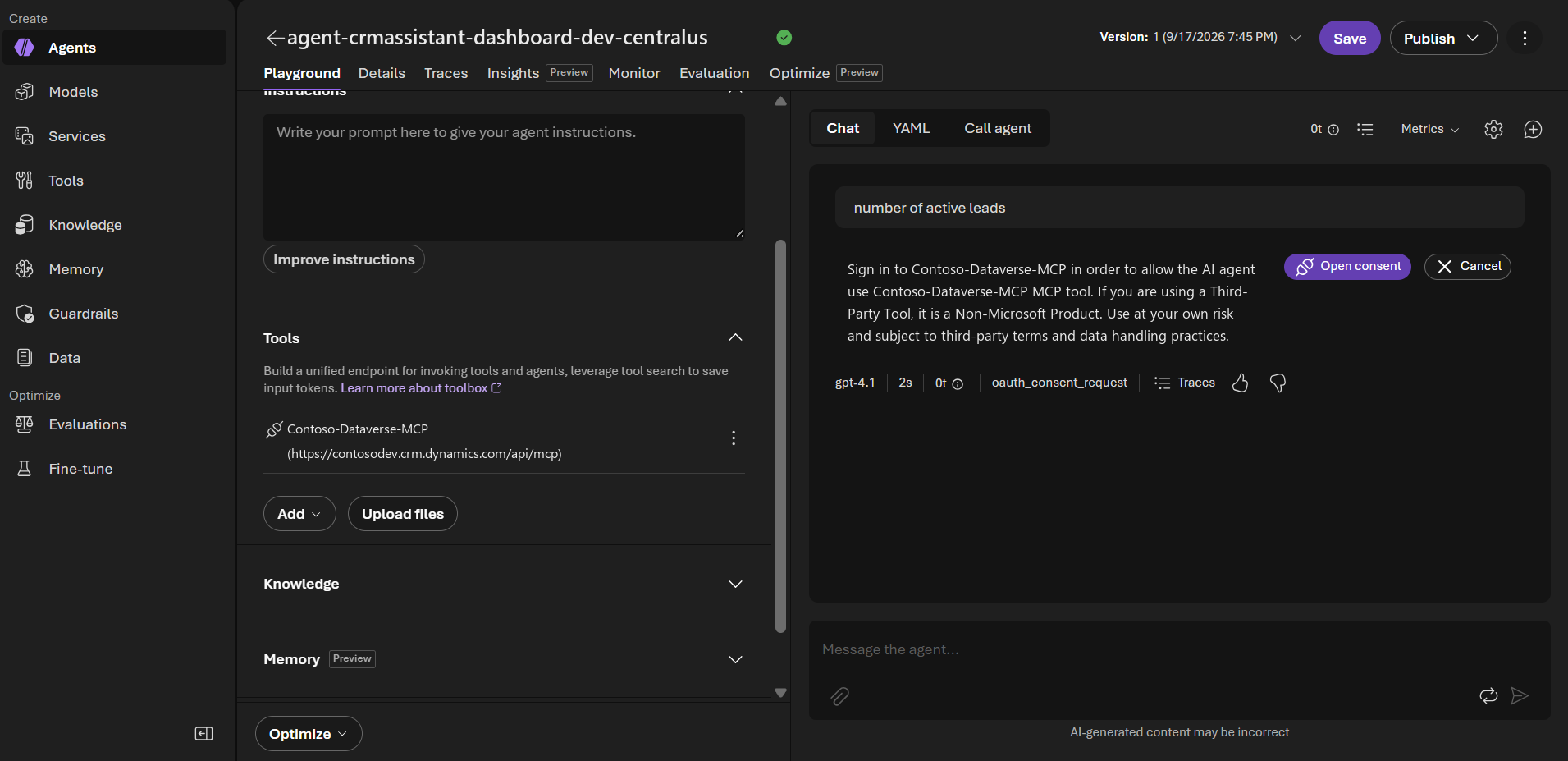
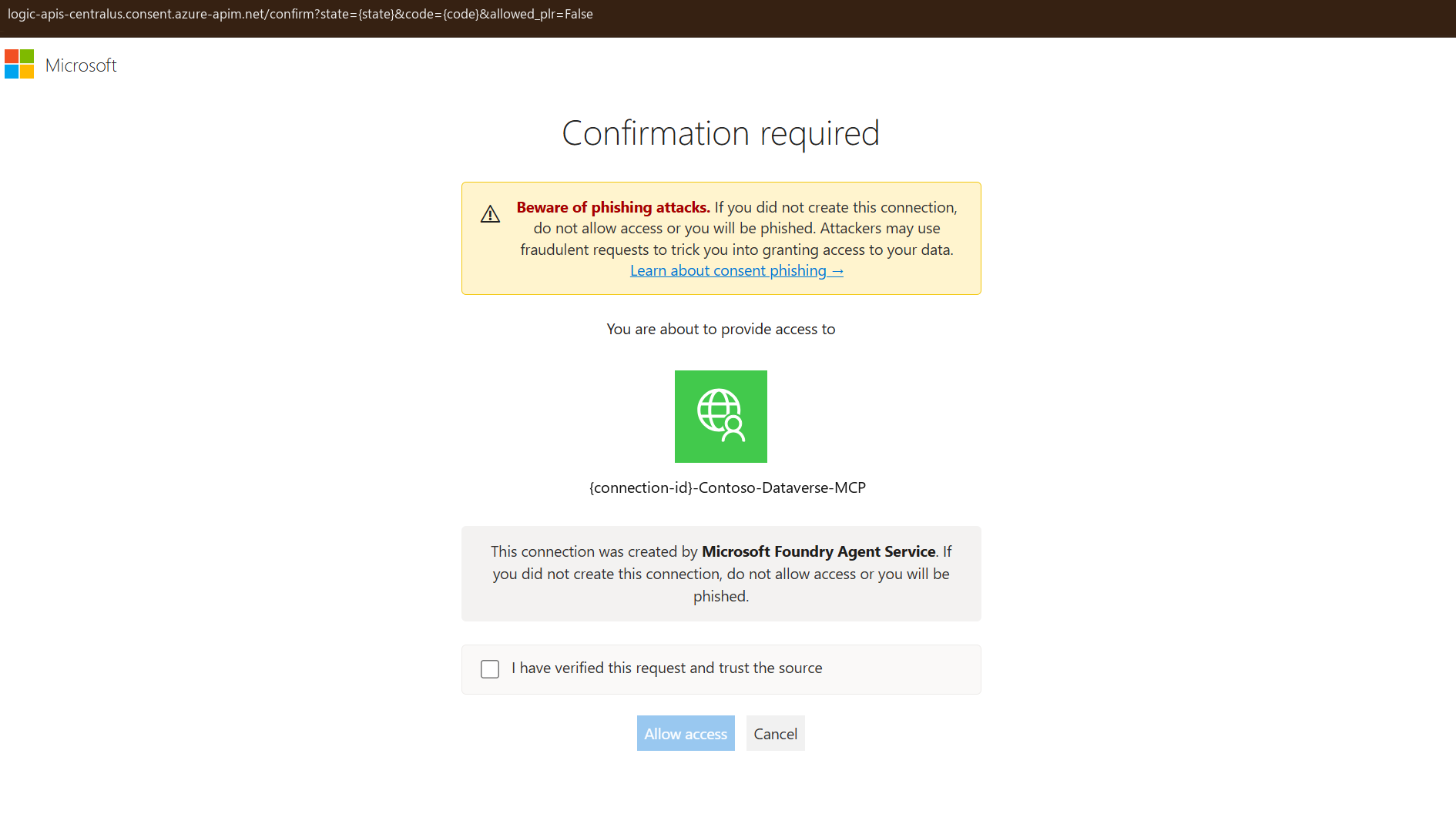
Selecting Open consent opens a Microsoft Confirmation required page carrying a phishing warning, naming the connection, and stating that it was created by Microsoft Foundry Agent Service. You have to tick I have verified this request and trust the source before Allow access becomes clickable.
When consent never sticks
Here is the failure we hit. Consent completes, the playground prints a green Sign in successful, and then immediately issues another oauth_consent_request for the same tool. Approving it again produces the same result. The agent never calls Dataverse.
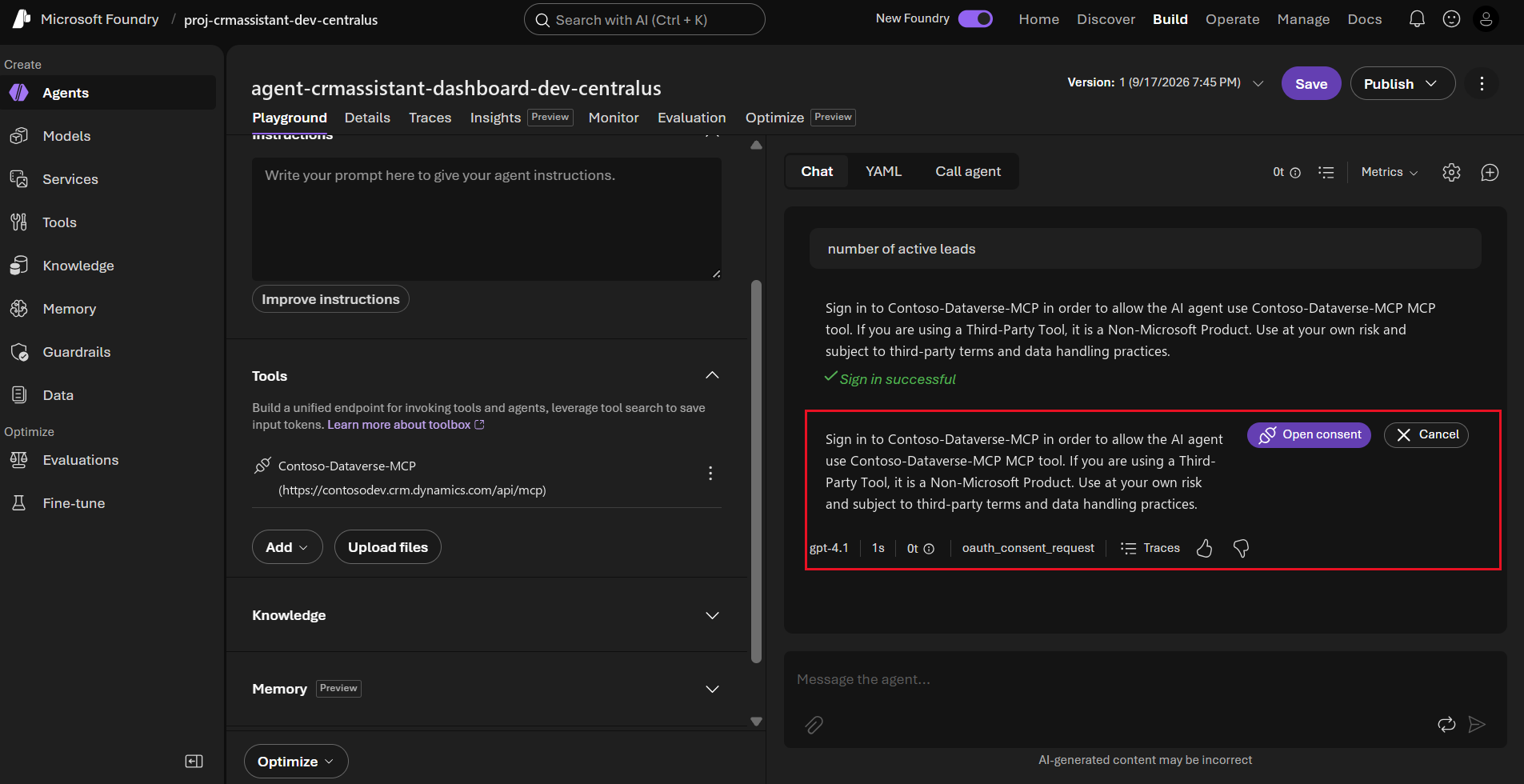
A repeating consent request means the token exchange is failing after the user has already approved, so Foundry has nothing cached and asks again. In our case the redirect URI had been registered under Single-page application rather than Web, so the secret-based code exchange was being rejected. Moving it to the Web platform resolved it.
Work through these in order if you see the loop:
| Check | Why it matters |
|---|---|
| Redirect URI registered under Web, not SPA | A confidential client cannot redeem a code against an SPA redirect URI |
| The redirect URI matches the generated one exactly | Entra matches the full string, including the trailing Gcfb-mcp7fd |
offline_access present in Scopes | Without a refresh token, consent cannot persist past the first call |
Allowed MCP Client record has Is Enabled = Yes | A disabled record fails silently with no error surfaced |
| Application Id on that record matches the app registration | A mismatch fails the same silent way |
| The client secret has not expired | Expired secrets produce an auth failure that reads as a consent problem |
Once consent sticks, Foundry agents are still conservative about tool use, and an agent with a Dataverse tool attached will often answer from the model instead of calling it. Instructions as blunt as “For any question about accounts, contacts, leads or opportunities, always use the Dataverse tool. Never answer CRM questions from memory.” materially change the hit rate. But only after auth works. Tuning instructions against a broken connection is wasted effort.
09Calling the Agent From Your Own Application
The portal playground is fine for testing. Ours needed to sit inside a web application, which meant calling the Foundry data plane directly. Three details cost us the most time, and none of them are obvious from the portal.
The token scope is https://ai.azure.com/.default. Not the older cognitive services audience. A token for the wrong audience is issued happily and rejected at the call.
The request body key is agent_reference, and it needs a type. The portal’s JavaScript sample is wrong on both counts. The Python sample is correct.
// Rejected: "The 'agent' property is deprecated. Use 'agent_reference' instead."
body: { agent: { name, version } }

// Rejected: "Required property 'type' is missing"
body: { agent_reference: { name, version } }

// Correct
body: {
  agent_reference: {
    name: 'your-agent-name',
    version: '1',
    type: 'agent_reference'
  }
}
Multi-turn uses the conversations API, not previous_response_id. Create a conversation once, then pass its id on every subsequent response. Do not replay the transcript, and do not chain response ids.
const conversation = await client.conversations.create();
// hold conversation.id for the life of the chat session
const response = await client.responses.create({
  conversation: conversation.id,
  input: userMessage
});
One more that cost an afternoon: a 403 on agents/write from a local machine is almost always the wrong Azure CLI tenant, not a missing role. DefaultAzureCredential picks up whatever az session is active, and on a consultant’s laptop that is rarely the tenant you think. Run az login --tenant {tenant} and restart the process. End users separately need the Azure AI User role on the Foundry resource.
10The Tenancy Trap
This is the part we would tell anyone before they start.
Our first build put the Foundry agent in our own tenant and pointed it at the client’s Dataverse. It worked. It demonstrated well. It was also architecturally dead, and we did not see why until we asked the security question properly.
A user signing into tenant A cannot have their identity flowed into tenant B’s Dataverse. On-behalf-of does not cross that boundary.
Everything in Steps 2 through 5 assumes the app registration, the Foundry project and the Dataverse environment are in one tenant. They have to be. Take that away and OAuth identity passthrough has nothing to pass through, so the MCP tool authenticates with one fixed connection and Dataverse sees the same identity for every user of the agent. A sales rep and a regional director get byte-identical results, because Dataverse is not being asked “what can this person see”, it is being asked “what can the service account see”.
That matters more than it first sounds. The Dataverse MCP server respects security roles and row-level security properly. It is a genuinely well-behaved server. But it can only enforce the security of the identity presented to it, and in a split-tenant design that identity is a constant.
| Design | Per-user CRM security | Verdict |
|---|---|---|
| Agent in your tenant, Dataverse in the client’s | Not achievable. One fixed identity for all users. | Demo only |
| Agent in the same tenant as Dataverse, OAuth identity passthrough | Achievable. Dataverse enforces roles per user. | Production |
| Split tenant, filtering in your own middleware | Possible, but you are rebuilding Dataverse security by hand, outside Dataverse | Avoid |
We rebuilt with the agent inside the client’s own tenant. The constraint disappeared, and the security model became Dataverse’s problem again, which is exactly where it belongs.
The same trap has a second face. A Power Apps code app cannot solve this for you either: the Power Apps host signs the user in but seals the credential, and exposes no public API for getting a token for an arbitrary audience. If your front end is a code app, the route to an external service is a custom connector over an Azure Function, where the Dataverse user token flows automatically and the Function performs the on-behalf-of exchange. Browser MSAL is the alternative, but the Foundry data plane does not offer CORS to arbitrary origins, so expect friction.
11Licensing
Since 15 December 2025, Dataverse MCP tools are charged when accessed by AI agents created outside Microsoft Copilot Studio. A Foundry agent is exactly that.
If the organisation holds qualifying Dynamics 365 Premium licences or Microsoft 365 Copilot user subscription licences, access to Dynamics 365 data is not charged. Otherwise it is metered. Model this before the pilot, not after, because the cost profile of a chat interface scales with curiosity, not with seats.
12Impact
- 1Afternoon to wire up, once the traps were known
- 0Lines of custom API or function schema
- 14Dataverse tools available with no per-table work
- 1Security model, Dataverse’s own, not a parallel one
- Build time measured in hours, not weeks. No custom API layer, no hand-written function schemas, no data synchronisation.
- Zero maintenance as the schema evolves. New tables and columns are discoverable through
describewithout touching the agent. - Security stays in Dataverse. With identity passthrough and a single tenant, existing security roles and row-level security apply unchanged.
- One rebuild avoided in future engagements. The tenancy question is now the first thing we ask, before any agent is provisioned.
13Conclusion
The technical build here is genuinely easy, and that is the trap. Four dialogs and a form, and the agent is talking to CRM.
What is not easy is everything the dialogs do not tell you: that the client allow list defaults to disabled, that Foundry hands you a redirect URL after you thought you were done, that the platform you register it under decides whether consent ever sticks, and above all whose identity the agent is acting as.
Answer that last one before you provision anything. If the agent and the data live in different tenants, per-user security is off the table, and every hour spent after that point is spent on a demo.
14FAQ
01Do I need a Managed Environment?
Only if you want to govern the MCP server through advanced connector policies. Basic enablement does not require it.
02Can I restrict which tables the agent can reach?
Yes, through ordinary Dataverse security roles and row-level security. With identity passthrough, the signed-in user’s own roles apply. No MCP-specific access controls are needed. You can also limit the tool subset when configuring the connection in Foundry, which is worth doing for least privilege.
03Why does the agent keep asking for consent after I have already approved it?
The token exchange is failing after approval, so nothing is cached. Check that the redirect URI is registered under the Web platform rather than Single-page application, that it matches the generated URL exactly, and that offline_access is in the scope list.
04Why does my agent ignore the Dataverse tool entirely, with no consent prompt?
That is a configuration failure rather than a consent failure. A tool with a failed connection still shows as attached and produces zero tool calls with no error. Confirm the Allowed MCP Client record exists with Is Enabled set to Yes and the right Application Id, then add explicit instructions naming the tool.
05Does the MCP server work with Finance and Operations?
When the environment URL is an F&O host, requests route to the ERP MCP server automatically.
06Can I use this with Copilot Studio instead?
Yes, and it is considerably simpler: Copilot Studio is allow-listed by default and the Dataverse MCP Server appears directly under Add tool, with no app registration, no redirect URL and no manual OAuth configuration. Choose Foundry when you need control over the model, the orchestration, or the hosting surface.
15Get in Touch
Building an AI agent over Dynamics 365 or Dataverse?
The connection is the easy part. If you want a second opinion on the identity and tenancy model before you commit to an architecture, we are happy to look at it with you.
Talk to us
Suchit Chaudhari
Dynamics 365 and Power Platform Consultant · CloudFronts
Works across Dynamics 365 and the Power Platform, with a focus on turning manual, document driven business processes into governed Dataverse solutions that survive audit and scale past their first release.
