How an Abu Dhabi-Based Diversified Holding Company Built a Budget-Controlled Procurement Process in Dynamics 365 Business Central – Part 2
Executive Summary
In Part 1, we explored how Emirates Consortium LLC expanded its use of Microsoft Dynamics 365 Business Central from primarily finance operations into a structured procurement process.
The journey begins with a Purchase Request, moves through approval and supplier selection, continues through Purchase Quotes, and ultimately reaches the Purchase Order stage.
For Emirates Consortium, however, creating a Purchase Order is not simply the final step in procurement. It is also an important financial control point.
The implemented solution evaluates the Purchase Order against the applicable departmental budget and provides visibility into the available budget, any budget shortfall, and whether a budget revision is required.
This creates a connected process in which procurement decisions and financial controls are managed within the same ERP environment.
Table of Contents
- Introduction
- Why Budget Control Matters
- Budget Validation at the Purchase Order Stage
- Understanding Budget Information on the Purchase Order
- What Happens When the Budget Is Exceeded?
- Finance and Budget Revision
- Supporting Documentation for Budget Decisions
- Budget Consumption and Financial Visibility
- Final Approval Control
- End-to-End Budget-Control Process
- Key Benefits
- Frequently Asked Questions
- Conclusion
Introduction
In a procurement process, approving a business requirement and selecting the right supplier are only part of the decision-making process. Organizations also need to determine whether the planned expenditure is aligned with the approved budget.
For Emirates Consortium, budgets were previously managed manually through Excel, while certain procurement activities were performed outside Business Central.
As part of the broader procurement implementation, the objective was to bring budget visibility directly into the purchasing process and establish a structured mechanism for determining whether planned expenditure could proceed.
The customized solution therefore evaluates the Purchase Order against the applicable departmental budget.
How Is the Applicable Budget Determined?
The budget is identified using a combination of:
Department + Budget Year + Budget Month + Category + Subcategory
The Purchase Order amount is then compared against the applicable budget to determine whether sufficient budget is available.
This provides the foundation for the organization’s over-budget control process.
Why Budget Control Matters
Without budget visibility, procurement and finance can easily become two disconnected processes.
The procurement team may know that a particular purchase is required to support the business, while Finance may know that the relevant department has a defined financial limit. However, without connecting these two perspectives, it can be difficult to determine whether the planned expenditure is within the approved budget.
The implemented process brings these perspectives together at the Purchase Order stage.
The Purchase Order is therefore more than a document used to communicate an order to a vendor. It becomes a financial control point where planned expenditure can be evaluated against the applicable budget.
Budget Validation at the Purchase Order Stage
Once a Purchase Quote has been reviewed and finalized, it can be released and converted into a Purchase Order using Make Order.
There is no separate approval workflow at the Purchase Quote stage in the implemented process. The primary budget control is applied when the transaction reaches the Purchase Order stage.
At this point, the system determines the applicable budget based on:
- Department
- Budget Year
- Budget Month
- Category
- Subcategory
The Purchase Order amount is then evaluated against the applicable departmental budget.
This allows the organization to determine whether the planned purchase is supported by the available budget before the expenditure proceeds further through the procurement lifecycle.
Understanding Budget Information on the Purchase Order
The customized Purchase Order provides users with visibility into several budget-related fields.
| Budget Information | Purpose |
|---|---|
| Budget Year | Identifies the applicable financial year for the budget evaluation. |
| Budget Month | Identifies the applicable budget period. |
| PO Budget Amount | Shows the budget amount considered for the Purchase Order. |
| Available Budget Amount | Shows the amount of budget available for the purchase. |
| Budget Exceeded Amount | Shows the amount by which the Purchase Order exceeds the available budget. |
| Budget Available | Indicates whether sufficient budget is available. |
| Budget Exceeded | Identifies whether the Purchase Order exceeds the applicable budget. |
| Budget Checked | Indicates whether the budget validation has been performed. |
| Budget Checked By | Identifies the user who performed the budget check. |
| Budget Checked Date/Time | Records when the budget validation was performed. |
| Budget Revision Required | Identifies whether additional budget consideration is required. |
These fields provide procurement and finance teams with a common view of the financial position associated with the purchase.
Key Questions Answered at the Purchase Order Stage
- How much budget is applicable to the purchase?
- How much budget is currently available?
- Is the Purchase Order within the available budget?
- If the budget is exceeded, by how much?
- Is a budget revision required?
- Who performed the budget check and when?
What Happens When the Budget Is Exceeded?
The key control comes into play when the Purchase Order amount is greater than the available budget.
Rather than treating the Purchase Order as an ordinary purchasing transaction, the system identifies that the planned expenditure requires additional financial consideration.
The Purchase Order provides visibility into:
- Budget Exceeded
- Budget Exceeded Amount
- Budget Revision Required
This establishes a clear distinction between a Purchase Order that falls within the available budget and one that requires further financial action.
The over-budget scenario therefore becomes an explicit part of the procurement process rather than something Finance needs to identify separately after the purchase has already progressed.
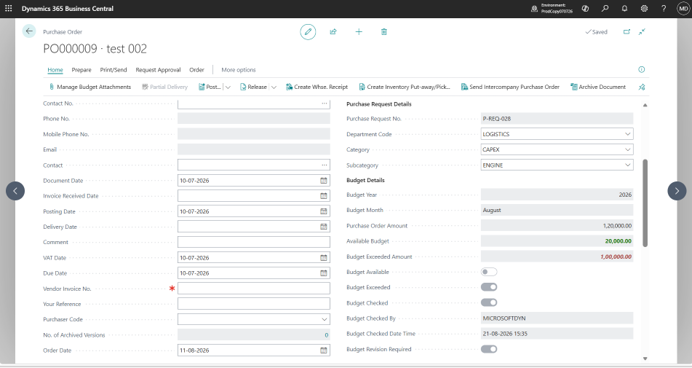
Budget control visibility when a Purchase Order exceeds the available budget.
Why This Matters
When budget exceptions are identified directly within the purchasing process, users have greater visibility into the financial implications of a purchase before it proceeds through the final control process.
Finance and Budget Revision
An over-budget Purchase Order requires a different level of financial consideration from a Purchase Order that falls within the available budget.
The implementation establishes the foundation for Finance to handle the budget revision process and ensures that an expenditure requiring additional budget consideration is not treated in the same way as a transaction that already has sufficient budget available.
The budget-control framework therefore connects:
Purchase Order → Budget Evaluation → Budget Revision, if Required → Final Approval
The Purchase Order provides visibility that a budget revision is required, allowing the relevant financial decision to be addressed as part of the broader procurement process.
Rather than maintaining the budget decision separately from the procurement transaction, the Purchase Order becomes the point where the requirement for additional budget consideration is identified.
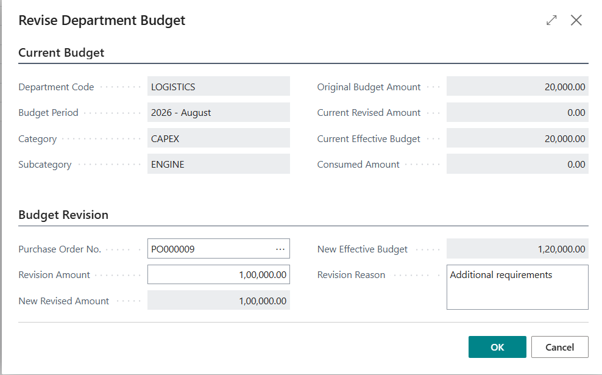
Finance budget revision process for an over-budget Purchase Order.
Supporting Documentation for Budget Decisions
Supporting documentation is an important component of procurement governance.
Within the Purchase Request process, users can attach documents supporting the original business requirement. However, these attachments remain associated with the Purchase Request and are not automatically transferred to the Purchase Quote or Purchase Order.
This distinction becomes particularly important when an over-budget Purchase Order requires additional documentation.
The implementation therefore differentiates between:
- Documents supporting the original business requirement
- Documents supporting subsequent procurement or budget decisions
This separation helps maintain clarity between the original justification for the purchase and the financial documentation associated with a subsequent budget decision.
Budget Consumption and Financial Visibility
Effective budget control requires more than knowing the original budget. Organizations also need visibility into how much budget remains available when a new purchase is being evaluated.
The Purchase Order provides visibility into the budget position through fields such as:
- PO Budget Amount
- Available Budget Amount
- Budget Exceeded Amount
- Budget Available
- Budget Exceeded
This gives users a clearer understanding of the financial impact of the Purchase Order.
Instead of requiring Finance to manually determine whether sufficient budget exists, the purchasing document itself exposes the relevant budget information.
This creates greater visibility between procurement activity and financial planning while reducing the separation between operational purchasing decisions and financial oversight.
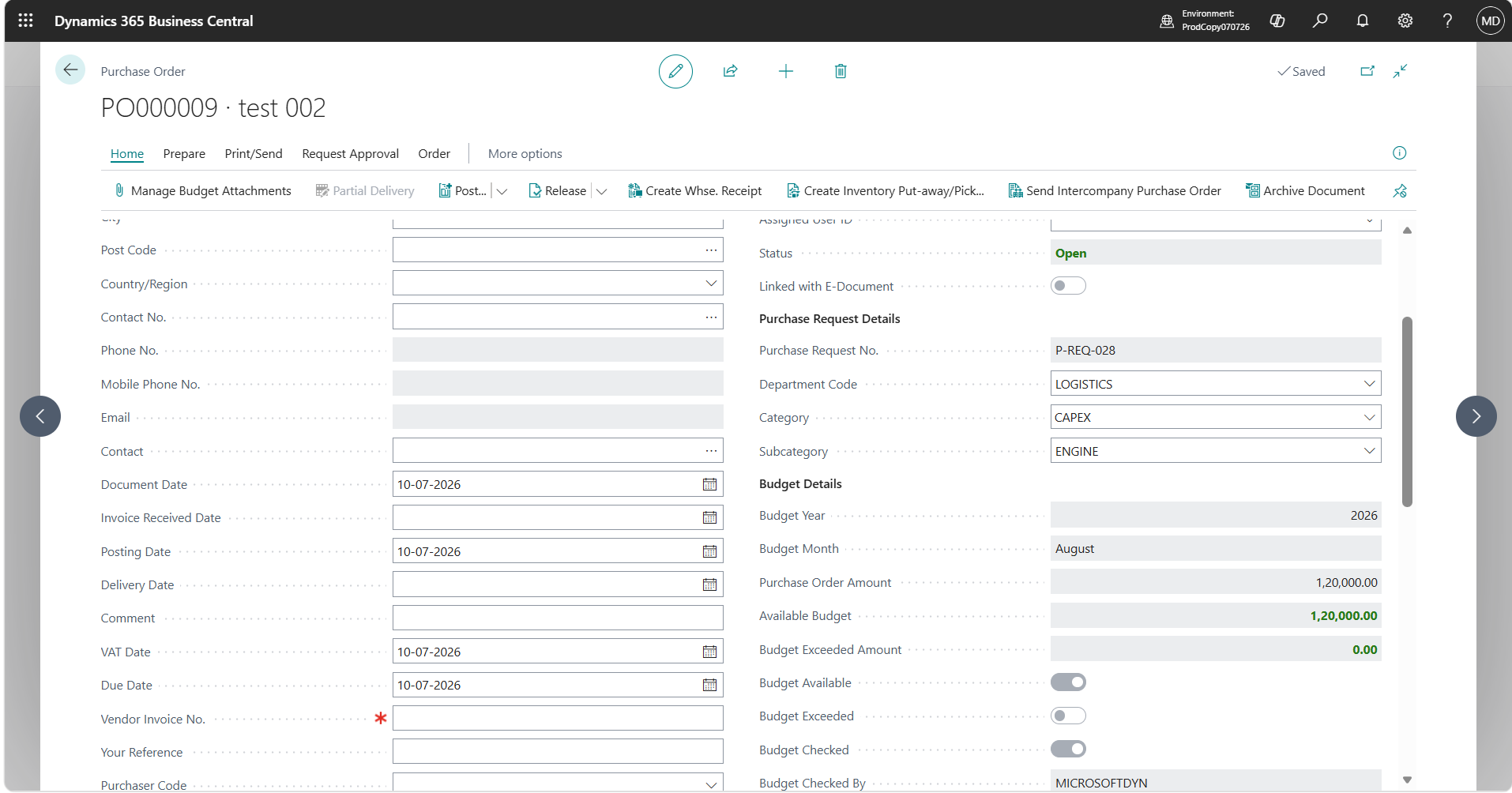
Budget consumption and financial visibility during the Purchase Order process.
Final Approval Control
Budget validation provides the financial checkpoint required before an expenditure can proceed through the final approval process.
The overall procurement lifecycle therefore moves through a structured sequence:
Business Requirement → Requirement Approval → Supplier Selection → Purchase Quote → Purchase Order → Budget Validation and Approval Control
The implementation identifies the final approval control as part of the budget-control framework for over-budget Purchase Orders.
This ensures that the financial impact of the purchase is considered as part of the procurement lifecycle rather than being handled as a completely separate Finance activity.
End-to-End Budget-Control Process
The complete procurement and budget-control process can be summarized as follows:
Step 1 – Business Requirement
An employee creates a Purchase Request identifying the required item or service.
Step 2 – Purchase Request Approval
The requirement is submitted for approval and must be approved before procurement proceeds.
Step 3 – Supplier Selection
Procurement selects the appropriate vendor for each Purchase Request line.
Step 4 – Purchase Quote
Business Central creates the applicable Purchase Quote based on the selected vendor.
Step 5 – Purchase Order
The finalized Purchase Quote is released and converted into a Purchase Order.
Step 6 – Budget Determination
The applicable budget is determined using:
Department + Budget Year + Budget Month + Category + Subcategory
Step 7 – Budget Evaluation
The Purchase Order amount is compared with the applicable departmental budget.
Step 8 – Within-Budget or Over-Budget
The system identifies whether the Purchase Order is within the available budget or whether the budget has been exceeded.
Step 9 – Budget Revision
If sufficient budget is not available, the Purchase Order identifies whether a Budget Revision Required.
Step 10 – Finance Review and Final Control
The budget-related decision is addressed through the applicable Finance and approval process before the expenditure proceeds.
This creates an end-to-end connection between the original business requirement, procurement activity, budget evaluation, and financial control.
Key Benefits
The implemented budget-control framework provides several practical benefits for Emirates Consortium.
| Benefit | How It Helps |
|---|---|
| Improved Budget Visibility | Users can view the applicable and available budget directly from the Purchase Order. |
| Early Identification of Budget Exceptions | Over-budget purchases are identified during the procurement lifecycle rather than after the transaction progresses. |
| Stronger Financial Control | Budget validation becomes an integral part of the purchasing process. |
| Clear Budget Revision Indicator | The system identifies when additional budget consideration is required. |
| Better Procurement-Finance Alignment | Procurement and Finance work with the same budget information within the ERP. |
| Greater Audit Visibility | The Purchase Order captures information about the budget check, including who performed it and when. |
Frequently Asked Questions
1. At what stage is the budget checked?
The primary budget control is applied at the Purchase Order stage.
2. How is the applicable budget determined?
The applicable budget is determined using Department, Budget Year, Budget Month, Category, and Subcategory.
3. What happens if the Purchase Order exceeds the available budget?
The Purchase Order identifies that the budget has been exceeded, displays the Budget Exceeded Amount, and identifies whether a Budget Revision is Required.
4. What information is available for the budget check?
The Purchase Order provides information including the PO Budget Amount, Available Budget Amount, Budget Exceeded Amount, Budget Available, Budget Exceeded, Budget Checked, Budget Checked By, and Budget Checked Date/Time.
5. Are Purchase Request attachments automatically transferred to the Purchase Order?
No. Attachments remain associated with the Purchase Request and are not automatically transferred to the subsequent Purchase Quote or Purchase Order.
6. Why is Budget Revision Required important?
It identifies that the Purchase Order requires additional budget consideration and cannot simply be treated as a standard within-budget transaction.
7. Does the Purchase Order become more than a purchasing document?
Yes. The implementation makes the Purchase Order an important point where procurement and financial control meet.
8. Does the solution provide an audit trail for the budget check?
The Purchase Order captures information such as whether the budget was checked, who performed the check, and the date and time of the validation.
Conclusion
The procurement journey for Emirates Consortium does not end when a Purchase Order is created.
Instead, the Purchase Order represents an important financial control point within the overall procurement lifecycle.
By connecting the Purchase Order with the applicable Department, Budget Year, Budget Month, Category, and Subcategory, the organization gains greater visibility into the budget associated with planned expenditure.
More importantly, the solution makes over-budget situations visible within the procurement process.
Users can identify the available budget, determine the amount by which the budget has been exceeded, understand whether a budget revision is required, and review the status of the budget check.
The Connected Procurement and Budget-Control Journey
Purchase Request → Approval → Supplier Selection → Purchase Quote → Purchase Order → Budget Validation → Budget Revision, if Required → Final Approval
For Emirates Consortium, this approach helps extend Business Central beyond traditional finance processing into a structured operational procurement and budget-control framework.
The result is a procurement process where business requirements, purchasing decisions, and financial controls are connected within the same ERP environment.
I hope you found this blog useful. If you would like to discuss anything or explore a future implementation, feel free to reach out to us at transform@cloudfronts.com .
About the Author

Siddhi Patekar
Senior ERP Functional Consultant · CloudFronts
Siddhi Patekar is a Senior ERP Functional Consultant at CloudFronts with experience in implementing Microsoft Dynamics 365 Business Central solutions across various industries.
She specializes in ERP implementation, business process analysis, requirement gathering, functional design, and translating business requirements into practical ERP solutions. Her experience includes working across finance, procurement, supply chain, and other business processes within Dynamics 365 Business Central.
As a functional consultant, Siddhi works closely with business stakeholders to understand existing processes, identify gaps, define appropriate solutions, and support organizations throughout their ERP transformation journey.
She is passionate about helping organizations streamline business processes through Microsoft Dynamics 365 and delivering practical, scalable ERP solutions aligned with business requirements.
Certification: Microsoft Certified: Dynamics 365 Business Central Functional Consultant Associate (MB-800)
Specialization: Dynamics 365 Business Central · ERP Implementations · Functional Consulting · Business Process Analysis · Requirements & Solution Design
Related posts:

From Client Secrets to Certificate-Based Authentication: Building a Secure Integration with Azure Ke...

From Multiple Data Sources to Azure Databricks: A Zero-Downtime Power BI Report Data Migration for F...
Using AI for Data Discipline That Drives Better AI Outcomes