

Summary
This post started with a real request. A Netherlands-based sustainability certification company that runs its certification programme on Dynamics 365 wanted the certificates it issues to come straight out of the CRM, instead of being rebuilt by hand in a document every time.
The problem itself is common. Certification bodies, testing labs and manufacturers issue certificates every day, and in most organisations that still means a Word template, a lot of copy and paste, and a PDF sent by email. The data that belongs on the certificate already lives in Dynamics 365, so why can’t the certificate come straight from the record? In this blog we build exactly that. A Generate Certificate button on a Dataverse form calls a Custom API, a small plugin hands the data to an Azure Function, and a branded, print-ready PDF comes back in about four seconds. Today the PDF is stored on the record as a base64 string, previewed and downloaded right on the form. Because the renderer only returns bytes, sending the same file to SharePoint, Azure Blob Storage or an email is a change to one step, not a rebuild.
In This Blog
This blog walks through a complete, working certificate generator for Dynamics 365, from the data model to the button, using a product certification scenario.
- The Scenario: A certification body issues product certificates and needs every one to be accurate, branded and traceable.
- The Approach: Keep the data in Dataverse, render the PDF in an Azure Function, and connect them with a Custom API.
- The Action: One click on the form produces the certificate, stores it on the record and shows a live preview.
- The Outcome: No manual formatting, no retyping, no per-document licence fees, and a design that can later publish to SharePoint or Blob storage.
Table of Contents
Business Challenges
A certificate is a legal statement: this product, made by this company, meets this standard, from this date to that date. When it is produced by hand, the risks are small individually and expensive together.
- Copy and paste errors. Product names, model numbers and expiry dates are retyped from the CRM into a document. One wrong digit on an issued certificate means a reissue and an awkward conversation.
- Template drift. Every coordinator keeps a slightly different copy of the Word template, so logos, wording and signatories quietly diverge.
- No trail. Once the PDF leaves someone’s desktop there is no record of which version was produced, when, or from which data.
- Platform limits. Dataverse plugins run in a sandbox that cannot lay out and paginate a PDF, and a JavaScript-only solution would expose service keys to every user’s browser.
- Values retyped from the record
- Layout depends on who made it
- File lives in someone’s Downloads folder
- No link back to the CRM record
- Values read directly from Dataverse
- One design, driven by configuration
- PDF stored on the record with its hash
- Preview and download on the same form
Solution Overview
The demo uses a fictional certification body, Contoso Product Assurance, which certifies products made by manufacturer accounts against its own published standards. The whole flow runs from a single button:
- FormGenerate CertificateCommand bar button on the Product Certificate form
- DataverseCustom APIBound action cf_GenerateCertificate
- PluginCollect the dataCertificate, product, holder and standard
- AzureRender the PDFFunction returns the file as base64
- RecordStore and previewBase64 saved, previewed and downloadable
Architecture
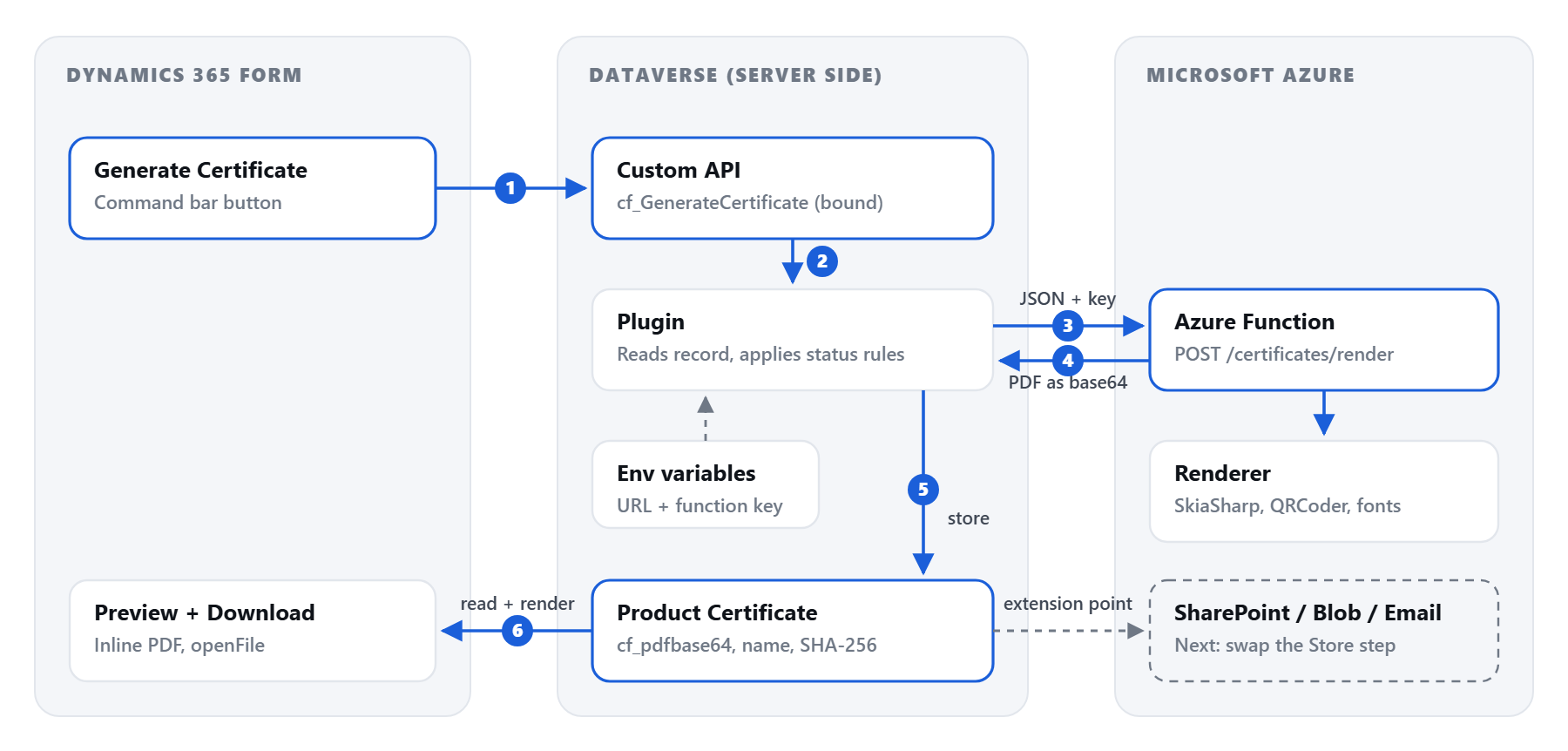
- Data modelThree custom tables (Standard, Product, Certificate) plus the standard Account table for manufacturers.
- Custom API and pluginOne server-side entry point. The function key never reaches the browser.
- Azure FunctionA .NET 10 renderer on the Consumption plan. Vector PDF, embedded fonts, QR code.
- Form experienceGenerate and Download buttons plus an inline PDF preview panel.

Technical Approach
1. The data model
Everything lives in one solution, CFCertificateGeneration, so it moves between environments as a unit.
| Table | Purpose | Key columns |
|---|---|---|
| Certification Standard | What products are assessed against | Code, Version, Default Scope, Validity (Months) |
| Certified Product | What is being certified | Product Number, Manufacturer (Account), Category |
| Product Certificate | The issued certificate | Auto-numbered Certificate Number, Status, Issue and Expiry Date, Product, Standard, Holder, Signatory, PDF (Base64), File Name, SHA-256, Generated On |
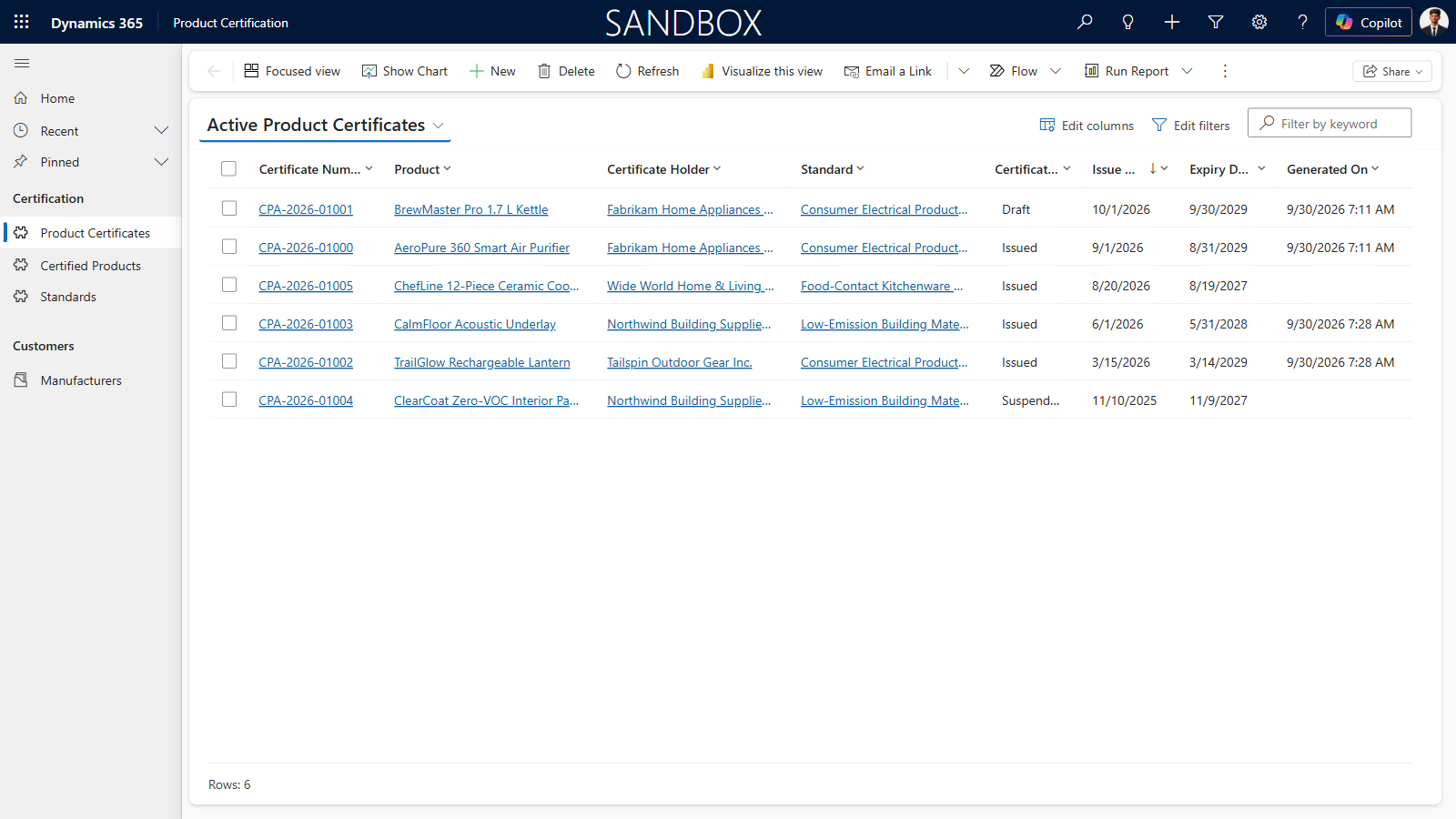
The certificate number is a Dataverse auto-number column with the format CPA-{DATETIMEUTC:yyyy}-{SEQNUM:5}, so numbering is guaranteed unique by the platform rather than by a person. The certificate holder defaults to the product’s manufacturer and can be overridden when a brand owner holds the certificate for a product someone else makes.
2. The renderer
The PDF is drawn with SkiaSharp and the QR code with QRCoder, both open source. The same drawing code targets either a PDF page or a PNG bitmap, which means the image you check during development is exactly what the customer receives. Text is real, selectable text in embedded fonts, every graphic is a vector shape rather than an image, and long product names shrink to fit instead of overflowing the frame.
public RenderedCertificate RenderPdf(CertificateRequest request)
{
    Validate(request);
    using var output = new MemoryStream();
    using (var document = SKDocument.CreatePdf(output, metadata))
    {
        var canvas = document.BeginPage(842f, 595f);   // A4 landscape, in points
        Draw(canvas, request);                        // same code paints the PNG preview
        document.EndPage();
        document.Close();
    }
    return new RenderedCertificate(output.ToArray(), FileNameFor(request.CertificateNumber));
}There is not a single raster image in the certificate. Every line of text is real text in an embedded font, and the frame, the seal, the dividers and even the QR code are drawn as vector shapes. Zoom to 800%, print it on A3 or project it on a wall and it stays razor sharp, with no blurry logo and no pixelated QR code. When you add your own logo or signature, supply it as an SVG and the document stays fully vector.
Branding is configuration, not code. The brand name, monogram, title, colours and footer are read from app settings such as Certificate__BrandName and Certificate__PrimaryColor, so a second certification body is a settings change. Draft certificates carry a DRAFT watermark automatically.

3. The Azure Function
A single HTTP function, POST /api/certificates/render, protected by a function key and hosted on the Windows Consumption plan. It takes the certificate values as JSON and returns the file plus the metadata needed to store it.
{
  "fileName": "Certificate-CPA-2026-01000.pdf",
  "contentType": "application/pdf",
  "sizeBytes": 174404,
  "sha256": "<hash of the file>",
  "generatedOnUtc": "2026-09-30T07:12:41Z",
  "pdfBase64": "JVBERi0xLjQK..."
}
The function deliberately does not decide where the file goes. It renders and returns. That single decision is what keeps storage flexible later.
4. The Custom API and plugin
The button does not call Azure directly. It calls a bound Custom API, cf_GenerateCertificate, whose plugin reads the certificate, product, holder and standard, applies the business rules, and calls the function from the server.
- The key stays on the server. The function URL and key live in environment variables that only the plugin reads. Nothing sensitive is shipped to the browser.
- One entry point for everything. The same action can be called from the form, from Power Automate, or from another system through the Web API.
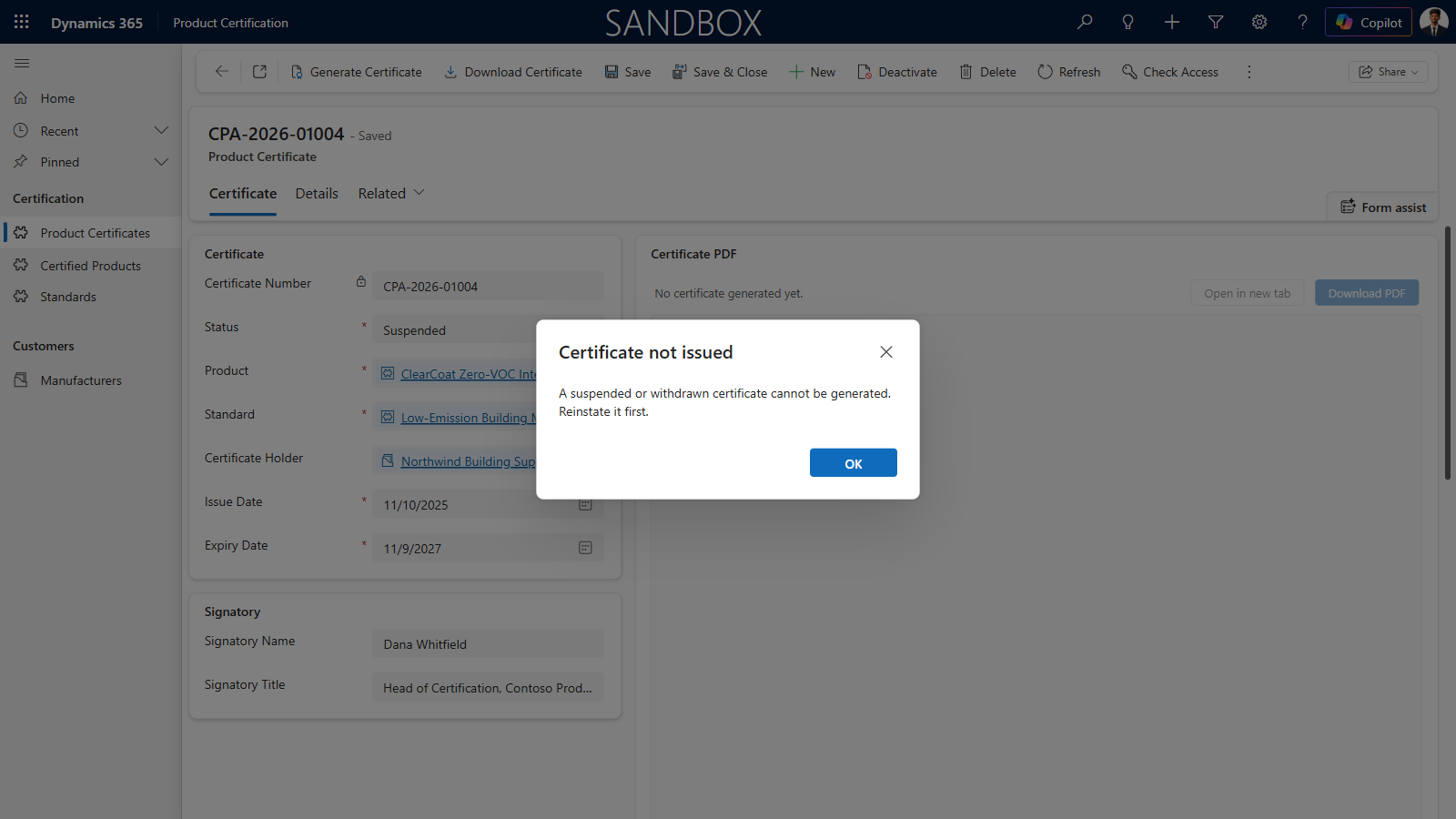
- Business rules in one place. Suspended and Withdrawn certificates are refused with a clear message; Draft certificates are watermarked.
var certificate = service.Retrieve("cf_productcertificate", target.Id, columns);
if (status == StatusSuspended || status == StatusWithdrawn)
    throw new InvalidPluginExecutionException(
        "A suspended or withdrawn certificate cannot be generated. Reinstate it first.");

var request  = BuildRequest(service, certificate, isDraft: status == StatusDraft);
var rendered = Render(Settings.Load(service), request, tracing);   // POST to the function
Store(service, certificate, rendered);                             // today: base64 on the record
5. The button and the preview
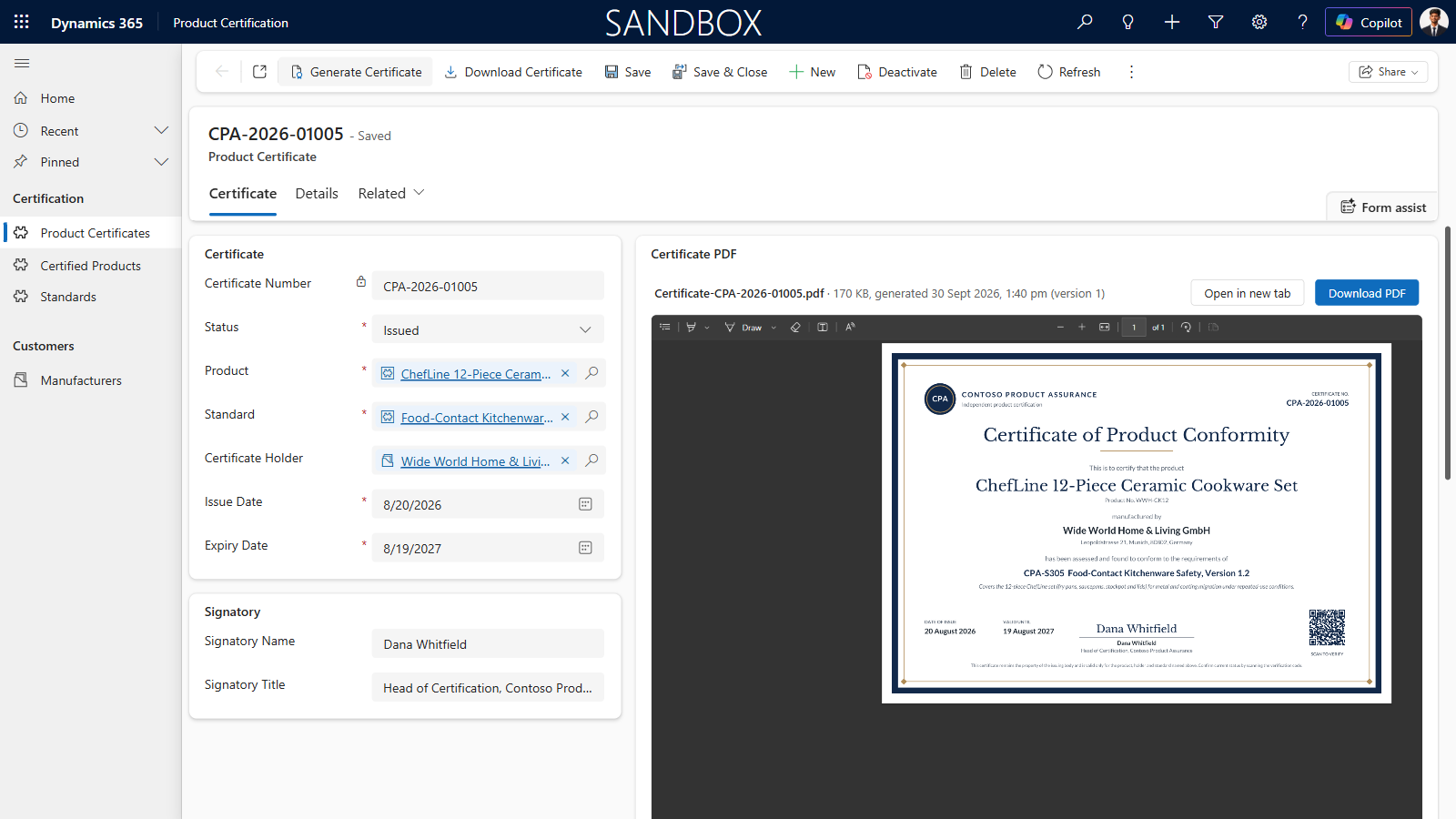
The command bar has two buttons: Generate Certificate and Download Certificate, both available once the record is saved. If nothing has been generated yet, Download says so instead of failing. Generate calls the Custom API through the client API; Download hands the base64 straight to the platform’s own file handler.
Xrm.WebApi.online.execute({
  entity: { entityType: "cf_productcertificate", id: recordId },
  getMetadata: () => ({
    boundParameter: "entity", operationType: 0, operationName: "cf_GenerateCertificate",
    parameterTypes: { entity: { typeName: "mscrm.cf_productcertificate", structuralProperty: 5 } }
  })
});

// Download: no Blob plumbing needed, openFile accepts base64 directly
Xrm.Navigation.openFile({ fileContent: record.cf_pdfbase64, fileName: record.cf_pdffilename,
  mimeType: "application/pdf", fileSize: record.cf_pdfsizebytes }, { openMode: 2 });
An HTML web resource beside the fields turns the same base64 into an inline PDF preview, with the file name, size, generation time and version, so users check the certificate without leaving the form.
6. Where the PDF goes next
Storing base64 on the record is the simplest thing that works, and it is honest about its limits. Because only the Store step knows about storage, each of these is an isolated change:
| Target | What changes | When to choose it |
|---|---|---|
| Base64 on the record (today) | Nothing | Demos, low volume, fully inside Dataverse |
| Dataverse File column | Store step writes a file column | Keeps files in Dataverse, lighter on database storage |
| SharePoint | A flow on the Custom API, or the plugin via Microsoft Graph | Documents tab, retention policies, sharing |
| Azure Blob Storage | The function uploads and returns a path | High volume, public verification links, CDN |
| Email to the customer | Attach the bytes to an email activity | Automatic delivery when status becomes Issued |
Impact
These figures are measured on the working build described above, running against a Dynamics 365 sandbox and the Azure Functions Consumption plan.
- ~4 sFrom button click to PDF stored on the record
- 100%Vector output: no raster images, sharp at any zoom or print size
- $0Licence fees for the generator itself
What it costs
Certificate and document generation is often bought as a third-party add-on, usually licensed per user or per generated document. This build has no such fee. What remains is a small Azure footprint, and at normal certification volumes almost all of it sits inside Azure’s free monthly allowances.
| Component | Cost |
|---|---|
| Azure Function (Consumption plan, used in this build) | Free within the monthly grant of 1 million executions and 400,000 GB-seconds per pay-as-you-go subscription |
| Azure Function (Flex Consumption plan, Microsoft’s recommended plan for new apps) | Smaller free grant of 250,000 executions and 100,000 GB-seconds a month, still roughly 200,000 certificates on a 512 MB instance |
| Storage account the Function App needs | Billed separately from the free grant; typically well under US$1 a month at this volume |
| Data sent back to Dynamics 365 | The first 100 GB of outbound data a month is free; at about 230 KB per certificate that is roughly 400,000 certificates |
| Application Insights (optional monitoring) | The first 5 GB of logs a month is free per billing account |
| Custom API, plugin, web resources, forms | Part of Dataverse, no extra licence |
| Internal users who generate certificates | The Dynamics 365 or Power Apps licence they already have |
| Your customers who receive certificates | Nothing. They get a PDF, with no licence, portal or sign-in required |
| Third-party document generation add-on | Not needed |
Azure bills Consumption functions by execution time and memory, with memory rounded up to the nearest 128 MB. Even assuming a generous 1 second at 512 MB for every certificate, the free grant of 400,000 GB-seconds covers roughly 800,000 certificates a month, more than 25,000 a day. Below that, the rendering itself costs nothing. Free grants apply to pay-as-you-go subscriptions; check current figures on the Azure Functions pricing page before you quote them.
While PDFs are stored on the record as base64 they use Dataverse database capacity. At low volumes that is negligible; at scale, moving files to a File column, SharePoint or Blob storage keeps capacity costs flat.
Conclusion
A certificate is only as trustworthy as the process that produces it. By rendering it from the Dataverse record, through a Custom API that owns the rules and an Azure Function that owns the layout, every certificate is consistent, traceable and one click away. The design stays small on purpose: the renderer returns bytes, and where those bytes go is a decision you can change later without touching the layout or the business rules.
The same pattern fits any document that is really a view of CRM data: certificates of conformance, training completion certificates, warranty cards, compliance letters or quotations.
FAQ
01Why not generate the PDF inside the plugin?
Dataverse plugins run in a sandbox with a two minute limit and no access to the graphics and font stack that PDF layout needs. An Azure Function has neither restriction, scales on demand and can be updated without redeploying the plugin.
02Why not use a Power Automate Word template?
It works for simple documents, but it relies on a premium connector, offers limited layout control, and cannot easily add things like vector QR codes or status-driven watermarks. A code renderer gives exact, repeatable output and can still be called from Power Automate through the Custom API.
03Is storing base64 in Dataverse a good idea?
For a demo or low volumes, yes. A 174 KB certificate is about 233,000 characters of base64, well inside the one million character column limit. At higher volumes it consumes database storage, which is the most expensive Dataverse capacity, so move the file to a File column, SharePoint or Blob storage.
04How is the Azure Function secured?
With a function key that only the plugin knows, read from a Dataverse environment variable. For production, store the key as an Azure Key Vault secret environment variable, or replace keys with Microsoft Entra ID authentication on the Function App.
05Can we brand it for a different organisation?
Yes. Brand name, monogram, title, colours and footer text are app settings on the Function App. A second brand is a configuration change, and a completely different layout is a second renderer behind the same contract.
06Can we generate certificates in bulk?
Yes. The Custom API is a normal Dataverse action, so a Power Automate flow or a batch job can call it for every certificate that needs generating, for example when a standard is revised.
07Is it really free?
There is no licence fee for the generator itself. On the Consumption plan you pay for the Azure Function only above the free grant of 1 million executions and 400,000 GB-seconds a month, which covers hundreds of thousands of certificates. The Flex Consumption plan has a smaller grant but still covers around 200,000 a month. The storage account it needs costs well under a dollar a month at typical volumes. Internal users need the Dynamics 365 or Power Apps licence they already have, and the customers receiving certificates need nothing at all.
08Will the certificate look sharp when printed?
Yes. The PDF is fully vector: text in embedded fonts, and the frame, seal and QR code as vector shapes, with no raster images at all. It prints cleanly at any size and zooms without blurring. Keep it that way by supplying logos and signatures as SVG rather than PNG or JPG.
Get in Touch
Turning CRM records into documents your customers trust?
We help organisations generate certificates, reports and customer documents directly from Dynamics 365 and Dataverse, and wire them into SharePoint, Azure or the tools you already use.
Talk to CloudFronts →
Suchit Chaudhari
Dynamics 365 & Azure, CloudFronts
Builds Dynamics 365 and Power Platform solutions that connect CRM data to Azure services, with a focus on document generation, integrations and practical automation.
