How an Abu Dhabi-Based Diversified Holding Company Simplified Intercompany Transactions in Dynamics 365 Business Central
Summary
For Emirates Consortium, an Abu Dhabi-based diversified holding company already using Microsoft Dynamics 365 Business Central across multiple legal entities, intercompany accounting is a relevant process area. This article explores how standard intercompany functionality can simplify transactions between related companies. It covers intercompany partner relationships, customer and vendor links, and G/L account and dimension mappings. Using practical scenarios, we walk through a sales invoice raised in one company and received as a purchase invoice in another, as well as journal-based allocation of partial expenses. The walkthrough also shows how the Intercompany Outbox and Inbox support transaction review before posting, and highlights key reconciliation controls and limitations.
Table of Contents
Introduction
Organizations operating through multiple legal entities often share resources, incur costs centrally, and recharge expenses to the company that actually benefits from them. Although these entities belong to the same business group, each company maintains its own accounting records, receivables, payables, and financial reporting.
Emirates Consortium LLC is an Abu Dhabi-based diversified holding company with businesses across the UAE and Maldives. As highlighted in the Emirates Consortium customer success story, CloudFronts deployed Dynamics 365 Business Central across five legal entities to support core business processes. For organizations operating across several companies, intercompany recharges and cost allocation are important areas to assess when looking to reduce duplicate finance work.
To explore these capabilities, consider two related companies, Gulf Aquaculture (GA) and Gulf Aquaculture Alliance (GAA). The walkthrough covers two practical routes: an intercompany sales invoice for a formal recharge and an intercompany general journal for direct cost allocation. It explains the setup, accounting impact, and important control points involved in both processes.
Route A
Intercompany Sales Invoice
A formal recharge from GA, received in GAA as a purchase invoice.
Route B
Intercompany General Journal
A direct allocation of part of a cost already recorded in GA.
The Business Problem
The finance team managed transactions for separate group companies, but some costs, such as consultancy, administration, payroll-related expenditure, and project-related operating expenses, were initially incurred or recorded in GA even when they partly or entirely related to GAA.
For example, GA might receive an external vendor invoice for AED 10,000, of which AED 4,000 is attributable to GAA. Without a standard cross-company workflow, staff must determine the chargeable amount, prepare a corresponding transaction in the second company, and verify that the two sets of books agree.
10,000
AED external vendor invoice recorded in GA
4,000
AED attributable to GAA
6,000
AED that remains GA’s own cost
Handling this manually created five gaps:
01
Manual Re-Entry
Re-entering transactions increased the risk of inconsistent amounts, descriptions, or account classifications between companies.
02
Hidden Costs
The receiving company needed visibility into its own project and operating expenses rather than having those costs remain embedded in GA.
03
Limited Control
Finance required control over which transactions were sent, accepted, and posted, particularly for higher-value recharges.
04
Different Account Structures
The chart of accounts and dimensions needed to translate correctly when the two companies used different codes or reporting structures.
05
Month-End Reconciliation
Intercompany balances needed to be traceable and reconcilable at month-end.
Business Objective
Record the charge once in the initiating company, communicate it through Business Central, and let the receiving company review and post the corresponding entry in its own books.
The Solution
The proposed approach used standard Business Central intercompany functionality rather than a separate custom integration. Both companies were configured as intercompany partners, with mapped accounts and dimensions to support the exchange of transactions.
1. Establishing the Intercompany Relationship
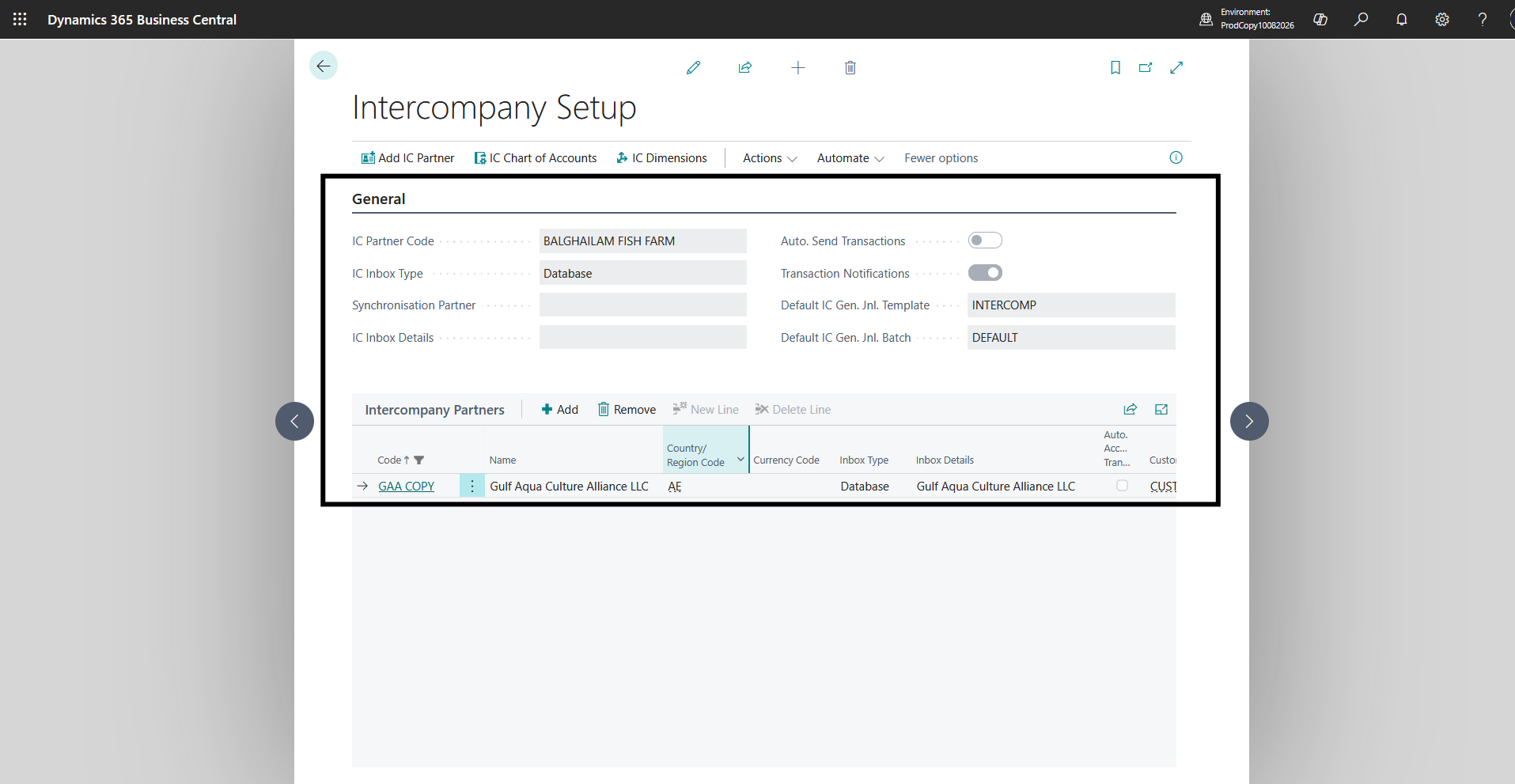
Each participating Business Central company needs its own Intercompany Setup and a unique IC Partner Code. The other company is then added as an intercompany partner with an appropriate transfer method. For a partnership inside the same Business Central environment, direct company-to-company transfer can be used where supported by the configured environment.
2. Connecting Customers and Vendors
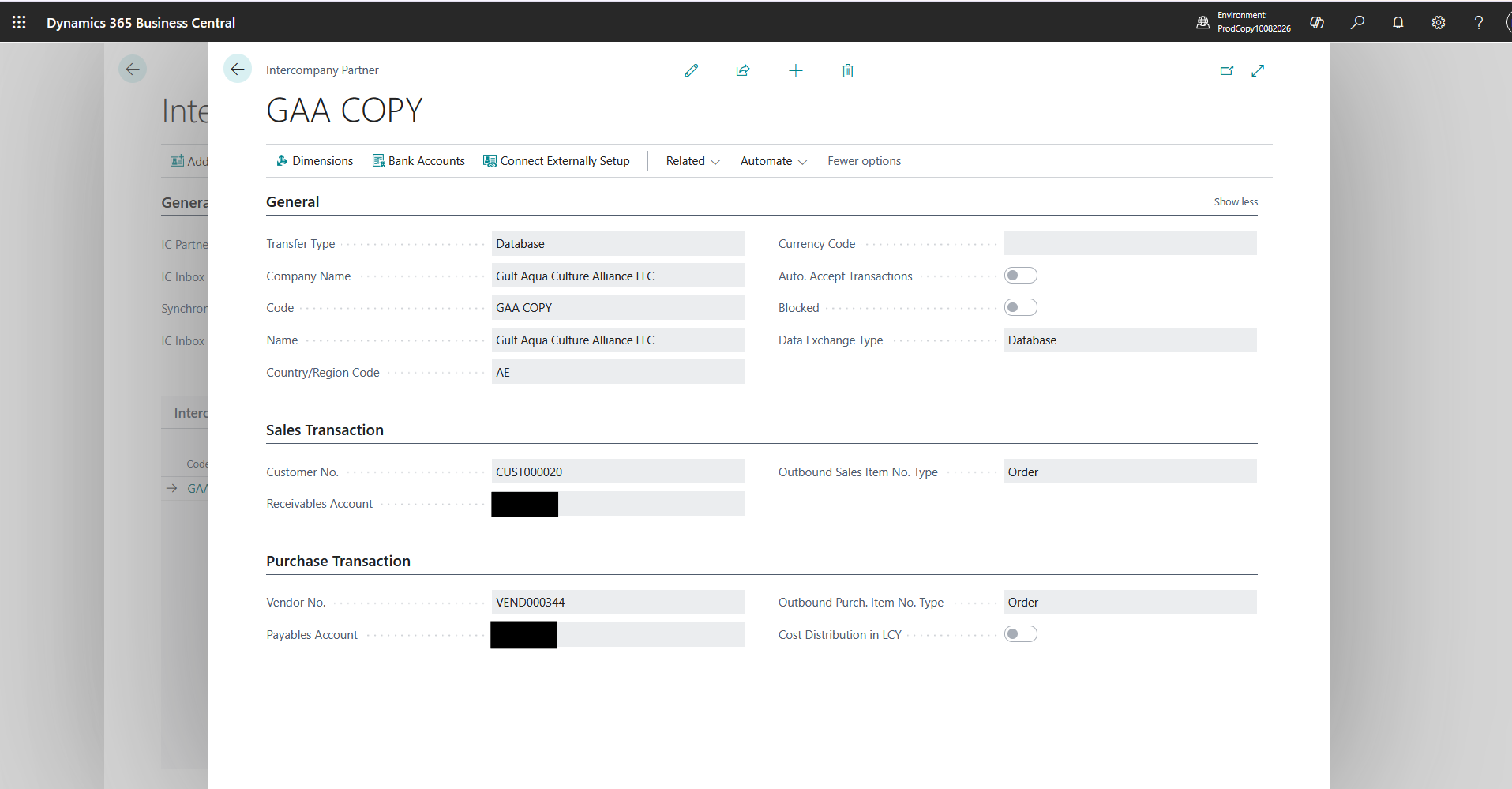
In GA, GAA is represented by an intercompany customer for billing. In GAA, GA is represented by an intercompany vendor for recording the payable. Assigning the relevant IC Partner Code on the customer and vendor records connects the commercial documents to the receiving company.
GAA as an Intercompany Customer
Used to bill GAA. The IC Partner Code links the invoice to GAA.
GA as an Intercompany Vendor
Used to record the payable to GA. The IC Partner Code links it back to GA.
3. Mapping the Intercompany Chart of Accounts
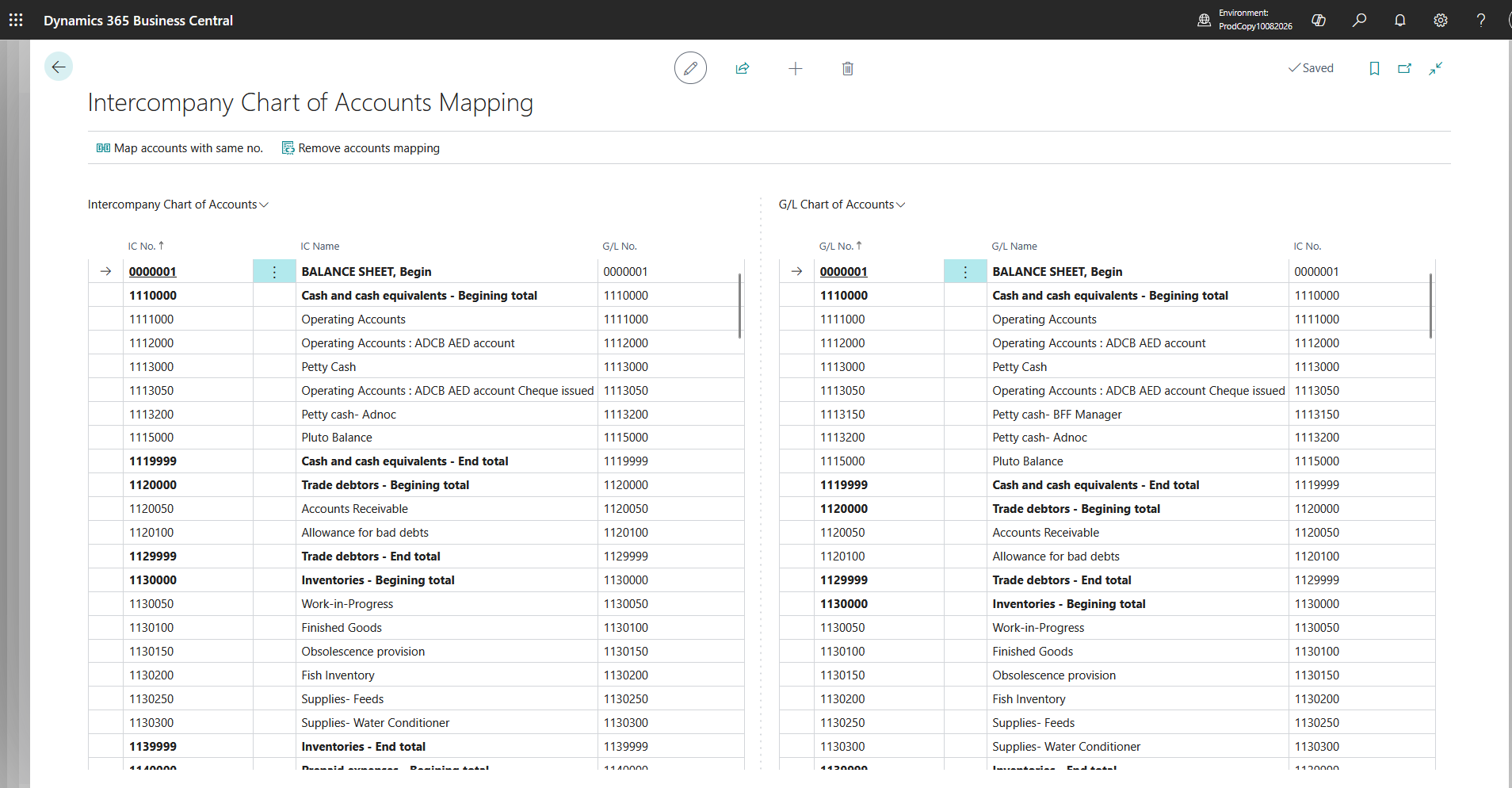
Business Central uses a shared intercompany chart of accounts as the language between companies. Each company maps its own G/L accounts to the intercompany accounts and maps incoming intercompany accounts back to its local G/L accounts. When account numbering differs between companies, these mappings are essential.
During the walkthrough, the team reviewed how a sales invoice line could carry an IC Partner Reference so that the receiving company would recognize the appropriate expense account. Account mapping in both directions was especially important: an account existing in one company does not guarantee that the other company can post it.
4. Preserving Dimensions and Project Context
Intercompany dimensions can transmit reporting context such as Department, Project, or Cost Centre when corresponding dimension codes and values are set up and mapped. The accounting team should confirm that the receiving company’s dimension values accurately represent the destination project or department.
5. Choosing the Appropriate Transaction Route
| Business Requirement | Recommended Standard Route |
|---|---|
| Formal charge for services or reimbursable costs | GA intercompany Sales Invoice → GAA Purchase Invoice |
| Partial allocation of an expense already recorded in GA | Intercompany General Journal → corresponding journal in GAA |
| Direct allocation while registering an external vendor invoice | Purchase Invoice cost-allocation fields for IC Partner, where applicable and tested |
| Correction of an earlier intercompany charge | Appropriate credit memo or reversing journal, reviewed in both companies |
The following walkthrough focuses on the first two routes: intercompany invoices and intercompany journals, rather than sales and purchase order processing.
6. Controlling Transactions Through the Inbox and Outbox
When an intercompany invoice or journal is posted, Business Central prepares the corresponding transaction for exchange. With manual sending enabled, the source user reviews it in the Intercompany Outbox and sends it to the partner. The recipient reviews it in the Intercompany Inbox, accepts it, and then posts the created purchase invoice or journal.
Good to Know
Automatic sending and acceptance options may reduce these manual handling steps, but acceptance does not mean the receiving document is automatically posted. For this scenario, the ability to review a charge before the receiving entity records it was an important control.
Implementation and Process Walkthrough
The following examples use GA as the company initiating a recharge and GAA as the company receiving it. Account names and figures are simplified to show the accounting principle without exposing the customer’s detailed chart of accounts.
1. The Intercompany Setup Checklist
| Setup Area | Configuration / Validation |
|---|---|
| Intercompany Setup | Unique company IC codes and the chosen transfer method |
| Intercompany Partners | GA configured in GAA and GAA configured in GA |
| Customer / Vendor cards | GAA linked as a customer in GA; GA linked as a vendor in GAA |
| Intercompany Chart of Accounts | Required IC accounts exist, with both outbound and inbound G/L mappings |
| Intercompany Dimensions | Relevant dimension codes and values mapped in both directions |
| Journal template and batch | IC general journal setup available to receive and post journal lines |
| Posting setup and tax | General/VAT posting groups, document numbers, currencies, and due-to/due-from handling validated |
2. Scenario A: GA Charges GAA Through a Sales Invoice
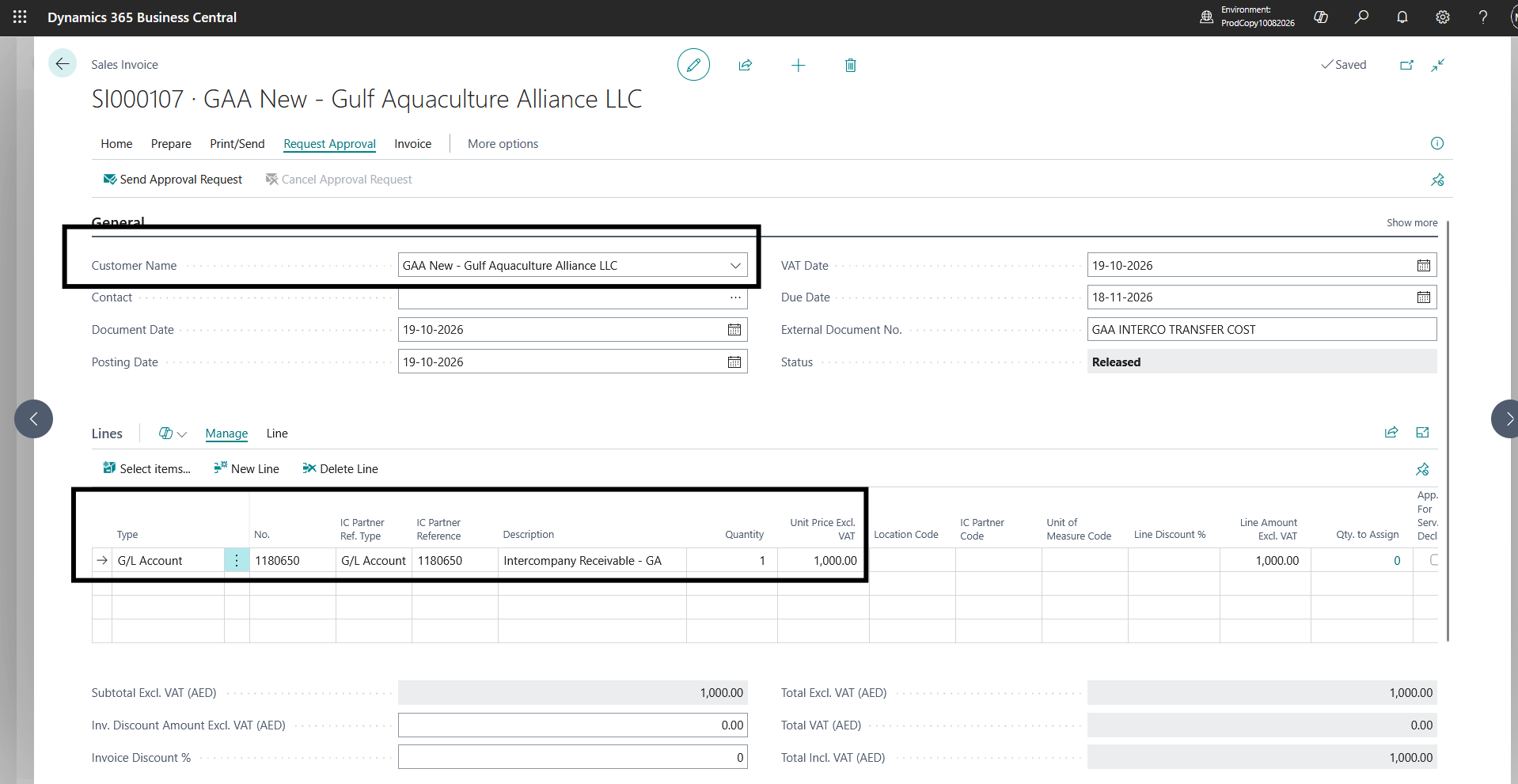
Assume GA needs to recharge AED 4,000 of services to GAA. In GA, the user creates a new Sales Invoice and chooses the customer linked to GAA’s intercompany partner code. The invoice includes a G/L Account line for the recharge and, where necessary, the IC Partner Ref. Type and IC Partner Reference identifying the expense account expected in GAA.
- In GA, open Sales Invoices and create an invoice for the intercompany customer representing GAA.
- Add a G/L Account line, enter the recharge description and AED 4,000, and verify the partner reference, dimensions, and applicable tax treatment.
- Complete internal approval if the organization’s approval workflow requires it, and post the sales invoice in GA.
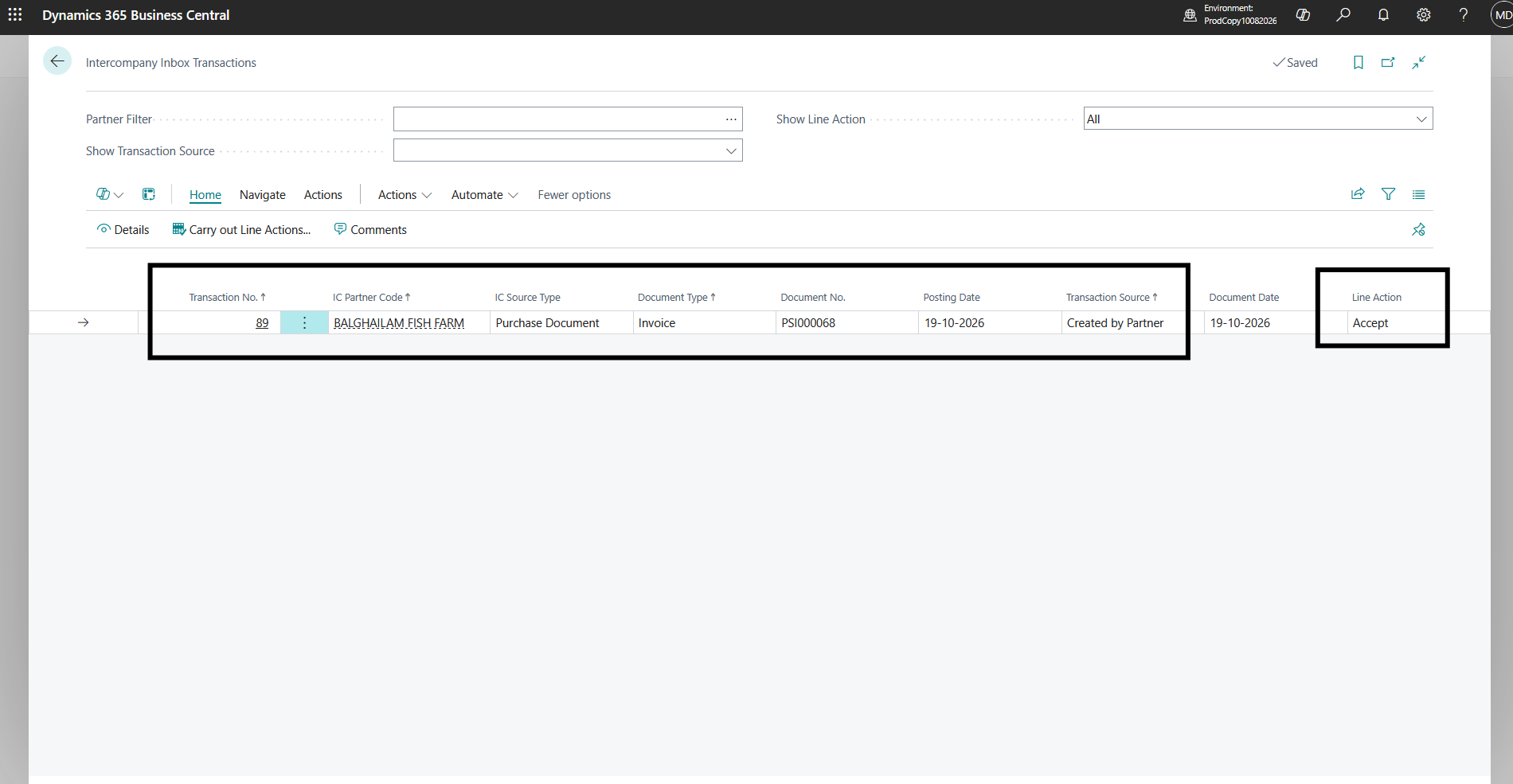
- Open Intercompany Outbox Transactions, review the posted entry, use Send to IC Partner, and complete the line action if manual processing is enabled.
- Switch to GAA, open Intercompany Inbox Transactions, review the entry, and accept it to create a Purchase Invoice.
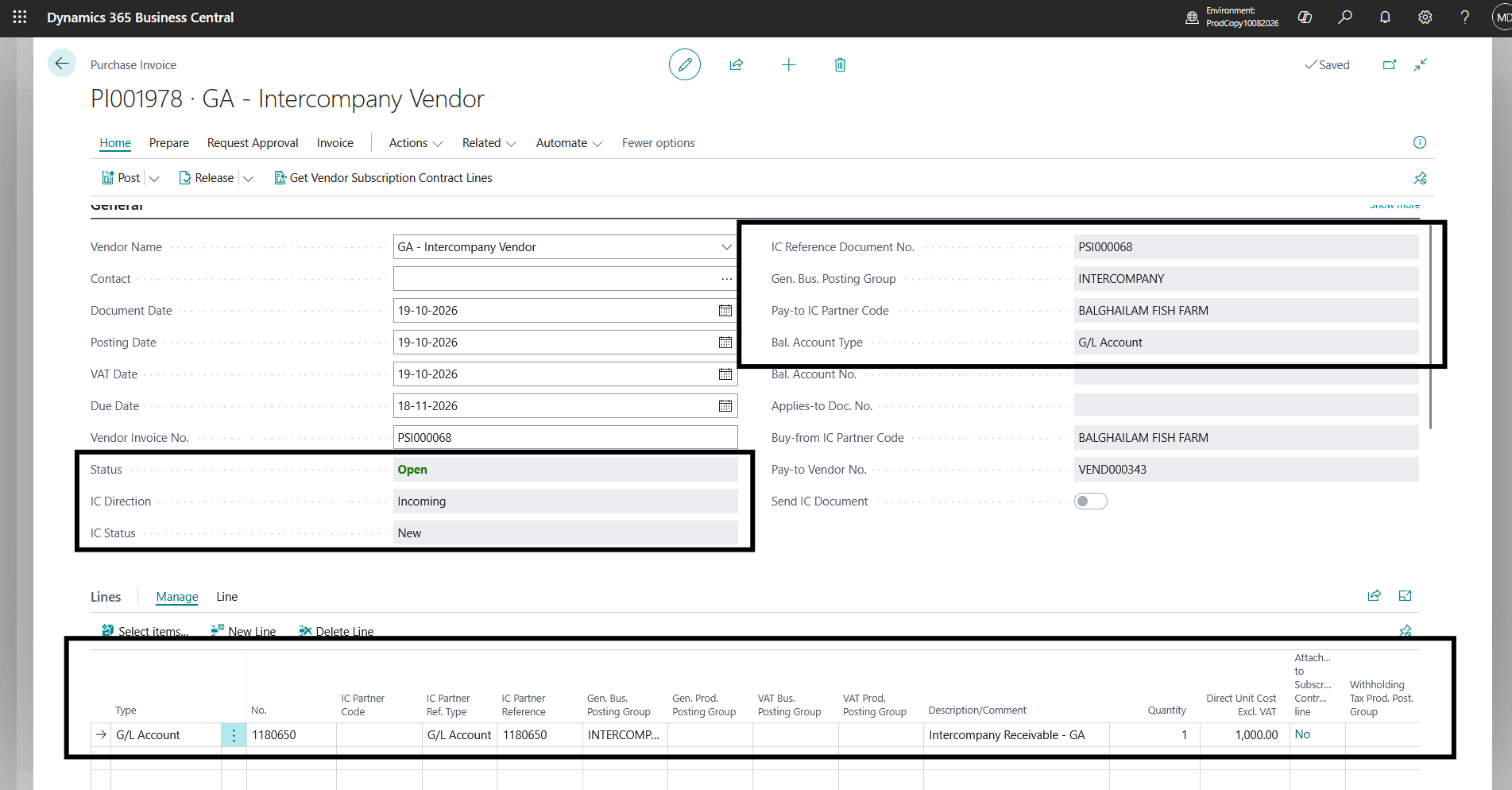
- Open the newly created purchase invoice in GAA, verify the mapped expense account, amount, dimensions, and VAT treatment, and post it.
- Reconcile GA’s customer receivable with GAA’s vendor payable and check the transaction status in the handled Inbox/Outbox.
Intercompany invoice workflow
GA: Post IC Sales Invoice
→
GA: IC Outbox
→
GAA: IC Inbox
→
GAA: Purchase Invoice
→
GAA: Post
| GA (Charging Company) | GAA (Receiving Company) |
|---|---|
| Sales invoice: Dr intercompany customer receivable AED 4,000; Cr recharge income / approved offset account AED 4,000 | Purchase invoice: Dr receiving expense AED 4,000; Cr intercompany vendor payable AED 4,000 |
These are simplified pre-tax accounting illustrations. Actual G/L entries depend on the accounts used, posting groups, invoice type, currency, and tax setup. A formal invoice does not automatically reverse the original vendor expense in GA; the organization must determine whether the credit is appropriately classified as income or an approved cost offset.
3. Scenario B: Allocate Part of a Cost Through an Intercompany Journal
Consider an external consultancy invoice of AED 10,000 recorded in GA, with AED 4,000 relating to GAA. If the business needs a direct redistribution of expense rather than a separate commercial sales invoice, an Intercompany General Journal can transfer the allocated cost.
- Confirm the original vendor invoice is already recorded in GA and identify the expense portion attributable to GAA.
- Open Intercompany General Journals in GA and choose the correct template and batch.
- Create a journal line with Account Type set to IC Partner, choose GAA, enter the AED 4,000 allocation, and specify the balancing expense or recharge clearing account and the IC Partner G/L Acc. No.
- Review the posting date, document reference, dimensions, posting groups, and whether the sign used produces the intended debit and credit.
- Post the journal in GA. Send the resulting entry from the Intercompany Outbox if it was not automatically sent.
- In GAA, accept the incoming intercompany journal transaction into the designated journal batch, review the proposed entries, and post them.
- Check that the allocated expense appears in GAA and that the due-from / due-to intercompany balances agree.
| Company / Point in Time | Debit | Credit |
|---|---|---|
| GA: original external invoice | Consultancy expense AED 10,000 | External vendor payable AED 10,000 |
| GA: intercompany allocation | Due from GAA AED 4,000 | Consultancy expense / clearing AED 4,000 |
| GAA: accepted IC journal | Consultancy expense AED 4,000 | Due to GA AED 4,000 |
Important Distinction
An intercompany journal reallocates the cost but does not by itself transfer the original external vendor payable from GA to GAA. If legal liability must move to another entity, that requires a separate, reviewed accounting and legal process.
4. Validation and Reconciliation
Both invoice and journal processing require validation, including reviewing how manual versus automatic sending affects the process. Finance teams should perform a cross-company check after posting, rather than merely confirming that a transaction reached the Inbox.
| Validation Point | Expected Outcome |
|---|---|
| Document pairing | GA posted sales invoice corresponds to GAA posted purchase invoice |
| Balances | GA due-from/receivable agrees with GAA due-to/payable, after accounting for timing and currency |
| Expense location | The allocated amount appears in the intended receiving-company expense account |
| Dimensions | Department, Project, and other intended analysis values are mapped correctly |
| Status trail | Outbox, Inbox, and handled records show the transaction’s progression |
| Exceptions | Rejected, duplicate, or incorrectly mapped entries are investigated before posting |
Limitations and Key Considerations
Intercompany removes duplicate entry, but it does not remove the need for accounting judgment, partner setup, and review controls.
| Area | What to Consider |
|---|---|
| Receiving-company posting | Accepting an intercompany invoice or journal prepares the corresponding transaction. Users still need to validate and post in the receiving company. |
| IC account mappings | A missing IC G/L account, missing partner reference, or unmapped target account can prevent the recipient from accepting or posting the transaction. |
| Dimension mapping | A destination dimension or value that is absent or not mapped may block posting or result in incorrect analysis. |
| External vendor liability | An IC cost-allocation journal does not move the original external vendor ledger entry or the contractual liability. |
| Tax treatment | VAT must be reviewed according to legal-entity relationships, jurisdiction, invoice purpose, and Business Central VAT posting setup. Do not assume an intercompany charge is automatically tax-exempt. |
| Automation and duplicate control | Auto-send and auto-accept are configurable conveniences, not substitutes for reconciliation and duplicate-document controls. |
| Scope of documents | The standard IC workflow can generate a purchase invoice from an intercompany sales invoice; it does not simply forward an external purchase invoice as the same vendor document. |
| Intercompany elimination | Operational IC postings do not automatically eliminate intercompany balances or income/expenses in group consolidated financial statements. Consolidation requires its own treatment. |
Business Impact
For the multi-entity charging scenario, the standard Business Central workflow provides a clearer hand-off from the company initiating a recharge to the company that owns the final expense. The approach can offer the following operational benefits:
Less Repetitive Data Entry
The receiving document or journal is created from the originating intercompany transaction.
Better Financial Visibility
The receiving company recognizes its share of costs in its own general ledger and dimensions.
Greater Control Over Recharges
Manual review, acceptance, and posting checkpoints can be applied where required.
Consistent Classification
Shared intercompany accounts and mappings classify cross-company transactions the same way.
Traceable History
A cross-company transaction history supports finance review and periodic reconciliation.
Foundation for Automation
Standard functionality can later support greater automation once user testing and controls are agreed.
The extent of these benefits depends on the organization’s transaction volumes, account mappings, and review processes.
Frequently Asked Questions
Does the receiving company automatically post a purchase invoice when GA posts a sales invoice?
No. The originating invoice can be transferred to the receiving company and accepted to create a purchase invoice. The receiving finance user must still review and post that purchase invoice. Automatic send and accept settings can reduce handling steps, but they do not replace the receiving-company posting step.
What if GA and GAA use different G/L account numbers?
The intercompany chart of accounts serves as a common layer. Both companies map their local G/L accounts to the shared IC accounts and map incoming IC accounts back to the appropriate local accounts. Invoice lines can also carry the applicable IC partner reference.
When should we use an intercompany invoice instead of an intercompany journal?
Use a sales/purchase invoice route when a formal intercompany charge and a corresponding customer/vendor document are needed. Use an intercompany general journal when finance is reallocating a recognized expense or recording a due-to/due-from adjustment without requiring a commercial invoice. Tax, legal, and audit requirements should determine the final choice.
Can intercompany transactions carry project or department dimensions?
Yes, if the intercompany dimensions and values are defined and mapped correctly on both sides. The receiving company should review the values before posting to ensure the cost reaches the intended department, project, or reporting segment.
Can Business Central redistribute costs from an external vendor invoice?
Yes. Standard Business Central provides intercompany cost-allocation options using journals and applicable purchase document fields. The chosen workflow must be tested, including G/L-only purchase allocation lines, tax setup, and account mapping. This is distinct from transferring the original vendor liability.
Conclusion
Intercompany functionality in Microsoft Dynamics 365 Business Central offers a practical way for related legal entities to transact while preserving separate books. In the GA-to-GAA scenario, a source-company recharge could be processed through an intercompany sales invoice and received as a purchase invoice, while an intercompany general journal offered a lighter route for allocating individual costs.
The most important implementation lessons were not about turning on a single feature. They were about connecting each company correctly, mapping G/L accounts and dimensions, choosing the right transaction method, and preserving a controlled Inbox/Outbox review process. With those fundamentals in place, finance teams can reduce duplicate work and make cross-company costs easier to classify, review, and reconcile.
Key Takeaway
Intercompany does not merge accounting responsibilities between legal entities. It connects their transactions while maintaining the review, posting, and audit trail required in each company.
Facing the same challenge?
Managing shared costs, intercompany recharges, or reconciliations across multiple entities? CloudFronts helps businesses streamline these processes with Microsoft Dynamics 365 Business Central. Tell us what you are trying to solve, and we can discuss the right approach.
About the Author

Related posts:
Recovering Lost Approval History After a Purchase Order Deletion in Business Central
From Project Operations to Business Central: Following the Data Behind Project Financials
Location-Based Item Based Visibility in Business Central for a Maldives-Based Marine Services Firm