

Transforming Accounts Payable with AI: Configuring the Payables Agent in Microsoft Dynamics 365 Business Central
Summary
This blog explores how the Payables Agent in Microsoft Dynamics 365 Business Central (2025 Release Wave 1) transforms traditional Accounts Payable (AP) processes by leveraging AI to automate invoice processing for a Netherlands-based non-profit organization.
Traditionally, finance teams spend considerable time manually entering invoice information, validating vendors, creating purchase invoices, and ensuring document accuracy. As invoice volumes grow, these repetitive tasks become increasingly time-consuming and susceptible to human error.
The Payables Agent introduces an AI-assisted approach that automatically monitors a designated mailbox, extracts invoice information from PDF documents, identifies vendors, creates draft purchase invoices, and routes them for supervisor review before posting.
This blog explains:
- The challenges associated with traditional Accounts Payable processing.
- How the Payables Agent works in Business Central.
- The configuration steps required to activate the agent.
- The end-to-end AI-powered invoice processing workflow.
- The business impact of automating Accounts Payable.
Table of Contents
1. Customer Scenario
A finance department within a Netherlands-based non-profit organization processing hundreds of vendor invoices each month was experiencing increasing pressure to improve efficiency while maintaining financial accuracy and compliance.
Invoice processing relied heavily on manual data entry. Finance users were responsible for opening incoming emails, downloading invoice PDFs, entering purchase invoice information into Business Central, validating vendors, and ensuring data accuracy before posting transactions.
As invoice volumes continued to increase, the organization needed a smarter and more scalable solution capable of reducing repetitive work without compromising financial controls.
The organization decided to leverage the new AI-powered Payables Agent introduced in Microsoft Dynamics 365 Business Central 2025 Release Wave 1.
2. Business Challenges
The existing Accounts Payable process presented several operational challenges.
Manual Invoice Entry
Finance users manually entered invoice information into Business Central, increasing processing time.
Vendor Validation
Each invoice required verification against existing vendor records before processing could continue.
Repetitive Administrative Work
Processing hundreds of invoices each month resulted in significant administrative overhead.
Human Errors
Manual entry increased the likelihood of incorrect invoice values, vendor selection mistakes, and duplicate processing.
Delayed Invoice Processing
Large invoice volumes often delayed purchase invoice creation and subsequent payment processing.
Business Need
The organization required an intelligent solution capable of automating repetitive Accounts Payable activities while allowing finance teams to retain complete control over invoice validation and final approvals.
The organization required an intelligent solution capable of automating repetitive Accounts Payable activities while allowing finance teams to retain complete control over invoice validation and final approvals.
3. Solution Overview
Microsoft introduced the Payables Agent as part of the AI capabilities available in Microsoft Dynamics 365 Business Central 2025 Release Wave 1. The agent is designed to streamline Accounts Payable operations by automating repetitive invoice processing tasks while maintaining financial controls.
The Payables Agent continuously monitors a configured mailbox for incoming vendor invoice PDFs. Once a new invoice is detected, it automatically analyzes the document, extracts key information using AI, identifies the appropriate vendor, and prepares a draft purchase invoice for review.
Once an invoice is received, the Payables Agent automatically performs the following tasks:
- Reads invoice information from the PDF document.
- Identifies the corresponding vendor.
- Extracts invoice header and line details.
- Creates a draft Purchase Invoice in Business Central.
- Notifies supervisors that a draft invoice is ready for review.
- Allows users to validate, finalize, and post the purchase invoice.
Key Benefit:
Rather than replacing finance professionals, the Payables Agent acts as an intelligent assistant that automates repetitive Accounts Payable activities while preserving financial governance, approval controls, and auditability.
Rather than replacing finance professionals, the Payables Agent acts as an intelligent assistant that automates repetitive Accounts Payable activities while preserving financial governance, approval controls, and auditability.
4. Solution Architecture
The Payables Agent follows a streamlined AI-assisted workflow that automates the processing of vendor invoices while ensuring finance teams retain full control over validation and posting. From receiving an invoice to creating a draft purchase invoice, each stage is designed to reduce manual effort and improve processing efficiency.
Process Flow
- Vendor emails the invoice PDF to the designated mailbox.
- The invoice is received in the configured mailbox.
- The Payables Agent continuously monitors the mailbox for new invoices.
- AI Document Intelligence extracts the invoice information.
- The system matches the invoice with an existing vendor.
- A draft Purchase Invoice is automatically created.
- A supervisor reviews and validates the extracted information.
- The Purchase Invoice is finalized and posted into Business Central.
Architecture Overview:
The Payables Agent combines AI-powered document processing, automated vendor matching, and draft purchase invoice creation with human review to deliver a faster, more accurate, and well-governed Accounts Payable process.
The Payables Agent combines AI-powered document processing, automated vendor matching, and draft purchase invoice creation with human review to deliver a faster, more accurate, and well-governed Accounts Payable process.
Core Components
The following components work together to automate the invoice processing lifecycle while ensuring appropriate financial controls and governance.
| Component | Purpose |
|---|---|
| Vendor Email | Sends vendor invoice PDFs to the designated mailbox. |
| Configured Mailbox | Receives incoming vendor invoices for processing. |
| Payables Agent | Monitors the mailbox and orchestrates the AI-driven invoice processing workflow. |
| AI Document Intelligence | Extracts invoice details such as vendor information, invoice number, dates, amounts, and line items. |
| Vendor Matching Engine | Matches extracted invoice data with existing vendor records in Business Central. |
| Draft Purchase Invoice | Automatically creates a draft purchase invoice using the extracted invoice information. |
| Supervisor Review | Allows finance users to validate the extracted information before posting. |
| Purchase Posting | Finalizes and posts the approved purchase invoice into Business Central. |
Key Takeaway:
By combining AI-powered document intelligence with Business Central’s standard purchasing process, the Payables Agent minimizes manual data entry while ensuring every invoice is reviewed and validated before posting.
By combining AI-powered document intelligence with Business Central’s standard purchasing process, the Payables Agent minimizes manual data entry while ensuring every invoice is reviewed and validated before posting.
5. Configuring the Payables Agent
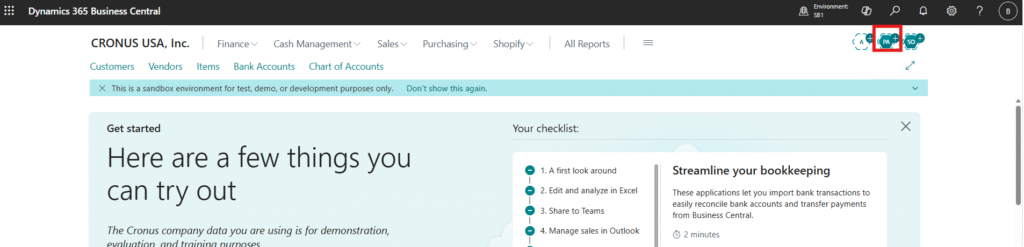
Step 1 – Open the Payables Agent
From the top-right corner of Microsoft Dynamics 365 Business Central, select the AP (Accounts Payable) icon to access the Payables Agent.
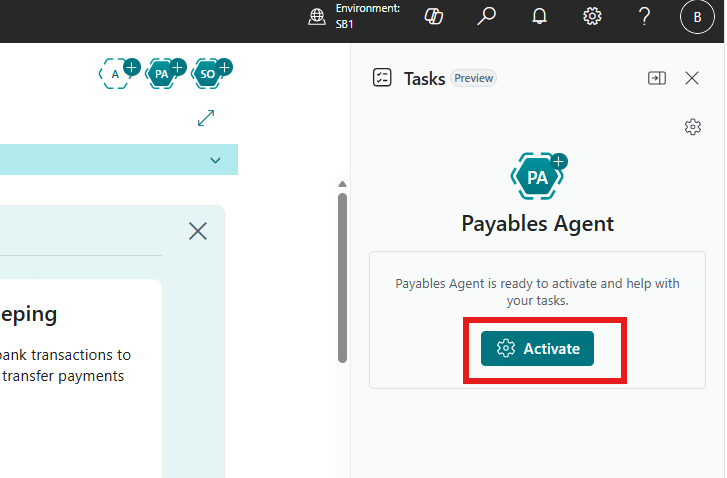
Step 2 – Activate the Agent
Enable the Payables Agent to begin AI-assisted invoice processing.
Once activated, the agent becomes available to monitor incoming invoices and assist with the automatic creation of purchase invoices.
Step 3 – Connect the Mailbox
Configure the mailbox that will receive vendor invoice PDFs.
The Payables Agent continuously monitors this mailbox and automatically imports incoming invoice documents as they arrive.
After successful processing, the invoices are archived for future reference within Business Central.
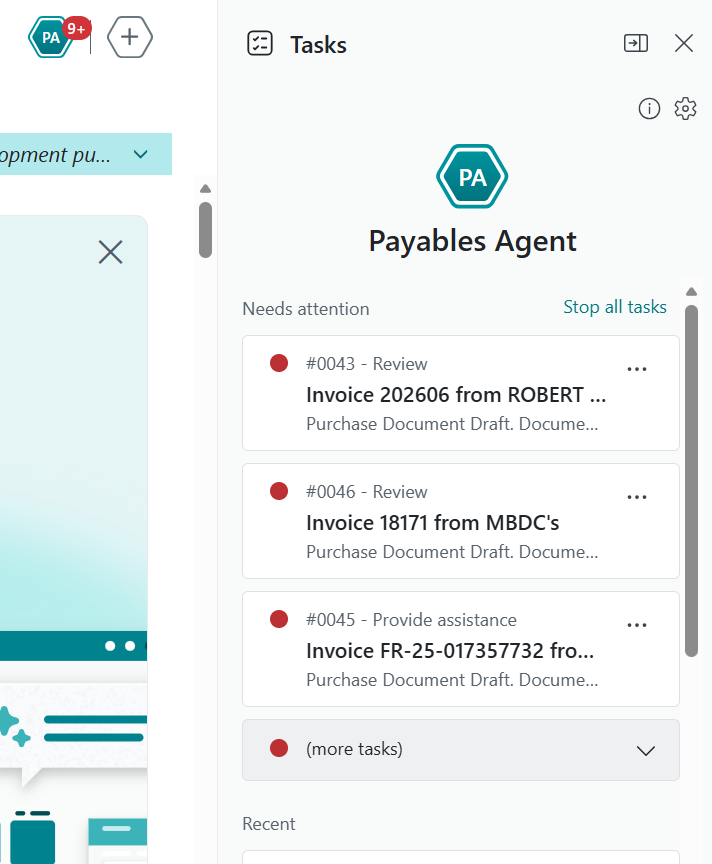
Step 4 – Vendor Matching
The Payables Agent compares extracted invoice information against existing vendor records.
If the vendor already exists, the invoice is automatically associated with the correct vendor.
If no matching vendor is found, supervisors receive a notification allowing them to review and create a new vendor before invoice processing continues.
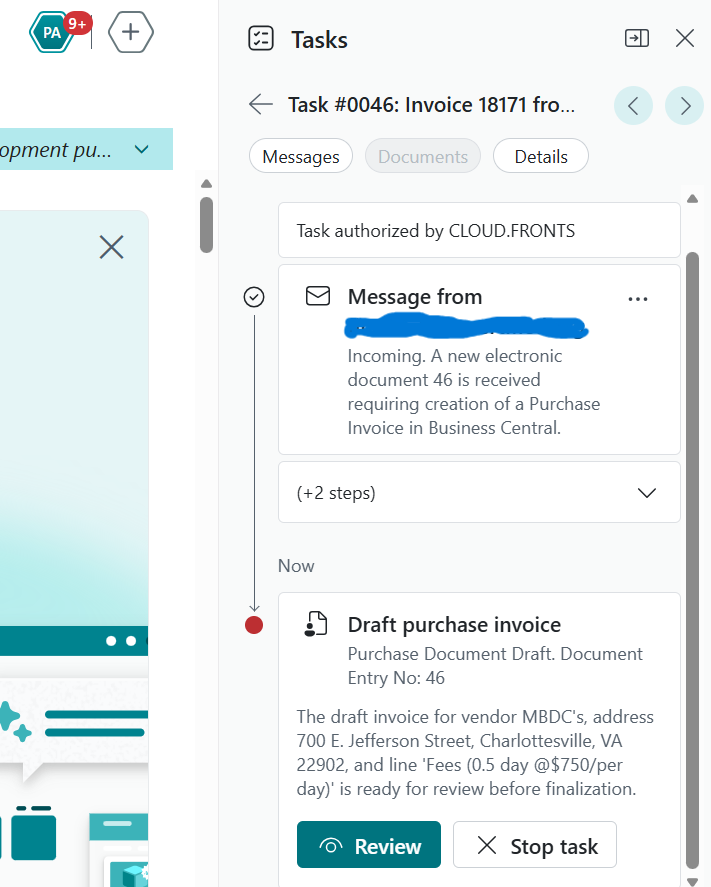
Step 5 – Draft Purchase Invoice
When users select Draft Purchase Invoice, Business Central automatically generates a draft purchase invoice using the extracted invoice information.
This eliminates the need for manual data entry while still allowing users to review and validate the document before posting.
Step 6 – Supervisor Review
Supervisors review the AI-generated purchase invoice to verify the following details:
- Vendor details
- Invoice number
- Invoice amount
- Purchase lines
- Financial accuracy
After validation, the purchase invoice can be finalized and posted into Business Central.
6. AI-Powered Invoice Processing Workflow
The complete invoice lifecycle becomes highly automated, significantly reducing manual effort while improving processing speed and accuracy within Accounts Payable operations.
- Vendor submits invoice via email.
- Invoice PDF arrives in the configured mailbox.
- Payables Agent detects the new document.
- AI extracts invoice information.
- Vendor matching is performed.
- Draft Purchase Invoice is created.
- Supervisor validates the extracted data.
- The invoice is posted into Microsoft Dynamics 365 Business Central.
Key Outcome:
The result is a faster, more accurate, and significantly more efficient Accounts Payable process with reduced manual intervention and improved financial control.
The result is a faster, more accurate, and significantly more efficient Accounts Payable process with reduced manual intervention and improved financial control.
7. Supervisor Review Process
Although AI automates invoice extraction and purchase invoice creation, supervisors remain responsible for the final approval of all processed invoices.
This ensures that key financial and operational controls are maintained throughout the Accounts Payable process.
- Financial governance
- Compliance adherence
- Data accuracy validation
- Auditability of all transactions
The Payables Agent accelerates invoice processing while allowing finance teams to retain complete control over all posted transactions.
8. Business Impact
-
Reduced Manual Data Entry
Invoice information is extracted automatically from PDF documents, significantly reducing manual effort.
-
Faster Invoice Processing
Draft purchase invoices are created within seconds, improving overall processing speed.
-
Improved Accuracy
AI-driven extraction minimizes manual typing errors and improves data consistency across transactions.
-
Better Vendor Management
Automatic vendor matching reduces duplicate vendor creation and improves vendor data quality.
-
Increased Finance Productivity
Finance teams spend less time on repetitive data entry and more time on reviewing exceptions and exceptions handling.
-
Scalable Accounts Payable Operations
The Payables Agent enables organizations to handle growing invoice volumes without a proportional increase in manual effort or headcount.
9. Disclaimer
The Payables Agent relies on Microsoft AI services to process invoice documents.
Each processed invoice consumes AI usage credits (tokens).
If you receive a message similar to:
“The limit has been utilized by agent.”
it indicates that the allocated AI processing quota has been exhausted.
Organizations should monitor AI usage and licensing to ensure uninterrupted invoice processing.
10. FAQs
What types of documents can the Payables Agent process?
The Payables Agent is designed to process vendor invoice PDFs received through the configured mailbox.
Does the Payables Agent automatically post invoices?
No. The agent creates draft purchase invoices that require supervisor review before posting.
What happens if a vendor does not exist?
The system notifies supervisors, who can review and create a new vendor before continuing with invoice processing.
Does the Payables Agent replace finance teams?
No. It automates repetitive activities while allowing finance professionals to retain full control over validation and approvals.
7. Final Thoughts
Microsoft Dynamics 365 Business Central’s event-driven architecture provides powerful extensibility options that allow organizations to enhance user experience without modifying standard workflow logic.
By leveraging the OnBeforeCreateApprovalEntryNotification event, we were able to intercept the standard approval email and replace it with a structured, business-friendly HTML notification containing payment details and direct navigation to the Payment Journal.
This approach ensures that the standard approval workflow remains fully intact while significantly improving how approvers consume and act on approval requests.
Looking to enhance your Business Central approval experience?
Organizations can modernize approval workflows by extending Microsoft Dynamics 365 Business Central using event-driven customizations, enabling richer notifications, better visibility, and faster decision-making without altering standard functionality.
CloudFronts helps businesses design and implement intelligent Business Central extensions, workflow optimizations, and automation solutions tailored to finance and operations needs.
For more information, reach out at transform@cloudfronts.com.
Organizations can modernize approval workflows by extending Microsoft Dynamics 365 Business Central using event-driven customizations, enabling richer notifications, better visibility, and faster decision-making without altering standard functionality.
CloudFronts helps businesses design and implement intelligent Business Central extensions, workflow optimizations, and automation solutions tailored to finance and operations needs.
For more information, reach out at transform@cloudfronts.com.
