Microsoft Fabric Part 1: Building a Config-Driven Data Ingestion Framework for Dynamics 365
Summary
- Building a new pipeline for every new data entity is one of the most common and quietly expensive habits in enterprise data engineering — this blog shows how to eliminate it entirely.
- A config-driven ingestion framework on Microsoft Fabric pulls data from any D365 Finance & Operations entity into the Bronze layer of a Fabric Lakehouse using just two generic pipelines and one master CSV config file.
- Adding a new entity requires no new pipeline, no new code, and no deployment — just a single row added to a configuration file.
- The framework handles OAuth authentication, OData pagination at 5,000 records per page, incremental watermark filtering, and key-based upsert loading — all driven by configuration.
- This is Part 1 of a two-part series. Part 2 covers transformation through Bronze → Silver → Gold, Direct Lake reporting in Power BI, and conversational AI via the Fabric Data Agent.
Table of Contents
Let’s Start Here
Every data engineering team eventually hits the same wall. You build a pipeline for one entity — opportunities, invoices, time entries. It works well. Then another entity gets added, and another. Before long, you have a collection of pipelines that each do roughly the same thing but are written differently, maintained separately, and break in different ways.
The question is not whether this happens — it always does. The question is whether your framework is designed to prevent it from the start.
This is Part 1 of a two-part series on building an end-to-end data engineering framework on Microsoft Fabric connected to Dynamics 365. Before we get into the detail, here is how the full architecture fits together:
The Full Architecture — D365 to AI
D365 / F&O → Bronze Layer (raw ingestion — this blog) → Silver Layer (cleansed) → Gold Layer (business-ready) → Power BI Reports + Fabric Data Agent
Part 1 covers the ingestion step — pulling data from D365 into the Bronze layer of the Fabric Lakehouse using a config-driven pipeline framework.
Part 2 covers everything after Bronze — transformation through Silver and Gold, Direct Lake reporting in Power BI, and conversational AI through the Fabric Data Agent.
D365 / F&O → Bronze Layer (raw ingestion — this blog) → Silver Layer (cleansed) → Gold Layer (business-ready) → Power BI Reports + Fabric Data Agent
Part 1 covers the ingestion step — pulling data from D365 into the Bronze layer of the Fabric Lakehouse using a config-driven pipeline framework.
Part 2 covers everything after Bronze — transformation through Silver and Gold, Direct Lake reporting in Power BI, and conversational AI through the Fabric Data Agent.
The Challenge
Traditional data engineering approaches treat each entity as a unique problem. A pipeline is built for accounts, another for contacts, another for time entries. Each has its own authentication logic, its own pagination handling, its own incremental-load approach.
This creates a set of problems that compound over time:
1Onboarding a new entity requires a new pipeline build, test cycle, and deployment — work that can take days
2Incremental load logic is duplicated across pipelines, often inconsistently, leading to missed records or duplicates
3When upstream systems change — authentication, API structure, column names — the blast radius is wide
4There is no single place to look to understand what is being ingested and how
The answer is not better pipelines. It is a framework where the pipeline is generic and the entity-specific details live in configuration.
The Solution — Config-Driven Ingestion on Microsoft Fabric
The ingestion layer of this framework runs entirely from a single Fabric workspace containing one Lakehouse, two pipelines, and one master configuration file. Every entity, its key column, its watermark column, and its source details live in a CSV — not in pipeline code.
The Lakehouse is structured using a Medallion architecture — three table layers: Bronze (raw data exactly as it arrives from D365), Silver (cleansed and standardised), and Gold (business-ready, joined, and logic-applied). The ingestion framework is responsible for the first step — getting data from D365 into the Bronze layer reliably, incrementally, and without entity-specific code.
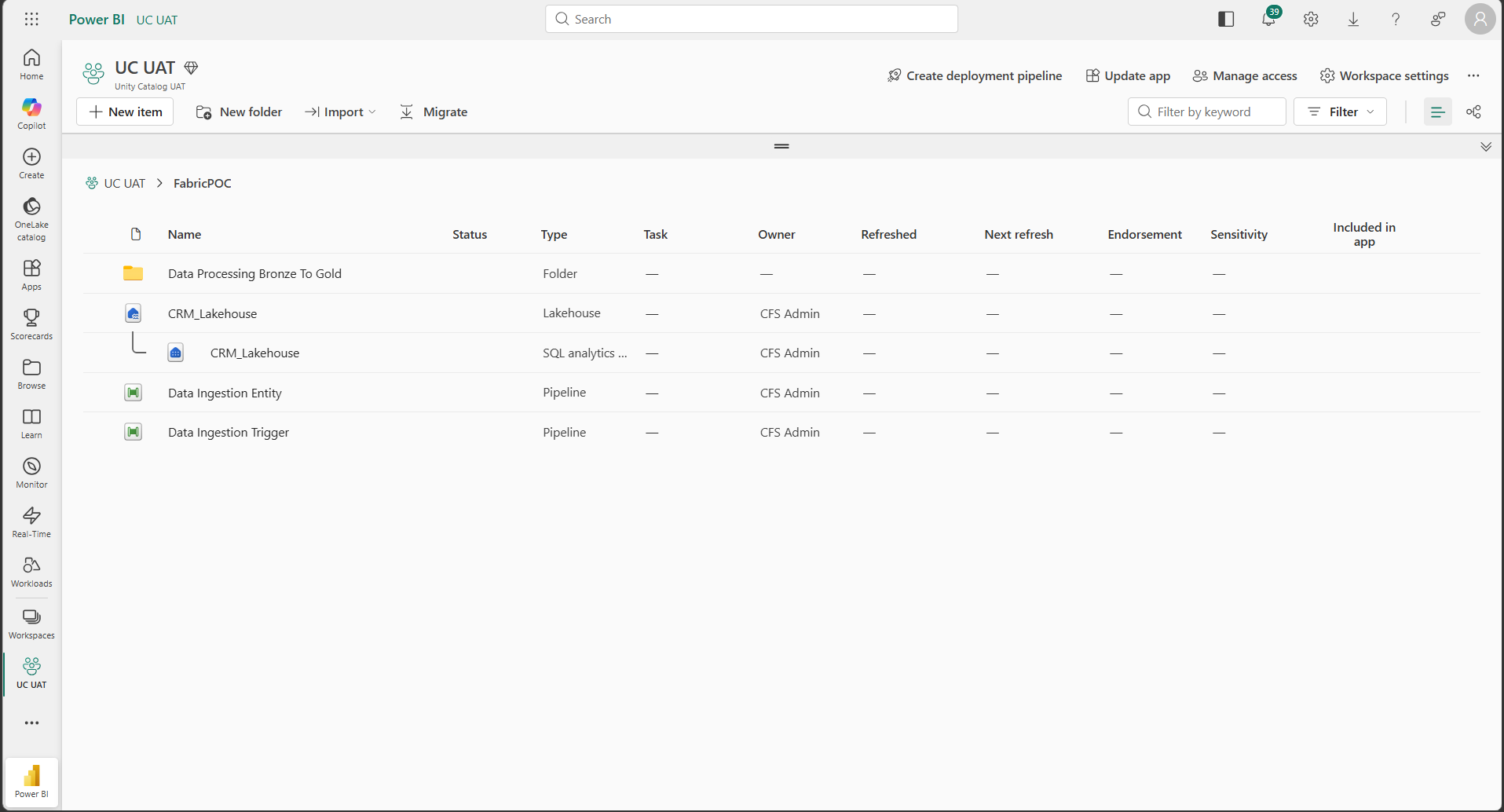
The Fabric workspace — one Lakehouse, two pipelines, and a config file that together handle ingestion for any number of D365 entities
Adding a new entity to the framework means adding one row to a CSV. No new pipeline. No new deployment. No code change.
Technical Deep-Dive
The Lakehouse and Config Files
Inside CRM_Lakehouse, the Tables area is organised by Medallion layer. The Files area holds the configuration CSVs that drive every pipeline and notebook. Three files do all the work:
ingestion.csv — controls which entities are ingested, how they are filtered, and where they land
b2s_columnconfig.csv — controls Bronze-to-Silver column mapping, aliasing, and type casting
gold_fixed.csv — controls Gold-layer business logic and join definitions
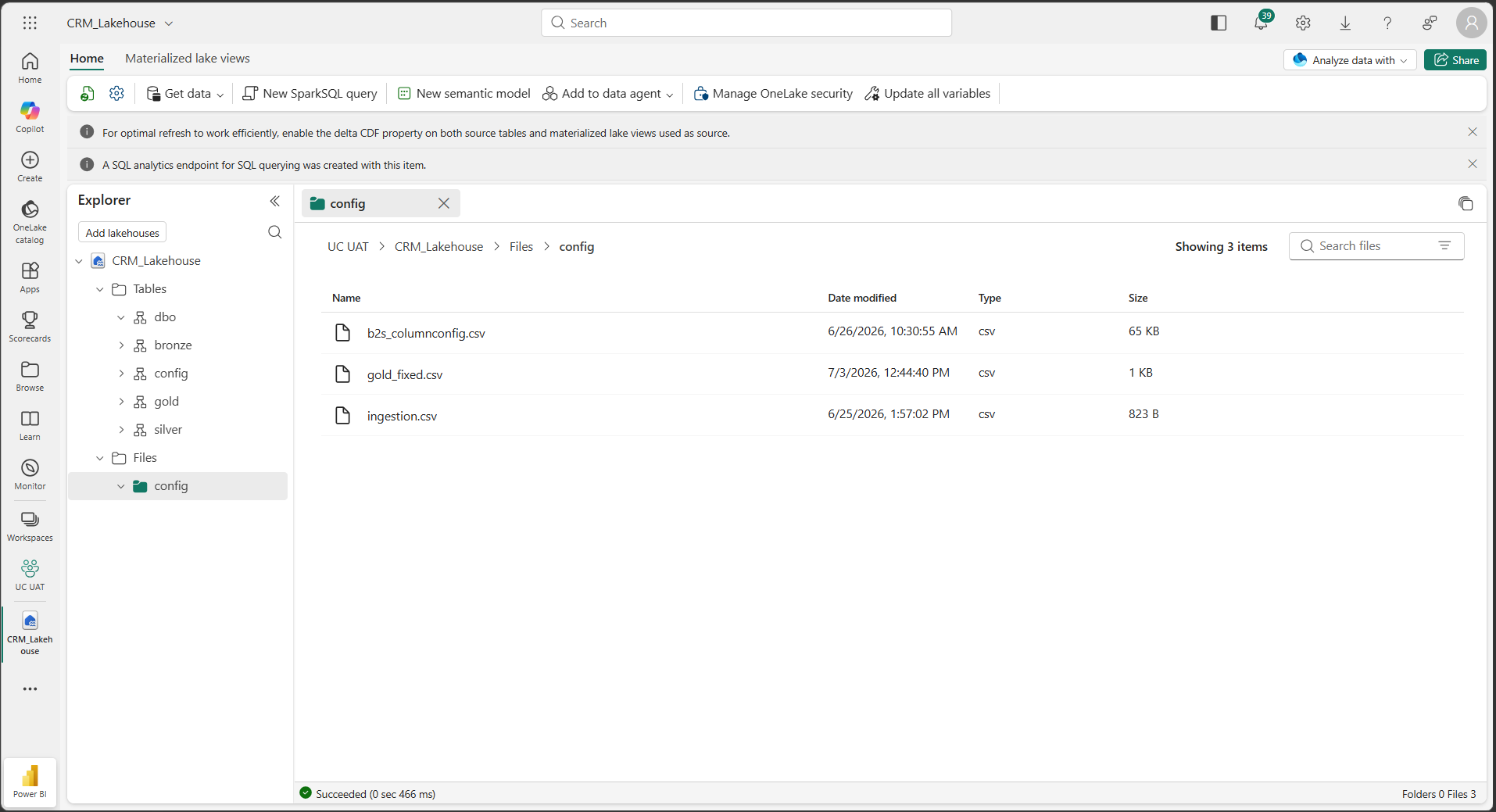
The Lakehouse holds both the data layers and the config files that drive every pipeline and notebook — everything in one place
The Master Config — ingestion.csv
Every entity is described in a single row of ingestion.csv. Each row contains:
Entity name and OData logical name — what to call and where to find it in D365
Primary key column — used for upsert to prevent duplicates
Incremental filter column — the watermark field used to fetch only changed records
Partition key — supports multi-source ingestion
Checkpoint — stores the last watermark value applied so each run picks up exactly where the last one left off
The pipeline reads this file, builds its incremental filter dynamically, and upserts records using the configured key. No entity-specific code exists anywhere.
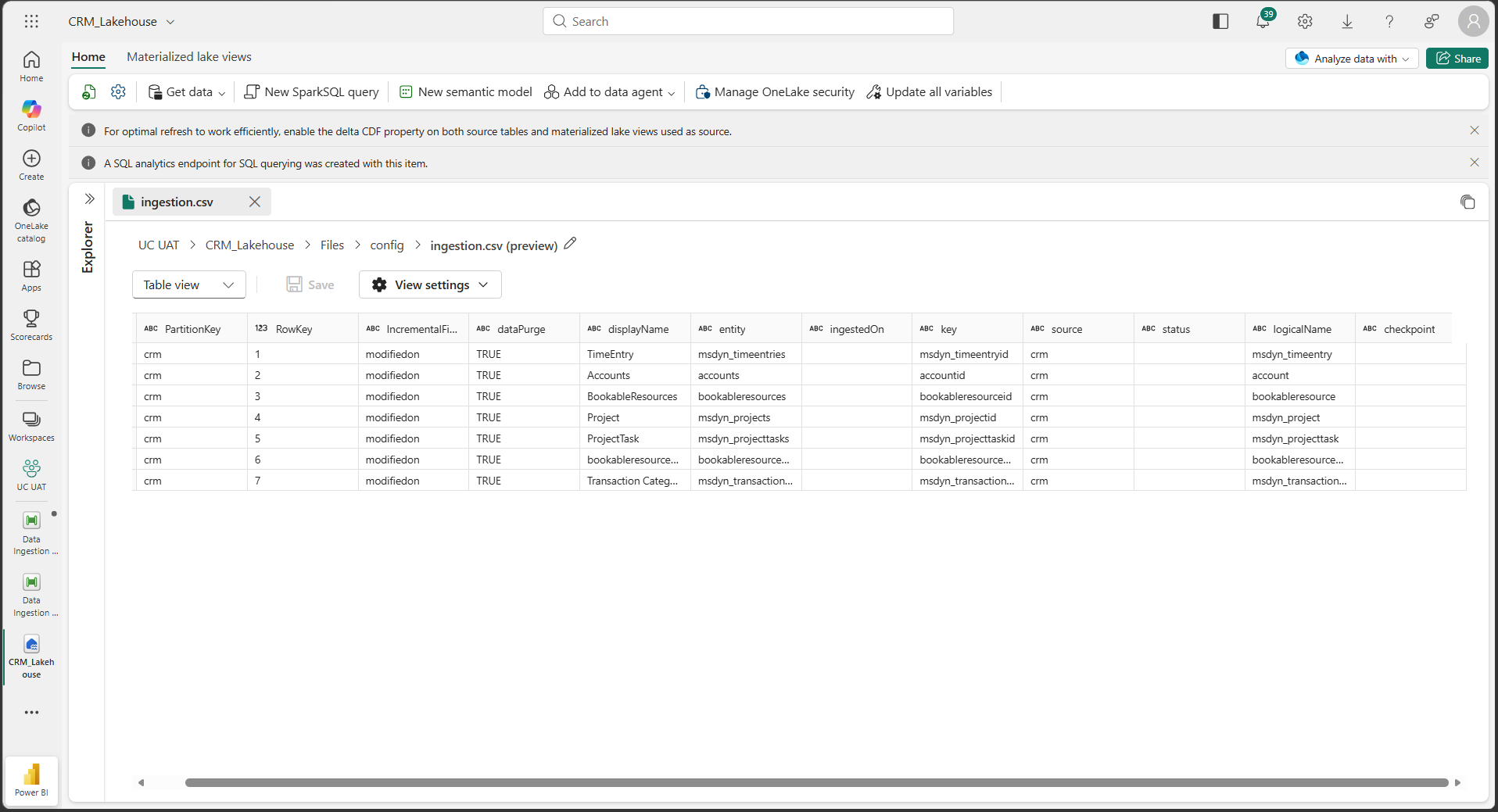
ingestion.csv — every entity is a single self-describing row. Adding a new D365 entity is a config change, not a code change
The Trigger Pipeline
The Data Ingestion Trigger pipeline is the orchestrator. It works in three steps:
1Lookup — reads ingestion.csv and returns the full list of configured entities
2ForEach — loops through every entity row in the config
3Invoke Pipeline — calls the Entity pipeline once per row, passing the full config object as a parameter
One lightweight orchestrator pipeline controls an unlimited number of entities — no changes needed when a new entity is added.
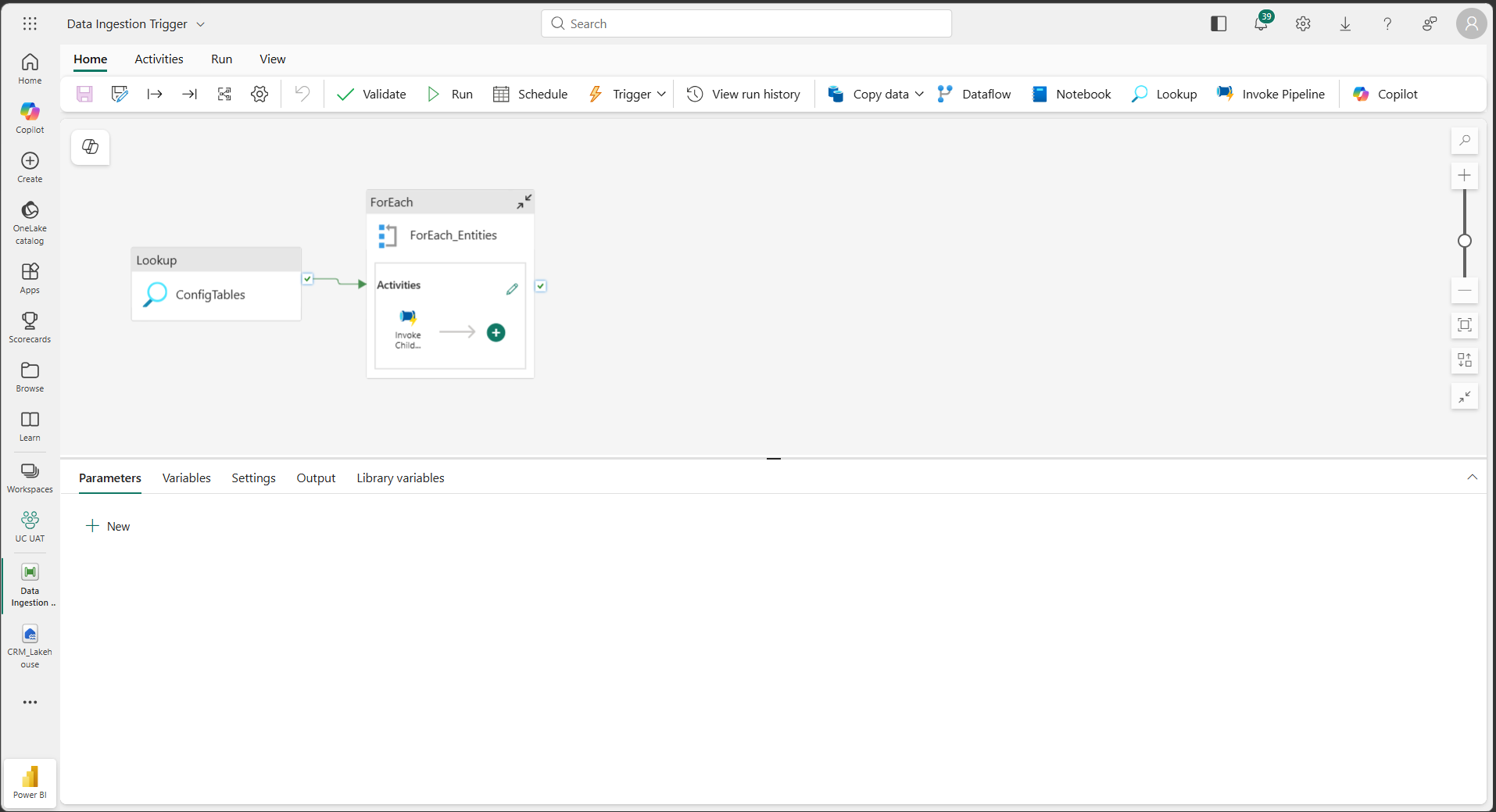
The Trigger pipeline — Lookup config, loop through entities, invoke the Entity pipeline once per row
The Entity Pipeline
The Data Ingestion Entity pipeline is the reusable worker. It receives a single entityConfig parameter and executes three steps:
1Get Access Token — authenticates against D365/F&O via OAuth using the entity config
2Set Variable — stores the token for use in the next activity
3Copy Data — calls the correct OData endpoint, handles pagination, and loads the result into the Bronze layer of CRM_Lakehouse
Raw data lands in Bronze exactly as it arrives from D365 — no transformation, no filtering. The same pipeline handles every entity with no hardcoded entity-specific logic.
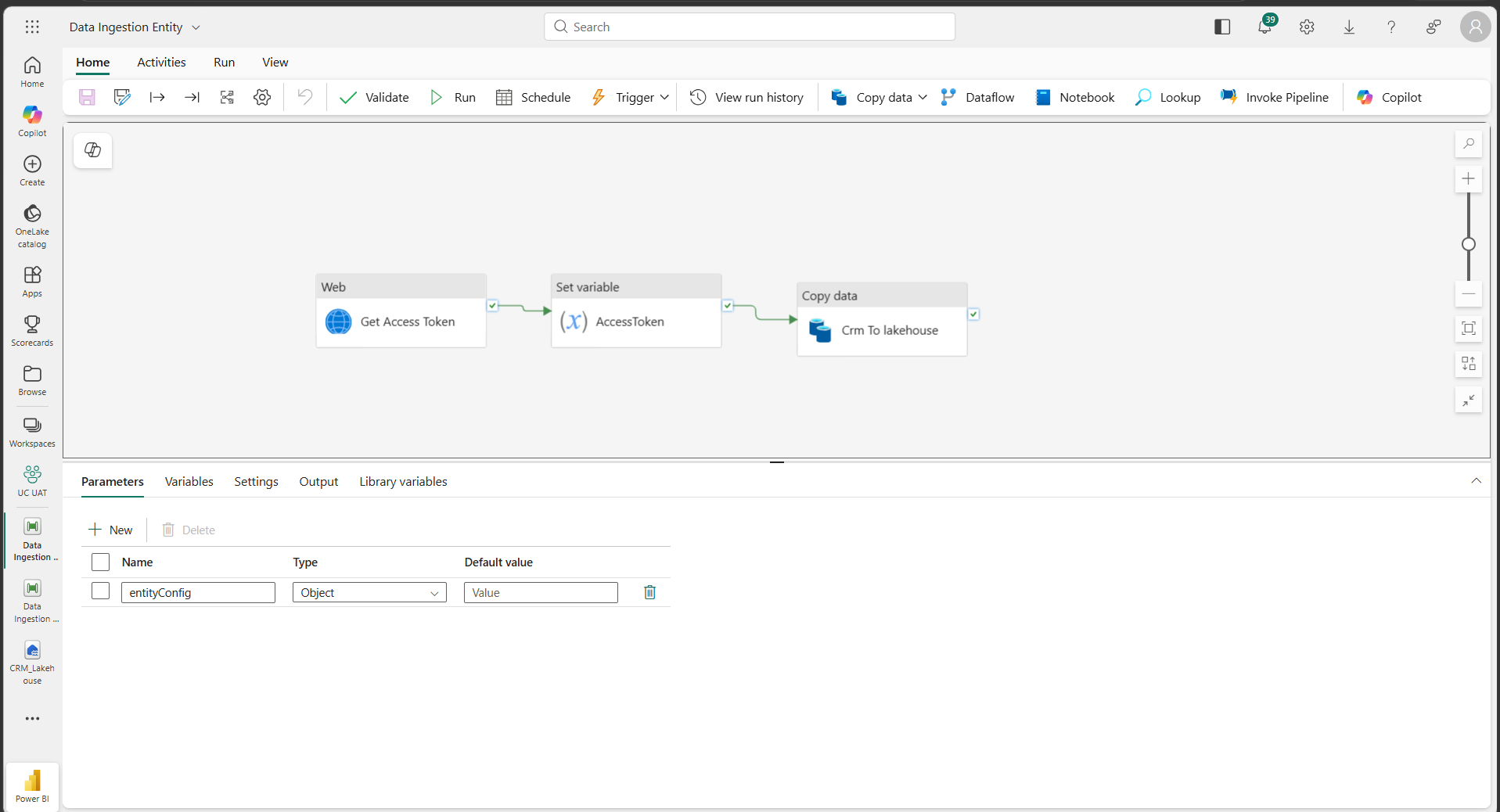
The Entity pipeline — authenticate, extract, and load. Three activities handle any entity without a line of entity-specific code
Pagination Handling
The Copy Data activity is configured to page through large D365 result sets automatically:
A Prefer header sets the page size to 5,000 records per request
After each page, the activity reads the @odata.nextLink field from the response and requests the next page
This repeats automatically until no continuation token is returned
No manual offset logic is required — pagination works identically for every entity regardless of record count.
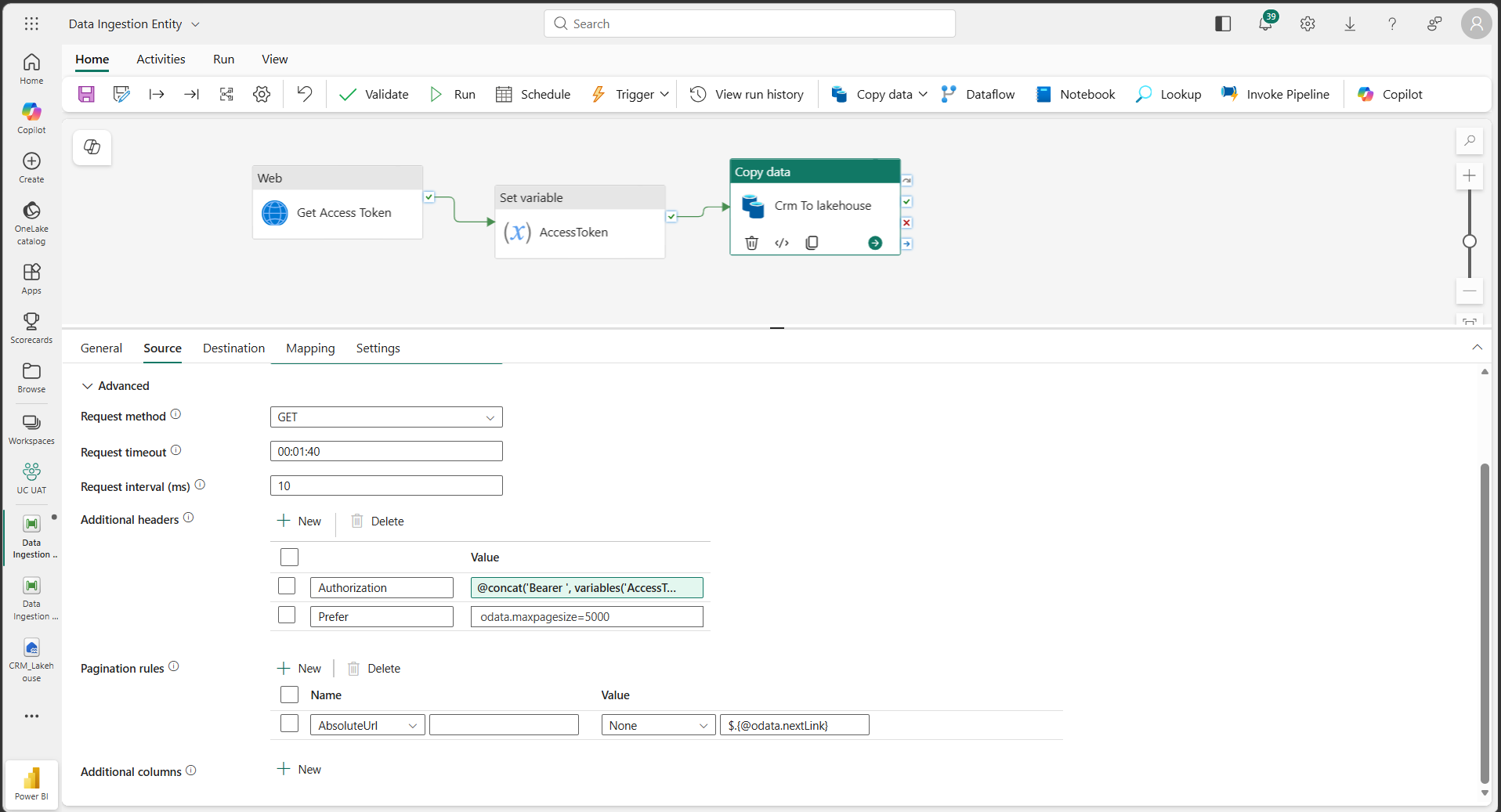
Pagination via OData’s native @odata.nextLink — the pipeline pages through any result set automatically, regardless of size
Incremental Load — Upsert
Each run filters the OData query using the entity’s configured IncrementalFilterColumn and last checkpoint value. Results are written to Bronze using an Upsert table action:
New records are inserted
Existing records are updated using the key column from entityConfig
No data is duplicated or lost across runs
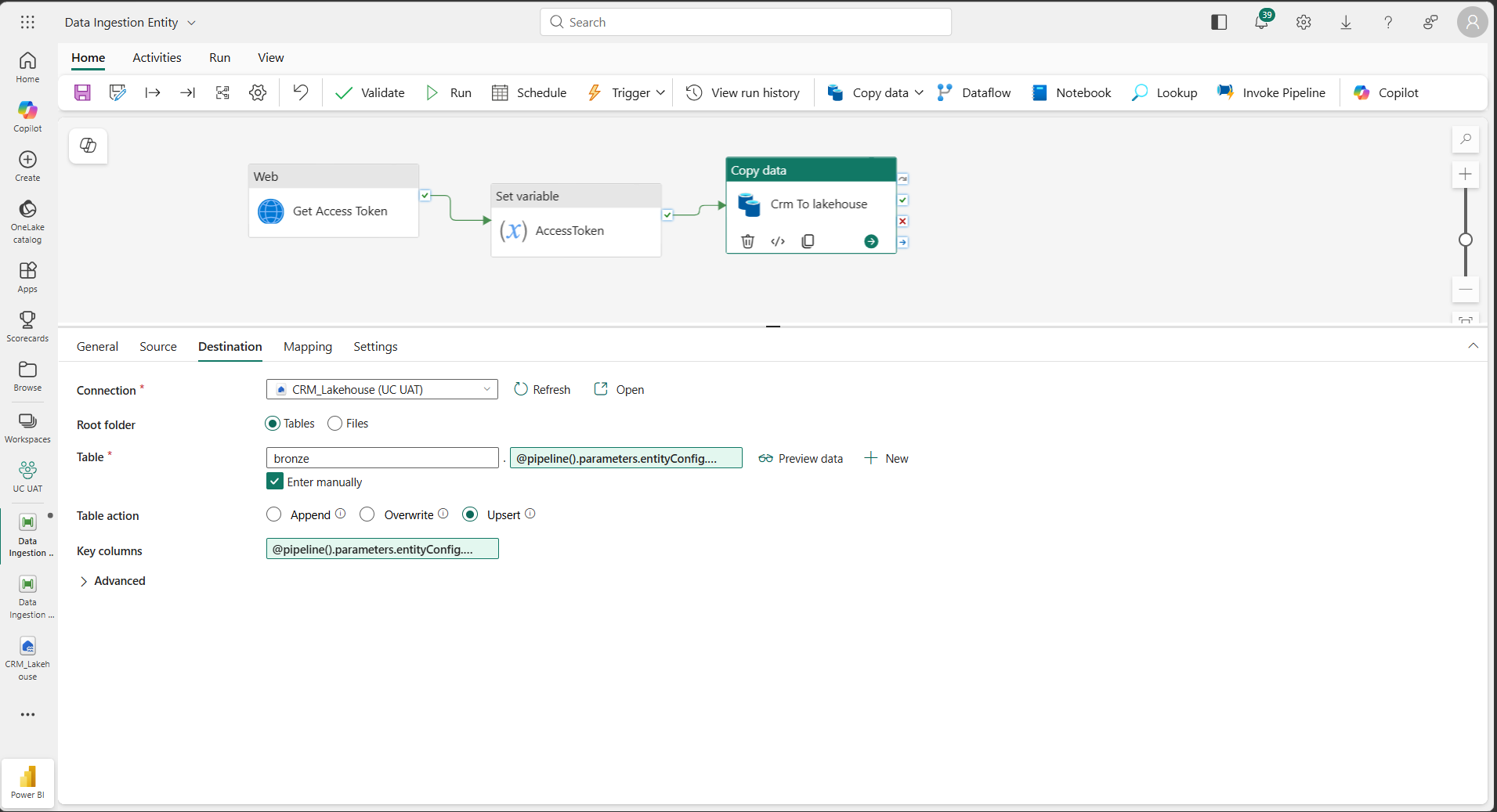
Upsert mode with config-driven key columns — Bronze stays accurate across every incremental run without duplicates or missed records
Business Impact
1Zero code for new entities — onboarding any new D365 entity is a single row added to ingestion.csv. No new pipeline, no deployment, no development cycle
2Reliable incremental loads — per-entity watermark columns and checkpoint tracking ensure each run picks up exactly where the last one left off
3No duplicate or missed records — key-based upsert logic keeps Bronze accurate without full reloads, regardless of how many times a run is executed
4Single source of truth for ingestion config — everything about what is ingested and how lives in one file, making the framework easy to audit, extend, and hand over
Conclusion
Building a new pipeline for every new data entity is one of the most common and quietly expensive habits in enterprise data engineering. It feels manageable at first — one entity, one pipeline — until the number of entities grows and the cost of maintaining, updating, and troubleshooting a collection of near-identical pipelines starts to outweigh the value they deliver.
The config-driven ingestion framework on Microsoft Fabric eliminates that pattern entirely. Any D365 entity — whether it is time entries today, invoices tomorrow, or a new custom entity next month — is onboarded by adding a single row to a configuration file. The same two pipelines handle authentication, pagination, incremental loading, and upsert logic for every entity, every time.
The result is a data ingestion layer that is faster to extend, easier to maintain, and more reliable to operate — with every entity landing in Bronze consistently, traceably, and without duplicates.
Coming up in Part 2 — With D365 data now landing reliably in the Bronze layer, Part 2 picks up from there. Two generic PySpark notebooks transform Bronze into cleansed Silver and then into business-ready Gold tables. A Direct Lake semantic model built on Gold powers Power BI reporting without a refresh cycle. And the built-in Fabric Data Agent gives business users conversational access to that same Gold data — all within the same platform, no additional infrastructure required.
Ready to Build a Scalable Data Ingestion Framework?
If your team is managing multiple D365 entities and looking for a smarter way to land data into a Fabric Lakehouse, we can help you design and implement a config-driven framework that scales without adding engineering overhead.
Connect with UsRelated posts:
How an Australian Linen Company Made Quote Approvals Secure with One Time Links in Dynamics 365
Recovering Lost Approval History After a Purchase Order Deletion in Business Central
How an Abu Dhabi-Based Diversified Holding Company Simplified Intercompany Transactions in Dynamics ...