Overcoming Zoho API Limitations in Payroll Automation for a Global Hardware Manufacturer
Summary
This blog highlights how Azure Logic Apps was used to overcome a critical API limitation encountered during the integration of Zoho People with FNO for payroll management.
During the implementation for a global manufacturing hardware enterprise, we discovered that Zoho’s API allows a maximum of 200 records to be fetched in a single request. While this limitation may not impact smaller organizations, it creates significant challenges for enterprises managing large employee datasets.
To address this issue, a scalable Azure Logic Apps solution was developed that dynamically retrieves records in batches, consolidates the results, and returns a complete dataset for downstream processing.
This blog explains:
- The integration challenge encountered during the Zoho-FNO implementation.
- Why the API limitation created scalability concerns.
- How Azure Logic Apps was used to overcome the restriction.
- The complete workflow configuration.
- The business impact achieved through automation.
Table of Contents
- Customer Scenario
- Business Challenge
- Integration Architecture
- Configuration Steps
- Why Azure Logic Apps?
- Outcome
- Business Impact
- Conclusion
1. Customer Scenario
During the implementation of a payroll integration between Zoho People and FNO, employee master data needed to be synchronized automatically to support payroll processing.
The organization maintained a large workforce within Zoho People, and payroll operations depended on accurate employee data being transferred to downstream systems.
As the integration design progressed, a significant limitation was identified within Zoho’s API framework.
The API could return a maximum of 200 records per request.
For organizations with hundreds or thousands of employees, this restriction created a challenge in retrieving complete employee datasets efficiently.
2. Business Challenge
The integration required access to the full employee dataset from Zoho People. However, the following challenges emerged:
Limited API Response Size
Zoho’s API only returns 200 records per request.
Large Employee Dataset
The organization maintained significantly more than 200 employee records.
Manual Pagination Not Feasible
Static API calls would require manual intervention or complex custom development.
Scalability Concerns
As employee counts continued to grow, the solution needed to support future expansion without requiring redesign.
The objective was to create a scalable and automated mechanism capable of retrieving all employee records regardless of volume.
3. Integration Architecture
The solution architecture follows a simple but highly scalable pattern.
Process Flow
- Logic App receives a request.
- Variables are initialized.
- Zoho API is called using the current index value.
- Retrieved records are appended to a central array.
- Index value is incremented by 200.
- Additional API calls continue until no records remain.
- Consolidated data is returned to the calling application.
4. Configuration Steps
Step 1: Add HTTP Trigger
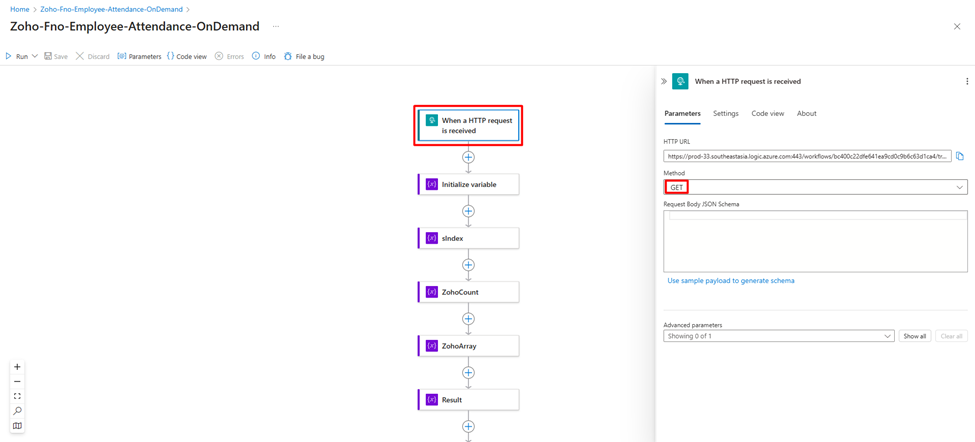
- Set up an HTTP trigger to start the workflow when invoked.
Step 2: Initialize Variables
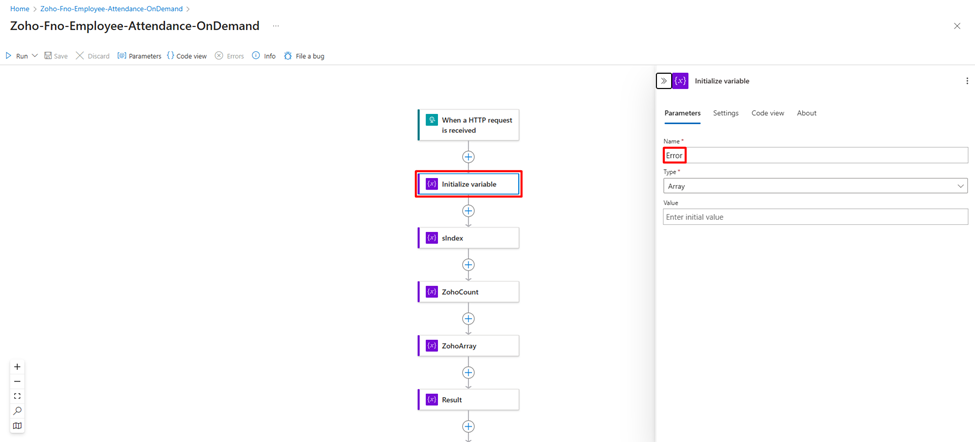
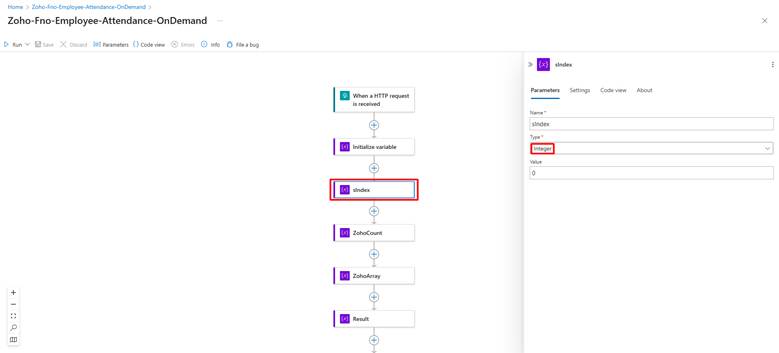
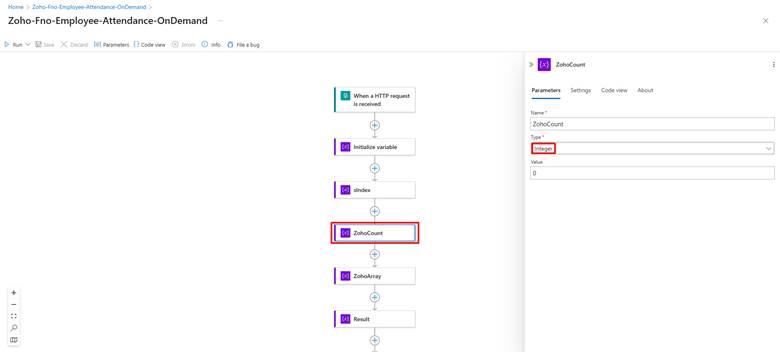
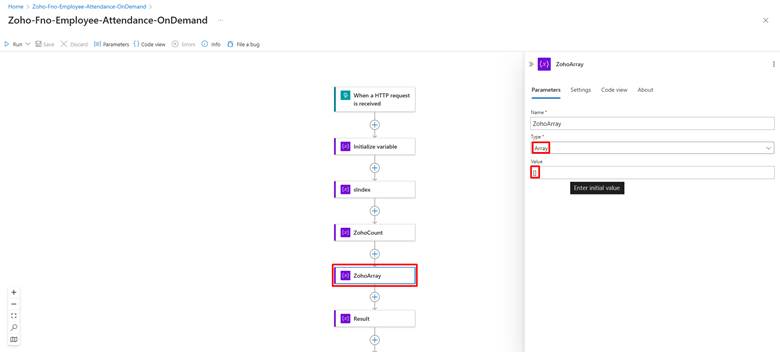
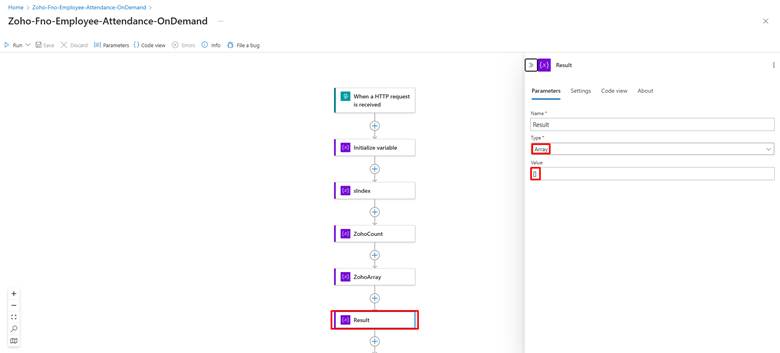
- Create variables:
- Initialize Variable: Stores Error in case any
- ZohoArray: Initialize as an empty array to store API responses.
- ZohoCount: Stores count of records
- Sindex: Initialize with the value 0 to act as the starting index for API calls.
- Result: Stores ZohoCount output
Step 3: Do Until Loop
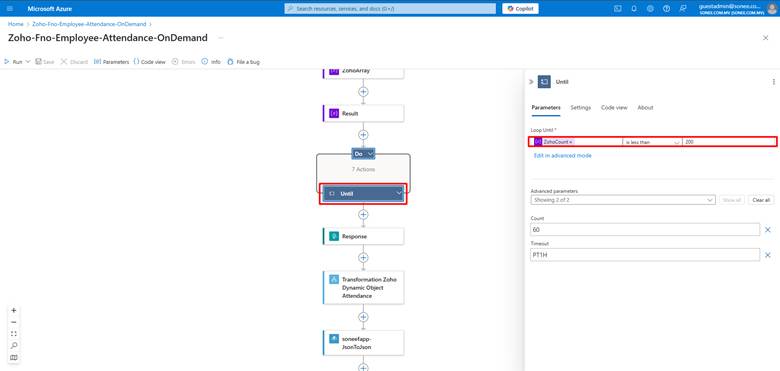
- Set up a loop with the condition length(variables(‘Result’)) > 0. This ensures the workflow runs until all records are fetched.
Step 4: HTTP Request Action
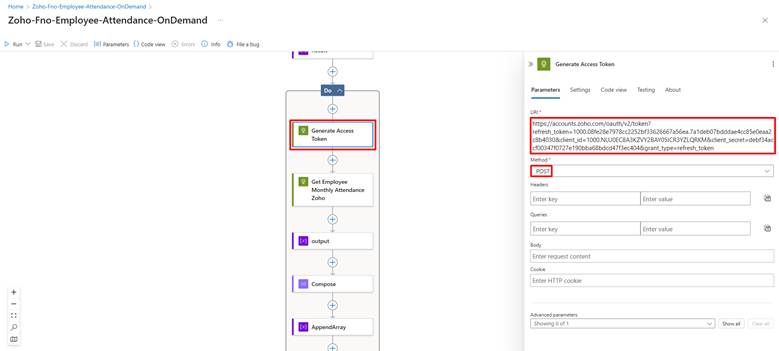
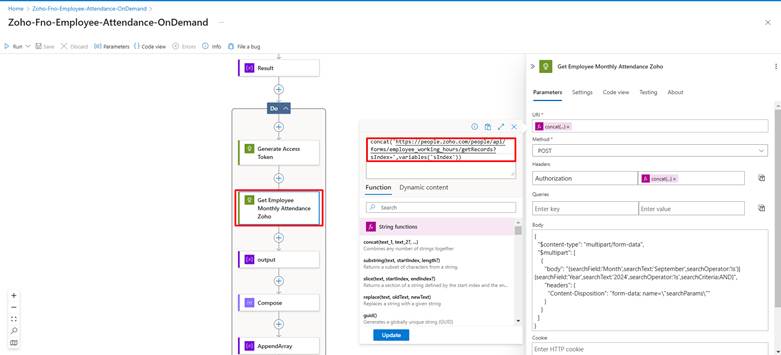
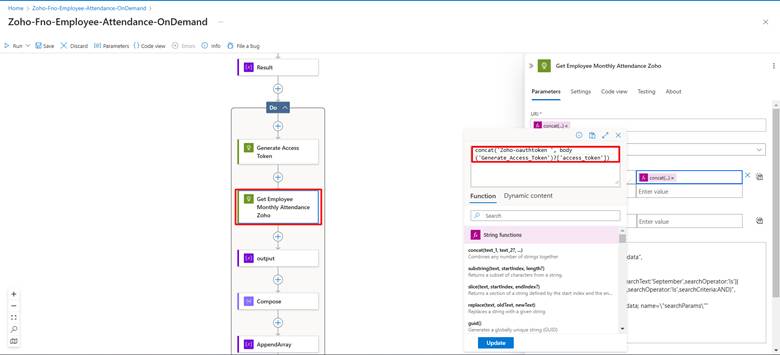
- Within the loop, configure an HTTP action to fetch data from Zoho API:
- Method: GET
- URL: Zoho’s API endpoint with dynamic query parameters, including Sindex for record pagination.
- Headers: Include Zoho’s API key for authentication.
Step 5: Output Variable
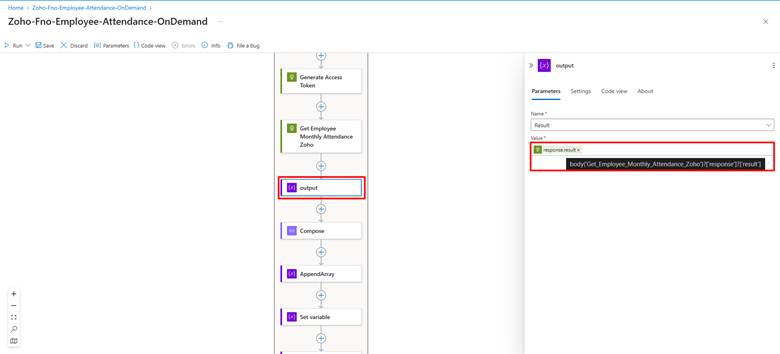
Step 6: Compose Variable
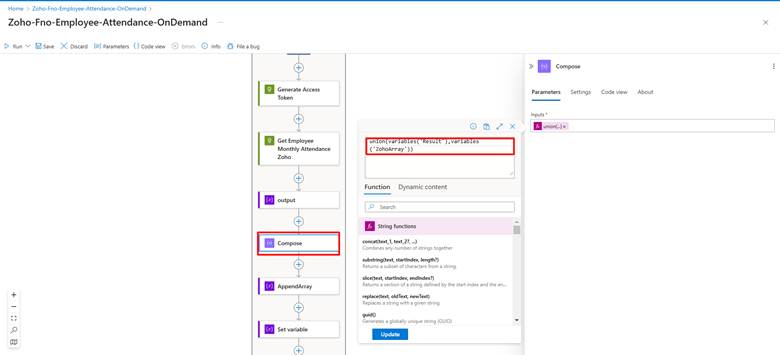
Step 7: Append to Array Variable
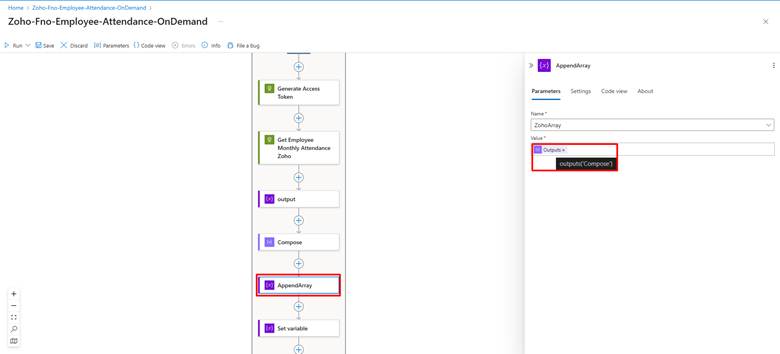
- Append the response data (body.data) from the HTTP request to the ZohoArray variable.
Step 8: Set Variable
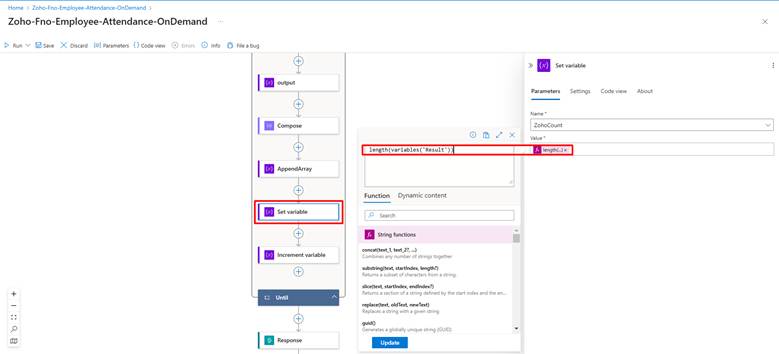
- Update the ZohoArray variable to include the updated array length using the length(variables(‘Result’)) function.
Step 8: Increment Variable
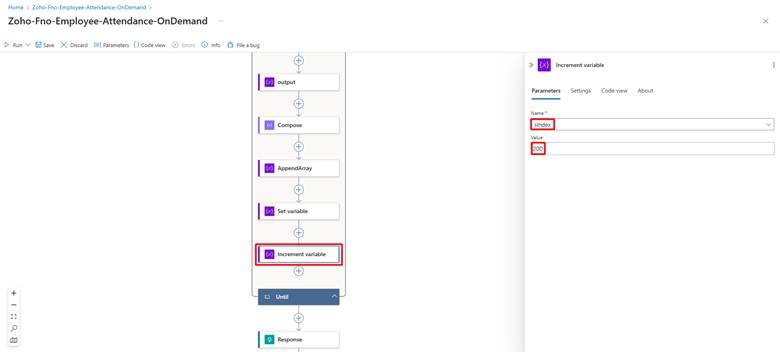
- Dynamically increase the Sindex variable by 200 to fetch the next set of records in the subsequent API call.
Step 9: Add Response Trigger
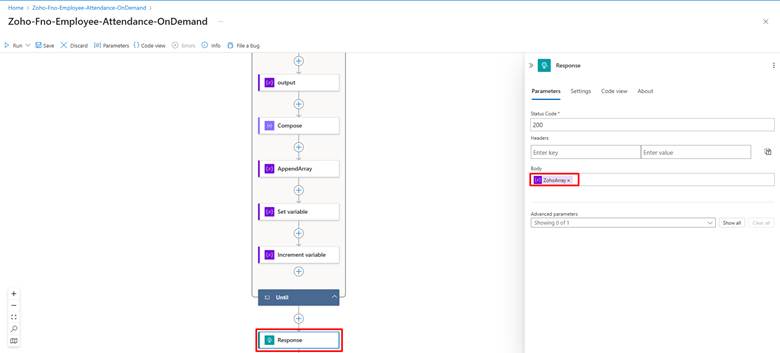
- At the end of the loop, add a response trigger to return the final compiled data stored in ZohoArray.
5. Why Azure Logic Apps?
Azure Logic Apps was instrumental in creating a flexible and efficient solution.
Key capabilities that made Logic Apps the ideal choice included:
Dynamic Variable Management
Allows runtime manipulation of counters and arrays.
Scalable Workflow Execution
Supports large datasets without requiring custom application development.
Native API Integration
Provides seamless connectivity with REST-based services.
Low-Code Development
Accelerates implementation and simplifies maintenance.
Enterprise Reliability
Offers monitoring, logging, and error-handling capabilities required for production environments.
6. Outcome
The final solution successfully overcame Zoho’s API record limitation.
The Logic App automatically:
- Retrieves employee records in batches.
- Handles pagination dynamically.
- Consolidates all results into a single response.
- Supports growing employee datasets.
- Eliminates manual intervention.
This approach ensured the success of the Zoho-FNO integration while maintaining scalability for future business growth.
7. Business Impact
1] Fully Automated Data Retrieval
Employee data is retrieved without manual intervention.
2] Improved Scalability
The solution can support organizations with thousands of employee records.
3] Reduced Development Complexity
Logic Apps eliminated the need for extensive custom coding.
4] Faster Integration Processing
Data retrieval occurs efficiently through automated pagination.
5] Improved Reliability
Built-in monitoring and error handling improve operational stability.
6] Future-Proof Architecture
The solution continues to perform effectively as employee counts grow.
To conclude, Integration projects often reveal platform-specific limitations that require creative problem-solving.
In this implementation, Zoho’s 200-record API limitation had the potential to impact payroll synchronization for a growing workforce. By leveraging Azure Logic Apps, we developed a scalable and automated solution capable of dynamically retrieving and consolidating employee data regardless of record volume.
The solution not only resolved the immediate challenge but also established a reliable and future-ready integration framework capable of supporting continued organizational growth.
For organizations facing similar API limitations, Azure Logic Apps provides a powerful platform for building scalable, low-code integration solutions that simplify complex data processing requirements.
Related posts:

Connecting Project Operations to Finance: Our Dataverse-to-Business Central Integration for Project ...
From Multiple Data Sources to Azure Databricks: A Zero-Downtime Power BI Migration for Future AI Rea...
How a Leading North American Commercial Vehicle Manufacturer Triggers MRP On Demand Using a Custom X...