

Microsoft Fabric Part 2: Where Raw Data Becomes Business Intelligence and Conversational AI
Summary
- With D365 data landed in Bronze (covered in Part 1), this blog covers the next three stages — transformation through a Medallion architecture, Direct Lake reporting in Power BI, and conversational AI via the Fabric Data Agent.
- Two generic PySpark notebooks — bronze_to_silver and silver_to_gold — transform raw Bronze data into cleansed Silver and business-ready Gold tables without entity-specific code.
- A Direct Lake semantic model built on the Gold layer gives Power BI real-time reporting without an import step or scheduled refresh cycle.
- The built-in Fabric Data Agent, grounded on the Gold layer, gives business users natural-language access to governed data — no separate AI platform, no additional licensing.
- The result is a complete data and AI layer — ingestion, transformation, reporting, and conversational AI — built on a single platform, driven by configuration, and designed to grow.
Table of Contents
Quick Recap — Part 1
In Part 1, we covered how a config-driven ingestion framework on Microsoft Fabric pulls data from any D365 Finance & Operations entity and lands it into the Bronze layer of a Fabric Lakehouse — using just two generic pipelines and a master CSV config file. No entity-specific code, no new pipeline per entity, and reliable incremental upsert loading driven entirely by configuration.
Bronze is the raw layer — data arrives exactly as it comes from D365, unmodified. That is intentional. The Bronze layer is not for reporting. It is the foundation — a reliable, auditable record of everything that came in. What happens next is where the data becomes useful.
Where Part 2 picks up
Bronze Layer (raw — covered in Part 1) → Silver Layer (cleansed) → Gold Layer (business-ready) → Power BI (Direct Lake reporting) + Fabric Data Agent (conversational AI)
Bronze Layer (raw — covered in Part 1) → Silver Layer (cleansed) → Gold Layer (business-ready) → Power BI (Direct Lake reporting) + Fabric Data Agent (conversational AI)
This part walks through how two generic PySpark notebooks transform Bronze data into clean, business-ready Gold tables, how a Direct Lake semantic model exposes that Gold layer to Power BI without a refresh cycle, and how the built-in Fabric Data Agent gives business users conversational access to the same governed data.
Technical Deep-Dive
Bronze → Silver — Cleansing and Column Mapping
The bronze_to_silver notebook is a parameterised PySpark notebook that promotes raw Bronze data into cleansed Silver tables. For each entity it:
1Reads the Bronze table for the configured entity
2Strips technical column prefixes added by D365
3Consults the b2s_columnconfig table to determine which columns are active and how they should be aliased
4Applies type casting and standardisation
5Writes the result to the Silver schema
The same notebook promotes any Bronze table to Silver — changing the entity parameter is all it takes to onboard a new one.
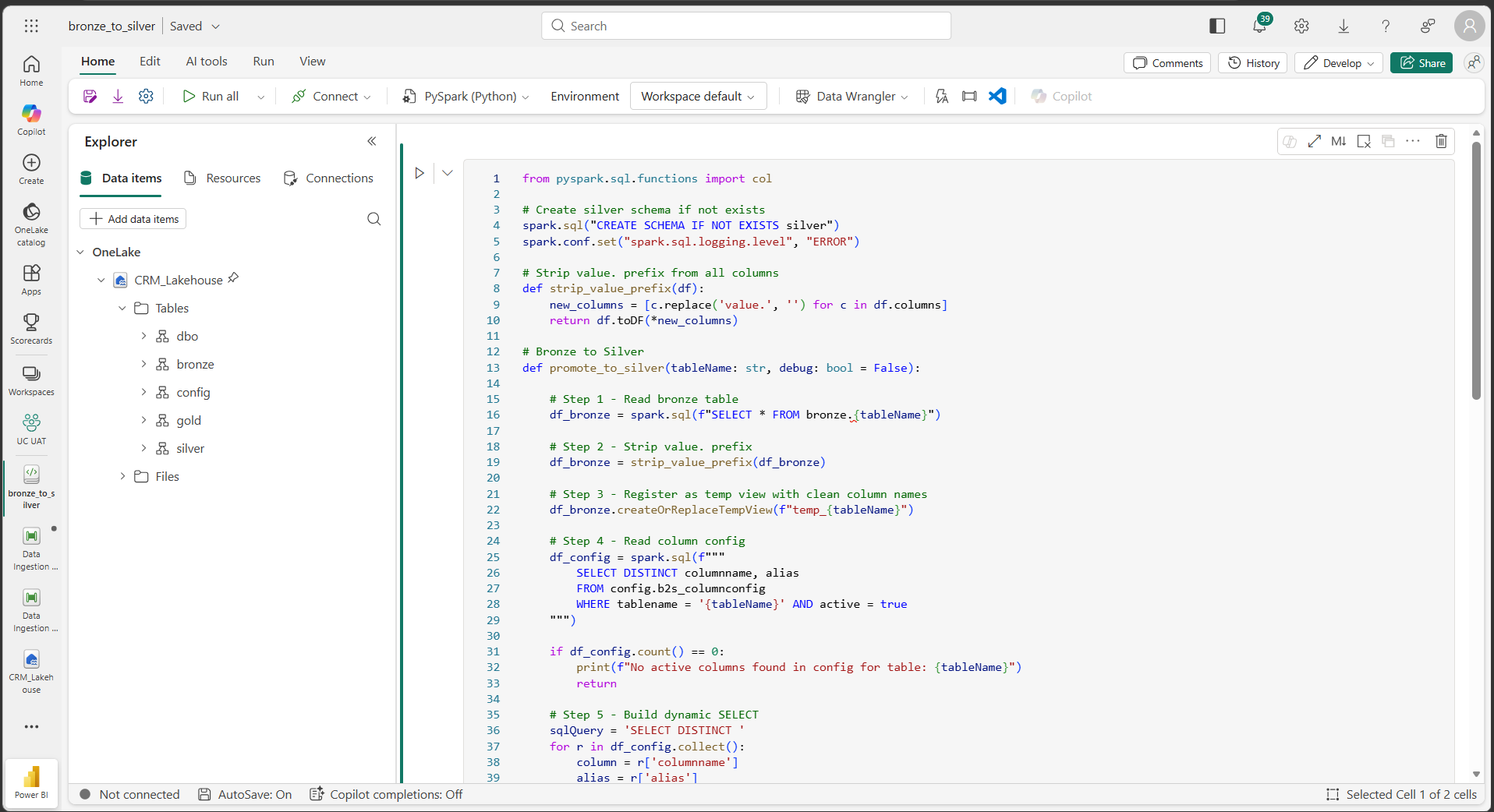
bronze_to_silver — strips prefixes, reads column config, applies aliasing. One notebook handles every Bronze-to-Silver promotion
Silver → Gold — Business Logic and Joins
The silver_to_gold notebook builds business-ready Gold tables by joining multiple Silver entities and applying business logic. For the Resource Time Tracking Gold table it:
1Joins six Silver entities — bookableresources, msdyn_timeentries, msdyn_projecttasks, msdyn_projects, accounts, and msdyn_transactioncategories
2Derives fields including Category, EntryDate, Weekday, TimeSheetStatus, and TimeSpent
3Translates D365 status codes into readable values
4Writes the result as a Delta table to the Gold schema
The Gold table is the single, trusted, business-ready version of the data — the only layer exposed to reporting and AI consumers.
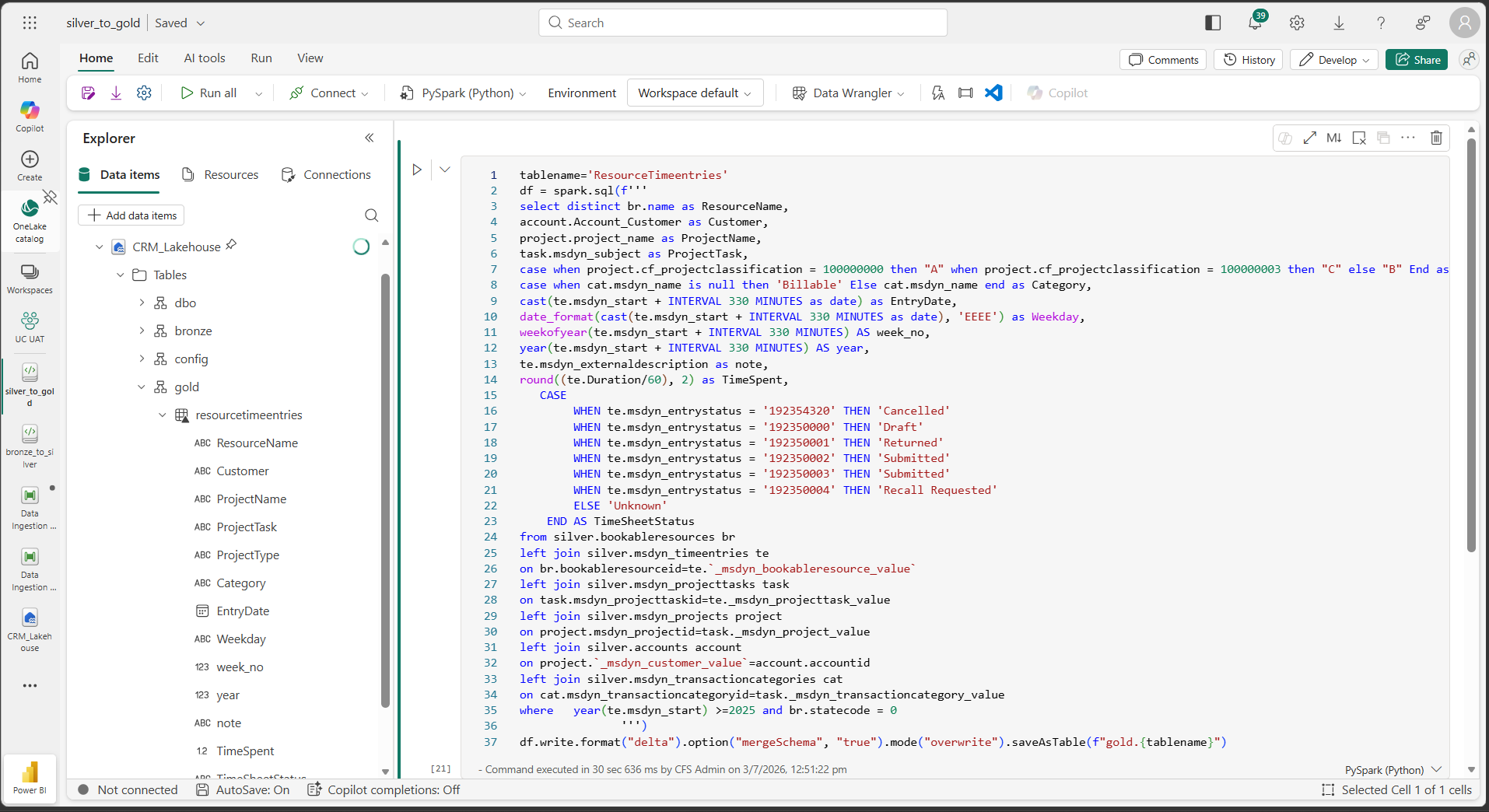
silver_to_gold — joins Silver entities, applies business logic, and writes a clean Gold table ready for reporting and AI querying
Direct Lake Semantic Model — Creation
Once the Gold layer is ready, a Direct Lake semantic model is created directly from the Lakehouse home screen. The setup follows three simple steps:
1Click New semantic model from the Lakehouse toolbar
2Select only the Gold table — Bronze and Silver remain hidden from report authors
3Confirm — the model is created in Direct Lake mode, reading Delta Parquet files directly from OneLake
No import step. No scheduled refresh. No data duplication.
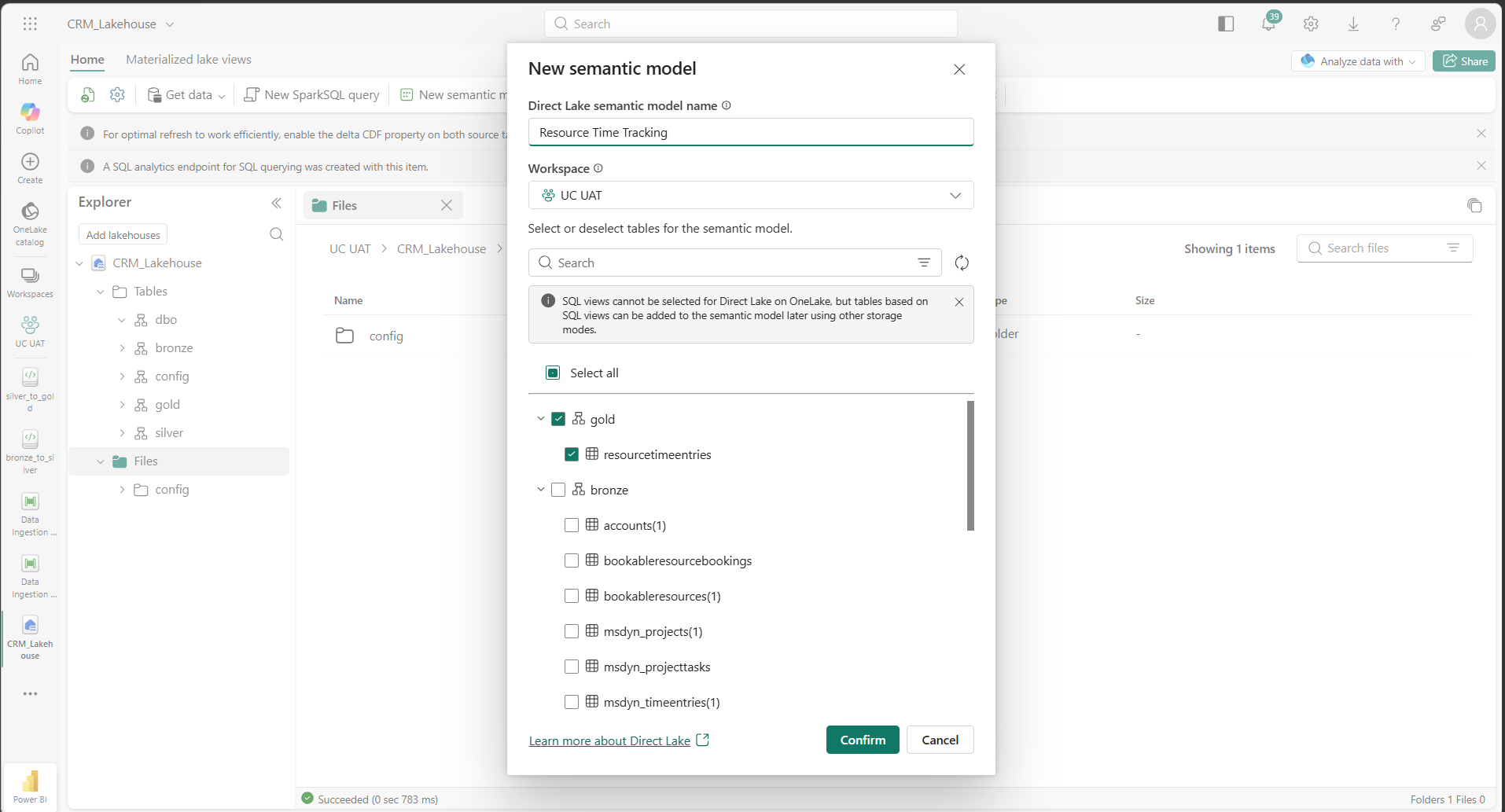
Only Gold is selected for the semantic model — reporting consumers never see raw or intermediate data
Direct Lake Semantic Model — Power BI
The finished Resource Time Tracking semantic model exposes Gold-layer fields ready for report authoring in Power BI:
Category, Customer, EntryDate, ProjectName, ProjectTask
ProjectType, ResourceName, TimeSheetStatus, TimeSpent
Weekday, Week Number, Year
Because it runs in Direct Lake mode, reports always reflect the latest Gold data without anyone needing to trigger a refresh.
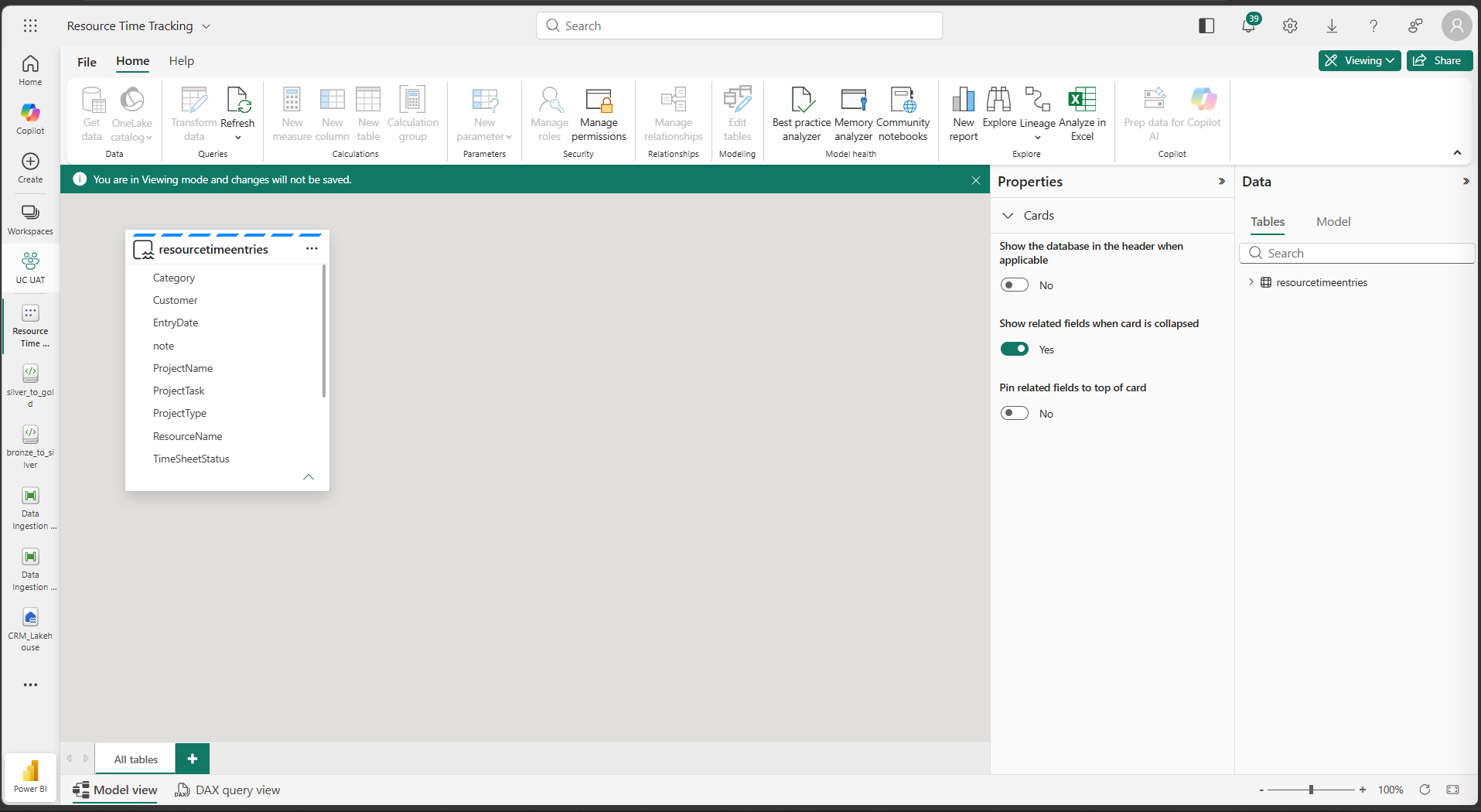
The finished semantic model in Power BI — Gold fields available for report authoring immediately, with no refresh cycle required
Fabric Data Agent
Beyond traditional BI, the built-in Fabric Data Agent extends the framework into conversational AI. Key characteristics of the agent:
Grounded exclusively on the Gold layer — only curated, business-ready data is exposed
Supports natural-language questions — trend analysis, outlier detection, resource summaries, and more
Runs within the same Fabric workspace — no separate AI platform, no additional licensing, no integration work
Business users and data teams access the same governed data whether they use Power BI or the agent
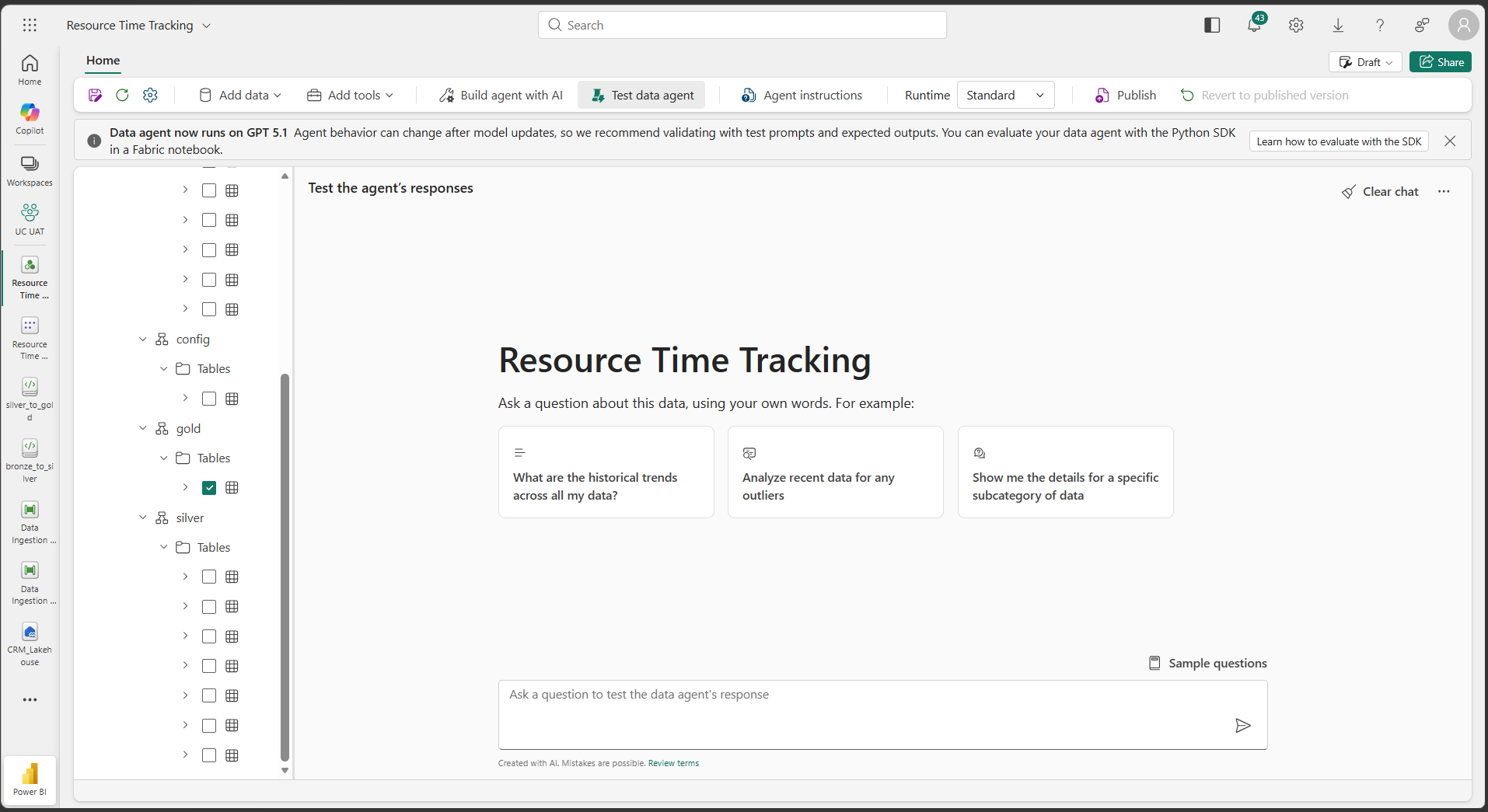
The Fabric Data Agent grounded on the Gold layer — business users ask questions in plain English on the same data that powers Power BI
Business Impact
1Consistent transformation governance — two notebooks enforce the same cleansing and business logic across every entity, from Bronze through Gold, with no per-entity exceptions or inconsistencies
2Near real-time reporting — Direct Lake semantic models read Gold Delta tables directly from OneLake, eliminating the import and refresh cycle that traditional Power BI datasets require
3Single trusted layer for all consumers — both Power BI reports and the Data Agent draw from the same governed Gold layer, ensuring consistent numbers across structured reporting and conversational queries
4Built-in AI access at no extra infrastructure cost — the Fabric Data Agent gives business users conversational access to governed data without a separate AI platform, additional licensing, or integration work
5End-to-end traceability — every record in Gold can be traced back through Silver and Bronze to the original D365 source, satisfying audit and data lineage requirements
Frequently Asked Questions
Do the notebooks need to be rewritten when a new entity is added?
No. Both notebooks are fully parameterised and config-driven. Adding a new entity means adding rows to the ingestion and column config files. The same notebooks promote the new entity through Bronze and Silver to Gold without any code changes.
Why is the semantic model built only on Gold and not Silver or Bronze?
Gold tables contain fully cleansed, joined, and business-logic-applied data. Exposing Silver or Bronze to report authors would mean presenting raw or partially processed data — increasing the risk of incorrect analysis and inconsistent numbers. The Medallion principle is that consumers always interact with the curated layer only.
Is the Fabric Data Agent the same as Databricks Genie?
They solve the same problem — natural-language querying on governed data — but are different products on different platforms. The Fabric Data Agent is built into Microsoft Fabric and grounded on Lakehouse Gold tables. Databricks Genie is built into the Databricks platform and grounded on Unity Catalog-governed tables. CloudFronts has implemented both, and an upcoming blog will cover the Databricks architecture side by side.
Is this framework production-ready?
Yes. Every pattern in this framework — config-driven ingestion, key-based upserts, checkpoint-based incremental loads, Medallion transformation, Direct Lake reporting, and a governed Data Agent — is designed for production use. The framework runs on real D365 data and is built to scale as new entities, users, and reporting requirements are added over time.
Conclusion
Transforming raw data into business intelligence has traditionally required multiple tools, multiple teams, and a significant gap between when data arrives and when it becomes useful. For organizations running Dynamics 365, that gap has often meant delayed reporting, inconsistent numbers across teams, and business users waiting on data specialists for answers to straightforward questions.
The transformation and reporting layer built on Microsoft Fabric closes that gap end to end. Two PySpark notebooks handle every entity’s journey from Bronze to Gold — consistently, without duplication of logic, and without rewriting code for each new entity. A Direct Lake semantic model means Power BI reports reflect the latest data the moment the Gold layer is updated. And the built-in Fabric Data Agent means business users can ask questions of that same governed data in plain English, without leaving the platform or raising a request.
The result is a complete data and AI layer — built on a single platform, driven by configuration, and designed to grow as the organization’s data needs grow.
The equivalent architecture on Databricks — using the same Medallion approach, the same D365 source entities, and a Genie Space for conversational AI — will be covered in an upcoming blog. Stay tuned for the side-by-side comparison.
Ready to Build an End-to-End Data and AI Layer on Microsoft Fabric?
If your organization is running Dynamics 365 and looking to move beyond disconnected reports into real-time analytics and conversational AI, our team can help you design and implement the full framework — from ingestion through to the Data Agent.
Connect with Us