Error ‘Cannot create another system semaphore’ while starting the AX 2012 AOS service
Introduction:
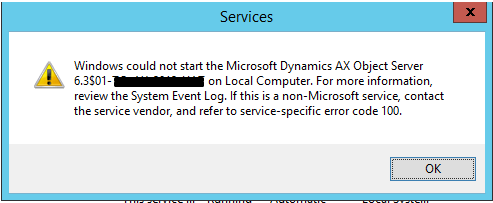
While starting the AOS service if you face above error then check 2 things,
- Check your System log as mention in error (Event Viewer-> Windows Log -> System) it will give you error ‘Cannot create another system semaphore’.
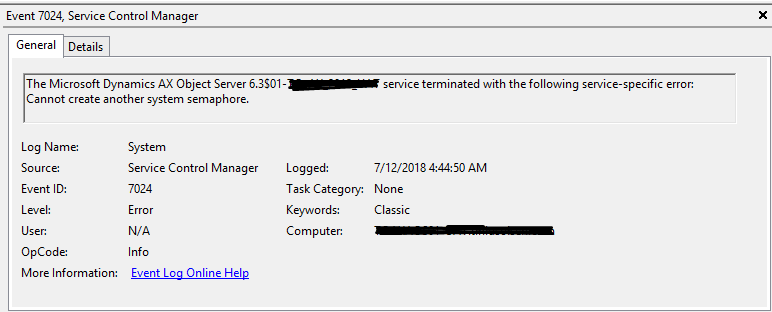
Event Viewer – System Log - Also, Check your Application Log (Event Viewer -> Windows Log -> Application).
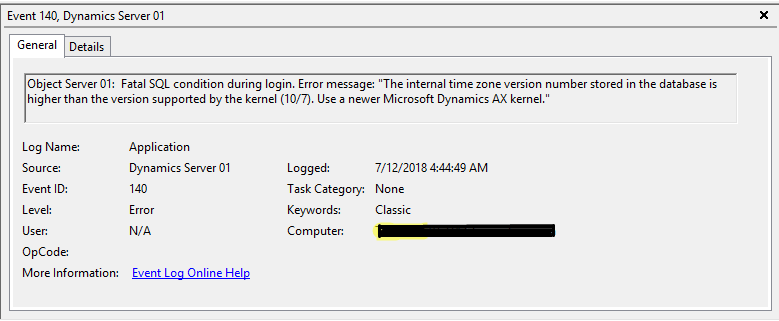
Event Viewer – Application Log
Cause:
This error means simply means your AX 2012 Kernel version is lower than your Application version. As, the kernel version is lower it does not support your current Timezone version.
Solution:
- Upgrade your AX 2012 kernel version to higher version.
- Run below script to modify your Timezone version
Update SQLSystemVariables
set value = 4
where parm = 'SYSTIMEZONESVERSION'
Related posts:

From Client Secrets to Certificate-Based Authentication: Building a Secure Integration with Azure Ke...

From Multiple Data Sources to Azure Databricks: A Zero-Downtime Power BI Report Data Migration for F...
Using AI for Data Discipline That Drives Better AI Outcomes