

01Summary
A global product certification institute needed to know one thing reliably before it could issue a certificate: does this legal entity have a valid, executed certification agreement that covers this certification type and standard version, on this date. Answering that meant opening a signing platform, a document store, and a legacy CRM, then trusting somebody’s judgement.
We built an Agreement Manager in Microsoft Dataverse that answers it with a query. The design decision that shaped everything else was refusing to rebuild what already worked. Adobe Acrobat Sign for Microsoft Dynamics 365 remains the signing engine. Azure Blob Storage remains the evidence store. The custom Dataverse layer exists only where the institute needs business control that neither provides: requirement rules, signer preparation, legal party snapshots, structured validation, and above all a machine readable record of what an executed agreement actually covers.
This first part covers the foundation: eleven tables, the ownership boundary between Dataverse and Adobe, the coverage model that makes certification gating possible, and the alternate key strategy that prevents two active coverages from ever existing for the same scope. Part 2 covers the automation built on top, and is honest about the one piece that is missing.
02In This Blog
A practitioner view of designing the data layer for certification agreement execution on Dataverse, where the output is not a signed PDF but a queryable statement of coverage.
- The Scenario: Certification decisions were being made without a reliable way to confirm that a valid agreement covered the applicant, the certification type, and the standard version in question.
- The Approach: Keep Adobe as the signing engine and Azure Blob as the document store. Build custom tables only where business control is genuinely missing.
- The Action: Eleven tables across a configuration layer, a process layer, and an evidence layer, with parental relationships on every snapshot child and eight alternate keys.
- The Outcome: Certification logic checks one thing, Agreement Coverage, and never inspects Adobe status or the existence of a PDF.
The deliverable of a contract system is not the signed document. It is the ability to prove, in a query, that the document applies.
Table of Contents
03Business Challenges
The institute certifies products against a published standard. Before a certificate can be issued, the applicant’s legal entity must have signed the applicable certification agreement, and the agreement that applies depends on region, country, certification type, standard version, and the date the requirement became mandatory.
- Coverage was a human judgement. Confirming that a signed agreement actually applied to a given application meant reading a PDF and deciding. Two reviewers could reasonably reach different conclusions.
- Evidence was spread across systems. Executed agreements existed in a legacy CRM, in Adobe outputs, in a document generation tool, and in a manual register. No system held all of them.
- Requirement rules lived in people’s heads. Which template version became mandatory for which region and certification type, and from what date, was tribal knowledge rather than configuration.
- Duplicate active agreements were possible. Nothing prevented two concurrent active agreements for the same legal entity and scope, which makes the question of which one governs unanswerable.
- Manual and wet signature cases had no controlled path. Exceptions were handled by email and stored wherever the handler chose.
The recurring failure is not that signing was hard. Adobe already did signing well. The failure was that nothing downstream could consume the result of signing as data.
04The Build Boundary
Before a single table was created, the specification fixed which system owns what. This is the decision that kept the build lean, and it is worth stating explicitly because it is the one most projects get wrong.
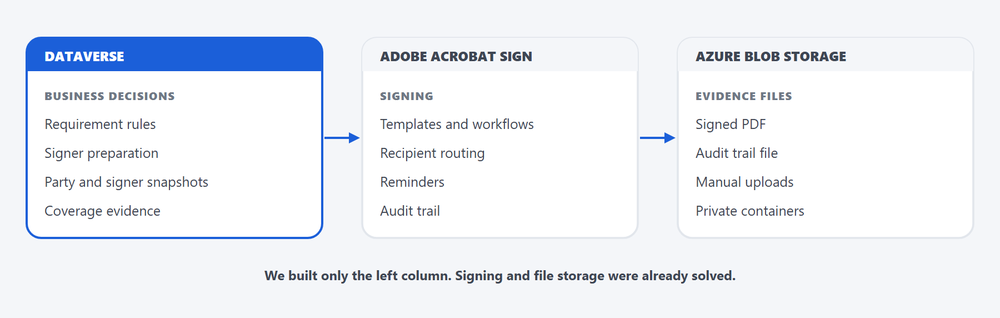
The rule applied throughout was simple. If a requirement can be met by supported Adobe managed functionality without losing business traceability, use the Adobe functionality. Custom tables exist only where the institute needs control that no product provides.
05The Data Model
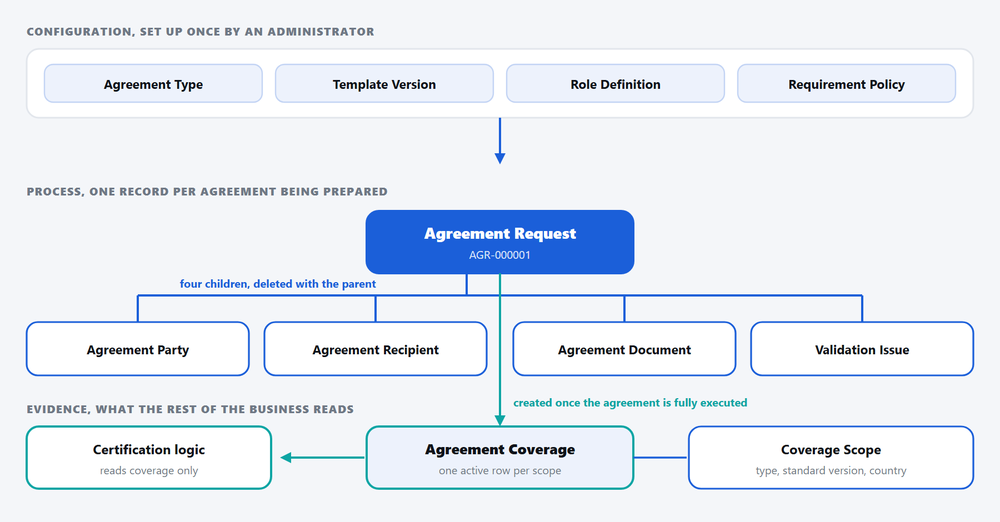
Eleven tables were built in a strict order, and they fall into three layers with different ownership models. Configuration tables are organization owned because they are administered centrally. Process tables are user or team owned because they carry work. Evidence tables are organization owned because coverage is a fact about the institute, not about a user.
| # | Table | Purpose | Ownership |
|---|---|---|---|
| 1 | Agreement Type | Reusable agreement categories | Organization |
| 2 | Agreement Template Version | Approved legal template and its Adobe workflow reference | Organization |
| 3 | Agreement Role Definition | Signer, reviewer and counter signer roles per template version | Organization |
| 4 | Agreement Requirement Policy | Configurable rule for when an agreement is required | Organization |
| 5 | Agreement Request | Central process record for preparation and lifecycle | User or Team |
| 6 | Agreement Party | Legal parties bound by the agreement, held as snapshots | Parented to Request |
| 7 | Agreement Recipient | Actual signers and their status snapshots | Parented to Request |
| 8 | Agreement Document | Metadata and control record for Blob stored files | Parented to Request |
| 9 | Agreement Coverage | Machine readable evidence that an executed agreement applies | Organization |
| 10 | Agreement Coverage Scope | Scope dimensions that make coverage queryable | Organization |
| 11 | Agreement Validation Issue | Structured validation findings per request | Parented to Request |
Build order was strict: data model, then forms and views, then seed data, then automation
Why parties and recipients are snapshots
Agreement Party and Agreement Recipient copy the legal name, signing name, and email at the moment of preparation rather than pointing at the live contact record. A contact record changes when someone changes job. The agreement was signed by a specific named person at a specific address on a specific date, and that fact must not silently rewrite itself two years later when an auditor is reading it.
Coverage is the whole point
Agreement Coverage is a machine readable statement that an executed agreement applies to a legal entity for a given agreement type and scope, effective from a given date. Agreement Coverage Scope breaks that into queryable dimensions: certification type, standard version, standard scope, region, country. Downstream certification logic reads these two tables and nothing else. It never inspects Adobe status, never checks whether a PDF exists, and never reads the legacy CRM.
06Lifecycle and Duplicate Prevention
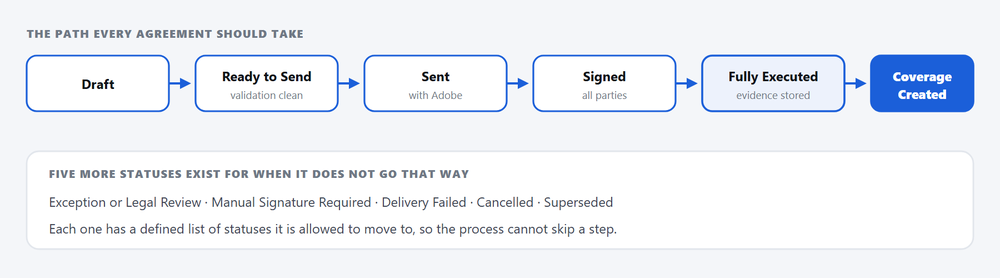
Agreement Request carries twelve business statuses with explicitly allowed transitions. Writing the transition table down before building anything is what allows a plugin to enforce it later without argument about intent.
Requirement policy resolution
Which template version applies is resolved rather than chosen. Active requirement policies are filtered by the request’s Policy Reference Date, then narrowed by specificity, preferring country over region over global and specific certification type or standard version over all. Remaining candidates are sorted by priority, then specificity, then effective date.
Two outcomes are treated as failures rather than defaults. If several policies tie on priority and specificity, validation writes a CONFIG_CONFLICT blocker. If nothing matches for an agreement type that creates coverage, it writes POLICY_NO_MATCH. The system refuses to guess.
One active coverage, guaranteed by the platform
The hardest integrity requirement in the build is that a legal entity must never hold two active coverages for the same agreement type and scope. The mechanism is a pair of fields plus an alternate key.
- Build a deterministic match keyCoverage Match Key is composed of the legal entity identifier, the agreement type code, and the sorted list of material scope value codes. Sorting matters, because the same scope arriving in a different order must produce the same key.
- Mirror it into Active Coverage Key while activeActive Coverage Key holds the same value only while Coverage Status is Active. The alternate key on Agreement Type plus Active Coverage Key then makes a second active row impossible at platform level.
- Clear the key on supersessionWhen coverage is superseded, expired, revoked, or invalidated, Active Coverage Key is cleared, which releases the constraint and frees the slot for the replacement.
- Supersede and insert in one transactionThe prior active row is superseded, its key cleared, and it is linked through Superseded By Coverage before the new active row commits. A partially applied supersession would leave the entity with no coverage at all.
- Verify the platform behaviour before trusting itThe specification made it a mandatory step to confirm in the development environment that the alternate key constraint genuinely releases when a nullable key field is cleared. If it does not, the plugin enforced check becomes authoritative and the key is demoted to a defensive second layer.
The eight alternate keys, and the one that failed
| Table | Alternate key | What it prevents |
|---|---|---|
| Agreement Type | Type code | Unstable references from flows, policies and imports |
| Agreement Template Version | Template version code | Ambiguous legal version identification |
| Agreement Role Definition | Template version plus role code | Duplicate role codes on one template |
| Agreement Requirement Policy | Policy code | Validation and gate logic binding to the wrong rule |
| Agreement Request | Request number, autonumber | Ambiguous request identity across systems |
| Agreement Coverage | Agreement type plus active coverage key | Two active coverages for the same scope |
| Agreement Coverage Scope | Coverage plus scope type plus scope value code | Duplicate scope rows inflating a match |
| Agreement Validation Issue | Request plus issue code plus source operation | Duplicate issues accumulating on every validation run |
Each key exists to make one specific failure impossible rather than merely unlikely
07Impact
- 11Tables built, seven more deliberately not built
- 7Alternate keys active, one still failed
- 48Forms and 130 views across those tables
- 12Statuses with defined transitions
- Coverage became a query. Asking whether an entity is covered for a certification type and standard version on a date is now a filter, not an investigation.
- Requirement rules became configuration. Region, country, certification type, standard version and mandatory dates live in Requirement Policy records that an administrator maintains.
- Signature stayed with the specialist. Adobe continues to do routing, reminders, signing URLs and audit trails, none of which was rebuilt.
- Evidence stayed out of the database. Binaries live in private Blob containers with hashes and storage status recorded in Dataverse, never file columns.
- Snapshots protect the record. Signer names and legal party details are frozen at preparation time and cannot be rewritten by later contact edits.
- The exception path is a designed path. Manual and wet signature cases have their own status, their own document type, and their own approval step.
08Conclusion
The most valuable decisions in this build were subtractive. Seven tables that a generic contract design would have produced were not created, because Adobe managed records, Case, Timeline, and environment variables already covered them. What remained is a model whose entire purpose is to turn a completed signature into a fact that downstream certification logic can act on without interpretation.
In Part 2 we cover the automation layer: the validation operation that writes structured issues, the send and status sync flows around Adobe, document retrieval with SHA-256 integrity checking into Azure Blob, and the custom API that is the only supported writer of active coverage.
09FAQ
01Why build custom tables at all if Adobe Acrobat Sign is already installed?
Adobe executes signatures extremely well, but it has no opinion about whether a signed agreement satisfies a certification requirement for a given standard version in a given country on a given date. That is business logic specific to the institute. The custom layer exists only for requirement rules, snapshots, evidence metadata, and coverage.
02Why not store the signed PDF in a Dataverse file column?
Storage cost and immutability. Final documents belong in private Azure Blob containers where retention and immutability policies can be applied, with the canonical path, container, version identifier, SHA-256 hash, file size and storage status held in Dataverse. Documents are never overwritten, so a replacement becomes a new record linked by supersession.
03Why are Agreement Party and Agreement Recipient snapshots instead of lookups?
Because the agreement was signed by a specific named person at a specific email address on a specific date. Contacts change roles and addresses. A live lookup would silently rewrite the historical record every time someone updates a contact, which destroys the evidential value of the agreement.
04What stops two active coverages existing for the same legal entity and scope?
An alternate key on agreement type plus active coverage key. The active coverage key mirrors the deterministic coverage match key while the record is active and is cleared the moment it is superseded, expired, revoked or invalidated. Supersession and insertion happen in a single transaction so the entity is never left uncovered.
05Why is Policy Reference Date a stored field rather than the current date?
Because validation and the certification gate must agree. If each evaluated policies against whatever today happens to be, the same request could be compliant in the morning and non compliant after a policy became mandatory at midnight. The reference date is populated from the triggering business event and reused by every caller.
06Is this a contract lifecycle management product?
No, and it was scoped explicitly not to become one. Redlining, clause libraries, negotiation workspaces and generic multi provider adapters are out of scope. It is an agreement execution and evidence control system whose output is queryable coverage.
10Get in Touch
Need agreement evidence your downstream processes can actually consume?
If a compliance, certification, or onboarding decision in your organisation depends on someone opening a PDF to check whether an agreement applies, we can help you model that as queryable data in Dataverse while keeping the signing platform you already run.
Talk to us →
Suchit Chaudhari
Dynamics 365 and Power Platform Consultant · CloudFronts
Works across Dynamics 365 and the Power Platform, with a focus on turning manual, document driven business processes into governed Dataverse solutions that survive audit and scale past their first release.
