

Using AI for Data Discipline That Drives Better AI Outcomes
Summary
Most organizations implement AI in a set sequence – connect systems, clean the data, then govern and track adoption. That is the right path, but we could help ourselves by implementing AI that eases the “Clean Data” process itself. This post flips the script: instead of using AI only for insights, use it to flag what is missing, overdue or stale in your Opportunities. An example from the Sales Opportunities review portal we run at CloudFronts shows how a Pipeline Risk area instils the habit of keeping Dataverse / D365 Sales data correct, so the AI that follows is closer to accurate.
Where We Are on the AI Journey
We are somewhere on the journey in implementing AI at our organization. And in this process, we often are looking to implement AI in the organization in the below sequence –
- Connect systems via robust integrations.
- Clean the data for Analytics and AI.
- Implement AI governance and track adoption.
While this is the right path to implement AI, we stick to the plan in implementing AI. And this isn’t incorrect. However, we could help ourselves by implementing AI that promotes easing the “Clean Data” process.
AI For Clean Data
So, let’s flip the script for a bit – “Clean Data for AI” can start with “AI for Clean Data”. Let me explain with a use case –
- You are a Sales Lead at a professional services firm. You are supposed to make sure Opportunities are correctly tracked with the right probabilities, follow ups and have clean prospect data in them.
- Now, implement an AI that flags the data discrepancies instead of typically using AI for “AI Insights”. Let AI tell you –
- “Something is missing”
- “Something is overdue”
- “You have not communicated yet”
- “There’s no address or website for the Opportunities”
- “Revenue numbers or follow up dates are missing”
- Now most times, it might not be relevant to put this info – there can always be 5% exception in the data.
- However, this promotes cleaning the data that matters for the actual AI to implement by instilling good habits.
Example
Now, I’m running this portal for the Sales Opportunities review of the Management. I’m supposed to keep the Opportunities always updated for the management to have a true view of the pipeline and probabilities.
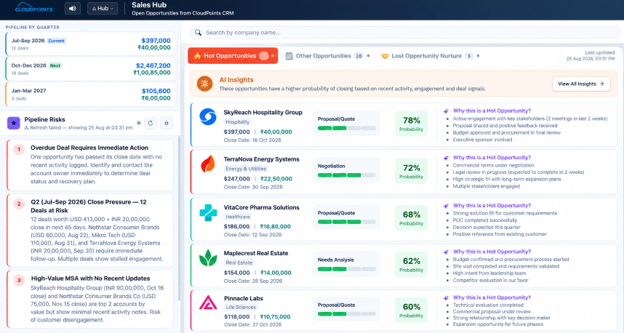
Due to busy schedule, things can fall through and the data continues to become stale and outdated. It might not show what Opportunities really are Hot or it might show some other Opportunities as Hot because I didn’t update the notes when probability dropped.
So to tackle this problem, on the main pane itself – I’ve added a Pipeline Risk area. This will look at the existing data and flag me anything which should be incorrect.

Now whether it is true or not is up to me – but this puts me in a habit to make sure I always update my Dataverse / D365 Sales Opportunities correctly, so the AI Summary for Hot Opportunities improves and shows relevant data at all times.
Now if you extrapolate these to bigger actions across all AI implementations of flagging incorrect data to the end user – it promotes good habits that make the intended AI to be closer to accuracy in its own non-deterministic nature.
This is what is implemented at CloudFronts for our Sales efforts and similar versions are implemented for our customers using Dynamics 365 CRM/Sales for their implementations.
Conclusion
This might be a small trigger for a human change, but it has its compounding effects in implementing AI at your organization that directly co-relate to a production use case being a success or a failure.
Human-in-the-loop is very much a reality and a necessity that we think it is. Further, the higher order of AI implementations like automated decision making can follow.
Want AI That Keeps Your CRM Data Honest?
If you’re exploring how to put AI on top of Dynamics 365 or Dataverse, we’d be glad to talk through where it makes sense to start. Keeping this running beyond the first use case is what our AI Managed Services Agreement is built for.
Contact Us AI Managed Services Agreement
